When it comes to setting up a studio, choosing the right SDI capture device can make all the difference in your workflow and output quality. You want something reliable that meets your specific needs, whether it’s for live streaming, video conferencing, or high-resolution production. In this guide, you’ll discover the top options that stand out regarding performance and value. Let’s explore what each device has to offer.
Blackmagic Design Capture UltraStudio Monitor 3G BDLKULSDMBREC3G

The Blackmagic Design Capture UltraStudio Monitor 3G is perfect for professionals who demand high-quality video monitoring on large displays. With support for all formats up to 1080p60 through 3G-SDI and HDMI connectors, you can easily connect to any large screen TV, projector, or broadcast monitor. Its advanced video technology guarantees you get the highest quality 10-bit SD/HD output, whether capturing or playing back. Plus, it’s incredibly portable and fits right in your pocket, making it ideal for on-the-go usage. The high-speed Thunderbolt 3 technology enhances data transfer, assuring peak performance for your video projects.
Best For: Professionals seeking high-quality video monitoring solutions for editing on large displays.
Pros:
- Supports all formats up to 1080p60, ensuring compatibility with a variety of devices.
- Extremely portable design, making it easy to carry for on-the-go video projects.
- Advanced video technology delivers high-quality 10-bit SD/HD output for both capture and playback.
Cons:
- Limited to 1080p60, which may not meet the needs of users requiring higher resolutions.
- Requires Thunderbolt 3 connectivity, which may not be available on all devices.
- May be less suitable for budget-conscious users due to its professional-grade features.
Magewell USB Capture SDI Gen 2 Video/Audio Capture Device

For studios seeking a reliable and efficient video/audio capture solution, the Magewell USB Capture SDI Gen 2 shines with its exceptional support for SDI input resolutions up to 2048×1080 at 60fps. This compact device features FPGA-based processing, allowing you to crop, scale, and de-interlace video without straining your CPU. Thanks to its plug-and-play USB 3.1 Gen 1 connectivity, it’s compatible across Windows, macOS, Linux, and Chrome OS. Built for 24/7 operation, it includes thermal protection and status LEDs. Plus, the USB Capture Utility lets you easily manage settings and diagnostics, ensuring smooth recording every time.
Best For: Studios and content creators looking for a reliable, high-resolution video/audio capture solution that operates seamlessly across multiple platforms.
Pros:
- Supports high SDI input resolutions up to 2048×1080 at 60fps, ensuring high-quality video capture.
- FPGA-based processing reduces CPU load while allowing for features like cropping and scaling.
- Wide compatibility with various operating systems, including Windows, macOS, Linux, and Chrome OS.
Cons:
- Limited to a single channel, which may not be suitable for multi-camera setups.
- Dependence on USB 3.1, which may require an upgrade if using older hardware.
- Initial setup and configuration might be complex for users unfamiliar with video capture technology.
AJA U-TAP SDI Simple USB 3.0 Powered SDI Capture Device

Looking for a reliable solution for high-quality video capture? The AJA U-TAP SDI is perfect for you. It captures video at 1920x1080p and 60fps, ensuring crisp recordings with minimal latency thanks to its USB 3.0 connectivity. Setup is a breeze with plug-and-play functionality—no external drivers needed. It’s UVC/UAC compliant, making it compatible with various software on both Windows and macOS. With stable SDI input and loop output via BNC connectors, you’ll enjoy a secure and consistent signal. Designed for professional use, the U-TAP enhances usability in immediate feedback applications, making it an ideal choice for your needs.
Best For: Professionals seeking a reliable and high-quality video capture solution for live streaming and video conferencing.
Pros:
- High-resolution capture up to 1920x1080p at 60fps for clear recordings.
- Plug-and-play functionality ensures quick and easy setup without the need for external drivers.
- Seamless compatibility with various software and platforms on both Windows and macOS.
Cons:
- Limited to SDI input, which may not suit all users who require HDMI or other connection types.
- No onboard recording capability; requires a connected computer for capturing video.
- Power reliant on USB 3.0, which might limit usage in certain setups without sufficient power supply.
Magewell USB Capture SDI 4K Plus Video/Audio Capture Device
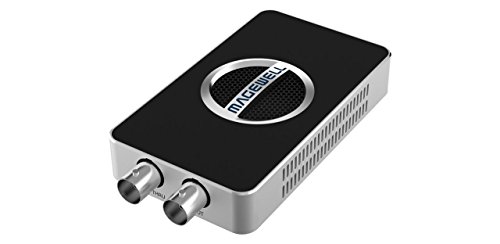
Designed for professionals seeking high-quality video capture, the Magewell USB Capture SDI 4K Plus excels in providing seamless integration with various SDI workflows. This compact device supports multiple SDI signals, including 6G-SDI, delivering stunning resolutions up to 4096×2160p30. With SDI loop-through monitoring, you can capture while simultaneously viewing your content. Advanced processing features like de-interlacing and scaling enhance video quality, while flexible audio options support up to eight embedded channels. Plus, its plug-and-play USB 3.1 interface guarantees compatibility with Windows, macOS, and Linux, making it a reliable choice for continuous operation in any studio environment.
Best For: Professionals in video production and live streaming who require high-quality, reliable video capture from SDI sources.
Pros:
- Supports multiple SDI signals including 6G-SDI, allowing for versatile usage in various workflows.
- Plug-and-play USB 3.1 interface ensures easy setup and compatibility with major operating systems without the need for drivers.
- Advanced video processing features such as de-interlacing and scaling enhance overall video quality for professional applications.
Cons:
- Limited to a single channel capture, which may not meet the needs of users requiring multi-channel inputs simultaneously.
- No onboard storage options for recorded content, necessitating external solutions for saving captured video.
- Relatively higher price point compared to basic capture devices, which may not be suitable for casual users or hobbyists.
AVMATRIX UC2018 Video Capture Card for Video Conferencing

The AVMATRIX UC2018 Video Capture Card stands out as an excellent choice for professionals in video conferencing, telemedicine, and online education. It converts SDI and HDMI to USB 3.0, delivering 1080P60 uncompressed video capture. With automatic input signal detection, you’ll enjoy seamless video and audio, featuring a 2-channel PCM audio codec. The compact design guarantees portability, while its compatibility with major platforms like OBS and Zoom makes it versatile. Plus, it operates reliably across a wide temperature range. Enjoy the convenience of driver-free operation and a 3-year guarantee, assuring your video quality remains exceptional.
Best For: Professionals in video conferencing, telemedicine, and online education seeking high-quality, reliable video capture solutions.
Pros:
- High-quality capture: Supports 1080P60 uncompressed video and audio for superior clarity.
- Driver-free operation: Easy to set up and use across multiple operating systems without the need for additional drivers.
- Compact design: Portable and lightweight, making it convenient for on-the-go professionals.
Cons:
- Limited to USB 3.0: May not utilize faster USB standards, potentially limiting data transfer speeds in some scenarios.
- No built-in recording: Requires external storage solutions for recording, which may add to setup complexity.
- Temperature sensitivity: While it operates reliably within a range, extreme temperature conditions could affect performance.
Magewell USB Capture SDI Plus – 1-Channel SDI to USB 3.1 Audio/Video Capture
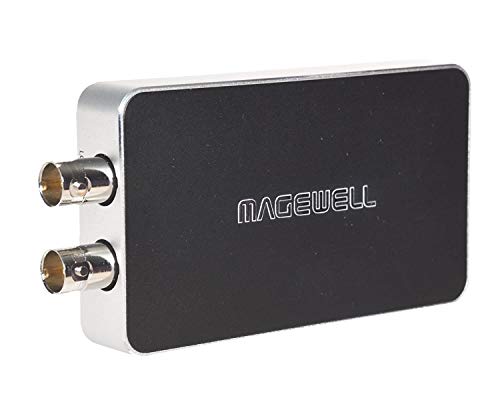
For professionals seeking a reliable and efficient way to capture high-quality audio and video, the Magewell USB Capture SDI Plus stands out with its ability to accept SD/HD/3G/2K SDI inputs and deliver smooth playback at up to 120 fps. This compact device features SDI loop-through for real-time monitoring and de-embeds embedded audio, or you can use analog line audio. Its plug-and-play USB 3.1 design guarantees compatibility with multiple operating systems without needing drivers. With robust thermal design and a 3-year warranty, the Magewell USB Capture SDI Plus is built for continuous operation in demanding environments.
Best For: Professionals and content creators seeking a reliable solution for capturing high-quality SD/HD video and audio with minimal setup.
Pros:
- High-quality capture: Supports SD/HD/3G/2K SDI inputs and captures video up to 120 fps for smooth playback.
- Plug-and-play design: No drivers required, ensuring easy compatibility with various operating systems including Windows, macOS, Linux, and Chrome OS.
- Robust thermal design: Built for continuous operation, making it ideal for demanding environments.
Cons:
- Single channel: Limited to 1-channel input, which may not be sufficient for multi-camera setups.
- Dependence on USB 3.1: While backward compatible with USB 2.0, performance may be significantly reduced.
- Higher price point: May be more expensive compared to other basic video capture devices on the market.
ZowieBox 3G SDI IP Video Streaming Encoder Decoder

Offering exceptional versatility, the ZowieBox 3G SDI IP Video Streaming Encoder Decoder is perfect for studios looking to enhance their live streaming capabilities. It supports multiple protocols like SRT and RTMP, allowing seamless UVC to SDI conversion. You can easily encode SDI signals to NDI or vice versa, although not simultaneously. With a compact aluminum design, it’s smaller than a phone and can power external devices through DC out. Control it effortlessly using the ZowieUI or OBS Dock integration, ensuring smooth streaming at up to 1080@60fps. This device is a smart investment for any studio aiming for quality performance.
Best For: Studios and content creators seeking a compact, high-performance solution for live streaming and video signal conversion.
Pros:
- Compact aluminum design allows for easy portability and reduced setup costs.
- Supports various streaming protocols (SRT, RTMP, RTSP) for versatile connectivity options.
- User-friendly control through ZowieUI and OBS Dock integration simplifies operation.
Cons:
- Cannot function as both encoder and decoder simultaneously, limiting flexibility.
- Compatibility issues with older hardware versions may restrict some users.
- Decoding resolution is limited to 1080@60fps, which may not meet all high-end streaming needs.
HDMI SDI Dual Output Capture Card for Live Streaming

When you’re looking to elevate your live streaming game, the HDMI SDI Dual Output Capture Card stands out as an ideal choice for content creators and professionals alike. This versatile device supports SDI to USB3.0 video capture and delivers stunning 1080P at 60FPS video. With its plug-and-play compatibility across Windows, Linux, and OS X, you won’t waste time on drivers. The card automatically adjusts input formats for seamless streaming and supports audio mixing, making it perfect for various applications like video meetings and education. With everything included, it’s a complete package to enhance your live streaming experience.
Best For: Content creators and professionals seeking a reliable and high-quality video capture solution for live streaming.
Pros:
- High-quality video output at 1080P and 60FPS ensures smooth and clear streaming.
- Plug-and-play functionality allows for easy setup without the need for additional drivers.
- Versatile compatibility with various operating systems and software makes it suitable for different applications.
Cons:
- Limited to USB3.0 output, which may not meet the needs of all users.
- Weight of 8.8 ounces may be considered bulky for portable use.
- Warranty information not readily available, which may concern some buyers regarding product support.
SDI Capture Card USB 3.0 for Video Streaming and Recording

The SDI Capture Card USB 3.0 stands out as an excellent choice for content creators and streamers who demand high-quality video performance. It effortlessly converts SDI to USB 3.0 with an HDMI loopout, supporting stunning 1080P at 60fps. You’ll appreciate its plug-and-play convenience, compatible with Windows, Linux, and Mac OS, requiring no additional drivers or power supply. With low latency technology, your live streams remain smooth and professional. Plus, it works seamlessly with platforms like Twitch and YouTube. Included accessories like cables and a user manual make setup a breeze, ensuring you’re ready to start streaming and recording in no time.
Best For: Content creators and streamers looking for high-quality video performance and easy setup.
Pros:
- Plug-and-play design allows for quick and easy installation without additional drivers.
- Supports 1080P at 60fps for smooth and high-quality video streaming and recording.
- Low latency technology ensures professional-quality live streams on popular platforms like Twitch and YouTube.
Cons:
- Limited to 1080P resolution, which may not satisfy users seeking 4K capabilities.
- USB 3.0 requirement may not be compatible with older systems lacking the necessary ports.
- No built-in audio input, requiring an additional solution for capturing audio alongside video.
SDI Capture Card with Loop Out and USB3.0 Audio Video Capture Device

For live streamers and content creators who need high-quality video capture, the SDI Capture Card with Loop Out and USB 3.0 Audio Video Capture Device is an excellent choice. It supports 1080P60fps video capture, making it perfect for gaming consoles, camcorders, and DSLRs. With four ports for faster transmission speeds and a durable aluminum alloy design, it guarantees stability and effective heat dissipation. You’ll also appreciate the 3.5mm mic-in/out port for clear audio streaming. Compatible with various systems and software, it’s a versatile addition to your setup, ready to elevate your live streaming or recording experience.
Best For: Live streamers and content creators seeking high-quality video capture from gaming consoles, camcorders, and DSLRs.
Pros:
- Supports 1080P60fps video capture for high-quality streaming.
- Durable aluminum alloy construction ensures stability and effective heat dissipation.
- Compatible with a wide range of systems and streaming platforms.
Cons:
- Does not support recording of party chats.
- Limited audio functionality may not meet all users’ needs.
- Requires a USB 3.0 connection for optimal performance.
Factors to Consider When Choosing SDI Capture Devices for Studios
When you’re choosing SDI capture devices for your studio, you’ll want to contemplate several key factors. Think about the resolution and frame rate you’ll need, along with the connectivity options available. Don’t forget to check for compatibility with your software and the device’s audio capture capabilities, as these can greatly impact your production quality.
Resolution and Frame Rate
Choosing the right SDI capture device involves careful consideration of resolution and frame rate, as these factors directly impact your production quality. Confirm the device supports a maximum resolution that meets your needs, with options available up to 4096×2160 for high-end applications. Frame rates are equally critical; opt for devices that capture at least 60 frames per second (fps) to guarantee smooth playback, especially for high-motion content. Look for devices that handle adaptive frame rates, enhancing performance during variable motion scenarios or live streaming. Additionally, features like de-interlacing and scaling can greatly improve video quality, particularly when working with lower resolution or interlaced sources. Finally, verify compatibility with various formats to confirm versatility across different production workflows.
Connectivity Options Available
While exploring connectivity options for SDI capture devices, you’ll find that the right connections can greatly enhance your production setup. Most SDI capture devices come with SDI input and output via BNC connectors, guaranteeing secure and stable video transmission. Look for devices that support USB 3.0 or USB 3.1 interfaces, as they provide high-speed data transfer essential for real-time video capture and streaming. Many also include HDMI outputs, allowing for simultaneous monitoring or recording of high-definition video. Plug-and-play functionality simplifies connections to your computer without needing extra drivers. Plus, compatibility with multiple operating systems like Windows, macOS, and Linux guarantees these devices fit seamlessly into your diverse production workflows.
Portability and Size
Portability and size are essential considerations for studios that need flexible setups, especially when you’re frequently moving between locations. Choosing a compact capture device allows for easy integration into your existing workflow without consuming valuable space, which is vital in smaller studio environments. Lightweight models enable swift adjustments during live events, ensuring you can reposition equipment quickly without hassle. Look for devices built for portability, as they’re often constructed to endure frequent transport and usage, guaranteeing reliable performance. Additionally, many portable capture devices come with plug-and-play functionality, markedly reducing setup time. This feature is particularly beneficial for rapid deployment, making it easier to focus on your production without the stress of complicated equipment setups.
Compatibility With Software
When setting up your studio, verifying your SDI capture device works seamlessly with your software is key for a smooth production experience. Check for compatibility with popular streaming platforms like OBS, Zoom, and Skype to streamline your workflow. It’s also essential to confirm that the device supports multiple operating systems, including Windows, macOS, Linux, and Chrome OS, so you can use it across different setups. Look for plug-and-play functionality to reduce setup time and avoid the hassle of extra drivers. Additionally, some devices offer backward compatibility with older USB standards, which is helpful if you have legacy systems. Finally, make sure the capture device can automatically detect input signals, allowing for easy adjustments based on your source.
Audio Capture Capabilities
Audio capture capabilities are essential for any studio setup, as they directly influence the quality of your production. Many SDI capture devices allow you to extract embedded audio from SDI signals, ensuring high-quality sound alongside your video. Look for models that support multiple audio channels, enabling you to capture up to 8 channels, which is vital for professional audio work. Additionally, devices with analog audio inputs and outputs give you flexibility to integrate external audio sources. Features like audio de-embedding and real-time monitoring through line-out ports help you adjust and monitor audio levels during recording. Finally, make sure the device supports various audio codecs, such as 16-bit PCM, to meet your specific streaming and recording needs.
Video Processing Features
Video processing features play a crucial role in selecting SDI capture devices for your studio setup. Look for devices that utilize FPGA-based video processing, as they can handle tasks like cropping, scaling, de-interlacing, and color format conversion, enhancing video quality while reducing CPU load. Make sure the capture device supports high frame rates, ideally up to 120 fps, for smooth playback and real-time monitoring. Check for audio capabilities, ensuring it can de-embed embedded audio or accept external analog inputs for thorough management. Devices with SDI loop-through features allow for immediate feedback during production, boosting workflow efficiency. Finally, consider options that support automatic input signal detection, simplifying setup and optimizing video processing based on incoming signals.
Build Quality and Durability
Choosing the right SDI capture device means considering build quality and durability, as these factors can greatly impact your studio’s workflow. Devices designed for continuous operation often feature robust materials and thermal designs, ensuring they withstand the demands of professional use. A compact design enhances portability, making it easier to transport your equipment without compromising durability. Look for devices with thermal protection to prevent overheating during extended sessions, ensuring reliable performance in demanding environments. Status LEDs are also key, providing real-time feedback on operational status and helping you monitor performance. Ultimately, opting for products with longer warranties can indicate a manufacturer’s confidence in their build quality, giving you peace of mind for 24/7 usage.
Warranty and Support Options
When selecting an SDI capture device, warranty and support options play an essential role in ensuring your investment remains protected and functional over time. Many devices come with a limited warranty, usually between 1 to 3 years, covering defects and malfunctions. It’s vital to check the specific warranty terms, as coverage can vary greatly. A longer warranty often reflects the manufacturer’s confidence in their product’s durability and performance.
Additionally, ongoing technical support can enhance your experience, providing assistance with setup, troubleshooting, and configuration. Look for manufacturers that offer multiple support channels, like phone, email, or live chat, to resolve issues efficiently. Prioritizing warranty and support options can save you time and stress in the long run.