If you’re looking to enhance your workspace with dual 8K displays, choosing the right Thunderbolt 4 dock is essential. These docks offer robust connectivity and power delivery, making them ideal for demanding tasks. With various options available, you’ll want to weigh performance against features. Let’s explore the top contenders that could elevate your setup and streamline your workflow, ensuring you get the most out of your technology.
Plugable Thunderbolt 4 Dock with 100W Charging (TBT4-UD5)
If you’re a creative professional or tech enthusiast who demands high-quality display performance, the Plugable Thunderbolt 4 Dock (TBT4-UD5) is your ideal solution. With 100W charging and 13 high-performance ports, it’s designed for ultimate connectivity. You can easily connect dual 4K 60Hz HDMI displays or a single 8K monitor, ensuring your visual experience is exceptional. The dock supports ultra-fast 40Gbps speeds and robust power delivery, making it perfect for high-speed storage and USB-C peripherals. Plus, its compatibility with Thunderbolt 4, USB4, and various macOS systems means you can work seamlessly across devices without hassle.
Best For: Creative professionals and tech enthusiasts who require high-quality display performance and extensive connectivity options.
Pros:
- Supports dual 4K 60Hz HDMI displays or a single 8K monitor for exceptional visual experiences.
- Delivers ultra-fast 40Gbps speeds and 100W power delivery, ideal for high-speed storage and USB-C peripherals.
- Compatible with a wide range of systems, including Thunderbolt 4, Thunderbolt 5, USB4, and various macOS configurations.
Cons:
- Limited support for external displays on base M1 and M2 MacBooks, which can restrict multi-monitor setups.
- Some users may find the price point higher compared to non-Thunderbolt docks with fewer features.
- Requires compatible devices to fully utilize the dock’s capabilities, which may limit its use for users with older hardware.
CalDigit TS4 Thunderbolt 4 Dock

The CalDigit TS4 Thunderbolt 4 Dock is an ideal solution for creative professionals who require high-resolution displays and extensive connectivity. With 18 ports, including three Thunderbolt 4 and eight USB ports, it supports single 8K or dual 6K 60Hz displays, ensuring stunning visuals. Plus, it delivers 98W charging, powering your laptop while connecting multiple devices. The 2.5GbE port offers considerably faster networking speeds than standard connections. Compatible with various devices, including Apple M1 – M4 and Windows PCs, it’s perfect for anyone needing versatile performance. Just remember, to access maximum capabilities, use Thunderbolt 4 or fully equipped USB4 ports.
Best For: Creative professionals and tech enthusiasts who need high-resolution displays and extensive connectivity options.
Pros:
- Supports high-resolution displays, including single 8K and dual 6K 60Hz, providing stunning visual quality.
- Offers extensive connectivity with 18 ports, including multiple Thunderbolt 4 and USB options, allowing for simultaneous device connections.
- Delivers 98W charging capability, powering laptops while connecting multiple peripherals through a single cable.
Cons:
- Maximum performance is limited to Thunderbolt 4 or fully equipped USB4 ports, which may not be available on all devices.
- Older interfaces like Thunderbolt 3 or USB-C without full data, power, and video support will experience capped performance.
- Higher cost compared to basic docks, which may not be justifiable for users with less demanding connectivity needs.
UGREEN Thunderbolt 4 Dock 13-in-1 40Gbps Docking Station

For professionals and creatives seeking unparalleled display capabilities, the UGREEN Thunderbolt 4 Dock 13-in-1 is an exceptional choice. With support for dual 4K@60Hz or a single 8K display, this dock elevates your workstation. You’ll appreciate its 13 ports, including two Thunderbolt 4 ports, a DisplayPort 1.4, and fast USB connections. Plus, it features a 180W GaN power adapter, delivering up to 90W charging to your laptop. Compatible with various Thunderbolt and USB-C devices, this dock guarantees seamless connectivity across your devices. Just connect it to power, and you’re ready to maximize your productivity and creativity.
Best For: Professionals and creatives looking for a versatile docking station with high display capabilities and extensive connectivity options.
Pros:
- Supports dual 4K@60Hz or single 8K display for enhanced visual experience.
- Comprehensive 13-port expansion for versatile connectivity with multiple devices.
- Includes a 180W GaN power adapter for efficient charging while using the dock.
Cons:
- Requires connection to power to function, limiting portability.
- Not compatible with Intel Mac mini 2018, restricting some users.
- Full-function USB-C devices only support single display, which may limit functionality for some setups.
UGREEN Thunderbolt 4 Dock 8-in-1 Hub

UGREEN Thunderbolt 4 Dock 8-in-1 Hub is perfect for professionals who demand high-performance connectivity and seamless multitasking. With three Thunderbolt 4 ports offering lightning-fast 40Gbps data transfer, you can effortlessly connect multiple devices. It supports dual 4K@60Hz displays or one 8K@30Hz display, ensuring stunning visuals for your projects. The included 140W GaN charger delivers up to 85W for your laptop while in use, enhancing productivity. Compatible with most Thunderbolt and USB-C devices, this dock streamlines your workflow and boosts efficiency, making it an essential tool for anyone needing reliable, high-speed connectivity.
Best For: Professionals seeking high-performance connectivity and seamless multitasking with multiple high-resolution displays.
Pros:
- High-speed data transfer: Offers lightning-fast 40Gbps speeds through three Thunderbolt 4 ports.
- Multi-display support: Supports dual 4K@60Hz or a single 8K@30Hz display for enhanced visual experiences.
- Powerful charging capability: Includes a 140W GaN charger, providing up to 85W charging for laptops during use.
Cons:
- Requires connection to charger for operation: The dock will not function unless connected to its power source.
- Limited compatibility for some devices: Not compatible with Mac mini 2018 (Intel) and full-featured USB-C devices only support a single display.
- Price point: Higher cost compared to standard USB hubs may be a consideration for budget-conscious users.
Anker Prime TB5 Docking Station (14-in-1 Thunderbolt 5)

Offering a powerful solution for professionals who demand high-performance connectivity, the Anker Prime TB5 Docking Station stands out with its 14-in-1 design and Thunderbolt 5 capabilities. With a maximum transfer speed of 120Gbps, you can transfer a 150GB file in just 25 seconds. Enjoy dual displays with up to 8K@60Hz from a single Thunderbolt 5 output or HDMI/DisplayPort. The 140W charging capability guarantees your devices stay powered, while multiple ports—including USB-A, USB-C, and Ethernet—offer versatile connectivity. Plus, it comes with a 24-month warranty and dedicated customer support, making it a reliable choice for your workstation.
Best For: Professionals and content creators who need high-performance connectivity and fast data transfer rates for their workstations.
Pros:
- High-speed transfer: Capable of transferring a 150GB file in just 25 seconds via Thunderbolt 5.
- Dual display support: Allows for dual 8K@60Hz outputs for enhanced productivity with compatible devices.
- Versatile connectivity options: Includes multiple USB-A, USB-C, and networking ports for various peripherals.
Cons:
- Limited external display support on Windows: Windows laptops with DisplayPort Alt Mode can only support one external display.
- Price point: Higher cost compared to standard docking stations may not suit all budgets.
- Compatibility restrictions: MacBooks with M1, M2, or M3 chips are limited to one external display, which may not meet the needs of all users.
Belkin Thunderbolt 4 Docking Station with 90W Power Delivery

The Belkin Thunderbolt 4 Docking Station with 90W Power Delivery is an ideal choice for professionals who demand high-performance connectivity and stunning visuals. With 12 ports, including 2 Thunderbolt 4 and 2 HDMI 2.0, you can easily connect multiple devices and peripherals. It supports incredible resolutions, handling up to 8K for a single display or dual 4K for two. Plus, the 90W power delivery guarantees your MacBook or Windows laptop stays charged while you work. The included Thunderbolt 4 cable provides flexibility for your desk setup, making this dock a versatile and powerful addition to your workspace.
Best For: Professionals who require high-performance connectivity and stunning visuals for their MacBook or Windows laptops.
Pros:
- Supports up to 8K resolution for a single display or dual 4K for enhanced visual experience.
- 90W power delivery ensures your laptop stays charged while using multiple devices.
- Versatile port configuration with 12 ports allows for connection of various peripherals and devices.
Cons:
- Higher price point compared to basic docking stations.
- May be overkill for casual users who do not need extensive display or device support.
- Limited compatibility with older devices that do not support Thunderbolt 4.
Plugable Thunderbolt 4 Hub (TBT4-HUB3C)

For professionals who rely on high-resolution displays, the Plugable Thunderbolt 4 Hub (TBT4-HUB3C) stands out with its ability to support dual 4K displays at 60Hz or a single 8K display at 30Hz. With three Thunderbolt 4 ports and 60W laptop charging, it guarantees seamless connectivity and power. You’ll appreciate the 40Gbps data transfer and 15W charging for devices, making it perfect for your high-performance needs. It includes a USB-C to HDMI 2.0 adapter for added flexibility. Plus, you can daisy-chain up to six peripherals, enhancing your workspace for content creation or multitasking.
Best For: Professionals and content creators who require high-resolution displays and fast data transfer capabilities for demanding tasks.
Pros:
- Supports dual 4K displays at 60Hz or a single 8K display at 30Hz, providing exceptional visual clarity.
- Fast 40Gbps data transfer speeds and 60W laptop charging ensure efficient performance for high-demand applications.
- Daisy-chain capability allows for connection of up to six additional Thunderbolt peripherals, enhancing workspace versatility.
Cons:
- Limited functionality on USB-C only systems, requiring a Thunderbolt 4/USB4 host for maximum performance.
- Compatibility varies with different Mac models, which may restrict some users from utilizing dual displays.
- The need for an external power adapter may limit portability compared to bus-powered hubs.
StarTech.com Thunderbolt 4 Dock – Dual 4K Docking Station

Designed for professionals who need robust display capabilities, the StarTech.com Thunderbolt 4 Dock – Dual 4K Docking Station excels in mixed-device environments. With 16 ports and 40Gbps data transfer, it supports quad display setups for Windows laptops with Intel 12th Gen CPUs, enabling up to four 4K 60Hz monitors. For MacBook Air and Pro, it provides dual extended displays in clamshell mode. The dock delivers up to 100W power, ensuring your devices stay charged while you work. Rigorously tested for reliability, it seamlessly integrates with various systems, making it an ideal choice for IT professionals and large-scale deployments.
Best For: IT professionals and users in mixed-device environments who require robust display capabilities and reliable performance.
Pros:
- Supports quad display setups for Windows laptops with Intel 12th Gen CPUs, allowing up to four 4K 60Hz monitors.
- Includes 100W power delivery, ensuring laptops and connected devices stay charged during use.
- Rigorously tested for reliability and cross-platform compatibility, making it suitable for enterprise environments and large-scale deployments.
Cons:
- Clamshell mode required for dual extended displays on MacBook Air/Pro with M3, which may limit usage flexibility.
- Higher upfront cost compared to standard docking stations, which may not be justified for casual users.
- Limited support for older systems, which may restrict functionality for users with legacy hardware.
Minthouz Thunderbolt 4 Dock with 160W Adapter
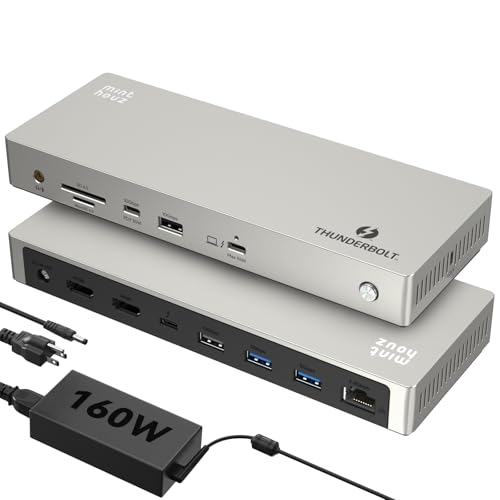
Looking to elevate your productivity with stunning visuals? The Minthouz Thunderbolt 4 Dock with a 160W Adapter has you covered. With 12 versatile ports, including dual 8K HDMI and Thunderbolt 4, it supports up to three 4K displays for seamless multitasking. Enjoy lightning-fast data transfers at 40Gbps and stable internet connectivity via 2.5G Ethernet. This dock is universally compatible with both Mac and Windows devices, making it a perfect addition to your setup. Plus, with 96W power delivery for laptops and additional charging for your devices, it streamlines your workspace while keeping everything powered.
Best For: Professionals and creatives who need high-resolution displays and fast data transfer for multitasking on Mac and Windows laptops.
Pros:
- Versatile Connectivity: Offers 12 ports, including dual 8K HDMI and Thunderbolt 4, for multiple device connections.
- High Performance: Supports fast data transfer speeds of up to 40Gbps and stable 2.5G Ethernet for reliable internet access.
- Universal Compatibility: Works seamlessly with both Mac and Windows devices, reducing the need for additional adapters.
Cons:
- Price Point: The dock may be considered expensive compared to basic docking stations.
- Size: The dock’s size may take up more desk space than smaller alternatives.
- Limited to Thunderbolt-Compatible Devices: Full functionality requires Thunderbolt 4 or USB4 compatibility, which may not be available on all laptops.
Thunderbolt 4 Dock with DisplayLink (21-in-1 USB-C/A Docking Station)

If you’re a creative professional or gamer who demands high-resolution displays, the Thunderbolt 4 Dock with DisplayLink is an ideal choice. This 21-in-1 USB-C/A docking station supports configurations from dual to five monitor setups, ensuring you can expand your workspace effortlessly. Compatible with laptops featuring 8th Gen Intel processors or newer, it offers 60W power charging and can support up to 90W laptop charging. The dock’s 40Gbps and 8K DP ports allow for stunning visuals, including single 8K or dual 4K@60Hz displays. With a 12-month warranty, you’ll have peace of mind while enhancing your productivity.
Best For: Creative professionals and gamers looking for high-resolution display setups and versatile connectivity options.
Pros:
- Supports dual, triple, quad, or five monitor setups for enhanced productivity and immersive gaming experiences.
- 60W power charging capability with support for up to 90W laptop charging, ensuring your devices stay powered throughout the day.
- 8K DP ports provide stunning visual quality, allowing for single 8K or dual 4K@60Hz displays, depending on the operating system.
Cons:
- Limited functionality for devices with 7th Gen Intel processors or older, which may restrict compatibility for some users.
- Devices over 90W may charge unstably, potentially leading to performance issues.
- Not fully compatible with M1 Macs, which may hinder some users looking to utilize their MacBooks with high-resolution displays.
Factors to Consider When Choosing Thunderbolt 4 Docks for Dual 8K Displays
When you’re choosing a Thunderbolt 4 dock for dual 8K displays, you’ll want to contemplate several key factors. Look at the display resolution support and port availability to guarantee compatibility with your devices. Also, check the power delivery capacity and data transfer speeds to maximize your setup’s efficiency.
Display Resolution Support
Choosing the right Thunderbolt 4 dock for dual 8K displays involves understanding several key factors, especially display resolution support. First, confirm the dock explicitly supports 8K@60Hz to maximize both monitors’ high resolution. Remember, your host system must also handle dual 8K outputs—this means you’ll likely need a newer laptop with Thunderbolt 4 or USB4 capabilities. Additionally, check for adequate power delivery, as some high-resolution setups may require more than the standard 90W to function correctly. Finally, verify the dock’s ports; configurations like HDMI 2.1 or DisplayPort 2.1 are essential for 8K resolutions. Don’t forget to take into account your laptop’s graphics card, as older models may struggle with dual 8K displays, even with a capable dock.
Port Availability
Port availability is essential for maximizing the potential of your Thunderbolt 4 dock, especially for dual 8K displays. When choosing a dock, make sure it supports dual 8K output at 60Hz. Look for multiple video output ports like Thunderbolt 4, HDMI 2.1, or DisplayPort 2.1 to accommodate various display connections. Additionally, check how many Thunderbolt 4 ports are available; having multiple downstream ports lets you daisy-chain devices or displays easily. It’s also vital to verify compatibility with your laptop’s GPU and operating system, as some setups may limit external display options. By ensuring these factors align, you’ll enhance your overall experience with dual 8K displays and achieve seamless connectivity.
Power Delivery Capacity
Power delivery capacity is a critical factor in selecting a Thunderbolt 4 dock for dual 8K displays. You need a dock with adequate power delivery, typically between 90W and 140W, to support high-performance laptops and peripherals effectively. A higher power delivery rating allows the dock to charge your laptop while powering multiple high-resolution displays, which is essential for energy-intensive applications. Make sure the dock’s power delivery matches or exceeds your laptop’s charging requirements, as most devices need at least 60W to function efficiently with multiple displays. Additionally, consider docks that provide extra power for peripherals, as they can benefit from 15W to 30W of charging capability, ensuring your entire setup runs smoothly.
Compatibility With Devices
When selecting a Thunderbolt 4 dock for dual 8K displays, compatibility with your devices is vital. First, make certain your device has a Thunderbolt 4 or USB4 port to maximize the dock’s potential. If you’re using an Apple device, note that only the M3 Pro/Max and M4 chips support dual 8K displays. Windows laptops with Thunderbolt 4 or 5 typically handle dual 8K, but older interfaces like Thunderbolt 3 may limit performance. Check that your dock supports DisplayPort 1.4 or HDMI 2.1 standards, important for 8K resolution at 60Hz. Finally, always verify that the dock’s specifications explicitly state dual 8K support, as some only cater to one 8K display or dual 4K displays.
Data Transfer Speeds
Ensuring compatibility with your devices is just the first step; data transfer speeds play a significant role in the overall performance of Thunderbolt 4 docks, especially when using dual 8K displays. Thunderbolt 4 docks can achieve impressive data transfer speeds of up to 40Gbps, making rapid file transfers and high-bandwidth applications seamless. To support dual 8K displays, you typically need a Thunderbolt 4 or USB4 connection, as these standards deliver the necessary bandwidth for high-resolution video output. Look for docks with multiple Thunderbolt ports to connect high-speed peripherals and displays simultaneously. Remember, to maximize performance, connect your Thunderbolt 4 devices to compatible host systems that support their full capabilities, ensuring you get the most out of your setup.
Build Quality and Design
While you might focus on connectivity and speed, the build quality and design of Thunderbolt 4 docks are equally important for achieving peak performance with dual 8K displays. A durable dock, made from materials like aluminum or reinforced plastics, guarantees longevity while effectively dissipating heat during intense tasks. You’ll want a design that allows easy access to ports, making it hassle-free to connect and disconnect devices. A compact and aesthetically pleasing dock can help reduce desk clutter, seamlessly fitting into your workspace. Additionally, effective ventilation systems are vital to prevent overheating, especially during prolonged use with demanding configurations. Prioritizing these design elements will enhance your overall experience with dual 8K displays.
Charging While Docked
A high-quality Thunderbolt 4 dock not only enhances connectivity and design but also plays a significant role in powering your devices. When you’re choosing a dock for dual 8K displays, check its power delivery capabilities. Look for options that provide between 90W and 140W to charge your laptop while docked. Some docks allow simultaneous charging of peripherals, which can boost your productivity. Keep in mind that power output may vary based on the number of connected devices, so consider how this might impact charging efficiency. Make certain the dock’s power adapter is rated to meet your laptop’s requirements, as using an inadequate adapter can compromise performance. Finally, confirm compatibility with your laptop’s charging specifications to avoid power delivery issues.
Additional Features Offered
When selecting a Thunderbolt 4 dock for dual 8K displays, it’s essential to evaluate additional features that can enhance your overall experience. Look for docks that support dual 8K or multiple 4K displays, as this boosts your productivity and multitasking capabilities. Advanced charging options, ranging from 90W to 140W, can power your laptop and other devices simultaneously, reducing cable clutter. Check for thorough port configurations, including multiple Thunderbolt 4, HDMI, USB-C, and Ethernet ports, which expand your connectivity options. Higher data transfer speeds of up to 40Gbps guarantee quick file transfers for demanding applications. Finally, enhanced networking with 2.5GbE ports offers faster internet connectivity, perfect for users with high-bandwidth needs.