Choosing the right cable can make or break a docked workstation. The best thunderbolt 5 cables for docking stations should deliver fast data, stable display output, and enough power for your laptop without adding clutter.
In this roundup, we focused on cables that fit real-world docking needs, from compact desk setups to longer runs for more flexible cable management.
Best 10 Thunderbolt 5 Cables for Docking Stations Picks for 2026
Best for High-Speed Docking
Anker Prime Thunderbolt 5 Cable, 1.7 ft, 240W

- Thunderbolt 5-certified for modern docking stations
- Up to 240W charging and 80Gbps data transfer
- Short 1.7 ft length keeps desk setups tidy
Best For: Users who want a short, certified Thunderbolt 5 cable for a high-performance dock or workstation.
Best for 240W Power Delivery
Apple Thunderbolt 5 Pro Cable (1m)

- Thunderbolt 5 data transfer up to 120Gb/s
- Up to 240W charging for powerful laptops
- Braided 1m cable for docks, displays, and drives
Best For: Mac users who want a high-speed, high-power cable for a Thunderbolt dock or display.
Best for Tight Desk Setups
Cable Matters 80Gbps Right Angle Thunderbolt 5 Cable
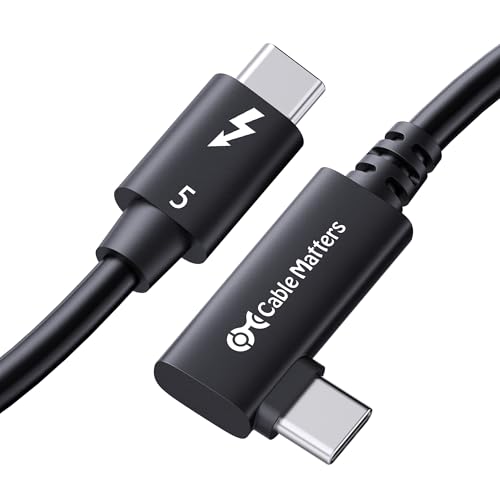
- Right-angle plug reduces strain and clutter behind docks.
- 80Gbps data with up to 120Gbps bandwidth boost.
- 240W charging plus broad Thunderbolt/USB4 compatibility.
Best For: Compact docking station setups, creator workstations, and high-power laptops.
Best for Maximum Bandwidth
Silkland 80Gbps USB4 Thunderbolt 5 Cable

- 80Gbps USB4 v2.0 data transfer with USB-IF certification
- 120Gbps video bandwidth for dual 8K or demanding multi-monitor use
- 240W charging plus broad Thunderbolt/USB4 backward compatibility
Best For: Power users who need a high-bandwidth cable for a Thunderbolt 5 dock, multi-display setup, and laptop charging.
Best for High-Performance Docks
80Gbps Thunderbolt 5 Cable, 3.3FT
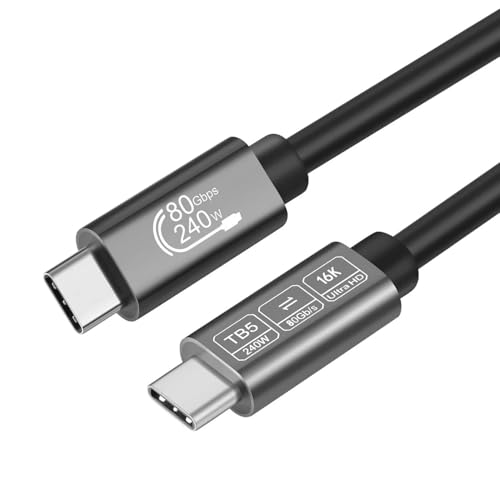
- 80Gbps transfer for fast dock and SSD workflows
- 240W charging for high-power laptops and devices
- Supports dual 8K or triple 4K display output
Best For: Anyone building a compact Thunderbolt dock setup that needs speed, charging, and pro-grade display support.
Best USB-IF Certified Pick
Silkland USB4 40Gbps 4FT Cable

- 40Gbps USB4 transfer for fast docking and SSD use
- Up to 240W charging with certified safety features
- 4FT length helps keep dock setups compact and stable
Best For: People who want a certified short cable for Thunderbolt 4/USB4 docks and high-power charging.
Best for High-Bandwidth Docking
UGREEN 240W USB-C USB4 Gen4 Cable

- 80Gbps USB4 Gen4 speed for docked workflows
- 240W PD 3.1 charging for powerful laptops
- Supports dual 8K or triple 4K display output
Best For: Dock users who want a short, high-speed cable with strong charging and display support.
USB-IF Certified Power Pick
Silkland 5FT Thunderbolt 5 Cable

- 80Gbps USB4/Thunderbolt 5 data support
- Up to 120Gbps display bandwidth for multi-monitor setups
- 240W PD 3.1 charging with braided durability
Best For: Power users who want a short, high-spec cable for Thunderbolt 5 docks and demanding monitor setups.
Best for 40Gbps USB4
Anker USB C Cable 3.3ft, 240W, 40Gbps

- 40Gbps USB4 data transfer
- 8K@60Hz / 4K@144Hz display support
- 240W USB-C power delivery
Best For: People who want a compact, high-speed USB-C cable for docking, monitors, and fast charging.
Best for High-Speed Docking – Anker Prime Thunderbolt 5 Cable, 1.7 ft, 240W
If you need one of the fastest thunderbolt 5 cables for docking stations, this Anker Prime cable is built for demanding desk setups. It combines 80Gbps data transfer, up to 120Gbps bandwidth, and 8K/4K display support in a short 1.7-foot form factor that helps keep dock connections tidy and efficient.
Best For: Users who want a short, certified Thunderbolt 5 cable for a high-performance dock, laptop, or multi-display workstation.
Pros:
- Thunderbolt 5-certified for modern high-bandwidth docking setups
- Supports up to 240W charging for power-hungry laptops and devices
- 80Gbps transfer speed with up to 120Gbps bandwidth for advanced displays
- Short 1.7 ft length helps reduce clutter near a dock
Cons:
- Short cable length may not work for wider desk layouts
- Premium performance usually comes with a higher price than basic USB-C cables
For buyers comparing thunderbolt 5 cables for docking stations, this is a strong pick when speed, charging, and display support matter more than reach. It’s especially appealing for compact workspaces where a short, certified cable makes the cleanest setup.
Best for 240W Power Delivery – Apple Thunderbolt 5 Pro Cable (1m)
If you need one of the most capable thunderbolt 5 cables for docking stations, Apple’s 1m Thunderbolt 5 Pro Cable is built for high-bandwidth setups with strong charging support and broad device compatibility. It’s a solid pick for Mac users who want a tidy, braided cable that can handle demanding docks, displays, and fast external storage.
Best For: Mac owners connecting Thunderbolt 3/4/5 laptops to a dock, display, or high-power peripheral.
Pros:
- Supports Thunderbolt 5 speeds up to 120Gb/s for demanding docking workflows
- Delivers up to 240W charging, which is great for power-hungry laptops and accessories
- Works with Thunderbolt 3, Thunderbolt 4, USB4, and DisplayPort 2.1 devices
- Black braided design resists tangling and feels premium on a desk
Cons:
- 1m length may be too short for some desk layouts
- Pricier than basic USB-C cables
- Most useful for Apple and Thunderbolt-centric setups
For buyers comparing thunderbolt 5 cables for docking stations, this is a strong match when top-tier speed, charging, and Apple-focused compatibility matter more than cable length or budget pricing.
Best for Tight Desk Setups – Cable Matters 80Gbps Right Angle Thunderbolt 5 Cable
If you need thunderbolt 5 cables for docking stations, this Cable Matters option stands out for its right-angle plug, strong 80Gbps data performance, and 240W charging support. It is aimed at compact desks and high-end workstations where cable strain, space, and display bandwidth all matter.
Best For: Users who want a space-saving Thunderbolt 5 cable for docks, multi-monitor setups, and high-power laptop charging.
Pros:
- Right-angle connector helps reduce clutter and port strain behind docks or laptops.
- Supports up to 80Gbps bi-directional data and up to 120Gbps bandwidth boost for demanding displays.
- 240W USB-C Power Delivery 3.1 makes it suitable for charging powerful laptops through a single cable.
- Intel certified and backward compatible with Thunderbolt 4, Thunderbolt 3, USB4, and USB-C.
Cons:
- 0.8m length may be too short for some monitor or desk layouts.
- Premium capability may be more than basic docking station users need.
For buyers comparing thunderbolt 5 cables for docking stations, this is a practical pick when the goal is maximum performance in a compact, cleaner setup. The angled connector and high power delivery make it especially useful for modern docks, creator rigs, and laptops that need both speed and charging from one cable.
Best for Maximum Bandwidth – Silkland 80Gbps USB4 Thunderbolt 5 Cable
If you want one of the fastest thunderbolt 5 cables for docking stations, this Silkland USB4 v2.0 option is built for heavy displays, fast file transfers, and high-watt charging in a single cable. It’s a practical pick for users who need more than a basic USB-C lead and want strong future-proofing for modern docks, monitors, and storage devices.
Best For: Power users connecting a Thunderbolt 5 or USB4 docking station, especially anyone running multiple high-resolution displays and charging a laptop at the same time.
Pros:
- USB-IF certified USB4 v2.0 cable with up to 80Gbps transfer speeds
- 120Gbps display bandwidth supports dual 8K setups and demanding monitor workflows
- 240W charging is enough for most modern laptops and high-power devices
- Backward compatible with Thunderbolt 4/3, USB4, and USB 3.2 gear
Cons:
- 4 ft length may be too short for some desk layouts
- Top-tier capabilities depend on compatible Thunderbolt 5/USB4 devices
Overall, this is a strong performance-first cable if you’re shopping for thunderbolt 5 cables for docking stations and care most about speed, display support, and charging headroom. It makes the most sense for desktop setups where one cable needs to do a lot.
Best for High-Performance Docks – 80Gbps Thunderbolt 5 Cable, 3.3FT
If you need one of the faster thunderbolt 5 cables for docking stations, this 3.3-foot option is built for high-bandwidth workflows where speed, display output, and charging all matter. It supports up to 80Gbps data transfer, 240W USB-C charging, and multi-display setups, making it a practical pick for modern Thunderbolt 4/USB4 docks and monitors.
Best For: Users who want a short, high-speed cable for a Thunderbolt dock, external display, and fast laptop charging in one connection.
Pros:
- 80Gbps transfer rate is ideal for fast file moves and dock-connected storage
- Supports up to dual 8K or triple 4K displays for demanding setups
- 240W charging helps power high-performance laptops through the same cable
- Wide USB-C compatibility covers Thunderbolt 4/3, USB4, and more
Cons:
- 3.3-foot length may be too short for desk layouts with extra cable routing
- Overkill if you only need basic charging or simple data sync
- Performance benefits depend on using compatible Thunderbolt 5 or USB4 hardware
For buyers comparing thunderbolt 5 cables for docking stations, this model stands out for its combination of top-tier bandwidth, strong charging support, and high-resolution display capability in a compact length. It makes the most sense when you want a single cable to handle a serious dock setup without compromising speed.
Best USB-IF Certified Pick – Silkland USB4 40Gbps 4FT Cable
If you want a reliable cable for high-speed docks, this Silkland USB4 option is a smart fit for thunderbolt 5 cables for docking stations discussions where backward compatibility and stable performance matter most. It delivers 40Gbps data, up to 240W charging, and strong display support in a compact 4-foot length that can help reduce dock-related signal issues.
Best For: Users who want a certified short cable for Thunderbolt 4/3 docks, high-power charging, and 4K/8K monitor setups.
Pros:
- USB-IF certified with 40Gbps data transfer for fast dock and SSD performance
- Supports up to 240W charging with E-Marker safety protection
- Good display support for single 8K or dual 4K setups
- 4-foot length is practical for keeping dock connections tidy and stable
Cons:
- It is USB4/Thunderbolt 4 focused, not a native Thunderbolt 5 cable
- 4FT length may be too short for some desk layouts
- Maximum dock performance still depends on your connected devices
For buyers comparing thunderbolt 5 cables for docking stations, this is a strong “safe pick” if your setup is Thunderbolt 4 or USB4-based and you want certified specs without paying for unnecessary length. It’s especially appealing for dock users who value power, display bandwidth, and dependable build quality in one cable.
Best for High-Bandwidth Docking – UGREEN 240W USB-C USB4 Gen4 Cable
If you want one of the fastest thunderbolt 5 cables for docking stations without giving up charging or display support, this UGREEN cable is built for serious desktop use. It combines USB4 Gen4 80Gbps bandwidth, 240W USB-C power delivery, and advanced video output in a single 3.3ft cable, making it a strong fit for high-performance docks, monitors, and workstation setups.
Best For: Users who need a short, high-speed cable for a Thunderbolt 4/5 dock, dual-monitor workflow, or a MacBook-based desk setup with fast charging.
Pros:
- 80Gbps USB4 Gen4 speed is ideal for high-bandwidth dock and SSD use
- 240W PD 3.1 charging supports powerful laptops and future-proof devices
- Supports demanding display setups up to dual 8K or triple 4K
- Braided build and reinforced connectors should hold up well over time
Cons:
- 3.3ft length is better for desk setups than flexible, long-distance routing
- Its premium features may be more than casual users actually need
For buyers comparing thunderbolt 5 cables for docking stations, this model stands out because it tries to do everything at once: fast charging, very high data throughput, and top-tier display support. If your dock can take advantage of those specs, it’s a compact and capable choice.
USB-IF Certified Power Pick – Silkland 5FT Thunderbolt 5 Cable
If you need one of the most spec-heavy thunderbolt 5 cables for docking stations, this Silkland 5FT cable is built for high-bandwidth desk setups with fast data, serious display output, and strong charging support. It’s a practical choice for users who want a single cable that can handle a dock, a high-resolution monitor chain, and power delivery without feeling under-specced.
Best For: Power users who want a short, high-spec cable for Thunderbolt 5 docks, multi-monitor workflows, and fast laptop charging.
Pros:
- USB-IF certified with 80Gbps bidirectional data support for modern Thunderbolt 5 and USB4 setups
- Supports up to 120Gbps display bandwidth and dual 8K or other demanding multi-monitor configurations
- 240W PD 3.1 charging makes it useful for docked laptops that also need power over one cable
- Braided build and reinforced connectors help it hold up well in desktop docking setups
Cons:
- 5-foot length may be too short for some desk layouts
- Top-end performance depends on compatible Thunderbolt 5 or USB4 v2 hardware
- Premium specs may be overkill for basic charging or simple peripherals
For buyers comparing thunderbolt 5 cables for docking stations, this model stands out when you want maximum headroom for displays, data, and charging in a compact cable length. It makes the most sense for users building a serious desktop dock setup rather than a simple everyday USB-C link.
Best for 40Gbps USB4 – Anker USB C Cable 3.3ft, 240W, 40Gbps
If you want a short, high-spec cable for thunderbolt 5 cables for docking stations, this Anker USB4 option is a strong practical pick. It delivers 40Gbps data speed, up to 8K display output, and 240W charging, so it covers the core needs of a modern dock setup without extra clutter.
Best For: Users who need a compact, high-bandwidth USB-C cable for a dock, hub, or external monitor setup.
Pros:
- 40Gbps transfer speed is ideal for fast dock-connected peripherals and storage.
- Supports up to 8K@60Hz or 4K@144Hz for sharp external displays.
- 240W power delivery makes it suitable for charging demanding USB-C laptops and devices.
- 3.3-foot length is tidy for desk setups and travel bags.
Cons:
- Short cable length may be restrictive for larger desk arrangements.
- It is Thunderbolt 4/3 compatible, but not marketed as a true Thunderbolt 5 cable.
- Best performance depends on using compatible dock, charger, and device hardware.
For buyers comparing thunderbolt 5 cables for docking stations, this Anker cable stands out as a solid USB4 fallback or everyday dock cable thanks to its speed, display support, and strong charging capability. It is a smart choice when you want top-tier connectivity in a compact, reliable package.
Best for Fast Docking Cable – Thunderbolt 5 USB-C Docking Station Cable
If you want one of the more capable thunderbolt 5 cables for docking stations, this 3-foot USB-C cable is built for high-bandwidth docks, fast SSD transfers, and power delivery in a compact setup. It supports Thunderbolt 5 up to 120Gb/s, backward compatibility with Thunderbolt 3/4 and USB4, and up to 240W charging for compatible devices.
Best For: Buyers who need a short, braided Thunderbolt cable for a dock, monitor, and laptop setup with top-tier speed support.
Pros:
- Thunderbolt 5-ready with up to 120Gb/s bandwidth
- Works with Thunderbolt 3/4, USB4, and many popular docking stations
- Supports up to 240W charging for compatible laptops
- Braided 3-foot design helps reduce tangles on a desk
Cons:
- 3-foot length may be too short for some desk layouts
- Full Thunderbolt 5 speeds require compatible devices and dock
- More cable than many users need if they only want basic USB-C charging
This is a strong pick if you’re shopping thunderbolt 5 cables for docking stations and want a cable that prioritizes speed, power, and dock compatibility over extra length. It’s especially practical for tidy desk setups with modern laptops, monitors, and high-speed external drives.
How We Picked the Best Thunderbolt 5 Cables for Docking Stations
We prioritized cables that make sense for docking, not just raw specs. That means strong Thunderbolt 5 or USB4 Gen 4 support, reliable power delivery, display compatibility, and length options that work on a desk without creating unnecessary signal loss or mess. Certification, build quality, and clear compatibility claims also mattered.
Quick Comparison
For most people, the main tradeoff is simple: shorter cables are usually easier to keep within spec for top performance, while longer cables offer better placement flexibility. Some options here are better for compact laptop-to-dock runs, while others are better if your dock sits farther from your device or monitor chain.
Key Buying Factors for Thunderbolt 5 Cables for Docking Stations
Data Speed and Bandwidth
Look for cables rated for Thunderbolt 5 or USB4 Gen 4 performance when you want the best chance of full dock throughput. If you only need basic peripherals, a lower-speed cable may work, but it is not ideal for high-resolution displays or fast external storage.
Power Delivery
Many laptop users need a cable that supports up to 240W charging. That helps simplify your desk by letting one cable handle power, data, and video through the dock.
Display Support
If your dock feeds one or more high-resolution monitors, check the stated display capability carefully. The best Thunderbolt 5 Cables for Docking Stations should clearly support the monitor setup you plan to run, especially for dual 8K or similar demanding configurations.
Length and Desk Layout
Shorter cables often perform best for high-bandwidth docking. Choose the shortest length that still gives you comfortable routing from laptop to dock. Longer options can be useful, but only if they are certified or clearly rated for the performance you need.
Connector Shape and Build
Right-angle designs can reduce strain in tight spaces and help keep ports cleaner on crowded desks. Braided jackets, sturdy strain relief, and brand-backed certification are all good signs for daily use.
Who Should Buy Which Thunderbolt 5 Cables for Docking Stations?
If you want the safest all-around choice, pick a certified Thunderbolt 5 cable with 240W charging and short-to-medium length. If your desk is tight, a right-angle model can improve cable routing. If you are building a more budget-conscious setup, USB4 Gen 4 options can still be a smart fit for many docks, especially when you do not need every Thunderbolt 5 feature.
For multi-monitor or creator setups, focus on the highest bandwidth and strongest display claims first. For office and travel use, prioritize portability, durability, and the cable length that keeps your workstation clean and flexible.