Thunderbolt 5 SSD enclosures can turn a modern PC workstation into a far more responsive editing, backup, and project-delivery setup. The best models balance speed, thermal control, and broad compatibility.
Below, we focus on options that make sense for demanding desktop workflows, from portable single-drive enclosures to dock-style units and higher-capacity multi-bay choices.
Best 10 Thunderbolt 5 SSD Enclosures for PC Workstations Picks for 2026
Best for All-in-One Workstations

- 120Gbps Thunderbolt 5 performance
- Built-in M.2 PCIe Gen4 SSD enclosure
- Triple 4K display support on Windows PCs
Best For: Power users and creators who want one Thunderbolt 5 dock to handle storage, displays, and peripherals.
Best for Thunderbolt 5 Speed

- Over 6000MB/s Thunderbolt 5 performance
- Works with PCs, Macs, and USB4 systems
- Rugged, fanless, bus-powered portable design
Best For: PC workstation users who need top-tier portable storage speed and broad compatibility.
Best for High-Speed Editing
TERRAMASTER D1 SSD Pro 80Gbps Enclosure

- Up to 7061MB/s transfer speeds
- Fanless aluminum cooling with zero noise
- Thunderbolt 5/4/3 and USB4 support
Best For: Creators and workstation users who need quiet, high-speed external storage for editing and project work.
Best for Small Spaces
- Over 6000MB/s claimed speeds
- Compatible with TB3, TB4, USB4, Mac, and PC
- Bus-powered, fanless, and rugged
Best For: Power users and creators who want maximum external SSD speed on a Thunderbolt 5 workstation.
Best Multi-Bay Thunderbolt 5 Storage
TERRAMASTER D4 SSD NVMe Enclosure

- 40Gbps support with Thunderbolt 5/4/3 and USB4
- Four-bay NVMe design supports up to 32TB total
- Active cooling and backup tools add workstation appeal
Best For: PC workstation users who need a high-capacity NVMe enclosure for fast external storage and backups.
Best Fanless Speed
Qwiizlab 80Gbps NVMe Enclosure

- 80Gbps Thunderbolt 5 performance
- Fanless aluminum chassis with copper cooling
- Supports TB5/TB4/TB3, USB4, and up to 8TB NVMe
Best For: Creators and workstation users who want a quiet, fast external NVMe enclosure.
Best for 80Gbps Speed
RayCue 80Gbps M.2 NVMe Enclosure

- Up to 80Gbps with Thunderbolt 5 support
- Active cooling with aluminum body and fan
- Supports 2280 NVMe drives up to 8TB
Best For: PC workstation users who need a fast Thunderbolt 5 enclosure for large NVMe storage.
Best with Extra Features
GLOTRENDS EM6002 80Gbps NVMe Enclosure

- 80Gbps enclosure with up to 7,000MB/s theoretical speed
- Supports Thunderbolt 5/4, USB4 V2, and USB 3.x
- Built-in PWM fan helps keep high-speed transfers stable
Best For: Workstation users who need very fast external NVMe storage for large files and media workflows.
Best for Maximum Throughput
UGREEN 80Gbps M.2 NVMe SSD Enclosure

- 80Gbps support with Thunderbolt 5 hardware
- Active fan and aluminum body for better cooling
- Supports up to 8TB 2280 NVMe drives
Best For: Creators and workstation users who need fast portable NVMe storage with thermal control.
Best 80Gbps Option
ANYOYO 80Gbps M.2 NVMe SSD Enclosure
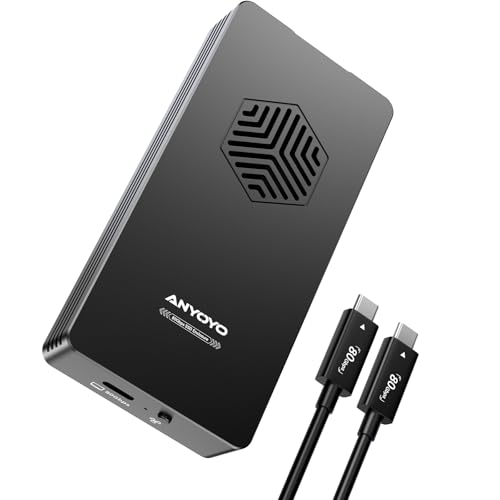
- 80Gbps-capable enclosure for very fast transfers
- Active cooling plus aluminum body for sustained use
- Tool-free setup with broad M.2 NVMe size support
Best For: PC workstation users who need high-speed portable NVMe storage for large files and heavy transfers.
Best for All-in-One Workstations – HyperDrive Next TB5 Dock
For buyers comparing thunderbolt 5 ssd enclosures for pc workstations, this HyperDrive dock stands out because it combines a fast M.2 SSD enclosure, high-bandwidth docking, and multi-display output in one unit. It is built for users who want a single cable solution that can handle storage, peripherals, networking, and expansion without adding extra hubs.
Best For: Power users, creators, and workstation setups that need fast external storage plus docking, display support, and PCIe expansion in one Thunderbolt 5 device.
Pros:
- 120Gbps Thunderbolt 5 bandwidth for fast storage and accessory performance
- Built-in M.2 PCIe Gen4 x4 enclosure with support for high-capacity NVMe drives
- Triple 4K display support on Windows PCs for demanding multi-monitor setups
- Includes 2.5Gb Ethernet, USB-A ports, and Thunderbolt Share for flexible workflows
Cons:
- Premium feature set makes it more expensive than basic SSD enclosures
- macOS and Chrome OS are limited to fewer extended displays than Windows
- Best value only if you will use the docking and expansion features, not just storage
As a category pick, this is one of the most capable thunderbolt 5 ssd enclosures for pc workstations when you need both speed and expansion. It is less of a simple storage enclosure and more of a workstation hub for users who want to consolidate displays, networking, and NVMe storage into one high-performance dock.
Best for Thunderbolt 5 Speed – OWC Envoy Ultra 2TB
If you want one of the fastest thunderbolt 5 ssd enclosures for pc workstations, the OWC Envoy Ultra is built for users who care more about sustained transfer speed and cross-platform compatibility than bargain pricing. It pairs Thunderbolt 5 performance with a rugged, bus-powered design that makes it a strong fit for demanding creative and engineering workflows.
Best For: PC workstation users who need near-internal-drive speed for large project files, media, and scratch storage.
Pros:
- Delivers over 6000MB/s for extremely fast file transfers and editing workflows
- Compatible with Thunderbolt 3, Thunderbolt 4, USB4, Macs, and PCs
- Bus-powered, fanless aluminum build keeps desk clutter and noise to a minimum
- Rugged, weather-resistant construction adds extra data protection on the go
Cons:
- Premium pricing will be overkill for basic storage needs
- Full speed depends on a Thunderbolt 5-capable system
- Portable form factor may not suit users wanting a multi-bay desktop enclosure
This is a smart pick if you want one of the most capable thunderbolt 5 ssd enclosures for pc workstations and need a portable drive that can keep up with large media libraries, 4K/8K editing, and high-speed project handoffs.
Best for High-Speed Editing – TERRAMASTER D1 SSD Pro 80Gbps Enclosure
If you need one of the faster thunderbolt 5 ssd enclosures for pc workstations, the TERRAMASTER D1 SSD Pro is built around real throughput, not just broad compatibility. Its 80Gbps design, strong cooling, and fanless operation make it a smart fit for creators and workstation users who want a quiet external NVMe drive for editing, cache, or project files.
Best For: Video editors, engineers, and power users who want a quiet, high-speed external SSD enclosure for demanding PC workstation workflows.
Pros:
- Up to 7061MB/s for fast transfers and real-time editing workflows
- All-aluminum, fanless design keeps noise at zero
- Strong thermal design helps maintain speed during long sessions
- Wide support for Thunderbolt 5/4/3 and USB4/USB 3.x systems
Cons:
- Diskless, so you still need to supply a compatible M.2 NVMe SSD
- Peak performance depends on a matching high-bandwidth host port
For buyers comparing thunderbolt 5 ssd enclosures for pc workstations, this model stands out because it combines top-end speed with passive cooling and cross-platform flexibility. It is especially appealing if you need workstation-class storage without adding fan noise to a studio or office setup.
Best for Small Spaces – OWC 8TB Envoy Ultra SSD
OWC’s 8TB Envoy Ultra is a strong fit for thunderbolt 5 ssd enclosures for pc workstations when raw transfer speed matters more than price. With claimed speeds over 6000MB/s, it is built to keep up with large media libraries, project scratch files, and fast offload workflows on modern PCs.
Best For: Power users who want near-internal-drive performance for editing, backup, and moving very large files on a Thunderbolt 5-equipped workstation.
Pros:
- Over 6000MB/s claimed performance for extremely fast transfers
- Thunderbolt 3, Thunderbolt 4, USB4, Mac, and PC compatibility
- Bus-powered, fanless aluminum design keeps the setup quiet and simple
- Rugged build with shock resistance and weather protection
Cons:
- Premium pricing compared with slower external SSD options
- Full speed depends on a compatible Thunderbolt 5 system and cable setup
- Portable enclosure format may be more than some desktop-only users need
This is a compelling choice if you want one of the fastest thunderbolt 5 ssd enclosures for pc workstations and need broad backward compatibility for mixed-device environments. It is especially attractive for creators who value speed, silence, and rugged portability in a single drive.
Best Multi-Bay Thunderbolt 5 Storage – TERRAMASTER D4 SSD NVMe Enclosure
If you need one of the more expandable thunderbolt 5 ssd enclosures for pc workstations, the TERRAMASTER D4 stands out for packing four M.2 NVMe drives into a 40Gbps desktop enclosure. It’s a practical fit for editors, content creators, and power users who want fast external storage without committing to built-in RAID.
Best For: PC workstation users who want a high-capacity, four-drive NVMe enclosure for fast storage expansion and backup workflows.
Pros:
- 40Gbps connectivity with support for Thunderbolt 5/4/3 and USB4
- Holds four M.2 NVMe 2280 SSDs for up to 32TB of total capacity
- Active cooling and multiple temperature sensors help keep noise and heat under control
- Useful backup extras, including mobile app support and Windows scheduling tools
Cons:
- No built-in RAID, so performance and redundancy require external software
- Diskless design means you must supply all SSDs separately
For buyers comparing thunderbolt 5 ssd enclosures for pc workstations, this Terramaster model makes the most sense when capacity and flexibility matter more than a simple single-drive setup. It’s a strong pick if you want a compact multi-bay enclosure that can grow with your workload.
Best Fanless Speed – Qwiizlab 80Gbps NVMe Enclosure
If you want one of the faster thunderbolt 5 ssd enclosures for pc workstations without a noisy cooling fan, this Qwiizlab enclosure is built for high-speed external storage on modern desktops and laptops. Its Thunderbolt 5 support, aluminum chassis, and backward compatibility make it a practical fit for creators who need quick project scratch space or a portable NVMe drive.
Best For: PC workstation users who want a fanless, high-speed Thunderbolt 5 enclosure for large file transfers and creative workflows.
Pros:
- Up to 80Gbps performance with very strong sequential read and write speeds
- Fanless aluminum design with internal copper heat dissipation for quieter operation
- Works with Thunderbolt 5, Thunderbolt 4/3, and USB4 for broader compatibility
- Supports PCIe Gen 4 and Gen 5 M.2 NVMe drives up to 8TB
Cons:
- SSD is not included, so you need to budget for a separate drive
- Best performance depends on a compatible Thunderbolt 5 or USB4 host system
For buyers comparing thunderbolt 5 ssd enclosures for pc workstations, this is a strong pick if you value speed, compatibility, and a fanless metal build over extra features. It is especially appealing for editing, caching, and fast NVMe storage on a tidy desktop setup.
Best for 80Gbps Speed – RayCue 80Gbps M.2 NVMe Enclosure
For buyers comparing thunderbolt 5 ssd enclosures for pc workstations, the RayCue 80Gbps enclosure stands out for its JHL9480 controller, claimed 7,000MB/s peak performance on Thunderbolt 5, and broad backward compatibility with Thunderbolt 4 and USB4. It is aimed at users who want a fast external NVMe bay with active cooling and support for large-capacity 2280 drives.
Best For: PC workstation users who want a high-speed Thunderbolt 5 enclosure for large NVMe projects, backups, and portable scratch storage.
Pros:
- Thunderbolt 5-ready design with up to 80Gbps bandwidth potential
- Built-in fan plus aluminum shell for better sustained cooling
- Supports 2280 M-Key and M&B Key NVMe drives up to 8TB
- Backward compatible with Thunderbolt 4 and USB4 setups
Cons:
- Needs Thunderbolt 5 hardware and cable to reach top speed
- Not compatible with SATA M.2 drives or PCIe 5.0 SSDs
- Fan activation depends on internal temperature, so it is not always running
In thunderbolt 5 ssd enclosures for pc workstations, this RayCue model is a strong fit if you want fast transfers, active thermal management, and room for an 8TB NVMe drive. It makes the most sense for users who can actually connect it to a Thunderbolt 5 workstation and need performance more than basic portability.
Best with Extra Features – GLOTRENDS EM6002 80Gbps NVMe Enclosure
If you want one of the faster thunderbolt 5 ssd enclosures for pc workstations, the GLOTRENDS EM6002 is built around an 80Gbps path and a JHL9480 B2 controller for very high-speed external NVMe storage. It’s a strong fit for demanding transfer-heavy workflows, especially when you want a plug-and-play enclosure that can scale up to 8TB.
Best For: Workstation users who want a high-speed external SSD enclosure for large project files, scratch storage, and fast media transfers.
Pros:
- 80Gbps design with up to 7,000MB/s theoretical performance
- Supports Thunderbolt 5/4/3, USB4 V2, and USB 3.x devices
- Built-in smart PWM cooling helps manage heat during long transfers
- Supports M.2 NVMe 2280 drives up to 8TB
Cons:
- Thunderbolt 3 support is limited to macOS 15.2+ only
- Top speeds depend heavily on host port, cable, and SSD choice
- Not intended for smartphone use
For buyers comparing thunderbolt 5 ssd enclosures for pc workstations, this model stands out for its high-speed controller, broad modern-port compatibility, and built-in cooling, making it a practical option for fast storage expansion rather than a budget pick.
Best for Maximum Throughput – UGREEN 80Gbps M.2 NVMe SSD Enclosure
If you want one of the faster thunderbolt 5 ssd enclosures for pc workstations, this UGREEN model is built around 80Gbps support, active cooling, and broad backward compatibility. It is a strong fit for creators and power users who need a portable NVMe enclosure with serious speed potential, especially when paired with the right Thunderbolt 5 cable and host port.
Best For: Editors, designers, and workstation users who want a fast, fan-cooled NVMe enclosure for large project files and portable scratch storage.
Pros:
- Up to 80Gbps with Thunderbolt 5 hardware and strong real-world speed potential
- Built-in fan plus aluminum shell help manage heat during long transfers
- Supports 8TB NVMe drives for large media and project libraries
- Works across Thunderbolt 5/4/3 and USB4 devices for flexible use
Cons:
- Needs Thunderbolt 5 cables and ports to reach top speed
- Only fits 2280 M-Key or M&B Key NVMe drives, not SATA M.2
- Fan activation depends on internal temperature, so cooling is not always audible
For buyers comparing thunderbolt 5 ssd enclosures for pc workstations, this one stands out for balancing top-end bandwidth, thermal control, and large-capacity support without getting overly bulky. It is especially compelling if you plan to move big files often and want a compact enclosure that can keep up with workstation workflows.
Best 80Gbps Option – ANYOYO 80Gbps M.2 NVMe SSD Enclosure
If you want one of the fastest thunderbolt 5 ssd enclosures for pc workstations, the ANYOYO 80Gbps enclosure is built for high-throughput scratch disks, large project transfers, and portable NVMe storage that still stays easy to use. Its JHL9480 controller, aluminum body, and active cooling make it a strong fit when sustained speed matters more than a bare-bones design.
Best For: PC workstation users who want an 80Gbps-capable enclosure for fast NVMe storage, large media files, and heavy transfer workloads.
Pros:
- Up to 80Gbps bandwidth with very high real-world transfer potential
- Built-in fan and aluminum housing help manage heat under load
- Tool-free, driver-free setup keeps installation simple
- Supports 2230/2242/2260/2280 M.2 NVMe SSDs
Cons:
- Thunderbolt 3 systems may fall back to USB speeds
- Not compatible with M.2 PCIe adapters or mobile phones
- Best performance depends on the right PCIe 4.0 x4 NVMe SSD
For buyers comparing thunderbolt 5 ssd enclosures for pc workstations, this model stands out for speed headroom and cooling rather than compactness or budget pricing. It is a practical pick if you need a fast external SSD enclosure that can keep up with demanding desktop workflows.
How We Picked the Best Thunderbolt 5 SSD Enclosures for PC Workstations
For this roundup of Thunderbolt 5 SSD Enclosures for PC Workstations, we prioritized real workstation needs: sustained transfer performance, reliable cooling, build quality, and compatibility with Thunderbolt 5, Thunderbolt 4, USB4, and common NVMe drives. We also considered whether each enclosure is better suited to a portable scratch drive, a dock-and-storage hybrid, or a more permanent desktop storage role.
Quick Comparison
Not every enclosure in this category serves the same purpose. Some are designed for maximum portability and single-drive speed, while others add docking features, fan-based cooling, or multi-bay storage for heavier file loads. If you move large video projects, virtual machines, or photo libraries between systems, a fast 80Gbps enclosure is often the sweet spot. If you need desk-side expansion with multiple drives, a 4-bay design may be the better fit.
Key Buying Factors for Thunderbolt 5 SSD Enclosures for PC Workstations
Speed Versus Real-World Sustained Performance
Peak ratings matter, but workstation users should look for enclosures that can hold performance during long writes. Good thermal design often matters more than a headline transfer number.
Cooling Design
Fanless aluminum models can be great for quiet offices, but active cooling is often safer for prolonged renders, backups, or large-copy jobs. If you expect repeated heavy use, prioritize heat dissipation.
Drive Support and Form Factor
Check whether the enclosure supports the NVMe size and keying you plan to use, usually M.2 2280. If you already own a drive, confirm compatibility before buying.
Host Compatibility
Thunderbolt 5 gives the best headroom, but backward compatibility with Thunderbolt 4 and USB4 improves flexibility across workstations and laptops. That matters if you share the enclosure across multiple machines.
Desk Setup Needs
Some users want a simple external drive, while others want extra connectivity and display support. Dock-style models can reduce cable clutter, but single-purpose enclosures may deliver a cleaner storage-first experience.
Who Should Buy Which Thunderbolt 5 SSD Enclosures for PC Workstations?
If you want the fastest portable storage for editing, caching, or project handoff, choose a high-speed single-drive Thunderbolt 5 enclosure with strong cooling. If you need quieter operation, a fanless aluminum model is appealing. If your workflow is heavy on large archives, backups, or multi-drive organization, a 4-bay enclosure is more practical. And if you want one device to handle storage plus workstation connectivity, a dock with an SSD enclosure is the smartest all-in-one option.
In short, the best choice depends on whether your priority is portability, sustained performance, silence, or expansion. Match the enclosure to the way your PC workstation actually works, not just the highest spec on the box.