If you’re looking to enhance your setup, choosing the right Thunderbolt dock with PCIe expansion can make a significant difference. These devices not only boost connectivity but also elevate performance for your creative or gaming needs. With options boasting exceptional bandwidth and versatile features, you’ll find something suited for your requirements. But how do you determine which dock will best fit your workflow? Let’s explore the top contenders that stand out in this competitive market.
Thunderbolt 3 to 2 PCIe Expansion Chassis (MK-T2Ls)
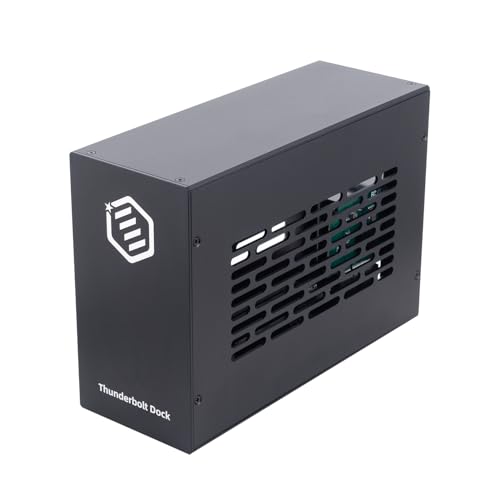
If you’re a creative professional or tech enthusiast looking to enhance your setup, the Thunderbolt 3 to 2 PCIe Expansion Chassis (MK-T2Ls) is your go-to solution. This chassis features dual PCIe 3.0 x16 slots, supporting high-performance cards for laptops and desktops across Mac, Windows, and Linux. With a blazing 40Gbps Thunderbolt bandwidth, it handles video capture, 10GbE networking, NVMe SSDs, and pro audio cards seamlessly. The durable all-aluminum build guarantees excellent thermal performance, while its smart passive cooling system keeps things quiet. Plus, the 60W power supply and 15W Power Delivery per port assure stable operation.
Best For: Creative professionals and tech enthusiasts seeking to enhance their workflow with high-performance external cards.
Pros:
- High-speed connectivity: Offers 40Gbps Thunderbolt bandwidth for seamless video capture and data transfer.
- Versatile compatibility: Supports a wide range of high-performance PCIe cards for various applications on Mac, Windows, and Linux.
- Silent operation: The smart passive cooling system ensures efficient heat dissipation without noise.
Cons:
- Limited expansion slots: Only two PCIe slots may not be sufficient for users needing multiple high-performance cards.
- Power supply limitations: The 60W power supply may not accommodate all high-power PCIe cards simultaneously.
- Portability concerns: The all-aluminum build, while durable, may add extra weight for users looking for a lightweight solution.
StarTech Thunderbolt 3 PCIe Expansion Chassis

For creative professionals and gamers needing high-performance graphics or storage solutions, the StarTech Thunderbolt 3 PCIe Expansion Chassis is an excellent choice. This external enclosure features a PCI Express slot that supports single-width cards up to 8 inches long, delivering up to 40Gbps bandwidth. Its toolless design makes it easy to integrate video capture cards and NVMe drives. With built-in active cooling and compatibility with both macOS and Windows, it enhances productivity by allowing multiple external displays. Plus, its 2-year warranty and lifetime technical support guarantees peace of mind while you focus on your projects.
Best For: Creative professionals and gamers who require high-performance graphics and storage solutions.
Pros:
- High bandwidth of up to 40Gbps for fast data transfer and performance.
- Toolless design for easy installation of video capture cards and NVMe drives.
- Built-in active cooling to maintain optimal performance during intensive tasks.
Cons:
- Limited to single-width cards which may restrict options for some users.
- Weight and size may make it less portable compared to smaller enclosures.
- Compatibility limited to Thunderbolt 3/4 devices, potentially excluding some older models.
PCIe to Thunderbolt 3/4 & USB4 Dock (MK-Q1L)

The PCIe to Thunderbolt 3/4 & USB4 Dock (MK-Q1L) is ideal for content creators and professionals who need powerful connectivity options. This sleek black dock features an aluminum enclosure and passive cooling for a noise-free experience. With a PCIe 3.0 x16 slot, you can seamlessly connect high-performance PCIe cards, achieving speeds of up to 40Gbps. It’s compatible with Windows, Linux, and macOS, offering driverless plug-and-play functionality. Plus, it provides 36W power delivery, perfect for video capture and 10G network cards. Weighing just 675 grams, this dock is an excellent choice for anyone seeking ultimate connectivity and performance.
Best For: Content creators and professionals seeking high-performance connectivity options for their laptops or desktops.
Pros:
- High-Speed Connectivity: Achieves data transfer speeds of up to 40Gbps through Thunderbolt 3/4 and USB4.
- Broad Compatibility: Works seamlessly with Windows, Linux, and macOS systems, featuring driverless plug-and-play functionality.
- Power Delivery: Provides 36W power delivery, making it suitable for powering video capture and networking cards.
Cons:
- Weight: At 675 grams, it may be considered heavier compared to some other portable docking solutions.
- Limited Compatibility with eGPUs: Not compatible with external graphics cards, restricting certain high-performance applications.
- Size: The dock’s dimensions may not be ideal for users with limited space on their desks.
PCIE 3.0 x16 eGPU Dock with Thunderbolt 4 Cable

Designed for gamers and content creators who demand high performance, the PCIE 3.0 x16 eGPU Dock with Thunderbolt 4 cable delivers seamless compatibility with top NVIDIA and AMD graphics cards. Enjoy up to 22Gbps transfer speeds and stunning 4K resolution at 3840 x 2160. It supports a range of devices, including Windows 10/11 and Linux laptops, desktops, and consoles. With flexible power input options, you can easily power your setup. The package includes a 23.6-inch Thunderbolt 4 cable and a 24Pin Power Jumper Cable, all backed by a one-year warranty, making it a reliable choice for your needs.
Best For: Gamers and content creators seeking high-performance graphics and seamless compatibility with NVIDIA and AMD GPUs.
Pros:
- High transfer speeds of up to 22Gbps for efficient data transfer and performance.
- Supports stunning 4K resolution at 3840 x 2160, perfect for advanced gaming and video editing.
- Flexible power input options provide versatility to accommodate different setups and requirements.
Cons:
- Limited compatibility with Intel graphics cards, which may restrict options for some users.
- USB4 functionality may require a BIOS update for certain consoles, potentially complicating setup.
- Average customer rating of 3.8 out of 5 stars, indicating mixed reviews from users.
PCIe Express to Thunderbolt 3/4 USB4 Dock (MK-M1s)

If you’re looking to enhance your workstation with reliable connectivity, the PCIe Express to Thunderbolt 3/4 USB4 Dock (MK-M1s) is an ideal choice. This dock features a PCIe 3.0 x16 slot, allowing you to seamlessly integrate devices like DeckLink Capture Cards with your laptops and desktops. With a blazing fast bandwidth of up to 40Gbps, it easily meets your performance needs. The aluminum housing guarantees durability, while passive cooling keeps it silent. Plus, it’s driverless and compatible with Windows, Linux, and macOS. With a 1-year warranty and excellent reviews, it’s a solid investment for ultimate connectivity.
Best For: Content creators and professionals seeking an efficient solution to connect PCIe devices like DeckLink Capture Cards to their laptops or desktops.
Pros:
- High-speed connectivity: Offers up to 40Gbps bandwidth through Thunderbolt 3 for optimal performance.
- Driverless operation: Compatible with multiple operating systems (Windows, Linux, macOS) without the need for additional drivers.
- Silent cooling: Features a passive cooling design, ensuring quiet operation during use.
Cons:
- Limited compatibility with GPU cards: Not suitable for connecting GPU cards, which may restrict some users.
- Size and weight: The dock might be less portable due to its dimensions and weight of 605 grams.
- Power supply requirements: Requires a 12V power supply, which may limit flexibility in certain setups.
Thunderbolt 3 to PCIe Card Dock with PCIe 3.0 x16 Slot

For tech enthusiasts and professionals seeking to expand their workstation capabilities, the ANQUORA Thunderbolt 3 to PCIe Card Dock stands out with its robust PCIe 3.0 x16 slot. This external enclosure supports PCIe cards up to 163mm x 28mm x 121mm, guaranteeing compatibility with a wide range of devices. With a bandwidth of up to 40Gbps via Thunderbolt 3, you’ll experience exceptional performance. The all-aluminum design is both portable and stylish, while the passive cooling guarantees silent operation. Plus, it’s driverless, working seamlessly across Windows, Linux, and macOS. Enjoy a 1-year warranty for added peace of mind.
Best For: Tech enthusiasts and professionals looking to expand their workstation capabilities with high-performance PCIe cards.
Pros:
- High Bandwidth: Supports up to 40Gbps data transfer via Thunderbolt 3 for exceptional performance.
- Versatile Compatibility: Works seamlessly with Windows, Linux, and macOS without the need for drivers.
- Silent Operation: Features passive cooling, ensuring quiet performance during use.
Cons:
- Limited to PCIe Cards: Does not support GPU cards, limiting certain expansion options.
- Size Constraints: Only accommodates PCIe cards up to specific dimensions (163mm x 28mm x 121mm).
- Weight: At 605 grams, it may be less portable compared to lighter alternatives.
Thunderbolt 3 to 2 PCIe Expansion Chassis for Laptops/NUC

The Thunderbolt 3 to 2 PCIe Expansion Chassis is an ideal solution for creatives and professionals who need to enhance their laptop or NUC’s capabilities with additional PCIe cards. With dual PCIe 3.0 x16 slots, you can connect high-performance video capture cards, network adapters, or NVMe storage. Enjoy a blazing-fast 40Gbps Thunderbolt interface, ensuring seamless data transfer. Its durable all-aluminum design features passive cooling for quiet operation, while a 60W power adapter provides ample power. Plus, it’s compatible with Windows, MacOS, and Linux, making it a versatile choice for your expansion needs. Experience ultimate connectivity with this powerful chassis!
Best For: Creatives and professionals seeking to enhance their laptop or NUC’s performance with additional PCIe capabilities.
Pros:
- High-speed 40Gbps Thunderbolt interface for seamless data transfer.
- Durable all-aluminum design with passive cooling for silent operation.
- Versatile compatibility with Windows, MacOS, and Linux systems.
Cons:
- Limited to two PCIe slots, which may not suffice for users needing more expansion options.
- Requires specific drivers for installed PCIe cards, which may complicate setup.
- Best Sellers Rank indicates lower popularity, potentially affecting availability and support.
StarTech.com Thunderbolt 3 PCIe Expansion Chassis (2TBT3-PCIE-ENCLOSURE)

Professionals in need of enhanced performance from their Thunderbolt 3/4 devices will find the StarTech.com Thunderbolt 3 PCIe Expansion Chassis (2TBT3-PCIE-ENCLOSURE) an excellent solution. This chassis adds PCI Express support to your laptop or desktop, featuring dual PCIe 3.0 x16 slots with impressive 32Gbps bandwidth. It’s compatible with various cards, including video capture and NVMe drives, and supports resolutions up to 8K. With 25W power per PCIe slot and active cooling, it guarantees peak performance. Plus, it comes with a 2-year warranty and lifetime technical support, giving you peace of mind for your investment.
Best For: Professionals seeking to enhance the performance of their Thunderbolt 3/4 devices with PCI Express support.
Pros:
- Supports dual PCIe 3.0 x16 slots with a combined bandwidth of 32Gbps, allowing for high-speed performance.
- Compatible with a variety of cards, including video capture and NVMe drives, making it versatile for different applications.
- Comes with a 2-year warranty and lifetime technical support, providing assurance and assistance for users.
Cons:
- Limited to single-width PCI Express cards, excluding graphics cards, which may restrict some users.
- Requires a Thunderbolt 3/4 capable device, limiting compatibility with older systems.
- The active cooling system may introduce noise, which could be a concern for users in quiet environments.
ASUS ThunderboltEX 4 with Intel Thunderbolt 4 Controller
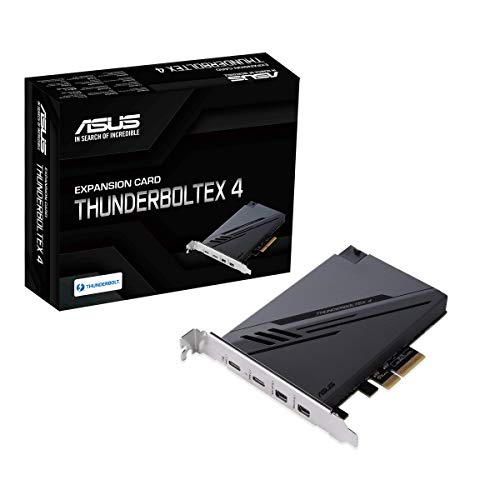
Designed for users who demand high-speed connectivity and versatility, the ASUS ThunderboltEX 4 with Intel Thunderbolt 4 Controller stands out with its impressive data transfer rate of up to 40Gb/s. You can connect up to five Thunderbolt-enabled devices in a daisy-chain configuration, maximizing your productivity. With two USB Type-C ports and two mini DisplayPort inputs, it easily integrates into your setup. Plus, it supports DisplayPort 1.4, allowing for stunning 8K resolution displays. Need quick charging? You’ll appreciate the 100W capability. Backed by a solid warranty, this dock is a reliable choice for performance enthusiasts.
Best For: Users who require high-speed connectivity and support for multiple Thunderbolt devices in a versatile setup.
Pros:
- High data transfer rate of up to 40Gb/s, enabling fast file transfers and improved productivity.
- Supports daisy-chaining of up to five Thunderbolt-enabled devices, enhancing connectivity options.
- Quick charging capability of up to 100W, perfect for powering laptops and fast-charging devices.
Cons:
- Limited to two USB Type-C ports, which may not be sufficient for users with multiple devices.
- Operating system compatibility is restricted to Windows 10 – 64 bit, excluding other platforms.
- Customer rating of 4.1 out of 5 stars indicates mixed feedback, suggesting room for improvement in user experience.
UGREEN Thunderbolt 4 Dock 8-in-1 Hub

If you’re looking for a robust docking solution that can handle multiple high-resolution displays, the UGREEN Thunderbolt 4 Dock 8-in-1 Hub is an excellent choice. With three Thunderbolt 4 ports and three USB A 3.2 ports, it offers lightning-fast data transfer speeds of up to 40Gbps. You can easily connect dual 4K displays or even an 8K display for enhanced productivity. Plus, the 140W GaN charger provides up to 85W for your laptop while you work. This dock is compatible with various devices, making it a versatile choice for professionals needing exceptional connectivity and performance.
Best For: Professionals needing a high-performance docking solution for multiple displays and extensive connectivity options.
Pros:
- Supports dual 4K or single 8K displays for enhanced productivity and visual experience.
- High-speed data transfer with Thunderbolt 4 capabilities up to 40Gbps.
- Includes a powerful 140W GaN charger that provides up to 85W charging for laptops while in use.
Cons:
- Requires connection to the charger for operation, limiting portability.
- Not compatible with Mac mini 2018 (Intel), restricting usage with certain models.
- Full-featured USB-C laptops/tablets only support a single display, which may limit multi-monitor setups.
Factors to Consider When Choosing Thunderbolt Docks With PCIe Expansion
When you’re choosing a Thunderbolt dock with PCIe expansion, you’ll need to take into account several key factors. Think about your performance bandwidth requirements and guarantee compatibility with your devices. Don’t forget to check the number of PCIe slots, cooling solutions, and power supply specifications to make the best choice.
Performance Bandwidth Requirements
Choosing the right Thunderbolt dock with PCIe expansion hinges on understanding the performance bandwidth requirements that suit your needs. Thunderbolt 3 and 4 offer a maximum bandwidth of 40Gbps, ideal for high-speed data transfer in demanding tasks like video editing and gaming. If you’re utilizing video capture or NVMe storage, aim for at least 20Gbps to guarantee smooth operation without latency. Docks featuring dual PCIe slots can provide up to 32Gbps combined bandwidth, perfect for multi-card setups requiring high data throughput. Additionally, keep in mind that compatibility with multiple display outputs, such as 4K at 60Hz or 8K, relies on the available bandwidth from your Thunderbolt connection. Prioritize these factors to optimize your performance.
Compatibility With Devices
Understanding compatibility is essential for ensuring your Thunderbolt dock with PCIe expansion meets your needs. First, confirm that the dock works with your operating system, as many models support Windows, macOS, and Linux but may have specific driver requirements. Next, check the slot size and length compatibility of PCIe cards; some docks only support single-width cards, while others can handle larger ones. Power delivery options also matter—make sure the dock provides sufficient wattage for your devices. Look for plug-and-play functionality to simplify installation without needing extra drivers or software. Finally, if you plan to connect multiple Thunderbolt devices, verify that the dock supports daisy chaining to enhance system expandability.
Number of PCIe Slots
The number of PCIe slots in a Thunderbolt dock is essential for your expansion needs, as it determines how many and what types of expansion cards you can install. Typically, docks offer options ranging from one to multiple slots. If you choose a dock with dual PCIe slots, you can connect multiple high-performance cards, like video capture and networking cards, which can enhance your workflow efficiency. However, be mindful that some docks support only single-width PCIe cards, limiting your options. Additionally, the bandwidth per slot can vary, with some providing up to 40Gbps, ensuring smooth operation under heavy loads. Opting for a dock with more PCIe slots can future-proof your setup, allowing for easier upgrades as technology evolves.
Cooling Solutions Offered
When evaluating Thunderbolt docks with PCIe expansion, it’s fundamental to reflect on the cooling solutions they offer, as these can greatly impact your system’s performance and longevity. Some docks employ passive cooling designs using aluminum materials, providing silent heat dissipation during operation. Others incorporate built-in fans for active cooling, which is crucial for maintaining ideal thermal performance, especially under heavy loads. Effective cooling is essential for high-performance cards, preventing overheating that could lead to reduced performance or hardware damage. Additionally, a well-designed cooling system enhances the dock’s longevity and reliability, particularly during intensive tasks like video editing or gaming. If noise reduction is a priority, consider passive cooling solutions for a quieter workspace.
Power Supply Specifications
Selecting a Thunderbolt dock with PCIe expansion requires careful consideration of power supply specifications, as these directly affect the performance and compatibility of your high-power cards. Look for docks that provide adequate wattage through their PCIe slots; some offer up to 60W, which is essential for powering demanding devices like video capture cards or NVMe drives. Check if the dock can supply enough power to all installed PCIe cards, as limited power distribution per slot can hinder performance. Be sure the dock includes a universal power adapter for compatibility across regions, reducing the hassle of multiple power supplies. Ultimately, ensuring the dock meets the power needs of your peripherals is fundamental to avoid instability or operational failures.