A reliable UPS battery backup for workstation PC use can keep your system running long enough to save work, shut down safely, and protect sensitive hardware from power problems.
Below, we focus on capacity, output quality, outlet layout, and runtime so you can choose the right backup for a single desktop setup or a demanding productivity workstation.
Best 10 Ups Battery Backup for Workstation PC Picks for 2026
Best for High-Load Workstations

- 900W capacity suits demanding desktop and workstation loads
- AVR helps ride through brownouts without wasting battery
- 10 outlets with battery backup, surge-only, and network protection
Best For: Workstations, gaming PCs, and home offices that need higher wattage support and extra protected outlets.
Best for ECO Savings
CyberPower EC850LCD Ecologic UPS

- 850VA/510W backup for a workstation PC and core peripherals
- ECO Mode helps reduce power use when the computer sleeps
- LCD panel and 12 outlets make monitoring and connections easy
Best For: Home office users who want compact UPS protection with energy-saving outlet control.
Best for Home Network Backup
APC 600VA Battery Backup for PC & Router

- 5 battery-backed outlets for a compact workstation setup
- 23 minutes of runtime at 100W for short outages and shutdown time
- Replaceable battery helps extend the unit’s usable life
Best For: Home offices and workstation setups that need backup power for a PC plus modem/router support during brief outages.
Best PFC Sinewave UPS
CyberPower CP1500PFCLCD 1500VA/1000W

- Pure sine wave output for active PFC PCs
- 1500VA/1000W capacity for workstation loads
- Color LCD, AVR, and 12 outlets
Best For: Workstation users who need clean power, solid capacity, and easy status monitoring.
Best For Small Spaces
APC Back-UPS 425VA/255W for Essentials

- 4 battery-backed outlets plus 2 surge-only
- Compact wall-mountable design for tight setups
- Up to 15 minutes at a 100W load
Best For: Compact home offices that need backup for routers, modems, and other low-power essentials.
Best Compact Choice
CyberPower SL700U 700VA Slim UPS

- Slim profile fits easily in tight office spaces.
- Five battery-backed outlets cover a basic workstation.
- Includes USB charging ports and a 3-year warranty.
Best For: Home office users who need a compact UPS for a workstation PC and router.
Best for Workstation Protection
CyberPower CP1500AVRLCD3 1500VA/900W UPS

- 1500VA/900W capacity for workstation and desk gear
- AVR helps smooth minor voltage fluctuations
- LCD panel and 12 outlets make monitoring easy
Best For: Home offices and workstation PCs that need dependable backup and surge protection.
Best for Compact Workstations
CyberPower ST425 425VA/260W UPS

- Compact 425VA/260W standby UPS for small desk setups
- 4 battery-backed outlets and 4 surge-only outlets
- UL certified with a 3-year warranty, including battery
Best For: Home office users with a single PC, monitor, and router who want a compact backup option.
Best for AVR Protection
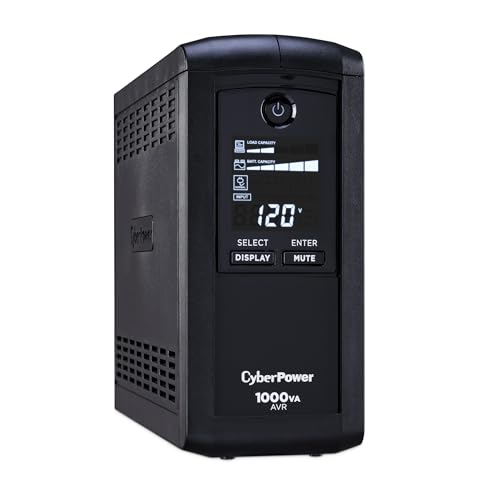
- 1000VA/600W capacity for workstation and office gear
- AVR helps smooth minor voltage fluctuations
- LCD readout makes battery and load status easy to monitor
Best For: Workstation users who want dependable backup power with AVR and clear status monitoring.
Best for High-Load Workstations – APC BX1500M 1500VA/900W UPS
If you need an ups battery backup for workstation pc setups that can handle real desktop loads, the APC BX1500M is a strong fit. Its 1500VA/900W capacity, AVR, and mix of battery-backed and surge-only outlets make it practical for keeping a workstation, network gear, and storage devices running through short outages and voltage dips.
Best For: Workstations, gaming PCs, and home office setups that need higher wattage support and extra protected outlets.
Pros:
- 900W output gives more headroom for power-hungry desktop PCs and peripherals
- AVR helps smooth brownouts without immediately draining the battery
- 10 outlets with both battery backup and surge-only protection
- LCD display makes runtime and load status easy to check at a glance
Cons:
- Heavier and bulkier than smaller desktop UPS units
- Runtime drops quickly at higher workstation loads
For buyers comparing an ups battery backup for workstation pc use, this model stands out more for capacity and practical outlet layout than for compact size. It’s a sensible choice if you want enough reserve power for safe shutdowns, brief continuity, and cleaner power for a busy desk setup.
Best for ECO Savings – CyberPower EC850LCD Ecologic UPS
If you want an ups battery backup for workstation pc that adds both battery protection and lower idle power use, the CyberPower EC850LCD is a practical compact pick. It gives you 850VA/510W of standby backup, surge protection, and an LCD that makes it easy to check power status at a glance.
Best For: Home offices and workstation users who want a compact UPS with ECO outlet control, clear status readouts, and enough backup capacity for a PC plus essential peripherals.
Pros:
- Six battery-backed outlets plus six surge-only outlets for flexible workstation setups
- ECO Mode can shut off peripherals when the PC sleeps, helping cut wasted power
- Multifunction LCD provides quick battery and power-condition monitoring
- 3-year warranty includes the battery, with a $100,000 connected equipment guarantee
Cons:
- Simulated sine wave output may not be ideal for every sensitive workstation PSU
- 850VA capacity is better for a single PC setup than for heavier multi-device loads
Overall, the EC850LCD stands out as an ups battery backup for workstation pc buyers who value efficient everyday use more than maximum wattage. It is a solid fit if you want dependable short-term backup, easy monitoring, and a compact footprint.
Best for Home Network Backup – APC 600VA Battery Backup for PC & Router
If you want an ups battery backup for workstation pc that also keeps your internet alive, this APC 600VA unit is a practical pick. It gives you enough runtime for a safe shutdown during short outages, while the surge protection helps cover the everyday power bumps that can hit a desk setup.
Best For: Home offices and workstation setups that need backup power for a PC plus modem/router support during brief outages.
Pros:
- 5 battery-backed outlets for a compact workstation setup
- 23 minutes of runtime at 100W for short outages and shutdown time
- USB charging plus 2 extra surge-only outlets for accessories
- Replaceable battery helps extend the unit’s usable life
Cons:
- 600VA/330W capacity is modest for heavier PCs or multi-monitor rigs
- Not ideal if you need long runtime for extended outages
- Only a single USB charging port
For a straightforward ups battery backup for workstation pc, this model makes sense when you care more about protecting a small office setup and keeping the network online than powering high-wattage gear. It’s a solid value choice for safe shutdowns, router backup, and everyday surge protection.
Best PFC Sinewave UPS – CyberPower CP1500PFCLCD 1500VA/1000W
If you need a reliable ups battery backup for workstation pc, the CyberPower CP1500PFCLCD is built around a 1500VA/1000W pure sine wave output, which is a strong match for modern desktops with active PFC power supplies. It also adds AVR to smooth out minor voltage swings, so it can help protect a workstation from brief power issues without constantly switching to battery.
Best For: Workstation users who want clean power, enough headroom for a high-end PC setup, and useful monitoring on a color LCD.
Pros:
- Pure sine wave output supports active PFC workstation power supplies
- 1500VA/1000W capacity suits demanding desktop and peripheral loads
- Color LCD and AVR make it easier to monitor and manage power conditions
- Includes 12 outlets plus USB-A and USB-C charging ports
Cons:
- Large for tight desk or floor spaces
- Not meant to run a full workstation for long during extended outages
For shoppers comparing an ups battery backup for workstation pc, this model stands out because it combines sine wave output, AVR, and a practical outlet layout in one desktop-friendly tower. It is a strong pick when compatibility and monitoring matter more than the absolute lowest price.
Best For Small Spaces – APC Back-UPS 425VA/255W for Essentials
If you need an ups battery backup for workstation pc peripherals rather than a full desktop rig, the APC Back-UPS BE425M is a practical pick. It delivers basic battery backup and surge protection for low-power gear like routers, modems, VoIP phones, and small home-office devices, helping you stay connected long enough to save work and shut down safely.
Best For: Compact home offices, dorm rooms, and users who want backup power for networking gear and small electronics.
Pros:
- 6 outlets total with 4 battery-backed and 2 surge-only
- Compact, wall-mountable design fits tight desk spaces
- Up to 15 minutes of runtime at a 100W load
- Includes 3-year warranty and $75,000 equipment protection
Cons:
- Too small for most full workstation PCs or monitors
- 255W output limits it to low-power devices
- Not ideal if you need long runtime during outages
For buyers comparing an ups battery backup for workstation pc, this model makes sense when your priority is keeping internet, VoIP, and lightweight office devices online—not powering a high-draw tower. It is a simple, space-saving option for outage protection without the bulk of a larger UPS.
Best Long-Run Battery Backup – GOLDENMATE 1000VA/800W Lithium UPS
If you want an ups battery backup for workstation pc that prioritizes long service life over cheap upfront pricing, the GOLDENMATE 1000VA/800W is a strong fit. Its LiFePO4 battery, pure sine wave output, and eight protected outlets make it a practical choice for keeping a desktop workstation, monitor, and networking gear online during outages.
Best For: Workstation users who want a long-life lithium UPS with clean power and multiple battery-backed outlets.
Pros:
- LiFePO4 battery is rated for 10+ years and 5,000+ charge cycles.
- Pure sine wave output is better suited to sensitive workstation equipment.
- Eight outlets give you room for a PC, monitor, router, and accessories.
- LCD readout helps you monitor battery and power status at a glance.
Cons:
- 800W capacity may be limiting for very high-end workstation builds.
- Cooling fan can become noticeable under heavy battery use.
For buyers comparing an ups battery backup for workstation pc, this model stands out for long-term value and dependable power conditioning rather than maximum output. It makes the most sense if you want a low-maintenance UPS that can support essential workstation gear for years.
Best Compact Choice – CyberPower SL700U 700VA Slim UPS
If you need an ups battery backup for workstation pc and want a compact unit that fits easily under a desk, the CyberPower SL700U is a practical pick. It delivers 700VA/370W of standby backup, surge protection, and enough outlet coverage for a PC setup plus network gear.
Best For: Home office and light workstation users who want a slim UPS with battery backup for a PC, router, and small accessories.
Pros:
- Slim profile makes it easier to place in tight desk or floor spaces.
- Five battery-backed outlets support a basic workstation and critical peripherals.
- Includes two USB charging ports for phones and small devices.
- 3-year warranty with battery coverage adds long-term value.
Cons:
- 370W output is limited for high-end desktops or heavy gaming PCs.
- Simulated sine wave output may not suit every workstation power supply.
- Not ideal if you need long runtime for multiple monitors or larger loads.
For a basic ups battery backup for workstation pc, this model stands out more for its space-saving design and dependable essentials than for raw power. It’s a smart fit if your priority is keeping a modest workstation and internet connection alive during short outages.
Best for Workstation Protection – CyberPower CP1500AVRLCD3 1500VA/900W UPS
If you want an ups battery backup for workstation pc that balances capacity, protection, and everyday convenience, the CyberPower CP1500AVRLCD3 is a solid all-around pick. Its 1500VA/900W rating, automatic voltage regulation, and LCD status panel make it well suited to desktop workstations that need clean shutdown time during outages and fewer interruptions from minor power swings.
Best For: Home offices, creator PCs, and workstation setups that need reliable battery backup plus extra surge-only outlets.
Pros:
- 1500VA/900W capacity is strong enough for many workstation and accessory setups
- AVR helps handle brownouts and small voltage dips without draining the battery
- LCD panel gives quick visibility into load, battery, and power status
- 12 outlets and USB charging ports add flexibility for a full desk setup
Cons:
- Simulated sine wave output may not suit every high-end PSU
- Mini tower design takes up more space than compact units
- Only part of the outlets provide battery backup
For buyers comparing an ups battery backup for workstation pc, this CyberPower model stands out because it combines practical runtime support with easy-to-read diagnostics and useful voltage regulation. It is a sensible choice if you want workstation-grade protection without moving into more expensive pure sine wave territory.
Best for Compact Workstations – CyberPower ST425 425VA/260W UPS
If you need a straightforward ups battery backup for workstation pc use, the CyberPower ST425 is a compact standby unit that covers the basics well: short outage ride-through, surge protection, and enough outlets for a modest desk setup. It’s a practical pick for a single PC, monitor, router, and a few low-power accessories.
Best For: Home office or light workstation users who want an affordable, space-saving UPS for essential gear rather than a high-wattage rig.
Pros:
- Compact 425VA/260W design fits easily under or beside a desk
- Four battery-backed outlets plus four surge-only outlets for flexible device coverage
- UL certified with a 3-year warranty, including the battery
- LED status light and right-angle plug help simplify everyday setup
Cons:
- Not powerful enough for high-end workstation PCs or heavy gaming systems
- Simulated sine wave output may be less ideal for sensitive power supplies
- Battery-backed outlets are limited to just four devices
Overall, this is a sensible entry-level choice if your ups battery backup for workstation pc needs are focused on protecting a single desktop setup from brief outages and routine surges. It won’t replace a higher-capacity UPS, but for a small office or basic workstation, it offers solid value and easy placement.
Best for AVR Protection – CyberPower CP1000AVRLCD UPS
If you need an ups battery backup for workstation pc setups that can handle everyday outages and brownouts, the CyberPower CP1000AVRLCD is a practical mid-range pick. Its 1000VA/600W capacity, LCD status display, and AVR make it a solid fit for desktop workstations, small office gear, and home office rigs that need clean, monitored backup power.
Best For: Workstation users who want dependable battery backup plus automatic voltage regulation for frequent minor power fluctuations.
Pros:
- AVR helps correct voltage dips and surges without constantly using the battery
- LCD panel shows runtime, load, and battery status at a glance
- Five battery-backed outlets plus four surge-only outlets
- Three-year warranty includes the battery
Cons:
- Simulated sine wave output may not suit every sensitive power supply
- 600W output is enough for many workstations, but not high-end multi-GPU systems
For most buyers looking for an ups battery backup for workstation pc use, this model stands out for balancing runtime visibility, AVR, and useful outlet layout without moving into premium pricing. It is a straightforward choice if you want protection for a desktop, monitor, and network gear in one compact unit.
How We Picked the Best Ups Battery Backup for Workstation PC
For an Ups Battery Backup for Workstation PC, the most important factors are real usable wattage, clean output, and enough battery support for your load. We prioritized units with stronger power ratings, AVR where available, and outlet counts that make sense for a PC, monitor, network gear, and accessories. We also considered form factor, LCD status displays, and lithium versus lead-acid battery design for long-term value.
Quick Comparison
In simple terms, higher-wattage models are best for powerful workstations and multi-monitor setups, while smaller units are better for basic desktops, routers, or light office PCs. Pure sine wave or sine-wave-friendly output is preferable for modern active PFC power supplies. If you need longer runtime and lower maintenance, lithium UPS models stand out; if you want lower upfront cost, standard standby or line-interactive models usually make more sense.
Key Buying Factors for Ups Battery Backup for Workstation PC
Wattage Matters More Than VA
VA is useful, but watt rating tells you how much real power the UPS can deliver. Match the UPS wattage to your actual PC load, then leave headroom for startup spikes and future upgrades. For a workstation with a high-end CPU and GPU, a 1000W-class unit is often more appropriate than a smaller office UPS.
Battery Runtime and Shutdown Margin
Most buyers do not need hours of runtime; they need enough time to save files and shut down cleanly. If your workstation is also supporting a NAS, router, or external drives, choose a unit with extra reserve so those devices stay online while you finish work.
Output Type and Power Quality
Modern workstation PSUs often work best with sine wave output, especially active PFC designs. If your system is basic, a standard standby model may be fine. If your PC is expensive or mission-critical, a better output waveform is worth paying for.
Outlets, AVR, and Connectivity
Look for enough battery-backed outlets for the tower, two monitors, and networking gear. AVR helps smooth minor voltage swings without draining the battery. USB monitoring and LCD status screens can make it easier to track load, battery health, and estimated runtime.
Who Should Buy Which Ups Battery Backup for Workstation PC?
Choose a higher-capacity UPS if you run a performance workstation, content-creation rig, CAD machine, or dual-monitor setup. Choose a midrange unit if you want a dependable balance of cost, runtime, and protection for a home office PC. Choose a compact UPS if you mainly need short backup time for a desktop, modem, or router, and choose a lithium model if you want long service life and less battery replacement over time.
For most shoppers, the best Ups Battery Backup for Workstation PC is the one that comfortably exceeds your measured load, supports clean shutdowns, and fits your desk and cable setup without wasting money on unnecessary capacity.