If you’re looking to enhance your device’s connectivity and storage, USB-C docking stations with SSD slots are a smart choice. They offer multiple ports and high-speed data transfer, making them ideal for gamers and professionals alike. With options like the SABRENT and ORICO models, you can find the perfect fit for your needs. But what should you really consider before making a selection? Let’s explore the top contenders and key factors to keep in mind.
SABRENT 7-in-1 Docking Station Compatible with Steam Deck

If you’re looking to elevate your gaming experience on the Steam Deck, the SABRENT 7-in-1 Docking Station is a game-changer. This docking station features an M.2 SSD slot, allowing you to expand your storage effortlessly. With HDMI 2.0 supporting 4K@60Hz and a Gigabit Ethernet port, your connectivity options are exceptional. It’s lightweight at just 5 ounces, making it portable without sacrificing performance. Users rave about easy installation and impressive speeds, with some reaching up to 4600MB/s. Plus, its 90W USB-C charging keeps your devices powered during intense gaming sessions. Experience seamless performance and connectivity like never before!
Best For: Gamers and professionals looking to enhance their Steam Deck experience with expanded storage and superior connectivity options.
Pros:
- M.2 SSD Slot: Easily expand storage with high-speed SSD options for improved gaming performance.
- 4K Display Support: HDMI 2.0 port allows for stunning 4K@60Hz video output, perfect for high-resolution gaming.
- Lightweight and Portable: Weighing only 5 ounces, it’s easy to carry for on-the-go gaming.
Cons:
- Firmware Updates Needed: Users may need to check for and install firmware updates for optimal performance.
- Thermal Management Required: Additional thermal pads may be necessary to prevent overheating during extended use.
- Limited USB-C Compatibility: Only compatible with devices that support DisplayPort Alternate (DP Alt) Mode, which may exclude some devices.
ORICO 12-in-1 USB-C Docking Station
The ORICO 12-in-1 USB-C Docking Station is perfect for creative professionals and power users who rely on high-speed data transfer and extensive connectivity options. With two 10Gbps Type-C and three 10Gbps USB-A ports, you can transfer large files in seconds. It supports M.2 drives up to 8TB and SATA drives up to 18TB, making storage expansion seamless. Enjoy stunning visuals through the HDMI 4K@60Hz and experience lag-free streaming with the Gigabit Ethernet. Plus, the 100W PD charging keeps your devices powered. Its sleek design guarantees it fits neatly into any workspace, combining functionality with style effortlessly.
Best For: Creative professionals and power users who need high-speed data transfer and extensive connectivity options.
Pros:
- Supports high-speed data transfer with 10Gbps USB ports, ideal for large files and 4K videos.
- Versatile connectivity with 12-in-1 features including HDMI, Gigabit Ethernet, and card readers.
- Seamless storage expansion capabilities for both M.2 and SATA drives, accommodating large storage needs.
Cons:
- May require additional power for optimal performance, depending on connected devices.
- Limited compatibility with older operating systems, potentially excluding some users.
- Potential heat generation during heavy use, necessitating adequate ventilation in the workspace.
SABRENT USB-C Hub & SSD Enclosure (HB-6PNV)

Looking for a versatile solution that combines high-speed connectivity with storage expansion? The SABRENT USB-C Hub & SSD Enclosure (HB-6PNV) is your answer. With six ports including three USB Type-A and an HDMI 2.0 that supports 4K@60Hz, it’s perfect for various devices like laptops and gaming consoles. The integrated USB-C cable offers 10Gbps transfer speeds and 90W Power Delivery. Plus, the internal M.2 slot supports SATA or NVMe SSDs for quick storage upgrades. Weighing just 4.8 ounces, it’s compact and durable, making it an excellent addition to your tech arsenal.
Best For: Users seeking a multifunctional hub that enhances connectivity and storage options for laptops, tablets, and gaming consoles.
Pros:
- High-speed transfer with USB-C connectivity and 90W Power Delivery.
- Versatile compatibility with various devices and operating systems.
- Individual power switches for each port enhance usability.
Cons:
- An external power adapter is recommended for high-energy devices.
- Some users find the LED brightness too intense in dark environments.
- Limited 4K@60Hz support requires DisplayPort 1.4 for optimal performance.
WAVLINK Laptop Docking Station with 3 Monitors

For professionals and creatives who need to maximize productivity, the WAVLINK Laptop Docking Station stands out with its ability to support triple display setups. It features dual 4K@60Hz HDMI ports and a 4K@30Hz DisplayPort, allowing you to mirror or extend your screens effectively. With 13-in-1 connectivity, including fast data transfer via USB-A and USB-C ports, you’ll enjoy seamless performance. The built-in M.2 SSD enclosure supports both PCIe NVMe and SATA drives, enhancing your storage capabilities. However, be aware of potential issues like random monitor blackouts and network performance limitations that some users have reported.
Best For: Professionals and creatives looking to enhance productivity with a multi-monitor setup and fast data transfer capabilities.
Pros:
- Provides support for triple display setups with dual 4K@60Hz HDMI ports and one 4K@30Hz DisplayPort.
- Includes a built-in M.2 SSD enclosure for expanded storage options and fast data transfer speeds.
- Easy setup and good design for convenient usability.
Cons:
- Users have reported random monitor blackouts and network performance limitations.
- Lightweight plastic design may be prone to movement and stability issues.
- Requires a separate PD charger for continuous power, which may lead to additional adapter needs.
Laptop Docking Station 15 in 1 for Dell/HP/Lenovo/Mac
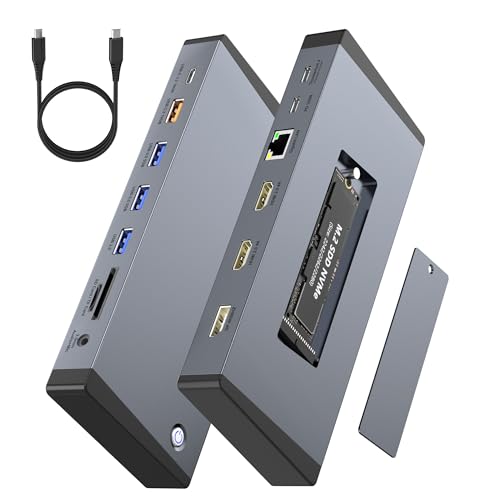
If you’re a financial analyst, video editor, or a multi-tasking professional, the Laptop Docking Station 15 in 1 for Dell, HP, Lenovo, and Mac is an ideal choice. It supports a triple monitor setup with dual 4K@60Hz HDMI and DisplayPort 1.4, ensuring you can multitask seamlessly. With 100W Power Delivery, it charges your Thunderbolt 4 laptop while providing 10Gbps USB-C and USB-A ports for fast data transfers. The built-in M.2 NVMe SSD enclosure offers easy storage expansion, and the stable Gigabit Ethernet connection enhances streaming and video calls. Enjoy smart office features like one-touch screen control for privacy.
Best For: Financial analysts, video editors, and multi-tasking professionals who need an efficient and high-performance docking solution.
Pros:
- Supports triple monitor setup with dual 4K@60Hz outputs for enhanced multitasking.
- Built-in M.2 NVMe SSD enclosure for easy storage expansion and fast data transfer.
- 100W Power Delivery for charging power-hungry laptops while in use.
Cons:
- Mac users are limited to extending only one 4K display due to macOS restrictions.
- Requires DisplayPort Alt Mode or Thunderbolt 4 host port for full functionality.
- Some Linux distributions may need additional driver configuration for compatibility.
j5create USB C Dual 4K 60Hz Display Docking Station (12-in-1)
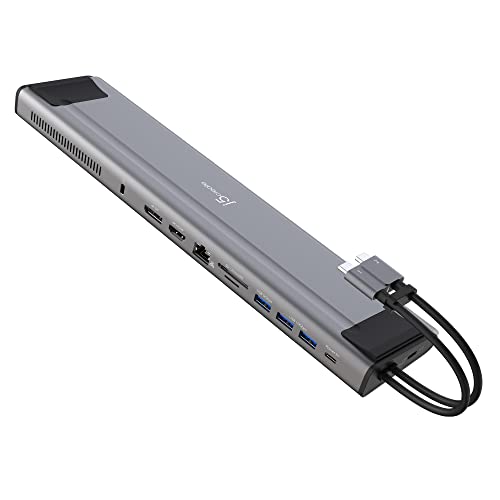
The j5create USB C Dual 4K 60Hz Display Docking Station (12-in-1) is an excellent choice for professionals seeking to enhance their workspace with dual 4K display capabilities. You’ll enjoy seamless connectivity with support for HDMI and DisplayPort, plus the convenience of a built-in M.2 NVMe SSD slot for added storage. With three SuperSpeed USB ports and 100W power delivery, charging your devices while using multiple peripherals is a breeze. While setup is generally easy, be aware of potential disconnections when using multiple monitors. Overall, it’s a solid option for those looking to streamline their workstation efficiently.
Best For: Professionals and creators looking to enhance their productivity with dual 4K displays and multiple connectivity options.
Pros:
- Dual 4K display support via HDMI and DisplayPort, ideal for multitasking.
- Built-in M.2 NVMe SSD slot for additional storage expansion.
- 100W power delivery allows for charging laptops while using peripherals.
Cons:
- Potential disconnections when using multiple monitors or peripherals, which can disrupt workflow.
- Some users reported overheating issues with specific laptops, affecting performance.
- Tech support responses have been described as dissatisfactory, particularly regarding performance concerns.
SABRENT USB-C Hard Drive Docking Station (DS-UC1B)

Designed for users needing reliable and fast data storage solutions, the SABRENT USB-C Hard Drive Docking Station (DS-UC1B) stands out with its impressive 10Gbps connection speed. It supports both 2.5” and 3.5” SATA SSDs and HDDs, making it perfect for all your backup needs. The tool-less design guarantees you can easily insert and remove drives without any hassle. Plus, it’s hot-swappable and backward compatible, accommodating drives up to 20TB. With included USB-A and USB-C cables, you’re set for compatibility across devices. SABRENT also offers solid customer support for any technical inquiries you might have.
Best For: Users seeking a reliable and fast data storage solution for both 2.5” and 3.5” SATA SSDs and HDDs.
Pros:
- High-speed performance with 10Gbps USB 3.2 Gen 2×1 connection for efficient data transfer.
- Tool-less design allows for quick and easy drive insertion and removal without the need for additional tools.
- Compatible with a wide range of drives, supporting SATA drives from 1.5Gbps to 20TB and larger.
Cons:
- Power adapter required for 3.5” HDDs, which may limit portability.
- Limited to SATA drives, not supporting other types of drives such as NVMe or M.2.
- Potential heat generation during prolonged use, especially with larger 3.5” drives.
JSAUX Steam Deck Dock with 100W Charger (HB0604)
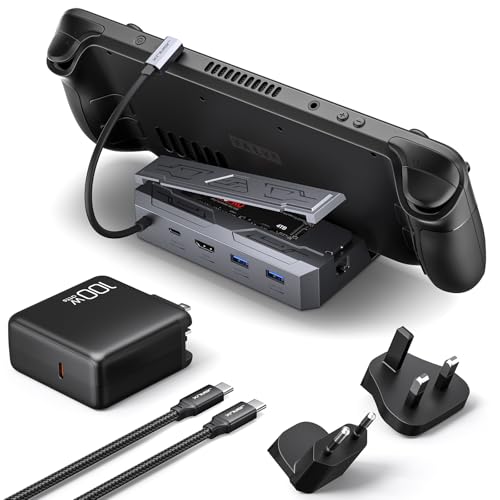
Gamers looking to enhance their Steam Deck experience will find the JSAUX Steam Deck Dock with 100W Charger (HB0604) an ideal choice. This 6-in-1 docking station features 4K@60Hz HDMI, Gigabit Ethernet, and two USB A 3.2 ports, ensuring seamless connectivity. You can also utilize the M.2 slot for SSDs up to 2TB, offering blazing speeds of 10Gbps. With a powerful 100W PD charging capability, it keeps your Steam Deck fully charged while you game. The package includes essential accessories and boasts an 18-month warranty, making it a reliable addition to your gaming setup.
Best For: Gamers seeking to enhance their Steam Deck experience with a versatile docking solution offering high-quality connectivity and charging capabilities.
Pros:
- 6-in-1 functionality: Combines HDMI, Gigabit Ethernet, USB A & C ports, and M.2 slot, providing extensive connectivity options.
- High-speed data transfer: Supports SSDs with speeds up to 10Gbps, ensuring quick access to games and data.
- Powerful charging capability: Provides 100W power delivery, keeping your Steam Deck charged during intensive gaming sessions.
Cons:
- Limited compatibility: Not compatible with ROG Ally X, AYANEO, and Switch devices, which may restrict use for some gamers.
- SSD not included: Requires separate purchase of an M.2 SSD for full functionality, adding to overall cost.
- Potential overkill for casual users: The advanced features may be unnecessary for those who only use the Steam Deck occasionally.
SABRENT USB-C Lay Flat Docking Station for SSD/HDD Enclosure

For those seeking a reliable and efficient solution to manage their SSDs and HDDs, the SABRENT USB-C Lay Flat Docking Station (DS-UFNC) stands out with its tool-free installation. This docking station supports various M.2 PCIe NVMe SSDs and 2.5”/3.5” SATA drives, accommodating up to 30 TB. With a data transfer rate of 10Gbps, you’ll experience swift backups and media access. The smart cloning feature allows you to copy drives offline without a PC. Although some users note overheating during heavy use, its high compatibility and ease of use make it a top choice for your storage needs.
Best For: Those needing an efficient and versatile docking solution for managing multiple SSDs and HDDs with high data transfer speeds.
Pros:
- Versatile compatibility with different drive sizes.
- High-speed data transfer capabilities of up to 10Gbps.
- Tool-free installation allows for easy drive swapping.
Cons:
- Requires an external power source, which may be cumbersome.
- Some users have reported overheating issues during prolonged use.
- Size and weight may be greater than other docking solutions.
SABRENT 4-Bay USB 3.0 Docking Station for SATA SSD/HDD

If you need a reliable solution for managing multiple drives, the SABRENT 4-Bay USB 3.0 Docking Station stands out with its tool-free installation and support for up to four SATA SSDs or HDDs at once. With dimensions of 6.3 x 4.72 x 2.76 inches and weighing just a pound, it’s compact and portable. You’ll enjoy fast data transfers at speeds up to 5Gbps and the convenience of hot-swapping drives without rebooting. While the duplication feature is handy, it can be finicky. Overall, this docking station is perfect for easy backups and drive management in home networks or IT workflows.
Best For: Users needing a versatile and efficient solution for managing multiple SATA SSDs or HDDs, particularly in home networks or IT environments.
Pros:
- Tool-free installation allows for quick drive swaps without the need for trays or tools.
- Supports fast data transfer speeds of up to 5Gbps with USB 3.2 Gen 1.
- Compact and lightweight design makes it easy to transport and integrate into any workspace.
Cons:
- Duplication feature can be unreliable and may require multiple attempts for successful cloning.
- After duplication, drives may display as a single disk letter, complicating file management.
- Bright LED indicators may be distracting in certain environments.
Factors to Consider When Choosing a USB C Docking Station With SSD Slot
When choosing a USB-C docking station with an SSD slot, you should consider several key factors. Think about the port selection and types, data transfer speeds, and power delivery capability that best suit your needs. Also, look into storage expansion options and multi-display support features to maximize your setup.
Port Selection and Types
Choosing the right USB-C docking station with an SSD slot hinges heavily on port selection and types. You should consider the number and types of ports available, like USB-A, USB-C, HDMI, and Ethernet, to guarantee compatibility with your devices. Look for docking stations offering high-speed USB ports, such as USB 3.2 Gen 1 or Gen 2, to facilitate efficient file management. An M.2 SSD slot that supports various form factors (2242, 2260, 2280) and protocols (NVMe/SATA) is essential for flexible storage options. If you’re into visual experiences, evaluate HDMI or DisplayPort capabilities for 4K@60Hz output. Additionally, check for Gigabit Ethernet ports and power delivery options for reliable internet connectivity and device charging.
Data Transfer Speeds
While evaluating USB-C docking stations with SSD slots, understanding data transfer speeds is essential for optimizing your workflow. You’ll find that these docking stations can achieve speeds up to 10Gbps, making file transfers swift and efficient. Pay attention to the type of SSD slot; M.2 slots often support NVMe or SATA protocols. Opt for NVMe drives, which deliver impressive read speeds averaging around 4600MB/s, greatly outperforming SATA options. The USB connection matters too—USB 3.2 Gen 2 offers the best performance at 10Gbps, while Gen 1 maxes out at 5Gbps. Keep in mind that actual speeds can vary based on your SSD configuration, USB port type, and the power management settings of your device.
Power Delivery Capability
Data transfer speeds are important, but power delivery capability can make or break your USB-C docking station experience. When you choose a docking station with an SSD slot, look for one that offers high wattage, ideally 100W, to keep power-hungry devices like laptops charged. This guarantees that your peripherals operate smoothly while you transfer data. A docking station with power delivery allows you to charge your devices and transfer data simultaneously, reducing cable clutter. Confirm the PD feature is compatible with your devices, as some may need specific profiles or adapters to take full advantage. Additionally, consider models with dedicated power adapters to maintain performance, especially during intensive tasks or when multiple devices are connected.
Storage Expansion Options
When you’re looking for a USB-C docking station with an SSD slot, several factors can impact your storage expansion experience. First, consider the type of SSD supported—NVMe or SATA—as this affects compatibility and performance. Opt for a docking station that includes an M.2 SSD slot, which supports various form factors and can expand storage up to 8TB or more. High-speed connectivity options, like 10Gbps data transfer rates, will enhance your data access and file transfer efficiency. Ease of installation is also important; choose a model that allows tool-free drive swaps for simple upgrades. Finally, make sure it has thermal management features to prevent overheating during demanding tasks with SSDs.
Multi-Display Support Features
If you’re aiming to boost your productivity with a USB-C docking station, multi-display support is a key feature to contemplate. Connecting multiple external monitors can greatly enhance your workspace, especially for tasks like video editing or presentations. Look for docking stations that support dual or triple displays, offering 4K@60Hz output through HDMI and DisplayPort for stunning visuals. Be sure to check your laptop’s compatibility, as its graphics capabilities may limit the number of supported external displays. Some docking stations use MST (Multi-Stream Transport) technology, allowing you to mirror or extend screens effortlessly. Finally, keep an eye on total bandwidth limitations, since the number of displays and their resolutions can affect overall performance and display quality.
Compatibility With Devices
As you explore USB-C docking stations to enhance your multi-display setup, compatibility with your devices plays a significant role in guaranteeing smooth operation. First, check if the docking station supports your operating system; while many models work with Windows, macOS, and Linux, they might have specific requirements. Make sure your device supports DisplayPort Alternate Mode (DP Alt) for video output through USB-C. Additionally, verify compatibility with SSD form factors like M.2 NVMe or SATA, ensuring the dock accepts the specific dimensions you need. Consider the USB-C connection type, as some docks offer 10Gbps speeds, while others are limited to 5Gbps. Finally, confirm the station provides sufficient power delivery to charge your devices effectively.
Build Quality and Design
Build quality and design are vital factors in choosing a USB-C docking station with an SSD slot. Look for durable materials like aluminum or high-grade ABS to guarantee longevity and efficient heat dissipation. A compact, lightweight profile enhances portability while accommodating multiple ports without bulkiness. Thermal management is critical, so opt for designs featuring heatsinks or thermal pads to prevent overheating, especially with high-capacity SSDs. Consider the layout of ports; angled connectors and integrated cable management systems facilitate easy access and organization. Finally, a tool-free installation mechanism improves user experience, allowing for hassle-free drive swaps and maintenance without needing extra tools. Prioritizing these aspects will lead to a more satisfying and efficient docking station experience.