Choosing the right dock can turn a laptop into a full desktop setup without sacrificing power or flexibility. If you need high-speed data, modern display outputs, and enough wattage to keep your machine charged, USB4 docks with 100W charging are the sweet spot.
Below, we focus on the best options for Mac and Windows users who want dependable performance, sensible port layouts, and the right mix of monitor support and charging headroom.
Best 9 Usb4 Docks with 100w Charging Picks for 2026
Best for Enterprise USB4 Rollouts

- Driverless USB4 dock for Mac and Windows fleets
- Dual 4K 144Hz or single 8K display support
- 100W charging plus 2.5GbE networking
Best For: IT teams and power users standardizing a cross-platform USB4 docking setup.
Best 5-Port USB4 Hub

- 100W Power Delivery for laptop charging
- USB4 plus three 10Gbps USB-C ports
- Compact 5-in-1 design with 4K@60Hz output
Best For: Travel-friendly USB4 users who want charging, fast transfers, and one external display.
Best for Lenovo Workstations
Lenovo ThinkPad USB4 Dock 5000

- 40Gbps USB4 bandwidth for fast connectivity
- Up to 100W Power Delivery 3.1 charging
- Supports one 8K or dual 4K high-refresh displays
Best For: ThinkPad and Lenovo users building a powerful single-cable desktop setup.
Best for Triple 4K Workstations
StarTech USB-C Docking Station (USB4)
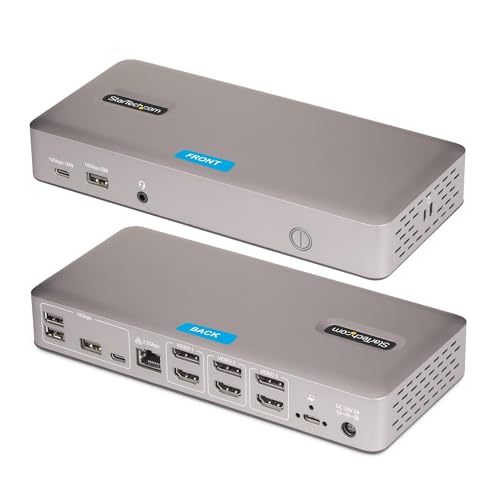
- Triple 4K 60Hz display support over USB4/Thunderbolt 4
- Up to 100W laptop charging with 180W power delivery
- 2.5GbE, PXE Boot, Wake-on-LAN, and driverless setup
Best For: Windows or ChromeOS users building a serious multi-monitor workstation with 100W charging.
Best for Lenovo Fleets

- USB4 with up to 40 Gbps bandwidth
- Up to 100W charging for connected laptops
- Supports up to four displays and remote fleet management
Best For: Business users and IT teams that need a powerful, manageable multi-monitor dock.
Best for Dual 4K MacBooks
Plugable 7-in-1 USB-C DisplayLink Dock
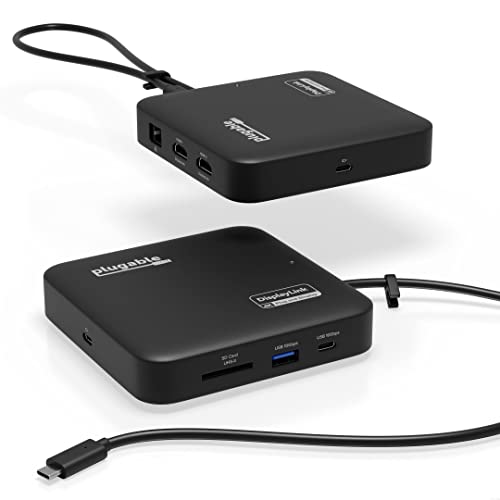
- Dual 4K 60Hz HDMI with DisplayLink support
- 10Gbps USB-C, USB-A, Ethernet, and SD card
- 100W USB-C input with up to 82W pass-through
Best For: MacBook and USB4 users who need dual monitors and a compact dock with charging.
Best for Windows USB4 Workstations
StarTech.com 10-in-1 USB4 Dock

- Up to 100W laptop charging
- Dual 4K display support over USB4
- 2.5GbE with PXE boot and Wake-on-LAN
Best For: Windows and ChromeOS users who need a business-ready USB4 dock with strong charging and networking.
Best for Mac Dual Displays
Plugable Thunderbolt 4 Dock for M4/M5 MacBook

- 100W charging over a single cable
- Dual 4K HDMI or single 6K support
- 13-port Thunderbolt 4 dock with no drivers
Best For: MacBook owners who want a plug-and-play dock for dual monitors and fast charging.
Best for Enterprise USB4 Rollouts – StarTech USB4 Docking Station
If you’re comparing usb4 docks with 100w charging for mixed Mac and Windows fleets, this StarTech dock is built around a simple goal: one driverless station that can standardize desks without creating compatibility headaches. It combines dual 4K display support, 2.5GbE, and 100W power delivery in a single USB4 or Thunderbolt connection.
Best For: IT teams, shared workspaces, and power users who want a cross-platform USB4 dock with strong charging and reliable dual-display support.
Pros:
- Driverless setup on macOS and Windows helps reduce rollout friction and support tickets.
- Supports dual 4K at 144Hz or a single 8K display, plus 2.5GbE networking.
- 100W USB-C charging is enough for most productivity laptops through one cable.
- Helpful fleet-friendly features like PXE Boot, Wake-on-LAN, and mounting options.
Cons:
- More than many casual users need if you just want basic docking and charging.
- Display performance depends on the laptop’s USB4 / Thunderbolt capabilities.
Overall, this is a smart pick for organizations evaluating usb4 docks with 100w charging because it focuses on consistency, manageability, and high-end display output rather than flashy extras.
Best 5-Port USB4 Hub – MOKiN USB C Hub 10Gbps
If you want a compact pick among usb4 docks with 100w charging, this MOKiN USB-C hub covers the essentials without adding bulk. It combines a USB4 video/data port, three 10Gbps USB-C ports, and 100W Power Delivery, making it a practical fit for portable workstations.
Best For: MacBook Pro, iPad Pro, and USB4 laptop users who need a simple multiport adapter with fast charging and 4K output.
Pros:
- 100W Power Delivery helps keep a laptop charged during heavy use
- USB4 and USB-C ports support fast 10Gbps transfers
- 4K@60Hz output is useful for a single external display
- Small 5-in-1 design is easy to carry for travel or desk use
Cons:
- Only one display output, so it is not ideal for multi-monitor setups
- Video output depends on a fully functional USB-C/Thunderbolt/USB4 port
For buyers comparing usb4 docks with 100w charging, this model stands out as a straightforward, travel-friendly option rather than a full desktop docking station. It is a strong match if you value charging, transfer speed, and 4K display support in one simple hub.
Best for Lenovo Workstations – Lenovo ThinkPad USB4 Dock 5000
If you want a dock that feels built for a serious desk setup, the Lenovo ThinkPad USB4 Dock 5000 is a strong pick among usb4 docks with 100w charging. It offers 40Gbps USB4 bandwidth, broad compatibility, and enough display support to handle demanding multitasking, whether you use one 8K screen or dual 4K high-refresh monitors.
Best For: Lenovo laptop owners and office users who need fast USB4 connectivity, strong monitor support, and a single-cable workstation setup.
Pros:
- 40Gbps USB4 performance for fast data and peripheral connections
- Supports one 8K 60Hz display or two 4K 144Hz monitors
- Power Delivery 3.1 with up to 100W charging capability
- Works across different operating systems for flexible office use
Cons:
- 100W charging depends on the power adapter configuration
- Display setup may be more than casual users need
- Geared more toward productivity than compact travel use
For users comparing usb4 docks with 100w charging, this Lenovo model stands out for its combination of high-speed connectivity, strong monitor support, and workstation-first design. It is especially appealing if you already use a ThinkPad and want a cleaner, more capable desk setup.
Best for Triple 4K Workstations – StarTech USB-C Docking Station (USB4)If you need one of the more capable usb4 docks with 100w charging for a multi-monitor desk setup, this StarTech dock stands out for pushing triple 4K at 60Hz over a single USB4 or Thunderbolt 4 port. It is built for Windows and ChromeOS users who want a driverless, IT-friendly dock with strong networking and plenty of peripheral ports.
Best For: Windows or ChromeOS users who need triple 4K displays, 100W laptop charging, and a dependable dock for office or managed deployments.
Pros:
- Drives up to three 4K 60Hz monitors from one USB4 or Thunderbolt 4 connection
- Delivers up to 100W charging plus a 180W power adapter for full dock performance
- Includes 2.5GbE, PXE Boot, Wake-on-LAN, and plenty of USB-A/USB-C ports
- Driverless plug-and-play setup on Windows and ChromeOS
Cons:
- Not compatible with macOS
- May be more dock than casual users need
- Mounting accessories are sold separately
For buyers comparing usb4 docks with 100w charging, this model is a strong pick if display output and enterprise features matter more than cross-platform flexibility. It is especially appealing when you want high-resolution multi-monitor support without relying on software-based display compression.
Best for Lenovo Fleets – ThinkPad USB4 Smart Dock 5500
If you want one of the more enterprise-friendly usb4 docks with 100w charging, Lenovo’s ThinkPad USB 4 Smart Dock 5500 is built for mixed-device offices, IT-managed environments, and laptop users who need serious display flexibility. It pairs USB4 performance with 100W laptop charging and a clean single-cable setup.
Best For: Business users, Lenovo laptop owners, and IT teams that need a manageable dock for multi-monitor desks.
Pros:
- USB4 bandwidth up to 40 Gbps for fast peripherals and data transfer
- Supports up to four displays, including 8K 60Hz or dual 4K 144Hz setups
- Delivers up to 100W power to charge a connected laptop
- Fleet management tools make remote administration easier for IT
Cons:
- Overkill if you only need basic charging and one monitor
- Best value is strongest in managed office or Lenovo-centric setups
This dock stands out in usb4 docks with 100w charging because it combines strong display output, solid charging, and IT-focused management in one package. If you need a docking station that can handle a demanding workstation while staying easy to deploy, it’s a very capable choice.
Best for Dual 4K MacBooks – Plugable 7-in-1 USB-C DisplayLink Dock
If you need one of the more practical usb4 docks with 100w charging for a MacBook or Windows laptop, this Plugable dock is built around real-world multitasking. It combines dual 4K 60Hz HDMI output, 10Gbps USB ports, Ethernet, and SD card support in a compact package, while also handling laptop power delivery through USB-C passthrough.
Best For: MacBook and USB4 laptop users who want dual extended 4K displays plus a clean, travel-friendly dock with charging support.
Pros:
- Dual 4K 60Hz HDMI output via DisplayLink for extended displays on Macs and Windows PCs
- Includes USB-C, USB-A, SD card, and Gigabit Ethernet in a compact 7-in-1 layout
- Supports USB-C power input up to 100W with up to 82W pass-through to the host
- Good fit for portable workstations and mixed Mac/Windows setups
Cons:
- Requires DisplayLink software for dual-display use, especially on macOS
- Not ideal for HDCP-protected streaming, gaming, or 3D workloads
- Pass-through charging does not deliver a full 100W to the laptop
This is a strong pick if you want a flexible, portable dock that plays nicely with USB4 laptops and still keeps the desk setup simple. Among usb4 docks with 100w charging, it stands out more for reliable dual-monitor expansion than for raw port count or max charging output.
Best for Windows USB4 Workstations – StarTech.com 10-in-1 USB4 Dock
If you need a no-fuss docking option for a Windows or ChromeOS setup, this StarTech.com unit is a strong fit among usb4 docks with 100w charging. It combines 40Gbps data, dual 4K display support, 2.5GbE, and up to 100W laptop charging in a driverless design that’s aimed at enterprise and BYOD use.
Best For: Windows and ChromeOS users who want a plug-and-play USB4 dock with strong display, Ethernet, and charging support.
Pros:
- Up to 100W charging plus 40Gbps USB4 data transfer
- Dual 4K display support, including high-refresh workflows on compatible setups
- 2.5GbE, PXE boot, and Wake-on-LAN support for managed environments
- Driverless deployment for faster setup in offices and shared workspaces
Cons:
- Not compatible with macOS
- Best display features depend on a USB4 or Thunderbolt 4 laptop
This is a practical pick if you want usb4 docks with 100w charging that lean more toward business reliability than flashy extras. It stands out most for IT-friendly deployment, wired networking, and flexible monitor support rather than universal cross-platform compatibility.
Best for Thunderbolt Power Users – Plugable Thunderbolt 4 Dock with 100W Charging
If you want one of the most capable usb4 docks with 100w charging, this Plugable Thunderbolt 4 dock is built for serious desk setups. It combines 100W laptop charging, dual 4K HDMI output, and 40Gbps Thunderbolt 4 bandwidth in a single certified dock for Windows and Mac users.
Best For: People who need a dependable Thunderbolt 4 dock for dual monitors, fast peripherals, and a clean one-cable workstation.
Pros:
- 100W Power Delivery with 96W certified charging for compatible laptops
- Dual 4K 60Hz HDMI or single 8K display support on supported systems
- 13 total ports, including Thunderbolt 4 downstream, USB-A, USB-C, SD/microSD, and Ethernet
- Thunderbolt certified and designed for Windows 10+ and compatible Mac models
Cons:
- Full dual-monitor support depends on your laptop’s Thunderbolt/USB4 and Mac model
- It is more expensive than basic USB-C docks
- Not every system can use the dock’s maximum display output
This is a strong pick if you’re comparing usb4 docks with 100w charging and care more about performance, certification, and display flexibility than the lowest price. It’s especially appealing for users who want a future-proof dock that can handle charging, storage, and multiple screens without compromise.
Best for Mac Dual Displays – Plugable Thunderbolt 4 Dock for M4/M5 MacBook
If you want one of the most capable usb4 docks with 100w charging for a MacBook setup, this Plugable Thunderbolt 4 dock is built for easy, driverless use. It combines 100W laptop power, dual 4K HDMI support, and a full spread of ports in a single aluminum dock that suits home offices and creative workstations.
Best For: Mac users who need a simple plug-and-play dock for dual external displays, fast charging, and a cleaner desk setup.
Pros:
- 100W charging keeps compatible MacBooks powered through a single cable
- Dual 4K HDMI outputs, or up to a single 6K display on supported setups
- 13 ports total, including USB-A, USB-C, SD/microSD, Ethernet, and audio
- No driver installation required on supported Mac and Windows systems
Cons:
- Dual-display support depends on your Mac model and mode
- More expensive than basic USB-C docks
- Best suited to Thunderbolt 4 or USB4 laptops, not older USB-A only systems
For buyers comparing usb4 docks with 100w charging, this model stands out for its Mac-friendly display support and straightforward setup. It is a strong choice if you want docking, charging, and peripheral expansion without extra software or a cluttered desk.
How We Picked the Best Usb4 Docks with 100w Charging
We prioritized docks that combine USB4 bandwidth, practical laptop charging, and broad compatibility. The strongest picks offer at least 100W power delivery, useful video outputs for one or more displays, and ports that fit real-world workflows like Ethernet, SD card access, and fast USB peripherals. We also favored driverless models where possible, since they simplify setup and reduce long-term hassle.
Quick Comparison
When comparing Usb4 Docks with 100w Charging, the biggest differences usually come down to display support, host compatibility, and port selection. Some docks are best for dual-4K productivity setups, while others are built for multi-monitor expansion or a cleaner single-cable desktop with robust networking and storage access. If you use a Mac, double-check display limitations, since some docks that work well on Windows may not support every macOS configuration.
Key Buying Factors for Usb4 Docks with 100w Charging
Charging Performance
Not all 100W-rated docks deliver the same real-world charging experience. Look for clear laptop power delivery specs and make sure your notebook can actually accept the full input. For many productivity laptops, 100W is enough to power the system and charge at the same time, but larger workstations may benefit from a dock with a higher adapter even if the laptop output is capped at 100W.
Display Support
Match the dock to your monitor setup before anything else. If you need dual 4K or triple-monitor output, verify the supported resolution and refresh-rate combinations. A dock that advertises high-resolution output may still limit refresh rates or require display-port specific cabling. For creative work or trading setups, those details matter more than headline bandwidth.
Compatibility and Setup
USB4 docks are usually easier to live with than older proprietary solutions, but compatibility still varies by host device, operating system, and GPU architecture. Driverless docks are appealing for shared spaces and travel because they are simpler to install. DisplayLink-based models can offer flexibility for some multi-monitor users, though they may introduce software dependence.
Ports and Networking
Choose based on your peripherals, not just your laptop. A strong dock should include enough USB-A or USB-C ports for accessories, plus Ethernet if you work from home or need stable network performance. Faster 2.5GbE can be a real upgrade for large file transfers and modern office networks.
Who Should Buy Which Usb4 Docks with 100w Charging?
Choose a compact USB4 dock if you mainly need charging, external display support, and a few extra ports. Pick a higher-end dual- or triple-display dock if you run multiple monitors every day and want one-cable convenience. If you use a Mac, prioritize confirmed macOS support and display behavior. If you work across different laptops, look for the most universal driverless option available.
In short, the best dock is the one that matches your display count, power needs, and platform before you worry about anything else.