If you want easier access to your hardware, better airflow, and a cleaner workspace, wall-mounted open-frame PC setups can be a smart upgrade.
This roundup of wall mount open air PC cases focuses on practical choices for gaming, testing, and DIY builds so you can pick the right frame or bracket with less guesswork.
Best 10 Wall Mount Open Air PC Cases Picks for 2026
Artful Wall-Mount Showcase
ABKCA Stainless Steel ATX Wall Case
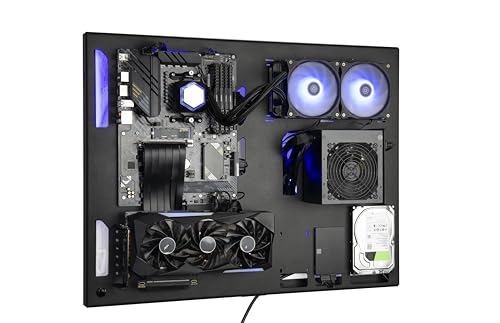
- Wall-mounted open design for display builds
- Supports 240mm/280mm liquid cooling
- Fits up to 39 cm GPUs with sag bracket
Best For: Display-focused builders wanting a wall-mounted ATX case with cooling flexibility
Simple Test-Bench Build

- Open-frame rack for fast component access
- Supports ATX, Micro ATX, and ITX boards
- GPU size is not limited
Best For: DIY builders who need a simple open bench for testing and frequent changes
Space-Saving Wall Bracket
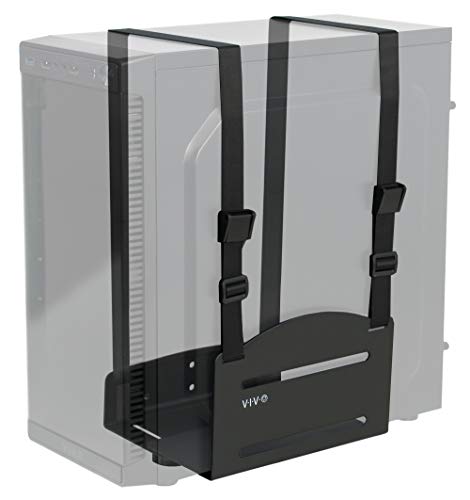
- Mounts an existing case to the wall
- Adjustable width fits 12.2 to 21.1 cm
- Supports cases up to 10 kg
Best For: Anyone who wants to wall-mount an existing PC case instead of buying a new chassis
Compact DIY Bench Platform
ALAMENGDA Open Chassis Test Rack

- Supports ATX, Micro ATX, and ITX boards
- Compatible with air and water cooling
- Compact steel bench with 7 expansion slots
Best For: PC tinkerers needing a compact open chassis for testing and cooling experiments
Open Air Test Bench

- Open portable rack design for testing and DIY builds.
- Supports M-ATX/ITX boards plus 360 mm water cooling.
- Can stand upright or lie down for flexible use.
Best For: DIY builders who need an open-frame test bench for M-ATX or ITX systems.
Flexible Aluminum Frame
Open Chassis for Multi-Board Builds

- Supports EATX, ATX, M-ATX, and ITX boards.
- Aluminum frame offers a stable vertical structure.
- Open layout supports strong airflow and water cooling.
Best For: Builders who want an adaptable open-frame chassis for multiple motherboard sizes.
Heavy-Duty Stackable Bench
Open Frame Workstation Chassis

- Steel SPCC construction with sandblasted finish
- Stacks up to 10 units for rack-style setups
- Fits EATX, ATX, Micro ATX, and ITX boards
Best For: Durable, stackable bench builds and workstation setups
Stackable Server-Rack Bench

- Rigid SPCC build with sandblasted finish
- Stacks up to 10 units for workstation use
- Supports EATX, ATX, Micro ATX, and ITX boards
Best For: Rugged bench and server-style builds that need stacking
Artful Wall-Mount Showcase – ABKCA Stainless Steel ATX Wall Case
If you’re comparing wall mount open air pc cases for a clean, display-first build, this ABKCA design leans hard into both looks and flexibility. It supports Mini ITX, Micro ATX, and Full ATX boards, adds space for liquid cooling, and keeps the hardware visible while helping your setup stay organized and off the desk.
Best For: Builders who want a wall-mounted ATX case that doubles as a showcase piece with solid cooling and storage options.
Pros:
- Stainless steel construction with durable electrostatic powder coating
- Supports 240mm or 280mm liquid cooling, plus unrestricted air-cooling size compatibility
- Includes side ventilation holes and a GPU sag prevention bracket
- Fits graphics cards up to 39 cm and offers flexible SSD/HDD storage
Cons:
- Wall-mounted format is less convenient than a standard desk case for quick swaps
- Larger size and feature set may be more than needed for simple test builds
- Installation requires a proper wall setup
Overall, this is a strong pick if you want your PC to be part of the room design as well as a functional build. It’s especially appealing for users who value liquid cooling support, hardware visibility, and a more premium wall-mounted presentation.
Simple Test-Bench Build – JOYJOM ATX Open Air Rack
For hands-on testing and easy component access, this open air pc case keeps the layout straightforward. It supports ATX, Micro ATX, and ITX motherboards, uses a compact open-frame design, and leaves graphics card length and width unrestricted for flexible DIY builds.
Best For: Builders who want a basic open-frame test bench for frequent hardware changes and bench-style setups.
Pros:
- Supports ATX, Micro ATX, and ITX motherboards
- Graphics card length and width are not limited
- Made from 0.8mm SPCC steel with black sandblasted paint
- Includes support for a standard ATX power supply and one HDD/SSD
Cons:
- Open bench design offers less physical protection than a closed case
- Storage support is limited to one drive
- Compact footprint may not suit users who need more expansion space
This is a practical choice if your priority is accessibility over enclosure. It’s best viewed as a straightforward test bench for builders who swap hardware often and want an uncomplicated frame at a low-complexity setup.
Space-Saving Wall Bracket – VIVO Adjustable PC Wall Mount
If you want a wall mount open air pc cases solution without replacing your current chassis, this VIVO bracket is the practical route. It lifts compatible cases off the floor, uses adjustable straps for added security, and helps reduce exposure to dust and ground vibrations.
Best For: Users who want to wall-mount an existing PC case for space savings and easier access.
Pros:
- Adjustable width fits many PC cases from 12.2 to 21.1 cm
- Steel construction with adjustable straps for extra security
- Holds cases up to 10 kg
- Backed by a 3-year manufacturer warranty
Cons:
- Cannot be mounted to drywall alone
- Not a full PC case, so it won’t add built-in drive or cooling features
- Compatibility depends on your existing case dimensions
As a mounting accessory, it makes more sense for people who already have a compatible chassis and just want it on the wall. It’s a good fit if your main goal is freeing desk or floor space while keeping the system accessible.
Compact DIY Bench Platform – ALAMENGDA Open Chassis Test Rack
This open air pc case is aimed at builders who want a compact, no-frills test bench with broad motherboard support. It accepts ATX, Micro ATX, and ITX boards, supports standard ATX power supplies, and keeps the layout open for air or water cooling experiments.
Best For: PC tinkerers who need a compact open chassis for testing builds and cooling setups.
Pros:
- Supports ATX, Micro ATX, and ITX motherboards
- Works with air and water cooling
- Uses 0.8mm SPCC steel with a black sand-grain finish
- Provides 7 expansion slots and room for 2 internal drives
Cons:
- Listed motherboard support in details is Micro ATX, so fit expectations should be checked carefully
- Open design offers little enclosure protection
- Compact dimensions may feel tight for larger custom builds
This is a solid pick for people who care more about function than enclosure. The mix of multi-platform motherboard support, cooling flexibility, and a simple open layout makes it useful for testing, benching, and lightweight DIY builds.
Heavy-Duty Wall Mount – Adjustable Steel Open Frame Bracket
If you want wall mount open air pc cases support without a full enclosure, this adjustable steel bracket is built for simple, sturdy CPU storage. Its open frame keeps the case off the floor for better airflow, while the width-adjustable design helps it fit a range of larger towers.
Best For: Home office or gaming setups that need a wall-mounted, open-frame holder for a full-size PC case.
Pros:
- Thickened steel construction is rated to hold up to 50 lbs.
- Open frame design has no height limit and fits cases 5.2″ to 8.5″ wide.
- Wall mounting can improve heat dissipation and free up floor space.
- Powder-coated black finish helps resist rust and corrosion.
Cons:
- Designed for flat-wall installation, so placement options are limited.
- Width range is helpful, but it still will not fit every oversized tower.
For buyers comparing wall mount open air pc cases accessories, this model stands out for durability and adjustability. It is less about flashy design and more about giving a heavy desktop case a secure, practical wall-mounted home.
Open Air Test Bench – M-ATX DIY Server Case
This open air pc case is aimed at builders who want quick access to components, not a closed chassis. It uses an open portable rack layout for M-ATX/ITX boards, supports stand-or-lie-down placement, and is designed for testing or DIY setups where easy part swaps matter most.
Best For: DIY builders and testers using M-ATX or ITX hardware who want an open-frame bench with flexible placement.
Pros:
- Open portable design makes hardware changes and testing easier.
- Supports M-ATX/ITX motherboards with front and rear ATX power supply mounting.
- Can stand upright or lie flat depending on your workspace.
- Supports up to 256 mm graphics cards and 360 mm water cooling.
Cons:
- The notes warn ATX motherboard screw holes may not align perfectly.
- Compatibility is focused on M-ATX/ITX use, so it is not a universal full-size solution.
As wall mount open air pc cases alternatives go, this is more of a test bench than a fixed mounting system. It makes sense for builders who value access, cooling support, and a straightforward open-air layout over case coverage.
Flexible Aluminum Frame – Open Chassis for Multi-Board Builds
For buyers shopping wall mount open air pc cases style builds, this aluminum open frame chassis is better described as a flexible test bench for multi-platform systems. It supports a wide range of motherboard sizes and offers strong cooling-friendly layout options for custom builds.
Best For: Enthusiasts who want an open aluminum frame for flexible, cooling-focused DIY builds across multiple motherboard sizes.
Pros:
- Compatible with EATX, ATX, M-ATX, and ITX motherboards.
- Aluminum alloy construction with a stable vertical structure.
- Open design promotes excellent heat dissipation.
- Supports water cooling and can be adjusted for different layouts.
Cons:
- Graphics card mounting may require optional accessories.
- Some configurations need extra extension cables for vertical GPU installation.
- Air-cooled CPU setups can limit ITX and M-ATX choices due to frame height.
This is a strong pick if you want a highly adaptable open chassis rather than a simple enclosure. The broad motherboard support and adjustable cooling layout make it especially useful for builders who like to tune the system around their hardware.
Heavy-Duty Stackable Bench – Open Frame Workstation Chassis
If you’re comparing wall mount open air pc cases for a flexible workstation or test rig, this open frame chassis stands out for its rigid steel build and stackable layout. It supports EATX, ATX, Micro ATX, and ITX boards, with room for air or liquid cooling and enough clearance for full-size hardware.
Best For: Builders who want a durable, stackable open-air bench for workstation or server-rack style setups.
Pros:
- 1.5mm SPCC panels and 0.8mm base plate add rigidity.
- Supports horizontal or vertical placement and stacks up to 10 units horizontally.
- Fits EATX, ATX, Micro ATX, and ITX motherboards up to 330 x 330mm.
- Allows up to 8x 120mm fans or multiple radiator sizes, including 360mm.
Cons:
- Uses a standard ATX PSU only, with up to 300mm length support.
- GPU clearance can tighten to 310mm when internal fans are installed.
- Open-frame design offers less physical protection than a closed case.
Overall, this is a practical pick if you prioritize strength, stacking, and broad compatibility over enclosure-style coverage. It is especially suited to bench testing and mixed cooling builds.
Aluminum DIY Techbench – Modular Open Air PC Case
For shoppers looking at wall mount open air pc cases with a lighter, more modular feel, this aluminum techbench focuses on airflow and flexible layout. It supports ATX, mATX, and ITX motherboards, plus horizontal or vertical GPU mounting, making it easy to adapt for custom builds and cooling changes.
Best For: DIY builders who want an adjustable open-frame case with strong airflow and flexible cooling options.
Pros:
- Aluminum construction keeps the frame lightweight and DIY-friendly.
- Open design improves airflow, cooling, and visibility for RGB hardware.
- Supports ATX, SFX, and SFX-L power supplies.
- Accommodates a wide range of fans and radiators, including 240mm and 280mm.
Cons:
- Vertical GPU mounting needs an extra riser cable, which is not included.
- Storage support is limited to 2.5-inch and 3.5-inch drives.
- No size limit is listed for the GPU, but placement may require rearranging cooling hardware.
This is a good option if your priority is modularity and easy part access rather than a fixed, enclosed layout. The adjustable water-cooling positions add useful flexibility for custom configurations.
Stackable Server-Rack Bench – DIY Open Air Chassis
If you need wall mount open air pc cases for dense workbench or rack-style use, this DIY stackable chassis is built for stability and expansion. It supports EATX, ATX, Micro ATX, and ITX boards, offers multiple cooling paths, and can be stacked horizontally for larger setups.
Best For: Workstation and server builds that need a rugged, stackable open test bench.
Pros:
- 1.5mm SPCC panels and 0.8mm base plate improve structural rigidity.
- Supports horizontal or vertical placement and stacks up to 10 units horizontally.
- Handles up to 8x 120mm fans or several radiator sizes, including 360mm.
- Includes support for 2 HDDs and 3 SSDs, plus an ATX PSU up to 300mm.
Cons:
- GPU length is limited to 310mm with internal fans installed.
- Open-frame design leaves components exposed to dust and handling.
- Best fit is for bench or rack use, not a traditional enclosed desktop build.
Compared with lighter DIY frames, this model leans into heavy-duty compatibility and stackability. It is a solid choice when you want a test bench that can also serve as a compact server-rack style platform.
How We Picked These Wall Mount Open Air PC Cases
We focused on build compatibility, mounting style, material quality, and everyday usability. Since Wall Mount Open Air PC Cases are often used for gaming rigs, test benches, and mod-friendly setups, we prioritized designs that make installation, component swapping, and cooling easier.
We also looked for options that support common motherboard sizes, provide enough clearance for large coolers or GPUs, and offer a stable structure for long-term use.
Quick Comparison
Most options in this roundup fall into two groups: wall-mounted brackets and open-frame chassis. Brackets are best if you already have a case and just want to move it off the desk. Open-frame chassis are better if you want a fully exposed build for testing, frequent upgrades, or a custom showcase setup.
Best for Different Needs
Choose a wall bracket if space-saving and simple mounting matter most. Choose an open-frame test bench if you regularly swap parts. Choose a more rigid aluminum or steel frame if you want better durability and a cleaner permanent install.
Key Buying Factors for Wall Mount Open Air PC Cases
Motherboard support: Check whether the frame fits ATX, Micro-ATX, Mini-ITX, or larger E-ATX boards. Not every open chassis supports every layout.
GPU and cooler clearance: Larger graphics cards and air coolers can be the first compatibility problem. Measure your components before buying.
Mounting method: Some models mount a full case, while others support the motherboard and components directly on an open rack. Make sure the wall hardware, straps, or brackets match your space and wall type.
Material and stability: Steel usually offers stronger support, while aluminum can be lighter and easier to handle. For heavier builds, rigidity matters more than looks.
Cable management and access: Open designs are convenient, but they can get messy fast. Look for layouts that leave room for clean routing, storage drives, and PSU placement.
Who Should Buy Which Wall Mount Open Air PC Cases?
If you are building a gaming PC and want showpiece visibility, an open-frame chassis may be the best fit. If you troubleshoot hardware often, a test bench style case will save time. If you simply want floor or desk space back, a wall bracket is the most practical choice.
For first-time buyers, the safest approach is to match your motherboard size first, then confirm GPU length, cooler height, and mounting style. That small checklist will eliminate most fit issues when shopping for Wall Mount Open Air PC Cases.