A wired controller can simplify PC gaming: plug it in, skip battery checks, and play without relying on a wireless connection. The harder part is choosing a layout and feature set that suit your games and budget.
These 10 selections span basic Xbox-style gamepads, controllers with Hall effect sticks, and options with extra inputs. Here’s what to check before you buy.
Best 10 Wired Controllers for PC Gaming Picks for 2026
Most Adjustable

- Adjustable Hall Effect stick tension
- Switchable click and linear triggers
- Extra buttons and software profiles
Best For: PC and Xbox players who switch genres often
Plug-and-Play Pick

- Hall Effect sticks and triggers
- Two customizable back buttons
- Removable USB cable and headset jack
Best For: Straightforward PC and Xbox play with Hall Effect controls
Classic PC Choice

- Familiar Xbox 360-style layout
- Responsive four-switch D-pad
- Optional keyboard and mouse mapping
Best For: PC players mixing older and newer games
Xbox 360-Compatible Pick

- PC and Xbox 360 compatibility
- Rumble feedback
- 7.2-foot USB cord
Best For: Casual, non-FPS PC and Xbox 360 gaming
Xbox 360 Pick
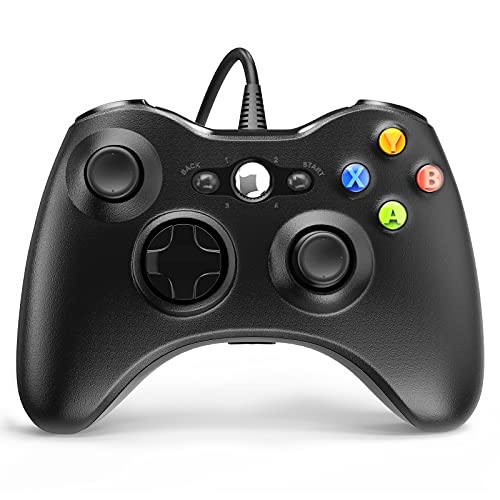
- USB plug-and-play setup
- 7.2-foot cable and contoured grip
- Dual vibration; up to four controllers
Best For: PC and Xbox 360 players seeking a simple wired gamepad
Tactile Control Pick

- Mecha-tactile buttons and D-pad
- Two remappable front buttons
- Trigger stops and non-slip grips
Best For: PC and Xbox players who prioritize tactile inputs
Hall Effect Pick

- Hall Effect sticks and triggers
- Remappable back buttons
- Silicone grip and swappable faceplate
Best For: Windows and Xbox players seeking customizable controls
Simple Xbox-Style Pick
PowerA Wired Controller for Xbox

- 10-foot USB-C cable
- Rumble motors and impulse triggers
- 3.5 mm headset jack
Best For: Straightforward Windows and Xbox play
Hall-Effect Control Pick
GameSir G7 SE Wired Controller

- Hall-effect sticks and triggers
- Two customizable back keys
- Detachable plug-and-play USB
Best For: Precise controls with simple PC setup
RGB Customization Pick
Turtle Beach Afterglow Wave Wired
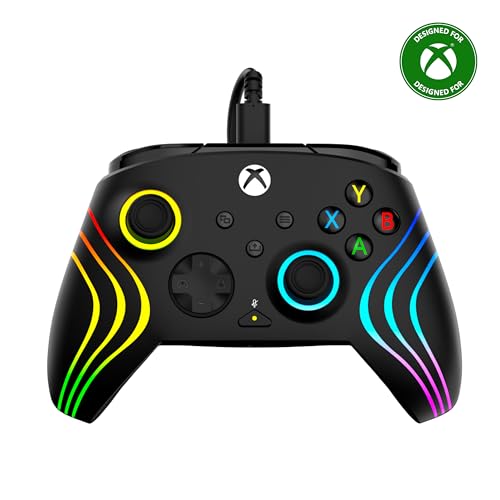
- Eight-zone customizable RGB
- Adjustable Hall-effect triggers
- Mappable buttons and audio controls
Best For: Lighting and on-controller adjustments
Most Adjustable – FLYDIGI Vader 5S
The FLYDIGI Vader 5S stands out among wired controllers for PC gaming if you want to tune the controls for different genres. Its Hall Effect sticks have adjustable tension, while the triggers switch between micro-click and linear response.
Best For: PC and Xbox players who regularly switch between shooters, racing games, and other genres.
Pros:
- Adjustable stick tension from 40gf to 100gf.
- Switchable micro-click and Hall Effect linear triggers.
- Extra rear and shoulder buttons, on-controller adjustments, and software profiles.
Cons:
- Wired connection limits how far you can sit from your PC or console.
- Some advanced customization requires FLYDIGI software.
Choose it when hands-on control over stick feel and trigger behavior matters more than a simple, fixed setup.
Plug-and-Play Pick – GameSir G7 SE
For buyers comparing wired controllers for PC gaming, the GameSir G7 SE pairs a removable USB connection with Hall Effect sticks and triggers. It supports Windows 10 and later, Steam, and supported Xbox consoles without requiring additional drivers for setup.
Best For: PC and Xbox players who want Hall Effect controls and straightforward USB setup.
Pros:
- Hall Effect sticks and triggers.
- Two customizable back buttons.
- 3.5 mm headset jack and textured, ergonomic grips.
Cons:
- Only two back buttons are listed for extra inputs.
- The wired connection requires a USB cable during play.
This is a practical choice if you value familiar controls, headset connectivity, and uncomplicated setup over extensive physical adjustments.
Classic PC Choice – Logitech G F310
The Logitech G F310 is a familiar option among wired controllers for PC gaming, with an Xbox 360-style button layout and a six-foot USB cord. Its four-switch floating D-pad is worth considering if quick directional inputs are a priority.
Best For: PC players who want a familiar gamepad for a mix of older and newer titles.
Pros:
- Broad game support and a familiar control layout.
- Four-switch D-pad responds to quick direction changes.
- Profiler software can map keyboard and mouse commands for games without gamepad support.
Cons:
- Profiler features require a software installation.
- The supplied plug-and-play compatibility information names older Windows versions; verify support for your current setup.
Pick the F310 for its straightforward PC-gamepad approach, especially if software mapping could help with a game that lacks native controller support.
Xbox 360-Compatible Pick – VOYEE Wired PC Controller
The VOYEE is a simple entry in the wired controllers for PC gaming category for players who also use an Xbox 360 or Xbox 360 Slim. It offers plug-and-play USB connectivity, rumble feedback, and a 7.2-foot cord.
Best For: Windows PC and Xbox 360 players who want a straightforward wired controller for non-FPS games.
Pros:
- Supports the listed Windows versions from 7 through 11, plus Xbox 360 and Slim.
- Rumble feedback adds tactile response in supported games.
- Contoured grips and a 7.2-foot cord allow a more flexible seating position.
Cons:
- The supplied product notes specifically say it is not for FPS games.
- Xbox console compatibility is limited to the Xbox 360 models listed.
Consider it for casual PC or Xbox 360 play, but choose another option from this roundup if shooters or newer Xbox consoles are central to your setup.
Xbox 360 Pick – YAEYE Wired Controller
If you want wired controllers for pc gaming that also work with an Xbox 360, the YAEYE offers a straightforward USB setup. Its 7.2-foot cable gives you some room to sit back, and the contoured grip is designed for comfortable play.
Best For: Players who want a simple wired controller for PC and Xbox 360 games.
Pros:
- Plug-and-play USB connection with no driver needed, according to the supplied notes.
- Dual vibration motors, pressure-point triggers, and an 8-way directional pad.
- Supports connecting up to four controllers for multiplayer play.
Cons:
- Wired design keeps you within the 7.2-foot cable length.
- Xbox console compatibility is listed for the Xbox 360, not newer Xbox generations.
This is a practical choice if your priority is easy setup and Xbox 360 compatibility rather than extensive customization.
Tactile Control Pick – Razer Wolverine V2
Among wired controllers for pc gaming, the Razer Wolverine V2 stands out for its mecha-tactile face buttons and D-pad. It also works with Xbox Series X|S and Xbox One, making it useful if you play across PC and Xbox.
Best For: Players who want tactile inputs, remappable buttons, and shorter trigger travel.
Pros:
- Two front-facing multifunction buttons can be remapped through Razer Controller Setup for Xbox.
- Trigger stop-switches enable a shorter-travel Hair Trigger Mode.
- Non-slip rubber grips and a 3.5 mm audio port add convenience during long sessions.
Cons:
- Only two additional remappable buttons are specified.
- Wired operation is less flexible than a wireless setup.
Choose this one if button feel and trigger control matter more to you than wireless freedom; its customization is focused on a small set of extra controls.
Hall Effect Pick – GameSir G7 HE
The GameSir G7 HE is a feature-rich option among wired controllers for pc gaming, with Hall Effect sticks and magnetic triggers. It is listed for Windows 10/11 and Steam, as well as Xbox Series X|S and Xbox One.
Best For: Players who want Hall Effect controls and extra customization on PC and Xbox.
Pros:
- Hall Effect sticks are designed for precise response and resistance to stick drift.
- Magnetic triggers can be toggled to hair-trigger mode for games that call for quicker inputs.
- Remappable back buttons, a headset jack, and a dedicated microphone mute button add control options.
- Textured silicone grips and a swappable magnetic faceplate offer comfort and personalization.
Cons:
- It requires a wired USB-C connection; the supplied notes say to insert the cable fully until it clicks.
- The listed PC support is Windows 10/11 and Steam, so support for other systems is not established here.
Its mix of Hall Effect components, microswitch face buttons, and remappable back controls makes it appealing if you will use those extras, not just the standard gamepad layout.
Simple Xbox-Style Pick – PowerA Wired Controller for Xbox
Among wired controllers for pc gaming, this PowerA model is a straightforward Xbox-style choice for Windows 10/11. Its included 10-foot USB-C cable gives you room to sit back from your PC.
Best For: PC players who want a comfortable, officially licensed Xbox controller without extra setup features.
Pros:
- Lightweight ergonomic design and precision-tuned analog sticks.
- Dual rumble motors and impulse triggers add tactile feedback.
- 3.5 mm headset jack and free app for testing and calibration.
Cons:
- Wired connection limits placement to the cable’s 10-foot reach.
- No back buttons are listed in the supplied features.
The two-year limited warranty adds reassurance. Choose this one if familiar controls and a long included cable matter more than extensive customization.
Hall-Effect Control Pick – GameSir G7 SE Wired Controller
For shoppers comparing wired controllers for pc gaming, the GameSir G7 SE pairs Hall-effect joysticks and triggers with a detachable USB connection. It supports Windows 10 and above, including the Steam platform, as well as supported Xbox consoles.
Best For: Players who want Hall-effect controls and a couple of customizable back buttons.
Pros:
- Hall-effect sticks and triggers are designed for precise control and long life.
- Two customizable back keys add control options.
- Plug-and-play USB setup, a 3.5 mm audio jack, and textured grips.
Cons:
- USB connection is required during play.
- Only two customizable back keys are listed.
Vibration in the triggers and grips rounds out the feature set. It is a strong fit if control hardware and simple setup take priority over wireless play.
RGB Customization Pick – Turtle Beach Afterglow Wave Wired
If you want wired controllers for pc gaming with more visual and control options, the Turtle Beach Afterglow Wave offers eight-zone customizable RGB lighting, two mappable buttons, and three-stop adjustable Hall-effect triggers. It is officially licensed for Windows PCs and Xbox Series X|S.
Best For: Players who want lighting, adjustable triggers, and headset controls on the controller.
Pros:
- Eight-zone RGB lighting and two mappable quick-action buttons.
- Three-stop adjustable Hall-effect triggers.
- Game/chat mix, master volume, and dedicated mic mute controls.
- Textured grips, dual rumble motors, and impulse triggers.
Cons:
- Requires a wired USB connection.
- The supplied features specify Hall-effect triggers, not Hall-effect joysticks.
The companion app expands its customization options. Pick it when lighting and on-controller adjustments are worth prioritizing alongside the wired setup.
How We Picked the Best Wired Controllers for PC Gaming
We focused on controllers listed for Windows or PC use and compared the features most likely to affect a buying decision: connection and compatibility, stick design, button layout, customization, and price positioning. The selection includes straightforward gamepads alongside models with Hall effect sticks, remappable controls, or RGB lighting. We did not treat a longer feature list as proof of better comfort or reliability; those depend on your hands, games, and setup.
Quick Comparison: Which Type Fits Your Setup?
For a basic Xbox-style controller, start with the PowerA Wired Controller or Logitech G F310. The VOYEE and YAEYE models are alternatives if you want an Xbox 360-style layout and are checking compatibility with an older Windows setup. GameSir’s G7 SE and G7 HE are worth comparing if Hall effect sticks are a priority. Consider the Razer Wolverine V2 or FLYDIGI VADER 5S if you want more control options, and the Turtle Beach Afterglow Wave if RGB styling matters to you.
The G7 SE appears twice in the selected lineup; treat those entries as the same model rather than two different choices, and compare the listing details before ordering.
Key Buying Factors for Wired Controllers for PC Gaming
Windows Support and Game Compatibility
Check the exact Windows versions in the listing, especially for an older PC. Many PC games support Xbox-style controls, but support still varies by title, launcher, and input mode. If you plan to use the controller on an Xbox too, verify the specific console generation rather than assuming PC compatibility covers it.
Sticks, Buttons, and Layout
Hall effect sticks are an appealing feature if stick wear is a concern, but they do not guarantee that a controller will never develop problems. Consider the shape and placement of the sticks, D-pad, triggers, and face buttons for the games you play. Extra or remappable buttons can help if you regularly need inputs without lifting a thumb from a stick; otherwise, a simpler layout may be enough.
Cable and Software Details
Confirm cable length, connector type, and whether the cable is detachable so it will reach your PC comfortably. Some customization features may require software or work differently across PC and Xbox. Check those details before paying extra for a feature you expect to use.
Who Should Buy Which Wired Controllers for PC Gaming?
Buy a basic gamepad if you mainly want familiar controls for casual games or local multiplayer. Prioritize Hall effect sticks if that feature matters more to you than lighting or extra buttons. Choose a model with remappable inputs if you have a specific use for them, and pick RGB only if you want the look. Whichever you prefer, confirm your PC compatibility, cable reach, and return policy before checkout.