Wireless drawing tablets for PC can make digital art feel faster, cleaner, and far less cluttered than a wired setup. With Bluetooth connectivity, battery-free pens, and customizable shortcut buttons, these tablets are a practical upgrade for artists, students, and creators alike.
In this roundup, we focus on the best options for different workflows and budgets, from compact tablets for casual sketching to larger models built for serious drawing and productivity.
Best 10 Wireless Drawing Tablets for PC Picks for 2026
Beginner-Friendly Large Workspace
XPPen Deco 01 V3 Drawing Tablet

- 16,384 pressure levels
- 8 shortcut keys
- Large 10 x 6.25-inch area
Best For: Beginners and students who want a roomy, simple pen tablet
Compact Wireless Pick

- Bluetooth and USB-A connectivity
- Battery-free EMR pen
- 4 ExpressKeys for shortcuts
Best For: Portable drawing and editing on the go
Wireless Value Tablet
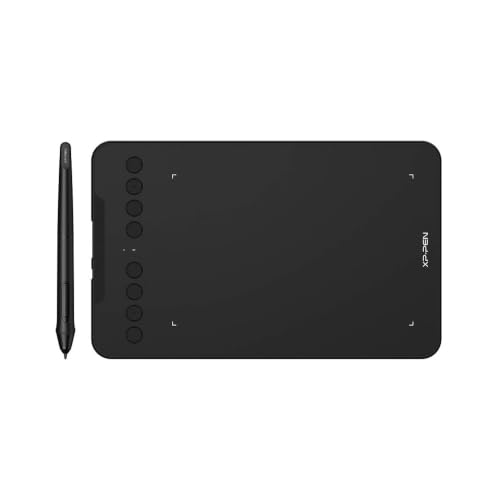
- 2.4 GHz wireless receiver
- 8,192 pressure levels
- 8 customizable press keys
Best For: Teachers and users who want a small wireless tablet
Mid-Size Bluetooth Option

- Bluetooth plus USB-A
- Medium active drawing area
- 4,096 pressure levels
Best For: Users who want more room and wireless flexibility
Wireless Pro Setup

- Bluetooth, USB receiver, and wired modes
- X3 Pro stylus with 16K pressure
- Includes shortcut remote with 10 keys
Best For: artists who want a roomy wireless tablet with shortcut control
Clean Canvas Portable

- Minimalist surface with no shortcut keys
- Bluetooth or USB-C with up to 24-hour battery
- Battery-free pen with 2 side keys
Best For: students and artists who want a simple, portable wireless tablet
Dial Control Value

- Bluetooth 5.0 plus USB-C wired support
- 16,384 pressure levels with tilt pen
- Dial and 8 shortcut keys speed up work
Best For: budget buyers who want compact controls and strong pen sensitivity
Wireless Shortcut Tablet
HUION KD200 Bluetooth Pen Tablet
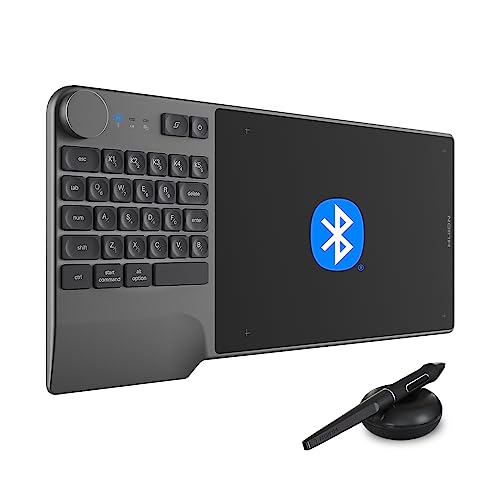
- Bluetooth 5.0 wireless connection
- Dial plus 5 customizable press keys
- Battery-free pen with 8192 levels
Best For: Artists and productivity users who want shortcut-heavy wireless control
Portable Bluetooth Tablet
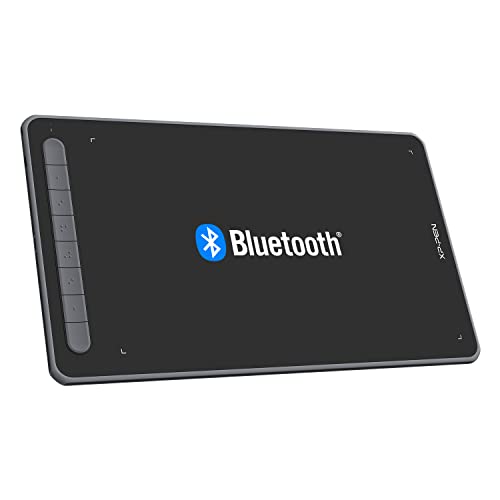
- 10 x 6 inch active area
- Bluetooth 5.0 plus wired/receiver options
- X3 stylus with 8192 levels and tilt
Best For: Creators who want a roomy wireless tablet with broad compatibility
Large Shortcut Tablet

- Large 10 x 6.25 inch working area
- 12 press keys plus 16 soft keys
- Battery-free pen with 60° tilt
Best For: Artists who want a large tablet with extensive shortcut controls
Beginner-Friendly Large Workspace – XPPen Deco 01 V3 Drawing Tablet
If you want wireless drawing tablets for pc compatibility without a steep learning curve, the XPPen Deco 01 V3 is a strong starter pick. It focuses on the basics that matter most: a large 10 x 6.25-inch work area, a battery-free stylus with 16,384 pressure levels, and easy USB-C connectivity for quick setup on Windows, Mac, Chrome OS, Linux, and Android.
Best For: Beginners, students, and teachers who want a roomy, easy-to-use drawing tablet with simple controls.
Pros:
- 16,384 pressure levels and up to 60 degrees of tilt for smoother lines and shading
- 8 customizable shortcut keys for right- and left-hand users
- Large 10 x 6.25-inch drawing area in a slim 8 mm body
- Battery-free pen and USB-C-to-USB-C support for easy setup
Cons:
- No built-in wireless connection is listed in the supplied notes
- Designed mainly for beginners rather than advanced workflows
- Best experience may depend on compatible driver/software setup
The Deco 01 V3 stands out for giving new users a comfortable amount of space and pressure sensitivity without adding complexity. If your priority is a practical, affordable-feeling tablet for art, teaching, or note-taking, it covers the essentials well.
Compact Wireless Pick – Wacom Intuos Small Bluetooth
For buyers comparing wireless drawing tablets for pc use, the Wacom Intuos Small Bluetooth is a compact option built around portability and straightforward control. It connects wirelessly via Bluetooth or by USB-A cable, and its battery-free pen uses Wacom’s EMR technology for a pen-on-paper feel across creative and everyday tasks.
Best For: Creators, students, and teachers who want a small, wireless tablet for flexible desktop or laptop use.
Pros:
- Bluetooth wireless connectivity plus USB-A wired backup
- Battery-free pen with EMR technology for natural-feeling input
- 4 ExpressKeys for shortcut access
- Software and training included with registration
Cons:
- Small size may feel restrictive for users who want a larger drawing area
- Fewer shortcut keys than some larger tablets
- Pressure level count is not listed in the supplied notes
The Intuos Small is a good fit if portability matters more than a big active surface. It keeps the experience simple and dependable, with the added convenience of Bluetooth for cable-free work at a desk, on a sofa, or in a classroom.
Wireless Value Tablet – XPPen Deco mini7W
The XPPen Deco mini7W is one of the more flexible wireless drawing tablets for pc users who want a small tablet with cable-free freedom. It uses a 2.4 GHz wireless receiver for PC or laptop connection, while also supporting USB-C-to-USB-C use with the included adapter, making it practical for home, classroom, and mobile setups.
Best For: Teachers, online tutors, and compact-workspace users who want wireless convenience in a small tablet.
Pros:
- 2.4 GHz wireless connection with included receiver for PC/laptop use
- Battery-free stylus with 8,192 pressure levels and tilt response
- 8 customizable press keys for workflow shortcuts
- Wide compatibility with Windows, Mac, Android, Chrome OS, and Linux
Cons:
- 7 x 4-inch size may feel tight for artists who prefer a larger canvas
- Wireless connection relies on the included receiver rather than Bluetooth
- Pressure level count is lower than some newer models
This model makes sense if you want a small tablet that still offers real wireless flexibility. It is especially appealing for teaching and e-learning, where quick setup and shortcut controls can matter more than size.
Mid-Size Bluetooth Option – Wacom Intuos Medium Bluetooth
If you want wireless drawing tablets for pc use with a bit more room to work, the Wacom Intuos Medium is a practical step up from smaller formats. It offers Bluetooth or USB-A connectivity, a battery-free pen, and Wacom’s EMR technology, making it a versatile choice for drawing, editing, photo work, and document markup.
Best For: Students, teachers, and creators who want a medium tablet with wireless flexibility and a larger active area.
Pros:
- Bluetooth wireless connection with USB-A cable backup
- Medium active surface area for more comfortable control
- Battery-free Wacom Pen 4K with 4,096 pressure levels
- Software and training included with registration
Cons:
- Only 4 ExpressKeys for shortcuts
- Fewer pressure levels than some competing tablets
- Not the most portable choice compared with smaller models
The Intuos Medium is a balanced option when you want more working space without moving into a large tablet category. It should appeal to users who value Wacom’s familiar feel, Bluetooth convenience, and broad software compatibility.
Wireless Pro Setup – XPPen Deco Pro LW 2nd
If you want wireless drawing tablets for pc that balance a larger work area with strong shortcut support, the XPPen Deco Pro LW 2nd is built for productive desktop workflows. It connects by Bluetooth v5.0, USB wireless receiver, or cable, and the included shortcut remote adds a fast way to manage tools while drawing, editing, or animating.
Best For: Artists and creators who want a roomy, wireless pen tablet with extra controls for animation, digital art, and video editing.
Pros:
- Bluetooth, USB wireless receiver, and wired connection options for flexible setup
- Large 11-inch class design with an A3-sized work area feel and full lamination
- X3 Pro stylus offers 16K pressure levels and 60-degree tilt support
- Wireless shortcut remote with 10 keys and up to 4 shortcut sets
Cons:
- Bluetooth wireless connection is not compatible with Android and Linux
- Best wireless support is focused on specific desktop and mobile combinations
- May be more tablet than needed for users who only want a basic sketch pad
Overall, this model stands out if you value a wide drawing surface and workflow controls more than a minimalist layout. It is especially practical for PC users who want one tablet to handle drawing, editing, and study tasks.
Clean Canvas Portable – HUION Inspiroy Frego Medium
For buyers comparing wireless drawing tablets for pc, the HUION Inspiroy Frego Medium is a clean, portable option with a minimalist design and no physical shortcut keys. It connects over Bluetooth or USB-C, and its battery is designed for long sessions after a relatively quick charge.
Best For: Students and artists who want a slim, wireless tablet with a simple layout and comfortable long-session use.
Pros:
- Bluetooth or USB-C connection for flexible desktop use
- Battery can charge in 2.5 hours and last up to 24 hours
- Battery-free stylus with 2 programmable side keys and tilt support
- Curved edges and wrist rest help reduce fatigue during longer sessions
Cons:
- No physical shortcut keys on the tablet surface
- Working area is slightly smaller than an A4 sheet
- Bluetooth compatibility is limited to newer Windows, macOS, and Android versions
This is a sensible pick if you prefer a tidy work surface and don’t need onboard buttons. Its portable shape and long battery life make it a strong everyday tablet for sketching, writing, and casual design work.
Dial Control Value – GAOMON WH851
If you need wireless drawing tablets for pc with a compact footprint and fast controls, the GAOMON WH851 is a practical 8 x 5 inch option. It supports Bluetooth 5.0 and USB-C wired use, while the centered dial and eight shortcut keys are aimed at speeding up common creative actions like zooming, scrolling, and brush changes.
Best For: Budget-minded users who want an agile tablet with a dial, shortcut keys, and strong pressure sensitivity.
Pros:
- Bluetooth 5.0 and USB-C connectivity for wireless or wired use
- 16,384 pressure levels with battery-free pen and tilt support
- Center dial plus 8 customizable shortcut keys for faster workflow
- Adjustable drawing area ratio for different screen setups
Cons:
- Smaller 8 x 5 inch active area than the other tablets here
- Battery life is strong, but the compact size may not suit all users
- Best for users who are comfortable with a more hands-on control layout
As a compact PC drawing tablet, this model focuses on efficiency rather than size. The dial-and-key setup makes it appealing for artists who want quick control over canvas movement and brush work in a smaller format.
Wireless Shortcut Tablet – HUION KD200 Bluetooth Pen Tablet
If you want wireless drawing tablets for pc that also double as a shortcut hub, the HUION Inspiroy Keydial KD200 is built for speed and desk organization. It combines Bluetooth 5.0, a battery-free pen, a dial, and a keypad-style layout, making it a practical pick for creators who switch often between drawing, editing, and teaching tasks.
Best For: Artists and productivity-focused users who want a wireless tablet with extra shortcut controls.
Pros:
- Bluetooth 5.0 wireless connection with up to 33 ft range for a cleaner workspace
- Dial plus 5 customizable press keys, alongside 23 shortcut keys for faster workflow
- Battery-free PW517 pen with 8192 pressure levels and 60° tilt support
- Lightweight, slim build with an 8.9 x 5.6 inch working area for portability
Cons:
- Smaller active area than some full-size drawing tablets
- No display, so you draw on the tablet while looking at your screen
- Best feature set is focused on shortcuts and efficiency rather than simple minimalism
The KD200 stands out if you value controls and wireless convenience over a basic pen tablet setup. It is especially appealing for PC users who want one device that can help with drawing, editing, and other shortcut-heavy work.
Portable Bluetooth Tablet – XPPen Deco LW 10×6
The XPPen Deco LW is one of the more flexible wireless drawing tablets for pc if you want a larger work area without giving up portability. It supports Bluetooth 5.0, wired use, and a wireless receiver, plus it brings a battery-free X3 stylus with 8192 pressure levels and 60° tilt for dependable everyday drawing.
Best For: Creators who want a roomy, wireless tablet with broad device compatibility.
Pros:
- 10 x 6 inch drawing area gives more room for sketching and layout work
- Wireless Bluetooth 5.0 plus wired and receiver options for connection flexibility
- X3 stylus delivers 8192 pressure levels and 60° tilt support
- Works with Windows, Mac, Linux, Chrome OS, and Android
Cons:
- No display, so it is still a pen tablet rather than a screen tablet
- Some users may prefer more built-in controls than this model emphasizes
- Wireless use depends on pairing and setup, which may take a little extra time
This model is a strong all-around option if you want a larger active area and wide OS support in a wireless form. It is a good fit for artists, students, and professionals who need a portable tablet that can move between devices easily.
Large Shortcut Tablet – HUION H1060P 10×6.25
The HUION Inspiroy H1060P is a straightforward choice in wireless drawing tablets for pc if you mainly want a large work area and lots of shortcut controls, though it connects by USB rather than Bluetooth. Its 10 x 6.25 inch surface, battery-free pen, and 12 plus 16 programmable keys make it well suited to long drawing sessions and shortcut-driven workflows.
Best For: Artists who want a large pen tablet with extensive programmable shortcuts.
Pros:
- Large 10 x 6.25 inch working area for comfortable drawing and writing
- 12 programmable press keys plus 16 programmable soft keys for customization
- Battery-free pen with 60° tilt support for uninterrupted use
- Symmetrical design works well for both right- and left-handed users
Cons:
- USB connection only, so it is not truly wireless
- Mac users need a USB adapter to connect to a computer
- No display, so it requires drawing on the tablet while viewing the monitor
If you are prioritizing workspace size and shortcut customization over wireless freedom, the H1060P is a strong value-oriented tablet. It is especially practical for beginners and experienced users who want a larger, no-fuss drawing surface for PC work.
How We Picked the Best Wireless Drawing Tablets for PC
We selected Wireless Drawing Tablets for PC based on the features that matter most in real use: stable Bluetooth connectivity, comfortable pen performance, shortcut controls, active drawing area, compatibility, and overall value. We also favored models with battery-free styluses and enough pressure sensitivity to support natural line control.
Quick Comparison
Smaller tablets are easier to carry and suit beginners or limited desk space, while medium and large tablets offer more room for arm movement and a more natural drawing feel. Some models prioritize simplicity, while others add dials, extra hotkeys, or more advanced stylus tech for faster workflows.
Key Buying Factors for Wireless Drawing Tablets for PC
Size and Active Area
A larger active area can improve comfort for illustration, photo editing, and long sessions, but compact tablets are often better for travel, tight desks, and note-taking.
Connectivity and Compatibility
Look for dependable Bluetooth pairing and confirmed support for your operating system and creative software. If you switch between devices, check whether the tablet supports both wireless and wired use.
Pen Performance
Pressure levels matter, but so does the pen’s overall feel. A battery-free stylus is usually the easiest to live with, and features like tilt support or higher-end pen tech can improve line control.
Controls and Workflow
Hotkeys, express keys, and dials can save time in drawing apps, especially for zooming, brush changes, undo, and canvas rotation. If you work quickly, these controls can matter as much as raw pen specs.
Battery Life and Portability
For Wireless Drawing Tablets for PC, battery life should be long enough for your typical sessions without frequent charging. Lightweight models are best if you plan to move between home, school, and studio use.
Who Should Buy Which Wireless Drawing Tablets for PC?
Beginners and students usually benefit from smaller, simpler tablets with a lower learning curve. Hobbyists and most artists will often be happier with a medium-size tablet that balances space and portability. Power users, frequent illustrators, and anyone who values shortcuts should look for larger active areas, more customizable controls, and a pen system that feels responsive over long sessions.
If you want the most practical setup, choose the tablet that matches your desk space, drawing style, and shortcut needs rather than chasing the highest spec sheet. The best wireless drawing tablet for PC is the one that feels comfortable enough to use every day.