The best wireless video editing keyboards put timeline controls, custom shortcuts, and everyday typing within easier reach—without adding another cable to your desk.
We selected options ranging from dedicated Premiere Pro and DaVinci Resolve boards to programmable shortcut controllers and versatile full-size wireless keyboards, so you can match your setup to the way you edit.
Best 10 Wireless Video Editing Keyboards Picks for 2026
Compact Shortcut Controller

- Up to 40 programmable shortcuts
- Dial for zoom, rotation, and brush controls
- Bluetooth, dongle, or USB connectivity
Best For: Portable one-handed creative control
Premiere Pro Specialist
Logickeyboard Titan Wireless for Mac

- Dedicated Adobe Premiere Pro shortcut layout
- Backlit, rechargeable, and Bluetooth-enabled
- Full-size Mac keyboard with USB-C
Best For: Mac-based Premiere Pro editing
Haptic Dial Controller
ULANZI D100H Wireless Editing Keyboard

- Stepless haptic-feedback control dial
- Seven customizable keys with dual modes
- Pairs with up to three Bluetooth devices
Best For: Timeline, color, and image adjustments
Resolve Shortcut Board

- Color-coded DaVinci Resolve shortcuts
- 20 interchangeable shortcut keycaps included
- Bluetooth, 2.4GHz, and USB-C modes
Best For: Customizable multi-device Resolve editing
Long-Battery Full-Size Pick

- Up to 1,200 hours of battery life
- 2.4GHz, Bluetooth 5.2, and wired modes
- Full-size layout with programmable keys
Best For: Editors needing a slim everyday keyboard with extensive battery life
Custom Macro Pick
Doohoeek Tri-Mode Programmable Keyboard
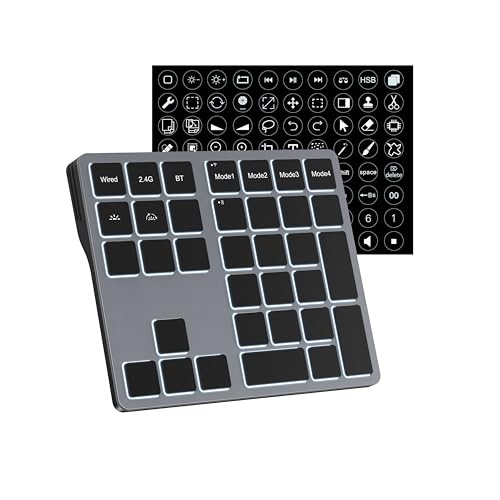
- 25 programmable keys for macros and shortcuts
- Four switchable key-mapping layers
- Bluetooth, 2.4GHz, and USB-C modes
Best For: Windows editors who need layered macros for different applications
Best Quiet RGB Pick
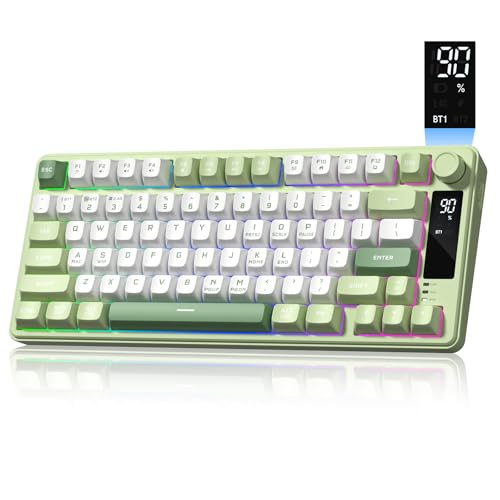
- Compact 75% layout with quiet membrane switches
- Bluetooth, 2.4GHz, and USB-C connectivity
- 4000mAh battery, RGB lighting, and rotary knob
Best For: Editors wanting quiet, compact, multi-device control
Best Programmable Full-Layout Pick
Keychron B35 Wireless Keyboard

- 98-key compact layout retains the number pad
- Programmable keys through Keychron Launcher
- Tri-mode connectivity with up to 320 hours of use
Best For: Cross-platform editors needing a number pad and custom shortcuts
Compact Shortcut Controller – XPPen ACK05 Wireless Keydial
The XPPen ACK05 is a compact option for anyone comparing wireless video editing keyboards with a focus on one-handed shortcut access. Its programmable keys and dial can help with actions such as zooming, canvas rotation, and brush-size adjustments, while Bluetooth, dongle, and USB connections suit different setups.
Best For: Creators who want a lightweight, ambidextrous shortcut controller for video, image, or creative software.
Pros:
- Offers up to 40 customizable shortcuts across four key sets.
- Includes a tactile dial and anti-ghosting support for simultaneous key presses.
- Supports Bluetooth, Bluetooth dongle, and USB connections.
- Compact 75 g design and a claimed battery life of about 300 hours.
Cons:
- Customization requires downloading the driver; iOS users need the Shortcut Remote app.
- The 10-key layout is less suitable as a full replacement for a standard keyboard.
- Charging input should not exceed 5V-2A.
The ACK05 makes the most sense as a portable companion controller rather than a complete editing keyboard. Its dial and flexible shortcut layers are useful when desk space and quick one-handed control matter most.
Premiere Pro Specialist – Logickeyboard Titan Wireless for Mac
The Logickeyboard Titan is a full-size choice among wireless video editing keyboards, built specifically around Adobe Premiere Pro on Mac. Its labeled shortcut layout, backlit keys, Bluetooth connectivity, and rechargeable battery are designed to make frequently used commands easier to identify during editing.
Best For: Mac users who primarily edit in Adobe Premiere Pro and want a dedicated, full-size shortcut layout.
Pros:
- Designed for Adobe Premiere Pro CC with visual keyboard shortcuts.
- Provides wireless Bluetooth operation and USB-C connectivity.
- Backlit keys can improve shortcut visibility in dim editing spaces.
- Includes a rechargeable battery and a two-year warranty.
Cons:
- Compatibility is focused on Mac systems and Adobe Premiere Pro.
- At 2.1 pounds, it is less portable than compact shortcut controllers.
- It is not water resistant.
This Titan model is a focused investment for Premiere Pro editors who prefer a conventional full-size keyboard with software-specific labeling. It is less versatile for mixed-platform or multi-application workflows.
Haptic Dial Controller – ULANZI D100H Wireless Editing Keyboard
The ULANZI D100H combines a stepless haptic dial with seven customizable keys, making it an appealing pick among wireless video editing keyboards for timeline, color, and image adjustments. It supports offline presets as well as software-based customization, with compatibility for applications including DaVinci Resolve, CapCut, Photoshop, and Lightroom.
Best For: Editors who prioritize tactile dial control, application presets, and a compact Bluetooth workflow.
Pros:
- Stepless aluminum dial provides haptic feedback for precise adjustments.
- Offers offline presets and online customization through Ulanzi Studio.
- Pairs with up to three devices and supports Bluetooth connections up to 33 feet.
- Can control compatible Ulanzi, Philips Hue, Nanoleaf, and Govee lighting.
Cons:
- Continuous dial operation is listed at approximately 2.5 hours per charge.
- Mac compatibility notes distinguish Intel-based and Apple silicon systems.
- Computers without built-in Bluetooth require a separate Bluetooth adapter.
The D100H is more of a focused editing controller than a conventional keyboard. Its dial and haptic feedback should appeal to users who make frequent timeline or adjustment changes and want a less screen-dependent workflow.
Resolve Shortcut Board – JCPAL Dash Wireless Keyboard
The JCPAL Dash is a compact mechanical option for shoppers seeking wireless video editing keyboards tailored to DaVinci Resolve. Its pre-mapped, color-coded keys, browser-based remapping, interchangeable shortcut keycaps, and tri-mode connectivity let editors adapt the layout without installing software on each computer.
Best For: DaVinci Resolve editors who want a customizable mechanical keyboard that works across multiple operating systems.
Pros:
- Pre-maps frequently used Resolve commands with labeled, color-coded keys.
- Includes 20 spare shortcut keycaps for rearranging the layout.
- Supports Bluetooth for three devices, 2.4GHz wireless, and USB-C wired use.
- Offers a compact low-profile design and a 3500mAh battery rated for up to 450 hours.
Cons:
- Its shortcut layout is primarily designed around DaVinci Resolve.
- Remapping uses the KeyStudio browser tool, so setup still requires web access.
- Some macOS compatibility details vary between Intel and Apple silicon Macs.
Dash is a strong fit for editors who want dedicated Resolve controls without sacrificing a standard 84-key mechanical format. The replaceable keycaps and stored onboard layout are especially useful for moving between editing machines.
Precision Dial Pick – ULANZI D100H
The ULANZI D100H is a focused option among wireless video editing keyboards, pairing a tactile aluminum control dial with customizable shortcut buttons. Its motor vibration feedback and support for popular editing software make it useful for precise timeline, color, and image adjustments on compatible computers.
Best For: Video editors and photographers who want a compact dial-based controller for Windows or Mac.
Pros:
- Aluminum knob with anti-slip texture and motor vibration feedback for precise adjustments.
- Supports CapCut, DaVinci Resolve, Final Cut Pro, Photoshop, and Lightroom Classic.
- Seven customizable buttons plus a multifunction knob support shortcut-based workflows.
- Bluetooth 5.1 supports switching among up to three devices.
Cons:
- Compatible only with Windows 10+ and macOS 12+; it does not support iPad or iPhone use.
- USB-C is for charging only, not wired or dual-mode connection.
- Rated continuous use after a full charge is about 2.5 hours.
The D100H is more of a specialized editing controller than a conventional full keyboard. Choose it when tactile dial control and one-handed shortcuts matter more than a complete typing layout.
Long-Battery Full-Size Pick – Keychron B6 Pro
The Keychron B6 Pro is a practical full-size choice among wireless video editing keyboards, combining a numeric keypad, low-profile scissor mechanism, and programmable keys. Its multiple connection modes and very long battery rating suit editors who also need a conventional keyboard for everyday work.
Best For: Editors who want a complete, slim keyboard with long battery life and flexible device connectivity.
Pros:
- Full-size 109-key layout includes a numeric keypad and multimedia functions.
- Supports 2.4GHz wireless, Bluetooth 5.2, and USB-C wired connections.
- Battery life is rated for up to 1,200 hours, or approximately eight months at five hours daily.
- Keychron Launcher and ZMK support key remapping and macro creation.
Cons:
- Remapping through the web app requires connecting by cable.
- Its full-size footprint is less compact than a dedicated editing keypad.
- The enclosure is ABS plastic rather than metal.
The B6 Pro is a strong all-purpose option if editing shortcuts are only part of your workflow. It prioritizes typing comfort, battery endurance, and broad connectivity over a dedicated editing dial or control surface.
Custom Macro Pick – Doohoeek Tri-Mode Programmable Keyboard
The Doohoeek Tri-Mode Programmable Keyboard is a versatile Windows-focused option among wireless video editing keyboards. Its 25 custom keys, four switchable layouts, and tri-mode connectivity let editors assign software shortcuts while keeping separate configurations for different tasks.
Best For: Windows video editors and office users who rely on many macros and task-specific shortcut layers.
Pros:
- Provides 25 programmable keys for macros, shortcuts, or text strings.
- Four key-mapping layers can be switched for different applications and workflows.
- Supports Bluetooth 5.0, 2.4GHz wireless, and USB-C wired connections.
- RGB backlighting improves visibility in dim conditions.
Cons:
- It is only compatible with Windows devices.
- Key customization must be performed in wired mode.
- The product is an 84-key keyboard, so it may offer less conventional full-size coverage.
The Doohoeek makes the most sense for shortcut-heavy Windows workflows. Its layered macro system offers more customization than a standard keyboard, though users on macOS or those wanting dial-based editing controls should look elsewhere.
Best Quiet RGB Pick – Womier DK75 Wireless Keyboard
The Womier DK75 is a practical choice for shoppers comparing wireless video editing keyboards who want a compact layout, quiet typing, and flexible connectivity. Its 75% design saves desk space while Bluetooth, 2.4GHz wireless, and USB-C wired modes support computers, tablets, and laptops.
Best For: Editors who want a compact, quiet keyboard with RGB lighting and multi-device support.
Pros:
- Tri-mode connectivity works with Bluetooth 5.0, 2.4GHz wireless, or USB-C wired mode.
- Quiet membrane switches, ergonomic tilt, and PBT keycaps support comfortable daily use.
- Built-in display, rotary knob, shortcut keys, and 15 RGB effects add convenient controls.
- 4000mAh rechargeable battery is designed for extended use between charges.
Cons:
- The 75% layout omits the dedicated full-size keyboard footprint and may require adjustment.
- It uses membrane switches rather than mechanical switches.
- It is not water resistant.
Choose the DK75 if workspace efficiency and quiet operation matter more than a full-size layout. The knob, screen, lighting controls, and three connection options make it a versatile editing and general-use keyboard.
Best for Mac Workflows – Logitech K980 Solar+ Keyboard
The Logitech Signature Slim Solar+ K980 is a full-size option for wireless video editing keyboards, especially for Mac users who prefer laptop-style keys and uninterrupted power. Its solar charging system works under solar or artificial light, while Bluetooth supports switching among Mac, iPad, and iPhone devices.
Best For: Mac-based editors who want a full-size, low-maintenance keyboard for long work sessions.
Pros:
- Light-powered design provides continuous operation under solar or artificial light.
- Full-size 108-key layout includes familiar laptop-style typing and media keys.
- Can switch between Mac, iPad, and iPhone with a tap.
- Logi Options+ enables Smart Actions and customizable keys.
Cons:
- It is designed specifically for Mac and requires macOS 13 Ventura or later.
- The full-size layout takes more desk space than compact alternatives.
- It uses membrane switches and offers single-color rather than RGB backlighting.
The K980 stands out for editors who value a familiar full-size layout and minimal charging maintenance. Its Mac-focused shortcuts and device switching are useful in an Apple-centered editing setup, though Windows-focused buyers should look elsewhere.
Best Programmable Full-Layout Pick – Keychron B35 Wireless Keyboard
The Keychron B35 is a strong productivity-focused choice among wireless video editing keyboards. Its compact 96% layout retains a number pad, while 2.4GHz, Bluetooth 5.2, and USB-C connections make it suitable for Mac, Windows, and Linux editing workstations.
Best For: Editors who need a number pad, programmable keys, quiet typing, and cross-platform flexibility.
Pros:
- Compact 98-key layout keeps a number pad while saving space.
- Supports 2.4GHz wireless, Bluetooth for up to three devices, and wired USB-C use.
- Every key can be remapped with macros and shortcuts through the Keychron Launcher web app.
- Quiet scissor switches, two-stage kickstand, and up to 320 hours of use support extended sessions.
Cons:
- Its low-profile membrane design may not suit users seeking mechanical key switches.
- Programming requires a compatible web browser such as Chrome, Opera, or Edge.
- The 96% layout is compact but still larger than a 75% keyboard.
The B35 is a practical middle ground for editors who want number-pad access without committing to a traditional full-size footprint. Its browser-based programming and broad operating-system support make it especially adaptable for mixed-device workflows.
How We Picked the Best Wireless Video Editing Keyboards
We focused on the features that have the greatest effect on editing speed and comfort: wireless connection options, shortcut programmability, software or platform compatibility, dial and knob controls, key layout, backlighting, battery convenience, and build quality. Dedicated editing keyboards can provide labeled controls for specific applications, while programmable models are often more flexible for mixed workflows. We also included conventional wireless keyboards for editors who want familiar typing, a number pad, or a cleaner multi-purpose desk setup.
Because product names and configurations can vary by seller, confirm the included accessories, operating-system support, layout, and connection method before purchasing.
Quick Comparison
- Best for dedicated Premiere Pro control: Logickeyboard Titan Wireless Backlit Keyboard.
- Best for DaVinci Resolve users: JCPAL Dash DaVinci Resolve Keyboard.
- Best for compact dial control: XPPen Mini Keydial ACK05.
- Best for a dedicated editing dial: ULANZI D100H.
- Best for broad customization: Doohoeek Tri-Mode Programmable Keyboard.
- Best for general typing and editing: Keychron B6 Pro or Keychron B35.
- Best for a slim Mac-oriented setup: Logitech Signature Slim Solar+ K980.
- Best for mechanical-keyboard enthusiasts: Womier DK75.
Key Buying Factors for Wireless Video Editing Keyboards
Shortcut Layout and Programmability
Look for clearly labeled editing commands if you primarily use Premiere Pro or DaVinci Resolve. If you switch between applications, programmable keys and custom layers are more valuable than fixed labels. Check whether configuration software supports your operating system and whether profiles can be saved to the keyboard.
Dial, Knob, and Transport Controls
A rotary dial can make timeline scrubbing, zooming, audio adjustment, and parameter changes more precise than keyboard shortcuts alone. Confirm what the dial controls by default and how easily its functions can be remapped. Dedicated transport keys are useful when reviewing footage repeatedly.
Wireless Reliability and Battery Life
Bluetooth is convenient for laptops and tablets, while 2.4GHz wireless can offer a more responsive desktop connection when a receiver is included. Tri-mode keyboards provide the most flexibility. For long editing sessions, check charging requirements, battery claims, and whether the keyboard can be used while connected by cable.
Size, Ergonomics, and Compatibility
Full-size layouts preserve the number pad and familiar spacing but take more desk space. Compact boards leave room for a mouse or control surface. Verify Mac and Windows compatibility, key legends, language layout, and whether the keyboard’s shortcut labels match your preferred platform.
Who Should Buy Which Wireless Video Editing Keyboards?
Choose a dedicated Logickeyboard or JCPAL model if your workflow centers on one supported editing application and you want labeled controls immediately. Pick the XPPen or ULANZI if hands-on dial control matters more than a traditional full-size layout. The Doohoeek is a practical choice for editors who want many customizable keys and multiple connection modes.
For a keyboard that also handles email, documents, and general production work, consider the Keychron B6 Pro, Keychron B35, or Logitech K980. Choose the Womier DK75 if you prefer the feel and customization potential of a compact mechanical keyboard, while remembering that its gaming-oriented design may require more setup for editing shortcuts.