As an engineer, you know the importance of having a reliable workstation that can handle demanding tasks with ease. In 2025, the landscape of workstation PCs is set to evolve, offering advanced processors and impressive specifications tailored for your needs. Whether you’re designing complex models or running simulations, the right PC can make a significant difference. Let’s explore the top contenders that promise to elevate your work experience and boost your productivity.
Dell 3030 Tower Desktop PC (14th Gen Intel Core i5-14400)

The Dell 3030 Tower Desktop PC, powered by the 14th Gen Intel Core i5-14400, is an ideal choice for engineers who demand both performance and reliability in their workstations. With 10 cores and 16 threads, it guarantees you tackle resource-intensive tasks effortlessly. The 32GB DDR5 RAM and 1TB PCIe SSD provide ample speed and storage for your projects. You’ll appreciate the Intel UHD Graphics 730 for smooth visuals. Connectivity options are plentiful, including USB 3.2 ports and HDMI. Weighing just 5.32 kg, it’s compact yet powerful, making it perfect for any engineering workspace. Experience productivity like never before!
Best For: Engineers and professionals seeking a powerful and reliable workstation for resource-intensive tasks.
Pros:
- High Performance: Equipped with a 14th Gen Intel Core i5-14400 with 10 cores and 16 threads for efficient multitasking.
- Ample Memory and Storage: Comes with 32GB DDR5 RAM and a 1TB PCIe SSD, ensuring fast data access and plenty of storage for projects.
- Versatile Connectivity: Features multiple USB ports and HDMI for easy connection to various devices and peripherals.
Cons:
- No Optical Drive: Lacks an optical drive, which may be inconvenient for users needing to read/write CDs or DVDs.
- Integrated Graphics: The Intel UHD Graphics 730 may not be sufficient for high-end gaming or graphic design tasks.
- Limited Upgrade Options: The compact design may restrict options for hardware upgrades in the future.
HP Envy Desktop PC (TE01-5002)

Engineers looking for a powerful and efficient workstation will find the HP Envy Desktop PC (TE01-5002) to be an excellent choice. Featuring an Intel Core i7-14700 processor, 32 GB of RAM, and a 1 TB SSD, it delivers impressive performance for rendering and multitasking. The 4K screen resolution guarantees sharp visuals, while the Intel UHD Graphics 770 enhances your editing and streaming experience. With Windows 11 Pro, you’ll enjoy seamless connectivity and a user-friendly interface. Although some users note limited customization options, its compact design and solid build make it a reliable option for your engineering needs.
Best For: Engineers and creative professionals seeking a high-performance workstation for rendering, editing, and multitasking tasks.
Pros:
- Powerful Intel Core i7-14700 processor and 32 GB of RAM provide exceptional performance for demanding applications.
- Compact design and solid build quality make it a reliable choice for limited workspace environments.
- 4K screen resolution and Intel UHD Graphics 770 enhance visual clarity for editing and streaming.
Cons:
- Limited customization options may restrict upgrades and personalization for advanced users.
- Some users have reported issues with the transition to Windows 11 and HP’s customer support.
- Average rating of 4.5 out of 5 indicates mixed feedback, suggesting potential concerns for some buyers.
Dell Desktop Computer Tower PC with 14th Gen Intel Core i5-14400

If you’re looking for a workstation that seamlessly balances performance and versatility, the Dell Desktop Computer Tower PC with the 14th Gen Intel Core i5-14400 is an excellent choice. With its powerful 10-core processor, it delivers impressive speeds of up to 4.7GHz, ensuring smooth multitasking for your engineering projects. The 32GB DDR5 RAM and 1TB PCIe SSD provide ample memory and fast storage. Enjoy stunning visuals with integrated Intel UHD Graphics 730, supporting multiple displays. Plus, with Wi-Fi 6 connectivity and various USB ports, you’ll stay connected and productive in any setting. This workstation is designed to meet your engineering needs.
Best For: Professionals, students, and home users seeking a powerful and reliable workstation for multitasking and productivity.
Pros:
- High-performance 14th Gen Intel Core i5-14400 processor with impressive speeds for seamless multitasking.
- Ample 32GB DDR5 RAM and 1TB PCIe SSD provide fast storage and efficient memory for demanding applications.
- Multiple connectivity options including Wi-Fi 6 and various USB ports ensure easy connectivity to devices and networks.
Cons:
- Limited integrated graphics may not be suitable for high-end gaming or graphic-intensive applications.
- No optical drive included, which may be a drawback for users needing to read/write CDs/DVDs.
- Weight may be on the heavier side for users looking for a portable desktop solution.
Dell Optiplex Desktop Plus Computer with Intel Core i9-12900K

With its powerful Intel Core i9-12900K processor and robust 64GB DDR4 RAM, the Dell Optiplex Desktop Plus Computer is an exceptional choice for professionals demanding high performance and multitasking capabilities. You’ll appreciate the impressive 2TB NVMe PCIe SSD, ensuring quick access to your files and applications. The Nvidia Quadro P1000 graphics card supports up to six monitors, perfect for complex projects. With a range of connectivity options, including USB 3.2 Gen 2 and Bluetooth 5.3, staying connected is seamless. Running on Windows 11 Pro, this black tower delivers the reliability and advanced features every engineer needs.
Best For: Professionals and engineers who require high-performance computing for multitasking and complex projects.
Pros:
- High-performance hardware with Intel Core i9-12900K and 64GB DDR4 RAM for demanding applications.
- Ample storage with a 2TB NVMe PCIe SSD for quick access to files and applications.
- Versatile connectivity options including support for up to six monitors and USB 3.2 Gen 2 ports.
Cons:
- No DVD drive included, which may be a drawback for users needing optical media.
- Limited upgrade options in a mini-tower form factor compared to larger desktops.
- Potentially overkill for casual users or those with less demanding computing needs.
Lenovo ThinkStation P360 Workstation Desktop

The Lenovo ThinkStation P360 Workstation Desktop stands out as an exceptional choice for professionals demanding powerful performance and reliability. With a robust 12-Core Intel i7-12700 processor, it delivers impressive speed, reaching up to 4.9 GHz. You’ll appreciate the 64GB DDR5 memory and a spacious 2TB PCIe NVMe SSD for all your storage needs. Connectivity is seamless with Wi-Fi 6E, Bluetooth 5.1, and multiple ports, including HDMI and USB 3.2 Type-C. Weighing 21.3 lbs and featuring efficient air cooling, this desktop is designed to handle your toughest engineering tasks, backed by a 1-year warranty and glowing customer reviews.
Best For: Professionals in need of a high-performance workstation for demanding tasks such as engineering, graphic design, or data analysis.
Pros:
- Powerful Performance: Equipped with a 12-Core Intel i7-12700 processor for exceptional speed and multitasking capabilities.
- Ample Storage: Features a 2TB PCIe NVMe SSD, providing plenty of space for large files and applications.
- Excellent Connectivity: Offers Wi-Fi 6E and multiple ports for seamless connectivity with various devices.
Cons:
- No Webcam: Lacks a built-in webcam, which may require additional purchases for remote communication.
- No Optical Drive: Does not include an optical drive, limiting access to physical media.
- Weight: At 21.3 lbs, it may be less portable compared to lighter desktops or laptops.
Dell OptiPlex 7020 Plus Business Desktop Computer
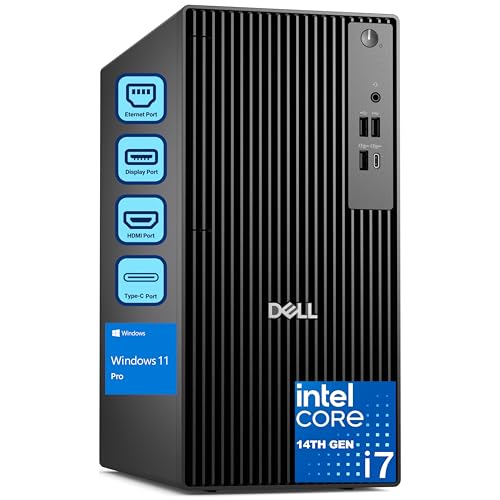
Engineers looking for a reliable workstation will find the Dell OptiPlex 7020 Plus an excellent choice, thanks to its powerful 14th Gen Intel Core i7 processor with 20 cores. With 64GB of DDR5 RAM, you can tackle multitasking with ease. The 2TB PCIe SSD guarantees quick boot times and rapid data transfers, while integrated Intel UHD 770 graphics deliver clear images through three DisplayPort outputs. Connectivity options are plenty, featuring multiple USB ports and a wireless USB WiFi adapter. Running on Windows 11 Professional, it enhances security and performance for any work, school, or home task you face.
Best For: Professionals and engineers seeking a powerful workstation for multitasking and demanding applications.
Pros:
- High Performance: Equipped with a 14th Gen Intel Core i7 processor and 64GB of DDR5 RAM for efficient multitasking.
- Ample Storage: 2TB PCIe SSD ensures quick boot times and fast data transfers.
- Versatile Connectivity: Multiple USB ports and integrated Intel UHD 770 graphics with three DisplayPort outputs enhance connectivity options.
Cons:
- No Built-in Wi-Fi: Requires a wireless USB WiFi adapter for internet connectivity.
- Lack of HDMI Port: Limited video output options for certain displays.
- No Pre-installed Wi-Fi: Users need to set up the wireless adapter separately upon first use.
Dell Optiplex 5060 Desktop Computer (Renewed)

For professionals seeking a reliable workstation, the Dell Optiplex 5060 Desktop Computer (Renewed) stands out with its powerful Hexa-Core Intel i7 processor and 32GB of DDR4 RAM. You’ll appreciate the 1TB SSD, offering speedy performance for multitasking and running demanding applications. Designed for content creators, it supports 4K resolution with Intel HD 630 graphics. With Windows 11 Professional and robust connectivity options—including five USB 3.0 ports and Bluetooth—you’ve got everything you need. Plus, enjoy peace of mind with a performance guarantee and award-winning customer support. This renewed model combines quality and sustainability, ensuring you get great value.
Best For: Professionals, content creators, and multitaskers seeking a reliable and high-performance workstation.
Pros:
- High-speed performance with a Hexa-Core Intel i7 processor and 32GB of RAM.
- 1TB SSD provides ample storage and quick access to applications and files.
- Multiple connectivity options, including USB 3.0 ports and Bluetooth, enhance versatility.
Cons:
- Integrated Intel HD 630 graphics may not meet the needs of heavy-duty gaming or advanced graphic design.
- As a renewed product, there may be slight cosmetic imperfections.
- Weight of 11.73 pounds could be less portable for users needing a lightweight option.
PCSP Precision 7920 Tower Workstation (Renewed)
Designed specifically for demanding tasks like artificial intelligence and 4K editing, the PCSP Precision 7920 Tower Workstation (Renewed) stands out as an excellent choice for professionals tackling complex projects. With dual Intel Xeon Gold 6148 processors and 192GB DDR4 memory, it delivers impressive performance. Enjoy ample storage with a 1TB SSD and 4TB HDD, expandable up to 136TB. The Quadro P4000 graphics card guarantees stunning visuals across multiple displays. Plus, with a tested and certified renewed status, you benefit from a minimum 90-day warranty, making it a reliable option for engineers seeking power and efficiency.
Best For: Professionals in fields such as artificial intelligence, virtual reality, and 4K editing who require high-performance computing capabilities.
Pros:
- Powerful Performance: Equipped with dual Intel Xeon processors and 192GB DDR4 memory for handling complex tasks efficiently.
- Ample Storage Options: Features a 1TB SSD and 4TB HDD, with the ability to expand storage up to 136TB for large project files.
- High-Quality Graphics: The Quadro P4000 graphics card supports multiple displays and delivers stunning visuals for graphic-intensive applications.
Cons:
- Potential Dust Accumulation: Some users have reported concerns about internal dust buildup, which may require regular maintenance.
- Power Cord Fit Issues: There have been mentions of fit issues with the power cord, which could be inconvenient for setup.
- Weight Not Specified: The lack of specified weight may be a concern for those considering transportability.
Lenovo ThinkStation P3 Tiny Workstation with Intel Core i7-14700

The Lenovo ThinkStation P3 Tiny Workstation, powered by the Intel Core i7-14700, stands out as an ideal choice for professionals in fields like architecture and engineering who demand exceptional performance and versatility. With 32GB RAM, a 1TB SSD, and NVIDIA T1000 graphics, it handles demanding tasks effortlessly. Its compact design allows for easy placement on shelves or desks, supporting up to six independent displays. Enhanced by Intel vPro technology, it offers multilayer security and remote management. With over 200 quality checks, this workstation guarantees durability and reliability in various environments, making it perfect for your demanding workload.
Best For: Professionals in architecture, engineering, finance, healthcare, and education who require high performance and versatility in their workstations.
Pros:
- Compact design allows for flexible placement and supports up to six independent displays.
- Intel vPro technology enhances security with multilayer protection and remote management capabilities.
- Durability ensured by over 200 quality checks, making it reliable in various environmental conditions.
Cons:
- The compact size may limit expandability for some users needing additional hardware upgrades.
- Price point may be higher compared to standard workstations without advanced features.
- Limited graphics capabilities for extremely graphics-intensive applications compared to higher-end workstations.
HP Pavilion Tower Desktop Computer (Intel i7-10700F, 32GB RAM, 1TB SSD)
Engineers seeking a powerful yet versatile workstation will find the HP Pavilion Tower Desktop Computer an excellent choice. With its Intel Core i7-10700F processor, you’ll experience impressive performance, boasting 8 cores and a turbo boost of up to 4.8 GHz. The 32GB DDR4 RAM and 1TB PCIe NVMe SSD guarantee you have ample speed and storage for demanding applications. You’ll also enjoy crisp visuals with the GeForce GT 610 graphics. Connectivity is a breeze with Wi-Fi 6, multiple USB ports, and HDMI. Weighing just 13.14 lbs, this compact tower fits perfectly into your workspace without sacrificing power.
Best For: Engineers and professionals seeking a powerful and versatile workstation for demanding applications and graphics-heavy tasks.
Pros:
- High performance with Intel Core i7-10700F processor and 32GB RAM for efficient multitasking.
- Ample storage provided by the 1TB PCIe NVMe SSD, ensuring quick access to files and applications.
- Enhanced connectivity options, including Wi-Fi 6 and multiple USB ports, accommodating various peripherals.
Cons:
- Limited graphics capabilities with the GeForce GT 610, which may not meet the needs of high-end gaming or professional graphics work.
- Weight of 13.14 lbs may be less portable compared to smaller desktop or laptop alternatives.
- No optical drive included, which may be a drawback for users needing to access CDs or DVDs.
Factors to Consider When Choosing Workstation PCs for Engineers
When choosing a workstation PC as an engineer, you need to reflect on several key factors. Processing power, memory, and graphics capabilities play an essential role in handling demanding tasks. Don’t forget to take into account connectivity options and form factor to guarantee your setup fits your workflow.
Processing Power Requirements
Choosing the right processing power for your workstation PC is vital for tackling demanding engineering tasks effectively. You’ll want a multi-core processor with at least 8 cores and a base clock speed of 3.0 GHz. Turbo boost capabilities should reach 4.5 GHz or higher to handle peak workloads seamlessly. For tasks like 3D modeling and rendering, aim for processors that support 16 threads or more; this guarantees smoother multitasking and faster processing. While integrated graphics work for basic tasks, dedicated graphics cards with a minimum of 4GB VRAM are essential for graphics-intensive applications. Finally, consider RAM carefully; a minimum of 32GB DDR4 or DDR5 will provide the bandwidth and capacity needed for large datasets and multiple applications.
Memory and Storage Needs
Memory and storage play an essential role in the performance of workstation PCs for engineering applications. You’ll want at least 32GB of RAM to effectively multitask and run resource-intensive software like CAD and simulations. For more demanding projects, consider workstations with 64GB or more to handle heavy computations and data processing without lag.
When it comes to storage, opt for SSDs with capacities of 1TB or greater for fast boot times and quick access to large files. PCIe NVMe SSDs are preferable over traditional hard drives due to their superior read and write speeds, enhancing system responsiveness. Finally, choose workstations with expandable memory options to accommodate future upgrades as your project demands grow.
Graphics Capabilities Importance
Since engineers regularly deal with complex models and simulations, having robust graphics capabilities is essential for their workstation PCs. High-performance graphics guarantee accurate visualizations, especially in fields like architecture and mechanical design. Workstations equipped with dedicated graphics cards, like NVIDIA Quadro or AMD Radeon Pro, support advanced rendering techniques and allow for multiple displays, boosting productivity. Choosing the right graphics card can drastically impact rendering speeds, reducing 3D visualization times from hours to minutes. While integrated graphics might suffice for basic tasks, they often struggle with demanding applications, hampering efficiency. By leveraging GPU acceleration in software like CAD and simulation tools, engineers can enjoy improved performance and responsiveness, ultimately enhancing their workflow and reducing project turnaround times.
Connectivity Options Available
A workstation PC’s connectivity options can greatly impact your productivity as an engineer. When choosing a workstation, look for multiple USB ports, especially USB 3.2 and USB Type-C, to guarantee compatibility with various peripherals and fast data transfer speeds. HDMI and DisplayPort outputs are vital for connecting high-resolution monitors, enabling you to utilize multiple displays for enhanced productivity. Wireless connectivity options like Wi-Fi 6 and Bluetooth offer flexibility, allowing you to connect devices without cluttering your workspace. Additionally, verify the workstation has Ethernet ports for reliable wired connections, essential for data-intensive applications. Finally, consider integrated graphics that support multiple monitor outputs, facilitating expansive visual setups for your design and simulation tasks.
Form Factor Considerations
When selecting a workstation PC, the form factor plays an essential role in determining its suitability for your engineering needs. A tower workstation typically offers superior cooling and more upgrade options, making it ideal for demanding tasks like 3D modeling and simulations. If desk space is limited, you might consider a mini or tiny workstation; however, keep in mind that these compact designs can sacrifice performance and upgradeability. Additionally, think about the workstation’s weight and dimensions, especially if you need to transport it between locations. Finally, verify the form factor provides enough ports for your peripherals and displays, as these connections are vital for enhancing your productivity in various engineering projects.