When it comes to audio editing, choosing the right XLR monitors can make all the difference. You need monitors that not only deliver accurate sound but also fit your workspace and budget. With options like the Yamaha HS3 and PreSonus Eris E7 XT, you’ll find a range of features tailored to your needs. But what should you really consider before making a decision? Let’s explore the top contenders and what sets them apart.
Yamaha HS3 Powered Studio Monitor in Black, Pair (HS3 B)

If you’re an aspiring audio engineer or a passionate music producer, the Yamaha HS3 Powered Studio Monitor is an excellent choice for your editing setup. This pair of 2-way bass-reflex speakers delivers a precise sound with its 3.5″ cone woofer and 0.75″ dome tweeter, covering a frequency response from 70 Hz to 22 kHz. With an output power of 26 W, you’ll get clear audio for mixing and mastering. Its room control and high trim response controls allow for tailored sound adjustments. Plus, the included accessories like speaker cables and anti-slip pads make setup a breeze, enhancing your workflow.
Best For: The Yamaha HS3 Powered Studio Monitor is best for aspiring audio engineers and passionate music producers seeking a reliable and precise sound for their editing setups.
Pros:
- High-quality sound reproduction with a frequency response of 70 Hz to 22 kHz.
- Tailored sound adjustments with room control and high trim response controls.
- Comes with essential accessories like speaker cables and anti-slip pads for easy setup.
Cons:
- Limited low-end response due to the smaller 3.5″ woofer size.
- May not provide sufficient power for larger studio spaces or environments.
- Lacks built-in Bluetooth or wireless connectivity options.
PreSonus Eris E7 XT Active Studio Monitor

The PreSonus Eris E7 XT Active Studio Monitor stands out with its innovative 100˚(H) x 60˚(V) EBM waveguide, making it an excellent choice for music producers and audio engineers who demand a wide sweet spot and precise imaging in their sound. With a 6.55-inch woven composite low-frequency transducer, you’ll enjoy deep lows, while the 1.25-inch silk-dome high-frequency transducer delivers smooth highs. The acoustic tuning controls allow you to tailor the monitor to your specific space for peak performance. Plus, it comes with valuable software like Studio One Prime and the Studio Magic plug-in suite, enhancing your music production experience.
Best For: The PreSonus Eris E7 XT Active Studio Monitor is best for music producers, audio engineers, and home studio enthusiasts looking for high-quality sound reproduction and precise imaging.
Pros:
- Excellent sound quality with deep lows and smooth highs.
- Wide sweet spot and solid imaging thanks to the innovative EBM waveguide.
- Comes with over $1000 USD worth of music production software included.
Cons:
- May require acoustic treatment in certain spaces for optimal performance.
- Larger size may not be suitable for small home studio setups.
- Active monitors may need a power source and proper placement for best results.
Edifier MR5 2.0 Studio Monitor Bookshelf Speakers

For audio professionals seeking studio-grade sound in a compact design, the Edifier MR5 2.0 Studio Monitor Bookshelf Speakers stand out as an excellent choice. With a 3-way active crossover system, these speakers deliver accurate audio reproduction across a wide frequency range of 46Hz to 40kHz. The 110W RMS Class D amplifier guarantees powerful performance, perfect for near-field use. You can easily tailor sound using physical knobs or the EDIFIER ConneX App. Plus, with multiple connectivity options including Bluetooth 6.0 and XLR inputs, you’ll seamlessly integrate these monitors into your setup, enhancing your audio editing experience.
Best For: Audio professionals and enthusiasts seeking high-quality, compact studio monitor speakers for precise sound reproduction and versatile connectivity options.
Pros:
- Studio-grade sound with a wide frequency response (46Hz–40kHz) for accurate audio reproduction.
- Multiple connectivity options including Bluetooth 6.0, XLR, TRS, RCA, and AUX for seamless integration with various devices.
- Customizable sound settings through physical knobs and the EDIFIER ConneX App for tailored listening experiences.
Cons:
- Limited bass response may not satisfy those looking for heavy bass in larger rooms.
- The compact design may not provide the same audio depth as larger studio monitors.
- Requires careful placement and acoustic treatment for optimal sound performance.
PreSonus Eris E5 2-Way 5.25″ Near Field Studio Monitor

Looking for a reliable studio monitor that balances sound quality and versatility? The PreSonus Eris E5 is your go-to choice. Featuring a 5.25-inch woven composite woofer and a 1-inch silk-dome tweeter, it delivers solid low-end sound with minimal distortion and balanced highs. With 80 watts of Class AB bi-amplification, you’ll enjoy ample volume for nearfield monitoring. Its versatile connectivity options include balanced XLR, 1/4-inch, and unbalanced RCA inputs. Plus, acoustic tuning controls allow you to optimize your mixing environment. The front-firing acoustic port enhances bass reproduction, making the Eris E5 a fantastic addition to your audio editing setup.
Best For: The PreSonus Eris E5 is best for audio professionals and enthusiasts seeking high-quality sound in a versatile and compact studio monitor.
Pros:
- Excellent sound quality with solid low-end and balanced highs, thanks to the woven composite woofer and silk-dome tweeter.
- Versatile connectivity options with balanced XLR, 1/4-inch, and unbalanced RCA inputs, accommodating various setups.
- Acoustic tuning controls and front-firing acoustic port enhance customization and bass reproduction for optimal mixing environments.
Cons:
- The 5.25-inch woofer may not provide sufficient low-end for larger spaces or bass-heavy music genres.
- Some users may find the maximum SPL of 102 dB limiting for larger studio settings.
- The monitor’s size may not be ideal for those looking for a more portable option for on-the-go mixing.
PreSonus Eris 3.5 Studio Monitors (Powered Active Monitor Speakers)

Designed for aspiring producers and audio enthusiasts alike, PreSonus Eris 3.5 Studio Monitors deliver studio-quality sound in a compact form. With woven-composite woofers and 50 Watts of Class AB dual amplification, you’ll experience tight bass and clear audio at impressive volumes. The 1-inch silk-dome tweeters provide excellent stereo imaging, ensuring you hear your mix from any angle. Connectivity options include ¼-inch TRS and RCA inputs, plus a front-panel ⅛-inch aux input for your mobile devices. You can easily customize your sound with high- and low-frequency controls, making these monitors perfect for any space.
Best For: Aspiring producers and audio enthusiasts looking for compact studio monitors that deliver accurate sound quality for music production and multimedia applications.
Pros:
- Excellent sound clarity and stereo imaging due to woven-composite woofers and silk-dome tweeters.
- Versatile connectivity options including TRS, RCA, and aux inputs for various audio devices.
- Customizable audio output with high- and low-frequency tuning controls to suit different room sizes and placements.
Cons:
- Limited low-frequency response without a subwoofer, which may not satisfy all bass-heavy genres.
- Smaller size may not provide sufficient volume or sound pressure for larger studio spaces.
- Lacks advanced features like digital connectivity options (e.g., Bluetooth) built into the monitors themselves.
Edifier MR5 2.0 Studio Monitor Bookshelf Speakers

The Edifier MR5 2.0 Studio Monitor Bookshelf Speakers are an excellent choice for audio professionals seeking accurate sound reproduction. With a 3-way active crossover system featuring a 5-inch woofer, 3.75-inch mid driver, and a silk dome tweeter, these speakers deliver a frequency response from 46Hz to 40kHz. They support Hi-Res Audio for a premium listening experience. You’ll appreciate the room acoustic tuning options and versatile connectivity, including Bluetooth 6.0 and multiple input types. Plus, the 110W Class D amplifier guarantees powerful output, while the MDF cabinets minimize distortion, making them perfect for near-field studio use or mid-sized rooms.
Best For: Audio professionals and enthusiasts seeking accurate sound reproduction in studio or mid-sized room settings.
Pros:
- High-quality sound: Equipped with a 3-way active crossover system and Hi-Res Audio support for exceptional audio fidelity.
- Versatile connectivity: Features Bluetooth 6.0 and multiple input options (XLR, TRS, RCA, AUX) for easy integration with various devices.
- Room acoustic tuning: Offers physical knobs and app-based EQ customization for tailored sound experience in any environment.
Cons:
- Size: May be too large for very small spaces or casual listeners looking for compact speakers.
- Price point: Higher-end compared to basic speakers, which may not fit every budget.
- Setup complexity: Some users may find the array of features and knobs overwhelming without prior experience.
Kali Audio in-5 Powered 3-Way Studio Monitor (160W Speaker System)
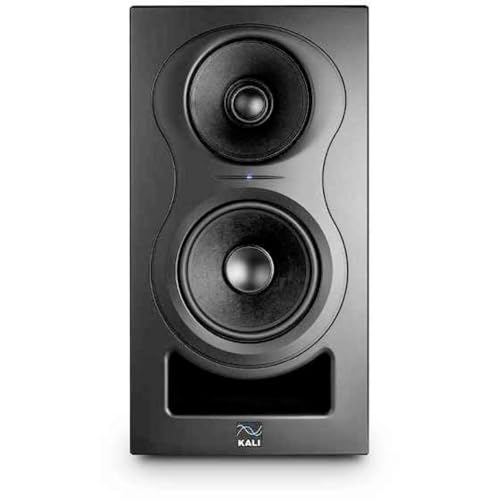
For audio professionals seeking a powerful yet precise monitoring solution, the Kali Audio in-5 Powered 3-Way Studio Monitor stands out with its 160W speaker system. You’ll appreciate the unrivaled punch and detail it offers, along with its hyper-realistic imaging thanks to the coaxial architecture of the midrange and tweeter. With customization features like DIP switches for EQ tuning and room adjustments, you can tailor the sound to your space. Plus, its versatile connectivity options—XLR, TRS, and RCA—make it ideal for mixing, recording, and audio production, ensuring you get the accuracy you need for your projects.
Best For: Audio professionals and enthusiasts looking for a precise and customizable monitoring solution for mixing, recording, and audio production.
Pros:
- Unrivaled punch and detail for an immersive listening experience.
- Hyper-realistic imaging due to the coaxial architecture, enhancing accuracy for mixing.
- Customizable EQ settings and room tuning capabilities for tailored sound.
Cons:
- May be overkill for casual listeners or home use without professional needs.
- The price point may be a consideration for budget-conscious buyers.
- Requires adequate space and setup to fully utilize its capabilities.
JBL Professional 30SPMkII 5-Inch Active Monitor Speaker

Looking for a powerful solution for your near-field monitoring needs? The JBL Professional 30SPMkII 5-inch active monitor speaker delivers exceptional sound quality for music production and studio monitoring. With next-generation transducers, it offers superior transient response and deep bass with minimal distortion. The Boundary EQ technology guarantees accurate sound reproduction, even when positioned near walls or on surfaces. You’ll appreciate its broad sweet spot, allowing for consistent frequency response while mixing, even off-axis. Sold individually, it includes a power cord, a quick setup guide, and rubber pads for stability. Elevate your audio experience with this sleek, modern monitor.
Best For: Music producers, audio engineers, and Hi-Fi audio enthusiasts seeking a reliable and high-quality near-field monitor speaker.
Pros:
- Exceptional sound quality with next-generation transducers for superior transient response and deep bass.
- Boundary EQ technology ensures accurate sound reproduction in various environments.
- Broad sweet spot allows for neutral frequency response, facilitating precise mixing even off-axis.
Cons:
- Sold individually, requiring a second purchase for stereo setups.
- Limited low-frequency extension due to the 5-inch driver size.
- May require additional adjustments for optimal performance depending on room acoustics.
Yamaha HS3 Powered Studio Monitor in White, Pair (HS3 W)

When precision matters in audio editing, the Yamaha HS3 Powered Studio Monitor in White (HS3 W) stands out as an ideal choice for aspiring producers and seasoned sound engineers alike. With a 2-way bass-reflex design, these monitors feature a 3.5-inch woofer and a 0.75-inch tweeter, delivering a frequency response from 70 Hz to 22 kHz. Each speaker boasts 26 W output power, providing clear, accurate sound. The room control and high trim response controls let you fine-tune the audio to fit your space perfectly. Sold as a pair, the HS3 W guarantees you get the professional quality needed for studio monitoring.
Best For: Aspiring producers and seasoned sound engineers seeking precise audio monitoring in their studio setups.
Pros:
- Excellent frequency response range from 70 Hz to 22 kHz for detailed sound reproduction.
- Compact design with a 3.5-inch woofer and 0.75-inch tweeter, ideal for smaller studio spaces.
- Room control and high trim response controls for customizable audio settings.
Cons:
- Limited low-end response due to the smaller woofer size, which may not satisfy bass-heavy applications.
- Output power of 26 W per speaker may not be sufficient for larger studio environments.
- The white finish may be prone to visible marks and scratches over time.
JBL Professional LSR310S – Studio Monitor Subwoofer, 10-Inch, Black
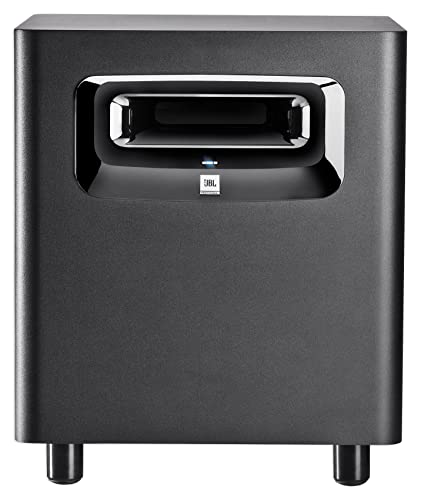
The JBL Professional LSR310S Studio Monitor Subwoofer stands out for its exceptional low-frequency performance, making it an excellent choice for audio professionals focused on producing deep, rich bass in their tracks. Its custom-designed driver delivers an impressive low-frequency response down to 20 Hz, while the double-flared port shape enhances low-frequency extension. With a peak output of 113 dB, it can handle extended periods at full power without failure. The XLF setting simulates club bass tuning, making it perfect for dance tracks. Plus, its versatile connectivity options guarantee compatibility with various studio systems, enhancing your audio experience.
Best For: Audio professionals and music producers seeking high-quality low-frequency performance in studio and live sound applications.
Pros:
- Exceptional low-frequency response down to 20 Hz, delivering deep and powerful bass.
- High peak output of 113 dB, capable of sustaining full power without failure.
- Versatile connectivity options, including balanced XLR and 1/4 inputs, ensuring compatibility with various audio systems.
Cons:
- Size may be cumbersome for smaller studio spaces or setups.
- Limited to low-frequency performance, requiring additional monitors for full-range sound.
- XLF setting may not suit all genres, potentially limiting versatility for certain audio applications.
Factors to Consider When Choosing XLR Monitors for Audio Editing
When choosing XLR monitors for audio editing, you’ll want to focus on several key factors. Audio quality performance and frequency response range play an essential role in how accurately you hear your mixes. Additionally, consider connectivity options, room acoustic adaptability, and power output specifications to guarantee you get the best setup for your needs.
Audio Quality Performance
Choosing the right XLR monitors for audio editing hinges on their audio quality performance. You’ll want monitors with a wide frequency response range, ideally from 70 Hz to 22 kHz, to guarantee you capture both low and high frequencies accurately. Consider 2-way or 3-way configurations for better sound separation, which helps you distinguish between low, mid, and high frequencies while mixing. Acoustic tuning controls like LF Trim and HF Trim let you customize the sound to your environment, enhancing accuracy. Look for monitors with at least 80 watts of output power for ample volume and clarity. Finally, prioritize balanced XLR inputs to minimize noise interference and maintain a clean audio signal during your editing process.
Frequency Response Range
Audio quality performance is closely linked to the frequency response range of your XLR monitors. This range, measured in Hertz (Hz), indicates the spectrum of sound your monitors can reproduce. A standard range of 20 Hz to 20 kHz covers the full spectrum of human hearing, making it suitable for audio editing. Monitors with a narrower range, like 70 Hz to 22 kHz, may suffice for casual listening but can lack the depth needed for mixing and mastering. It’s crucial to choose monitors with a flat frequency response to guarantee accurate audio reproduction without coloration. Additionally, consider models with customizable acoustic tuning features to adjust the frequency response according to your specific acoustic environment for peak performance.
Connectivity Options Available
Understanding the connectivity options available for XLR monitors is essential, as they directly impact how you’ll integrate them into your studio setup. XLR connectors are standard in professional audio equipment because they provide balanced signal transmission, minimizing noise and interference, especially over long distances. Many studio monitors come with multiple input options, such as XLR, TRS, and RCA, giving you versatility with different audio sources. Plus, some monitors feature stereo mini inputs for connecting mobile devices or computers, broadening your options. When choosing monitors, consider the number of inputs available, as this affects how you connect various studio gear and instruments. Using balanced XLR cables is vital for enhancing audio quality during editing and mixing.
Room Acoustic Adaptability
When setting up your studio, room acoustic adaptability plays a significant role in how well your XLR monitors perform. Sound waves can reflect off walls, impacting audio quality, so choosing monitors with room control features is essential. Look for models that offer acoustic tuning controls, allowing you to adjust high and low frequencies to counteract room anomalies. Some monitors even include DIP switches or knobs for precise tuning based on your room’s size and shape. By customizing the monitor settings to fit your space, you can achieve a flatter frequency response, reducing unwanted coloration and enhancing mixing accuracy. This adaptability leads to clearer, more accurate audio editing results, ultimately improving your overall workflow.
Power Output Specifications
Power output specifications are essential in ensuring your XLR monitors deliver the sound quality and volume you need for effective audio editing. Typically measured in watts, power output directly influences both volume capabilities and overall sound quality. Monitors with higher wattage, like 80 watts or more, provide better headroom, allowing for louder sound levels without distortion. Focus on the continuous power rating (RMS) instead of peak power, as RMS gives a clearer picture of a monitor’s sustained performance. Match the power output to your room size; larger spaces need higher wattage to maintain clarity. Finally, consider the amplifier type—Class D often delivers higher power output in a compact design, enhancing both efficiency and sound quality.
Build Quality and Design
The build quality and design of XLR monitors play an essential role in your audio editing experience. Materials like MDF are vital because they reduce distortion and resonance, enhancing sound accuracy. A robust cabinet structure minimizes vibrations, ensuring sound clarity even at high volumes. You’ll also want to take into account aesthetics; sleek, modern designs can elevate your studio setup’s overall look. User-friendly front-panel controls, such as volume knobs and EQ settings, allow you to make quick adjustments without interrupting your workflow. Additionally, effective thermal management prevents overheating during long sessions, ensuring consistent performance and longevity. Prioritizing these aspects will greatly improve your audio editing capabilities and enhance your creative environment.
Size and Placement Flexibility
Choosing the right size and placement for your XLR monitors can greatly enhance your audio editing experience. Larger woofers generally deliver deeper bass, but they need more space for ideal placement. If you’re working in a compact area, smaller monitors might be more suitable. Regardless of size, positioning is vital; place your monitors at ear level and away from walls to minimize unwanted reflections and achieve accurate sound reproduction. Look for monitors with adjustable acoustic controls to tailor the sound to your room’s layout. Remember, the monitor’s design, including cabinet shape and materials, also impacts placement options and sound quality. Choose a model that aligns with both your physical space and acoustic requirements for the best results.
Price and Value Assessment
Evaluating the price and value of XLR monitors is essential for ensuring you invest wisely in your audio editing setup. Start by balancing performance specifications like frequency response and output power with your budget. Additional features such as acoustic tuning controls and connectivity options can greatly enhance value beyond just sound quality. Don’t overlook included accessories, like cables and software, which can reduce overall setup costs. Compare power ratings in watts to gauge the volume and headroom suitable for your needs. Finally, research the warranty and customer support from manufacturers; a solid warranty can protect your investment and provide peace of mind over time. Prioritize these factors to make an informed choice that meets your audio editing demands.