The NSYCA G11 gaming mouse review is about a clear tradeoff: it packs a lot of competitive-gaming features into a lightweight, wireless shell.
If you want a flexible mouse for FPS play, daily productivity, and mixed-device use, it is easy to see why this model gets attention.
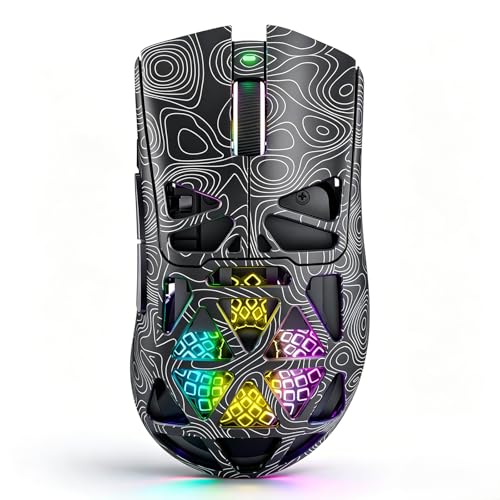
G11 Mouse Review Summary
The G11 mouse makes the most sense for buyers who want a feature-rich wireless mouse without moving into a bulky shape or a complicated setup.
Its strongest appeal is the combination of a PAW3311 sensor, tri-mode connectivity, programmable controls, and a lightweight honeycomb design that is meant to reduce hand fatigue during longer sessions.
Verdict: this is a practical pick for players who value speed, customization, and versatility more than premium build materials or minimalist styling. It should suit FPS-focused users, MMO or MOBA players who want mapped buttons, and general desktop users who want one mouse that can move between gaming, work, and travel.
Review Scorecard
| Category | Score | Rationale |
|---|---|---|
| Sensor and tracking | 8/10 | PAW3311 sensor with up to 22,000 DPI gives it credible gaming-grade positioning on paper. |
| Connectivity | 9/10 | Bluetooth 5.1, 2.4GHz wireless, and USB-C wired mode make it unusually flexible. |
| Button customization | 8/10 | Driver-based macros, button assignments, and six programmable buttons expand its usefulness. |
| FPS responsiveness | 8/10 | The fast trigger button and up to 1000Hz polling rate are aimed at quick input. |
| Comfort and portability | 7/10 | Lightweight honeycomb construction helps reduce fatigue, but comfort depends on hand preference. |
| Everyday versatility | 9/10 | It is positioned for gaming, office work, study, and Mac or PC use. |
| Long-term practicality | 7/10 | USB-C charging and play-while-charging support are useful, but software dependence may matter. |
Key Features and Specifications of G11 Mouse
The listing centers on performance and flexibility.
The G11 mouse uses a PAW3311 optical sensor with adjustable DPI up to 22,000, which is the most important hardware detail for buyers who care about precise cursor control and fast aiming.
It also supports three connection modes: Bluetooth 5.1, 2.4GHz wireless, and USB-C wired.
That matters because the mouse can move between a desktop gaming setup, a laptop bag, and a work desk without forcing you into one connection style.
Other important listed features include:
- Up to 1000Hz polling rate for responsive input
- Dedicated driver software for macros, button assignments, DPI levels, polling rates, and RGB effects
- Fast Trigger Button intended for rapid clicking in FPS games
- Lightweight honeycomb shell designed to reduce hand fatigue and help airflow
- Six programmable buttons, including three side buttons
- Built-in 500mAh rechargeable battery
- USB-C charging with play-while-charging support
- Compatibility with Windows, macOS, desktop PCs, laptops, and Mac devices
- 1-year warranty and lifetime technical support
Taken together, those features show a mouse built for input flexibility rather than premium ornamentation.
The design language is clearly performance-first.
Pros and Cons of G11 Mouse
Pros
- Very flexible connectivity across Bluetooth, 2.4GHz, and wired USB-C
- Good feature density for the class, especially with macros and programmable buttons
- Lightweight shell should appeal to players who dislike heavier mice
- USB-C charging is convenient and modern
- Cross-platform support makes it useful for mixed PC and Mac households
Cons
- Honeycomb shells are not for everyone and can feel less substantial than closed-shell designs
- Driver software dependence may be a drawback for users who want plug-and-play simplicity only
- Too many features for very casual users who just want a basic office mouse
- No exact weight is listed, so buyers cannot judge the lightweight claim numerically from the evidence provided
The balance here is straightforward: the G11 mouse offers a lot of capability, but the buyer needs to actually want programmable gaming features.
If not, much of its value gets wasted.
Who Should Buy G11 Mouse?
This mouse is a good fit for gamers who want a light wireless mouse with customization.
FPS players should pay attention to the fast trigger button and the high polling-rate support, while MMO and MOBA players will likely value the programmable buttons and macro support more.
It also makes sense for people who want one mouse for several roles.
The listing explicitly positions it for gaming, office work, study, and everyday use, so it is a reasonable choice if your desk setup changes between workdays and play sessions.
You should probably skip it if you want a simple office mouse, a very heavy premium-feeling shell, or a device that needs almost no software tuning. Buyers who dislike honeycomb designs or who prefer a quieter feature set may be better served elsewhere.
G11 Mouse for Competitive Play
Sensor and Aiming Control
The PAW3311 sensor and 22,000 DPI ceiling are the key reasons competitive players would look at this model.
That does not guarantee elite performance by itself, but it does give the G11 mouse credible specs for precise aim and quick movement.
Trigger Button and Polling Rate
The fast trigger button is clearly aimed at FPS users who want quicker clicking behavior.
Combined with the listed 1000Hz polling rate, the mouse is marketed toward players who care about fast response and smoother input timing.
Macros and Side Buttons
The G11 mouse includes six programmable buttons and driver-based macro support, which gives it real utility beyond shooters.
That makes it more appealing for MOBA skills, MMO rotations, productivity shortcuts, and common desktop workflows.
Portability and Daily Use
The rechargeable battery, USB-C charging, and tri-mode connectivity make the mouse easy to move around.
If you switch between laptops, gaming PCs, and travel setups, that is one of the more practical parts of the design.
Alternatives to G11 Mouse
If you like the general idea but want a different shape or brand, a few Amazon search alternatives are worth comparing:
These are credible alternatives because they come from established gaming peripheral lines and cover similar use cases: wireless play, desktop work, and mainstream gaming performance.
The main difference is that each one prioritizes a slightly different feel, shape, or ecosystem, so the best option depends on whether you value portability, ergonomics, or brand familiarity.
Is G11 Mouse Worth It?
Yes, if you want a lightweight wireless gaming mouse with strong feature coverage and tri-mode flexibility. The G11 mouse is worth considering for FPS players, macro users, and anyone who wants one device for both gaming and everyday use.
It is less compelling if you do not care about customization or if you prefer a simpler, more traditional mouse shape.
For the right buyer, though, the combination of sensor, connectivity, programmable controls, and USB-C convenience makes it a sensible buy.