When it comes to enhancing your workspace, choosing the right docking station can make all the difference. In 2026, Anker offers a range of options tailored to fit various setups, whether you’re at home or on the go. From powerful multi-display capabilities to versatile port selections, these docking stations promise to elevate your productivity. Let’s explore the top choices that could transform your work experience and what factors you should consider before making a decision.
Anker Prime Docking Station (DL7400) – 14-Port Triple Display
The Anker Prime Docking Station (DL7400) is perfect for professionals and creatives who need to boost their productivity with a robust 14-port setup. With support for triple external monitors, including one in stunning 8K, multitasking becomes ultra-efficient. You’ll enjoy 140W max power through the USB-C upstream port, ensuring your laptop stays charged while you work. The variety of ports—including HDMI, USB-A, and a 2.5Gbps Ethernet port—offers flexibility for all your devices. Plus, with ActiveShield 3.0 for cooling and stability, you can trust it’ll perform reliably during your busiest days.
Best For: Professionals and creatives who require extensive connectivity and support for multiple displays to enhance productivity.
Pros:
- Supports triple external monitors, including one in 8K, enabling efficient multitasking.
- Offers a wide variety of ports, ensuring compatibility with numerous devices and peripherals.
- Features ActiveShield 3.0 for improved cooling and stability during heavy use.
Cons:
- Requires the latest DisplayLink driver for optimal performance.
- DRM-protected streaming may result in a black screen unless hardware acceleration is disabled in browser settings.
- Front USB-C ports do not support media display, limiting their functionality for certain devices.
Anker 13-in-1 USB-C Laptop Docking Station

Need a versatile docking station that can elevate your workspace? The Anker 13-in-1 USB-C Laptop Docking Station is your solution. With 13 ports, including dual HDMI, DisplayPort, and USB-C, you can easily connect multiple devices. It supports triple display setups at 1080p@60Hz, perfect for multitasking. Plus, you’ll enjoy fast data transfer speeds of up to 10 Gbps. The 85W charging power guarantees your laptop stays powered during heavy use. Compatible with various brands like Dell and HP, this docking station balances functionality and design, making it an essential accessory for any modern workspace.
Best For: Professionals and multitaskers who need to connect multiple devices and displays for an efficient workspace.
Pros:
- Versatile Connectivity: Offers 13 ports, including dual HDMI and DisplayPort, allowing for extensive device connections.
- Triple Display Support: Enables up to three monitors at 1080p@60Hz, ideal for multitasking and media streaming.
- Fast Data Transfer: Supports high-speed data transfer with 10 Gbps USB-C and 5 Gbps USB-A ports.
Cons:
- macOS/iPadOS Limitations: Only supports Single-Stream Transport, resulting in identical content on external monitors.
- Weight: At 13.12 ounces, it may be less portable compared to lighter docking options.
- Color Options: Limited to a single color (Gray), which may not suit all aesthetic preferences.
Anker Prime TB5 Docking Station (14-in-1 Thunderbolt 5 Dock)

Looking for a versatile docking station that elevates your workspace? The Anker Prime TB5 Docking Station is your go-to solution with 14-in-1 connectivity options. It features Thunderbolt 5 ports for lightning-fast 120Gbps transfer, letting you move a 150GB file in just 25 seconds. Enjoy dual 8K displays at 60Hz without overheating, thanks to its active cooling system. With 140W max charging and multiple USB ports, it efficiently powers your devices. Compact and portable, this docking station is perfect for any setup. Backed by a 24-month warranty, it’s a reliable choice for your tech needs.
Best For: Professionals and tech enthusiasts who require high-performance connectivity and charging solutions for multiple devices.
Pros:
- Versatile connectivity with 14 ports, including Thunderbolt 5 and USB options for various devices.
- Impressive performance with 120Gbps transfer speeds and support for dual 8K displays at 60Hz.
- Active cooling system prevents overheating, ensuring stable operation during heavy use.
Cons:
- Higher price point compared to simpler docking stations may not suit budget-conscious users.
- Limited compatibility with non-Thunderbolt devices may restrict usage for some users.
- Weight and size may make it less portable for those needing a lightweight solution.
Anker Nano Laptop Docking Station with Detachable Hub

For those who require a versatile and robust solution for their workspace, the Anker Nano Laptop Docking Station with Detachable Hub stands out with its 13-in-1 functionality. You can easily set up a triple-screen workstation, enhancing your productivity. With ports for USB-C, HDMI, DisplayPort, Ethernet, and more, connecting your devices is a breeze. Plus, it supports up to 4K resolution for stunning visuals. The detachable 6-in-1 hub makes mobile access seamless. Enjoy fast data transfers at 10 Gbps, and keep your laptop powered with up to 100W. With a customer rating of 4.2 stars, it’s a reliable choice.
Best For: Professionals and students who need a versatile docking station for enhanced productivity and multiple device connections.
Pros:
- Versatile 13-in-1 functionality allows for a wide range of connectivity options for various devices.
- Triple-screen support enhances multitasking and productivity with multiple displays.
- Fast data transfer speeds of up to 10 Gbps ensure quick file transfers and efficient workflow.
Cons:
- Limited compatibility may not support all laptop brands or models perfectly.
- 4K resolution support is only available on certain operating systems, limiting functionality for some users.
- Size may be a bit bulky for those looking for a more compact solution, especially for mobile use.
Anker Laptop Docking Station Dual Monitor (8-in-1 USB C Hub)

If you’re a professional needing to enhance your workspace with dual monitors, the Anker Laptop Docking Station Dual Monitor (8-in-1 USB C Hub) is a standout choice. This hub supports 4K dual monitor setups with two HDMI ports, allowing you to mirror or stream content effortlessly. With an 85W Power Delivery feature, you can charge your laptop while using it. The docking station also includes USB-A ports, an Ethernet port, and an SD/microSD card reader, making it incredibly versatile. Compatible with various systems, it’s designed to simplify your connectivity while maximizing your productivity.
Best For: Professionals seeking to enhance their workspace with dual monitor capabilities and versatile connectivity options.
Pros:
- Supports 4K dual monitor setups with two HDMI ports for high-quality displays.
- Includes multiple connectivity options such as USB-A ports, Ethernet, and card readers for added functionality.
- Offers 85W Power Delivery for laptop charging while in use, reducing cable clutter.
Cons:
- Requires a 100W PD wall charger for optimal performance, which is not included.
- macOS users may experience identical displays on external monitors, limiting multi-display functionality.
- Not compatible with Linux systems, which may restrict use for some users.
Anker Prime Docking Station, 14-Port with Dual 4K Displays

The Anker Prime Docking Station is an ideal choice for professionals seeking a robust and versatile connectivity solution. With 14 ports and a 160W max output, it supports USB-C, USB4, and Thunderbolt connections, making it perfect for Windows 10/11 and ChromeOS users. Enjoy dual 4K displays via the HDMI ports, ensuring clear visuals for your projects. Charge up to four devices simultaneously, thanks to three USB-C ports offering 100W each. The included USB-C cable and responsive customer service further enhance your experience. Elevate your workspace with this all-in-one docking station that combines power and performance seamlessly.
Best For: Professionals and power users who require extensive connectivity options and dual 4K display capabilities for their devices.
Pros:
- Supports a wide range of connections including USB-C, USB4, and Thunderbolt, enhancing versatility.
- Capable of charging multiple devices simultaneously with a powerful 160W output.
- Offers dual HDMI ports for dual 4K displays, providing exceptional visual clarity.
Cons:
- Not compatible with Linux systems, limiting its usability for some users.
- External monitors display identical images on macOS, reducing flexibility for multi-monitor setups.
- Does not support 5120*1440 monitors, which may be a drawback for users with specific display needs.
Anker Laptop Docking Station 14 in 1 USB C Hub

Looking to expand your workspace versatility? The Anker Laptop Docking Station 14 in 1 USB C Hub is your go-to solution. With dual 4K HDMI ports and a 1080p VGA port, you can easily set up a triple display environment. You’ll enjoy speedy data transfers with USB-A and USB-C ports supporting 5 Gbps. Plus, the 80W power delivery guarantees your devices stay charged. Weighing just 134 grams, this sleek grey hub offers 14 connectivity options, including Ethernet and SD card slots. Compatible with various devices, it’s perfect for MacBook, Windows, and ChromeOS users seeking a seamless experience.
Best For: Users looking to enhance their workspace with multiple display options and robust connectivity for MacBook, Windows, or ChromeOS devices.
Pros:
- Supports triple display with dual 4K HDMI and 1080p VGA ports for expanded screen real estate.
- Fast data transfer speeds of up to 5 Gbps through USB-A and USB-C ports.
- Compact and lightweight design at just 134 grams, making it easy to transport.
Cons:
- Wall charger not included, which may require an additional purchase for full power delivery.
- Not compatible with Linux, limiting use for some users.
- May not support some USB-C devices that do not meet required specifications.
Anker 675 USB-C Docking Station (12-in-1, Monitor Stand)

Designed specifically for Lenovo ThinkPad and MacBook Pro M1/M2 users, the Anker 675 USB-C Docking Station (12-in-1, Monitor Stand) stands out with its impressive 10Gbps USB-C ports and 4K@60Hz HDMI display capability. With a 100W USB-C upstream port, three USB-A ports, and SD/microSD slots, it offers extensive connectivity. The elevated design enhances your workspace, allowing better posture and organization for your keyboard and mouse. Plus, the wireless charging pad keeps your smartphone powered up. Enjoy peace of mind with an 18-month warranty, ensuring you get the most out of this versatile docking station.
Best For: Users of Lenovo ThinkPad and MacBook Pro M1/M2 looking for a versatile docking solution that enhances workspace organization and connectivity.
Pros:
- Supports multiple high-speed connections with 10Gbps USB-C ports and a 4K@60Hz HDMI display.
- Elevates monitor height to promote better posture and workspace organization.
- Includes a wireless charging pad for convenient smartphone charging.
Cons:
- HDMI port is the only display output; USB-C ports do not support display.
- Limited power sharing of 45W across two USB-C Power Delivery ports.
- May not be compatible with devices other than Lenovo ThinkPad and MacBook Pro M1/M2.
Anker USB C Hub, 11-in-1 Docking Station

If you’re a professional or a student needing to enhance your workspace, the Anker USB C Hub, 11-in-1 Docking Station is a game changer. It transforms a single USB-C port into 11 essential connections, including dual monitor support with 4K HDMI and DisplayPort. You can enjoy lightning-fast data transfer at 10 Gbps through multiple USB ports while charging your devices with 85W power delivery. Compatible with MacBook, Windows, and ChromeOS, it’s perfect for multitasking. Plus, with an 18-month warranty and solid customer support, you’ll have peace of mind. Upgrade your setup and streamline your productivity with this versatile hub.
Best For: Professionals and students seeking to enhance their workspace with versatile connectivity options and dual monitor support.
Pros:
- Transforms one USB-C port into 11 essential connections, allowing for extensive device connectivity.
- Supports dual monitor setups with high-resolution output, enhancing productivity for multitasking.
- Fast data transfer rates of up to 10 Gbps through multiple USB ports while also providing power delivery.
Cons:
- Requires a separate charger for power delivery, which is not included with the hub.
- Not compatible with Linux operating systems, limiting its usability for some users.
- macOS mirrors displays on external monitors, potentially restricting display configurations for Mac users.
Anker 10-in-1 USB C Docking Station
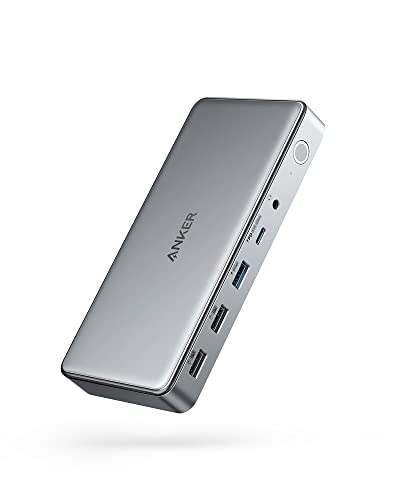
The Anker 10-in-1 USB C Docking Station is perfect for professionals who need robust connectivity on the go. With DisplayLink technology, it seamlessly expands a single USB-C port into multiple options, including two HDMI ports, a DisplayPort, and various USB ports. You’ll enjoy triple display support, achieving stunning visuals up to 4K@30Hz. Plus, it delivers up to 100W charging for laptops, including the latest MacBooks, while also charging your phone simultaneously. File transfers are speedy at 5 Gbps. Compact and efficient, this docking station is backed by an 18-month warranty, ensuring reliability for your daily tech needs.
Best For: Professionals and tech enthusiasts who require versatile connectivity and high-performance charging on the go.
Pros:
- Multiple Ports: Expands a single USB-C port into two HDMI, a DisplayPort, and various USB ports for extensive connectivity.
- Triple Display Support: Capable of supporting multiple displays with high-resolution output up to 4K@30Hz.
- Fast Charging: Provides up to 100W charging for laptops and 30W for phones, allowing simultaneous device charging.
Cons:
- Limited Compatibility: Primarily designed for Windows laptops and MacBook models, which may not suit all users.
- Size: Slightly larger than some portable docking stations, which may affect portability.
- DisplayLink Dependency: Requires DisplayLink drivers for full functionality, which may complicate setup for some users.
Factors to Consider When Choosing Anker Docking Stations
When choosing an Anker docking station, you’ll want to contemplate several key factors. Think about compatibility with your devices, the number of ports you need, and the display capabilities that suit your setup. Don’t forget to check the power delivery capacity and data transfer speed to guarantee peak performance.
Compatibility With Devices
Considering compatibility with your devices is essential when choosing an Anker docking station, as it can greatly impact your overall experience. Anker docking stations work with various operating systems, including macOS 13.5+, Windows 10/11, and ChromeOS, making them versatile for different setups. Many models support USB-C, USB4, and Thunderbolt connections, enhancing compatibility with laptops and peripherals. However, if you’re using macOS, be aware that some models may only support Single-Stream Transport (SST), leading to identical displays on multiple monitors. Additionally, to access advanced display features, installing the latest DisplayLink drivers is often necessary. Keep in mind that Linux compatibility is generally lacking, so if you’re a Linux user, you might face limitations.
Number of Ports
Choosing the right Anker docking station often hinges on the number of ports it offers, since this directly affects your ability to connect multiple devices. Look for options that provide between 8 to 14 ports, ensuring you have enough connectivity for all your peripherals. Pay attention to the types of ports available, like USB-C, USB-A, HDMI, and Ethernet, to guarantee compatibility. Some models boast specialized ports for high-speed data transfer and power delivery, which can greatly boost your productivity. Additionally, consider whether the docking station supports multiple displays, as this can enhance your workspace efficiency. Features like SD/microSD card slots and audio jacks can also add valuable utility to your setup.
Display Capabilities
The number of ports is just one aspect to evaluate; display capabilities are equally important in selecting the right Anker docking station. First, consider how many external displays you need. Some docking stations support dual or even triple monitors, while others only manage a single display. Next, check the maximum resolution; options range from 4K to stunning 8K on certain models. Also, look at the types of connections available, like HDMI, DisplayPort, or VGA, to guarantee compatibility with your monitors. Additionally, features like Single-Stream Transport (SST) and Multi-Stream Transport (MST) can enhance multitasking. Finally, remember that macOS environments may restrict some docking stations to mirrored displays rather than extending your desktop.
Power Delivery Capacity
Power delivery capacity plays an essential role when you’re selecting an Anker docking station. It determines the maximum wattage supplied to charge your devices, with options ranging from 85W to 140W. Higher ratings mean faster charging for your laptop and peripherals, keeping them powered while you work. Some models offer multiple USB-C ports with varying power delivery capabilities, enabling efficient charging for both your laptop and additional devices at the same time. Always check the power delivery specifications to confirm compatibility with your specific laptop’s requirements, as insufficient power can lead to performance issues. Look for docking stations that support the latest Power Delivery standards, like PD 3.1, to maximize charging efficiency and maintain peak performance.
Data Transfer Speed
When selecting an Anker docking station, understanding data transfer speeds is essential for maximizing efficiency. Data transfer rates can range from 480 Mbps to 10 Gbps, depending on the port type and configuration. USB-C ports typically deliver faster speeds, reaching up to 10 Gbps, while USB-A ports might offer 5 Gbps or 480 Mbps. Choosing the right USB version matters too; USB 3.2 Gen 2 provides higher speeds than older versions. To achieve peak performance, verify you use compatible cables and devices that support these maximum rates. Additionally, some Anker docking stations come with multiple data ports, enabling you to connect several devices simultaneously without sacrificing transfer speeds, enhancing your productivity considerably.
Design and Size
Selecting the right Anker docking station goes beyond just data transfer speeds; design and size also play a significant role in your overall experience. Consider dimensions and weight—compact, lightweight designs enhance portability for those who travel or work remotely. Evaluate features like built-in cable management or monitor elevation to keep your workspace organized and ergonomic. Look for docking stations with a detachable hub for flexible setups that suit both mobile and stationary use. Additionally, assess the aesthetic appeal and color options to guarantee it complements your workspace and personal style. Finally, check for design elements like LED indicators that show power status, enhancing functionality while maintaining a sleek appearance.
Cooling Mechanism
While many factors play a role in choosing the right Anker docking station, an effective cooling mechanism is essential for maintaining performance. When you’re tackling high-performance tasks, overheating can hinder your work. Look for models with built-in fans or advanced thermal management systems that help maintain ideal operating temperatures. If you plan to connect multiple external displays or require high data transfer rates, robust cooling solutions become even more critical due to increased thermal output. A well-designed cooling system not only enhances stability and performance but also prolongs the lifespan of your docking station by minimizing heat stress on its components. So, prioritize docking stations that incorporate these advanced cooling technologies for reliable performance during extended usage.
Warranty and Support
Understanding the warranty and support options for Anker docking stations can considerably enhance your buying decision. Most of these docking stations come with an 18 to 24-month warranty, covering defects and performance issues, giving you peace of mind. You’ll also benefit from customer service support, ensuring help is just a call or click away when you need it. Additionally, Anker typically offers a return policy, like Amazon’s 30-Day Return Guarantee, so you can return items if you’re not satisfied. Many products include a safety sheet with a QR code, granting easy access to user manuals and resources. With ratings around 4.2 to 4.3 out of 5 stars, you can trust that most users have had a positive experience.