If you’re looking to boost your workspace efficiency, exploring the best Kensington docking stations of 2026 could be a game-changer. These advanced solutions cater to a range of needs, from multiple display setups to extensive connectivity options. Each model offers unique features that can transform how you work. Curious about which docking stations made the list and how they can elevate your setup? Let’s take a closer look.
Kensington 11-in-1 USB-C Docking Station

The Kensington 11-in-1 USB-C Docking Station is the ideal choice for professionals who need to maximize their productivity with multiple external displays. You can connect up to three monitors—one 4K at 30Hz and two 1080p at 60Hz—using DisplayLink technology. It’s compatible with USB-C Alt Mode laptops, including MacBook models and Windows machines. With 100W power delivery, you can charge your laptop and accessories simultaneously. The docking station features 3 HDMI ports, 6 USB-A ports, and a Gigabit Ethernet port, ensuring you’ve got all the connectivity options covered. Plus, it’s backed by a 3-year warranty for added peace of mind.
Best For: Professionals needing to enhance productivity with multiple external displays and reliable connectivity options.
Pros:
- Supports up to three external monitors, including one 4K display, enhancing multitasking capabilities.
- Provides 100W power delivery to charge laptops and accessories simultaneously.
- Features a versatile connectivity range with 3 HDMI ports, 6 USB-A ports, and a Gigabit Ethernet port.
Cons:
- The Kensington DockWorks software is only available for Windows users, limiting performance optimization for macOS and Chrome OS users.
- The zero-footprint mounting option requires an additional purchase of a mounting bracket.
- Security cable locks are sold separately, which may add to the overall cost of the setup.
Kensington SD5700T Thunderbolt 4 Docking Station

For professionals using Thunderbolt 4 laptops, the Kensington SD5700T Thunderbolt 4 Docking Station stands out as an essential tool. It seamlessly connects to Thunderbolt 4 Windows laptops and Thunderbolt 3/4 MacBooks, supporting stunning video outputs like single 8K or dual 4K @ 60 Hz. With a powerful 180 Watt power supply, it charges your laptop while powering peripherals. Enjoy multiple ports, including three Thunderbolt 4 ports and an SD card reader, along with robust security features. Plus, with a three-year warranty and lifetime technical support, you can trust that your workspace efficiency is well supported.
Best For: Professionals using Thunderbolt 4 laptops and Thunderbolt 3/4 MacBooks who require high-performance connectivity and video output.
Pros:
- Supports impressive video outputs including single 8K and dual 4K @ 60 Hz.
- Features a robust 180 Watt power supply, providing 90W to charge laptops and power peripherals simultaneously.
- Includes multiple ports, such as three Thunderbolt 4 ports, an SD card reader, and various USB options for versatile connectivity.
Cons:
- Not compatible with Thunderbolt 3 Windows laptops, limiting its user base.
- Macs with M1, M2, or M3 chipsets can only display to a single monitor, restricting multi-monitor setups for those devices.
- Adapters for HDMI or DisplayPort connections are not included, requiring additional purchases for full functionality.
Kensington SD5900T Thunderbolt 4 Docking Station

Engineered for professionals seeking seamless connectivity, the Kensington SD5900T Thunderbolt 4 Docking Station is a game-changer for MacBook Pro and Air users equipped with M1, M2, M3, or M4 chipsets. This 16-in-1 dock supports Quad 4K @ 60Hz for higher-end models and Triple 4K @ 60Hz for base models, ensuring stunning visuals. With two Thunderbolt 4 ports and multiple USB options, you’ll experience lightning-fast data transfer. Its 100W charging powers your laptop while charging connected devices. Plus, the eco-friendly design boasts 100% post-consumer recycled aluminum, making it a smart choice for your workspace and the planet.
Best For: Professionals using MacBook Pro and Air models with M1, M2, M3, or M4 chipsets who require seamless connectivity and high-resolution display capabilities.
Pros:
- Supports Quad 4K @ 60Hz for high-end MacBook models, ensuring exceptional visual clarity.
- Includes multiple ports (16-in-1 design) for versatile connectivity options and fast data transfer.
- Eco-friendly construction with 100% post-consumer recycled aluminum, promoting sustainability.
Cons:
- The mounting bracket for zero-footprint installation is sold separately, which may incur additional costs.
- Limited compatibility with non-Mac devices, reducing versatility for some users.
- May be overkill for casual users who do not require multiple high-resolution displays or extensive connectivity options.
Kensington USB 3.0 Dual Display Docking Station (K33972US)

If you’re a professional who relies on multiple peripherals and dual display setups, the Kensington USB 3.0 Dual Display Docking Station (K33972US) is an excellent choice. It connects via one USB-A cable, letting you hook up to eight peripherals and two 1080HD monitors effortlessly. With dual display resolutions up to 2048×1152 and a variety of ports—including two SuperSpeed USB 3.0 and four USB 2.0—you’ll enjoy robust connectivity. Plus, it features Gigabit Ethernet and audio jacks for added convenience. Backed by a two-year warranty and lifetime technical support, it’s a reliable addition to your workspace.
Best For: Professionals who need to connect multiple peripherals and dual monitors for efficient multitasking.
Pros:
- Supports dual display resolutions up to 2048×1152, enhancing productivity with multiple monitors.
- Includes a variety of ports, allowing connection of up to eight peripherals simultaneously.
- Backed by a two-year warranty and lifetime technical support for peace of mind.
Cons:
- Does not power the laptop, requiring an additional power source for charging.
- Driver installation required for MacBooks, which may complicate setup for some users.
- Limited to USB-A connectivity, which may not be compatible with newer laptops that only have USB-C ports.
Kensington SD5800T Thunderbolt 4 and USB4 Quad 4K Display Docking Station

Designed for professionals who rely on high-resolution displays and fast data transfer, the Kensington SD5800T Thunderbolt 4 and USB4 Quad 4K Display Docking Station offers unmatched performance with support for Quad 4K @ 60Hz. You’ll enjoy lightning-fast 40Gbps data transfer and up to 100W charging for your devices. Its versatile 16-in-1 configuration features multiple HDMI and DisplayPort options, USB ports, and dual SD/Micro card readers, perfect for tasks like graphic design and video editing. Plus, built-in security features guarantee your investment stays protected. With DockWorks software enhancing your experience, this docking station is a game-changer for your workspace efficiency.
Best For: Professionals in graphic design, video editing, and other industries requiring high-resolution displays and fast data transfer.
Pros:
- Supports Quad 4K @ 60Hz and Single 8K @ 60Hz for superior visual performance.
- Features a versatile 16-in-1 port configuration, providing ample connectivity options.
- Up to 100W charging capability ensures devices stay powered during intensive tasks.
Cons:
- The zero-footprint mounting bracket is sold separately, adding to the overall cost.
- Limited compatibility with older operating systems, requiring Windows 10 or macOS 11 or later.
- The price point may be higher compared to simpler docking solutions.
Kensington USB-C Quad 4K Displaylink Docking Station

The Kensington USB-C Quad 4K Displaylink Docking Station is the ideal solution for professionals who rely on multiple displays to enhance their productivity. It supports up to four external monitors with Windows and Chrome laptops or three with MacBooks using Displaylink technology. You’ll appreciate its extensive connectivity options, featuring six USB ports, a Gigabit Ethernet port, and a combo audio jack. Plus, with 100W Power Delivery, it charges your laptop and accessories simultaneously. Committed to sustainability, this dock contains 50% post-consumer recycled plastic and comes with a three-year warranty, ensuring peace of mind in your tech investments.
Best For: Professionals who need to connect multiple displays for enhanced productivity on Windows, Chrome, or Mac devices.
Pros:
- Supports up to four external monitors for Windows and Chrome laptops, and three for MacBooks, maximizing screen real estate.
- Offers extensive connectivity options with six USB ports, a Gigabit Ethernet port, and a combo audio jack for versatile usage.
- Provides 100W Power Delivery, allowing simultaneous charging of laptops and other accessories.
Cons:
- Limited to three external monitors for MacBook users, which may be a drawback for those needing more display options.
- Compatibility primarily with Displaylink technology may require additional software installation for optimal performance.
- May not be lightweight or portable, making it less ideal for users who need a more mobile docking solution.
Kensington Triple Display USB-C Docking Station

For professionals who require seamless multitasking, the Kensington Triple Display USB-C Docking Station stands out as an essential tool. This dock supports a variety of devices, including Dell, HP, and Microsoft Surface, offering impressive triple display capabilities with four video-out ports. You can achieve stunning 4K resolutions across all displays, perfect for detailed work. With 100W Power Delivery and multiple USB ports, your devices stay powered and connected. Plus, the DockWorks WiFi Auto-Switch guarantees reliable internet access. Backed by a three-year warranty and lifetime technical support, it’s a solid investment for enhancing your workspace efficiency.
Best For: Professionals who require seamless multitasking with multiple displays and reliable connectivity.
Pros:
- Triple display capability with stunning 4K resolution on multiple monitors enhances productivity.
- 100W Power Delivery keeps laptops charged while providing connectivity through a single cable.
- DockWorks WiFi Auto-Switch ensures consistent internet access, making it ideal for remote work environments.
Cons:
- The maximum resolution for triple displays is limited to 30Hz at 4K, which may not suit all users’ needs.
- Compatibility may vary with some devices, requiring users to check specifications beforehand.
- The docking station may take up more desk space compared to simpler docking solutions.
Kensington SD4780P USB-C Docking Station for Dual 4K Video
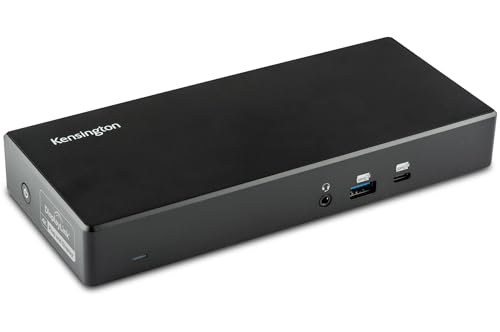
If you rely on dual 4K displays for enhanced productivity, the Kensington SD4780P USB-C Docking Station is an ideal solution. It supports a variety of devices, including Windows, MacBooks, and Chromebooks, offering dual 4K@60Hz output via its four video ports. With six USB ports, including fast charging options, you can connect multiple peripherals effortlessly. Plus, it delivers up to 100W laptop charging through Power Delivery. Weighing just 2.8 pounds, it’s portable and features a Kensington lock slot for added security. Enjoy peace of mind with a 3-year warranty and lifetime technical support for your investment.
Best For: Professionals who require dual 4K displays for enhanced productivity and connectivity with multiple devices.
Pros:
- Dual 4K@60Hz output enables high-resolution multitasking with four video-out ports.
- Fast charging options available with six USB ports, including two for quick device charging.
- Lightweight and portable design, coupled with a Kensington lock slot for security.
Cons:
- Requires optional power splitter for charging USB-A laptops or Surface devices, which may incur additional costs.
- Some users may experience compatibility issues with certain devices or software.
- Restocking fees may apply for returns due to misuse or tampering, potentially deterring some buyers.
Kensington SD4700P Displaylink Docking Station for MacBook and Windows

Designed specifically for users of both MacBook and Windows laptops, the Kensington SD4700P Displaylink Docking Station excels in versatility and performance. It supports dual 2K displays and connects seamlessly to M1, M2, M3, and M4 MacBooks, as well as various Windows PCs. With five SuperSpeed USB 3.0 ports and a gigabit Ethernet connection, you can easily expand your workspace. Plus, it charges your laptop with a 135W power supply, providing up to 60W for compatible devices. Enjoy lifetime technical support and a three-year warranty, making this docking station a reliable choice for enhancing your productivity.
Best For: Users of MacBook M1/M2/M3/M4 and Windows laptops looking for a versatile docking station that supports dual displays and expands connectivity options.
Pros:
- Supports dual 2K displays for enhanced productivity and multitasking.
- Offers multiple USB ports and gigabit Ethernet, allowing for extensive peripheral connectivity.
- Includes a 135W power supply that provides up to 60W charging for compatible laptops.
Cons:
- Requires DisplayLink driver installation for MacBook compatibility, which may be an extra step for users.
- Limited to 2K display output, which may not meet the needs of users seeking 4K resolution.
- Windows laptops must support Power Delivery to utilize the full charging capabilities, potentially limiting compatibility.
Kensington SD5910T Thunderbolt 4 Docking Station

The Kensington SD5910T Thunderbolt 4 Docking Station is perfect for creative professionals who rely on high-resolution displays and need seamless connectivity. It supports Quad 4K @ 60Hz for M1/M2/M3/M4 MacBook models, ensuring stunning visuals. With a variety of ports, including dual Thunderbolt 4, HDMI, and USB options, you can connect all your devices effortlessly. Plus, it transfers data at up to 40Gbps while providing 100W charging for your laptop. The eco-friendly design features security lock slots for added protection, making it both practical and secure. Enjoy peace of mind with a 3-year warranty and lifetime support.
Best For: Creative professionals who require high-resolution displays and seamless connectivity with multiple devices.
Pros:
- Supports Quad 4K @ 60Hz for M1/M2/M3/M4 MacBook models, ensuring stunning visuals.
- Transfers data at up to 40Gbps while providing 100W charging for connected devices.
- Eco-friendly design with security lock slots for added protection.
Cons:
- The mounting bracket for Zero-Footprint mounting is sold separately.
- Security cable lock is not included and must be purchased separately.
- May be overkill for users with less demanding connectivity needs.
Factors to Consider When Choosing Kensington Docking Stations
When you’re choosing a Kensington docking station, think about how well it works with your devices and the number of monitor outputs you need. You’ll also want to contemplate the power delivery capacity and the variety of ports available for your setup. Finally, don’t overlook design and mounting options that suit your workspace.
Compatibility With Devices
Choosing the right Kensington docking station involves considering several compatibility factors to make certain it meets your device’s needs. Kensington docks work with a range of devices, including Windows laptops, MacBooks (M1, M2, M3, M4), Chromebooks, and Surface devices. Check if your model supports USB-C Alt Mode, Thunderbolt 3, or Thunderbolt 4 for peak performance. Specific models, like the SD5900T and SD5910T, can drive multiple 4K displays for MacBooks, while others might offer fewer display options. Pay attention to the docking station’s USB-A and USB-C port compatibility to confirm it matches your laptop’s specifications. Finally, some models use DisplayLink technology, so verify software compatibility to avoid installation issues.
Number of Monitor Outputs
Understanding how many monitor outputs you need is essential for selecting the right Kensington docking station. Start by considering how many external monitors you plan to connect. Some models support up to four displays, while others may only accommodate dual or triple setups. Check the maximum resolution and refresh rates; certain docking stations can output up to 8K or multiple 4K displays at 60Hz. Remember that technologies like DisplayLink or Thunderbolt can influence the number of monitors you can use simultaneously and their performance. Also, verify your laptop’s video output capabilities align with the docking station’s specifications. Finally, the types of video ports available, such as HDMI or DisplayPort, will determine how many monitors can connect and whether adapters are necessary.
Power Delivery Capacity
As you explore Kensington docking stations, power delivery capacity is an important factor to take into account, especially if you plan to connect multiple devices. Typically ranging from 60W to 100W, this capacity determines how much power can be supplied to your laptop and peripherals. Opting for a higher wattage, like 100W, means faster charging for your laptop while using additional devices. Some models feature static charging technology, allowing Thunderbolt ports to receive power without affecting your laptop’s charging. It’s vital to verify the docking station’s power delivery matches your laptop’s requirements for peak performance. In multi-device setups, consider the total power output to confirm all devices receive adequate power simultaneously.
Port Variety and Speed
When selecting a Kensington docking station, the variety and speed of ports can greatly impact your overall experience. Look for models with multiple USB ports, ranging from USB 2.0 to USB 3.2 Gen2 at 10Gbps, to accommodate various devices. Video output options like HDMI and DisplayPort are essential, especially if you need to support resolutions from 1080p to Quad 4K @ 60Hz. Evaluate the data transfer speeds; some docking stations offer up to 40Gbps with Thunderbolt, while others may only provide 5Gbps via USB-A. Additionally, consider including Gigabit Ethernet ports for reliable internet connectivity and guarantee the docking station can deliver adequate power—many provide up to 100W to keep your laptop running during heavy usage.
Design and Mounting Options
Selecting the right Kensington docking station goes beyond just considering port variety and speed; design and mounting options play a significant role in your workspace setup. Many models offer a zero-footprint mounting option, allowing you to save valuable desktop space by mounting the dock on a wall or under a desk. You’ll find that Kensington docking stations typically feature a compact design, making them portable and suitable for both home and office environments. Plus, some are crafted from 100% post-consumer recycled aluminum, reflecting a commitment to sustainability. With a variety of connectivity ports, you can connect multiple devices while maintaining a sleek appearance. These factors guarantee that your docking station not only enhances functionality but also complements your workspace aesthetics.
Security Features Available
Choosing Kensington docking stations involves more than just functionality; security features are essential for protecting your devices and data. Many models come with security cable lock slots, letting you secure your dock and devices against theft. If you prefer a more permanent solution, some docks offer a zero-footprint mounting option that attaches securely to a surface, minimizing the risk of being moved or stolen. For data protection, look for docks featuring Intel VT-d DMA protection, which blocks unauthorized access to system memory. Kensington’s DockWorks software provides network monitoring, enhancing visibility for IT managers. Plus, models with MAC Address ID pass-through and device connection monitoring help you track and secure all connected devices effectively.
Warranty and Support Terms
How confident are you in your choice of a docking station? When selecting a Kensington docking station, consider its warranty and support terms. Most models come with a reassuring 3-year warranty, covering manufacturing defects. This means you can seek repairs or replacements at no extra cost during that period. Additionally, many Kensington products offer lifetime technical support, ensuring you have help whenever needed. Some stations even include advanced security features, like Intel VT-d DMA protection, which can be detailed in the warranty documentation. Remember to review the specific warranty terms for each model, as conditions can vary. By understanding these aspects, you’ll feel more secure in your investment and its long-term performance.