If you’re looking to boost your productivity with your Lenovo ThinkPad, the right docking station can make all the difference. These devices enhance connectivity and streamline your workspace, allowing you to connect multiple peripherals and high-resolution displays effortlessly. In this guide, you’ll discover the top 10 docking stations specifically designed for Lenovo ThinkPad users. Each option has unique features that cater to various professional needs, so let’s explore what they offer and how they can elevate your setup.
Lenovo ThinkPad USB-C Dock Gen 2 (40AS0090)

If you’re looking for a docking station that enhances your productivity, the Lenovo ThinkPad USB-C Dock Gen 2 (40AS0090) is an excellent choice. This dock seamlessly connects all your peripherals while providing USB data transfer speeds up to 10Gbps. You’ll enjoy stable wired network connections and the ability to support vivid 4K resolution on a single display. Plus, it’s perfect for multitasking with multiple displays. With features like PXE Boot and System Wake-on-LAN, this dock acts as the centerpiece of your workspace. You can also rest easy with its 3-year worldwide warranty for added peace of mind.
Best For: Professionals and multitaskers who require seamless connectivity and high-resolution display support for their workstations.
Pros:
- Supports multiple peripherals with USB data transfer speeds up to 10Gbps for efficient workflow.
- Enables vivid 4K resolution on a single display, enhancing visual clarity for presentations and design work.
- Includes features like PXE Boot and System Wake-on-LAN, making it ideal for business environments.
Cons:
- Limited compatibility with non-ThinkPad devices, which may restrict its use for some users.
- Requires a USB-C compatible laptop, which might not be available for all users.
- Higher price point compared to basic docking stations, which may not suit budget-conscious consumers.
Lenovo ThinkPad Universal USB-C Dock-40AY0090

The Lenovo ThinkPad Universal USB-C Dock-40AY0090 is the perfect solution for professionals seeking a streamlined workspace. With its one-cable docking approach, you can reduce clutter while enhancing your efficiency. This dock supports automatic firmware updates and is compatible with essential IT tools like PXE boot and MAC Address Pass Through. You’ll enjoy fast data transfers and rapid charging for your USB-C notebooks, all with plug-and-play functionality for displays and accessories. Whether you’re in the office, hot-desking, or working remotely, this dock maximizes desk space and minimizes workflow interruptions, making it an ideal choice for both users and IT managers.
Best For: Professionals and IT managers seeking a clutter-free and efficient workspace solution.
Pros:
- Supports automatic firmware updates for improved performance and security.
- Plug-and-play functionality makes it easy to connect displays and accessories without hassle.
- Enhances productivity by minimizing workflow interruptions in various work environments.
Cons:
- Limited to USB-C compatible notebooks, which may exclude some older devices.
- Performance may vary based on the power delivery capabilities of the host USB-C port.
- Initial setup may require specific IT configurations for optimal use in corporate environments.
Lenovo ThinkPad Thunderbolt 3 Dock Gen 2 (40AN0135US)

For professionals seeking a reliable and high-performance docking solution, the Lenovo ThinkPad Thunderbolt 3 Dock Gen 2 (40AN0135US) stands out with its dual UHD 4K display support. This sleek black dock features 13 ports, including two HDMI and two DisplayPort connectors, allowing seamless connectivity. Weighing just 2 pounds, it’s portable yet powerful, delivering 135 watts of power. You’ll enjoy enhanced performance for video solutions and fast file transfers thanks to its Intel Thunderbolt chipset. Compatible with multiple ThinkPad models and supported by a solid warranty, this dock is an excellent choice for boosting your productivity.
Best For: Professionals who require a high-performance docking station for enhanced productivity and seamless connectivity with multiple devices.
Pros:
- Dual UHD 4K display support allows for extensive screen real estate, ideal for multitasking.
- Multiple connectivity options with 13 ports, including HDMI, DisplayPort, and USB, ensuring compatibility with a wide range of devices.
- Lightweight and portable design makes it easy to transport, perfect for on-the-go professionals.
Cons:
- Limited compatibility with non-ThinkPad devices may restrict options for some users.
- The 135-watt power supply may not be sufficient for all high-performance laptops.
- Premium pricing compared to basic docking stations might deter budget-conscious consumers.
Lenovo Docking Station Dual Monitor Hybrid USB-C (40AF0135US)
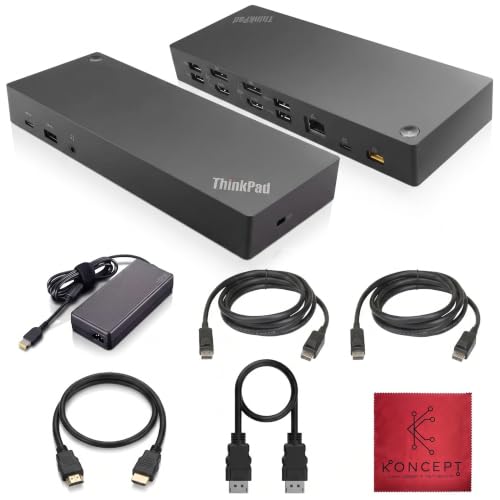
Designed with professionals in mind, the Lenovo Docking Station Dual Monitor Hybrid USB-C (40AF0135US) offers seamless connectivity and enhanced productivity for your ThinkPad. With dual DisplayPort and HDMI ports, you can easily set up a multi-monitor workspace. It features high-speed USB 3.1 Gen 2 ports for fast data transfer and an Always-On USB option for charging devices. The Gigabit Ethernet port guarantees stable internet connectivity, while the included cables simplify your setup. You’ll appreciate the versatility this dock brings, making your work environment more efficient and organized with just one connection.
Best For: Professionals seeking enhanced productivity and seamless connectivity through a dual monitor setup.
Pros:
- High-speed connectivity: Equipped with USB 3.1 Gen 2 ports for fast data transfer and Always-On charging feature.
- Multi-monitor support: Dual DisplayPort and HDMI ports allow for easy multi-monitor setups, enhancing workspace efficiency.
- Stable internet access: Gigabit Ethernet port ensures reliable and fast internet connectivity.
Cons:
- Limited compatibility: Primarily designed for ThinkPad users, which may restrict use with other laptop brands.
- Power adapter size: The included 135W power adapter may be bulky for some setups.
- Cable management: While it includes necessary cables, managing multiple connections can be cumbersome.
USB C Laptop Docking Station Dual Monitor Hub (14 in 1)

Release the full potential of your Lenovo ThinkPad with the USB C Laptop Docking Station, a powerful 14 in 1 multiport adapter that elevates your productivity. This versatile hub extends your USB C/Thunderbolt port into 14 different connections, including dual HDMI and DisplayPort outputs for stunning 4K displays. You’ll enjoy rapid data transfers with USB A 3.1 ports and can connect to Ethernet for stable internet. Plus, with 100W power delivery, your laptop stays charged while you work. Compatible with various brands, this docking station transforms your workspace, making multitasking effortless and efficient.
Best For: Professionals and creatives who need a versatile docking solution for their USB C laptops to enhance productivity and connectivity.
Pros:
- Versatile connectivity: Offers 14 different ports including dual HDMI and DisplayPort for multiple display options.
- High-speed data transfer: Equipped with USB A 3.1 ports providing data transfer speeds up to 10Gbps.
- Power delivery: Provides 100W power delivery, ensuring your laptop stays charged during use.
Cons:
- Limited compatibility: Not compatible with devices that require converters, which may restrict its use with some laptops.
- Charging cable not included: Requires a separate charging cable/adapter to utilize the full 100W power delivery.
- MacBook limitations: External monitors display the same image rather than extending the display, reducing multitasking capabilities for Mac users.
Lenovo ThinkPad USB-C UltraDock with 90W AC Adapter

The Lenovo ThinkPad USB-C UltraDock with a 90W AC Adapter stands out as the perfect solution for professionals who need seamless connectivity and power in a compact design. This dock features three USB 3.0 ports, two USB 2.0 ports, a USB Type-C port, and two DisplayPorts, ensuring you can connect multiple devices effortlessly. It also includes a 90W AC power supply, supporting up to 60W Power Delivery for your laptop. With support for dual FHD displays or a single UHD display, it enhances your productivity. Plus, it’s compatible with a range of Lenovo ThinkPad models, making it a versatile choice.
Best For: Professionals seeking a compact docking solution with extensive connectivity options for their Lenovo ThinkPad laptops.
Pros:
- Versatile Connectivity: Offers multiple USB ports and DisplayPorts for connecting various devices.
- Power Delivery Support: Includes a 90W AC adapter that provides up to 60W of power to your laptop.
- Enhanced Display Options: Supports dual FHD displays or a single UHD display for improved productivity.
Cons:
- Limited to USB-C Laptops: Compatibility is restricted to specific Lenovo ThinkPad models, which may not suit all users.
- Single UHD Display at 30Hz: The refresh rate may not be ideal for high-performance tasks or gaming.
- No HDMI Port: Lacks an HDMI port, which could limit connectivity with certain monitors and TVs.
USB C Docking Station Dual Monitor Adapter (8 in 1)

If you’re looking to enhance your Lenovo ThinkPad’s functionality, the USB C Docking Station Dual Monitor Adapter (8 in 1) is an excellent choice. This versatile adapter supports dual 4K displays, letting you connect via HDMI, DisplayPort, or VGA. With three USB 2.0 ports, you can easily connect your peripherals without lag. Plus, it features a 100W USB C power delivery port, ensuring your laptop stays charged while you work. Just make sure your laptop supports the necessary protocols for peak performance. It’s compatible with various laptops, making it a reliable option for boosting productivity.
Best For: Professionals and students using Lenovo ThinkPad or other compatible laptops who need to enhance their connectivity and productivity with multiple displays and peripherals.
Pros:
- Supports dual 4K displays for advanced multitasking and enhanced visual experience.
- Multiple connectivity options including HDMI, DisplayPort, and VGA, allowing flexibility in display setups.
- 100W USB C power delivery ensures your laptop stays charged during intensive tasks.
Cons:
- Requires laptops to support specific protocols for optimal performance, which may limit compatibility with some older models.
- VGA connection limits resolution to 1080P, which may not meet the needs of users requiring higher resolutions.
- Power adapter not included, necessitating an additional purchase for optimal charging capabilities.
Lenovo Thinkpad Docking Station Gen 2 (Renewed)
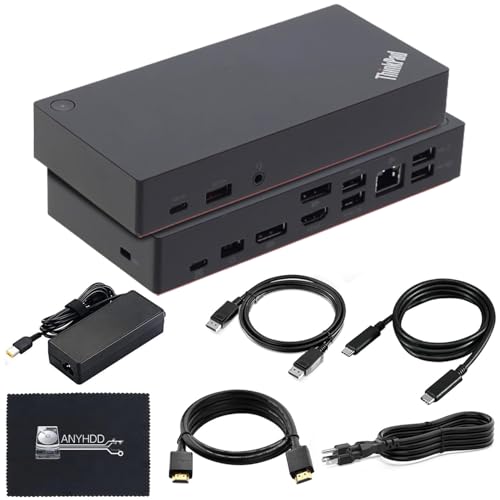
For professionals seeking a reliable and versatile docking solution, the Lenovo ThinkPad Docking Station Gen 2 (Renewed) stands out with its robust connectivity options. With a total of ten ports, including three USB 3.1, two USB 2.0, and a Gigabit Ethernet port, you’ll easily connect multiple devices. It supports dual external monitors via HDMI and DisplayPort, delivering impressive 4K resolution at 60Hz. Included accessories like a 90W adapter and HDMI cable enhance your setup. Rated 4.0 stars by users, this dock guarantees compatibility with various ThinkPad models, making it a solid choice for enhancing your productivity.
Best For: Professionals seeking a reliable and versatile docking solution for their ThinkPad laptops.
Pros:
- Robust Connectivity: Offers 10 ports including multiple USB and video outputs for extensive device connections.
- Dual Monitor Support: Capable of supporting dual external monitors with 4K resolution at 60Hz.
- Included Accessories: Comes with essential accessories like a 90W adapter and HDMI cable for immediate setup.
Cons:
- Renewed Condition: As a renewed product, it may have minor cosmetic imperfections compared to new items.
- Compatibility Limitations: Requires USB-C or Thunderbolt compatibility, limiting use with non-compatible devices.
- Firmware Updates May Be Necessary: Users may need to update firmware for optimal performance and compatibility.
Lenovo ThinkPad USB Type-C Dock Gen 2 Starter Bundle

Designed with versatility in mind, the Lenovo ThinkPad USB Type-C Dock Gen 2 Starter Bundle is perfect for professionals who need to connect multiple devices seamlessly. Weighing just 11.46 ounces, this sleek black dock offers a total of 11 USB ports, including USB Type-C and Type-A, plus two DisplayPort outputs and one HDMI port. You can easily connect three external displays with stunning resolutions up to 3840 x 2160. With 90 watts of power, it’s compatible with most USB Type-C laptops. Enjoy a 1-year warranty and a 30-day return policy for added peace of mind while enhancing your productivity!
Best For: Professionals seeking a versatile docking solution to connect multiple devices and external displays for enhanced productivity.
Pros:
- Versatile connectivity with 11 USB ports and support for three external displays.
- High-resolution support up to 3840 x 2160 for exceptional visual clarity.
- Lightweight design at just 11.46 ounces, making it portable and easy to transport.
Cons:
- Limited compatibility as it primarily supports USB Type-C laptops, potentially excluding older models.
- No integrated power supply for charging devices beyond USB-C laptops, which may require additional adapters.
- Average customer ratings with a score of 4.3 out of 5 stars, indicating some user dissatisfaction.
Lenovo Thinkpad Docking Station Dual Monitor (Renewed)

The Lenovo ThinkPad Docking Station Dual Monitor (Renewed) is perfect for professionals who need enhanced connectivity and display options. With support for 4K displays, this dock offers multiple ports, including HDMI, DisplayPort, and USB-C. You’ll appreciate the six USB ports for connecting all your peripherals and the included cables to get you started right away. Weighing only 16 ounces, it’s portable and efficient. Just verify your ThinkPad model is compatible and update the dock firmware if necessary. Rated 4.0 out of 5 stars, it’s a reliable choice that can boost your productivity appreciably.
Best For: Professionals seeking a reliable docking solution to enhance productivity with dual monitor support and multiple connectivity options.
Pros:
- Supports 4K displays, providing high-resolution output for detailed visuals.
- Includes multiple ports (HDMI, DisplayPort, USB-C) and six USB ports for extensive peripheral connectivity.
- Lightweight design (16 ounces) makes it easy to transport and set up in various work environments.
Cons:
- Compatibility limited to specific Lenovo ThinkPad models, which may exclude other laptop brands.
- Renewed condition may raise concerns about longevity and warranty compared to new products.
- Firmware updates may be necessary for optimal performance, adding a step for users.
Factors to Consider When Choosing Docking Stations for Lenovo Thinkpad
When choosing a docking station for your Lenovo ThinkPad, consider the connectivity options available to guarantee it meets your needs. You’ll also want to check the display support capabilities and power delivery specifications to maximize efficiency. Finally, think about compatibility with your devices and how the size and portability fit into your workspace.
Connectivity Options Available
Choosing the right docking station for your Lenovo ThinkPad involves considering various connectivity options that suit your needs. Look for docking stations that offer a mix of USB 3.1, USB-C, HDMI, and DisplayPort ports, allowing you to connect multiple devices simultaneously. USB 3.1 Gen 2 ports are particularly beneficial, offering high-speed data transfer rates up to 10Gbps. If you multitask, consider options that support dual or multiple monitor setups with resolutions up to 4K. An Ethernet port is essential for stable wired connections, especially in environments where reliable internet access is critical. Additionally, features like PXE Boot and Wake-on-LAN enhance functionality for IT management and remote access, making your workflow even smoother.
Display Support Capabilities
Considering display support capabilities is essential for maximizing your Lenovo ThinkPad’s productivity. First, check the maximum resolution supported by the docking station; many can handle up to 4K on single or multiple displays. Confirm compatibility with DisplayPort 1.4 and HDMI 2.0 standards, as these greatly affect display quality and refresh rates. Look for options that support dual or triple monitor setups, giving you more screen real estate to work efficiently. Pay attention to the refresh rates for different configurations; some docks may offer 60Hz for 4K on one display but lower rates for dual setups. Finally, verify that the docking station’s connectivity aligns with your monitors to avoid compatibility issues and guarantee seamless connectivity.
Power Delivery Specifications
Power delivery specifications play an essential role in guaranteeing your Lenovo ThinkPad remains charged and ready for action. When choosing a docking station, consider the power output, which typically ranges from 60W to 100W. If you need to power your laptop and charge additional peripherals, look for options with higher wattage ratings, like 135W. To take full advantage of these capabilities, make sure your laptop’s USB-C port supports power delivery. Some docking stations also feature smart power management, adjusting power distribution based on connected devices’ needs. Remember, higher power delivery specifications directly impact charging speed—100W can charge your laptop quickly while keeping connected devices performing effectively. Choose wisely for enhanced productivity!
Compatibility With Devices
When it comes to finding the right docking station for your Lenovo ThinkPad, compatibility is key. First, make sure the docking station fits your specific ThinkPad model, as different models require unique docking solutions. Next, check for USB-C or Thunderbolt compatibility, since some stations support only USB-C while others offer Thunderbolt for better performance. It’s also essential to verify that the docking station works with your operating system, mainly Windows, to guarantee all features function correctly. Consider the number and types of ports available to match your peripherals and external displays. Finally, confirm that the docking station supports your desired display resolutions and configurations, especially if you’re aiming for dual or triple monitor setups to boost your productivity.
Size and Portability
Choosing the right docking station for your Lenovo ThinkPad isn’t just about functionality; size and portability play essential roles too. A docking station weighing around 2 pounds or less makes it easy to transport between workspaces. Opt for compact designs, ideally less than 9 inches long, which fit seamlessly into your bag and don’t take up much desk space. Remember, while smaller docks are convenient, they might have fewer ports for your peripherals. Some models come with integrated power supplies, reducing clutter and making your setup more portable by eliminating extra adapters. Evaluating the dock’s footprint on your desk is vital, especially in tight environments, as a smaller size can help maximize available workspace.
Price and Budget Considerations
Budgeting for a docking station for your Lenovo ThinkPad involves more than just the initial price tag. You should assess your budget against the price range of available models, as costs can vary considerably based on features and capabilities. Consider any additional expenses, like compatible cables or adapters, which may not be included in the purchase price and can impact your overall budget. Evaluate the performance features offered; investing in a higher-end model can lead to faster data transfer rates and better display capabilities, enhancing your productivity. Finally, research customer reviews and ratings to ascertain you’re getting good value for your money, as pricier options may offer better reliability and user satisfaction.
Warranty and Support Services
Considering the warranty and support services is essential for guaranteeing your docking station for a Lenovo ThinkPad meets your long-term needs. Look for models that offer a longer warranty, like a 3-year worldwide coverage, which can provide peace of mind. Evaluate the return policy as well; many retailers offer a 30-day return guarantee for defective items. Don’t overlook customer support options, as they’re vital for troubleshooting connectivity issues. Confirm the warranty covers specific conditions like defects in materials or workmanship. Finally, check for firmware updates and technical support availability, which are important for maintaining compatibility and performance over time. Making these considerations will help you choose a reliable and efficient docking station.
Ease of Setup
When evaluating docking stations for your Lenovo ThinkPad, ease of setup plays a significant role in your overall experience. Look for models that offer plug-and-play functionality, letting you connect peripherals and displays without extensive setup or software installation. Automatic firmware updates guarantee smooth integration with the latest operating systems and devices, saving you time and hassle. A docking station with a clear and accessible port layout simplifies connecting various devices and reduces clutter on your desk. Make sure to verify compatibility with your specific ThinkPad model to avoid any setup issues. Finally, choose a station that provides thorough documentation or support resources for initial setup and troubleshooting, making the whole process seamless and user-friendly.