When it comes to equipping your office with the right color laser printer, efficiency and quality are essential. You want a machine that not only delivers vibrant prints but also enhances productivity. With so many options available, it can be challenging to find the perfect fit for your needs. Let’s explore the top contenders that can elevate your office printing experience and streamline your daily tasks.
HP Color LaserJet Pro MFP 3301sdw Wireless All-in-One Printer

The HP Color LaserJet Pro MFP 3301sdw is an excellent choice for busy offices that need a reliable all-in-one printer. With its impressive print speed of up to 26 ppm and auto 2-sided printing, you’ll save time and resources. It features a 250-sheet input tray and an auto document feeder, making large tasks manageable. The printer offers high-quality output with a maximum resolution of 1200 x 1200 dpi, ensuring vibrant colors and sharp text. Plus, its wireless connectivity options—USB, Wi-Fi, and Ethernet—make it easy to integrate into your office setup. Get ready to boost your productivity!
Best For: The HP Color LaserJet Pro MFP 3301sdw is best for busy offices that require a reliable and efficient all-in-one printing solution.
Pros:
- Fast print speeds of up to 26 ppm, increasing office productivity.
- High-quality output with a maximum resolution of 1200 x 1200 dpi for vibrant colors and sharp text.
- Versatile connectivity options including USB, Wi-Fi, and Ethernet for easy integration.
Cons:
- Weighs 37.7 pounds, making it less portable than some other printers.
- The initial cost may be higher compared to basic printers, which could be a consideration for small businesses.
- Limited to a maximum media size of 8.5″ x 14″, which may not accommodate larger printing needs.
HP Color Laserjet Pro 3201dw Wireless Color Laser Printer

If you’re looking for an efficient printing solution for your office or small team, the HP Color LaserJet Pro 3201dw is a standout choice. With print speeds of up to 26 pages per minute and automatic duplex printing, you’ll save both time and resources. Its 250-sheet input tray guarantees you won’t constantly refill paper. The next-generation TerraJet toner delivers vivid colors, while dual-band Wi-Fi and mobile printing compatibility keep you connected. Weighing 30.4 pounds, it fits neatly into your workspace. Plus, HP Wolf Pro enhances security, making it a reliable option for your printing needs.
Best For: Offices and small teams looking for an efficient and reliable color printing solution.
Pros:
- High print speed of up to 26 pages per minute for both black and color documents.
- Automatic duplex printing saves paper and time by allowing two-sided printing.
- Next-generation TerraJet toner ensures vivid colors and high-quality output.
Cons:
- Weighs 30.4 pounds, which may be cumbersome for some users to move.
- Limited to original HP cartridges, potentially increasing long-term costs.
- Customer rating of 3.5 out of 5 stars indicates mixed user satisfaction.
Brother MFC-L3720CDW Wireless Color Laser Printer

For small to medium-sized businesses needing a reliable all-in-one solution, the Brother MFC-L3720CDW Wireless Color Laser Printer stands out with its robust features. It offers print speeds up to 19 ppm, ensuring you won’t be left waiting. The 250-sheet capacity and automatic duplex printing enhance productivity, while the 50-sheet auto document feeder streamlines multi-page jobs. You’ll appreciate the dual-band wireless connectivity and mobile printing capabilities, allowing seamless access from any device. Plus, the 3.5-inch color touchscreen simplifies navigation with customizable shortcuts. With cloud service integration and a Refresh Subscription Trial, it’s designed to keep your office running efficiently.
Best For: Small to medium-sized businesses seeking a reliable all-in-one wireless printing solution.
Pros:
- High print speeds of up to 19 ppm enhance productivity.
- Dual-band wireless connectivity allows seamless printing from multiple devices.
- 3.5-inch color touchscreen with customizable shortcuts simplifies navigation and operation.
Cons:
- May be more expensive than basic printers for budget-conscious users.
- The size may be too large for very small office spaces or home use.
- Toner replacement costs can add up over time, especially without a subscription plan.
Brother MFC-L8930CDW Business Color Laser All-in-One Printer

Designed specifically for high-demand office environments, the Brother MFC-L8930CDW Business Color Laser All-in-One Printer stands out with its impressive duplex printing and scanning capabilities. It prints and copies at speeds up to 33 pages per minute, ensuring efficiency. With high-speed, two-sided scanning reaching 104 images per minute, your workflow stays streamlined. The 7” color touchscreen makes navigation a breeze, while robust security features protect your documents. Plus, this printer supports mobile device printing and utilizes eco-friendly materials, earning EPEAT Gold and ENERGY STAR certifications. Compact yet powerful, it’s an ideal choice to maximize productivity in your office.
Best For: Businesses and offices seeking a reliable, high-speed color laser printer that combines printing, scanning, and copying functionalities in a compact design.
Pros:
- High-speed printing and scanning: Achieves print and copy speeds up to 33 ppm and two-sided scanning up to 104 ipm, enhancing productivity.
- Advanced security features: Incorporates Triple Layer Security and an NFC card reader for secure access and document protection.
- Sustainability certified: EPEAT Gold rated and ENERGY STAR certified, using eco-friendly materials in its packaging.
Cons:
- Weight: At 71.2 pounds, it may be challenging to move or reposition in smaller office spaces.
- Initial cost: The investment may be higher compared to basic printers, which could be a consideration for smaller businesses.
- Limited paper handling capacity: While it supports various media types, the auto document feeder may not accommodate larger print jobs without frequent refilling.
HP Color LaserJet Pro MFP 3301cdw Wireless All-in-One Printer (Renewed)
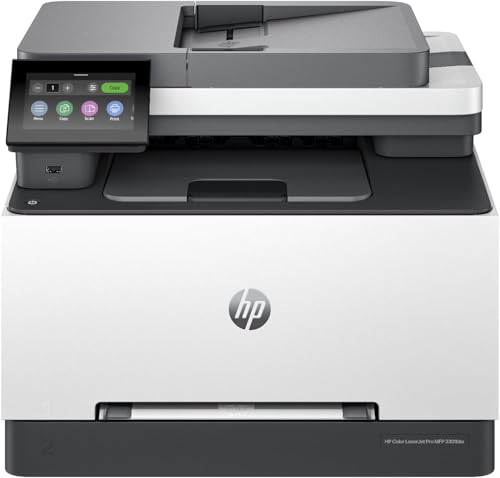
The HP Color LaserJet Pro MFP 3301cdw Wireless All-in-One Printer is an excellent choice for busy office environments that demand versatility and efficiency. It combines printing, scanning, copying, and faxing into one compact unit, weighing just 35 lbs. With a print speed of up to 26 pages per minute and a resolution of 600 x 600 dpi, you’ll enjoy high-quality results. Its dual-band Wi-Fi and mobile printing capabilities guarantee seamless connectivity. Plus, built-in security features protect your data while its Energy Star certification highlights its eco-friendly design. With a one-year warranty, it’s a reliable investment for your office.
Best For: The HP Color LaserJet Pro MFP 3301cdw is best for busy office environments that require a reliable all-in-one printer for various tasks.
Pros:
- Fast print speed of up to 26 pages per minute for efficient workflow.
- Versatile functions including printing, scanning, copying, and faxing in one device.
- Built-in security features and eco-friendly design with Energy Star certification.
Cons:
- Weighs 35 lbs, which may be heavy for some users to move.
- Limited media size support compared to some higher-end models.
- Customer ratings indicate some users may have experienced issues with setup or connectivity.
Brother HL-L3280CDW Wireless Compact Digital Color Printer

If you’re seeking a reliable printer that combines efficiency and quality, the Brother HL-L3280CDW Wireless Compact Digital Color Printer is an excellent choice for small offices and home setups. It delivers impressive print speeds of up to 27 pages per minute and features automatic duplex printing, saving you time and resources. The 2.7” touchscreen makes navigation easy, while dual-band wireless connectivity and mobile compatibility guarantee seamless printing from your devices. Plus, with ENERGY STAR® compliance and eco-friendly modes, you can print responsibly. Backed by a one-year warranty and solid customer support, this printer truly meets your office needs.
Best For: The Brother HL-L3280CDW Wireless Compact Digital Color Printer is best for small offices and home users looking for a reliable and efficient printing solution.
Pros:
- Fast print speeds of up to 27 pages per minute enhance productivity.
- Automatic duplex printing saves paper and time by allowing double-sided printing.
- Mobile and cloud compatibility enables seamless printing from various devices and applications.
Cons:
- Initial purchase cost may be higher compared to basic inkjet printers.
- Toner replacement can lead to ongoing expenses, especially for color printing.
- Limited paper handling capacity may require frequent reloads for larger print jobs.
HP Color LaserJet Pro MFP 3301fdw Wireless All-in-One Printer

For small teams that demand high-quality color documents without sacrificing speed, the HP Color LaserJet Pro MFP 3301fdw is an excellent choice. This all-in-one printer handles printing, scanning, copying, and faxing with ease. You’ll enjoy impressive print speeds of up to 26 pages per minute, and the next-generation TerraJet toner guarantees vivid colors. With features like auto 2-sided printing and a 250-sheet input tray, productivity soars. Plus, dual-band Wi-Fi and HP Wolf Pro security keep your sensitive information safe. It’s designed for office efficiency, making it a solid investment for your team’s needs.
Best For: Small teams requiring professional-quality color documents and efficient all-in-one functionality.
Pros:
- Fast print speeds of up to 26 pages per minute for both black and color.
- Next-generation TerraJet toner ensures vivid and high-quality color output.
- Comprehensive features including auto 2-sided printing and single-pass scanning enhance productivity.
Cons:
- Compatible only with HP cartridges, limiting options for users.
- Heavier weight at 37.7 pounds may limit portability.
- Customer feedback rating of 3.8 out of 5 stars indicates some users may have experienced issues.
Brother Color Laser Printer (HL-L3220CDW)

Looking for a reliable color laser printer that balances speed and quality? The Brother HL-L3220CDW is an excellent choice for your office. It prints at 19 pages per minute, delivering professional-quality text and vibrant graphics. With a 250-sheet tray and automatic duplex printing, it minimizes interruptions. Plus, its wireless connectivity lets you print seamlessly from your devices. The high-capacity toner system guarantees cost-effective operation, while built-in security features keep your documents safe. Weighing just 24.7 pounds and measuring compactly, it fits well in any workspace. With a solid 4.2-star rating from users, this printer is definitely worth considering.
Best For: Small to medium-sized offices looking for a reliable and efficient color laser printer that offers quality and speed.
Pros:
- Professional print quality with crisp text and vibrant graphics.
- Automatic duplex printing saves paper and reduces costs.
- Wireless connectivity allows for easy printing from multiple devices.
Cons:
- Initial cost may be higher compared to inkjet printers.
- Limited maximum media size of 8.5 x 14 inches may not suit all needs.
- Weight of 24.7 pounds may make it less portable than lighter models.
HP Color LaserJet Pro MFP 4301fdw Wireless All-in-One Printer
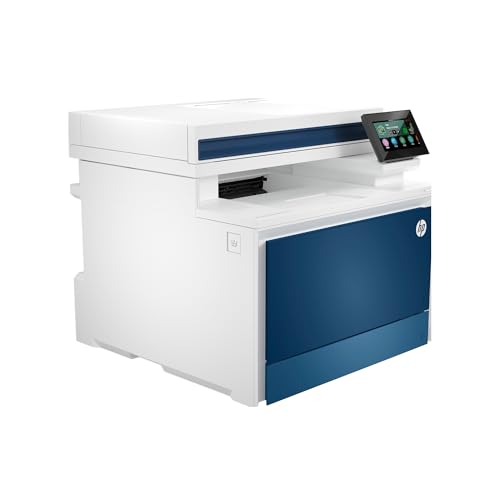
The HP Color LaserJet Pro MFP 4301fdw is an ideal choice for small teams of up to 10 people who need a reliable and efficient all-in-one solution. With print speeds of up to 35 pages per minute and a maximum resolution of 607 x 600 DPI, you’ll enjoy quick, high-quality prints. It features wireless printing, making it easy to connect from mobile devices or PCs. Security is exceptional with HP Wolf Pro Security, ensuring your documents stay safe. Plus, its automatic 2-sided printing and 300-sheet capacity enhance productivity, making this printer a smart addition to your office.
Best For: Small teams of up to 10 people who need a reliable and efficient all-in-one printer solution.
Pros:
- Fast print speeds of up to 35 pages per minute for both color and black & white.
- Wireless connectivity allows for easy printing from various mobile devices and PCs.
- Equipped with HP Wolf Pro Security for enhanced document safety.
Cons:
- Heavier weight at 45 pounds, making it less portable.
- Cartridge compatibility limited to original HP cartridges, which may increase ongoing costs.
- Customer reviews indicate a mixed rating of 3.6 out of 5 stars, suggesting potential reliability concerns.
Canon Color imageCLASS MF662Cdw Wireless Duplex Laser Printer

If your office needs a reliable all-in-one solution that combines printing, scanning, and copying, the Canon Color imageCLASS MF662Cdw Wireless Duplex Laser Printer stands out as an excellent choice. With print speeds up to 26 pages per minute, you’ll enjoy quick, high-quality outputs. The 5-inch color touchscreen makes navigation easy, while its wireless setup allows for seamless mobile printing via the Canon PRINT app, Apple AirPrint, or Mopria Print Service. Plus, the auto duplex feature saves paper and costs. With a 250-sheet capacity and a 3-year warranty, it’s built for efficiency and reliability in any office setting.
Best For: Small to medium-sized offices seeking a reliable all-in-one printer that offers fast printing, scanning, and copying capabilities.
Pros:
- Fast print speeds of up to 26 pages per minute for both color and monochrome documents.
- User-friendly 5-inch color touchscreen enhances navigation and access to frequently used functions.
- Auto duplex printing feature helps save paper and reduces operational costs.
Cons:
- Initial setup may require some technical knowledge, especially for wireless connectivity.
- Limited paper capacity with only a 250-sheet standard cassette, which may not suffice for high-volume printing.
- Toner replacement costs can be high if not using high-capacity cartridges.
Factors to Consider When Choosing Color Laser Printers for Office
When choosing a color laser printer for your office, you’ll want to take into account several key factors. Think about print speed, functionality, and connectivity options that suit your needs. Additionally, evaluate print quality requirements and the cost and yield of toner to guarantee you make the best choice for your workspace.
Print Speed Considerations
Choosing a color laser printer for your office involves careful evaluation of print speed, which can range from 19 to 35 pages per minute (ppm). High print speeds reduce wait times, enhancing productivity, especially in busy environments. If you’re printing a high volume of documents, look for a printer that meets your speed requirements. Automatic duplex printing is another feature to examine; it lets you print double-sided documents without extra effort, saving you time and resources. Also, think about the types of documents you’ll print—complex graphics and high-resolution images may take longer to process than standard text. Don’t forget to check the first page out time, as this impacts your overall workflow efficiency.
Functionality and Versatility
While evaluating color laser printers for your office, functionality and versatility play an essential role in maximizing productivity. Look for models that offer multifunctionality—printing, scanning, copying, and faxing—to streamline your workflow. Automatic document feeders (ADF) and duplex printing capabilities can further enhance efficiency, reducing the need for manual intervention. Aim for printers with a print speed of at least 26 pages per minute for both black and color documents to meet your high-demand needs. Verify the printer accommodates various media sizes and types, like envelopes and glossy photo paper, for diverse printing tasks. Finally, consider mobile printing options, as well as connectivity features, to enable seamless printing from multiple devices across your office.
Connectivity Options Available
A robust connectivity setup is vital for maximizing the efficiency of your office’s color laser printer. When choosing a printer, consider options like USB, Ethernet, and dual-band Wi-Fi to guarantee it works seamlessly with various devices and networks. Look for models that support mobile printing through apps like AirPrint and Google Cloud Print, making it easy for users on the go. Some printers even offer Wi-Fi Direct technology, allowing you to print directly from devices without a network. Security features are important too; they protect your network connections and prevent unauthorized access. Finally, choose a printer with a user-friendly interface for easy navigation of connectivity settings, simplifying the setup process for everyone in your office.
Print Quality Requirements
Print quality is essential for making a strong impression with professional documents. Look for a color laser printer with a resolution of at least 600 x 600 dpi to guarantee sharp text and vibrant colors. Advanced toner technology can greatly enhance color reproduction and consistency, making your prints stand out. Pay attention to print speed as well; a printer that delivers 26 pages per minute or more can boost your office’s productivity. Versatility is key, so choose a model that supports various media types, like glossy photo paper and card stock, to elevate your marketing materials. Finally, regular firmware updates keep your printer performing at its best, adapting to new printing needs and technologies.
Toner Cost and Yield
Selecting the right color laser printer goes beyond just print quality; toner cost and yield play a significant role in your overall printing expenses. High-yield cartridges can dramatically lower your cost per page, making them a smart choice for busy offices. These options often deliver thousands of pages, reducing both the frequency and cost of replacements. However, keep an eye on compatibility, as some printers require original manufacturer cartridges, which can inflate long-term costs. Additionally, consider toner technology; next-generation formulations can enhance print quality and longevity. Finally, don’t forget that regular firmware updates from manufacturers can optimize your printer’s performance and toner efficiency, ensuring you get the most out of your investment.
Size and Weight Factors
When choosing a color laser printer for your office, size and weight are essential factors that directly affect your workspace. Models can range from compact designs under 30 pounds to hefty units exceeding 70 pounds, often requiring dedicated setups. Consider the printer’s dimensions, as they typically vary from around 15 inches in depth to over 23 inches, influencing the desk or floor space you’ll need. A heavier printer might offer more robust features but can limit mobility, making relocation challenging. If space is tight, prioritize models with a smaller footprint; larger teams might benefit from bigger printers with more extensive capabilities. Also, make certain you have sturdy furniture to support heavier models for stability during operation.
Security Features Importance
As you assess color laser printers for your office, don’t overlook the importance of security features. Protecting sensitive business information is vital, and advanced capabilities like HP Wolf Pro Security can safeguard documents in transit and stored data from potential breaches. Regular firmware updates are essential, too, as they help address vulnerabilities that cyber threats might exploit. Additionally, consider printers that only accept original manufacturer cartridges; this can prevent the use of counterfeit products that compromise security and performance. Integrated features, such as NFC card readers, allow secure authentication, ensuring that only authorized personnel can access the printer’s functions. Prioritizing these security features will help you maintain a secure and efficient office environment.
Warranty and Support Options
A solid warranty and reliable support options are essential factors to evaluate when choosing color laser printers for your office. Typically, a limited warranty lasts for one year, covering defects in materials and workmanship, ensuring your printer remains dependable. Look for models with a return policy, like a 30-day satisfaction guarantee, which lets you return the printer if it doesn’t meet your expectations. Consider customer support options as well; channels like phone, online chat, and email can provide assistance throughout the printer’s lifespan. Some manufacturers offer extended warranty options or service plans to enhance protection and lower future repair costs. Finally, check customer ratings and reviews for insights into the reliability of warranty claims and support responsiveness.