The Mac mini M4 needs an input setup that fits how you use it. A keyboard with a built-in touchpad can save desk space or let you control a TV-connected Mac from the couch.
These seven options range from full-size keyboards to handheld remotes. The right choice depends less on size alone than on connection type, typing comfort, and how far you sit from the screen.
Best 7 Mac Mini M4 Keyboard Trackpad Combo Picks for 2026
Flexible Connection Pick
CZUR K5S Keyboard with Touchpad

- Bluetooth or wired USB connection
- Mac/iOS key-mode shortcut
- Rechargeable, compact design
Best For: Small desks needing connection flexibility
Multi-Device Pick
Arteck HD197 Wireless Touchpad Keyboard
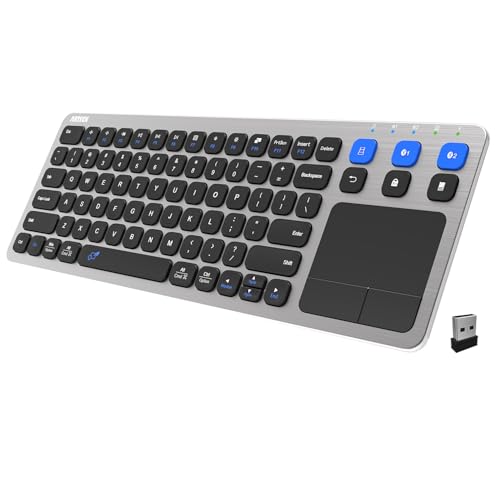
- Switches among three devices
- USB receiver plus two Bluetooth slots
- Touchpad and media hotkeys
Best For: Sharing controls across desk and TV setups
Handheld Remote Pick
iPazzPort Mini Keyboard with Touchpad

- Handheld keyboard and touchpad
- 2.4 GHz USB receiver; up to 30 feet
- Requires two AAA batteries
Best For: Couch-based navigation and brief text entry
Backlit Pick
Arteck HB305-4B Bluetooth Touchpad Keyboard

- Seven colors and two brightness levels
- Bluetooth with integrated touchpad
- Media keys and USB-C charging cable
Best For: Dim-room Bluetooth setups
Best for Desk-to-Couch Use
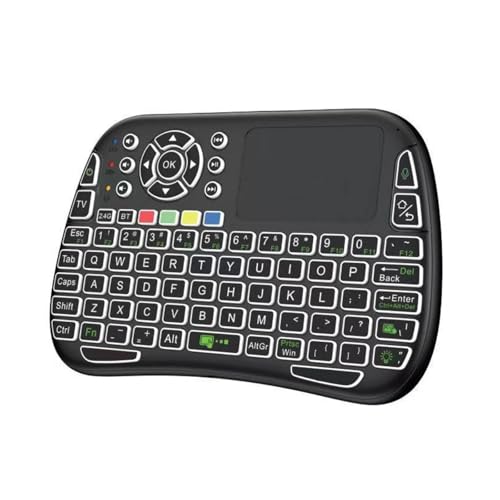
- 84-key layout with multi-touch trackpad
- Bluetooth 5.0 or included 2.4GHz receiver
- Seven-color backlight; USB-C rechargeable
Best For: Compact Mac mini control from a desk or couch
Best for Everyday Use
Easytone Backlit Mini Keyboard
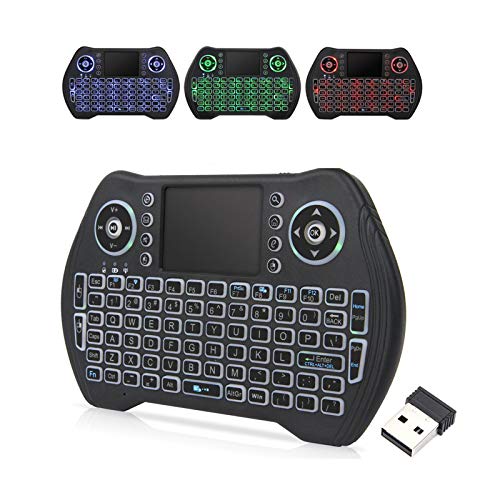
- Handheld keyboard with multi-finger touchpad
- USB-receiver connection; up to 10-meter range
- Multicolor backlight and rechargeable battery
Best For: Light typing and media control from the couch
Best Dual-Mode Pocket Pick

- Bluetooth 4.0 and 2.4GHz USB dongle
- Integrated touchpad in a compact body
- Rechargeable; verify listed AZERTY layout
Best For: Portable Mac mini navigation and short text entry
Flexible Connection Pick – CZUR K5S Keyboard with Touchpad
If you want a mac mini m4 keyboard trackpad combo that can also travel with you, the CZUR K5S combines an integrated touchpad with Bluetooth and wired USB connection options. Its Mac/iOS shortcut lets you select the appropriate key mode.
Best For: Compact desks and users who want wired or Bluetooth flexibility.
Pros:
- Switches between Bluetooth and wired USB connections.
- Offers Mac/iOS, Windows, and Android key-mode shortcuts.
- Rechargeable, slim design with an integrated touchpad.
Cons:
- Keycaps are slightly smaller than those on a standard full-size keyboard.
- No key backlighting; the touchpad cannot wake it from sleep.
The K5S is a practical space-saving choice if connection flexibility matters more than full-size keys or illuminated typing.
Multi-Device Pick – Arteck HD197 Wireless Touchpad Keyboard
For a mac mini m4 keyboard trackpad combo that can also control a TV-connected computer, the Arteck HD197 offers an integrated touchpad, media hotkeys, and one-key switching among three device connections.
Best For: Users who share one keyboard between a Mac and other desk or living-room devices.
Pros:
- Connects through a USB wireless receiver and two Bluetooth slots.
- Touchpad and media hotkeys suit TV-connected setups.
- Rechargeable, with a stated wireless range of up to 33 feet.
Cons:
- The USB wireless connection requires the included receiver.
- Wireless range may vary with the environment.
Choose this model when easy device switching is the priority; its receiver option also gives you an alternative to Bluetooth.
Handheld Remote Pick – iPazzPort Mini Keyboard with Touchpad
If your mac mini m4 keyboard trackpad combo is mainly for occasional input from the couch, this handheld iPazzPort pairs a mini keyboard and touchpad with a plug-and-play 2.4 GHz USB receiver. It is a remote-style option rather than a desktop typing setup.
Best For: Occasional text entry and pointer control from across the room.
Pros:
- Compact handheld design combines keyboard and touchpad.
- USB receiver provides a stated operating distance of up to 30 feet.
- Includes return, left-click, and side-scroll controls.
Cons:
- No Bluetooth connection.
- Requires two AAA batteries, which are not included.
Its small size favors media navigation and quick searches over extended typing; plan on using an available USB port for the receiver.
Backlit Pick – Arteck HB305-4B Bluetooth Touchpad Keyboard
For a mac mini m4 keyboard trackpad combo used in a dim room, the Arteck HB305-4B brings together Bluetooth, a built-in touchpad, media keys, and seven backlight colors. Its listed compatibility includes Mac and TV-connected computers.
Best For: Bluetooth-only setups where illuminated keys and touchpad control are useful.
Pros:
- Seven backlight colors with two brightness levels.
- Integrated touchpad and media keys.
- Includes a USB-C charging cable and has a stated range of up to 33 feet.
Cons:
- Bluetooth is the listed connection method; no USB receiver option is specified.
- Wireless range can vary with the environment.
This is the better fit of the four for illuminated typing, provided Bluetooth connectivity suits your setup.
Best for Desk-to-Couch Use – iPazzPort M9 Mini Keyboard
If your mac mini m4 keyboard trackpad combo needs to double as a living-room controller, the iPazzPort M9 offers an 84-key layout and a built-in multi-touch trackpad in one compact device. It supports Bluetooth 5.0 and includes a 2.4GHz USB receiver, giving you two connection options.
Best For: Mac mini users who want a compact keyboard for occasional couch control as well as desk use.
Pros:
- Built-in 1.97-by-1.26-inch trackpad supports two-finger scrolling and pinch-to-zoom.
- Bluetooth and 2.4GHz USB receiver provide flexible connectivity.
- Seven-color backlighting and USB-C recharging suit use in a dark room.
Cons:
- The compact 84-key layout may feel cramped for extended typing.
- The listing rules out Fire TV Stick, Samsung Smart TVs, and LG Smart TVs.
This is a practical space-saving option if you want pointer control without a separate mouse. Its strongest appeal is flexibility, though the small format is better suited to navigation and short typing sessions than long workdays.
Best for Everyday Use – Easytone Backlit Mini Keyboard
For a mac mini m4 keyboard trackpad combo used mainly to browse or control media from across the room, the Easytone is a handheld alternative to a desktop keyboard. It connects through an included USB receiver and combines a touchpad, multimedia hotkeys, and backlit keys.
Best For: Buyers who primarily need a small, rechargeable remote for light typing and media navigation.
Pros:
- Included USB receiver offers plug-and-play wireless connectivity with a stated range of up to 10 meters.
- Multi-finger touchpad and eight hotkeys put navigation controls in one handheld device.
- Multicolor backlighting and a rechargeable battery support evening use.
Cons:
- No Bluetooth connection is listed; it relies on the USB receiver.
- Its handheld form is less suited to sustained desk typing than a standard keyboard.
The Easytone makes the most sense when the Mac mini is part of an entertainment setup. The product title lists macOS compatibility, but the specifications emphasize Android and Linux, so confirm compatibility with your intended setup before buying.
Best Dual-Mode Pocket Pick – Rii i4 Mini Keyboard
The Rii i4 is a pocket-size approach to a mac mini m4 keyboard trackpad combo. Its integrated touchpad, Bluetooth 4.0 connection, and included 2.4GHz USB dongle make it worth considering when portability matters more than a full-size typing surface.
Best For: Mac mini owners who want a portable controller that can also connect to other devices.
Pros:
- Switches between Bluetooth and 2.4GHz connections.
- Integrated touchpad keeps keyboard and pointer control together.
- Rechargeable battery and compact 7.1-by-4.2-inch footprint make it easy to move between rooms.
Cons:
- Pocket-size keys are a compromise for lengthy typing.
- The notes conflict on layout: the title describes a mini keyboard, while the specifications list AZERTY, so verify the key layout before ordering.
The i4 stands out for its two wireless modes and portability, not as a replacement for a full-size work keyboard. Its listed macOS support starts at macOS 13 Ventura; check your Mac mini’s software and the seller’s layout details before purchase.
How We Picked the Best Mac Mini M4 Keyboard Trackpad Combo
We focused on keyboards with built-in touchpads that could suit different Mac mini M4 setups: a small desk, a shared workstation, or a TV across the room. The selection includes Bluetooth models, keyboards with 2.4 GHz USB receivers, and options that offer both. We also considered layout, portability, backlighting, and whether a device is better suited to regular typing or occasional navigation. Product descriptions do not establish long-term reliability or full macOS shortcut support, so check current specifications and return terms before buying.
Quick Comparison: Match the Shape to the Job
For frequent typing, start with the larger CZUR K5S or an Arteck touch TV keyboard; their layouts are more practical for documents and email than a handheld mini keyboard. If you mainly launch apps, search for videos, or make quick adjustments from a sofa, the iPazzPort, Easytone, and Rii i4 are more compact choices. The dual-mode mini keyboard is worth considering if you want to switch between Bluetooth and a USB receiver without committing to a larger board. For use in a dim room, compare the backlit Arteck, Easytone, and Rii options, including how their lighting is powered and controlled.
Key Buying Factors for a Mac Mini M4 Keyboard Trackpad Combo
Connection and Setup
The Mac mini M4 supports Bluetooth, while a 2.4 GHz keyboard generally needs its included USB receiver plugged in. A receiver may occupy a valuable port or require an adapter or hub, depending on its connector. Bluetooth keeps ports free but requires pairing; a wired option can be useful while setting up a Mac or troubleshooting a wireless connection. Confirm the exact connection methods for the model you choose.
Typing and Touchpad Comfort
Decide whether this will be your primary keyboard. Full-size keys are generally easier for sustained typing, while thumb-sized layouts favor short searches and media control. Built-in touchpads also tend to be smaller than standalone trackpads. Check touchpad placement, click method, and stated macOS gesture support if scrolling or gestures matter to you; do not assume every model behaves like an Apple Magic Trackpad.
Layout, Power, and Range
Look for the key layout and shortcuts you use most, especially Command, Option, and media controls. Backlighting helps in a dark living room but can affect battery life. Check whether the keyboard uses replaceable batteries or a rechargeable battery, and whether its charging cable suits your setup. Wireless range claims are only a starting point: distance, walls, interference, and receiver placement can change real-world performance.
Who Should Buy Which Mac Mini M4 Keyboard Trackpad Combo?
Choose a larger CZUR or Arteck model if the Mac mini is a daily desktop and you want one device for typing and pointer control. Pick a compact iPazzPort, Easytone, Rii, or dual-mode mini keyboard for a TV-connected Mac that needs occasional input rather than long writing sessions. If you frequently edit documents, use precise gestures, or work for hours, a separate keyboard and trackpad may be more comfortable than any all-in-one Mac Mini M4 Keyboard Trackpad Combo.