If you want to turn a Mac Studio into a cleaner, faster workstation, the right hub can make a huge difference. The best options add high-speed storage, extra displays, reliable networking, and serious charging without creating cable clutter.
In this roundup, we focus on practical picks for different workflows, from simple expansion to full creator-grade docking setups.
Best 10 Mac Studio Thunderbolt 5 Hub Picks for 2026
Best for Thunderbolt 5 Power Users

- 120Gbps boost-mode Thunderbolt 5 transfer
- 140W charging with 4x USB-A and Ethernet
- 8K display support plus cooling and security
Best For: Creators and Mac or Thunderbolt laptop users who want maximum speed, charging, and expansion in one dock.
Best for Extreme Expansion
RayCue 80Gbps Dock for Mac Studio

- Dual SSD bays with RAID support and up to 16TB expansion
- 2x HDMI 2.1 plus DisplayPort 2.1 for multi-monitor workflows
- CFexpress readers and Hi-Fi audio for pro media users
Best For: Creative pros who need major storage expansion and robust display connectivity on Mac Studio.
Best Thunderbolt Hub for Mac Studio

- 4 Thunderbolt 4 ports for fast expansion
- 1 USB-A port for older accessories
- Compact hub for clean desktop setups
Best For: Mac Studio users who need a streamlined Thunderbolt expansion hub with one legacy USB-A port.
Best for Triple-Display Macs
iVANKY FusionDock Max 2 Thunderbolt 5 Dock

- 23-in-1 docking with 3x Thunderbolt 5 ports
- Up to triple 6K@60Hz on compatible M-series Macs
- 140W PD and built-in cooling for sustained workloads
Best For: MacBook and Mac Studio users who need a Mac-only Thunderbolt 5 dock with serious display support.
Best Storage-First Dock
Satechi Mac mini Hub & Stand with SSD

- Adds internal-style SSD expansion via NVMe/SATA M.2 support.
- Includes USB-C, USB-A, SD/microSD, and 3.5mm audio ports.
- Built-in vents and aluminum finish help with cooling and desk setup.
Best For: Mac mini M1/M2 or Mac Studio users who want storage expansion and extra ports in one tidy dock.
Best for Thunderbolt 5 Performance

- 80Gb/s Thunderbolt 5 bandwidth
- Up to three 8K displays supported
- 140W charging in a fanless design
Best For: Mac Studio users building a fast, compact Thunderbolt 5 workstation.
Best for Thunderbolt Expansion
Belkin Connect 5-in-1 Thunderbolt 4 Dock

- 4 Thunderbolt 4 ports plus 1 USB-A port
- Dual 4K or single 8K display support
- 96W power delivery with cable and PSU included
Best For: Mac and Windows users who need a dependable dock for displays, charging, and fast expansion.
Best Compact MacBook Dock

- 140W pass-through charging for compatible USB-C laptops
- 4K 60Hz HDMI plus Gigabit Ethernet and SD/microSD readers
- Three 10Gbps data ports in a travel-friendly design
Best For: MacBook and USB-C laptop users who need a compact, all-in-one hub for everyday desk and travel use.
Triple-Monitor Thunderbolt 5 Powerhouse
Thunderbolt 5 Hub Docking Station
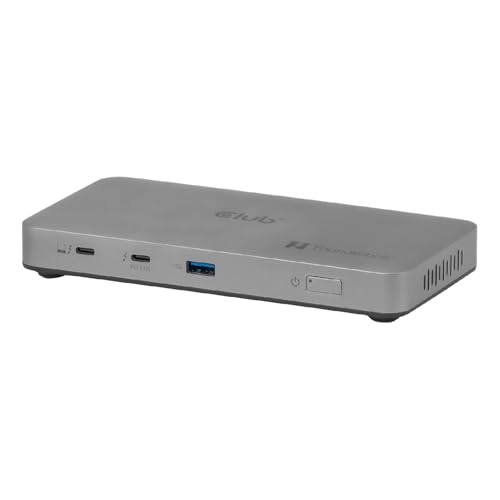
- Three 5K@60Hz displays or one 8K@60Hz screen
- Thunderbolt 5 performance up to 120Gbps
- 180W power supply with 96W laptop charging
Best For: Mac Studio and MacBook Pro users who need high-end multi-monitor expansion and fast Thunderbolt connectivity.
Best for Mac Pro/Max Displays
UGREEN Revodok Max 208 Thunderbolt 4 Dock

- Three Thunderbolt 4 ports for 40Gbps expansion
- Dual 4K@60Hz support on Mac Pro/Max chips
- 85W charging with Gigabit Ethernet and USB-A ports
Best For: Mac Studio and MacBook Pro users who want a strong Thunderbolt dock for displays, charging, and accessories.
Best for Thunderbolt 5 Power Users – WAVLINK TB5 Docking Station
If you need a mac studio thunderbolt 5 hub for a high-end desk setup, this WAVLINK dock stands out for raw bandwidth, charging, and expandability. It’s aimed at users who want a single connection for fast storage, multiple peripherals, and high-resolution displays—though macOS display limits still apply.
Best For: Creators, power users, and Mac or Thunderbolt laptop owners who want a feature-packed dock with serious charging and expansion.
Pros:
- Thunderbolt 5 support with up to 120Gbps boost-mode transfer for fast external drives and accessories
- 140W host charging plus multiple downstream ports for phones, tablets, and peripherals
- Strong desktop connectivity with 4x USB-A 3.2, 2.5G Ethernet, SD 4.0, and Kensington lock support
- 8K display support and a built-in cooling system for demanding workflows
Cons:
- macOS does not support the full triple-display setup advertised for Windows 11
- Requires a Thunderbolt 4 or 5 host for optimal performance
- USB-C to HDMI/DP cables are not included
For anyone shopping a mac studio thunderbolt 5 hub, this dock is compelling if you care most about speed, power delivery, and a broad port mix. Just make sure your display plan matches Mac limitations before buying.
Best for Extreme Expansion – RayCue 80Gbps Dock for Mac Studio
If you want a mac studio thunderbolt 5 hub-style upgrade with far more storage and display flexibility than a basic dock, the RayCue 10-in-1 is built for demanding Mac Studio setups. It combines dual NVMe bays, pro-grade card readers, and multiple high-bandwidth video outputs in a single aluminum enclosure that sits cleanly under your machine.
Best For: Creative pros and power users who need fast internal storage expansion, multi-monitor support, and front-loaded media access on Mac Studio or compatible Mac mini models.
Pros:
- Dual SSD bays support RAID 0/1 and up to 16TB of expansion
- 2x HDMI 2.1 plus DisplayPort 2.1 for flexible multi-display setups
- CFexpress Type A/B readers and Hi-Fi 96kHz audio suit media workflows
- Precision-aluminum, stackable design helps keep the desk tidy
Cons:
- Only works with supported Mac Studio and Mac mini models
- 45W PD input is for dock power, not high-wattage laptop charging
- Feature-rich design may be more than casual users need
Overall, this is a strong choice if you need a mac studio thunderbolt 5 hub alternative focused on storage, display output, and media workflows rather than simple port splitting. It’s especially appealing for creators who want their dock to do more than just add USB ports.
Best Thunderbolt Hub for Mac Studio – OWC Thunderbolt Hub
If you need a simple way to add more high-speed ports to a desktop Mac, the OWC Thunderbolt Hub is a practical fit for a mac studio thunderbolt 5 hub setup. It gives you four Thunderbolt 4 ports plus one USB-A port, making it easy to connect fast storage, displays, docks, and legacy accessories through a compact hub.
Best For: Mac Studio users who want a clean, high-bandwidth expansion hub for Thunderbolt accessories and a legacy USB-A device.
Pros:
- Four Thunderbolt 4 ports for flexible expansion
- Includes one USB-A port for older peripherals
- Compact design keeps desk clutter down
- Good match for pro workflows with multiple accessories
Cons:
- No HDMI or DisplayPort outputs
- Only one USB-A port
- Premium pricing compared with basic USB hubs
For Mac Studio owners who mostly live in Thunderbolt gear, this is a straightforward expansion option that prioritizes speed and simplicity. It is not a full-featured dock, but as a mac studio thunderbolt 5 hub-style add-on, it covers the essentials very well.
Best for Triple-Display Macs – iVANKY FusionDock Max 2 Thunderbolt 5 Dock
If you need a mac studio thunderbolt 5 hub built for heavy multitasking, the iVANKY FusionDock Max 2 stands out with 23-in-1 expansion, three Thunderbolt 5 ports, and support for up to triple 6K@60Hz output on the right Mac chipsets. It’s a serious desk dock for creative workflows, fast storage, and lots of peripherals—but it’s limited to Mac only, so it’s best for users fully committed to the Apple ecosystem.
Best For: MacBook and Mac Studio owners who want a high-end Thunderbolt 5 dock for triple-display setups and lots of wired connections.
Pros:
- Triple 6K@60Hz display support on compatible M-series Max models
- Three Thunderbolt 5 ports plus 10 USB ports for broad expansion
- 140W power delivery helps keep high-performance Macs charged
- Built-in cooling fan and hybrid thermal design for sustained use
Cons:
- Not compatible with Windows or Chrome laptops
- Only works with one Mac and does not switch between multiple Macs
- Display support varies by chip tier, so base and Pro models get fewer screens
This is a strong fit if you want a mac studio thunderbolt 5 hub that prioritizes display bandwidth, port density, and workstation stability over universal compatibility. Just make sure your Mac chip tier matches the monitor setup you want.
Best Storage-First Dock – Satechi Mac mini Hub & Stand with SSD
If you want a practical mac studio thunderbolt 5 hub alternative for adding ports and local storage in one neat setup, this Satechi stand is a smart fit. It combines an SSD enclosure with a useful mix of USB-C, USB-A, card readers, and audio while also helping keep your Mac cool and organized.
Best For: Mac mini M1/M2 or Mac Studio owners who want a clean desktop hub with fast external SSD expansion and everyday ports.
Pros:
- Built-in M.2 SSD enclosure supports NVMe and SATA drives for fast storage expansion.
- Offers a handy mix of USB-C, USB-A, microSD/SD, and 3.5mm audio connections.
- Aluminum design with air vents helps manage heat and matches Apple desktops well.
- Includes SSD install tools, thermal pad, and a 2-year limited warranty.
Cons:
- Not compatible with the Mac mini M4.
- SSD and heatsink are not included, so storage adds extra cost.
- It is a dock/stand, not a true Thunderbolt 5 hub with top-tier bandwidth.
For buyers who care more about clean expansion than raw connector count, this is a strong mac studio thunderbolt 5 hub-style pick. It won’t replace a full Thunderbolt dock, but it does a great job combining storage, ports, and desk organization in one compact accessory.
Best for Thunderbolt 5 Performance – OWC Thunderbolt 5 Hub
If you need a mac studio thunderbolt 5 hub that adds fast, flexible I/O without taking up much desk space, this OWC hub is a strong fit. It delivers up to 80Gb/s bandwidth, supports modern Thunderbolt and USB-C devices, and is built to handle demanding multi-display workflows.
Best For: Mac Studio users who want a compact Thunderbolt 5 hub for high-speed storage, daisy chaining, and advanced display setups.
Pros:
- Up to 80Gb/s bandwidth with Thunderbolt 5, plus strong backward compatibility
- Supports up to three 8K displays for serious creative and productivity work
- 140W charging helps keep a power-hungry laptop or workstation topped off
- Fanless aluminum design keeps noise low on a clean desk setup
Cons:
- No Ethernet port, so wired networking needs a separate adapter
- More expensive than basic USB-C hubs
- Best performance requires Thunderbolt 5-capable hardware
For Mac Studio owners who care more about speed, display support, and reliable expansion than extra legacy ports, this mac studio thunderbolt 5 hub is an easy recommendation. It is especially appealing if you plan to build a high-end workstation around fast external drives and multiple monitors.
Best for Thunderbolt Expansion – Belkin Connect 5-in-1 Thunderbolt 4 Dock
If you want a practical desktop hub for a Mac Studio setup, this Belkin dock is a strong option even if you were originally searching for a mac studio thunderbolt 5 hub. It gives you Thunderbolt 4 connectivity, dual 4K display support, and 96W charging in a compact 5-in-1 design that fits a clean workstation.
Best For: Mac and Windows users who need a reliable Thunderbolt dock for charging, external displays, and fast expansion from a single cable.
Pros:
- 4 Thunderbolt 4 ports plus 1 USB-A port for flexible expansion
- Supports dual 4K displays at 60Hz or one 8K display at 30Hz
- Up to 96W power delivery keeps laptops and compatible devices charged
- Includes Thunderbolt 4 cable and power supply in the box
Cons:
- It’s Thunderbolt 4, not native Thunderbolt 5
- Best display support depends on your Mac model and mode
- Only one USB-A port, so legacy peripheral users may want more
For buyers comparing a mac studio thunderbolt 5 hub, this Belkin dock makes sense when stability, display support, and charging matter more than chasing the newest spec. It’s a sensible pick for a streamlined Mac workspace.
Best Compact MacBook Dock – Plugable 9-in-1 USB-C Hub
If you want a portable mac studio thunderbolt 5 hub-style dock for a laptop-focused desk, this Plugable 9-in-1 is a practical pick. It gives you the core extras most people need—4K 60Hz HDMI, fast data ports, Ethernet, and card readers—without the bulk of a full desktop dock.
Best For: MacBook and USB-C laptop users who want a compact, travel-friendly hub for one external display, wired networking, and everyday peripherals.
Pros:
- 140W pass-through charging helps keep compatible laptops powered while you work
- 4K 60Hz HDMI, Gigabit Ethernet, and SD/microSD slots cover most everyday setups
- Three 10Gbps data ports make it easy to connect drives and accessories quickly
- Works with macOS, Windows, ChromeOS, and many Thunderbolt/USB4 systems
Cons:
- Only supports one external display over HDMI
- Best for close-to-laptop use because the built-in cable is short
- Full charging speeds depend on a PD 3.1 EPR charger and compatible cable
This is a smart fit if you need a compact hub rather than a full workstation dock. For a mac studio thunderbolt 5 hub search, it’s worth noting that the Plugable focuses on portable expansion and single-monitor simplicity, so it makes more sense for MacBook setups than a desktop Mac Studio station.
Triple-Monitor Thunderbolt 5 Powerhouse – Thunderbolt 5 Hub Docking Station
If you need a mac studio thunderbolt 5 hub that can drive a serious multi-display workflow, this dock is built for exactly that kind of setup. It combines Thunderbolt 5 bandwidth, triple 5K monitor support, and strong power delivery in one unit, making it a practical choice for creators and power users who want fewer compromises on their desk.
Best For: Mac Studio and MacBook Pro users who want triple-monitor support, fast Thunderbolt 5 expansion, and a single-cable desk setup.
Pros:
- Supports up to three 5K displays at 60Hz, or a single 8K@60Hz screen
- Thunderbolt 5 certification with up to 120Gbps data transfer and downstream expansion
- 180W power supply with 96W laptop charging for cleaner, all-in-one connectivity
Cons:
- Likely overkill if you only need a simple single-monitor dock
- Requires a Thunderbolt 5-capable system to get the full benefit
- More premium than basic USB-C hubs
For buyers comparing a mac studio thunderbolt 5 hub, this model stands out for its display flexibility and high-speed expansion rather than barebones simplicity. It is a strong fit when your priority is workstation-level connectivity and you want one dock that can scale with demanding creative or technical workflows.
Best for Mac Pro/Max Displays – UGREEN Revodok Max 208 Thunderbolt 4 Dock
If you want a mac studio thunderbolt 5 hub alternative that is already built for serious desk setups, this UGREEN Thunderbolt 4 dock is a strong fit. It gives Mac users 40Gbps expansion, dual 4K display support on Pro/Max chips, wired Ethernet, and enough USB-A ports to handle accessories without a mess of adapters.
Best For: Mac Studio owners who need a reliable Thunderbolt dock for dual displays, fast peripherals, and one-cable charging.
Pros:
- Three Thunderbolt 4 ports plus three 10Gbps USB-A ports for flexible expansion
- Supports dual 4K@60Hz on Mac Pro/Max chips, with broad USB-C and Thunderbolt compatibility
- Up to 85W laptop charging with the included 140W GaN power supply
- Gigabit Ethernet adds a stable wired connection for work and content creation
Cons:
- Requires the included power adapter to operate
- Basic M-chip Macs are limited to a single external display
- It is Thunderbolt 4, not Thunderbolt 5
For buyers comparing a mac studio thunderbolt 5 hub, this dock makes sense if you value mature compatibility and multiple high-speed ports more than waiting for the newest standard. It is especially practical for Mac Studio, MacBook Pro, and other USB4/Thunderbolt systems that need dependable display output and everyday desk convenience.
How We Picked the Best Mac Studio Thunderbolt 5 Hub Options
We prioritized real-world usefulness over raw spec sheets. That means looking at port variety, Thunderbolt 5 or Thunderbolt 4 bandwidth, display output support, charging wattage, compatibility with Mac Studio configurations, and whether the dock suits creators, multitaskers, or users who simply need dependable expansion.
We also weighed build quality, thermal design, and how likely each option is to stay useful as your setup grows.
Quick Comparison
For most buyers, the best Mac Studio Thunderbolt 5 Hub is the one that matches your monitor count and accessory load. If you need multiple high-resolution displays and fast external storage, look at full-featured docks with stronger power delivery. If you mainly want a cleaner desk and a few extra ports, a simpler hub may be the better value.
Broadly, the lineup splits into three groups: high-end Thunderbolt 5 docks for demanding workflows, Thunderbolt 4 hubs for reliable everyday expansion, and compact multiport adapters for lighter setups.
Key Buying Factors for Mac Studio Thunderbolt 5 Hub
Bandwidth and Real-World Speed
Thunderbolt 5 offers more headroom than older standards, which matters if you run fast SSDs, capture devices, or several peripherals at once. If your workflow is lighter, Thunderbolt 4 can still be plenty capable.
Display Support
Check how many monitors the dock can handle and at what resolution and refresh rate. A Mac Studio Thunderbolt 5 Hub should support your current display setup with room to grow, especially if you work in video, design, or data-heavy multitasking.
Power Delivery
Charging output matters even on a desktop. Higher wattage is useful if you also connect a MacBook, need bus-powered accessories, or want one dock that can serve multiple machines.
Ports and Expansion
Look for the right mix of USB-A, USB-C, Ethernet, SD or CFexpress card readers, and audio. Creators often benefit from integrated storage bays, while office users may prefer simple connectivity and stable networking.
Compatibility and Mac Features
Not every dock handles every display mode or bandwidth level the same way on macOS. Confirm support for your Mac Studio model, your monitor configuration, and whether you need Mac-specific behavior rather than generic USB-C compatibility.
Who Should Buy Which Mac Studio Thunderbolt 5 Hub?
If you want the most capable desk setup, choose a premium Thunderbolt 5 dock with strong charging and multiple display outputs. If your priority is value and dependable expansion, a Thunderbolt 4 hub is often the smarter buy. If you only need a few extra ports for travel or light desk use, a compact USB-C hub can cover the basics without overpaying.
For power users, the best Mac Studio Thunderbolt 5 Hub is the one that reduces friction: fewer adapters, faster transfers, and enough ports to keep your workspace organized.