A good mac studio under desk mount frees up desktop space while keeping your machine protected, accessible, and neatly integrated into your setup.
Below, we’ve focused on mounts that balance fit, ventilation, scratch protection, and installation simplicity so you can choose the right option with confidence.
Best 10 Mac Studio Under Desk Mount Picks for 2026
Best for Neat Desks

- 2mm steel build for sturdy support
- Foam padding helps prevent scratches and slips
- Vent-aware design helps maintain airflow
Best For: Mac Studio users who want to save desk space and keep their setup organized.
Best for a Clean Under-Desk Setup
IFCASE Under Desk Laptop Mount
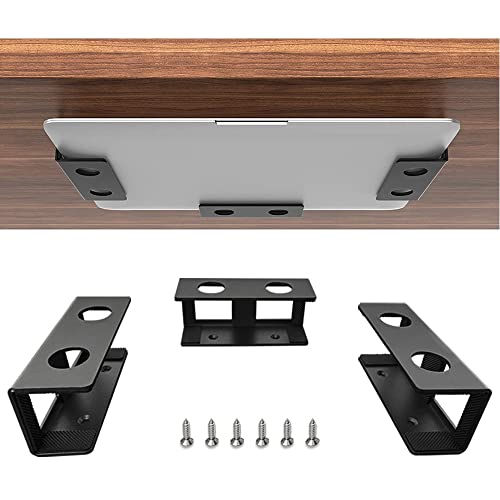
- Saves desk space by mounting slim devices underneath
- Silicone pads help prevent scratches and slipping
- Metal construction feels sturdy for everyday use
Best For: Users who want a neat under-desk mount for a Mac mini, laptop, or other slim device.
Best for Dust Protection
Transparent Acrylic Mac Studio Stand with Filter

- Precision-fit acrylic stand for Mac Studio only
- Detachable washable filter helps block dust
- Anti-slip pads improve stability on the desk
Best For: Mac Studio owners who want a clean, ventilated stand with extra dust protection.
Best for Easy Under-Desk Storage
IFCASE Under Desk Mount for Mac mini

- Fits devices up to 1.5 inches thick
- Silicone padding helps prevent scratches
- Durable aluminum frame with stainless steel screws
Best For: People who want a tidy under-desk holder for a Mac mini, keyboard, or similar slim device.
Best for Easy Installation

- Includes installation hardware
- Under-desk, VESA, or wall use
- Made in the USA; black finish
Best For: Mac Studio owners who want a simple, tidy mounting solution with flexible placement.
Best for Airflow
IFCASE Aluminum Under Desk Mac Studio Mount

- 3 cm lift improves ventilation around the Mac Studio
- Aluminum body adds sturdy under-desk support
- Silicone padding helps prevent scratches and vibration
Best For: People who want a stable under-desk Mac Studio mount with better airflow.
Best for Hidden Under-Desk Setup
HumanCentric Mac Studio Under Desk Mount

- Steel bracket with silicone padding for scratch protection
- Open sides support airflow and easy port access
- Includes cable ties and installs quickly with wood screws
Best For: Mac Studio owners who want to hide the computer under the desk while keeping it secure and ventilated.
Best with Extra Features
IFCASE Aluminum Under Desk Mount for Mac Studio

- Improves airflow with a raised bracket design
- Anti-scratch pad helps prevent scuffs and vibration
- Durable aluminum build saves desk space
Best For: Users who want a sturdy, ventilated under-desk mount for a clean Mac Studio setup.
Best for Cooling & Cable-Free Mounting
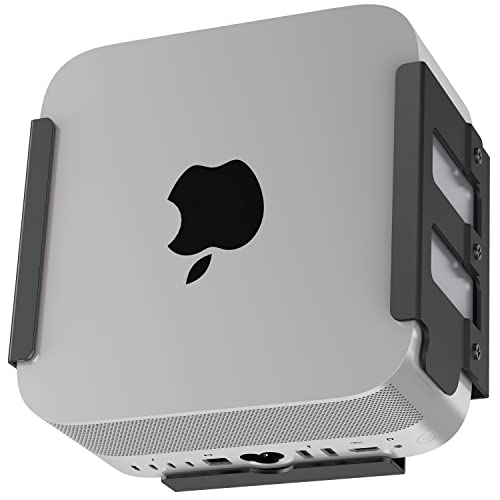
- Helps improve airflow and ventilation
- Supports under-desk, wall, or monitor-back mounting
- Anti-scratch silicone padding protects the finish
Best For: People who want a secure, space-saving Mac Studio mount with better cooling support.
Best for Cooling

- Saves desk space with an under-desk bracket
- Padded contact points help prevent scratches
- Raised design helps preserve airflow around vents
Best For: Mac Studio owners who want a tidy, ventilated under-desk setup.
Best for Neat Desks – Under Desk Mac Studio Mount
If you want a mac studio under desk mount that frees up workspace without compromising airflow, this steel holder is a practical fit. It’s designed for Mac Studio M1/M2/M3 and the new M4 2025 Max/Ultra models, with foam padding to help keep the unit secure and protected.
Best For: Mac Studio owners who want a cleaner desk setup, better protection from dust, and a mount that keeps vents unobstructed.
Pros:
- 2mm steel construction feels sturdy and durable for long-term use
- Foam padding helps prevent scratches and accidental slipping
- Under-desk design saves surface space and helps reduce dust buildup
- Customized fit for Mac Studio M1/M2/M3 and M4 2025 Max/Ultra
Cons:
- Only works with Mac Studio models, not other mini PCs or desktops
- Under-desk mounting may require measuring and installation time
- Minimal cushioning means careful alignment is important
For a tidy workspace and a secure way to relocate your Mac Studio, this mac studio under desk mount gets the basics right: solid metal, protective padding, and an airflow-conscious design. It’s a straightforward pick if your goal is to clear desk clutter and keep the machine out of harm’s way.
Best for a Clean Under-Desk Setup – IFCASE Under Desk Laptop Mount
If you want a simple way to clear desk clutter, this mac studio under desk mount is designed to park slim devices out of sight while keeping them easy to reach. It fits laptops and other gear under 38mm thick, and the silicone padding helps protect finishes from scratches.
Best For: Anyone who wants a minimal, space-saving under-desk storage solution for a Mac mini, laptop, or small accessory.
Pros:
- Helps free up valuable desktop space
- Anti-scratch silicone and non-slip support protect your device
- Metal build with stainless steel screws for sturdy mounting
- Works with Mac mini, MacBook, keyboards, and other slim devices
Cons:
- Requires a desk that is at least 3/4" thick
- Best suited for devices under 1.5" thick
- Installation is more involved than adhesive-only mounts
For buyers prioritizing a tidy workspace over bells and whistles, this mac studio under desk mount is a practical pick. It is especially appealing if you want a low-profile, durable holder that keeps your computer tucked away without taking up shelf or desk surface.
Best for Dust Protection – Transparent Acrylic Mac Studio Stand with Filter
If you want a mac studio under desk mount-style stand that keeps your Mac Studio elevated, ventilated, and cleaner over time, this acrylic bracket is built around that use case. It’s shaped from real-machine molds for a precise fit and adds a detachable filter layer to help reduce dust buildup while maintaining airflow.
Best For: Mac Studio owners who want a tidy desktop setup with added dust protection and a stable elevated base.
Pros:
- Precise Mac Studio-only fit based on real machine molds
- Detachable, washable dust filter helps protect intake airflow
- Clear acrylic finish looks clean and blends into modern setups
- Includes anti-slip pads for better stability on your desk
Cons:
- Not compatible with other Mac models or general desktops
- Acrylic may not suit buyers who prefer a more rugged metal mount
- Filter maintenance is required to keep airflow and dust control effective
For buyers comparing a mac studio under desk mount or desktop stand, this model stands out more for protection and fit than for heavy-duty mounting. It’s a practical pick if your priority is keeping the Mac Studio lifted, stable, and easier to clean.
Best for Easy Under-Desk Storage – IFCASE Under Desk Mount for Mac mini
If you want a simple mac studio under desk mount that clears off desktop clutter, this IFCASE metal shelf is a practical fit for compact gear like a Mac mini, MacBook, or keyboard. It mounts under a desk to keep devices accessible while using silicone padding to help protect finishes from scratches.
Best For: Buyers who want a low-profile under-desk storage solution for a Mac mini, keyboard, or similarly thin device.
Pros:
- Fits devices up to 1.5 inches thick, including Mac mini and MacBook
- Anti-scratch silicone pads and a non-slip surface help protect hardware
- Hard aluminum construction with stainless steel screws for durability
- Minimalist design keeps the area under the desk neat and usable
Cons:
- Requires a desk at least 3/4 inch thick for installation
- Not ideal for larger desktop computers or bulkier peripherals
- Installation is straightforward, but it does require drilling for a secure fit
This is a good pick if your main goal is reclaiming desk space without overcomplicating the setup. For a mac studio under desk mount search, it stands out more as a compact, general-purpose holder than a dedicated heavy-duty workstation solution.
Best for Easy Installation – Oeveo Mac Studio Mount
If you want a mac studio under desk mount that keeps the Mac Studio secure and out of the way, this Oeveo option is built for straightforward setup and flexible placement. It includes the hardware you need, supports under-desk mounting, and adds a 100 mm x 100 mm VESA pattern for other setups too.
Best For: Buyers who want a clean, simple mount for an Apple Mac Studio with easy installation and U.S.-made construction.
Pros:
- Includes the mounting hardware needed for installation
- Works as an under-desk holder, VESA mount, or wall case
- Made in the USA and available in black for a cleaner office look
- Compatible with Apple M1 and M2 Mac Studio models
Cons:
- Primarily designed around the Mac Studio, so it is not a universal PC mount
- VESA flexibility is useful, but the main appeal is still the Mac Studio fit
This is a practical mac studio under desk mount for people who want a tidy workspace without a complicated install. If you value a secure fit, flexible mounting options, and U.S.-made build quality, it makes a strong case.
Best for Airflow – IFCASE Aluminum Under Desk Mac Studio Mount
If you want a practical mac studio under desk mount that clears desk space without trapping heat, this IFCASE bracket is built around airflow and stability. It lifts the Mac Studio slightly off the surface, adds silicone padding to help prevent scuffs, and uses a simple aluminum design that should fit neatly into most workspaces.
Best For: Users who want a durable under-desk storage solution with extra ventilation for a Mac Studio setup.
Pros:
- Raises the Mac Studio about 3 cm for better ventilation
- Hard aluminum construction feels sturdy and long-lasting
- Anti-scratch silicone padding helps protect the finish and reduce noise
- Frees up desk space for a cleaner setup
Cons:
- Requires a desk or shelf at least 3/4 inch thick
- Mounting location is fixed once installed
- Silver finish may not match every workstation aesthetic
For buyers prioritizing cooling clearance and a tidy workspace, this mac studio under desk mount offers a straightforward balance of protection, space savings, and solid construction. It is a smart choice if you want to tuck the machine out of the way without sacrificing airflow.
Best for Hidden Under-Desk Setup – HumanCentric Mac Studio Under Desk Mount
If you want a tidy workspace without giving up access to your Mac Studio, this mac studio under desk mount is a practical way to free up valuable surface space. The steel bracket keeps the computer secure, leaves two open sides for airflow and port access, and helps clean up cable routing around your desk.
Best For: Mac Studio owners who want a sturdy under-desk install that hides the computer, improves organization, and still keeps ports easy to reach.
Pros:
- Steel mount with silicone pads to help prevent scratches
- Open-sided design supports airflow and easier access to ports
- Includes cable ties for cleaner cable management
- Quick installation with included wood screws
Cons:
- Requires a desk that is at least 3/4" thick
- Only fits Mac Studio users, so it is not a general-purpose mount
- The hidden placement may make button access less convenient than on-desk placement
For buyers who want a durable mac studio under desk mount with a simple, space-saving design, this HumanCentric bracket is a strong fit. It is especially appealing if you want to keep your Mac Studio secure, organized, and out of sight while preserving airflow and port access.
Best with Extra Features – IFCASE Aluminum Under Desk Mount for Mac Studio
If you want a clean, secure mac studio under desk mount, the IFCASE aluminum bracket is built to free up desktop space while keeping the Mac Studio elevated for better airflow. The wraparound design and anti-scratch pad help keep the machine steady, and the included hardware makes installation straightforward on a desk or shelf.
Best For: Buyers who want a sturdy under-desk solution that prioritizes ventilation, protection, and a tidier workspace.
Pros:
- Raises the Mac Studio to improve ventilation and reduce heat buildup
- Anti-scratch silicone pad helps protect the finish and cut vibration noise
- Durable aluminum build feels secure and helps save desk space
- Compatible with multiple Mac Studio generations and easy to mount
Cons:
- Only works with desks or shelves at least 3/4" thick
- Single-purpose design may not suit users wanting adjustable mounting options
This mac studio under desk mount is a smart fit if your priority is a simple, durable way to clear desk clutter without trapping heat. It leans practical over flashy, making it a strong choice for a tidy workstation.
Best for Cooling & Cable-Free Mounting – IFCASE Mac Studio Mount
If you want a practical mac studio under desk mount, this IFCASE bracket is built to save desktop space while keeping airflow in mind. Its aluminum frame, anti-scratch inner padding, and support for wall, desk, or monitor-back installation make it a flexible way to secure a Mac Studio without cluttering your workspace.
Best For: Users who want a sturdy, space-saving Mac Studio mount with extra attention to ventilation and device protection.
Pros:
- Heat-dissipation design helps promote airflow around the Mac Studio
- Can be mounted under a desk, on a wall, or behind a monitor
- Silicone inner padding helps prevent scratches and slipping
- Hard aluminum build feels durable and rust-resistant
Cons:
- Only works with Mac Studio models, so it’s not a universal mount
- Requires a desk or shelf at least 3/4-inch thick for installation
Overall, this is a strong mac studio under desk mount for buyers who care about both organization and cooling. It’s especially appealing if you want a clean setup with a secure hold and a more intentional look than a generic shelf or stand.
Best for Cooling – Under Desk Mac Studio Mount
If you want a mac studio under desk mount that saves desktop space without blocking airflow, this stainless steel bracket is a practical fit. It lifts the Mac Studio off the desk, keeps the chassis protected with padded contact points, and aims to reduce clutter in studio or office setups.
Best For: Users who want a sturdy, space-saving mount that keeps Mac Studio accessible, protected, and better ventilated under the desk.
Pros:
- Space-saving under-desk design helps clear valuable desk surface
- Anti-scratch padding protects the Mac Studio finish and improves grip
- Raised bracket leaves vents unobstructed for better cooling
- Stainless steel build adds durability and rust resistance
Cons:
- Requires under-desk installation, so it’s not a plug-and-play accessory
- Fixed bracket style may not suit users who move their Mac Studio often
For buyers focused on ventilation, desk organization, and a secure fit, this mac studio under desk mount is a straightforward pick. It’s less about premium extras and more about doing the core job well: holding the Mac Studio safely while keeping the setup tidy.
How We Picked These Mac Studio Under Desk Mounts
We prioritized mounts designed for stable support, accurate Mac Studio sizing, and practical long-term use. The best options in this category offer secure retention without blocking airflow, plus padded contact points to help prevent scuffs over time. We also looked for designs that make it easy to access ports, power, and cables after installation.
Because desk materials and workstation layouts vary, we favored products with clear mounting methods, solid hardware, and form factors that fit common under-desk and wall-mounted setups.
Quick Comparison
Most buyers will choose between compact metal brackets, vented or heat-conscious designs, and premium mounts with broader compatibility or mounting versatility. If you want the simplest space-saving solution, a basic under-desk bracket is usually enough. If airflow and thermal management matter more, choose a model with open-sided construction or dedicated heat-dissipation features. For users who want a cleaner premium install, VESA-capable or multi-position systems may be worth the extra cost.
Key Buying Factors for a Mac Studio Under Desk Mount
Compatibility
Check the exact Mac Studio generation supported, including M1, M2, M3, and newer M4 variants if applicable. A tight fit matters, especially if the mount uses side walls or a full cradle design.
Airflow and Heat
The Mac Studio is compact and powerful, so airflow should never be an afterthought. Look for mounts that leave vents unobstructed and avoid enclosing the chassis too tightly. If the product mentions heat dissipation or open framing, that is a plus.
Surface Protection
Anti-scratch pads, silicone liners, and smooth edges help protect both the computer and the mount itself. This is especially important if you remove the unit occasionally for maintenance or rearranging cables.
Mounting Style
Some buyers want a straightforward under-desk bracket, while others prefer a VESA-compatible or wall-capable solution. Pick the style that best matches your desk layout, cable routing, and access needs.
Build Quality
Steel and aluminum are the most common choices for a Mac Studio Under Desk Mount. Aluminum often feels more refined and lighter, while steel can offer extra rigidity. In either case, a well-finished mount with secure fasteners is essential.
Who Should Buy Which Mac Studio Under Desk Mount?
If you want maximum simplicity, choose a standard under-desk holder with padding and a snug fit. If you care most about ventilation, choose a model specifically designed for heat dissipation or open airflow. If you need a more premium workspace setup, look for mounts that offer VESA support, wall mounting, or extra installation flexibility. For most users, the best choice is the mount that matches your Mac Studio model, protects the finish, and keeps ports easy to reach.