An iMac M4 setup gets a lot more useful with the right dock. More ports, faster external storage, and simpler cable management can turn a clean desktop into a real productivity hub.
This roundup focuses on practical options for everyday users, creative workflows, and anyone who wants an imac m4 thunderbolt dock that fits both performance needs and desk space.
Best 10 Imac M4 Thunderbolt Dock Picks for 2026
Best for Storage Expansion

- 4K@60Hz HDMI plus 2.5GbE for sharper output and faster networking
- Hidden M.2 SSD enclosure supports up to 4TB of extra storage
- 10Gbps USB, SD/TF, and easy-access audio suit busy desktop setups
Best For: iMac M1/M3/M4 owners who want a clean dock with display, networking, and SSD expansion.
Best for Power Users

- 96W charging for capable host power delivery
- Three Thunderbolt ports plus four USB-A ports
- Supports up to 8K or dual 5K displays
Best For: Power users who want a feature-rich dock for Macs with lots of peripherals.
Best for Built-In SSD Expansion
Minisopuru iMac Hub with M.2 SSD

- Adds hidden M.2 SSD storage up to 2TB
- 7-in-1 hub with 10Gbps USB-C and USB-A
- Includes SD/TF card readers for quick media transfers
Best For: iMac 24-inch users who want a tidy hub with extra storage and everyday ports.
Best for Mixed Mac & Windows Fleets
StarTech.com Thunderbolt 4 Dock

- Dual 4K 60Hz on MacBook Air/Pro M4
- Up to four 4K 60Hz displays on Windows
- 98W charging with 16-port expansion
Best For: Users who need a dependable dock for M4 Macs and mixed Mac/Windows office setups.
Best for iMac Expansion
11-in-1 iMac USB-C Hub with SSD

- Purpose-built for 24-inch iMac models
- Adds HDMI, 2.5G Ethernet, and 10Gbps ports
- Supports optional M.2 NVMe SSD expansion
Best For: iMac 24-inch users who want a clean, all-in-one dock with extra connectivity and storage.
Best for Pro Mac Display Expansion
UGREEN Revodok Max 208 Thunderbolt 4 Dock

- 3x Thunderbolt 4 ports for 40Gbps expansion
- Dual 4K@60Hz or single 8K display support
- 85W charging, Ethernet, and 3x USB-A ports
Best For: Mac users with Pro/Max chips who want a fast, display-friendly dock for a clean single-cable setup.
Best for Dual-Display Macs
StarTech USB-C Dock for MacBook & M4
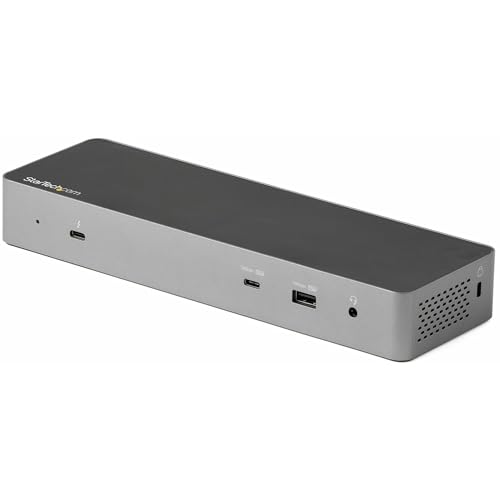
- Dual 4K 60Hz on supported Macs
- 96W charging with broad port selection
- Driverless setup with HDMI and DisplayPort
Best For: Mac users who want a dependable dock for dual monitors, fast peripherals, and laptop charging.
Best for Dual Displays
Plugable Thunderbolt 4 Dock for M4/M5 Macs

- Dual 4K HDMI output on supported M4/M5 and Pro/Max Macs
- 100W charging and 13 ports for a full desktop setup
- Plug-and-play Thunderbolt 4/USB4 compatibility with Mac and Windows
Best For: Mac users who want an easy dual-monitor dock with strong charging and lots of ports.
Best for Dual 4K & Legacy Ports

- Dual 4K 60Hz video with DP, HDMI, and VGA outputs
- 85W Power Delivery plus Gigabit Ethernet
- Plug-and-play setup with included Thunderbolt cable
Best For: Users who want a dependable dock for an iMac M4 setup with dual displays and legacy monitor support.
Best for Storage Expansion – Minisopuru DS802PRO iMac Dock
If you want an imac m4 thunderbolt dock-style hub for your iMac 24-inch, the Minisopuru DS802PRO is built around expansion rather than just extra ports. It adds 4K@60Hz HDMI, 2.5GbE networking, front-access USB-C charging, and a hidden M.2 SSD enclosure, making it a practical desktop upgrade for both work and creative setups.
Best For: iMac M1/M3/M4 users who want a tidy all-in-one dock with display output, fast networking, and built-in SSD expansion.
Pros:
- 4K@60Hz HDMI and 2.5GbE help turn the iMac into a more capable workstation.
- Built-in M.2 SSD enclosure supports up to 4TB for easy local storage expansion.
- Includes 10Gbps USB, SD/TF card slots, and relocated audio for easier access.
Cons:
- Designed specifically for iMac 24-inch models, so it is not a universal dock.
- SSD is not included, so storage expansion adds extra cost.
The DS802PRO is a strong pick if you want your imac m4 thunderbolt dock alternative to do more than basic connectivity. Its real advantage is the combination of clean iMac integration, storage expansion, and wired performance in one base unit.
Best for Power Users – OWC 11-Port Thunderbolt Dock
If you want an imac m4 thunderbolt dock that leans hard into expansion and charging, the OWC 11-Port Thunderbolt Dock is built for a desk full of gear. It combines 96W host charging, three Thunderbolt ports, multiple USB-A connections, Gigabit Ethernet, and SD card support in one hub, making it a strong fit for streamlined Mac setups.
Best For: Users who need a high-port-count dock for peripherals, external storage, and dual-display workflows.
Pros:
- 96W charging is enough for many Mac notebooks and docked workstations
- Three Thunderbolt ports plus four USB ports give you lots of expansion headroom
- Supports up to one 8K display or dual 5K displays on compatible systems
- Includes SD card, Ethernet, and audio for a more complete desktop setup
Cons:
- Display support depends on the computer, so not every Mac gets the same setup
- Runs overkill if you only need a simple charging dock and a few ports
- Some power delivery limitations can show up when multiple high-demand devices are connected
This is a strong pick if you want an imac m4 thunderbolt dock that prioritizes connectivity over compactness. It is especially appealing for users who regularly swap drives, accessories, and displays and want a single hub that can handle more demanding desk setups.
Best for Built-In SSD Expansion – Minisopuru iMac Hub with M.2 SSD
If you want an imac m4 thunderbolt dock alternative that also adds storage, this Minisopuru hub is a practical match for iMac 24-inch setups. It combines a 7-in-1 USB-C hub with an integrated M.2 NVMe/SATA enclosure, so you can add fast local storage without cluttering the desk.
Best For: iMac owners who want a cleaner all-in-one hub with built-in SSD expansion, card readers, and extra USB ports.
Pros:
- Built-in M.2 SSD support for expanding storage up to 2TB
- 10Gbps USB-C and USB-A ports for faster transfers
- Includes SD/TF card readers for easy camera and media imports
- Aluminum design blends into the iMac and helps with heat dissipation
Cons:
- M.2 SSD is not included
- Embedded fit is aimed at iMac 24-inch models, so compatibility is limited
- Not a full Thunderbolt dock with display output or charging hub features
This is a strong choice if your priority is storage plus convenience rather than a traditional imac m4 thunderbolt dock. It gives the iMac a more integrated, desk-friendly setup while keeping everyday ports within easy reach.
Best for Mixed Mac & Windows Fleets – StarTech.com Thunderbolt 4 Dock
If you need an imac m4 thunderbolt dock that can handle both Mac and Windows setups, this StarTech.com Thunderbolt 4 dock is built for exactly that kind of flexibility. It combines driverless USB4/Thunderbolt compatibility, strong display support, and enough power delivery for a clean one-cable desk setup.
Best For: Buyers who want a reliable dock for MacBook Air/Pro M4 systems and mixed-device office environments with lots of monitor and peripheral needs.
Pros:
- Dual 4K 60Hz extended displays on MacBook Air/Pro M3 and M4
- Up to four 4K 60Hz displays on supported Windows laptops
- 98W charging and 16-port expansion reduce cable clutter
- Driverless compatibility across macOS, Windows, and more
Cons:
- Mac display support is strong, but not as expansive as Windows
- Requires the right host hardware to unlock full multi-monitor modes
- Desk-friendly, but not the cheapest Thunderbolt dock option
As an imac m4 thunderbolt dock, it makes the most sense for people who value compatibility and expansion over the lowest price. If you want a serious dock that can anchor a modern workstation and also travel between ecosystems, this one is a very practical pick.
Best for iMac Expansion – 11-in-1 iMac USB-C Hub with SSD
If you want an imac m4 thunderbolt dock that adds real desk utility without looking tacked on, this iMac-specific hub is a strong fit. It combines HDMI, 2.5G Ethernet, SD/TF readers, multiple USB ports, audio, and optional M.2 SSD storage in one integrated accessory for the 24-inch iMac.
Best For: iMac 24-inch owners who want a tidy, all-in-one dock with display output, faster networking, and extra storage support.
Pros:
- Custom-fit design for iMac 24-inch models with a clean integrated look
- Includes 4K 60Hz HDMI, 2.5G Ethernet, and 10Gbps USB-C/USB-A ports
- Supports M.2 NVMe SSD expansion for added storage flexibility
- No drivers required; simple plug-and-play setup
Cons:
- Only works with iMac 24-inch 2021/2023/2024 models
- SSD not included and heatsink-equipped drives are not supported
- External display output requires connection to an iMac Thunderbolt port
Overall, this is a practical imac m4 thunderbolt dock alternative if you want more ports and storage in one matched accessory. It is less of a universal dock and more of a purpose-built iMac expansion solution, which is exactly the appeal for the right buyer.
Best for Dual-Display Flexibility – Plugable Thunderbolt 4 Dock with 100W Charging
If you need an imac m4 thunderbolt dock that can handle serious desktop expansion, the Plugable Thunderbolt 4 Dock is built for exactly that. It delivers dual 4K HDMI support, 100W charging, and a broad mix of USB and network ports, making it a practical hub for a clean Mac setup with room for displays, storage, and accessories.
Best For: Mac users who want a high-performance Thunderbolt 4 dock with dual-display support, strong charging, and lots of wired connectivity.
Pros:
- Supports dual 4K 60Hz displays on compatible Macs, including M4 models
- Provides 100W Power Delivery for charging a MacBook while docked
- Includes 13 ports, plus fast Thunderbolt 4, Ethernet, SD/microSD, and audio
Cons:
- Not every Mac supports dual displays, so compatibility depends on your model
- More dock than casual users need if you only want one monitor and a few USB ports
For buyers comparing an imac m4 thunderbolt dock, this model stands out for its mix of display support, charging power, and port variety. It is a strong pick if you want a dock that can anchor a more complete desktop workstation instead of just adding a few basics.
Best for Pro Mac Display Expansion – UGREEN Revodok Max 208 Thunderbolt 4 Dock
If you need an imac m4 thunderbolt dock with serious port bandwidth, this UGREEN Thunderbolt 4 dock is built for heavier desktop setups. It combines Thunderbolt 4 expansion, wired Ethernet, and USB-A ports in a single hub, while also supporting high-resolution external displays on compatible Macs.
Best For: Mac users with Pro/Max chips who want a fast, all-in-one dock for dual displays, peripherals, and single-cable desk setups.
Pros:
- Three Thunderbolt 4 ports give you flexible 40Gbps expansion for fast storage and accessories.
- Supports dual 4K@60Hz or a single 8K display on compatible systems.
- Includes 85W laptop charging plus Gigabit Ethernet and three USB-A 3.2 ports.
- Works with Mac, Windows, USB4, and Thunderbolt 3/4 devices.
Cons:
- Display support is more limited on base M-chip Macs.
- The dock must be connected to the included charger to operate.
- Not ideal if you only need a simple, low-cost port extender.
This is a strong pick if you want an imac m4 thunderbolt dock that prioritizes display support, fast connections, and desk cleanliness over minimalism. It makes the most sense for users who regularly connect monitors, storage, and Ethernet from one hub.
Best for Dual-Display Macs – StarTech USB-C Dock for MacBook & M4
If you need an imac m4 thunderbolt dock that can handle a real desktop setup, this StarTech option is built around broad Mac compatibility and flexible video output. It supports dual 4K 60Hz on supported M-series Pro/Max systems, includes plenty of USB ports, and offers 96W power delivery for a clean one-cable setup.
Best For: Mac users who want a reliable Thunderbolt/USB-C dock for dual monitors, fast peripherals, and strong charging.
Pros:
- Dual 4K 60Hz support on compatible Macs, with HDMI and DisplayPort options
- 96W Power Delivery helps keep a MacBook charged while connected
- Five USB ports, gigabit Ethernet, and headset jacks cover everyday desk needs
- Driverless setup makes it easy to use right out of the box
Cons:
- Base M-series Macs are limited to a single external display
- More expensive than basic USB-C hubs
- Best results depend on the host Mac’s display support
This is a strong imac m4 thunderbolt dock pick if you care more about dependable dual-display support and port selection than about the lowest possible price. It suits users who want a docking station that feels closer to a full workstation hub.
Best for Dual Displays – Plugable Thunderbolt 4 Dock for M4/M5 Macs
If you want an imac m4 thunderbolt dock that keeps setup simple while still supporting serious multitasking, the Plugable TBT-UDM is built for that job. It combines Thunderbolt 4 speed, 100W laptop charging, and driverless connectivity with HDMI outputs, so you can turn a Mac into a tidy dual-monitor workstation without relying on extra adapters.
Best For: Mac users who want a plug-and-play Thunderbolt dock for dual 4K displays, strong power delivery, and a clean all-in-one desk setup.
Pros:
- Dual 4K HDMI support on compatible M4/M5 and Pro/Max Macs without driver downloads
- 100W charging plus 13 total ports keeps a MacBook powered and fully connected
- Includes Thunderbolt, USB-A, USB-C, SD/microSD, Ethernet, and audio for flexible desk setups
- Works plug-and-play with Thunderbolt 4 and USB4 systems
Cons:
- Base M1/M2 Macs are limited to a single external display
- Base M3 Macs need clamshell mode for dual-monitor use
- More dock than casual users may need if you only want basic port expansion
For buyers focused on compatibility, monitor support, and cable management, this is a strong imac m4 thunderbolt dock option. It’s especially compelling if you want a dependable dock that can anchor a dual-screen Mac workspace without extra setup friction.
Best for Dual 4K & Legacy Ports – StarTech Thunderbolt 3 Dock
If you need an imac m4 thunderbolt dock that prioritizes broad monitor support and a no-fuss setup, this StarTech Thunderbolt 3 dock is a practical pick. It gives you dual 4K 60Hz output, 85W charging, wired Ethernet, and a mix of DisplayPort, HDMI, and VGA so you can connect modern and older displays from one cable.
Best For: Users who want a reliable Thunderbolt dock for an iMac M4 setup with dual displays, wired networking, and flexible legacy video connections.
Pros:
- Dual 4K 60Hz support with flexible DisplayPort, HDMI, and VGA outputs
- 85W Power Delivery is strong enough for many laptop docking setups
- Driverless, plug-and-play installation keeps setup simple
- Includes Gigabit Ethernet plus USB-A ports for everyday peripherals
Cons:
- Thunderbolt 3 design is older than newer Thunderbolt 4 docks
- Not the most compact option if you only need a few ports
- Base M-series Macs may be limited to a single external display
For buyers shopping an imac m4 thunderbolt dock, this model stands out most when monitor compatibility matters more than having the newest spec sheet. It is a solid, dependable workstation dock with enough flexibility for mixed-display offices and straightforward everyday use.
How We Picked the Best Imac M4 Thunderbolt Dock
We looked for docks and hubs that offer strong compatibility, dependable charging, modern display output, and the kind of port selection iMac users actually need. Priority went to models with Thunderbolt or USB-C performance, useful video support, and clear value for the price.
We also favored docks that expand workflow without adding clutter, whether that means extra USB ports, Ethernet, SD card readers, or built-in NVMe support.
Quick Comparison
Some models are best for all-around expansion, while others focus on high-speed Thunderbolt connectivity, single-cable desktop docking, or built-in storage enclosure support. If you want the simplest setup, a compact USB-C hub may be enough. If you need multiple displays, fast external drives, and higher power delivery, a full Thunderbolt dock is usually the better choice.
Key Buying Factors for an Imac M4 Thunderbolt Dock
Display Support
Check whether the dock supports single 4K, dual 4K, or higher resolutions. macOS display behavior can vary by connection type, so confirm the exact monitor setup you plan to use.
Power Delivery
Make sure the dock can supply enough charging power for your use case. Higher wattage is more helpful if you connect accessories, external drives, and a monitor through the same dock.
Ports and Expansion
Think about what you actually plug in daily. USB-A ports, SD/microSD slots, Ethernet, audio, and fast downstream Thunderbolt ports can all matter more than raw port count alone.
Storage Options
Some iMac M4 hub designs include an M.2 SSD enclosure. That is useful if you want fast local storage for media, backups, or project files without adding another external drive.
Compatibility and Performance
An Imac M4 Thunderbolt Dock should be chosen for macOS support, not just port quantity. Look for models that clearly state Mac compatibility and offer the display and charging features you need.
Who Should Buy Which Imac M4 Thunderbolt Dock?
If you want a simple desktop upgrade, a USB-C hub with HDMI, card readers, and a few extra ports may be enough. If you edit media, work with large files, or want a cleaner one-cable desk, a Thunderbolt dock with higher bandwidth and stronger charging is the smarter pick.
For users who want to add both ports and storage, an iMac hub with an M.2 enclosure is especially appealing. If your workflow depends on dual displays or faster networking, prioritize a dock with the right video outputs and Ethernet speed rather than the cheapest option.