The Mac mini M4 is compact, powerful, and easy to outgrow if you rely on external drives, multiple displays, or lots of peripherals. A good hub can turn it into a far more capable desktop setup.
Below, we focus on the best options for speed, expansion, and Mac-friendly design so you can choose the right dock without overspending on features you won’t use.
Best 9 Thunderbolt 5 Hub for Mac Mini M4 Picks for 2026
Best for Multi-Display Power Users

- Five TB5 ports with up to 80Gb/s bandwidth
- Supports up to three 8K displays
- 140W charging in a silent fanless design
Best For: Mac Mini M4 users who want a high-speed Thunderbolt hub for multi-monitor and storage-heavy setups.
Best for Storage Expansion
UGREEN Mac mini M4 Dock with NVMe SSD

- Adds up to 8TB of NVMe storage
- 10Gbps USB-A/USB-C and card readers
- 4K display support with a Mac mini stand
Best For: Mac mini M4 owners who want a dock, stand, and SSD enclosure in one compact unit.
Best USB-C Expansion

- Adds four USB 3.0 ports from one USB-C connection
- 5Gbps speeds for keyboards, drives, and accessories
- Compact 0.5FT cable keeps setups tidy
Best For: Mac mini M4 owners who need simple USB expansion without Thunderbolt features.
Best for High-Speed Storage Expansion
Thunderbolt 5 Mac mini M4 Dock

- 80Gbps Thunderbolt-class data path on supported Macs
- Dual M.2 SSD slots for up to 16TB expansion
- Adds USB-A, SD 4.0, 2.5G LAN, and audio ports
Best For: Mac mini M4 owners building a fast, storage-heavy workstation.
Best Dock + SSD Expansion
Mac mini M4 Dock with 4K HDMI and SSD Bay

- Adds M.2 NVMe/SATA storage up to 8TB
- 4K@60Hz HDMI for a single external display
- 10Gbps USB-A/USB-C plus extra USB-A ports
Best For: Mac mini M4 users who want a tidy dock with built-in storage expansion and core ports.
Best Retro Dock
M5 Retro Dock Station for Mac mini M4 Pro

- 80Gbps M.2 NVMe enclosure for fast external storage
- Built-in 5-inch HD display for quick desktop info
- 8K@60Hz DP, SD/microSD, and multiple USB ports
Best For: Mac mini M4 Pro owners who want a retro all-in-one dock with fast storage and extra display utility.
Best for Built-In Storage
Qwiizlab 40Gbps Mac mini M4 Hub

- 40Gbps NVMe enclosure for up to 8TB drives
- USB-C 10Gbps, USB-A 10Gbps, and SD/TF readers
- Vertical stand saves space and improves access
Best For: Mac mini M4 or M4 Pro owners who want a dock with fast storage expansion.
Best with Extra Features
ACASIS Mac mini M4 Dock with Dual NVMe SSD
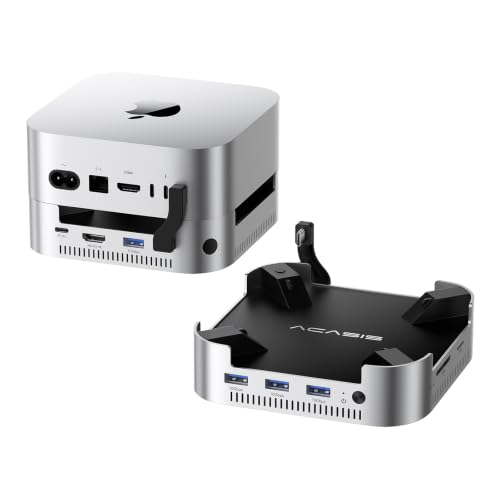
- Up to 16TB dual-NVMe storage expansion
- 3x 10Gbps USB-A plus SD/TF card slots
- 4K@60Hz HDMI and included 30W power
Best For: Mac mini M4 users who want a dock, stand, and high-capacity SSD enclosure in one.
Best for Multi-Display Power Users – OWC Thunderbolt 5 Hub
If you want a thunderbolt 5 hub for mac mini m4 that prioritizes raw bandwidth and display flexibility, the OWC Thunderbolt 5 Hub is built for demanding desktop setups. It adds five Thunderbolt 5 ports, supports up to 80Gb/s performance, and can handle multiple high-resolution displays while keeping your workspace quiet with a fanless aluminum design.
Best For: Mac Mini M4 owners who need a fast, no-fuss Thunderbolt hub for multi-monitor workflows, external storage, and high-power laptop docking.
Pros:
- Five Thunderbolt 5 ports with up to 80Gb/s bandwidth for fast peripherals and storage
- Supports up to three 8K displays, making it strong for advanced monitor setups
- 140W charging helps keep power-hungry notebooks topped up
- Fanless aluminum enclosure keeps operation silent
Cons:
- No Ethernet port, so wired networking needs a separate adapter
- Premium pricing compared with simpler USB-C hubs
- Overkill if you only need a few basic desktop ports
For buyers who care most about speed, display support, and future-proof connectivity, this is a compelling thunderbolt 5 hub for mac mini m4. It is less of an all-in-one dock and more of a high-performance expansion hub for users who want maximum Thunderbolt flexibility.
Best for Storage Expansion – UGREEN Mac mini M4 Dock with NVMe SSD
If you want a thunderbolt 5 hub for mac mini m4-style desk upgrade that also adds serious local storage, this UGREEN dock is a practical pick. It combines a Mac mini stand with a built-in M.2 NVMe enclosure, display output, and extra USB, card reader, and audio connections to keep your setup tidy and fast.
Best For: Mac mini M4 owners who want a compact dock with expandable SSD storage, extra ports, and a clean all-in-one desktop footprint.
Pros:
- Built-in M.2 NVMe enclosure supports up to 8TB of extra storage.
- 10Gbps USB-A/USB-C ports handle fast file transfers and peripherals.
- DP output supports up to 4K@144Hz on M4 and 4K@240Hz on M4 Pro.
- Includes SD/TF card slots, audio, and a power button lever for convenience.
Cons:
- SSD is not included, so you’ll need to buy your own NVMe drive.
- It relies on your Mac’s Thunderbolt port for full multi-display setups.
For buyers who care more about storage expansion and a cleaner workspace than raw hub counts, this is a strong fit. It’s not a true thunderbolt 5 hub for mac mini m4, but it does a great job turning the Mac mini into a more capable desktop station with minimal clutter.
Best USB-C Expansion – UGREEN 4-Port USB 3.0 Hub
If you need a simple way to add more wired accessories to a compact desktop, this UGREEN hub is a practical pick for a thunderbolt 5 hub for mac mini m4 setup. It does not add Thunderbolt speeds or video output, but it does give you four reliable USB 3.0 ports for everyday peripherals, storage, and quick file transfers.
Best For: Users who want a compact, plug-and-play USB port expander for a Mac mini M4, MacBook, or other USB-C device.
Pros:
- Expands one USB-C port into four USB 3.0 ports for keyboards, mice, drives, and accessories
- Up to 5Gbps transfer speeds for fast everyday data moving
- Compact 0.5FT design keeps desktop cable clutter to a minimum
- Broad compatibility with Mac mini M4, MacBook, iPad, Windows laptops, and more
Cons:
- Not a true Thunderbolt hub, so it won’t deliver Thunderbolt 5 bandwidth
- No video output or card reader support
- The USB-C power port is power-only and limited to 5V/2A
For buyers who mainly need extra USB-A connectivity rather than advanced Thunderbolt expansion, this is an easy add-on. If your goal is a thunderbolt 5 hub for mac mini m4, treat it as a budget-friendly USB expansion accessory instead of a full docking solution.
Best for High-Speed Storage Expansion – Thunderbolt 5 Mac mini M4 Dock
If you want a thunderbolt 5 hub for mac mini m4 that doubles as a desk stand and serious storage upgrade, this dock is built around speed and expandability. It adds dual M.2 NVMe slots, extra USB-A ports, SD card access, and wired networking, making it a strong fit for creator workflows and clutter-free setups.
Best For: Mac mini M4 users who need fast external SSD expansion, better port access, and a tidy all-in-one dock/stand.
Pros:
- Up to 80Gbps transfer speeds on Mac Mini M4 Pro, with 40Gbps support on Mac Mini M4
- Dual M.2 SSD bays support up to 16TB of expandable storage
- Includes 2.5G LAN, SD 4.0, USB-A, audio, and PD power support
- Built-in cooling fan and aluminum shell help keep SSDs stable
Cons:
- SSD drives are not included
- Full speed depends on host device and cable compatibility
- May be more dock than casual users need for basic everyday use
This is a compelling thunderbolt 5 hub for mac mini m4 if your priority is turning the mini into a compact storage workstation. It’s especially appealing for editors, photographers, and power users who want fast expansion without adding a separate enclosure and hub.
Best Dock + SSD Expansion – Mac mini M4 Dock with 4K HDMI and SSD Bay
If you want a practical thunderbolt 5 hub for mac mini m4 in a dock-style setup, this aluminum stand is built around expandability rather than pure port count. It adds a built-in M.2 SSD enclosure, 4K@60Hz HDMI, fast USB-A/USB-C data ports, and a clean stand design that helps keep the Mac mini desktop setup organized.
Best For: Mac mini M4 owners who want a tidy all-in-one dock with extra storage, display output, and everyday peripherals in one footprint.
Pros:
- Built-in M.2 NVMe/SATA enclosure supports up to 8TB for easy storage expansion
- 4K@60Hz HDMI output covers single-monitor setups for work or media
- Includes 10Gbps USB-A/USB-C ports plus extra 5Gbps ports for accessories
- Aluminum stand design matches the Mac mini M4’s look and saves desk space
Cons:
- Only one HDMI port, so it’s not ideal for dual-monitor needs
- SSD use may require the rear USB-C power connection for stable operation
- Not a true Thunderbolt 5 dock, despite the roundup keyword fit
This is a smart pick if you value storage expansion and a cleaner desk more than cutting-edge Thunderbolt bandwidth. As a thunderbolt 5 hub for mac mini m4 alternative, it makes the most sense for users who want a compact, all-in-one Mac mini dock rather than a high-end multi-display workstation hub.
Best Retro Dock – M5 Retro Dock Station for Mac mini M4 Pro
If you want a thunderbolt 5 hub for mac mini m4 that does more than add ports, the Wokyis M5 stands out with its built-in 80Gbps SSD enclosure, front display, and space-saving dock design. It’s aimed at users who want one desktop base to handle storage, video output, card reading, and everyday USB expansion.
Best For: Mac mini M4 Pro owners who want a retro-style all-in-one dock with fast external storage and a built-in display.
Pros:
- 80Gbps M.2 NVMe enclosure with strong performance for large transfers and editing workflows
- Built-in 5-inch HD screen adds useful at-a-glance info without extra clutter
- Includes 8K@60Hz DisplayPort, SD/microSD reader, and multiple USB-A/USB-C ports
- Integrated dock layout helps reduce cable mess around the Mac mini
Cons:
- Thunderbolt 5 top speeds require a TB5 cable and compatible host
- Needs a 36W PD power supply for stable operation
- Performance depends on using a fast enough NVMe SSD
This is a compelling pick if you want a thunderbolt 5 hub for mac mini m4 that doubles as a storage upgrade and desk centerpiece. It’s more specialized than a basic port hub, but the extra functionality makes it attractive for power users who value speed and a cleaner setup.
Best for Built-In Storage – Qwiizlab 40Gbps Mac mini M4 Hub
Qwiizlab Mac mini M6, M5 Pro, M4/M4 Pro USB Dock & Stand with 40Gbps NVMe SSD Enclosure, Vertical
Check Price On AmazonIf you want a thunderbolt 5 hub for mac mini m4 that also adds fast local storage, the Qwiizlab stand hub is a strong all-in-one option. It combines a vertical Mac mini base with an NVMe enclosure, multiple high-speed USB ports, SD/TF card readers, and a tidy aluminum design that helps reclaim desk space.
Best For: Mac mini M4 or M4 Pro users who want a compact dock with expandable NVMe storage and extra front-facing ports.
Pros:
- 40Gbps NVMe enclosure supports M.2 PCIe drives up to 8TB for fast local storage
- Includes USB-C 10Gbps, USB-A 10Gbps, USB 2.0, and SD/TF 4.0 readers
- Vertical stand design makes the Mac mini power button easier to reach
- Clean aluminum build saves desk space and matches the Mac mini well
Cons:
- Only works with the 2024 Mac mini M4 and M4 Pro
- NVMe SSD is not included, so you’ll need to buy storage separately
- Port selection is useful, but not as expansive as a full-size dock
For buyers who want a thunderbolt 5 hub for mac mini m4 with built-in SSD expansion, this Qwiizlab unit hits a very practical middle ground. It is especially appealing if you need fast storage and a cleaner desktop setup without adding a separate enclosure and hub.
Best with Extra Features – ACASIS Mac mini M4 Dock with Dual NVMe SSD
If you want a practical thunderbolt 5 hub for mac mini m4-style desk expansion without paying for a full Thunderbolt dock, this ACASIS stand adds storage, USB-A, SD/TF, and 4K HDMI in one compact base. Its biggest draw is the dual NVMe enclosure, which can push total capacity up to 16TB while keeping the Mac mini neatly mounted and cooled.
Best For: Mac mini M4 owners who need a dock-plus-storage solution for media projects, backups, and everyday peripheral connections.
Pros:
- Dual NVMe bays support up to 16TB of expandable storage
- Three 10Gbps USB-A ports plus SD/TF slots cover common accessories
- 4K@60Hz HDMI helps power a clean multi-screen setup
- Aluminum build, dual fans, and included 30W power keep it stable
Cons:
- Not a true Thunderbolt 5 dock, so bandwidth is more limited
- SSD installation adds setup time and requires compatible drives
- Cooling fans may be noticeable in very quiet rooms
This is a smart pick if your priority is expansion rather than raw I/O speed. For buyers searching for a thunderbolt 5 hub for mac mini m4, it makes more sense as a storage-heavy hub/stand hybrid that simplifies the desktop while adding useful everyday ports.
Best Heavy-Duty Pick – ACASIS 40Gbps Mac mini M4 Dock & SSD Hub
If you want a thunderbolt 5 hub for mac mini m4-style desk expansion without giving up storage, the ACASIS dock is built around dual NVMe bays, extra USB ports, and DisplayPort support. It’s a practical all-in-one base for users who need more capacity, better cable management, and a cleaner Mac mini setup.
Best For: Mac mini M4 owners who want to add fast SSD storage, improve desktop organization, and connect multiple peripherals from one compact dock.
Pros:
- Dual NVMe enclosure supports up to 16TB of expandable storage
- Multiple display support with up to 4K@144Hz single-screen or 4K@60Hz dual-screen output
- Three 10Gbps USB-A ports plus SD/TF 4.0 card readers for creators and power users
- Aluminum build with dual cooling fans helps keep temperatures in check
Cons:
- Not a true Thunderbolt 5 dock, so it won’t deliver TB5 bandwidth
- Needs proper power and cable setup to avoid display or SSD disconnect issues
- Drive installation and RAID setup may be overkill for simple plug-and-play users
For buyers comparing a thunderbolt 5 hub for mac mini m4, this ACASIS unit makes more sense if storage expansion matters more than top-tier TB5 throughput. It’s especially appealing for anyone who wants a dock, stand, and dual-SSD enclosure in one compact aluminum package.
How We Picked the Best Thunderbolt 5 Hub for Mac Mini M4
We prioritized real-world usefulness for a Thunderbolt 5 Hub for Mac Mini M4: bandwidth, port selection, storage expansion, display support, charging, and build quality. We also looked for docks that make sense on a small Mac desktop, including stand-style designs that reduce clutter.
Because not every buyer needs maximum speed, we included a mix of Thunderbolt 5, Thunderbolt 4/USB4, and USB-based hubs. That gives you options whether your priority is top-end performance, extra SSD storage, or simply more convenient front-facing ports.
Quick Comparison
Choose Thunderbolt 5 if you want the highest headroom for fast storage and demanding peripherals. Choose a dock with an NVMe enclosure if your main goal is adding local SSD space. Choose a simpler USB hub if you mainly need extra USB-A ports for keyboards, adapters, and accessories.
For most Mac mini users, the best value comes from matching the dock to the bottleneck: storage, display connectivity, or port count. There is no benefit in paying for advanced specs you won’t use every day.
Key Buying Factors for Thunderbolt 5 Hub for Mac Mini M4
Bandwidth and Future-Proofing
Thunderbolt 5 offers more headroom than older standards, which matters if you use fast external SSDs, multiple accessories, or high-resolution displays. If your workflow is light, a 40Gbps option may still be enough.
Storage Expansion
Many of the strongest picks here include M.2 NVMe enclosures. That is ideal if you want fast local storage for media, backups, or project files. Check whether the dock supports single- or dual-bay SSDs and whether it uses NVMe, SATA, or both.
Display and Port Layout
Look for HDMI or DisplayPort based on your monitor setup. Also consider how many USB-A, USB-C, SD, and audio ports you need on the front or side for daily access.
Cooling, Charging, and Fit
Fanless designs stay quiet, while fan-cooled models can help with sustained SSD performance. If you want your Mac mini to sit on top of the dock, confirm the stand fits the M4 chassis properly. Charging support is less important for the Mac mini itself, but it can matter for connected devices and cable management.
Who Should Buy Which Thunderbolt 5 Hub for Mac Mini M4?
If you want the fastest and most premium option, choose a Thunderbolt 5 hub with strong display support and high charging output. If storage is your priority, pick a dock with one or two NVMe bays. If you just need a cleaner desk and a few extra ports, a simpler USB or 40Gbps stand hub may be the smartest buy.
For most buyers, the best Thunderbolt 5 Hub for Mac Mini M4 is the one that solves your biggest limitation today while leaving enough room for future peripherals tomorrow.