If you use a fast NVMe SSD in a portable enclosure, heat can quickly become the limiting factor. An nvme enclosure with active cooling helps maintain steadier performance during long file transfers, backups, and creative workloads.
In this roundup, we focused on enclosures that balance cooling, speed, build quality, and device compatibility so you can pick the right match for your setup.
Best 10 Nvme Enclosure with Active Cooling Picks for 2026
Best for Speed Monitoring

- 80Gbps-ready with Thunderbolt 5 support
- LCD shows temperature and fan status
- Active cooling helps reduce throttling
Best For: Power users who want fast transfers, thermal control, and live status monitoring.
Best for Active Cooling
Thermalright HR-EB101 AC NVMe Enclosure
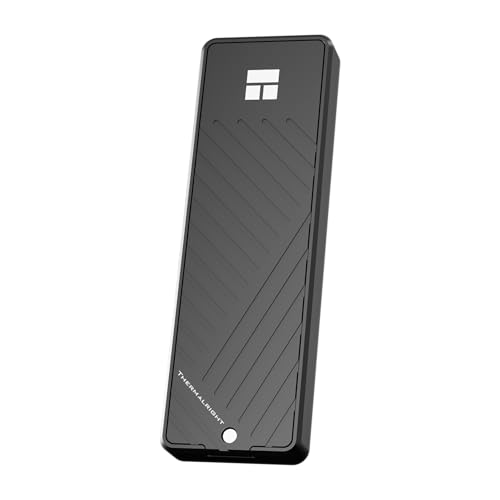
- Aluminum housing with layered thermal pads
- 10Gbps USB 3.2 Gen 2 with UASP/TRIM/S.M.A.R.T.
- Supports M.2 NVMe drives up to 8TB
Best For: Users who want a portable NVMe enclosure with better thermal control and broad device support.
Best Budget
ACASIS TBU405 Pro 40Gbps NVMe Enclosure

- Built-in fan for better thermal control
- 40Gbps USB4/Thunderbolt 4/3 support
- Works with M1/M2/M3 Macs, Windows, and Linux
Best For: Power users who need a fast enclosure with active cooling for sustained workloads.
Best for Heat Management
Sharge Disk M.2 NVMe SSD Enclosure

- Built-in fan for active heat dissipation
- 10Gbps USB-C 3.2 Gen2 transfer speed
- Ultra-compact with write protection
Best For: Travelers, handheld gamers, and creators who want stable speeds in a tiny enclosure.
Best for Data Protection
ineo M.2 NVMe Enclosure with Fan

- Active cooling with built-in fan and thermal pad
- Write-protect switch adds read-only safety
- 10Gbps USB 3.2 Gen 2 performance
Best For: People who want a fast NVMe enclosure with active cooling plus an extra layer of data protection.
Best for Macs
40Gbps M.2 NVMe Enclosure with Cooling Fan

- 40Gbps Thunderbolt 3/4 and USB4 support
- Active cooling fan for better heat control
- Compact aluminum build with broad NVMe compatibility
Best For: Mac users and travelers who need a fast, thermally managed NVMe enclosure.
Best for Cooling
GRAUGEAR M.2 NVMe SSD Enclosure with Fan

- Active cooling with 50 mm fan and aluminum heatsink
- 10Gbps USB 3.2 Gen 2 with UASP/TRIM support
- Tool-free, portable enclosure for quick SSD swaps
Best For: People who want better thermal management for sustained external SSD use.
Best with Extra Features
UGREEN 40Gbps NVMe Enclosure with Fan

- Triple cooling: aluminum shell, thermal pad, and PWM fan
- 40Gbps USB4 with Thunderbolt 3/4 compatibility
- Supports 2230/2242/2260/2280 NVMe drives up to 4TB
Best For: Users who need a fast, cool-running enclosure for long transfers and heavy workloads.
Best Heavy-Duty Pick
fanxiang M.2 NVMe/SATA Enclosure with Fan

- Active cooling fan for better thermal control
- Supports NVMe and SATA M.2 drives
- Fits 2230, 2242, and 2280 SSDs
Best For: Users who want a cooled, versatile enclosure for frequent transfers and mixed SSD types.
Best Simple Pick

- Silent fan and aluminum housing improve heat dissipation
- Tool-free sandwich design speeds up SSD installation
- Supports NVMe M-Key and B+M Key drives up to 2280
Best For: Anyone who wants a cooler-running, easy-to-install SSD enclosure for sustained transfers.
Best for Speed Monitoring – MOKiN 80Gbps NVMe Enclosure
If you want an nvme enclosure with active cooling that also gives you real-time status checks, this MOKiN model stands out. It pairs an 80Gbps-rated design with a built-in LCD, fan-speed control, and broad Thunderbolt/USB4 compatibility, making it a strong fit for fast transfers and sustained workloads.
Best For: Users who want top-end transfer potential, active thermal management, and at-a-glance temperature monitoring for large NVMe SSDs.
Pros:
- Up to 80Gbps support with PCIe Gen5 SSDs and Thunderbolt 5
- LCD display shows temperature and fan status in real time
- Built-in fan starts at 40°C to help prevent thermal throttling
- Supports NVMe M.2 drives up to 8TB in 2230/2242/2260/2280 sizes
Cons:
- 80Gbps speeds require a Thunderbolt 5 port and compatible cable
- Not compatible with SATA M.2 SSDs
Overall, this is a compelling nvme enclosure with active cooling for power users who care about both performance and thermal visibility. If you regularly move large files or run long transfers, the display and cooling fan add real practical value.
Best for Active Cooling – Thermalright HR-EB101 AC NVMe Enclosure
If you want an nvme enclosure with active cooling for sustained transfers, the Thermalright HR-EB101 AC stands out with its aluminum body, thermal pads, and 10Gbps USB 3.2 Gen 2 support. It is designed to keep M.2 NVMe drives running steadily during large file moves, backups, and other long sessions without throttling as quickly as basic enclosures.
Best For: Users who need a portable NVMe enclosure for reliable high-speed transfers, broad device compatibility, and better thermal control.
Pros:
- Active cooling-focused design with aluminum housing and layered thermal pads
- USB 3.2 Gen 2 10Gbps support with UASP, TRIM, and S.M.A.R.T.
- Works with M.2 NVMe drives in 2230/2242/2260/2280 sizes up to 8TB
- Includes both USB-C to C and USB-A to C cables for flexible use
Cons:
- Not compatible with B Key SATA-style M.2 drives
- To reach full speed, the host port must also support 10Gbps
For buyers prioritizing cooling over gimmicks, this nvme enclosure with active cooling offers a practical balance of speed, thermal management, and portability. It is a strong fit if you regularly move large files and want steadier performance than a bare-bones enclosure.
Best Budget – ACASIS TBU405 Pro 40Gbps NVMe Enclosure
If you want an nvme enclosure with active cooling for sustained speed, the ACASIS TBU405 Pro is built for heavy transfers and warmer-running drives. Its built-in fan, aluminum shell, and 40Gbps USB4/Thunderbolt support make it a practical pick for creators, power users, and Mac or PC setups that need better thermal control than a passive enclosure.
Best For: Users who want a high-speed enclosure with active fan cooling for long transfers, editing, and dependable thermal stability.
Pros:
- Built-in fan helps reduce throttling during sustained workloads
- 40Gbps USB4/Thunderbolt 4/3 support for fast NVMe performance
- Wide compatibility with M1/M2/M3 Macs, Windows, Linux, and multiple drive sizes
- Compact aluminum design is easy to carry
Cons:
- Fan must be switched on manually
- Premium feature set comes at a higher price than basic enclosures
- Best performance depends on a compatible 40Gbps host connection
This is a strong choice if your priority is keeping an nvme enclosure with active cooling stable under pressure. It balances speed, portability, and thermal management better than many passive models, especially for long editing sessions or large file backups.
Best for Heat Management – Sharge Disk M.2 NVMe SSD Enclosure
If you want an nvme enclosure with active cooling that can handle long transfers without getting too hot, the Sharge Disk is built for that job. Its built-in fan helps maintain stable performance, while the 10Gbps USB-C connection keeps everyday file moves fast and simple.
Best For: Users who want a compact, travel-friendly SSD enclosure for sustained performance, phone or handheld use, and extra data protection.
Pros:
- Active cooling fan helps reduce heat during heavy workloads
- 10Gbps USB 3.2 Gen 2 transfer speed for fast file movement
- Very small and lightweight for bags, keychains, and mobile setups
- Write protection plus IP54 and drop protection add peace of mind
Cons:
- Only supports M-key 2230 NVMe SSDs
- Does not support SATA, B-key, or B&M-key drives
- Fan-based cooling may be unnecessary for casual users
This is a strong choice if you need an nvme enclosure with active cooling that stays portable and practical. It leans more toward reliable thermal control and device compatibility than sheer capacity, making it a smart pick for on-the-go creators and handheld gaming setups.
Best for Data Protection – ineo M.2 NVMe Enclosure with Fan
ineo M.2 NVMe (PCIe) SSD Enclosure Built-in Cooling Fan and Write Protection Switch [C2605-NVMe]
Check Price On AmazonIf you want an nvme enclosure with active cooling that also adds a security-focused feature, this ineo model stands out. It supports USB 3.2 Gen 2 10Gbps transfer speeds, includes a built-in cooling fan plus a thermal pad, and works with common M.2 NVMe sizes from 2230 to 2280.
Best For: Users who want fast portable NVMe storage with active cooling and a write-protect mode for safer public-machine use.
Pros:
- Built-in fan and thermal pad help manage heat during long transfers
- Write-protection switch can lock the drive to read-only mode
- 10Gbps USB 3.2 Gen 2 performance suits fast external SSD use
- Supports multiple NVMe M.2 sizes, including 2230 through 2280
Cons:
- Does not support SATA/NGFF M.2 SSDs
- Fan-based design may be less appealing if you want silent operation
Overall, this is a practical nvme enclosure with active cooling for people who value both speed and control. The write-protect switch gives it a useful edge over basic enclosures, especially if you move data between trusted and public systems.
Best for Macs – 40Gbps M.2 NVMe Enclosure with Cooling Fan
If you want an nvme enclosure with active cooling that can keep up with high-speed transfers, this 40Gbps model is built for fast, sustained performance. Its Thunderbolt 3/4 and USB4 support, plus the included cables, make it a practical pick for Mac and cross-platform users who move large files often.
Best For: M1 Pro/Max Mac users and anyone who needs a compact, high-speed SSD enclosure with better thermal control.
Pros:
- Built-in cooling fan helps reduce heat and maintain steadier speeds
- ASM2464PD chipset supports up to 40Gbps transfers over Thunderbolt 3/4 and USB4
- Works with 2280, 2260, and 2242 NVMe drives plus S.M.A.R.T., TRIM, and UASP
- Compact aluminum shell is travel-friendly and improves heat dissipation
Cons:
- Only supports NVMe M.2 drives, not SATA SSDs
- Maximum speeds depend on host port compatibility and drive quality
- The fan adds moving parts, so it may not be ideal for silent-build preferences
This is a strong choice if you value speed and thermal stability in an nvme enclosure with active cooling. It especially suits laptop and Mac users who want a small, durable enclosure that can handle heavier workloads without overheating.
Best for Cooling – GRAUGEAR M.2 NVMe SSD Enclosure with Fan
If you want an nvme enclosure with active cooling for longer transfers and safer sustained speeds, this GRAUGEAR dock is built around a 50 mm fan plus an aluminum heatsink. It also adds USB 3.2 Gen 2 10Gbps performance, UASP, and TRIM support, making it a practical pick for daily backup, cloning, or portable workspace storage.
Best For: Users who need an easy-to-swap external SSD enclosure that can help manage heat during longer file transfers.
Pros:
- Built-in fan and aluminum heatsink for active + passive cooling
- 10Gbps USB-C connection with UASP and TRIM support
- Tool-free design makes SSD changes quick and simple
- Works with NVMe PCIe and SATA M.2 drives in multiple sizes
Cons:
- Fan adds some noise compared with fanless enclosures
- Not every M.2 drive ships ready to use, so formatting may be needed
- Cooling focus makes it a bit less compact than ultra-slim cases
As an nvme enclosure with active cooling, this model stands out when you care more about thermal control and stable performance than having the smallest possible shell. It’s especially appealing for power users who move large files regularly and want a simple, tool-free setup.
Best with Extra Features – UGREEN 40Gbps NVMe Enclosure with Fan
If you want an nvme enclosure with active cooling for sustained transfers, this UGREEN model stands out with its aluminum body, thermal pad, and PWM fan working together to keep temperatures in check. It’s aimed at users who move large files often and want steadier performance over long sessions.
Best For: MacBook users, creators, and anyone who needs a fast, cool-running USB4/Thunderbolt NVMe enclosure for heavy file transfers.
Pros:
- Triple cooling setup: aluminum shell, thermal pad, and high-speed fan
- 40Gbps support with USB4 and Thunderbolt 3/4 compatibility
- Fits common 2230/2242/2260/2280 M.2 NVMe drives up to 4TB
- S.M.A.R.T. and TRIM support help with drive health and performance
Cons:
- Does not support M.2 heatsink SSDs
- Top Thunderbolt 4 speeds depend on the right cable and host port
- Active cooling adds a bit more complexity than fanless enclosures
For buyers prioritizing sustained speed, this nvme enclosure with active cooling is a smart fit because it focuses on thermal control first and still delivers modern 40Gbps connectivity. It’s especially practical if your SSD tends to run hot during video editing, backups, or large game transfers.
Best Heavy-Duty Pick – fanxiang M.2 NVMe/SATA Enclosure with Fan
If you want an nvme enclosure with active cooling for long transfers, this fanxiang model is built to help keep temperatures under control while still offering 10 Gbps USB 3.2 Gen 2 performance. It supports both NVMe and SATA M.2 drives, so it works as a flexible pick for users who need one enclosure for different SSD types and sizes.
Best For: Buyers who want a cooled M.2 enclosure for frequent file transfers, backups, or extended SSD use.
Pros:
- Built-in cooling fan helps reduce heat during sustained use
- Supports NVMe and SATA M.2 SSDs in M and B+M key formats
- Compatible with 2230, 2242, and 2280 drive lengths
- 10 Gbps USB 3.2 Gen 2 interface for fast external storage access
Cons:
- Fan adds noise compared with passive enclosures
- Not ideal if you want the smallest possible pocket-friendly enclosure
Overall, this is a practical nvme enclosure with active cooling for shoppers who care more about steady performance and drive temperatures than ultra-minimal size. Its broad SSD compatibility makes it especially useful if you swap drives often or want a single enclosure for multiple M.2 formats.
Best Simple Pick – NVMe Enclosure with Fan
If you want an nvme enclosure with active cooling that prioritizes temperature control and easy everyday use, this sandwich-style aluminum model is a strong pick. It pairs a silent fan with a thermal pad and USB 3.2 Gen 2 speeds up to 10Gbps, making it a practical choice for sustained transfers and large file work.
Best For: Users who need a tool-free SSD enclosure with active cooling for reliable, high-speed transfers and broad M.2 compatibility.
Pros:
- Built-in silent fan plus aluminum shell helps reduce heat during heavy workloads
- Tool-free, sandwich-style design makes SSD swaps quick and simple
- Supports M-Key and B+M Key NVMe SSDs in 2230/2242/2260/2280 sizes
- USB 3.2 Gen 2 connection delivers up to 10Gbps transfer speeds
Cons:
- Does not support M.2 SSDs with a heatsink installed
- Not compatible with B-Key SATA or AHCI SSDs
For shoppers comparing an nvme enclosure with active cooling, this one stands out for combining real thermal management with straightforward installation and wide OS support. It’s a sensible pick if you want dependable performance without moving up to a bulkier, more expensive external drive setup.
How We Picked the Best Nvme Enclosure with Active Cooling
We prioritized real-world cooling, interface speed, SSD compatibility, and enclosure design. That means looking at fan-assisted thermal control, supported drive sizes, USB4 and Thunderbolt options, tool-free access, and build materials that help dissipate heat effectively. We also considered whether each Nvme Enclosure with Active Cooling makes sense for laptops, desktops, Macs, and frequent travelers.
Quick Comparison
In general, 10Gbps models are best for everyday storage, backups, and older systems, while 40Gbps and higher enclosures are better for users who want to push faster NVMe drives closer to their potential. If you transfer large video projects, virtual machines, or game libraries, the faster tier is usually worth the premium. If you mainly want reliable portable storage, a simpler 10Gbps enclosure can be the better value.
Key Buying Factors for an Nvme Enclosure with Active Cooling
Interface Speed
Match the enclosure to your host port. A Thunderbolt 4 or USB4 system can benefit from a 40Gbps enclosure, but only if your computer supports that bandwidth. Otherwise, you may not see the full advantage.
Cooling Design
Look for a fan, thermal pad, and aluminum housing that work together. Active cooling is most useful during sustained transfers, not just short bursts, so enclosure airflow and internal heat contact matter.
Drive Support
Confirm M.2 length compatibility, keying support, and whether the enclosure is NVMe-only or supports SATA as well. Many high-performance models are designed specifically for M-key NVMe drives, while some offer broader compatibility.
Practical Features
Useful extras include tool-free installation, write protection, status displays, and secure shell designs that reduce accidental drops or unplugging. These features can make daily use easier without changing raw performance.
Who Should Buy Which Nvme Enclosure with Active Cooling?
Choose a 10Gbps active-cooling enclosure if you want a dependable portable SSD for documents, media, and moderate backups. Choose a 40Gbps or Thunderbolt-class model if you move large files often or use your SSD for professional workloads. If you want maximum flexibility, look for a model with clear compatibility notes and a proven cooling system. For most buyers, the best Nvme Enclosure with Active Cooling is the one that matches both your computer’s port speed and your workload, not just the highest advertised number.