Choosing the right mini PC for conference room display use can make meetings smoother, cleaner, and far easier to manage. The best options balance 4K output, stable networking, and dependable performance in a compact form factor.
Below, we focus on practical picks for modern conference rooms, from Microsoft Teams Rooms setups to touchscreen displays and multi-screen presentation environments.
Best 10 Mini PC for Conference Room Display Picks for 2026
Best for Microsoft Teams Rooms

- 4K UHD output for clear conference-room displays
- Built for Microsoft Teams Rooms deployments
- Wi‑Fi, Ethernet, and USB for flexible setup
Best For: Teams-centered conference rooms that need a compact 4K video conferencing PC.
Best for Dual Displays
Beelink EQR5 Mini PC Ryzen 5 5500U

- Dual HDMI for two-screen conference room setups
- Ryzen 5 5500U with 16GB RAM for office tasks
- 4K@60Hz output for sharp presentations
Best For: Teams that need a compact, dual-display mini PC for meeting rooms and presentations.
Best for Avocor Rooms
AVOCOR OPS Slot PC for Touchscreens

- OPS-slot design keeps conference setups clean and cable-free
- 12th Gen Core i5 delivers dependable meeting-room performance
- Windows 11 Pro with TPM 2.0 suits managed business environments
Best For: Teams using compatible Avocor displays for meetings, classrooms, and digital whiteboarding.
Best for Triple Displays
GMKtec Nucbox G10 Ryzen 5 Mini PC

- Triple-display output for presentations and signage
- 16GB RAM plus 1TB SSD for smooth everyday use
- 2.5GbE LAN for dependable office networking
Best For: Conference rooms and office setups that need compact triple-monitor support.
Best for Easy Setup

- Dual HDMI 2.0 outputs for 4K 60Hz displays
- 12GB LPDDR5 RAM plus 500GB SSD
- WiFi 6, 2.5GbE LAN, and VESA mount included
Best For: Small conference rooms and meeting spaces needing dependable dual-display output.
Best for Everyday Use

- Triple 4K/60Hz display output for conference setups
- 16GB RAM and 1TB SSD for smooth office use
- Dual 2.5GbE LAN for stable wired networking
Best For: Conference rooms that need a compact PC for presentations, dashboards, and multi-screen displays.
Best for Dual-Display Conference Rooms

- Dual HDMI 2.0 with 4K@60Hz output
- Compact VESA-mountable design
- Good for Office, web, and presentations
Best For: Small offices and meeting rooms that need an easy dual-display PC for presentations and signage.
Best for Triple-Display Rooms

- Triple 4K output for multi-screen presentations
- Dual RJ45 adds stable wired networking
- 16GB RAM and 512GB SSD suit daily office use
Best For: Conference rooms and office teams that need multi-monitor display support with reliable connectivity.
Best Heavy-Duty Pick
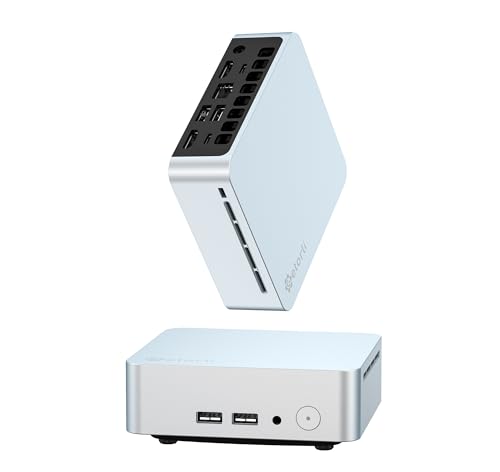
- Triple 4K display support for multi-screen conference setups
- 16GB RAM and 512GB NVMe SSD for smooth office multitasking
- WiFi 6, Bluetooth 5.3, and Gigabit Ethernet for flexible connectivity
Best For: Small meeting rooms and office displays that need a compact multi-monitor mini PC.
Best for Dual-NIC AV Setups
GMKtec G11 Ryzen Embedded R2514 Mini PC
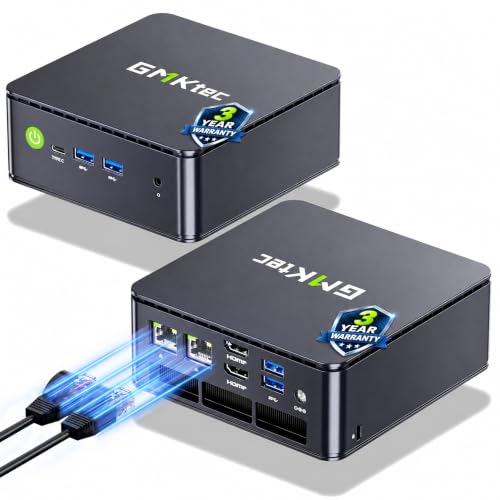
- Triple-display output with dual HDMI and USB-C
- Dual 2.5GbE ports for stable office networking
- 16GB RAM and 512GB SSD for smooth daily use
Best For: Conference rooms and office displays that need multi-screen output with fast wired networking.
Best for Microsoft Teams Rooms – Poly Mini IP Conference PC
If you want a reliable mini pc for conference room display duties, this Poly Mini IP Conference PC is built around Microsoft Teams Rooms and 4K UHD output. It’s a practical fit for meeting spaces that need stable video conferencing, wired network support, and simple peripheral connectivity in a compact device.
Best For: Teams-first conference rooms that need a compact, 4K-capable PC for meeting displays and video calls.
Pros:
- Supports 3840 x 2160 4K UHD video output for crisp meeting-room displays
- Microsoft Teams Rooms focus makes it a strong fit for business conferencing setups
- Includes Wi‑Fi, RJ-45 Ethernet, and USB for flexible installation options
Cons:
- Best suited to Teams-centric environments rather than general-purpose use
- May be more system-specific than a standard mini PC for mixed software needs
For organizations standardizing on Teams, this is a focused mini pc for conference room display use that emphasizes compatibility and dependable 4K presentation output over extra general-computing features. It’s a smart pick when you want a purpose-built meeting room system instead of a do-it-all desktop replacement.
Best for Dual Displays – Beelink EQR5 Mini PC Ryzen 5 5500U
If you need a mini pc for conference room display use, the Beelink EQR5 is a practical pick thanks to its Ryzen 5 5500U processor, dual HDMI outputs, and 4K@60Hz support. It has enough everyday performance for slide decks, video calls, dashboards, and streaming presentations without taking up much space behind a TV or meeting-room monitor.
Best For: Conference rooms that need a compact PC for dual-screen presentations, signage, or meeting apps.
Pros:
- Dual HDMI outputs make it easy to run two displays at once.
- Ryzen 5 5500U and 16GB RAM handle office workloads smoothly.
- 4K@60Hz support is a good fit for crisp presentations and displays.
- WiFi 6, Bluetooth 5.2, and dual Ethernet add flexible connectivity.
Cons:
- Not built for heavy creative work or demanding multitasking.
- Storage is solid, but power users may still want a larger SSD later.
For teams choosing a mini pc for conference room display setups, the EQR5 stands out more for dependable connectivity and dual-monitor support than raw horsepower. It is a sensible option when you want a compact machine that can stay tucked away and keep presentations running reliably.
Best for Avocor Rooms – AVOCOR OPS Slot PC for Touchscreens
If you need a mini pc for conference room display use that stays hidden inside the panel, this AVOCOR OPS slot PC is built for exactly that workflow. It turns compatible Avocor interactive displays into a complete Windows 11 Pro system for meetings, whiteboarding, and hybrid collaboration, while keeping the setup clean and cable-free.
Best For: Conference rooms, classrooms, and teams already using compatible Avocor interactive touchscreen displays.
Pros:
- Slides directly into the OPS slot for a tidy, all-in-one installation
- 12th Gen Intel Core i5 and Iris Xe graphics handle presentations and collaboration apps smoothly
- Windows 11 Pro, TPM 2.0, 8GB RAM, and 256GB SSD make it enterprise-ready
Cons:
- Only works with compatible Avocor OPS displays
- 8GB RAM is fine for meetings, but not ideal for heavier multitasking
For buyers already invested in Avocor hardware, this is a practical mini pc for conference room display use because it keeps the system integrated, secure, and easy to manage. It is less of a universal mini PC and more of a purpose-built upgrade for clean, professional touchscreen rooms.
Best for Triple Displays – GMKtec Nucbox G10 Ryzen 5 Mini PC
If you need a mini pc for conference room display setups that can handle slides, dashboards, and video playback at once, the GMKtec Nucbox G10 is a strong practical pick. Its Ryzen 5 3500U, 16GB dual-channel RAM, and triple-display output give it more headroom than basic entry-level mini PCs, while the 1TB SSD and 2.5GbE port make it easy to drop into an office network.
Best For: Conference rooms, meeting spaces, and office users who want a compact PC with triple-monitor support and fast wired networking.
Pros:
- Triple-display support via HDMI 2.1, DisplayPort, and USB-C
- Ryzen 5 performance is stronger than typical N-series mini PCs
- 1TB SSD and 16GB RAM are ready for business use out of the box
- 2.5GbE LAN is great for reliable office connectivity
Cons:
- Ryzen 5 3500U is older than newer AMD chips
- Wi‑Fi 5 is fine, but not as current as Wi‑Fi 6/6E
- Not the quietest or most powerful option for heavy creative work
For a mini pc for conference room display use, this model stands out more for practical connectivity than raw power. It’s a sensible choice when you want a small, wired, multi-display system that can stay dependable for everyday presentations and signage.
Best for Easy Setup – Beelink MINI S13 N150 Mini PC
If you need a compact mini pc for conference room display use, the Beelink MINI S13 is a practical option thanks to its dual HDMI outputs, 4K support, and low-power Intel N150 processor. It’s built for light office work, slide decks, video calls, and always-on presentation tasks without taking up much space behind a screen.
Best For: Small conference rooms, meeting spaces, and digital signage setups that need dual 4K display support and reliable everyday performance.
Pros:
- Dual HDMI 2.0 ports support two 4K 60Hz displays
- 12GB LPDDR5 RAM and 500GB SSD provide smooth everyday responsiveness
- WiFi 6, 2.5GbE LAN, and Wake-on-LAN add flexible deployment options
- Includes VESA mount for cleaner behind-screen installation
Cons:
- Not intended for heavy content creation or demanding multitasking
- N150 performance is best suited to light business workloads
- Windows 11 Home may be less ideal than Pro for managed IT environments
For buyers focused on a compact, easy-to-mount mini pc for conference room display tasks, this Beelink model covers the essentials well. It’s strongest where quiet operation, dual-monitor output, and simple office reliability matter more than raw speed.
Best for Everyday Use – BOSGAME E5 5300U Mini PC
If you need a mini pc for conference room display, the BOSGAME E5 is a practical option thanks to its triple 4K@60Hz output support, dual LAN, and compact, easy-to-place design. It has enough memory and storage for everyday presentation loops, web dashboards, and signage software without taking up space at the table or behind the screen.
Best For: Teams that want a compact conference room PC for presentations, dashboards, and multi-screen display setups.
Pros:
- Triple-display support with HDMI 2.0, DisplayPort, and USB-C at 4K/60Hz
- 16GB RAM and 1TB SSD provide solid room for office apps and local files
- Dual 2.5GbE LAN is useful for stable wired networking in meeting spaces
- Compact Ryzen 3 5300U platform keeps power use and footprint modest
Cons:
- Ryzen 3 performance is fine for office tasks, but not ideal for heavy workloads
- Wi-Fi 5 is serviceable, though newer wireless standards would be preferable
- Conference-room buyers may want to verify mounting and cable management needs
Overall, the BOSGAME E5 is a smart pick if your priority is a reliable mini pc for conference room display rather than raw processing power. Its multi-output support and dual wired networking make it especially well suited to presentation and signage duties.
Best for Dual-Display Conference Rooms – GMKtec Mini PC N95 8GB/256GB
If you need a compact mini pc for conference room display use, the GMKtec G3 S is a practical choice for basic presentation duty, dashboards, and everyday office apps. Its N95 processor, dual HDMI output, and small VESA-mountable design make it easy to tuck behind a monitor or meeting-room screen without adding clutter.
Best For: Small offices, huddle rooms, and teams that want a simple dual-display setup for presentations and signage.
Pros:
- Dual HDMI 2.0 outputs support two 4K@60Hz displays
- N95 processor is solid for Office, web, video, and light multitasking
- VESA mount helps keep conference tables and displays uncluttered
- WiFi 5, Gigabit Ethernet, and Bluetooth 5.0 cover common office connections
Cons:
- 8GB RAM and 256GB SSD are modest for heavier workloads
- Not ideal for demanding creative work or advanced virtualization
- WiFi 5 is functional, but not as fast as newer WiFi 6/6E models
For a mini pc for conference room display, this model makes the most sense when you want low cost, low footprint, and dependable 4K output rather than maximum performance. It’s a good fit for meeting room screens, digital signage, and straightforward business use.
Best for Triple-Display Rooms – BOSGAME E4 Ryzen 5 Mini PC
If you need a practical mini pc for conference room display setups, the BOSGAME E4 is a strong fit thanks to its triple 4K output, dual Ethernet, and compact footprint. It has enough everyday performance for presentations, video calls, dashboards, and general office multitasking without taking up desk space.
Best For: Conference rooms, huddle spaces, and office display setups that need multiple monitors and reliable wired networking.
Pros:
- Triple 4K display support via HDMI, DisplayPort, and USB-C
- Ryzen 5 3550H with 16GB RAM handles office apps and streaming smoothly
- Dual RJ45 plus Wi-Fi 5 and Bluetooth 5.0 for flexible connectivity
- 512GB SSD offers fast boot times and plenty of room for documents
Cons:
- Wi-Fi 5 is fine for business use, but not the newest wireless standard
- Not aimed at heavy creative work or demanding 3D workloads
- Ryzen 5 3550H is capable, but not a high-end processor
For teams that want a mini pc for conference room display use without overspending, this BOSGAME model hits a useful balance of screen support, wired stability, and compact convenience. It is especially appealing if your room setup depends on multiple monitors and dependable everyday performance.
Best Heavy-Duty Pick – Getorli Ryzen 5 Mini PC
If you need a mini pc for conference room display use, this Getorli model is a practical choice thanks to its triple 4K output support, compact footprint, and built-in WiFi 6. It has enough everyday horsepower for presentation playback, dashboards, video calls, and light office multitasking without taking up much desk or AV space.
Best For: Small meeting rooms, huddle spaces, and office setups that need multiple screens on a compact Windows mini PC.
Pros:
- Triple 4K display support makes it well-suited to conference room and signage-style setups.
- Ryzen 5 3550H, 16GB RAM, and 512GB NVMe SSD provide smooth day-to-day performance.
- WiFi 6, Bluetooth 5.3, and Gigabit Ethernet offer flexible connectivity for business use.
- Compact design with dual HDMI and USB-C ports helps it fit neatly behind a display.
Cons:
- Not ideal for demanding creative workloads or heavier 3D gaming.
- Ryzen 5 3550H is an older processor compared with newer mini PC options.
Overall, this is a strong mini pc for conference room display use if your priority is driving multiple monitors in a small space rather than chasing top-end performance. It balances useful specs, flexible ports, and compact size in a business-friendly package.
Best for Dual-NIC AV Setups – GMKtec G11 Ryzen Embedded R2514 Mini PC
If you need a mini pc for conference room display, the GMKtec G11 is a practical pick thanks to its triple-display output, 4K support, and business-friendly dual 2.5GbE ports. It has enough headroom for signage, meeting-room dashboards, and everyday office workloads without taking up much space.
Best For: Conference rooms, digital signage, and office setups that need reliable multi-display output plus fast wired networking.
Pros:
- Triple-display support with dual HDMI and USB-C DisplayPort Alt Mode
- Dual 2.5GbE NICs for fast, stable wired networking
- 16GB dual-channel RAM and 512GB SSD for smooth everyday business use
- Ryzen Embedded R2514 is built for 24/7-style operation
Cons:
- Not the cheapest option for basic display-only use
- More performance than many meeting-room tasks actually require
- May be overkill if you only need a single screen
For buyers comparing a mini pc for conference room display, this model stands out most when networking and multi-screen flexibility matter as much as compact size. It is a strong fit for always-on office environments, though simpler rooms may not need all of its hardware.
How We Picked the Best Mini PC for Conference Room Display
For a Mini PC for Conference Room Display setup, the most important priorities are reliability, video output quality, network stability, and ease of installation. We looked for models with enough performance for collaboration apps, support for one or more external displays, and business-friendly features like VESA mounting, wired Ethernet, and USB-C or HDMI connectivity.
We also favored systems that fit different room sizes and deployment styles, including purpose-built room systems, OPS slot PCs for interactive displays, and general-purpose mini desktops that can handle signage, presentations, and video conferencing.
Quick Comparison
Some buyers need a dedicated Microsoft Teams Rooms or conference platform device, while others want a flexible mini PC that can drive a display, handle browser-based conferencing, and run office apps. If your priority is a polished room-installation experience, purpose-built options are often best. If you need value and versatility, a standard mini PC with dual- or triple-display support may be the smarter choice.
Key Buying Factors for a Mini PC for Conference Room Display
Display Output and Resolution
Look for at least 4K support if the system will power a large screen or digital signage display. Dual-display support is useful for rooms that show both the meeting content and a control interface. Triple-display support can be valuable for more advanced collaboration setups.
Processor and Memory
For basic conferencing and presentation playback, entry-level processors can be enough. For smoother multitasking, browser tabs, screen sharing, and room control software, choose a stronger CPU with 16GB of RAM when possible.
Networking and Audio/Video Stability
Wired Ethernet is preferable in meeting rooms because it reduces dropouts and improves consistency. Dual LAN can be especially useful for advanced IT deployments or segmented networks.
Mounting and Integration
Check whether the mini PC supports VESA mounting, OPS slot installation, or other clean-install options. Easy integration matters in conference rooms where cable management and security are important.
Operating System and Platform Compatibility
Make sure the device matches your software stack, whether that is Microsoft Teams Rooms, Zoom Rooms, Windows-based conferencing tools, or browser-based signage and presentation software.
Who Should Buy Which Mini PC for Conference Room Display?
If you want a dedicated room system with the least setup friction, choose a purpose-built conference solution. If you are installing into an interactive touchscreen or whiteboard, an OPS-compatible model is the most streamlined option. For small and mid-size meeting rooms that need flexibility, a well-equipped mini PC with 4K output, Ethernet, and enough RAM is usually the best value.
For budget-conscious buyers, smaller office rooms and simple display duties can be handled by entry-level models. For larger rooms, heavier multitasking, or dual- and triple-screen workflows, step up to a more capable Ryzen-based unit or a business-oriented system with stronger connectivity and better thermal headroom.