If you need a compact desktop that can handle video calls without lag, a mini PC for Zoom meetings is a smart upgrade. The best models balance fast startup, stable connectivity, and quiet operation.
In this roundup, we focus on small systems that fit home offices, shared workspaces, and meeting-room setups, with enough headroom for multitasking, screen sharing, and everyday productivity.
Best 10 Mini PC for Zoom Meetings Picks for 2026
Best for Multitasking
GMKtec M2 Pro S Intel Core i7 Mini PC
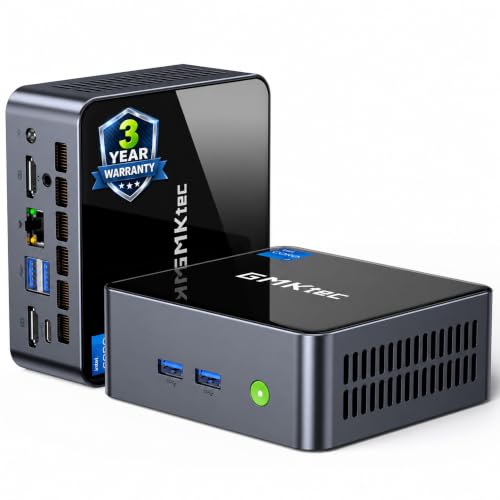
- Fast Core i7 performance for smooth Zoom calls and daily work
- Modern connectivity includes WiFi 6, USB4, BT 5.2, and 2.5G Ethernet
- Supports up to three 4K displays for a tidy multitasking setup
Best For: Remote workers who want a compact, responsive mini PC for meetings and productivity.
Best for Teams Rooms
ViewSonic TeamJoin TRS10-UB Bundle

- Certified Microsoft Teams Rooms bundle
- One-touch 10-inch control console
- Includes 4K UHD conferencing camera
Best For: Conference rooms that need a simple, certified Teams Rooms setup with fast join controls.
Best for Multi-Display Calls

- 13th Gen Core i5 handles meetings and multitasking smoothly
- Dual HDMI 2.1 plus Thunderbolt supports multi-monitor setups
- Wi‑Fi 6E, Bluetooth 5.3, and Ethernet cover modern connectivity
Best For: Remote workers and home offices that want a compact meeting PC with multiple display support.
Best for Compact Zoom Setups

- Small footprint fits neatly behind a monitor or on a crowded desk.
- 16GB RAM and 500GB SSD handle meetings and daily office work.
- Dual HDMI and 2.5Gbps LAN support a tidy, connected workstation.
Best For: Remote workers and home offices needing a compact, budget-friendly Zoom machine.
Best for Windows Pro Teams
Lenovo ThinkCentre neo 50q Gen 5 Mini Desktop

- Core i5 and 16GB DDR5 keep Zoom and multitasking responsive
- Dual-monitor support helps with meetings and day-to-day work
- Tiny, VESA-mountable design keeps desks clean and uncluttered
Best For: Remote workers and small teams who need a compact Windows 11 Pro desktop for meetings and productivity.
Best for Triple-Monitor Calling
BOSGAME E5 Ryzen 5300U Mini PC

- Ryzen 5 5300U with 16GB RAM for smooth office multitasking
- Triple-display output for Zoom, notes, and shared content
- Dual 2.5G LAN plus Wi‑Fi 5 for flexible home-office networking
Best For: Remote workers who want a compact desktop for Zoom and multi-monitor productivity.
Best for Quiet Multi-Tasking
Lenovo ThinkCentre neo 50q Gen 4 Mini
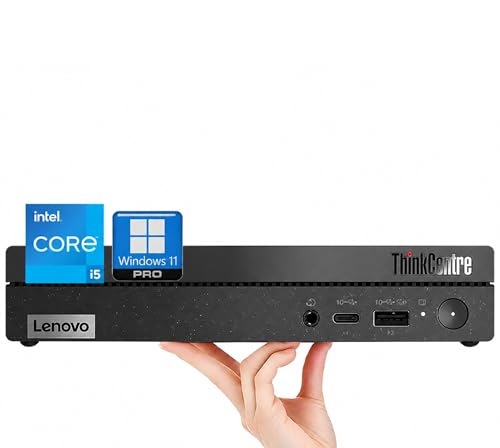
- Fast Intel Core i5 performance for smooth Zoom calls
- Tiny 1L business desktop with a very small footprint
- Dual-monitor support and Windows 11 Pro included
Best For: Remote workers and small offices that need a quiet, space-saving PC for meetings and everyday productivity.
Best with Extra Features
BOSGAME E2 Mini PC Ryzen 5 3500U

- Ryzen 5 3500U with 16GB RAM for smooth Zoom calls and office work
- 512GB NVMe SSD for quick boot and app loading
- Triple-display support via dual HDMI and USB-C
Best For: Remote workers and small offices needing a compact PC for meetings and everyday productivity.
Best for Fast Zoom Multitasking

- Core i3-10110U is responsive for Zoom and office apps
- 16GB dual-channel RAM + 512GB SSD keep multitasking smooth
- Dual HDMI, WiFi 6, Bluetooth 5.2, and 2.5GbE add flexibility
Best For: Remote workers who want a compact, capable desktop for video calls and everyday productivity.
Best for Wired Zoom Setups
GMKtec G3 Pro Mini PC, i3-10110U

- 16GB dual-channel RAM keeps calls and multitasking smooth
- Dual HDMI supports two-monitor Zoom workstations
- WiFi 6 plus 2.5GbE covers wireless or wired setups
Best For: Home office users who want a compact, dependable Zoom PC with dual monitors.
Best for Multitasking – GMKtec M2 Pro S Intel Core i7 Mini PC
If you want a mini pc for zoom meetings that can also handle everyday work, the GMKtec M2 Pro S is a strong all-around option. Its Intel Core i7-1185G7, 16GB of RAM, and fast NVMe SSD should keep video calls, screen sharing, and multitasking running smoothly, while the compact size helps keep your desk uncluttered.
Best For: Remote workers, small offices, and anyone who wants a compact desktop that can manage Zoom, office apps, and light creative work without feeling sluggish.
Pros:
- Core i7-1185G7 and Iris Xe graphics offer solid responsiveness for video conferencing and daily productivity
- WiFi 6, USB4, Bluetooth 5.2, and 2.5G Ethernet give you flexible, modern connectivity
- Supports up to three 4K displays, which is handy for multitasking during calls
- Compact footprint keeps your meeting setup tidy and space-efficient
Cons:
- Only 16GB RAM out of the box, so heavier workloads may benefit from an upgrade
- Not the cheapest choice if you only need a basic meeting machine
Overall, this is a practical mini pc for zoom meetings if you want more than just webcam-ready basics: it adds enough CPU power, ports, and display support to serve as a capable home office hub.
Best for Teams Rooms – ViewSonic TeamJoin TRS10-UB Bundle
If you want a mini pc for zoom meetings that also works as a dedicated room system, this ViewSonic TeamJoin bundle is built for easy, touch-first control in Microsoft Teams Rooms. It combines the mini PC, 10-inch console, and 4K camera into a tidy setup that’s made for quick joins, consistent performance, and less IT friction.
Best For: Conference rooms, huddle spaces, and office teams that want a certified Teams Rooms system with simple one-touch meeting control.
Pros:
- Includes everything needed for a Teams Rooms setup: mini PC, touch console, and 4K camera
- One-touch meeting controls make joining and managing calls fast and easy
- 12th Gen Intel Core i3 performance with TPM 2.0 and Windows 11 IoT Enterprise
- Camera tracking and 4K UHD video help keep meetings clear and professional
Cons:
- Designed for Microsoft Teams Rooms, so it’s less flexible for mixed-platform use
- More of a room bundle than a standalone general-purpose mini PC
For buyers who need a mini pc for zoom meetings in a shared room environment, the main appeal here is simplicity: certified hardware, centralized controls, and a ready-to-deploy package. It’s a strong pick if you want a polished meeting-room experience rather than a basic desktop mini PC.
Best for Multi-Display Calls – ASUS NUC 13 Pro Slim Mini PC
If you want a mini pc for zoom meetings that can also handle serious day-to-day work, the ASUS NUC 13 Pro Slim is a strong fit. Its 13th Gen Intel Core i5 processor, upgradeable memory, and dual HDMI plus Thunderbolt support make it easy to run a smooth video call setup with room for extra monitors and peripherals.
Best For: Remote workers, home offices, and users who want a compact meeting PC with flexible multi-screen support.
Pros:
- 13th Gen Core i5 performance is well suited to video calls, multitasking, and office apps
- 2× HDMI 2.1 and 2× Thunderbolt ports support flexible multi-monitor setups
- Wi‑Fi 6E, Bluetooth 5.3, and RJ-45 offer modern, reliable connectivity
- Expandable RAM and SSD let you scale it beyond the base configuration
Cons:
- 256GB SSD is modest if you keep a lot of files or recordings locally
- Not the cheapest option for buyers who only need basic meeting-room use
As a mini pc for zoom meetings, this ASUS NUC stands out most when you want a tidy desktop footprint without giving up productivity headroom. It is especially appealing if you plan to connect multiple displays and want a machine that can stay responsive during meetings, browser use, and light multitasking.
Best for Compact Zoom Setups – Beelink Mini S12 Mini PC
If you want a mini pc for zoom meetings that stays small, affordable, and ready for everyday office tasks, the Beelink Mini S12 is an easy fit. Its Intel N95 chip, 16GB of RAM, and 500GB SSD are enough for video calls, screen sharing, web browsing, and light multitasking without taking up much desk space.
Best For: Remote workers, students, and home offices that need a compact desktop for reliable Zoom calls and basic productivity.
Pros:
- Compact size makes it easy to tuck behind a monitor or mount with VESA.
- 16GB RAM and 500GB SSD provide a solid baseline for smooth everyday use.
- Dual HDMI outputs support a practical dual-monitor Zoom workspace.
- 2.5Gbps LAN plus WiFi 5 adds flexible connectivity options.
Cons:
- N95 performance is fine for meetings, but not ideal for heavier creative workloads.
- WiFi 5 and Bluetooth 4.2 are a step behind newer wireless standards.
As a mini pc for zoom meetings, this Beelink model stands out more for practicality than raw power: it has the memory, storage, and ports most people need for smooth calls and a tidy setup. If your priority is dependable conferencing in a small form factor, it covers the essentials well.
Best for Windows Pro Teams – Lenovo ThinkCentre neo 50q Gen 5 Mini Desktop
If you want a mini pc for zoom meetings that can also handle everyday office work without taking over your desk, the Lenovo ThinkCentre neo 50q Gen 5 is a strong fit. It pairs a 13th Gen Core i5 processor with fast DDR5 memory, solid storage, and modern wireless connectivity in a compact business-friendly chassis.
Best For: Remote workers, small offices, and professionals who need a compact Windows 11 Pro desktop for video calls, multitasking, and dual-monitor productivity.
Pros:
- Fast Core i5 H-series chip and 16GB DDR5 handle Zoom, Office, and multitasking smoothly
- Dual-display support makes it easier to work during meetings with notes, docs, or shared content open
- WiFi 6E, Bluetooth 5.3, and plenty of USB ports simplify modern desktop setups
- Very small footprint with VESA-mount support helps keep the workspace clean
Cons:
- No dedicated graphics, so it is not meant for creative or gaming-heavy workloads
- 16GB RAM is good for most business users, but power users may want more headroom
- Business-oriented features can make it pricier than basic mini PCs
For buyers focused on a mini pc for zoom meetings, this Lenovo stands out for its balance of speed, quiet operation, and pro-level connectivity. It is a practical pick if you want a reliable meeting machine that can also serve as a full-time work PC.
Best for Triple-Monitor Calling – BOSGAME E5 Ryzen 5300U Mini PC
The BOSGAME E5 is a practical mini pc for zoom meetings if you want enough speed for video calls, screen sharing, and everyday office apps without taking up desk space. Its Ryzen 5 5300U, 16GB RAM, and 512GB SSD give it a smooth, responsive feel for home-office use, while the compact chassis and VESA mount make it easy to tuck behind a monitor.
Best For: Remote workers who want a compact desktop for Zoom, email, document work, and a multi-monitor setup.
Pros:
- Ryzen 5 5300U and 16GB RAM handle calls, multitasking, and light productivity well
- Triple-display support is useful for Zoom, notes, and shared content at once
- 512GB NVMe SSD gives fast boot times and enough storage for everyday use
- Dual 2.5G LAN plus Wi‑Fi 5 adds flexible connectivity for home offices
Cons:
- Wi‑Fi 5 is fine, but not as current as Wi‑Fi 6 or 6E
- Single-stick 16GB memory may be less ideal than dual-channel configurations
- Integrated graphics are suited to office work, not heavier creative tasks
For a mini pc for zoom meetings, the BOSGAME E5 stands out more for practicality than flash: it covers the essentials, supports multiple displays, and keeps your desk uncluttered. If your priority is reliable video meetings and everyday productivity, this is a strong value-oriented pick.
Best for Quiet Multi-Tasking – Lenovo ThinkCentre neo 50q Gen 4 Mini
If you want a mini pc for zoom meetings that can also handle everyday office work without hogging desk space, the Lenovo ThinkCentre neo 50q Gen 4 is a strong fit. Its Intel Core i5 processor, 16GB of RAM, and 512GB SSD help it stay responsive during video calls, document editing, and light multitasking.
Best For: Remote workers, small offices, and students who need a compact business desktop for reliable video conferencing and daily productivity.
Pros:
- 8-core Intel Core i5 chip delivers smooth performance for Zoom and multitasking
- Ultra-compact 1L design saves space and fits neatly on crowded desks
- Supports dual-monitor use up to 4K for a more productive meeting setup
- Includes Wi-Fi 6, Bluetooth, keyboard, mouse, and Windows 11 Pro
Cons:
- Integrated graphics are fine for office use, not demanding creative work
- Only 16GB of RAM out of the box, though it is expandable
Overall, this is a practical mini pc for zoom meetings if you want dependable speed, quiet operation, and a tiny footprint. It is especially appealing for users who value business features and dual-monitor flexibility over flashy extras.
Best with Extra Features – BOSGAME E2 Mini PC Ryzen 5 3500U
If you want a mini pc for zoom meetings that can also handle everyday office work, the BOSGAME E2 is a solid all-around option. Its Ryzen 5 3500U chip, 16GB of RAM, and 512GB NVMe SSD give it enough speed for video calls, browser tabs, documents, and light multitasking without feeling sluggish.
Best For: Remote workers, small offices, and home users who need a compact desktop for smooth video meetings plus day-to-day productivity.
Pros:
- Ryzen 5 3500U and 16GB RAM handle Zoom, Office apps, and multitasking well
- Quiet cooling and small form factor make it easy to place on a desk or behind a monitor
- Dual HDMI plus USB-C support up to three displays for a more efficient workspace
- Fast NVMe SSD helps the system boot quickly and open apps snappily
Cons:
- WiFi 5 is fine, but not as modern as WiFi 6 or 6E
- Integrated graphics are suitable for office use, not demanding creative work
Overall, this is a practical mini pc for zoom meetings if you want reliable performance, strong connectivity, and a compact footprint rather than flashy extras. It fits especially well in a home office where quiet operation and dual- or triple-monitor support matter.
Best for Fast Zoom Multitasking – GMKtec G3 PRO Core i3 Mini PC
If you want a reliable mini pc for zoom meetings that can also handle everyday work without slowing down, the GMKtec G3 PRO is a practical pick. Its Core i3-10110U, 16GB dual-channel RAM, and 512GB SSD give it enough responsiveness for video calls, browser tabs, and office apps, while the dual HDMI setup makes it easy to run two screens.
Best For: Remote workers and home-office users who need a compact Windows desktop for steady video calls, multitasking, and dual-monitor productivity.
Pros:
- Core i3-10110U offers solid single-core speed for Zoom, browsing, and office work
- 16GB dual-channel RAM and 512GB SSD help keep multitasking smooth
- Dual HDMI, WiFi 6, Bluetooth 5.2, and 2.5GbE cover flexible office setups
- Small footprint is easy to tuck behind a monitor or on a crowded desk
Cons:
- Integrated graphics are fine for meetings and media, but not for demanding creative work
- Not the newest processor generation, even if it remains capable for light productivity
For buyers comparing a mini pc for zoom meetings, this GMKtec model stands out for balanced specs and useful connectivity rather than flashy extras. It is a sensible choice if you want a compact meeting PC that can also double as a dependable daily workstation.
Best for Wired Zoom Setups – GMKtec G3 Pro Mini PC, i3-10110U
The GMKtec G3 Pro is a practical mini pc for zoom meetings if you want a compact desktop that can handle video calls, web apps, and light multitasking without taking up much desk space. Its Core i3-10110U, 16GB of dual-channel RAM, and 512GB SSD make it a sensible office-ready option for everyday conferencing.
Best For: Home offices, small workspaces, and users who want a reliable wired or wireless Zoom machine with dual-display support.
Pros:
- Dual-channel 16GB RAM and SSD storage help keep Zoom and browser tabs responsive.
- 2.5GbE, WiFi 6, and Bluetooth 5.2 offer flexible connectivity for office setups.
- Dual HDMI outputs make it easy to run two monitors for meetings and multitasking.
- Compact size fits neatly beside a monitor or under a desk.
Cons:
- The older i3-10110U is fine for productivity, but not ideal for heavier creative work.
- Built-in storage starts at 512GB SATA rather than a larger or faster NVMe drive.
Overall, this is a straightforward mini pc for zoom meetings when your priority is dependable performance, easy monitor hookups, and strong networking over cutting-edge specs.
How We Picked the Best Mini PC for Zoom Meetings
We prioritized systems that are well-suited to video conferencing, remote work, and multi-tab productivity. For a Mini PC for Zoom Meetings, that means dependable CPUs, at least 16GB of memory in most cases, solid-state storage for quick app loading, and modern wireless support for stable calls.
We also looked for practical features that matter in real meetings, such as multiple display outputs, USB-C or USB4 connectivity, Bluetooth for headsets, and quiet cooling. Business-oriented models and certified room kits earned extra consideration where they add value.
Quick Comparison: What Matters Most
For most buyers, the biggest differences come down to performance class, connectivity, and intended use. Entry-level options are fine for one or two calls at a time, while stronger Intel Core i5/i7 and Ryzen-based models are better if you keep lots of apps open during meetings. Certified meeting-room bundles are the best fit for dedicated conference spaces.
If you mainly want a desktop for video calls, document work, and browser-based collaboration, you do not need the most powerful chip available. But if you stream, present, or run multiple displays, a faster processor and more robust I/O will make the experience feel smoother.
Key Buying Factors for a Mini PC for Zoom Meetings
Processor and Responsiveness
Look for a modern CPU that can handle camera use, screen sharing, and multitasking without stuttering. Intel Core i5 and i7 models, along with newer Ryzen options, usually offer a better long-term experience than older low-power chips.
RAM and Storage
For most users, 16GB of RAM is the sweet spot. It helps keep Zoom, browser tabs, chat apps, and office tools responsive. An SSD is equally important because it speeds up boot times and app launches.
Connectivity and Display Support
Stable Wi-Fi, Bluetooth, and enough video outputs matter more than many shoppers expect. If your workflow includes external monitors, choose a model with dual-display or triple-display support. USB4, USB-C, HDMI, and DisplayPort can all be useful depending on your setup.
Noise, Size, and Placement
A quiet mini PC is easier to live with during calls, especially if it sits on a desk near a microphone. Small footprints are ideal for tight spaces, but make sure the system still offers the ports you need.
Who Should Buy Which Mini PC for Zoom Meetings?
If you want a basic, budget-friendly Mini PC for Zoom Meetings and everyday office work, entry-level configurations can be enough. If you work from home full-time, choose a midrange model with a newer Core i5 or Ryzen processor and 16GB of RAM. For conference rooms or executive spaces, a certified meeting bundle is the cleanest option because it simplifies deployment and is designed for collaborative use.
In short, the best choice depends on how often you meet, how many apps you run at once, and whether the mini PC will serve one person or an entire room.