A good mini PC can give you a capable graphic design workstation without taking over your desk. The right choice depends on your projects: logo and layout work have different demands from large Photoshop files, motion graphics, or 3D previews.
These 10 options span affordable everyday systems and more powerful configurations. Use the buying guide below to decide where faster processors, more memory, and stronger integrated graphics are worth paying for.
Best 10 Mini PC for Graphic Design Picks for 2026
Flexible Creative Pick
ACEMAGICIAN S3A Ryzen 7 Mini PC

- Ryzen 7 H 255 with Radeon 780M graphics
- Supports three 4K displays
- 16GB RAM and expandable 512GB SSD
Best For: Multi-monitor 2D design and creative multitasking
AI Workflow Pick
GEEKOM IT15 Core Ultra 9 Mini PC

- Core Ultra 9 with integrated NPU and Arc graphics
- 32GB DDR5, upgradeable to 128GB
- Four-display support and USB4 expansion
Best For: AI-assisted design and demanding creative multitasking
Project Storage Pick

- Ryzen 9 6900HX with Radeon 680M
- 24GB onboard RAM and 1TB SSD
- Three 4K displays plus storage expansion
Best For: Photo editing and 2D drafting across three monitors
Best Compact Creative Workstation

- Ryzen 7 8745HS with Radeon 780M graphics
- 16GB DDR5 and 1TB SSD; both upgradeable
- 0.5-liter chassis with VESA mount
Best For: Designers seeking a compact, upgradeable workstation
Best 32GB Starter Configuration
GMKtec M6 Ultra Ryzen 5 7640HS

- 32GB dual-channel DDR5 installed
- USB4, HDMI, and DisplayPort for three displays
- Dual 2.5GbE wired network ports
Best For: Designers wanting 32GB RAM without an immediate upgrade
Best Four-Monitor Setup

- Supports up to four 4K displays
- 16GB DDR5 upgradeable up to 64GB
- Radeon 680M graphics and 1TB Gen4 SSD
Best For: Designers building a multi-monitor workspace
Best for Multitasking

- 8-core Ryzen 7 with Radeon 680M
- 32GB LPDDR5 RAM and 1TB SSD
- HDMI and DisplayPort for dual 4K
Best For: Designers wanting ample memory for a dual-monitor desk
Best for Expandability

- Ryzen 7 7730U with integrated Vega 8
- RAM upgradable to 64GB
- Up to four 4K displays
Best For: Designers planning future memory and storage upgrades
Best for Three Displays
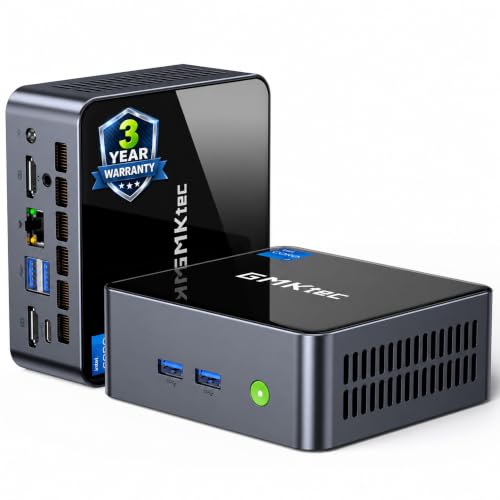
- Core i7-1185G7 with Iris Xe
- Three independent 4K 60Hz outputs
- RAM expandable to 64GB
Best For: Designers organizing work across three monitors
Flexible Creative Pick – ACEMAGICIAN S3A Ryzen 7 Mini PC
If you need a mini pc for graphic design that can also handle photo editing and broader content-creation work, the ACEMAGICIAN S3A pairs an eight-core Ryzen 7 H 255 with Radeon 780M graphics. Its compact footprint and three-display support make it a practical fit for a busy design desk.
Best For: Designers who want a compact, multi-monitor PC for 2D work and occasional more demanding creative tasks.
Pros:
- Ryzen 7 H 255 and Radeon 780M provide a capable foundation for creative multitasking.
- HDMI, DisplayPort, and USB4 Type-C support up to three 4K displays.
- 512GB PCIe 4.0 SSD can be expanded to accommodate larger project libraries.
Cons:
- 16GB LPDDR5 RAM may feel restrictive when working with many large files or apps at once.
- The included 512GB SSD may fill quickly with sizable creative projects.
The adjustable power modes let you prioritize quieter everyday work or more performance when needed. Consider your memory and storage needs before choosing it as your primary design workstation.
Space-Saving 2D Pick – KAMRUI Pinova P2 Mini PC
The KAMRUI Pinova P2 is a mini pc for graphic design buyers whose work centers on 2D layouts, photo edits, and everyday office tasks. Its Ryzen 7330U, 16GB of RAM, and compact VESA-mountable case suit a desk where space matters.
Best For: Light design and photo work in a small, multi-monitor workspace.
Pros:
- HDMI, DisplayPort, and USB-C can drive three 4K displays at 60Hz.
- Includes a VESA mount to free up desk space.
- Two storage expansion slots offer room beyond the included SSD.
Cons:
- The 256GB SSD leaves limited space for applications and project files.
- Its four-core Ryzen 7330U and integrated Radeon graphics are less suited to demanding 3D work.
This is a sensible choice if workspace flexibility matters more than maximum rendering power. Budget for additional storage if you keep substantial asset libraries locally.
AI Workflow Pick – GEEKOM IT15 Core Ultra 9 Mini PC
For a mini pc for graphic design that also needs to support AI-assisted creation and heavier multitasking, the GEEKOM IT15 offers a Core Ultra 9 285H, 32GB of DDR5 RAM, and a 1TB SSD. Its integrated NPU and Arc 140T graphics broaden its usefulness for compatible creative workflows.
Best For: Design professionals juggling creative apps, AI-enabled tools, and multiple high-resolution displays.
Pros:
- 32GB of DDR5 RAM is upgradeable to 128GB.
- Dual HDMI and two USB4 ports support up to four displays.
- USB4 provides a connection option for an external GPU and high-speed accessories.
- Includes a 1TB PCIe Gen 4 SSD and a three-year warranty.
Cons:
- Its built-in Arc 140T is integrated graphics; demanding GPU-heavy work may call for an external GPU.
- AI acceleration benefits depend on the software and features you actually use.
The IT15 stands out for memory headroom and connectivity rather than a dedicated built-in graphics card. It is the strongest fit here if your workflow can use its AI features or future expansion options.
Project Storage Pick – BOSGAME P6 Ryzen 9 Mini PC
The BOSGAME P6 makes a case as a mini pc for graphic design when you want ample included storage and room for several apps at once. Its Ryzen 9 6900HX, 24GB of onboard LPDDR5X RAM, and 1TB PCIe 4.0 SSD suit photo editing, 2D drafting, and other everyday creative work described in its specifications.
Best For: Designers who want a compact three-monitor setup with generous starting memory and storage.
Pros:
- Eight-core Ryzen 9 6900HX and Radeon 680M graphics support creative multitasking.
- 24GB of RAM and a 1TB SSD offer useful capacity out of the box.
- HDMI, DisplayPort, and USB-C support three 4K displays at 60Hz.
- An additional M.2 NVMe drive can expand storage.
Cons:
- The 24GB of RAM is onboard, so choose this configuration with future memory needs in mind.
- Radeon 680M is integrated graphics, not a dedicated GPU for intensive rendering.
For Photoshop work, 2D drafting, and multi-screen organization, the P6 offers a well-equipped starting point. Its stated strengths are everyday content creation and 1080p editing, rather than a dedicated graphics workstation.
Best Compact Creative Workstation – GEEKOM A8 Ryzen 7 8745HS
If you want a mini pc for graphic design without giving up desk space, the GEEKOM A8 pairs an eight-core Ryzen 7 8745HS with Radeon 780M integrated graphics. Its 16GB DDR5 RAM and 1TB PCIe 4.0 SSD provide a starting point for creative work.
Best For: Designers who want a compact, upgradeable PC for digital artwork and multi-monitor work.
Pros:
- Ryzen 7 processor and Radeon 780M graphics suit demanding visual workflows.
- Upgradeable DDR5 RAM and SSD storage offer room for larger projects.
- 0.5-liter aluminum chassis includes a VESA mount to clear desk space.
- 2.5GbE and Wi-Fi 6E support fast network connections.
Cons:
- Ships with 16GB RAM; heavier multitasking may call for an upgrade.
- Uses integrated graphics rather than a dedicated GPU.
The A8 makes the most sense when compact size and future upgrades matter as much as its strong integrated graphics.
Best 32GB Starter Configuration – GMKtec M6 Ultra Ryzen 5 7640HS
The GMKtec M6 Ultra is a mini pc for graphic design buyers who want 32GB of DDR5 RAM installed from the start. Its six-core Ryzen 5 7640HS, Radeon 760M graphics, and 1TB SSD make it a practical option for multitasking across creative apps and displays.
Best For: Designers who prioritize ample included memory and a three-display workspace.
Pros:
- Includes 32GB dual-channel DDR5 RAM and a 1TB SSD.
- Supports three displays through USB4, HDMI, and DisplayPort.
- Radeon 760M supports hardware encoding and decoding for AV1, HEVC, and AVC.
- Dual 2.5GbE ports add wired networking flexibility.
Cons:
- Radeon 760M is integrated graphics, not a dedicated GPU.
- The supplied notes give conflicting RAM expansion limits, so verify upgrade capacity before buying.
- One-year limited warranty is shorter than the three-year coverage listed for the GEEKOM models.
Choose the M6 Ultra if its included 32GB and display connections fit your setup; confirm any planned memory upgrade against the current specifications.
Best Four-Monitor Setup – GEEKOM A6 Ryzen 7 6800H
For a mini pc for graphic design built around a broad multi-monitor workspace, the GEEKOM A6 supports up to four 4K displays. It combines a Ryzen 7 6800H and Radeon 680M graphics with 16GB DDR5 RAM and a 1TB PCIe 4.0 SSD.
Best For: Designers who need multiple screens for reference material, tools, and their main canvas.
Pros:
- Supports up to four 4K monitors, with USB4 and dual HDMI among its connections.
- Dual-slot DDR5 memory is upgradeable up to 64GB.
- Radeon 680M graphics support creative tasks without a dedicated GPU.
- Includes 2.5GbE, Wi-Fi 6E, and a three-year warranty.
Cons:
- Ships with 16GB RAM, so larger projects may benefit from an upgrade.
- Integrated graphics may not suit buyers who require a dedicated GPU.
The A6 is a good fit when display capacity and upgradeable memory take priority over having the newer Radeon 780M graphics in the A8.
Best for Multitasking – Getorli Ryzen 7 6800H
If you need a mini pc for graphic design with room for several apps and browser tabs, the Getorli pairs an eight-core Ryzen 7 6800H with 32GB of LPDDR5 memory and a 1TB SSD. Its Radeon 680M integrated graphics and HDMI and DisplayPort outputs make it a practical choice for a dual-4K-monitor desk.
Best For: Designers who want substantial memory and storage out of the box for a two-monitor workspace.
Pros:
- 32GB of LPDDR5 RAM and a 1TB SSD come installed.
- HDMI and DisplayPort support dual 4K displays.
- Wi-Fi 6, a full-featured USB-C port, and dual Gigabit Ethernet offer flexible connections.
Cons:
- Memory is listed with a 32GB maximum, leaving no stated RAM upgrade headroom.
- Radeon 680M graphics are integrated rather than a dedicated GPU.
Choose this one if generous preinstalled memory matters more than future RAM expansion; the dual-display outputs are especially useful for keeping design work and reference material separate.
Best for Expandability – GEEKOM A5 2027 Edition
The GEEKOM A5 is a mini pc for graphic design if you value an upgrade path over a large starting configuration. Its Ryzen 7 7730U, 16GB of RAM, and 512GB NVMe SSD suit a compact workspace, while two HDMI and two USB-C display connections support up to four 4K screens.
Best For: Designers who want to add memory or storage as their projects grow.
Pros:
- Dual-slot DDR4 memory is listed as upgradable to 64GB.
- Storage options include an upgradable NVMe SSD, an extra M.2 slot, and a 2.5-inch drive bay.
- Supports up to four 4K displays and includes a three-year limited warranty.
Cons:
- The included 16GB RAM and 512GB SSD may prompt an earlier upgrade than higher-capacity configurations.
- Radeon Vega 8 is integrated graphics, not a dedicated graphics card.
Its strongest case is flexibility: you can start with the supplied configuration and expand it later. The four-display support is helpful for reference-heavy layouts, but it does not replace a dedicated GPU for graphics-intensive work.
Best for Three Displays – GMKtec M2 Pro S
For a mini pc for graphic design built around a three-screen setup, the GMKtec M2 Pro S provides two HDMI outputs and a USB-C display output, each listed for 4K at 60Hz. It combines a four-core Intel Core i7-1185G7 with Iris Xe integrated graphics, 16GB of DDR4 RAM, and a 512GB NVMe SSD.
Best For: Designers who want separate screens for a canvas, tools, and reference material.
Pros:
- Supports three independent 4K displays at 60Hz.
- DDR4 RAM is expandable to 64GB, with an additional M.2 storage option.
- USB4, Wi-Fi 6, and 2.5Gb Ethernet provide varied connectivity.
Cons:
- The included 16GB RAM and 512GB SSD may need upgrading for larger workloads.
- Iris Xe is integrated graphics rather than a dedicated GPU.
This is the most straightforward pick here for a three-monitor layout. Its upgradeable memory and storage add flexibility, while the integrated graphics make it better suited to display-rich design workflows than tasks that require a dedicated GPU.
How We Picked the Best Mini PC for Graphic Design
We focused on specifications that matter for common design workflows: processor class, included RAM and SSD capacity, integrated graphics, and room to grow where the listing specifies it. We also considered the range of needs across this list, from basic 2D design to heavier multitasking. Specifications alone cannot establish real-world speed, noise, or reliability, so check independent testing and the exact seller configuration before buying.
Quick Comparison: Match the Hardware to Your Work
For large layered files and frequent multitasking, the 32GB configurations of the GEEKOM IT15 and GMKtec M6 Ultra offer more memory out of the box; the Getorli Ryzen 7 6800H listing also specifies 32GB, but describes it as LPDDR5, so confirm whether it is replaceable if upgrades matter. The 24GB BOSGAME P6 sits between those models and the many 16GB options. If storage is a priority, several picks include a 1TB SSD, while the KAMRUI Pinova P2 starts at 256GB. The Ryzen 7 H 255 system lists Radeon 780M graphics; other models vary in graphics capability, so compare verified benchmarks for the applications you use rather than relying on processor names alone.
Key Buying Factors for a Mini PC for Graphic Design
RAM and Storage
Consider 16GB a practical starting point for 2D design; 32GB provides more breathing room for large documents, multiple creative apps, and heavy browser use. Check whether memory is socketed or soldered before counting on an upgrade. A 512GB SSD can fill quickly with apps and project files; 1TB or reliable external storage is more comfortable for growing libraries. Confirm available internal slots and drive formats if expansion is part of your plan.
Graphics and Displays
Integrated graphics are suitable for many illustration, page-layout, and photo-editing tasks, but demanding 3D, GPU effects, and high-resolution video can require more graphics power than these compact systems provide. Check your software’s GPU requirements and the mini PC’s video outputs, supported resolutions, and refresh rates before connecting multiple monitors. A color-accurate, calibrated display will usually matter more to final artwork than a faster PC paired with an unsuitable screen.
Ports, Software, and Setup
List every device you need to connect, including a drawing tablet, external SSD, card reader, and monitors. Verify the specific USB and video port standards rather than assuming every USB-C port supports a display. Check operating-system compatibility with your creative apps and confirm whether the advertised price includes the OS, power supply, and any accessories you need.
Who Should Buy Which Mini PC for Graphic Design?
Choose a lower-cost 16GB option, such as the KAMRUI Pinova P2 or GEEKOM A5, for lighter layouts and everyday editing if its storage and display connections meet your needs. Look at the 1TB, Ryzen 7-based GEEKOM A6 or A8 for a balance of included storage and general-purpose performance. Prioritize an included 24GB or 32GB configuration for larger files and heavier multitasking, and compare the GEEKOM IT15, GMKtec M6 Ultra, BOSGAME P6, and Getorli accordingly. If advanced 3D rendering or intensive video effects drive your work, check application-specific benchmarks and consider a desktop with a dedicated GPU instead.