Choosing a mini pc for youtube editing means balancing CPU power, fast storage, RAM capacity, and reliable video output in a compact system.
This roundup focuses on models that can handle timeline scrubbing, proxy workflows, multitasking, and export jobs without taking over your desk.
Best 10 Mini PC for Youtube Editing Picks for 2026
AI Editing Workhorse

- Intel Ultra 9 285H with Arc 140T graphics
- 32GB DDR5 RAM and 2TB Gen 4 SSD included
- Four-display support with WiFi 7 and USB4
Best For: Creators who need a compact PC for YouTube editing, multitasking, and AI-powered workflows.
Best Budget 4K Multitasker

- AMD 3150U is fine for light editing and everyday creator tasks
- Dual 4K display support is great for timeline plus preview setups
- M.2 storage expansion helps when your footage library grows
Best For: Budget creators who want a compact PC for light YouTube editing and dual-monitor productivity.
Best for AI-Powered Editing

- Intel Core Ultra 9 285H boosts editing, rendering, and AI tasks.
- 32GB DDR5 RAM + 1TB Gen 4 SSD keep projects moving smoothly.
- USB4, dual HDMI, and WiFi 7 fit a modern creator setup.
Best For: YouTube creators who want a compact, AI-ready editing PC with strong multitasking and display support.
Best for Stable Multitasking

- Ryzen 5 3550H handles basic editing and multitasking
- 16GB RAM + 512GB SSD support quick workflows
- Triple 4K display output fits multi-window setups
Best For: Creators who want a compact, budget-conscious machine for light-to-moderate YouTube editing and streaming.
Best for Everyday Use

- Intel Core Ultra 9 185H for fast editing and exports
- Dual 2.5GbE, WiFi 7, and quad-display support
- Upgradeable to 96GB RAM and 4TB SSD
Best For: YouTube creators who want a compact, upgradeable mini PC for editing and multitasking.
Best Expandable Mini PC

- Ryzen 5 7430U handles light editing and multitasking well
- RAM and storage are upgradeable for future needs
- Four-display support helps with editing and workflow setups
Best For: Creators who want a compact, upgradeable mini PC for light YouTube editing and daily productivity.
Best for Triple-Display Editing
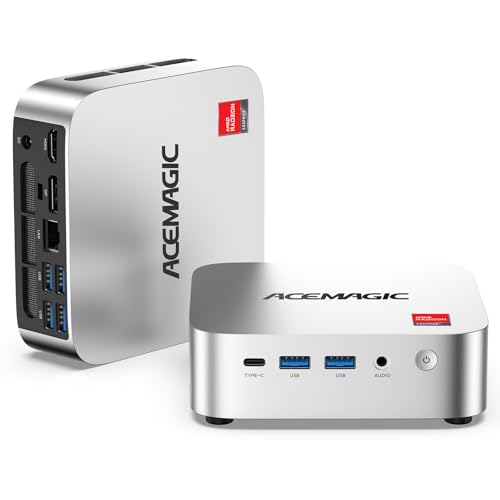
- Ryzen R2544 with Radeon graphics handles light editing better than basic entry-level mini PCs
- Triple 4K display support helps separate timeline, preview, and tools
- Upgradeable RAM and storage give it room to grow
Best For: Budget-conscious creators who want a compact PC for light YouTube editing and multitasking.
Best for Multi-Display Editing

- Ryzen 7 7730U handles 1080p editing and multitasking well
- 1TB SSD plus upgradeable RAM/storage give it room to grow
- Triple 4K display support is ideal for creator workflows
Best For: Creators who want a compact desktop for 1080p YouTube editing and multi-monitor productivity.
Best High-Performance Pick – KAMRUI Hyper H2 Mini PC
If you want a mini pc for youtube editing that can handle heavier timelines, the KAMRUI Hyper H2 stands out for its Intel Core i5-14450HX, 32GB of RAM, and fast 1TB PCIe 4.0 SSD. It’s built more like a compact workstation than a basic office box, so it’s a smart choice if you edit in 1080p or light 4K and keep multiple apps open while working.
Best For: Creators who want near-desktop performance in a small Windows mini PC for editing, multitasking, and a clean desk setup.
Pros:
- HX-class i5-14450HX brings strong multi-core performance for editing and rendering
- 32GB RAM and 1TB PCIe 4.0 SSD give you plenty of headroom for projects and media
- Triple 4K display support makes it easier to manage timelines, previews, and tools
- Good connectivity with USB-C, WiFi 6, Bluetooth 5.2, HDMI, and DisplayPort
Cons:
- More power-focused than entry-level, so it may be overkill for very simple edits
- Integrated graphics are fine for editing, but not ideal for demanding heavy-duty effects work
Overall, this is a compelling mini pc for youtube editing if you want strong sustained CPU performance, lots of memory, and flexible display support without moving to a full tower. It’s especially attractive for creators who value speed, multitasking, and a compact workspace.
AI Editing Workhorse – GEEKOM IT15 Mini PC
If you want a mini pc for youtube editing that can also handle AI-assisted workflows, the GEEKOM IT15 is built like a compact desktop workstation. Its Intel Ultra 9 285H, Arc 140T graphics, 32GB of DDR5 RAM, and 2TB Gen 4 SSD give it the headroom for 4K timelines, multitasking, and faster project loading without taking up much desk space.
Best For: Creators who want a small but powerful Windows mini PC for YouTube editing, multitasking, and light AI or coding work.
Pros:
- Intel Ultra 9 285H and Arc 140T graphics deliver strong performance for editing and rendering
- 32GB DDR5 RAM and 2TB Gen 4 SSD provide excellent multitasking and storage out of the box
- Supports up to four displays, including 8K output, for a flexible creator setup
- WiFi 7, 2.5GbE, and USB4 make it easy to move large media files fast
Cons:
- Overkill for basic browsing, schoolwork, or casual office use
- Built-in graphics are good for editing, but not a substitute for a high-end discrete GPU
This is a strong mini pc for youtube editing if you want portability without giving up workstation-style specs. It is especially appealing for editors who also stream, code, or run AI tools and need a compact system that can keep up.
Best Budget 4K Multitasker – KAMRUI Essenx E1 Mini PC
The KAMRUI Essenx E1 is a practical mini pc for youtube editing if you’re cutting simple 1080p projects, managing thumbnails, or handling everyday creator tasks on a tight budget. Its AMD 3150U chip, 8GB RAM, and SSD storage give it enough speed for light editing, while dual 4K display support makes it easy to keep your timeline, preview, and browser open at once.
Best For: Budget-conscious creators who need a compact desktop for light YouTube editing, multitasking, and dual-monitor workflows.
Pros:
- AMD 3150U offers solid entry-level performance for basic editing and multitasking
- Dual 4K output helps streamline multi-monitor creator setups
- 256GB SSD with M.2 expansion gives you room to grow your media library
- Quiet, compact build suits home offices, dorms, and small desks
Cons:
- 8GB RAM is limiting for heavier video editing or lots of effects
- Not ideal for 4K editing workflows or demanding creative software
- Storage is modest out of the box if you keep large project files locally
For a mini pc for youtube editing, this model makes sense when you want affordable responsiveness and a tidy footprint more than raw creative horsepower. It’s a smart pick for beginner creators who work in lighter projects and value dual-display convenience.
Best for AI-Powered Editing – GEEKOM IT15 Mini PC
If you want a mini pc for youtube editing that can also handle AI-assisted tools, the GEEKOM IT15 is a strong all-around pick. Its Intel Core Ultra 9 285H, Arc 140T graphics, and 32GB of DDR5 memory give it enough headroom for 4K timelines, multitasking, and fast exports in a compact desktop footprint.
Best For: Creators who edit YouTube videos, work in Adobe apps, and want a compact system with modern connectivity and room to grow.
Pros:
- Intel Core Ultra 9 285H with AI acceleration is well suited to editing, rendering, and creative workflows.
- 32GB DDR5 RAM and a 1TB Gen 4 SSD help keep large projects and multitasking responsive.
- Dual USB4, dual HDMI, and support for up to four displays make it flexible for a creator desk.
- WiFi 7, 2.5GbE, and quiet cooling add polish for streaming and daily use.
Cons:
- Higher-end pricing makes it more than many casual editors need.
- Integrated graphics are capable, but not a substitute for a dedicated workstation GPU.
For buyers comparing a mini pc for youtube editing, the IT15 stands out because it balances strong CPU performance, fast storage, and creator-friendly connectivity in a small chassis. It is a smart choice if you want one machine for editing, streaming, and general productivity.
Best for Stable Multitasking – BOSGAME E4 Ryzen 5 Mini PC
If you want a practical mini pc for youtube editing without overspending, the BOSGAME E4 is a solid midrange option. The Ryzen 5 3550H, 16GB of RAM, and PCIe SSD should handle timeline scrubbing, basic cuts, browser tabs, and 4K playback more smoothly than entry-level mini PCs.
Best For: Creators who need a compact desktop for light-to-moderate YouTube editing, streaming, and everyday multitasking.
Pros:
- Ryzen 5 3550H with 4 cores and 8 threads for everyday editing tasks
- 16GB RAM and 512GB PCIe SSD for faster app launches and file handling
- Triple 4K display support helps with multi-window editing workflows
- Dual RJ45 and Wi-Fi 5 add flexible, stable connectivity options
Cons:
- Integrated Vega 8 graphics are fine for light editing, not heavy effects work
- CPU class is better for starter or moderate projects than advanced 4K editing
- No mention of newer Wi-Fi 6 or higher-end creator-focused hardware
This is a sensible pick if you need a compact mini pc for youtube editing and general home or office use. It is not a powerhouse, but the balanced specs make it a dependable choice for creators who value affordability, dual-network support, and triple-display flexibility.
Best for Everyday Use – GEEKOM IT13 MAX AI Mini PC
If you want a mini pc for youtube editing that can also handle heavier multitasking, the GEEKOM IT13 MAX is built around Intel Core Ultra 9 performance, Iris/Arc graphics, and fast DDR5 storage. It’s a strong fit for creators who want smooth 4K timelines, quick exports, and enough headroom for side apps like browser tabs, music, and thumbnails.
Best For: YouTube creators who need a compact Windows mini PC for editing, encoding, and everyday productivity with extra AI and multi-monitor headroom.
Pros:
- Core Ultra 9 185H brings strong CPU performance for editing and rendering
- Up to four displays plus dual 2.5GbE makes it flexible for serious workflows
- WiFi 7, USB-C, and 1TB SSD add modern connectivity and fast storage
- 3-year warranty and quiet cooling improve long-term reliability
Cons:
- 16GB RAM is fine to start, but serious editors will likely want to upgrade
- Integrated graphics are capable, but not ideal for high-end effects-heavy editing
- Premium pricing may be more than casual creators need
Overall, the IT13 MAX stands out as a compact, creator-friendly mini pc for youtube editing if you want strong all-around speed, modern I/O, and room to grow. It’s especially appealing for users who value reliability and a small footprint over a full-size desktop tower.
Best for Multitasking – KAMRUI Ryzen 7 7735HS Mini PC
If you want a mini pc for youtube editing that can also handle everyday work and light gaming, the KAMRUI Hyper H1 is a strong all-around pick. Its Ryzen 7 7735HS processor, 24GB of LPDDR5 memory, and 512GB NVMe SSD give it the speed to move through timeline edits, app switching, and file transfers without feeling sluggish.
Best For: Creators who need a compact desktop for 1080p YouTube editing, multitasking, and a clean dual- or triple-monitor setup.
Pros:
- Ryzen 7 7735HS offers solid performance for editing and multitasking
- 24GB LPDDR5 RAM and 512GB SSD help keep projects and apps responsive
- Triple-display support makes it easier to edit, preview, and manage tools at once
- 2.5G LAN and WiFi 6 improve file transfers and streaming stability
Cons:
- Integrated graphics are fine for editing, but not ideal for heavy 4K effects work
- 512GB storage may fill quickly with large video projects
- RAM is not as easily upgradable as some desktop mini PCs
Overall, this is a practical mini pc for youtube editing if you want a compact machine with strong everyday speed and room to expand storage later. It is especially appealing for creators who value a small footprint and smooth productivity over maximum workstation power.
Best Expandable Mini PC – GEEKOM A5 2026 Ryzen 5 7430U
If you want a mini pc for youtube editing that can also handle everyday work, the GEEKOM A5 2026 Edition is a practical middle-ground pick. Its Ryzen 5 7430U, 16GB of RAM, and fast NVMe SSD should be enough for light-to-moderate timeline editing, thumbnails, browser tabs, and background apps without taking up much desk space.
Best For: Creators who need a compact Windows mini PC with strong upgrade flexibility for casual YouTube editing, multitasking, and home office use.
Pros:
- Ryzen 5 7430U delivers solid everyday performance for editing, streaming, and multitasking.
- Upgradeable RAM and storage make it easier to grow the system over time.
- Supports up to four displays, which is useful for editing timelines and managing references.
- 3-year warranty adds peace of mind for long-term use.
Cons:
- Integrated graphics are fine for light edits, but not ideal for heavy effects or 4K workflows.
- 16GB RAM is workable, though serious editors may want to upgrade sooner.
Overall, the A5 stands out if you want a mini pc for youtube editing that prioritizes value, expandability, and compact design over raw creative horsepower. It’s a sensible choice for creators who mainly edit short-form or lighter YouTube projects and want room to upgrade later.
Best for Triple-Display Editing – ACEMAGIC K1 Ryzen Mini PC
If you want a compact desktop that can handle a light-to-moderate mini pc for youtube editing workflow, the ACEMAGIC K1 is worth a look. Its Ryzen R2544 chip, Radeon graphics, and triple-4K display support make it a practical fit for cutting clips, organizing timelines, and running your everyday creator apps without taking up much desk space.
Best For: Budget-minded creators who want a small, tidy PC for light YouTube editing, streaming setup tasks, and multitasking across multiple monitors.
Pros:
- Ryzen R2544 and Radeon graphics are stronger than basic entry-level mini PCs for editing and multitasking
- Triple 4K display support is great for timeline, preview, and tool window separation
- USB-C, Gigabit Ethernet, and Wi-Fi 5 offer flexible connectivity for a compact creator desk
- Upgradeable RAM and storage leave room to grow beyond the base 8GB/256GB configuration
Cons:
- 8GB RAM and 256GB SSD are modest for heavier video projects
- Not ideal for demanding 4K editing or serious effects work
- Wi-Fi 5 and Bluetooth 4.2 are serviceable, but not cutting-edge
Overall, the ACEMAGIC K1 is a sensible mini pc for youtube editing if your projects are short, your budget is limited, and you value a compact system with useful expansion and multi-monitor support.
Best for Multi-Display Editing – BOSGAME P4 Ultra Mini PC
If you want a mini pc for youtube editing that can handle day-to-day multitasking without taking up much desk space, the BOSGAME P4 Ultra is a strong value pick. Its Ryzen 7 7730U, 16GB RAM, and 1TB NVMe SSD give it enough headroom for 1080p edits, browser-heavy research, and background apps while keeping the system responsive.
Best For: Creators who want a compact desktop for 1080p YouTube editing, dual-use productivity, and multi-monitor setups.
Pros:
- Ryzen 7 7730U offers solid 8-core/16-thread performance for editing and multitasking
- 1TB NVMe SSD and upgradeable RAM/storage make it easy to grow over time
- Triple 4K display support is great for editing timelines, preview windows, and research tabs
- Dual 2.5GbE LAN, Wi‑Fi 6E, and quiet cooling add flexibility for home office use
Cons:
- Not ideal for demanding 4K workflows or heavy color grading
- Integrated graphics are fine for light gaming, but not AAA titles
- 16GB RAM is workable, though serious creators may want an upgrade sooner
Overall, this is a practical mini pc for youtube editing if your projects are mostly 1080p and you value storage, expandability, and multiple display support. It’s a balanced pick for creators who need a small, quiet machine rather than a high-end rendering box.
How We Picked the Best Mini PC for Youtube Editing
For YouTube editing, we prioritized processors with enough multi-core performance for rendering and background tasks, at least 16GB of memory where possible, and SSD-based storage for fast project loading. We also looked at display support, connectivity, and upgrade headroom, since editing needs tend to grow over time.
Compact size matters, but not at the expense of thermals or ports. A strong Mini PC for Youtube Editing should stay responsive during long sessions and offer practical expansion for external drives, monitors, and audio gear.
Quick Comparison: What Matters Most
Higher-tier Intel Core Ultra and Ryzen 7-class systems are the best fit for heavier editing, effects work, and smoother exports. Midrange Ryzen 5 and older Ryzen 7 options are still solid for 1080p projects, lighter 4K timelines, and everyday creator tasks. Entry-level chips are better suited to short-form edits, basic cuts, and channel management rather than demanding color work or heavy transitions.
Key Buying Factors for Mini PC for Youtube Editing
CPU Performance
Video editing depends heavily on sustained processor speed. Look for modern multi-core CPUs if you plan to work with 4K footage, multiple layers, or frequent rendering.
RAM and Upgradeability
16GB is a practical starting point, while 32GB is safer for serious editing. If the system can be upgraded later, that adds value for growing channels.
Storage Speed and Capacity
An NVMe SSD improves project loading, cache performance, and overall responsiveness. If you keep large media libraries, choose 1TB or more, or plan to use fast external storage.
Graphics and Display Support
Integrated graphics are often enough for lighter workflows, but stronger onboard GPUs and support for multiple 4K displays help with smoother previews and better multitasking.
Ports and Connectivity
USB-C, fast USB-A ports, and reliable networking matter when moving footage, connecting capture devices, or syncing assets. Dual LAN can be useful for studio-style setups.
Who Should Buy Which Mini PC for Youtube Editing?
If you edit mostly short-form or 1080p content, a more affordable mini PC can handle the job well. If you regularly work in 4K, use effects, or keep many apps open at once, step up to a higher-performance model with more RAM and a stronger CPU.
Creators who want a long-term workstation should favor systems with upgradeable memory and storage. That way, your Mini PC for Youtube Editing can keep up as your channel, file sizes, and editing demands increase.