A mini PC can save desk space without giving up a capable DaVinci Resolve workflow—but the right choice depends on your footage, effects, and delivery format. Smooth playback for basic cuts demands far less than heavy noise reduction or complex Fusion work.
These 10 options span compact everyday systems and expandable workstations. Use the guide below to weigh GPU capability, memory, storage, and connectivity before choosing.
Best 10 Mini PC for Davinci Resolve Picks for 2026
CPU-Focused Pick
KAMRUI Hyper H2 Core i5-14500HX

- 14-core, 20-thread CPU
- RAM and dual-M.2 expansion
- Intel UHD integrated graphics
Best For: CPU-heavy editing work with planned upgrades
Compact Mac Pick

- Five-by-five-inch desktop
- Three Thunderbolt 4 ports
- Verify installed memory and storage
Best For: Mac editors building a compact, Thunderbolt-connected desk
Ready-to-Edit Value
GMKtec M6 Ultra Ryzen 5 7640HS

- 32GB DDR5 RAM and 1TB SSD
- AV1, HEVC, and AVC codec support
- Verify conflicting RAM-upgrade claims
Best For: Editors wanting substantial memory and storage installed
Graphics-Forward Pick
GMKtec EVO-X2 Ryzen AI Max+ 395

- 16-core CPU and 40-CU integrated GPU
- Two USB4 ports and four-display support
- Verify memory, storage, and GPU details
Best For: Editors evaluating high-end integrated graphics
Expansion-Ready Workstation

- Core Ultra 9 285HX with 32GB DDR5
- PCIe 5.0 x16 expansion capability
- 10GbE, 2.5GbE, and dual NVMe slots
Best For: Editors building an expandable compact workstation
Compact Starter Setup

- Eight-core Ryzen 7 7735U
- 24GB LPDDR5 and 500GB SSD
- Three display outputs
Best For: Compact multi-monitor setups for less demanding editing
External-GPU Option

- Ryzen 7 PRO 6850U and Radeon 680M
- 32GB DDR5 and 1TB SSD installed
- OCuLink port for a compatible eGPU setup
Best For: Editors considering an external-GPU upgrade
CPU-First Pick

- 24-core Core i9-13900HX with 32GB RAM
- Two M.2 PCIe 4.0 SSD slots
- Integrated Intel UHD graphics
Best For: CPU-focused editing with expandable storage
Expansion Powerhouse
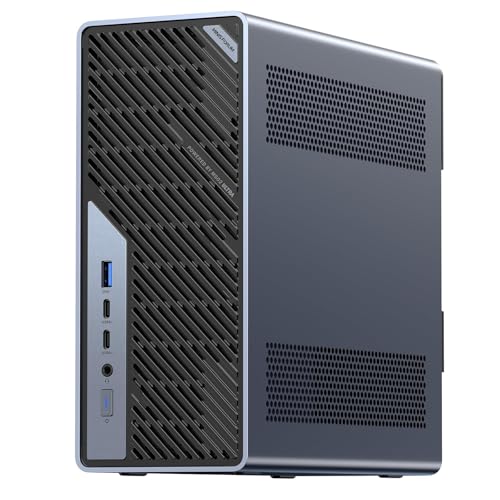
- 24-core Core Ultra 9 285HX
- PCIe 5.0 x16 GPU expansion
- Four M.2 slots and dual 25GbE
Best For: Expandable, GPU-equipped editing workstations
Network-Ready Workstation

- Core i9-13900H with 32GB DDR5
- Dual 10G SFP+ and dual USB4
- PCIe GPU slot; RTX 3050 tested
Best For: Editing from fast network storage
CPU-Focused Pick – KAMRUI Hyper H2 Core i5-14500HX
If you need a mini PC for DaVinci Resolve and your workflow also involves CPU-heavy tasks, the KAMRUI Hyper H2 offers a 14-core Core i5-14500HX in a compact chassis. Its 16GB RAM and 512GB SSD are workable starting specifications, with room to expand both.
Best For: Editors who prioritize CPU performance and plan to upgrade memory or storage as projects grow.
Pros:
- 14-core, 20-thread processor for demanding multitasking.
- Supports up to 64GB RAM and up to 4TB of storage across two M.2 slots.
- HDMI, DisplayPort, and USB-C support a three-display workspace.
Cons:
- Intel UHD integrated graphics may limit graphics-intensive Resolve workflows.
- Ships with 16GB RAM and 512GB storage, so larger projects may call for upgrades.
The strong CPU and expansion options make this a flexible starting point, but its integrated graphics are the key trade-off for effects-heavy editing.
Compact Mac Pick – Apple 2026 Mac mini M6
For buyers seeking a Mac mini PC for DaVinci Resolve, the 2026 Mac mini M6 offers a five-by-five-inch desktop with unified memory and fast connections for external media. The supplied specifications describe up to 32GB of unified memory, but do not identify the memory or storage configuration of this listing.
Best For: Mac-based editors who want a small desk footprint and Thunderbolt connections for their peripherals.
Pros:
- Three rear Thunderbolt 4 ports, plus front USB-C ports.
- Supports up to three external displays.
- 2.5Gb Ethernet and Wi-Fi 7 support fast network connectivity.
Cons:
- The supplied notes do not specify this listing’s installed memory or storage.
- No DaVinci Resolve performance measurements are provided.
Its ports and compact design suit a tidy editing desk; check the exact memory and storage configuration before choosing it for your project sizes.
Ready-to-Edit Value – GMKtec M6 Ultra Ryzen 5 7640HS
The GMKtec M6 Ultra is a mini PC for DaVinci Resolve buyers who want more memory and storage installed from the outset: this configuration lists 32GB DDR5 RAM and a 1TB SSD. Its Ryzen 5 7640HS pairs with Radeon 760M integrated graphics, which the supplied notes say can encode and decode AV1, HEVC, and AVC.
Best For: Editors looking for a 32GB/1TB starting configuration and built-in support for common video codecs.
Pros:
- 32GB DDR5 RAM and a 1TB SSD are included.
- Radeon 760M supports hardware encoding and decoding of AV1, HEVC, and AVC.
- USB4, HDMI, and DisplayPort provide three-display connectivity.
Cons:
- Integrated Radeon 760M graphics may be restrictive for demanding Resolve effects.
- The notes conflict on maximum RAM capacity, so verify upgrade limits before buying.
This is a practical out-of-box configuration for lighter editing, with a useful codec feature set. Graphics demands and the uncertain RAM ceiling deserve a closer look before purchase.
Graphics-Forward Pick – GMKtec EVO-X2 Ryzen AI Max+ 395
If integrated graphics performance is a priority in a mini PC for DaVinci Resolve, the GMKtec EVO-X2 stands out on paper. Its Ryzen AI Max+ 395 combines a 16-core CPU with a 40-compute-unit RDNA 3.5 GPU, although the supplied notes do not establish actual Resolve performance.
Best For: Editors comparing high-end integrated-graphics systems for GPU-dependent projects.
Pros:
- 16-core, 32-thread processor and 40-compute-unit integrated GPU.
- LPDDR5X memory and two USB4 ports are listed.
- HDMI, DisplayPort, and dual USB4 outputs support up to four displays.
Cons:
- The supplied notes do not clearly identify this listing’s installed memory or storage capacity.
- The notes use inconsistent Radeon GPU names; verify the exact configuration.
Its CPU and GPU specifications make it a compelling option to investigate for heavier editing. Confirm the installed memory, storage, and graphics details rather than relying on the listing’s broad performance comparisons.
Expansion-Ready Workstation – MINISFORUM MS-02 Ultra
If you want a mini pc for davinci resolve with room to build a more capable editing setup, the MS-02 Ultra stands out for its Core Ultra 9 285HX, 32GB of installed DDR5 memory, and PCIe 5.0 x16 expansion capability. The expansion slot gives you an option to add a compatible dedicated GPU, but none is specified as included.
Best For: Editors planning a compact workstation with substantial memory, storage, networking, and GPU expansion options.
Pros:
- 24-core Core Ultra 9 285HX and four DDR5 slots supporting up to 256GB.
- Two PCIe 4.0 NVMe slots, with a 1TB SSD installed.
- PCIe 5.0 x16 expansion, 10GbE and 2.5GbE networking, and USB4 connectivity.
Cons:
- A dedicated GPU is not listed as included; expansion-device compatibility depends on the configuration.
- Only 32GB of its supported 256GB memory capacity is installed.
This is the most configurable choice here for an editor willing to plan the GPU and other upgrades. Check the compatibility of any intended expansion hardware before buying.
Compact Starter Setup – Beelink SER5 MAX
The Beelink SER5 MAX is a mini pc for davinci resolve shoppers considering an integrated-graphics system for a compact editing desk. It pairs an eight-core Ryzen 7 7735U with 24GB of LPDDR5 memory and a 500GB SSD, while HDMI, DisplayPort, and Type-C outputs support a three-screen workspace.
Best For: Editors prioritizing a small, multi-monitor setup for less demanding projects.
Pros:
- Ryzen 7 7735U has eight cores and 16 threads.
- 24GB of installed LPDDR5 memory and a 500GB SSD.
- Three display outputs, Wi-Fi 6, and 2.5G Ethernet.
Cons:
- Radeon graphics are integrated and use shared memory.
- The included 500GB SSD may fill quickly with video media.
This model makes sense when desk space and multiple displays matter more than dedicated graphics. Assess your project and effects demands before choosing an integrated-GPU system.
External-GPU Option – GMKtec M7 Ultra
For a mini pc for davinci resolve that can start with integrated graphics and leave an external-GPU route open, consider the GMKtec M7 Ultra. Its Ryzen 7 PRO 6850U, Radeon 680M graphics, 32GB of dual-channel DDR5, and 1TB SSD provide a compact starting configuration; the OCuLink port is intended for a compatible eGPU setup.
Best For: Editors who want a compact system now and may add a compatible external GPU later.
Pros:
- Eight-core Ryzen 7 PRO 6850U with 32GB of installed dual-channel DDR5.
- OCuLink port offers an external-GPU connection option.
- 1TB installed SSD, dual USB4 video outputs, and up to four simultaneous displays.
Cons:
- It ships with integrated Radeon 680M graphics; an external GPU is not listed as included.
- Adding an eGPU requires a compatible setup beyond the mini PC.
The M7 Ultra is a flexible middle ground if its included memory and storage suit your current projects. Treat OCuLink as an upgrade path, not as a substitute for a dedicated GPU already in the box.
CPU-First Pick – MINISFORUM M1-1390
If you want a mini PC for DaVinci Resolve with a strong processor and room for project storage, the M1-1390 pairs a 24-core Core i9-13900HX with 32GB of RAM and a 1TB SSD. Its Intel UHD graphics are integrated, so this is a better fit for CPU-heavy multitasking than for demanding GPU-dependent effects.
Best For: Editors prioritizing CPU performance, multiple displays, and expandable storage over dedicated graphics.
Pros:
- Core i9-13900HX offers 24 cores and 32 threads.
- Two M.2 PCIe 4.0 SSD slots allow separate media and project drives.
- HDMI, DisplayPort, and USB-C outputs support three displays.
Cons:
- Integrated Intel UHD graphics may limit GPU-intensive Resolve work.
- Uses DDR4 rather than DDR5 memory.
Choose this model if your editing workflow benefits most from a fast CPU and flexible local storage; look for a GPU-upgradeable workstation if heavy grading or effects are central to your projects.
Expansion Powerhouse – MINISFORUM MS-02 Ultra
For a mini PC for DaVinci Resolve that can grow into a more demanding workstation, the MS-02 Ultra combines a 24-core Core Ultra 9 285HX, 32GB of RAM, and a 1TB SSD with a PCIe 5.0 x16 slot for a desktop-class GPU. Its extensive storage and networking options are especially useful when projects span multiple drives or shared storage.
Best For: Editors planning a GPU-equipped Resolve workstation with substantial storage and fast network connectivity.
Pros:
- PCIe 5.0 x16 expansion supports a desktop-class GPU upgrade.
- Four DDR5 SODIMM slots and four PCIe 4.0 M.2 slots provide room to expand.
- USB4 v2, dual 25GbE, 10GbE, and 2.5GbE support high-bandwidth peripherals and networks.
Cons:
- The listed configuration does not specify an included dedicated GPU.
- Its advanced networking may be unnecessary for a simple local editing setup.
The MS-02 Ultra makes the most sense if you intend to use its GPU slot and expansion capacity. Budget for any graphics card and additional memory or drives your workflow requires.
Network-Ready Workstation – MINISFORUM MS-01
The MS-01 is a mini PC for DaVinci Resolve buyers who work with fast external drives or networked media. It ships with a Core i9-13900H, 32GB of DDR5 RAM, and a 1TB SSD, while two USB4 ports and dual 10G SFP+ connections give editors several ways to move footage.
Best For: Editors using high-speed network storage who also want an option to add a supported graphics card.
Pros:
- Two 10G SFP+ ports and two 2.5G LAN ports suit networked workflows.
- Two USB4 ports support fast peripherals and display output.
- Additional M.2 storage slots and a PCIe slot offer upgrade paths; the notes identify an RTX 3050 as tested.
Cons:
- The supplied configuration uses integrated Intel Iris Xe graphics.
- The PCIe graphics slot runs at PCIe 4.0 x8 despite its x16 form factor.
This is a practical choice when connectivity matters as much as compute. For graphics-heavy Resolve projects, evaluate a compatible GPU upgrade rather than relying solely on the integrated graphics.
How We Picked the Best Mini PC for Davinci Resolve
We prioritized the specifications that matter to DaVinci Resolve: graphics capability, usable memory, processor class, storage, and connectivity for fast media drives and displays. The selection also covers different budgets and workflows, rather than assuming every editor needs a workstation. Listed specifications are a starting point, not a playback guarantee; cooling, sustained power limits, software support, and configuration can change real-world results.
Quick Comparison: Match the Machine to the Edit
For lighter editing, the Beelink SER5 MAX and KAMRUI Hyper H2 offer more modest starting configurations. The GMKtec M6 Ultra and M7 Ultra step up to 32GB of memory and 1TB of listed storage, making them more comfortable candidates for growing projects. The MINISFORUM M1-1390 emphasizes CPU capacity, while the MS-01 adds workstation-oriented networking and USB4 connectivity. The two listed MS-02 Ultra configurations and the GMKtec Ryzen AI Max+ 395 system are worth examining if expandability or stronger graphics potential is a priority. The Apple 2026 Mac mini M6 is the macOS choice; check its exact unified-memory and storage configuration before comparing prices.
Key Buying Factors for a Mini PC for Davinci Resolve
Graphics and Effects
Resolve relies heavily on the GPU, especially for color effects, noise reduction, Fusion, and higher-resolution timelines. Do not judge a mini PC by CPU core count alone. Check the exact integrated graphics or dedicated-GPU setup, available graphics memory, and whether the system can sustain performance under a long export. A PCIe expansion slot may offer options, but confirm enclosure, power, and GPU compatibility before budgeting for an upgrade.
Memory, Media, and Storage
Consider 16GB a practical entry point for lighter edits; 32GB gives more headroom for larger timelines and multitasking. Demanding effects and high-resolution media may justify more. A 512GB SSD fills quickly once footage, cache, and exports accumulate, so plan for a larger internal drive or fast external storage. Check whether RAM and storage are upgradeable: soldered memory and fixed configurations require a better choice at checkout.
Ports and Workflow Fit
Match display outputs to your monitor setup and look for sufficiently fast ports for external SSDs, docks, or capture hardware. USB4 and high-speed networking can be useful in shared-media workflows, but port labels alone do not establish support for every accessory. Confirm operating-system compatibility, codec support, and the Resolve features you need before ordering.
Who Should Buy Which Mini PC for Davinci Resolve?
Choose an entry-level configuration if you mostly cut lighter footage and can use proxies when playback slows. Favor a 32GB model with ample SSD space for regular editing across multiple projects. If effects, high-resolution media, or shared storage dominate your work, investigate the graphics capability, thermals, and expansion options of the higher-end GMKtec and MINISFORUM systems. Prefer macOS? Compare the Mac mini’s exact memory and storage tier against your workload, since those choices matter after purchase.