A mini PC can give you a capable Photoshop workspace without taking over your desk. The right choice depends less on its size than on its processor, memory, storage, and connections for your display and accessories.
These 10 picks cover a wide range of hardware. Use the guide below to match a system to the size of your projects and the upgrades you may need later.
Best 10 Mini PC for Adobe Photoshop Picks for 2026
Best for Demanding Edits

- 8-core Ryzen 7 and Radeon 780M
- 16GB LPDDR5; 512GB PCIe 4.0 SSD
- Three 4K outputs; storage expandable to 4TB
Best For: Heavier photo edits and multi-monitor creative work
Compact Starter Pick

- 4-core Ryzen 5 3500U with listed 16GB RAM
- Three 4K outputs at 60Hz
- 256GB SSD; storage expandable to 2TB
Best For: Occasional edits in a space-limited setup
Clean-Desk Choice

- 4-core, 8-thread Ryzen 7330U
- 16GB non-expandable RAM; 256GB SSD
- Built-in power supply and six USB-A ports
Best For: Light edits on a tidy, compact workstation
Budget Upgrade Pick

- Ryzen 3 5300U with integrated Radeon graphics
- 8GB RAM; expandable to 64GB
- Extra NVMe slot and triple 4K outputs
Best For: Light photo editing with future upgrades
Heavy Multitasking Pick

- 16-core Core Ultra 7 356H
- 32GB DDR5 RAM and 1TB PCIe 4.0 SSD
- Second NVMe slot and triple 4K output
Best For: Editing alongside demanding multitasking
Flexible Storage Pick

- Ryzen 7 7730U with 16GB RAM
- 512GB SSD with extra drive options
- Four 4K outputs; three-year limited warranty
Best For: Everyday editing and expanding photo libraries
Best for Expandability

- 16GB DDR4; stated expansion up to 96GB
- 256GB NVMe SSD
- Supports up to four displays
Best For: Editors who plan to add memory and use multiple monitors
Best for Everyday Photo Editing
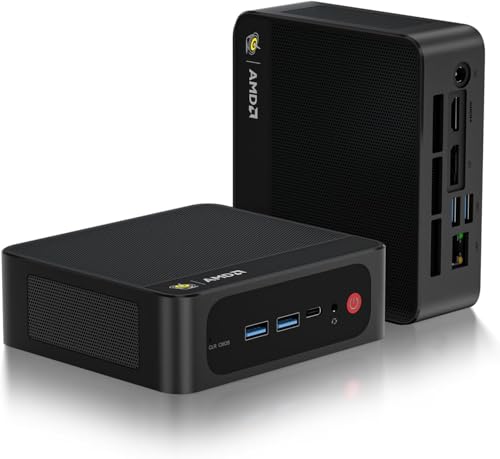
- Ryzen 7 7735U and Radeon 680M
- 16GB LPDDR5 and 500GB PCIe 4.0 SSD
- HDMI, DisplayPort, and USB-C video
Best For: Editors seeking a compact, ready-to-use Windows setup
Best for Linux-Friendly Workflows

- Ryzen Embedded R2514
- 16GB dual-channel DDR4
- Three 4K display outputs and dual 2.5GbE
Best For: Buyers willing to verify Photoshop OS compatibility first
Best for Demanding Edits – ACEMAGICIAN S3A Ryzen 7 H 255
If you need a mini pc for adobe photoshop alongside other creative apps, the ACEMAGICIAN S3A has the strongest specifications in this group: an eight-core Ryzen 7 H 255, Radeon 780M graphics, 16GB of LPDDR5 memory, and a 512GB PCIe 4.0 SSD.
Best For: Photographers who edit larger projects, multitask heavily, or want a multi-monitor workspace.
Pros:
- Eight-core, 16-thread processor and Radeon 780M graphics suit more demanding creative workloads.
- Supports three 4K displays through HDMI, DisplayPort, and USB4 Type-C.
- Storage can be expanded up to 4TB; three power modes let you prioritize quiet operation or performance.
Cons:
- Ships with 512GB of storage, which may fill quickly with large photo libraries.
- Its 16GB LPDDR5 memory is not described as upgradeable.
This is the most capable option here on paper for sustained Photoshop work. Budget for additional storage if you keep substantial image archives on the PC.
Compact Starter Pick – ACEMAGIC V1 Ryzen 5 3500U
The ACEMAGIC V1 is a compact mini pc for adobe photoshop when your work centers on basic edits rather than demanding projects. Its four-core Ryzen 5 3500U, listed 16GB of RAM, and 256GB SSD make it a more modest choice than the S3A.
Best For: Occasional photo editing in a small home-office or dorm setup.
Pros:
- Small 3.94-by-3.94-inch footprint fits a crowded desk or a monitor-back mount.
- HDMI, DisplayPort, and USB-C support three independent 4K displays at 60Hz.
- Dual M.2 storage slots provide an upgrade path up to 2TB.
Cons:
- The included 256GB SSD leaves limited room for photo files.
- The older Ryzen 5 3500U is better suited to lighter work than intensive editing.
Choose this one when desk space and basic editing matter more than processing headroom. Plan on adding storage if you maintain a local image library.
Clean-Desk Choice – ACEMAGIC K1 Ryzen 7330U
The ACEMAGIC K1 is a mini pc for adobe photoshop users who want a tidy workstation for lighter editing. It combines a four-core, eight-thread Ryzen 7330U with 16GB of LPDDR4 memory, a 256GB SSD, and a built-in power supply that eliminates an external power brick.
Best For: Light photo edits on a compact, neatly cabled desk.
Pros:
- Built-in power supply and included VESA-mount option help keep the workspace clear.
- Six USB-A ports plus USB-C, HDMI, and DisplayPort offer ample peripheral and display connections.
- Storage can be expanded up to 2TB.
Cons:
- The 16GB LPDDR4 memory is non-expandable.
- The included 256GB SSD is small for a growing photo library.
The K1 makes sense if convenient connections and minimal desk clutter outweigh upgrade flexibility. Its fixed RAM and modest starting storage are worth considering before buying.
Storage-Friendly Alternative – KAMRUI Pinova P2 Ryzen 4300U
For a mini pc for adobe photoshop with more storage out of the box than the 256GB options here, consider the KAMRUI Pinova P2. It pairs a four-core Ryzen 4300U and 16GB of LPDDR4 memory with a 512GB SSD, making it a practical starting point for light photo editing.
Best For: Casual editors who want a compact PC with room to expand their local file storage.
Pros:
- Includes a 512GB SSD and two storage slots supporting up to 4TB total.
- HDMI, DisplayPort, and USB-C support three 4K displays at 60Hz.
- USB-C and two USB-A 3.2 Gen 2 ports offer 10Gbps connections for compatible peripherals.
Cons:
- The Ryzen 4300U is a lighter-duty choice than the eight-core S3A for intensive edits.
- The notes do not describe the 16GB LPDDR4 memory as upgradeable.
The P2 balances a useful starting SSD with generous stated storage expansion. It is better positioned for routine edits than for the most demanding Photoshop workflows.
Budget Upgrade Pick – BOSGAME E5 11 Pro
If you need a budget-minded mini pc for adobe photoshop, the BOSGAME E5 11 Pro offers a Ryzen 3 5300U, integrated Radeon graphics, and room to upgrade. Its 8GB RAM and 256GB SSD make it better suited to lighter photo edits than large, layered projects out of the box.
Best For: Occasional Photoshop editing with a plan to expand memory or storage.
Pros:
- Four-core, eight-thread Ryzen 3 5300U processor.
- Dual SODIMM slots support up to 64GB RAM.
- Extra M.2 NVMe slot and three 4K@60Hz display outputs.
Cons:
- 8GB RAM and 256GB storage may feel restrictive for larger photo libraries.
- Uses integrated graphics rather than a dedicated GPU.
The expansion options are the main draw: adding RAM and a second SSD could make this compact system more practical as your editing workload grows.
Heavy Multitasking Pick – MINISFORUM M2-356H
For a mini pc for adobe photoshop that arrives with more working memory and storage, the MINISFORUM M2-356H pairs a 16-core Intel Core Ultra 7 356H with 32GB DDR5 RAM and a 1TB PCIe 4.0 SSD. Those specifications make it the strongest out-of-box option here for juggling editing files and other applications.
Best For: Photo editors who want generous starting memory, fast storage, and multiple displays.
Pros:
- 32GB DDR5 RAM installed, with support for up to 128GB.
- 1TB PCIe 4.0 SSD plus a second M.2 NVMe slot.
- Supports three simultaneous 4K displays.
Cons:
- Intel graphics are integrated; the notes do not list a dedicated GPU.
- Its AI TOPS figures do not establish Photoshop-specific performance.
The substantial RAM and SSD are the practical reasons to choose it for editing. Treat the advertised AI capabilities as an additional feature, not a substitute for application-specific benchmarks.
Flexible Storage Pick – GEEKOM A5 2027 Edition
The GEEKOM A5 is a balanced mini pc for adobe photoshop if you want more starting memory than an 8GB model without giving up expansion options. It combines a Ryzen 7 7730U, 16GB RAM, and a 512GB NVMe SSD in a compact desktop.
Best For: Everyday photo editing and growing image libraries in a compact workspace.
Pros:
- 16GB RAM installed and upgradeable to 64GB.
- NVMe storage, an extra M.2 2242 slot, and a 2.5-inch drive bay.
- Supports up to four 4K displays and includes a three-year limited warranty.
Cons:
- Radeon Vega 8 graphics are integrated, not dedicated.
- The supplied configuration has less RAM and storage than the MINISFORUM M2-356H.
Its mix of usable starting specifications, multiple storage paths, and warranty coverage makes it a practical middle-ground choice for editors who expect their file collection to expand.
Best for Expandability – GEEKOM IT12 Mini PC
If you want a mini pc for adobe photoshop that you can upgrade as your projects grow, the GEEKOM IT12 is worth a look. It pairs an Intel Core i3-12300HE with 16GB of DDR4 RAM and a 256GB NVMe SSD; GEEKOM lists RAM expansion up to 96GB.
Best For: Photoshop users who want upgradeable memory and room for a multi-monitor workspace.
Pros:
- 16GB of RAM is included, with substantial stated upgrade capacity.
- Dual USB4 and dual HDMI ports support up to four displays.
- IceBlast cooling and a full-copper heat module are designed for sustained use.
Cons:
- The included 256GB SSD may fill quickly with large photo libraries and scratch files.
- Its industrial connectivity and 24/7 features may be unnecessary for a simple editing desk.
The appeal here is flexibility rather than the i3-versus-i5 marketing comparison. Budget for more storage if you keep RAW files or multiple Photoshop projects on the PC.
Best for Everyday Photo Editing – Beelink SER5 Max
The Beelink SER5 Max is a practical mini pc for adobe photoshop if you want a ready-to-use Windows 11 Pro system. Its Ryzen 7 7735U, 16GB of LPDDR5 RAM, and 500GB PCIe 4.0 SSD make it a more storage-friendly starting point than a 256GB configuration.
Best For: Home and office editors who want a compact Photoshop workstation with three-display support.
Pros:
- Eight-core, 16-thread Ryzen 7 processor with Radeon 680M integrated graphics.
- 500GB SSD is listed as upgradeable.
- HDMI, DisplayPort, and USB-C video outputs support a triple-display setup.
Cons:
- The listed 16GB RAM maximum leaves no stated memory upgrade path.
- Large photo libraries may still need additional storage.
This is the straightforward pick if you prioritize included storage and display options over future RAM expansion. The product notes contain conflicting memory wording, so confirm the configuration before ordering.
Best for Linux-Friendly Workflows – GMKtec G11 Mini PC
The GMKtec G11 is a specialized option in a mini pc for adobe photoshop roundup. Its Ryzen Embedded R2514, 16GB of dual-channel DDR4, and triple-display support suit a compact editing desk, but the supplied operating-system details mention Ubuntu and Linux compatibility rather than a Windows installation.
Best For: Buyers who want the G11’s networking and display features and will verify a compatible Photoshop setup before purchase.
Pros:
- 16GB of dual-channel DDR4 memory is included.
- Two HDMI outputs and USB-C DisplayPort Alt Mode support three 4K displays.
- Dual 2.5GbE ports and Wi-Fi 6E offer flexible connectivity.
Cons:
- The notes do not establish that Windows is installed; verify OS support before buying it for desktop Photoshop.
- The supplied excerpt does not clearly state the included SSD capacity.
Consider the G11 for its ports and dual-channel memory, not as a confirmed plug-and-play Photoshop machine. Check the exact OS and storage configuration against your editing requirements first.
How We Picked the Best Mini PC for Adobe Photoshop
We compared the listed processors, memory, storage, graphics, and connectivity with common Photoshop tasks, including RAW edits, layered documents, and running other creative apps alongside Photoshop. We gave extra weight to 32GB of memory, reasonably fast SSD storage, and practical upgrade paths. Published specifications are a starting point, not a guarantee of Photoshop speed: confirm the exact configuration and port selection before buying.
Quick Comparison
For heavier projects, the MINISFORUM M2-356H stands out on paper with 32GB of RAM and a 1TB SSD. The ACEMAGICIAN S3A, Beelink SER5 Max, and GEEKOM A5 pair Ryzen 7-class processors with 16GB of RAM, making them worth comparing for general photo editing. The ACEMAGIC K1, KAMRUI Pinova P2, BOSGAME E5, GEEKOM IT12, and ACEMAGIC V1 are better starting points for lighter workloads or tighter budgets, subject to their actual prices. Check the GMKtec G11’s complete memory and storage configuration before placing it in either group.
Key Buying Factors for a Mini PC for Adobe Photoshop
Memory and Processor
Look for at least 16GB of RAM for comfortable everyday editing; 32GB gives large layered files and multitasking more breathing room. A newer, stronger multicore processor can make exports, filters, and batch work feel faster. Do not rely on core count or a seller’s “beats” claim alone—processor generation, power limits, and cooling also matter.
Storage and Graphics
A 256GB SSD can fill quickly once you add Photoshop, RAW photos, and scratch files. A 512GB SSD is a more flexible starting point, while 1TB reduces the need for immediate external storage. Check whether the SSD and RAM are replaceable if you plan to upgrade. Integrated graphics are suitable for many standard edits, but graphics-accelerated features vary; check Adobe’s current requirements for any feature you depend on.
Displays and Desk Setup
Check that the PC has the right output for your monitor’s resolution and refresh rate, plus enough USB ports for a card reader, external drive, and input devices. Multiple 4K outputs can be useful, but they do not tell you how accurately a monitor displays color. For color-critical work, prioritize a suitable calibrated display.
Who Should Buy Which Mini PC for Adobe Photoshop?
Choose the M2-356H if its price works for you and you want 32GB of RAM and 1TB of built-in storage without planning an immediate upgrade. Compare the S3A, SER5 Max, and A5 if you want a Ryzen 7-class system and are comfortable starting with 16GB. For occasional edits and smaller documents, compare the K1, Pinova P2, E5, IT12, and V1 by current price, storage, ports, and upgrade options. Consider the G11 only after verifying its full specifications. Whichever mini PC you choose, leave room in your budget for a good monitor and reliable photo backups.