A mini PC can make a capable Lightroom workstation without taking over your desk. The right choice depends less on its size than on its processor, memory, storage, and ability to drive your editing monitor.
These 10 options span entry-level systems and more capable configurations for photographers who edit large RAW files, build previews, or keep other creative apps open alongside Lightroom.
Best 10 Mini PC for Lightroom Editing Picks for 2026
Best for Large Photo Libraries

- 14-core Core i5-14500HX
- RAM expandable to 64GB
- Dual M.2 storage slots
Best For: Expandable photo-editing desktops
Best for Photo Editing and Casual Gaming

- Ryzen 7 6800H and Radeon 680M
- Supports three 4K displays
- Dual M.2 storage support
Best For: Editing alongside media and light gaming
Best for Fast External Drives

- Two USB4 ports, up to 20Gbps
- Supports up to four displays
- RAM expandable to 64GB
Best For: Editing from external photo drives
Best for a Multi-Monitor Workspace

- Supports four 4K displays
- Two Thunderbolt 4 ports
- Tool-less chassis; three-year warranty
Best For: Compact editing desks with multiple monitors
Compact Upgrade Pick

- Ryzen 7 8745HS with Radeon 780M graphics
- 16GB DDR5 and 1TB PCIe 4.0 SSD
- Upgradeable internals, SD slot, and VESA mount
Best For: Small photo workspaces with future upgrade plans
Triple-Display Pick
GMKtec M2 Pro S Core i7 Mini PC

- Core i7-1185G7 with 16GB DDR4
- 1TB NVMe SSD plus a second SSD slot
- Supports three 4K displays at 60Hz
Best For: Multi-monitor photo-editing desks
Memory-Ready Pick
MINISFORUM X1 Lite-255 Ryzen 7 Mini PC

- Ryzen 7 255 and Radeon 780M graphics
- 32GB DDR5 and 1TB PCIe 4.0 SSD included
- Dual M.2 slots, USB4, and OCuLink
Best For: Larger photo workloads and expansion flexibility
Best for Larger Photo Libraries
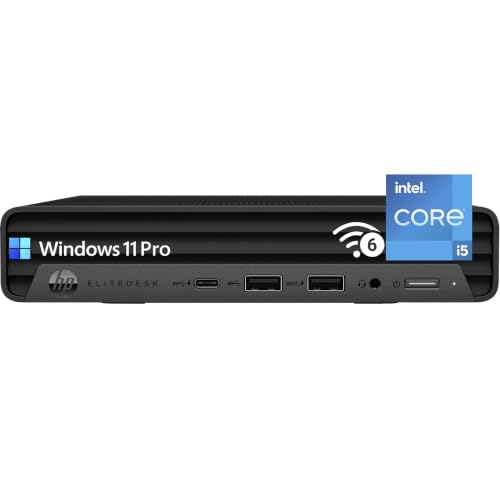
- Six-core Core i5-10500
- 32GB RAM and 1TB NVMe SSD
- Dual 4K DisplayPort outputs
Best For: Larger catalogs and multitasking without an immediate storage upgrade
Best for Expandable Storage

- Ryzen 5 3500U with 16GB dual-channel RAM
- 512GB SSD and two M.2 slots
- Three display outputs
Best For: Modest catalogs with plans to add internal SSD storage
Best for Multi-Monitor Desks

- Ryzen 3 5300U and 16GB RAM
- HDMI, DisplayPort, and USB-C outputs
- Extra M.2 slot and included VESA mount
Best For: Compact three-monitor editing setups
Best for Large Photo Libraries – KAMRUI Hyper H2
If you want a mini pc for lightroom editing with room to grow, the KAMRUI Hyper H2 pairs a 14-core Core i5-14500HX with 16GB of DDR4 memory and a 512GB PCIe 4.0 SSD. Its dual M.2 slots are particularly useful when your photo library outgrows the included drive.
Best For: Photographers who want a compact editing desktop with upgradeable memory and storage.
Pros:
- 14-core, 20-thread processor for demanding multitasking.
- Memory supports up to 64GB; dual M.2 slots support up to 4TB total storage.
- HDMI, DisplayPort, and USB-C support a three-display setup.
Cons:
- Integrated Intel UHD graphics, not a dedicated GPU.
- The included 512GB SSD may fill quickly with photo files.
This is a strong fit if you expect your editing setup to expand. Budget for additional storage—and potentially more RAM—as your catalog grows.
Best for Photo Editing and Casual Gaming – Glorlin Ryzen 7 6800H
The Glorlin is a mini pc for lightroom editing worth considering if you also want a compact machine for media and light gaming. It combines an eight-core Ryzen 7 6800H, Radeon 680M integrated graphics, 16GB of LPDDR5 memory, and a 512GB NVMe SSD.
Best For: Photographers who want one small PC for editing, multiple monitors, and casual gaming.
Pros:
- Radeon 680M graphics support photo editing, media playback, and light gaming.
- HDMI, DisplayPort, and Type-C support three 4K displays.
- Dual M.2 storage support provides room to add a drive.
Cons:
- Memory is listed with a 16GB maximum, limiting future RAM upgrades.
- The included 512GB SSD offers limited space for a growing photo collection.
Its display flexibility and Radeon graphics make it a versatile desk companion. Choose it if 16GB of memory meets your long-term needs; expand the storage if you keep large libraries locally.
Best for Fast External Drives – GEEKOM Mini IT11
The GEEKOM Mini IT11 is a mini pc for lightroom editing that makes sense if your photos live on external drives. Its two USB4 ports are rated for transfers up to 20Gbps, while the Core i7-11390H, 16GB of DDR4 memory, and 512GB PCIe SSD cover the basics of a compact editing setup.
Best For: Editors who regularly connect external photo storage or use several displays.
Pros:
- Two USB4 ports support fast external storage and docking accessories.
- Supports up to four displays through USB4, HDMI, and Mini DisplayPort.
- Memory is expandable to 64GB, with an additional 2.5-inch drive bay.
Cons:
- The four-core, eight-thread processor offers fewer cores than some alternatives here.
- The included SSD is 512GB, so local photo storage may need expansion.
The IT11 stands out for its ports and upgrade options rather than its processor core count. It is especially practical when a fast external drive is already part of your editing workflow.
Best for a Multi-Monitor Workspace – ASUS NUC 15 Pro
For a tidy multi-screen desk, the ASUS NUC 15 Pro is a mini pc for lightroom editing with a Core 5 210H, 16GB of DDR5 memory, and a 512GB NVMe SSD. Two HDMI 2.1 ports and two Thunderbolt 4 ports allow a four-display 4K setup.
Best For: Photographers who prioritize a compact, well-connected editing workstation with several monitors.
Pros:
- Supports four 4K displays via HDMI 2.1 and Thunderbolt 4.
- Two Thunderbolt 4 ports offer options for displays and compatible peripherals.
- Tool-less chassis simplifies access for upgrades; includes a three-year manufacturer warranty.
Cons:
- Uses integrated Intel graphics rather than a dedicated graphics card.
- Comes with a 512GB SSD, which may need supplementing for a large local library.
Choose this NUC if connectivity and a compact footprint matter most. Its display outputs and accessible chassis are useful strengths, but plan your storage needs before committing a large photo archive to the included drive.
Compact Upgrade Pick – GEEKOM A8 Ryzen 7 Mini PC
If you want a mini pc for lightroom editing without giving up desk space, the GEEKOM A8 pairs an eight-core Ryzen 7 8745HS with 16GB of DDR5 memory and a 1TB PCIe 4.0 SSD. Its compact chassis and included VESA bracket make it easy to fit into a photo workspace.
Best For: Photographers who want a small editing PC with room to upgrade memory and storage later.
Pros:
- Eight-core, 16-thread processor and Radeon 780M integrated graphics suit creative work.
- Upgradeable DDR5 memory and SSD storage offer flexibility as projects grow.
- SD card slot and included VESA mount are useful at a photo-editing desk.
Cons:
- The included 16GB of RAM may prompt an upgrade for larger projects or heavier multitasking.
- Integrated graphics may not suit buyers who need a dedicated GPU.
The A8 is a practical choice if you value a tidy setup and upgrade options; its 16GB starting configuration is the main specification to weigh against your workload.
Triple-Display Pick – GMKtec M2 Pro S Core i7 Mini PC
For a mini pc for lightroom editing that can anchor a multi-screen desk, the GMKtec M2 Pro S offers an Intel Core i7-1185G7, 16GB of DDR4 memory, and a 1TB NVMe SSD. Its two HDMI outputs and USB-C video output support up to three 4K displays at 60Hz.
Best For: Editors who want a compact PC for photo work alongside multiple displays and everyday office tasks.
Pros:
- Three display outputs provide flexibility for a multi-monitor workspace.
- 16GB of dual-channel DDR4 is expandable to 64GB.
- A second SSD slot allows additional storage alongside the included 1TB drive.
Cons:
- The four-core processor is a less compelling fit for demanding batch workloads than the eight-core options here.
- Its included SSD uses PCIe 3.0 rather than PCIe 4.0.
This GMKtec model makes the most sense when display connectivity and expandable storage matter more to you than having the newest processor platform.
Memory-Ready Pick – MINISFORUM X1 Lite-255 Ryzen 7 Mini PC
If you expect to keep large catalogs open while multitasking, the MINISFORUM X1 Lite-255 is a mini pc for lightroom editing worth considering. It starts with 32GB of DDR5 memory, a 1TB PCIe 4.0 SSD, and an eight-core Ryzen 7 255 processor with Radeon 780M graphics.
Best For: Photographers who want 32GB of RAM out of the box and flexible options for fast storage and displays.
Pros:
- 32GB of DDR5 memory is included, with support for upgrades up to 128GB.
- Two PCIe 4.0 M.2 slots provide room for additional SSD storage.
- USB4, HDMI, and DisplayPort offer versatile display connections.
- OCuLink provides an option for connecting an external GPU.
Cons:
- Using OCuLink requires one of the M.2 2280 PCIe 4.0 SSD slots.
- An external GPU is not included.
The stronger starting memory configuration is its clearest advantage for photo work. If external-GPU expansion appeals to you, account for the SSD-slot trade-off before planning your storage setup.
Best for Larger Photo Libraries – HP EliteDesk 800 Mini
If you need a mini pc for lightroom editing with room for a growing catalog, this HP EliteDesk combines a six-core Core i5-10500, 32GB of RAM, and a 1TB PCIe NVMe SSD. Its compact case leaves desk space for a photo-editing monitor.
Best For: Photographers who want generous preinstalled memory and storage in a compact Windows 11 Pro desktop.
Pros:
- 32GB RAM supports multitasking alongside a photo-editing workflow.
- 1TB SSD provides useful space for an active catalog and applications.
- Two DisplayPort 1.4 outputs support dual 4K displays.
Cons:
- Intel UHD Graphics 630 is integrated rather than a dedicated graphics card.
- The supplied notes do not specify an SD card reader.
This is the strongest out-of-box memory-and-storage combination of the three. Its integrated graphics make it a more sensible choice for everyday edits than for buyers seeking a dedicated GPU.
Best for Expandable Storage – GMKtec NucBox G10
The GMKtec NucBox G10 is a mini pc for lightroom editing if you value a small footprint and a path to more internal storage. It pairs a four-core Ryzen 5 3500U with 16GB of dual-channel DDR4 and a 512GB PCIe SSD.
Best For: Photographers starting with a modest catalog who want the option to add SSD storage later.
Pros:
- Two M.2 2280 slots provide storage expansion options.
- 16GB dual-channel RAM is preinstalled and listed as upgradeable to 32GB.
- HDMI, DisplayPort, and USB-C support a three-screen workspace.
Cons:
- The 512GB starting drive may fill quickly with large photo libraries.
- The four-core Ryzen 5 3500U is an older platform than the other Ryzen option here.
Choose this one for its expansion flexibility, not its starting capacity. Adding a second SSD could keep photo files separate from the system drive without relying solely on external storage.
Best for Multi-Monitor Desks – BOSGAME E5 Mini PC
For a mini pc for lightroom editing on a desk with several screens, the BOSGAME E5 offers HDMI, DisplayPort, and USB-C display outputs. Its Ryzen 3 5300U, 16GB DDR4 RAM, and 512GB NVMe SSD make it a practical starting point for lighter photo work.
Best For: Editors who want separate screens for their photos, tools, and other desktop tasks.
Pros:
- Supports a three-monitor setup through HDMI, DisplayPort, and USB-C.
- An extra internal M.2 slot allows a second SSD of up to 2TB.
- Includes a VESA mount for keeping the mini PC off the desk.
Cons:
- 16GB RAM is installed as one module; the notes conflict on its maximum supported capacity.
- The starting 512GB SSD may call for additional storage as a catalog grows.
The display connections and included mount are its clearest advantages for a tidy editing station. Check the seller’s current memory specifications before buying if a RAM upgrade is part of your plan.
How We Picked the Best Mini PC for Lightroom Editing
We prioritized configurations that make sense for Lightroom workflows: capable processors, at least 16GB of memory where specified, SSD storage, and useful display connections. We also considered whether a machine offers a practical upgrade path or comes with enough memory and storage to avoid an immediate upgrade. This is a comparison of listed specifications and intended use, not a claim that every system was benchmarked. Check the exact configuration before buying, especially on listings that omit RAM, storage, or processor details.
Quick Comparison: Which Configuration Fits?
For heavier editing and multitasking, the MINISFORUM X1 Lite-255 stands out on paper with 32GB of DDR5 memory and a 1TB SSD. The GEEKOM A8 pairs a newer Ryzen 7 platform with a 1TB SSD and upgradeable DDR5 memory. The KAMRUI Hyper H2 offers a Core i5-14500HX, but its 16GB RAM and 512GB SSD may call for upgrades as a photo library grows.
The Glorlin Ryzen 7 6800H and GEEKOM Mini IT11 occupy the 16GB/512GB middle ground; the Glorlin also lists triple-display support. The GMKtec Core i7-1185G7 provides 1TB of storage with 16GB RAM. For a 32GB/1TB configuration, the HP EliteDesk 800 Mini is worth comparing, but verify its exact Core i5 generation and whether the listing is refurbished. The GMKtec Ryzen 5 3500U and BOSGAME E5 Ryzen 5300U are better suited to lighter workloads; confirm the BOSGAME’s included memory and storage. The ASUS NUC 15 Pro could suit buyers seeking a compact platform with a listed three-year warranty, but confirm its processor and whether RAM and storage are included.
Key Buying Factors for a Mini PC for Lightroom Editing
Processor and Memory
Lightroom benefits from strong CPU performance when importing photos, generating previews, exporting batches, and applying demanding edits. Aim for 16GB RAM as a practical starting point; 32GB offers more breathing room for large RAW files, panoramas, and multitasking. An upgradeable system can be a better long-term buy than one with fixed memory.
Storage, Graphics, and Displays
A 512GB SSD can fill quickly once catalogs, previews, applications, and photos share the drive. A 1TB SSD or a fast external drive is more comfortable for a growing library. Integrated graphics are sufficient for many editing tasks, but GPU-intensive Lightroom features can benefit from stronger graphics. Check Adobe’s current requirements for the features you use, and confirm the mini PC has the right ports for your monitor’s resolution and refresh rate. An external SSD also needs a suitably fast USB or USB4 connection to perform well.
Price and Listing Details
Compare the total cost, not just the advertised box price. RAM, an SSD, a Windows license, or an external drive may be extra. Confirm warranty terms, return policy, and the precise configuration—particularly for barebones or refurbished units.
Who Should Buy Which Mini PC for Lightroom Editing?
Choose a 32GB configuration, such as the listed MINISFORUM or HP, if you routinely work with large catalogs or keep several apps open. Consider the GEEKOM A8 if you want a newer platform with room to upgrade. A 16GB model with a capable CPU can work well for everyday RAW editing if you are comfortable adding storage later. Budget-focused buyers editing smaller batches can consider the older Ryzen systems, provided their specifications and price justify the trade-off. Whatever you choose, leave room in the budget for a calibrated monitor and reliable photo backups.