Choosing a local AI PC build is about more than raw speed. You want enough CPU, GPU, memory, and storage to run models, creative tools, and productivity apps smoothly without leaning on the cloud.
In this roundup, we focus on compact systems and one high-performance laptop that balance practical AI capability, upgrade options, and everyday usability for 2026 buyers.
Best 5 Local AI PC Build Picks for 2026
Best for AI-Ready Expansion
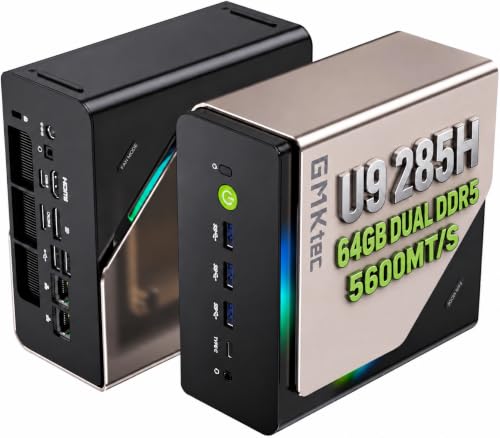
- Core Ultra 9 285H with 64GB DDR5 for strong AI-ready performance.
- Oculink and 3x M.2 slots add rare expansion flexibility.
- Quad 4K/8K display support suits multi-monitor workflows.
Best For: Users who want a compact AI-focused mini PC with strong upgrade potential.
Best for Local AI Workflows

- Ryzen AI 9 HX 470 with built-in AI acceleration
- 32GB DDR5 RAM and 2TB SSD included
- USB4, WiFi 7, and HDMI 2.1 for modern connectivity
Best For: Creators, developers, and power users building a compact local AI workstation.
Best Mobile AI Gaming Pick
Acer Nitro V 16S AI Gaming Laptop

- RTX 5060 Laptop GPU with 572 AI TOPS for on-device AI work
- 32GB DDR5 and 1TB Gen 4 SSD are ready to go out of the box
- 16-inch 180Hz display and slim chassis balance speed with portability
Best For: Gamers and creators who want a portable AI-capable laptop instead of a desktop build.
Best for Local AI Servers
Beelink GTR9 Pro Ryzen AI Max+ 395
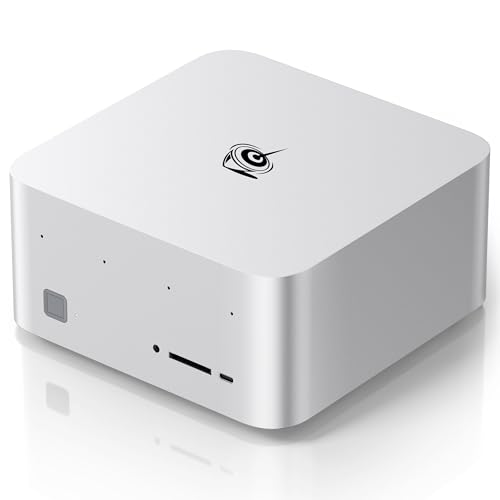
- 126 AI TOPS with Ryzen AI Max+ 395 and Radeon 8060S
- 128GB RAM and 2TB SSD for large local AI workloads
- Dual 10GbE, USB4, and Wi‑Fi 7 for fast networking
Best For: Power users building a compact local AI workstation or private AI server.
Best for Local AI Workloads

- Core Ultra 9 platform for local AI inference and productivity
- Dual 2.5GbE, Wi‑Fi 7, and quad-display support
- Quiet mini PC with upgradeable RAM and storage
Best For: Developers and power users who want a compact workstation for local AI tasks, coding, and multitasking.
Best for AI-Ready Expansion – GMKtec EVO-T1 Ultra 9 Mini PC
If you want a compact local ai pc build that still leaves room to grow, the GMKtec EVO-T1 is a strong pick. It combines Intel Core Ultra 9 performance, built-in AI acceleration, a capable Arc GPU, and expandability that makes it more flexible than most mini PCs in this class.
Best For: Buyers who want a small AI-focused desktop for multitasking, light gaming, creative work, and future storage or eGPU expansion.
Pros:
- Core Ultra 9 285H with 64GB DDR5 gives it a strong base for productivity and AI workloads.
- Oculink plus 3x M.2 slots make it unusually upgrade-friendly for a mini PC.
- Quad-display support and 8K output are great for multi-monitor workstations.
- 2.5GbE, Wi‑Fi 6, and Bluetooth 5.2 cover modern connectivity needs.
Cons:
- Integrated graphics will not match a full desktop GPU for heavy gaming.
- Advanced expansion features may be overkill if you only need a basic office PC.
- High-end specs can push it above entry-level mini PC pricing.
For a local ai pc build in a very small footprint, this model stands out because it balances CPU power, memory headroom, and expansion options better than most compact systems. It is especially appealing if you want a machine that can start as an all-in-one mini desktop and later scale with storage or an external GPU.
Best for Local AI Workflows – GEEKOM A9 Max AI Mini PC
The GEEKOM A9 Max is a strong fit for a local ai pc build if you want a compact desktop with serious AI-ready specs in a small footprint. With an AMD Ryzen AI 9 HX 470, 32GB of DDR5 memory, and a 2TB SSD, it gives you plenty of room for on-device productivity, creative apps, and heavier multitasking without moving to a full tower.
Best For: Creators, developers, and power users who want a compact Windows AI PC for local inference, editing, and daily work.
Pros:
- Ryzen AI 9 HX 470 delivers strong CPU and NPU performance for AI-focused workloads
- 32GB RAM and 2TB SSD come ready for demanding apps and large project files
- USB4, HDMI 2.1, WiFi 7, and dual 8K support make it highly versatile
- Mini PC design saves desk space while still targeting pro-level productivity
Cons:
- Integrated graphics may not suit serious high-end gaming
- Premium hardware means it is not a budget-friendly entry option
- Small-form-factor cooling can be a consideration under sustained heavy loads
Overall, this is a compelling choice for a local ai pc build when you want modern AI hardware, lots of memory, and a tidy desktop setup in one box. It leans more toward productivity and content work than raw upgradeability, but the spec sheet is well matched to everyday local AI use.
Best Mobile AI Gaming Pick – Acer Nitro V 16S AI Gaming Laptop
If you’re shopping for a laptop that can pull double duty as a gaming rig and a capable local ai pc build, the Acer Nitro V 16S AI is built around the right mix of modern CPU, GPU, memory, and storage. The Ryzen 7 260 and RTX 5060 Laptop GPU give it the muscle for on-device AI workloads, while the slim chassis keeps it easier to move than a typical desktop replacement.
Best For: Buyers who want a portable laptop for gaming, creative work, and light-to-moderate local AI tasks without building a desktop.
Pros:
- RTX 5060 Laptop GPU with 572 AI TOPS is well suited to local AI acceleration
- 32GB DDR5 RAM and 1TB Gen 4 SSD give it a strong out-of-the-box setup
- 16-inch 180Hz WUXGA display is fast and sharp for gaming and multitasking
- Slim, portable design makes it easier to carry than a tower-based setup
Cons:
- Still a laptop, so sustained AI workloads will trail larger desktop systems
- Maximum memory tops out at 32GB, limiting future expansion
- Not ideal if you want a fully customizable local AI PC build
For users who want a flexible machine instead of a full tower, this Nitro V 16S makes a compelling local ai pc build alternative. It won’t beat a high-end desktop in raw headroom, but it offers a practical balance of portability, speed, and AI-capable hardware.
Best for Local AI Servers – Beelink GTR9 Pro Ryzen AI Max+ 395
If your priority is a serious local ai pc build in a compact desktop, the Beelink GTR9 Pro stands out for its Ryzen AI Max+ 395 platform, huge 128GB memory, and 2TB SSD. It’s aimed at users who want to run large models, handle creative workloads, and keep everything on-device with minimal compromise.
Best For: Power users who want a compact AI workstation for local models, editing, and heavy multitasking.
Pros:
- Ryzen AI Max+ 395, Radeon 8060S, and 126 AI TOPS deliver top-tier local AI performance.
- 128GB LPDDR5X RAM and 2TB SSD give it excellent headroom for large projects and datasets.
- Dual 10GbE, dual USB4, and Wi-Fi 7 make it well suited for fast networking and AI server use.
- Supports up to four 8K displays for advanced workstation setups.
Cons:
- Expensive for buyers who only need a basic mini PC.
- Overkill if your local ai pc build is mainly for lightweight inference or office work.
- Small-form-factor cooling and power limits may still matter under sustained loads.
For builders who want a compact machine that can genuinely anchor a local ai pc build, this Beelink is one of the more capable all-in-one options thanks to its memory capacity, connectivity, and AI-focused silicon.
Best for Local AI Workloads – GEEKOM IT13 MAX AI Mini PC
If you want a compact local ai pc build that can handle inference, light model work, coding, and content creation without taking over your desk, the GEEKOM IT13 MAX is a strong all-in-one pick. Its Core Ultra 9 platform, fast SSD storage, and dual 2.5GbE networking make it especially appealing for developers, homelab users, and creators who want desktop-class performance in a mini PC.
Best For: Developers, engineers, and power users who want a quiet mini PC for local AI tasks, multitasking, and small-space workstation setups.
Pros:
- Core Ultra 9 185H brings strong CPU performance and better AI acceleration for local workloads
- Dual 2.5GbE LAN, Wi‑Fi 7, and quad-display support make it highly flexible for workstations
- Quiet operation and compact size suit offices, labs, classrooms, and shared spaces
- Upgradeable memory and storage give it room to grow with heavier projects
Cons:
- 16GB RAM is usable, but serious AI and creative work will likely want an upgrade
- Integrated graphics are capable, but not a substitute for a discrete GPU in demanding gaming or training
For a practical local ai pc build, this mini PC stands out because it balances performance, connectivity, and expandability without needing a full tower. It is a smart choice if you want a small machine that can run local tools today and scale up later.
How We Picked These Local AI PC Build Options
We prioritized systems that make sense for real-world on-device workloads: strong AI-focused processors, enough RAM for multitasking, fast SSD storage, modern connectivity, and sensible thermals for sustained use. We also looked at form factor, since a Local AI PC Build should fit the way you work, whether that means a desk-friendly mini PC or a portable laptop.
Quick Comparison
Some buyers will want the highest memory ceiling and expansion flexibility, while others may value portability or a lower-friction setup. Mini PCs are the best fit for fixed workstations, but a gaming laptop can be the smarter choice if you need to move between locations. If you plan to run larger local models or heavier creative workloads, prioritize RAM capacity, storage headroom, and cooling before chasing headline AI numbers.
Key Buying Factors for a Local AI PC Build
Processor and AI Acceleration
Look for newer CPUs with integrated AI acceleration and strong multicore performance. These help with inference, indexing, transcription, and everyday productivity, especially when the workload is optimized for local execution.
Memory and Storage
For a Local AI PC Build, 32GB of RAM is a practical starting point, while 64GB or more is better for larger models and heavier multitasking. Fast NVMe SSDs matter too, because model files, datasets, and scratch space can grow quickly.
Graphics and Expansion
If you plan to use GPU-accelerated tools, pay close attention to discrete graphics support, high-bandwidth connectivity, and expansion options such as extra M.2 slots, external GPU links, or faster networking. These can make a bigger difference than a small boost in peak CPU speed.
Connectivity and Thermals
Wi-Fi 7, 2.5GbE or faster LAN, and solid USB-C support are useful for modern workflows. Just as important, choose a system with cooling designed for long sessions; sustained performance is what matters most in a Local AI PC Build.
Who Should Buy Which Local AI PC Build?
Choose the mini PC with the most expansion and memory if you want a near-desktop setup for heavier local AI work. Pick a balanced productivity mini PC if your main needs are coding, research, office tasks, and light model testing. Go with the laptop if portability matters more than maximum expansion. If you need the strongest all-around workstation-style option, favor the model with the highest RAM ceiling, fastest networking, and the most headroom for future upgrades.