Choosing the right pc for 3d modeling and rendering can make the difference between smooth creative work and constant waiting. The best systems balance CPU speed, GPU power, memory capacity, and fast storage for demanding 3D workflows.
In this roundup, we focus on desktops that fit different budgets and workloads, from entry-level 3D tasks to high-end scene building, simulation, and production rendering.
Best 8 PC for 3d Modeling and Rendering Picks for 2026
Best for GPU-Accelerated Rendering

- RTX 5070 12GB helps with complex 3D scenes
- Core Ultra 7 supports fast multitasking and creation
- 1TB NVMe SSD keeps projects loading quickly
Best For: Creators who prioritize GPU-accelerated 3D rendering and also want strong gaming performance.
Best Budget Starter
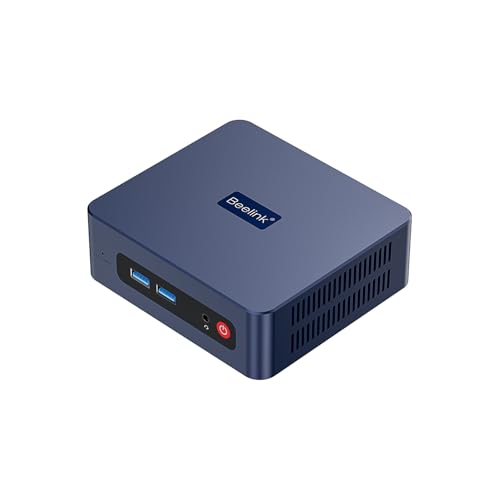
- 16GB RAM and 500GB SSD for basic multitasking
- Dual HDMI supports two-monitor workflows
- Compact mini PC design for small desks and studios
Best For: Beginners and hobbyists who need a low-cost mini PC for light 3D work and everyday tasks.
Best for Fast CPU Work
i9-14900HX / RTX 5060 Ti Prebuilt Tower
- 24-core Core i9-14900HX boosts CPU-heavy modeling and multitasking.
- RTX 5060 Ti 8GB handles modern GPU-accelerated creative work.
- 1TB NVMe SSD and DDR5 RAM keep the system quick out of the box.
Best For: Creators who want a ready-to-run workstation for modeling, editing, and moderate rendering.
Best for Entry-Level 3D Work
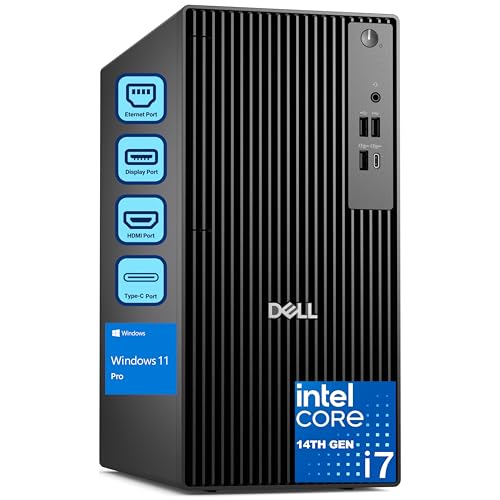
- 20-core Intel i7-14700 for strong multitasking
- 32GB RAM and 1TB SSD support creative workloads
- Tower chassis leaves room for future upgrades
Best For: Designers and small teams needing a capable business desktop for modeling and light rendering.
Best for High-End 3D Work
Velztorm White Praetix RTX 5080 Desktop

- RTX 5080 16GB for fast GPU rendering and viewport work
- Ryzen 7 9800X3D with liquid cooling for sustained performance
- 32GB DDR5, 2TB SSD, and WiFi 7 for a creator-ready setup
Best For: 3D artists who want a powerful desktop for rendering, viewport performance, and fast project loading.
Best for High-Volume 3D Work
Velztorm Pilum Ryzen 7 RTX 5060 Desktop
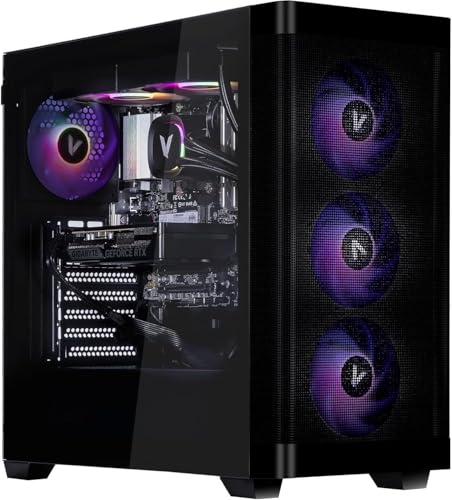
- 8-core Ryzen 7 5700X handles modeling and multitasking well
- RTX 5060 adds useful GPU acceleration for creative apps
- 64GB RAM and 1TB SSD keep projects moving smoothly
Best For: Artists and creators who want a balanced desktop for 3D modeling, rendering, and multitasking.
Best Value RTX 5060 Pick
Velztorm White Pilum Z2 Gaming Desktop

- Ryzen 7 5700X and RTX 5060 suit modeling and rendering tasks.
- 32GB RAM and 1TB SSD support smooth multitasking and fast loads.
- 240mm liquid cooling and 4 ARGB fans help sustain performance.
Best For: Creators who want a capable, ready-to-run desktop for 3D work and gaming.
Best for Balanced 1080p Creative Work
Velztorm Pilum Gaming Desktop PC
- Ryzen 7 5700X with 8 cores and 16 threads
- RTX 5060 for GPU-accelerated creative work
- 32GB RAM and 1TB SSD for smoother multitasking
Best For: Creators who want a capable prebuilt desktop for 3D modeling, rendering, and everyday multitasking.
Best for GPU-Accelerated Rendering – Core Ultra 7 RTX 5070 Desktop
If you need a pc for 3d modeling and rendering that can also handle gaming and streaming, this tower is built around a strong CPU/GPU combo. The Core Ultra 7 265KF and GeForce RTX 5070 with 12GB of GDDR7 VRAM give it the kind of graphics headroom that helps with viewport performance, texture-heavy scenes, and faster render workloads.
Best For: Creators who want a high-performance desktop for 3D work, GPU-accelerated rendering, and also want solid 4K gaming capability.
Pros:
- RTX 5070 12GB gives useful VRAM for complex scenes and render tasks
- Core Ultra 7 platform is well-suited to multitasking and creator apps
- 1TB NVMe SSD supports quick boots and faster project loading
- Airflow-focused tower is designed to keep performance stable under load
Cons:
- 16GB RAM is workable, but heavier 3D projects may benefit from an upgrade
- Not a workstation-class system with ECC memory or pro-grade GPU drivers
- Storage is decent, but large asset libraries may outgrow 1TB quickly
This is a strong choice if you want a pc for 3d modeling and rendering with modern GPU acceleration and enough all-around horsepower for creative work, though serious professionals may still want to add more RAM.
Best Budget Starter – Beelink SER3 Mini PC
If you want an affordable pc for 3d modeling and rendering for very light projects, the Beelink SER3 is a compact entry-level option with 16GB of RAM, a 500GB SSD, and dual-monitor support. Its Ryzen 3 3200U and Vega 3 graphics are fine for basic scene work, viewport previews, and general creative tasks, but it is not built for demanding production workloads.
Best For: Beginners, students, or hobbyists who need a low-cost mini PC for simple modeling, lighter renders, and everyday productivity.
Pros:
- 16GB RAM and 500GB SSD give it a solid baseline for multitasking
- Dual HDMI output makes it easy to run two displays
- Compact, quiet mini PC design fits small desks or studios
- USB 3.2 and Wi-Fi 6 add useful modern connectivity
Cons:
- 2-core Ryzen 3 CPU is limited for heavy 3D rendering
- Integrated Vega 3 graphics are only suited to light 3D work
- Not ideal for large scenes, complex textures, or professional pipelines
As a pc for 3d modeling and rendering, this Beelink makes sense only if your needs are modest and your budget is tight. It is better viewed as a starter machine for learning, small projects, and general-use creative workflows than as a serious production box.
Best for Fast CPU Work – i9-14900HX / RTX 5060 Ti Prebuilt Tower
If you want a pc for 3d modeling and rendering that leans hard on CPU speed while still giving you modern GPU support, this prebuilt WIWB tower is worth a look. The Core i9-14900HX and RTX 5060 Ti combo should handle modeling, viewport work, and midrange rendering tasks well, while the 1TB NVMe SSD and DDR5 memory help keep projects moving.
Best For: Creators who need strong processor performance for modeling, editing, and mixed workstation use without building a system from scratch.
Pros:
- Core i9-14900HX offers 24 cores and up to 5.8GHz boost for demanding multitasking.
- RTX 5060 Ti 8GB adds modern ray tracing and DLSS support for GPU-accelerated workloads.
- 16GB DDR5 RAM and a 1TB NVMe SSD deliver quick load times and responsive day-to-day use.
- WiFi 6 and multiple display outputs make it easy to build a flexible workstation setup.
Cons:
- 16GB of RAM may feel limiting for larger 3D scenes or heavier multitasking.
- 8GB of VRAM is workable, but power users may want more for complex rendering projects.
For buyers seeking a pc for 3d modeling and rendering that prioritizes processor strength and arrives ready to use, this build offers a practical starting point. It is a better fit for moderate creative workloads than for very large scenes or pro-level production pipelines.
Best for Entry-Level 3D Work – Dell Pro Tower i7 Desktop
If you want a dependable pc for 3d modeling and rendering without jumping into workstation pricing, this Dell Pro Tower is a practical middle-ground. The Intel Core i7-14700, 32GB of RAM, and 1TB SSD give it enough headroom for modeling, multitasking, and lighter-to-moderate render workloads, while the tower design leaves room for upgrades later.
Best For: Designers, freelancers, and small studios that need a capable business desktop for 3D modeling, general creative work, and everyday productivity.
Pros:
- 20-core Core i7 processor handles demanding multitasking well
- 32GB RAM and 1TB SSD provide a strong baseline for creative apps
- Tower form factor is easier to upgrade than compact desktops
- Windows 11 Pro suits business and professional workflows
Cons:
- No dedicated graphics card listed, which limits heavy rendering performance
- Better suited to entry-level or moderate 3D work than advanced animation pipelines
This is a solid pc for 3d modeling and rendering if your priority is CPU power, memory, and expandability over a factory-built GPU-focused workstation. For heavier scenes and faster renders, you may eventually want to add a strong discrete graphics card.
Best for High-End 3D Work – Velztorm White Praetix RTX 5080 Desktop
If you want a pc for 3d modeling and rendering that can also handle demanding GPU-accelerated workflows, this Velztorm build is aimed squarely at heavy creators. The RTX 5080, Ryzen 7 9800X3D, 32GB of DDR5 memory, and 2TB PCIe SSD give it the kind of fast response and large-project headroom that matters when scenes get complex.
Best For: Creators who need a high-end desktop for GPU rendering, fast viewport performance, and general 3D production work.
Pros:
- RTX 5080 16GB offers serious GPU power for rendering and viewport acceleration
- Ryzen 7 9800X3D and liquid cooling support strong sustained performance
- 32GB DDR5 and 2TB NVMe SSD are a solid starting point for large projects
- WiFi 7, Windows 11 Pro, and plenty of ports make it workstation-friendly
Cons:
- 32GB RAM may be limiting for very heavy multitasking or massive scenes
- Premium parts put it well above entry-level creator budgets
- Gaming-first CPU choice may not be the absolute best value for all pro apps
For a pc for 3d modeling and rendering, this is a strong high-end option if you care most about GPU throughput, fast storage, and smooth day-to-day responsiveness. It is overkill for basic CAD or light modeling, but a good fit for users who want a powerful all-in-one desktop for serious creative work.
Best for High-Volume 3D Work – Velztorm Pilum Ryzen 7 RTX 5060 Desktop
If you want a practical pc for 3d modeling and rendering that can handle everyday creative workloads without feeling underpowered, the Velztorm Pilum is a strong midrange option. Its Ryzen 7 5700X and RTX 5060 pairing gives you solid CPU performance for modeling tasks and enough GPU muscle for viewport acceleration, rendering, and light-to-moderate content creation.
Best For: Artists, students, and creators who need a well-balanced desktop for 3D modeling, rendering, and multitasking.
Pros:
- 8-core Ryzen 7 5700X is well suited to creative workloads and smooth multitasking
- RTX 5060 supports ray tracing, fast viewport work, and GPU-accelerated software
- 64GB RAM and 1TB PCIe SSD help keep large projects responsive
- 240mm liquid cooling and four ARGB fans should help maintain stable performance
Cons:
- DDR4 platform is less future-facing than newer DDR5 systems
- 1TB storage may fill up quickly with large asset libraries and project files
- Better for midrange creative work than heavy professional rendering farms
Overall, this is a sensible pc for 3d modeling and rendering if you want strong specs without jumping into a much more expensive workstation class. It offers a useful blend of CPU threads, GPU acceleration, and generous memory for creators who need dependable day-to-day performance.
Best Value RTX 5060 Pick – Velztorm White Pilum Z2 Gaming Desktop
If you want a practical pc for 3d modeling and rendering that also handles gaming well, the Velztorm White Pilum Z2 is a strong middle-ground option. Its Ryzen 7 5700X, RTX 5060, 32GB of RAM, and 1TB PCIe SSD give it the core specs needed for smoother scene work, faster viewport performance, and responsive multitasking.
Best For: Creators who need a ready-to-use desktop for 3D modeling, rendering, and everyday gaming without jumping to a much pricier workstation class.
Pros:
- Ryzen 7 5700X and RTX 5060 offer a capable CPU/GPU mix for creative workloads.
- 32GB RAM and a 1TB PCIe SSD help with larger projects, caching, and fast load times.
- 240mm liquid cooling plus four ARGB fans should keep thermals under control during long sessions.
- Arrives prebuilt with Windows 11 Home and a 750W Gold PSU for a convenient setup.
Cons:
- DDR4-based platform is less future-forward than newer DDR5 builds.
- Not ideal for heavy professional rendering pipelines that demand higher-end RTX 4070-class performance or above.
Overall, this is a balanced pc for 3d modeling and rendering if you want solid everyday creative performance and don’t need an elite workstation budget. It offers enough memory, storage, and cooling to stay useful for mixed design and gaming use.
Best for Balanced 1080p Creative Work – Velztorm Pilum Gaming Desktop PC
If you want a practical pc for 3d modeling and rendering without jumping into workstation pricing, the Velztorm Pilum offers a strong mix of CPU speed, modern RTX graphics, and plenty of memory. The Ryzen 7 5700X and RTX 5060 should handle modeling, viewport work, and lighter rendering tasks well, while the 32GB RAM and 1TB SSD help keep projects responsive.
Best For: Creators who need a capable all-in-one desktop for 3D modeling, rendering, and smooth multitasking at 1080p or 1440p.
Pros:
- Ryzen 7 5700X provides 8 cores and 16 threads for creative workloads
- RTX 5060 supports GPU-accelerated apps and ray-traced visuals
- 32GB DDR4 RAM and 1TB PCIe SSD help with large files and fast loading
- 240mm liquid cooling plus four ARGB fans improve thermal headroom
Cons:
- AM4 platform is not as future-facing as newer CPU platforms
- Storage may feel limited if you keep many large project files locally
For buyers comparing a pc for 3d modeling and rendering, this Velztorm stands out as a balanced midrange option: enough cores for productivity, a modern GPU for accelerated workflows, and a prebuilt design that avoids assembly hassle. It is a sensible pick if you want capability first and customization second.
How We Picked the Best PC for 3d Modeling and Rendering
We looked for systems that offer strong real-world performance for modeling, viewport navigation, baking, rendering, and multitasking. That means prioritizing modern multi-core processors, capable NVIDIA or AMD-class graphics where applicable, enough RAM for complex scenes, and NVMe SSD storage for fast project loading.
We also considered upgrade potential, cooling, and how well each system fits different levels of 3D work. A PC for 3d Modeling and Rendering should do more than launch software quickly; it should stay responsive under long sessions and heavy export jobs.
Quick Comparison
For the fastest rendering and the most headroom, high-end RTX 5080 and current-generation Core Ultra or Ryzen 7 builds are the strongest choices. Midrange towers with RTX 5060 Ti or RTX 5060 graphics are better for mainstream modeling, smaller scenes, and creator-student workflows. Higher-RAM options are especially helpful if you keep many apps open or work with large textures and complex assets.
Key Buying Factors for PC for 3d Modeling and Rendering
CPU Performance
3D software depends heavily on the processor for simulation, scene preparation, and some render engines. Look for strong single-core speed for viewport responsiveness plus enough cores for multitasking and final output.
GPU Capability
A modern GPU helps with real-time previewing, acceleration in supported render engines, and smoother interaction with heavy scenes. For demanding work, more VRAM is a major advantage.
Memory and Storage
16GB RAM is a starting point, but 32GB is the safer choice for serious 3D work. 64GB is worthwhile for larger scenes, large texture libraries, or multiple creative apps. A 1TB NVMe SSD is a solid baseline for fast boot times and project access.
Cooling and Power
Rendering can hold components at high load for long periods. Good airflow, liquid cooling, and a quality power supply help maintain performance and system stability.
Who Should Buy Which PC for 3d Modeling and Rendering?
If you are a student, beginner, or light hobbyist, a more affordable tower with balanced CPU and GPU hardware may be enough. If you model regularly and render often, step up to a 32GB RAM system with a stronger graphics card. For professionals working with large scenes, animation, or GPU-heavy rendering, choose the highest-end option you can justify for long-term productivity.
In short, the best PC for 3d Modeling and Rendering is the one that matches your software, scene complexity, and how much time you want to save on every project.