A good pc fan controller hub makes it much easier to run multiple case fans from one setup without turning your build into cable clutter. It can also simplify airflow tuning, especially in systems with limited motherboard headers.
Below, we focus on practical options for PWM, ARGB, SATA-powered, and high-fan-count builds so you can choose a hub that matches your case, lighting, and control needs.
Best 10 PC Fan Controller Hub Picks for 2026
Best for High-Fan Builds
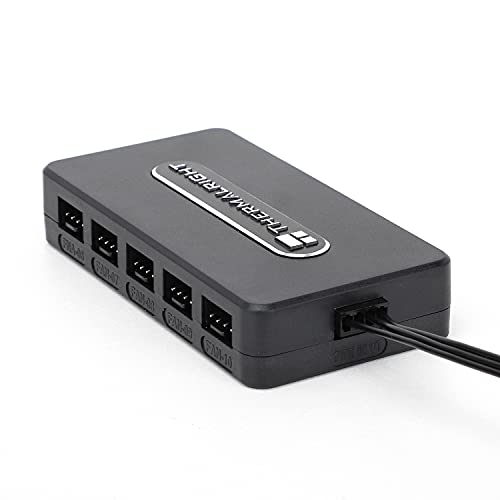
- Supports up to 10 fans for larger builds
- SATA-powered for stable, direct output
- Compact, adhesive-mounted design simplifies cable management
Best For: PC builders who need a simple hub for powering and organizing many case fans.
Best for 9-Fan Builds
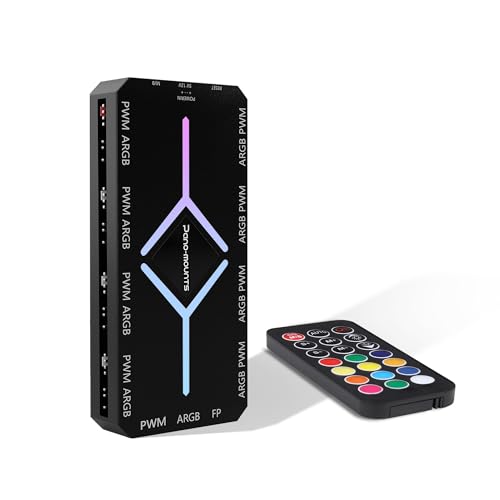
- Handles up to 9 PWM fans and 9 ARGB ports
- Magnetic mount simplifies installation in metal cases
- SATA power supports steadier operation and lighting sync
Best For: PC builders who need a centralized hub for multiple fans and ARGB devices.
Best for USB-Powered Builds
4 Pin PWM Fan Controller Hub with USB-C

- 5-way splitter for multiple 4-pin PWM fans
- USB-C power input for flexible setup options
- 15-18W output suits light to moderate fan loads
Best For: Users who want a simple hub to power and control several PWM fans from a compact USB-powered setup.
Best for Clean Multi-Fan Builds
Thermalright Fan and ARGB HUB X8

- Runs up to 8 PWM fans and 8 ARGB devices
- SATA-powered for stable, tidy cable management
- Easy adhesive mounting inside the case
Best For: Builders who need a simple expansion hub for multiple fans and ARGB devices.
Best for Multi-Fan PWM Builds
12V 4 Pin PWM Fan Controller Hub

- Supports up to 6x 4-pin PWM fans
- Type-C PD/QC or DC 5521 powered
- 60W total output with 10-step control
Best For: PC builders who want a powered six-fan PWM hub with flexible input options.
Best for Big Fan Builds
ShakingTank 9-Port ARGB PWM Hub

- 9 fan ports for larger cooling setups
- SATA power for steadier operation
- Magnetic mount for quick, clean installation
Best For: PC builders who need a simple way to power and organize multiple fans and ARGB devices.
Best for High-Load PWM Setups
4 Pin PWM Fan Controller Hub, 6 Fans

- Supports up to 6 PWM fans
- SATA or DC 5525 12V powered
- Manual 1%–99% speed adjustment
Best For: Builders who want straightforward manual control over several 4-pin PWM fans.
Best for Multi-Fan Builds
Thermalright ARGB Fan HUB Controller

- 8 fan-group support for cleaner wiring
- 5V 3-pin ARGB compatibility
- Magnetic mounting for easier placement
Best For: PC builders who want a compact hub to manage multiple PWM fans and ARGB lighting.
Best Heavy-Duty Pick
EZDIY-FAB PWM Fan Hub Controller

- Runs up to 10 fans from one motherboard PWM header
- SATA power reduces motherboard load
- Easy to mount with adhesive or screw hole
Best For: Large PC builds that need centralized fan control and cleaner wiring.
Best for Simple Fan Expansion
Thermalright ARGB 8-Port Fan HUB
- 8 fan ports for cleaner multi-fan setups
- SATA power supports steadier performance
- 5V 3-pin ARGB support with magnetic mounting
Best For: Users who want a straightforward hub for adding multiple PWM fans and ARGB devices.
Best for High-Fan Builds – Thermalright 10-Port Fan Hub
If you need a practical pc fan controller hub for a build with lots of case fans, this Thermalright 10-port hub is built around simplicity and capacity. It uses SATA power for more stable output, supports up to 10 fans, and keeps wiring cleaner by concentrating multiple fan connections into one compact hub.
Best For: PC builders who want a straightforward way to power and organize several case fans without adding a complicated controller.
Pros:
- Supports up to 10 fans, making it a strong fit for multi-fan cases
- SATA-powered design helps maintain stable output under heavier loads
- Compact hub with adhesive mounting keeps cable management tidy
- Includes fan speed reading support from the red port
Cons:
- SATA cable is not included and must be purchased separately
- Speed reading is limited to the single fan connected to the red interface
As a pc fan controller hub, this model is best when you want reliable fan distribution and cleaner wiring rather than advanced software control. It is a solid match for builders who value capacity, stable power delivery, and an easy install over extra features.
Best for 9-Fan Builds – PWM & ARGB Magnetic Fan Hub
If you need a pc fan controller hub that can organize a larger case cleanly, this 9-port model is built for exactly that job. It combines PWM speed control and 5V 3-pin ARGB syncing in one SATA-powered unit, so you can reduce cable clutter while keeping fan behavior and lighting under one hub.
Best For: Builders who want centralized control for up to nine PWM/ARGB fans with simple magnetic mounting.
Pros:
- Controls up to 9 fans and 9 ARGB connections from one hub
- Magnetic backplate makes placement quick on metal chassis surfaces
- SATA power helps maintain steadier performance than weak daisy-chain setups
- Works with major RGB ecosystems like Aura Sync, Mystic Light, and RGB Fusion
Cons:
- Designed for 5V 3-pin ARGB, not standard 12V RGB strips
- Best suited to systems with available SATA power and a metal mounting area
For high-fan-count systems, this pc fan controller hub is a practical way to centralize both airflow and lighting without turning the build into a wiring project. It is especially appealing if you want easy installation, broad software compatibility, and reliable power delivery in a single accessory.
Best for USB-Powered Builds – 4 Pin PWM Fan Controller Hub with USB-C
If you need a simple pc fan controller hub for a small build or a fan-heavy setup, this PWM splitter hub is built around practical power delivery and straightforward control. It supports 4-pin PWM fans, uses a Type-C USB power cable, and is rated for 15-18W output, making it a useful option when you want to manage multiple fans without overcomplicating wiring.
Best For: Builders who want an easy-to-use hub for splitting and controlling several 4-pin PWM fans from a USB-powered setup.
Pros:
- 5-way PWM splitter helps tidy up multi-fan cable management
- USB-C power input adds flexible compatibility for modern setups
- 15-18W, 1.2-1.5A output is suitable for light to moderate fan loads
- Compact hub format keeps the install simple
Cons:
- Limited power output is not ideal for very high-draw fan arrays
- Designed for 4-pin PWM fans, so it is not a universal fan controller
- May be more basic than feature-rich fan controllers with software support
For buyers who mainly want cleaner fan distribution and dependable PWM control, this pc fan controller hub is a straightforward fit. It is less about advanced tuning and more about giving you a compact, workable way to power and manage multiple fans from one hub.
Best for Clean Multi-Fan Builds – Thermalright Fan and ARGB HUB X8
If you need a practical pc fan controller hub for a build with multiple RGB fans, the Thermalright HUB X8 is designed to simplify cable routing and expand limited motherboard headers. It combines ARGB and PWM fan distribution in one compact SATA-powered unit, making it a straightforward option for tidy, multi-fan setups.
Best For: Builders who want to run up to 8 PWM fans and 8 ARGB devices while keeping wiring organized and powered reliably.
Pros:
- Supports both ARGB lighting and PWM fan connections in one hub
- SATA power helps maintain stable output for larger fan setups
- Strong double-sided adhesive makes installation easy inside the case
- Compact layout helps reduce cable clutter in crowded builds
Cons:
- Does not support 12V 4-pin RGB devices
- Does not add true fan-speed or lighting control beyond header distribution
- Best suited to organization and expansion, not advanced tuning
Overall, this pc fan controller hub is a solid pick if your main goal is cleaner cable management and broader header support rather than software-style control features. It fits best in RGB-heavy systems where reliability and simplicity matter more than extra customization.
Best for Multi-Fan PWM Builds – 12V 4 Pin PWM Fan Controller Hub
If you need a straightforward pc fan controller hub for a build with multiple 4-pin PWM fans, this model keeps things simple: one powered hub, up to six fans, and adjustable speed control in 10% steps. It’s a practical fit for cases, workstations, and cooling setups that need centralized PWM management without extra software.
Best For: Builders who want a powered 6-fan PWM hub with flexible Type-C PD/QC or DC input.
Pros:
- Supports up to 6x 4-pin PWM fans from one hub
- Flexible power input via Type-C PD3.0/QC3.0 or DC 5521
- 60W total output is strong enough for larger fan groups
- 10-step PWM control makes speed tuning easy
Cons:
- Not compatible with 3-pin or 2-pin fans
- Fans are not included
- Requires an external 12V power source to operate
This pc fan controller hub is best for users who already know they want PWM-only control and a powered distribution setup. If your cooling plan centers on multiple matched 4-pin fans, it offers a clean, flexible way to manage them from one place.
Best for Big Fan Builds – ShakingTank 9-Port ARGB PWM Hub
If you need a practical pc fan controller hub for a multi-fan case, the ShakingTank 9-port model is built to simplify wiring while keeping PWM control and ARGB lighting in sync. Its SATA power input helps avoid stressing the motherboard, and the magnetic base makes placement quick and flexible.
Best For: PC builders who want an easy way to manage up to nine PWM fans and ARGB devices with cleaner cable routing.
Pros:
- Supports up to 9 fans with synchronized PWM and ARGB control
- SATA-powered design helps deliver steadier power for higher-demand setups
- Magnetic mounting makes installation simple and repositioning easy
- Compact size helps reduce cable clutter inside the case
Cons:
- ARGB support is limited to 5V 3-pin devices
- PWM control still depends on motherboard connections for fan speed management
Overall, this pc fan controller hub is a smart fit for builders who want a low-fuss splitter with strong expansion and tidy cable management. It is less about advanced software features and more about getting reliable fan and lighting distribution in a clean, compact package.
Best for High-Load PWM Setups – 4 Pin PWM Fan Controller Hub, 6 Fans
If you need a practical pc fan controller hub for a multi-fan build, this model keeps things simple: it supports up to six 4-pin PWM fans and gives you manual speed control with a knob. The flexible SATA or 5.5×2.5mm 12V input is handy for different case and bench setups, while the 60W/5A total limit makes the power envelope clear.
Best For: Builders who want straightforward manual control over several 4-pin PWM fans in a high-airflow PC or test rig.
Pros:
- Supports up to 6 PWM fans from one hub
- Runs on either SATA 12V or DC 5525 12V input
- Simple knob control with 1%–99% PWM duty adjustment
- Each port supports up to 2A, with 60W total output
Cons:
- Not compatible with 3-pin or 2-pin fans
- Fans are not included
- Total current must stay within the 5A combined limit
Overall, this pc fan controller hub is a good fit if you want dependable manual fan tuning without software or motherboard dependency. It is especially useful for cases, open-air benches, and other builds where a basic, powered PWM hub is all you need.
Best for Multi-Fan Builds – Thermalright ARGB Fan HUB Controller
If you need a simple pc fan controller hub for consolidating several case fans and ARGB devices, this Thermalright hub is a practical pick. It supports up to 8 fan groups, uses standard 4-pin PWM fan connections, and adds 5V 3-pin ARGB expansion for coordinated lighting setups.
Best For: Builders who want an easy, compact hub to manage multiple PWM fans and 5V ARGB lighting without taking up much space.
Pros:
- Supports up to 8 fan groups for cleaner cable management
- Includes 5V 3-pin ARGB support for synced lighting control
- Magnetic/adhesive mounting makes installation straightforward
- Compact hub design works well in tight cases
Cons:
- Does not support 12V 4-pin RGB devices
- Best suited for users already comfortable with fan-header routing
Overall, this pc fan controller hub is a solid choice if your main goal is to simplify fan and ARGB wiring in a multi-fan build. Just make sure your lighting gear is 5V 3-pin compatible before buying.
Best Heavy-Duty Pick – EZDIY-FAB PWM Fan Hub Controller
If you need a practical pc fan controller hub for a larger case setup, this EZDIY-FAB hub is built to run up to 10 fans from one motherboard PWM header while taking power from SATA. It’s a straightforward way to expand cooling without loading the motherboard header directly, making it especially useful in multi-fan gaming or airflow-focused builds.
Best For: Builders who want to control a large group of PWM fans from one header with simple cable management.
Pros:
- Supports up to 10 fans from a single 4-pin motherboard header
- SATA power helps reduce strain on the motherboard
- Includes adhesive backing and a center screw hole for mounting
- One dedicated fan port provides RPM signal feedback
Cons:
- 3-pin fans will run at full speed rather than being PWM controlled
- Total current is limited to 3A, so fan specs need to be checked
- Only one fan header reports speed to the motherboard
This pc fan controller hub is a good fit if you want to simplify wiring and scale cooling from a single header, but it works best when your fans are all within the power limit and ideally PWM-based.
Best for Simple Fan Expansion – Thermalright ARGB 8-Port Fan HUB
If you need a practical pc fan controller hub for cleaning up wiring and expanding header count, this Thermalright unit is built for straightforward fan and ARGB distribution. It supports up to 8 fan groups, runs on SATA power for more stable delivery, and uses a magnetic adhesive mount to make placement easier inside the case.
Best For: Builders who want an easy way to connect multiple 4-pin PWM fans and 5V 3-pin ARGB devices without overcomplicating cable management.
Pros:
- Supports up to 8 fan connections for simpler system expansion
- SATA-powered design helps maintain stable output under load
- Built-in magnetic adhesive makes mounting quick and flexible
- Includes ARGB support for synchronized 5V 3-pin lighting gear
Cons:
- Does not support 12V 4-pin RGB devices
- Only one fan speed reading is recognized for PWM reporting
- It expands connections, but does not independently control speed or lighting
As a pc fan controller hub, this is a solid choice if your priority is more headers, cleaner cable routing, and reliable power delivery rather than advanced software control. Just make sure your lighting hardware is 5V ARGB-compatible before buying.
How We Picked the Best PC Fan Controller Hub
We prioritized fan hubs that solve real-world build problems: enough ports for multi-fan setups, stable power delivery, broad compatibility with 4-pin PWM and, where relevant, 3-pin ARGB devices, plus easy installation. We also looked for hubs that reduce motherboard header strain and suit both simple airflow-only systems and more elaborate RGB builds.
Quick Comparison
If you want the simplest setup, a SATA-powered pwm hub is usually the easiest route for multiple fans from a single motherboard header. If lighting matters too, choose an ARGB-capable model so you can centralize both fan speed and illumination management. For high-draw or higher-fan-count systems, pay close attention to the power source and the manufacturer’s total wattage or current limits.
Key Buying Factors for a PC Fan Controller Hub
Port Count and Expansion
Match the number of outputs to your current fans plus a little room for future upgrades. An 8- or 9-port hub is often ideal for modern cases with several intake and exhaust fans.
Power Delivery
Most multi-fan setups should use SATA, Type-C, or direct DC power rather than relying only on the motherboard header. This helps prevent overload and keeps fan speed control more consistent under load.
PWM, DC, and ARGB Compatibility
Check whether the hub supports 4-pin PWM fans, 3-pin DC fans, or both. If you use lighting, confirm 5V 3-pin ARGB support and avoid mixing it up with 12V RGB headers.
Control Method and Header Usage
Some hubs mirror one motherboard signal across all ports, while others add a remote, knob, or smart controller. If you want BIOS-based control and minimal complexity, a hub that uses only one motherboard header is usually the cleanest choice.
Mounting and Cable Management
Magnetic backs, adhesive pads, and compact layouts can make installation easier inside tight cases. Good placement also improves airflow and keeps cables out of fan blades.
Who Should Buy Which PC Fan Controller Hub?
Choose a simple SATA-powered hub if you want dependable fan expansion with minimal setup. Pick an ARGB model if your build includes addressable lighting and you want one place to manage both cooling and visuals. Go for a higher-wattage controller or a Type-C/DC-powered option if you run many fans, larger fans, or accessories that draw more power. If you are building a clean, low-fuss system, the best PC Fan Controller Hub is the one that matches your header count, fan type, and power limits without forcing unnecessary complexity.