A radiator fan needs to move air through dense fins, not just across an open case. That makes pressure capability, noise at working speeds, and fit more important than a headline airflow figure.
These seven 140mm options cover quiet single fans, high-speed models, multipacks, and ARGB choices. Use the guide below to narrow them down for your radiator and the way you run your PC.
Best 7 140mm PC Fans for Radiator Picks for 2026
Best Dual Pack

- Two 140mm fans included
- 3.46 mm-H2O static pressure
- Daisy-chain PWM wiring
Best For: Paired radiator fans with simpler cabling
Best Accessory Kit

- Square radiator-friendly frame
- 300–1,500 RPM PWM range
- Mounts and cables included
Best For: Flexible single-fan radiator installation
Best Streamlined Noctua
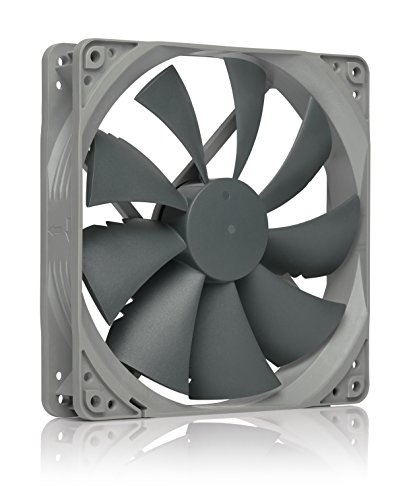
- Square radiator-friendly frame
- Up to 1,500 RPM via PWM
- Six-year manufacturer warranty
Best For: Straightforward radiator cooling without extra accessories
Best Adjustable Speed
be quiet! Silent Wings Pro 4 140mm

- Three selectable speed modes
- Radiator-optimized blade design
- Fluid-dynamic bearing
Best For: Radiator builds needing adjustable maximum speed
Best Three-Pack for Radiators
be quiet! Pure Wings 3 140mm High-Speed PWM

- Closed-loop motor holds target speed against resistance
- Up to 2.44 mm H2O static pressure
- Three 4-pin PWM fans included
Best For: Filling multiple radiator fan positions
Best ARGB Dual Pack
CORSAIR RS140 ARGB 140mm PWM Fans

- 3.46 mm H2O static pressure
- Daisy-chain PWM and +5V ARGB connections
- Two fans with eight LEDs each
Best For: Two-fan radiator builds with motherboard ARGB control
Best Quiet Single Fan
be quiet! Pure Wings 3 140mm Silent PWM

- Radiator-optimized frame outlet
- 21.9 dB listed noise level
- One 4-pin PWM fan included
Best For: Quiet single-fan radiator replacements
Best Dual Pack – CORSAIR RS140 PWM
If you need two 140mm pc fans for radiator cooling, the CORSAIR RS140 dual pack combines 3.46 mm-H2O static pressure with daisy-chain wiring that lets multiple fans share one 4-pin PWM connector.
Best For: Two-fan radiator builds where simpler cable routing matters.
Pros:
- Two fans included, with daisy-chain connections.
- Up to 1,700 RPM and 95.5 CFM airflow.
- AirGuide vanes direct airflow when mounted to a radiator or heatsink.
Cons:
- Listed noise level is 36 dB.
- One PWM connection controls daisy-chained fans together.
The magnetic dome bearing and five-year manufacturer warranty round out a practical option for a paired radiator setup.
Best Accessory Kit – Noctua NF-A14 PWM
Among 140mm pc fans for radiator use, the Noctua NF-A14 PWM stands out for its square frame, 300–1,500 RPM PWM range, and included mounting and cabling accessories.
Best For: Buyers who want a radiator-ready fan with flexible installation options.
Pros:
- Square 140 × 140 × 25 mm frame suits water-cooling radiators.
- Includes anti-vibration mounts, screws, an extension cable, and a PWM Y-cable.
- Supplied Low-Noise Adaptor limits maximum speed to 1,200 RPM.
Cons:
- Sold as a single fan, so multi-fan radiators need additional units.
- Using the Low-Noise Adaptor reduces the available maximum speed.
Its listed 24.6 dB(A) maximum noise level and six-year manufacturer warranty make it a well-equipped choice when installation flexibility is a priority.
Best Streamlined Noctua – NF-P14s redux-1500 PWM
For shoppers comparing 140mm pc fans for radiator builds, the Noctua NF-P14s redux-1500 PWM offers a square frame, a design described as delivering strong static pressure, and motherboard-controlled speeds up to 1,500 RPM.
Best For: Buyers who want Noctua’s radiator-oriented design in a streamlined package.
Pros:
- Square 140 × 140 × 25 mm frame suits water-cooling radiators.
- 4-pin PWM supports automatic motherboard speed control.
- Listed maximum noise level is 25.8 dB(A); manufacturer warranty is six years.
Cons:
- Package includes screws, but accessories such as anti-vibration mounts and Y-splitters are optional.
- One fan per package.
The redux edition keeps the focus on the fan itself, making sense if you do not need an expanded accessory kit.
Best Adjustable Speed – be quiet! Silent Wings Pro 4 140mm
If your search for 140mm pc fans for radiator cooling calls for adjustable performance, the be quiet! Silent Wings Pro 4 has a switch for medium-, high-, and ultra-high-speed PWM modes, plus a blade and frame design optimized for radiators and heat sinks.
Best For: Radiator builds that benefit from selectable maximum fan-speed settings.
Pros:
- Three maximum-speed settings via an onboard switch.
- Small tip clearance and funnel-shaped outlet are designed for high air pressure.
- Six-pole motor and fluid-dynamic bearing are designed to limit vibration.
Cons:
- Listed noise level is 36.8 dB.
- Product details list a one-year warranty.
The supplied notes differ on peak speed: the feature bullets say up to 3,000 RPM, while the specifications list 2,400 RPM. Check the speed setting and listing details if the maximum RPM is central to your choice.
Best Three-Pack for Radiators – be quiet! Pure Wings 3 140mm High-Speed PWM
If you need three 140mm pc fans for radiator mounting, this Pure Wings 3 pack focuses on maintaining speed against resistance. Its closed-loop motor adjusts to hold the target RPM, while the redesigned frame outlet helps limit air leaks.
Best For: Buyers outfitting multiple radiator positions who want PWM control and high-speed cooling.
Pros:
- Closed-loop motor compensates for resistance from a radiator or fan grill.
- Up to 2.44 mm H2O static pressure and 1,800 RPM maximum speed.
- Three fans included, each with a 4-pin PWM connector and an 80,000-hour-rated rifle bearing.
Cons:
- Listed noise level is 30.5 dB.
- Three-pack may be more than a single-fan build needs.
The speed-regulating motor and radiator-focused frame make this the performance-oriented choice here when you can use all three fans.
Best ARGB Dual Pack – CORSAIR RS140 ARGB 140mm PWM Fans
For 140mm pc fans for radiator use with built-in lighting, the CORSAIR RS140 ARGB dual pack combines 3.46 mm H2O static pressure with daisy-chainable PWM and ARGB connections. Its AirGuide vanes direct airflow when mounted to a radiator or heatsink.
Best For: Builders adding two illuminated radiator fans who have a compatible motherboard ARGB header.
Pros:
- 3.46 mm H2O static pressure helps push air through radiator obstructions.
- Daisy-chaining lets multiple fans share one 4-pin PWM connection and one +5V ARGB connection.
- Eight LEDs per fan; rated for up to 95.5 CFM airflow and 1,700 RPM.
Cons:
- Motherboard-based lighting control requires a compatible ARGB motherboard.
- Listed noise level is 36 dB.
This is a strong fit if radiator airflow, lighting, and simpler multi-fan wiring matter more to you than a low listed noise figure.
Best Quiet Single Fan – be quiet! Pure Wings 3 140mm Silent PWM
If you need just one of the 140mm pc fans for radiator mounting, this Pure Wings 3 Silent PWM offers a radiator-optimized frame outlet and seven airflow-optimized blades. Its low minimum RPM supports quieter operation when full speed is not needed.
Best For: Replacing or adding a single radiator fan in a build that prioritizes quiet operation.
Pros:
- Frame outlet is designed for radiator performance.
- Listed noise level of 21.9 dB and support for very low minimum RPM.
- 4-pin PWM connection and an 80,000-hour-rated rifle bearing.
Cons:
- Only one fan is included.
- Maximum airflow is listed at 57.4 CFM, below the other two options here.
Choose this model when you want a single, lower-noise fan with a radiator-focused frame rather than the higher listed airflow of the other picks.
How We Picked the Best 140mm PC Fans for Radiator
We focused on 140mm PWM fans that give buyers distinct choices: quiet operation, higher-speed cooling, multipack value, or lighting. For radiator use, the key considerations are performance against airflow restriction, controllable speed, mounting compatibility, and the total cost of filling a radiator. Manufacturer specifications can help narrow the field, but they do not guarantee the same temperatures or noise in every case.
Quick Comparison: Which Type Fits Your Build?
For a premium high-speed option, consider the be quiet! Silent Wings Pro 4. The Noctua NF-A14 PWM is a familiar all-round choice, while the NF-P14s redux-1500 PWM offers a simpler alternative. The CORSAIR RS140 and RS140 ARGB dual packs suit builds that need two matching fans; choose the ARGB version if lighting matters. The Pure Wings 3 High-Speed triple pack is worth considering when you need three fans. The standard Pure Wings 3 PWM is better suited to buyers prioritizing quieter everyday operation over maximum speed.
Key Buying Factors for 140mm PC Fans for Radiator Use
Pressure, Speed, and Noise
Radiator fins resist airflow, so look beyond free-air CFM. Static-pressure ratings and maximum RPM are useful clues, but compare them alongside noise ratings and the speeds you will actually use. A faster fan provides more room to tune for demanding loads, yet it may be noticeably louder at full speed. PWM control lets you set a fan curve that stays quiet at idle and ramps up when coolant or CPU temperatures rise.
Fit and Connections
Confirm that your radiator takes 140mm fans, then check fan thickness, screw clearance, and nearby RAM, motherboard heatsinks, or case panels. For a push-pull setup, double-check clearance on both sides. Count your motherboard or controller headers before buying a multipack, and check splitter or hub current limits. ARGB lighting requires a compatible connection or controller separate from the PWM fan connection.
Pack Price and Setup
Match the pack size to your radiator: a 280mm radiator typically needs two 140mm fans on one side, while a 420mm radiator typically needs three. Compare cost per fan, but account for any unused extras. Using matching fans makes installation and speed tuning simpler.
Who Should Buy Which 140mm PC Fans for Radiator?
Choose a high-speed model if you want greater tuning range for a restrictive radiator or heavier sustained loads. Start with the Silent Wings Pro 4 or the Pure Wings 3 High-Speed pack, depending on how many fans you need. For a quieter-focused build, consider the NF-A14 PWM or standard Pure Wings 3 PWM and tune the fan curve after installation. Pick the NF-P14s redux-1500 PWM if you prefer a straightforward Noctua option. Choose the RS140 dual pack for a two-fan setup, or the RS140 ARGB dual pack when coordinated lighting is part of the build.