A dedicated temperature display puts your PC’s vital stats where you can see them without switching windows. The right screen can show CPU and GPU readings at a glance while adding a personal touch to your build.
These 10 options range from compact USB-powered status screens to wide LCD panels designed for a prominent spot inside a case. Your best fit depends on available space, mounting options, and the monitoring software you’re willing to use.
Best 10 PC Temperature Monitor Display Picks for 2026
Compact Pick
WOWNOVA 5-Inch Temperature Monitor

- 5-inch, 800 × 480 IPS panel
- Single USB-C connection
- Custom layouts and video themes
Best For: Small in-case stats displays
Slim Wide-Screen Pick
Thermalright Trofeo Vision 9.16-Inch LCD
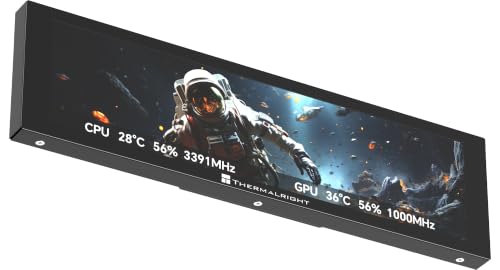
- 9.16-inch, 1920 × 480 display
- CPU/GPU, fan, and memory readouts
- USB-C and customizable TRCC themes
Best For: Long, slim Windows PC dashboards
ARGB Build Pick
Lian Li 8.8-Inch Universal Screen

- 8.8-inch IPS screen with ARGB frame
- Adjustable and flexible mounting
- L-Connect 3 themes and layouts
Best For: Coordinated builds with ARGB lighting
Wide Theme Pick
WOWNOVA 8.8-Inch Temperature Monitor

- 8.8-inch, 1920 × 480 display
- USB-C or 9-pin cable connection
- Video themes and 32GB flash card
Best For: Customizable Windows stats dashboards
Best for Desk Builds

- USB-powered 1920 x 480 IPS display
- Adjustable stand and diffused ARGB frame
- Custom layouts can switch °C and °F
Best For: Desk setups combining PC stats, custom visuals, and lighting
Best Dedicated Case Panel
darkFlash V92 9.2-Inch Sensor Screen
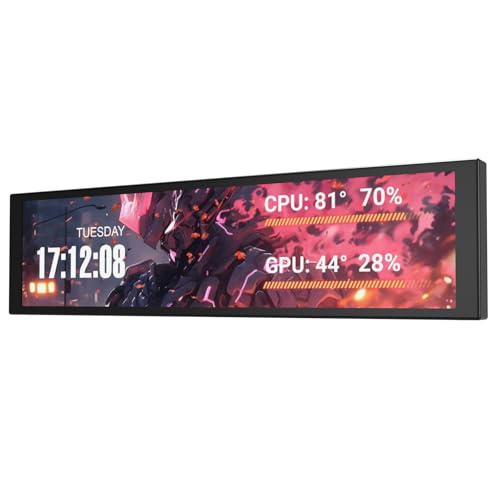
- 1920 x 462 IPS sensor panel
- External USB-C or internal 9-pin connection
- Windows-only Station Space software
Best For: In-case monitoring on Windows 10/11 builds
Best Magnetic Mount
Thermalright Trofeo Vision 9.16
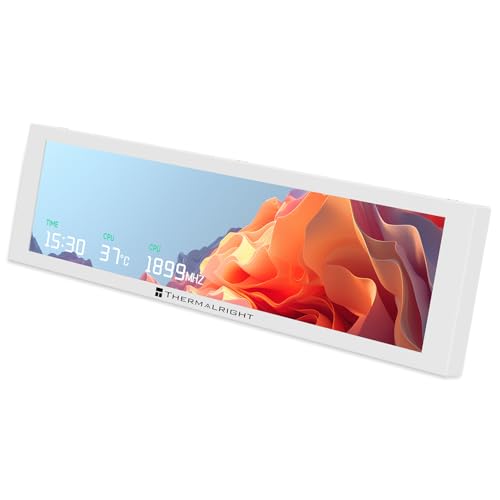
- Screw-free magnetic mounting
- 1920 x 480 IPS display
- TRCC software controls monitoring and visuals
Best For: Repositionable monitoring on compatible metal surfaces
Best Dual-Mode Display
WOWNOVA 8-Inch PC Sensor Panel

- 8-inch, 1280 × 800 IPS screen
- USB-C or internal 9-pin connection
- Sensor dashboard or extended desktop
Best For: Builders wanting a large, customizable dual-mode display
Best Wide-Format Panel

- 9.2-inch, 1920 × 462 IPS panel
- USB connection leaves GPU output free
- Metal casing with flexible mounting options
Best For: Showcase builds needing a narrow hardware-status strip
Best Simple Pick
Generic 3.5-Inch Status Screen

- 3.5-inch, 320 × 480 IPS panel
- Single-cable USB-C setup
- In-case or desk placement
Best For: Tight setups needing a small, glanceable stats screen
Compact Pick – WOWNOVA 5-Inch Temperature Monitor
The WOWNOVA 5-inch pc temperature monitor display is a compact choice for showing CPU, GPU, RAM, FPS, and drive data inside a PC case. Its 800 × 480 IPS panel uses a single USB-C connection, so it does not need a GPU video port.
Best For: Builders who want a small, customizable stats panel with minimal cabling.
Pros:
- Single USB-C connection can run from an internal USB header.
- Supports preset and custom video themes, plus horizontal or vertical layouts.
- Includes a 16GB flash card for storing custom content.
Cons:
- The 5-inch screen offers less room for stats than the larger panels in this roundup.
- Displaying system data depends on WOWNOVA’s software.
Choose this one when case space and simple wiring matter more than a wide dashboard. Check your available mounting space before buying.
Slim Wide-Screen Pick – Thermalright Trofeo Vision 9.16-Inch LCD
The Thermalright Trofeo Vision is a wide pc temperature monitor display with a 9.16-inch, 1920 × 480 screen. It can show CPU and GPU temperatures, fan speed, memory usage, and other system information through Thermalright’s TRCC software.
Best For: Windows PC builders who want a long, slim stats display with customizable visuals.
Pros:
- Wide 1920 × 480 layout provides space for multiple readouts.
- TRCC offers preset themes and DIY customization.
- USB-C connection simplifies setup without complicated drivers.
Cons:
- At 9.88 inches long, it needs a suitable mounting location.
- Its wide, shallow shape may not suit buyers seeking a conventional screen layout.
This is a practical fit for a build with room for a horizontal dashboard. Measure the intended spot before choosing it over a smaller panel.
ARGB Build Pick – Lian Li 8.8-Inch Universal Screen
The Lian Li 8.8-inch Universal Screen is a pc temperature monitor display for builders who also want coordinated case lighting. L-Connect 3 supports hardware-information layouts, preset themes, and uploaded photos or videos, while the frame adds diffused ARGB lighting.
Best For: Lian Li-focused builds that need flexible mounting and synchronized ARGB effects.
Pros:
- Connects through a 9-pin USB header or Type-A USB without occupying a GPU port.
- Adjustable bracket supports height and tilt changes; other mounting options include fan frames and adhesive pads.
- L-Connect 3 controls both display content and ARGB lighting.
Cons:
- Temperature units can be changed in custom layouts, but preset templates use a fixed unit.
- Stand installation requires the specified screws; the instructions warn against using the longer “g” screw.
Its mounting options and lighting controls make it especially useful when the display is part of a coordinated build, not just a readout.
Wide Theme Pick – WOWNOVA 8.8-Inch Temperature Monitor
The WOWNOVA 8.8-inch pc temperature monitor display offers a 1920 × 480 dashboard for CPU, GPU, RAM, FPS, and drive data. Its Windows 10/11 software supports preset video themes and custom layouts, giving builders room to personalize a long, narrow screen.
Best For: Windows users who want a wide stats panel with animated themes and one-cable setup.
Pros:
- Connects with a single USB-C or 9-pin cable; no GPU port or separate power connection is required.
- Supports horizontal and vertical layouts, image and video themes, and brightness adjustment.
- Includes a 32GB flash card for custom content.
Cons:
- Listed software compatibility is Windows 10/11.
- The 9.33-inch-wide body needs an appropriate spot in or around the case.
This model suits a build with space for a wide dashboard and an interest in changing its appearance. Confirm the fit before buying.
Best for Desk Builds – Lian Li 8.8-Inch ARGB Screen
If you want a pc temperature monitor display that also works as a USB-powered secondary screen, the Lian Li 8.8-inch model offers a 1920 x 480 IPS panel and a diffused ARGB frame. Its adjustable stand makes it especially suited to a visible desk setup.
Best For: Desktop builders who want system stats, custom visuals, and coordinated lighting on one compact screen.
Pros:
- 500-nit, 60 Hz IPS display supports stats, media, and custom visuals.
- USB connection leaves GPU display ports available.
- L-Connect 3 controls screen content and the diffused ARGB frame.
Cons:
- Preset temperature templates use a fixed unit; switching between °C and °F requires a custom layout.
- Stand installation requires the specified H screws, not the longer g screws.
Choose this one when display flexibility and lighting matter as much as temperature readouts. Check the mounting instructions before assembly.
Best Dedicated Case Panel – darkFlash V92 9.2-Inch Sensor Screen
The darkFlash V92 is a pc temperature monitor display built specifically for case monitoring rather than use as a standard extended monitor. Its 9.2-inch, 1920 x 462 IPS panel can show CPU and GPU temperatures alongside usage, fan speeds, and other widgets.
Best For: Windows 10/11 builders who want a dedicated sensor panel mounted inside their PC case.
Pros:
- Connects through external USB-C or a motherboard USB 2.0 9-pin header, with both cables included.
- Free Station Space software supports themes, media, and system-data widgets without AIDA64.
- Included bracket supports horizontal or vertical case mounting.
Cons:
- Not a standard extended monitor.
- Station Space must remain running and supports Windows 10/11 only.
- Requires clearance for its approximately 9.54 x 2.48 x 0.47-inch body.
This is a focused choice for at-a-glance case telemetry. Confirm both your mounting space and operating system before buying.
Best Magnetic Mount – Thermalright Trofeo Vision 9.16
For a pc temperature monitor display you can reposition without screws, the Thermalright Trofeo Vision 9.16 uses a magnetic frame. Its 1920 x 480 IPS panel displays CPU and GPU temperatures through TRCC software, which also supports personalized themes and media.
Best For: Builders with a compatible magnetic chassis surface who want an easily movable stats screen.
Pros:
- Magnetic mounting simplifies installation and removal on suitable metal surfaces.
- 9.16-inch, 1920 x 480 IPS display supports monitoring and custom visuals.
- TRCC software supports static and dynamic images, video playback, and automatic startup.
Cons:
- Needs a suitable magnetic surface for its screw-free mounting approach.
- Screen monitoring and on/off functions depend on TRCC software.
- Requires a motherboard 9-pin USB connection for power and data.
The magnetic design is its main advantage if you expect to adjust placement. Check that your case has the right surface and an available USB header.
Best Dual-Mode Display – WOWNOVA 8-Inch PC Sensor Panel
The WOWNOVA 8-inch pc temperature monitor display gives Windows 10/11 users room to view CPU, GPU, RAM, FPS, and drive data. Its 1280 × 800 IPS panel can also switch to extended-desktop mode when you want more than a dedicated stats screen.
Best For: Builders who want a customizable in-case dashboard that can double as an extended desktop display.
Pros:
- Runs through one USB-C or internal 9-pin connection, without HDMI or a separate power cable.
- Supports editable layouts, portrait or landscape orientation, and image or video themes.
- Aluminum housing and an 8-inch IPS screen offer a substantial display area for a case build.
Cons:
- Listed compatibility is limited to Windows 10/11.
- Its 7.52 × 4.59-inch body needs more mounting space than a compact sensor panel.
Choose this one if display flexibility matters as much as monitoring. Measure your case opening first, then decide whether the larger screen earns its space.
Best Wide-Format Panel – upHere 9.2-Inch D92K
The upHere 9.2-inch pc temperature monitor display uses a long, narrow 1920 × 462 IPS panel that suits a dashboard-style layout. Its software shows temperatures alongside hardware readings such as CPU and GPU frequency and power consumption.
Best For: DIY builders fitting a wide status strip into a showcase case or along a fan-bracket area.
Pros:
- USB connection supports a motherboard 9-pin header or rear Type-C port without using a GPU video output.
- Metal casing and included mounting accessories offer several installation options.
- Supports custom MP4, GIF, JPG, and PNG content alongside monitoring themes.
Cons:
- The 1920 × 462 format is better suited to a narrow dashboard than a conventional desktop workspace.
- The supplied notes list conflicting brightness figures, so brightness is worth checking before purchase.
This is the more specialized choice if a horizontal readout fits your build. Check your intended mounting spot against the panel dimensions before ordering.
Best Simple Pick – Generic 3.5-Inch Status Screen
This 3.5-inch pc temperature monitor display is a small, USB-C-connected option for keeping CPU, GPU, RAM, and drive readings separate from your main screen. The 320 × 480 IPS panel can sit inside a case or on a desk using the included stand.
Best For: Buyers who want a small, straightforward hardware-status screen for a tight setup.
Pros:
- Single USB-C connection carries power and data.
- Compact screen offers in-case and desktop placement options.
- IPS panel has a listed 178-degree viewing angle.
Cons:
- 320 × 480 resolution leaves limited room for dense monitoring layouts.
- Listed refresh rate is just 1 Hz, so it is not a choice for fluid animation.
- Listed warranty is one month.
Its appeal is the small footprint, not screen space or motion smoothness. It makes the most sense when a quick glance at core readings is enough.
How We Picked the Best PC Temperature Monitor Display
We focused on practical differences buyers can check before ordering: screen size, stated resolution, mounting approach, connection requirements, and support for hardware-monitoring layouts. The selection includes compact status screens, mid-size panels, and wide displays for more visible dashboards. Listed features are a starting point, not a guarantee that every metric or installation method will work with every PC; check the current product listing and software documentation for your setup.
Quick Comparison: Which Size Fits?
A 3.5-inch screen suits a small status readout when case space is tight. Five-inch and 8-inch options offer more room for temperatures, usage figures, and a custom layout without necessarily taking over the build. The 8.8- to 9.2-inch models are better candidates for wide, at-a-glance dashboards, but they need substantially more uninterrupted mounting space. The Lian Li 8.8-inch screen appears in both black and white here; choose by build color rather than treating them as different size classes.
Key Buying Factors for a PC Temperature Monitor Display
Fit and Mounting
Measure the usable area inside your case, not just the empty-looking area through the side panel. Check clearance around fans, radiators, GPU cables, and the glass panel. Confirm whether the screen uses magnets, brackets, adhesive, or another method—and whether that method works on your intended surface. A display made to sit on a cooler or case component may be less flexible than a general-purpose secondary screen.
Connection and Software
“One cable” and “USB-powered” do not always describe the full setup. Check whether the display needs an internal USB header, an external USB port, a video connection, or a separate power lead. Also verify operating-system support and how the screen gets CPU and GPU data. Some models rely on dedicated theme software; others function as secondary monitors and need a compatible monitoring app or dashboard. Decide which setup you would rather maintain before buying.
Readability and Appearance
For a dashboard behind tinted glass, prioritize legible text and strong contrast over elaborate animation. Match the display’s orientation and aspect ratio to the information you want to show. Resolution matters most when you plan to use small labels or detailed graphics. ARGB frames and customizable themes can help a screen blend into a coordinated build, but they should not outweigh fit and reliable data display.
Who Should Buy Which PC Temperature Monitor Display?
Choose the 3.5-inch option for a simple, space-saving status view. Start with the WOWNOVA 5-inch model if you want a compact screen with more layout room. Compare the WOWNOVA 8-inch model with the 8.8-inch WOWNOVA and Lian Li screens if you have room for a larger in-case display; the Lian Li color choices make sense for matching an existing theme. Look at the darkFlash, upHere, and Thermalright wide-format options when a panoramic dashboard is the goal. Whichever size appeals to you, confirm dimensions, mounting hardware, connection type, and software compatibility before checkout.