If you need more NVMe storage than your motherboard currently supports, a PCIe adapter can be the easiest upgrade path. The right card lets you add one or more M.2 drives without replacing your main system hardware.
This roundup focuses on practical options for desktop builders, upgraders, and high-storage workstations, with choices for simple installs, heatsink-equipped models, and multi-drive expansion.
Best 10 Pcie M 2 Adapter Card Picks for 2026
Best for Easy Install
SABRENT M.2 NVMe to PCIe Adapter with Heatsink

- Supports 2230/2242/2260/2280 NVMe SSDs
- Aluminum heatsink and thermal pad included
- Easy desktop installation with standard PCIe x16/x8/x4 slots
Best For: Desktop upgraders who want a simple NVMe adapter with built-in cooling.
Best for High-Speed NVMe Builds
GLOTRENDS M.2 NVMe to PCIe 4.0 X4 Adapter

- PCIe 4.0/3.0 NVMe support
- Heatsink plus full and low-profile brackets
- Works with 2230 to 2280 M.2 sizes
Best For: Desktop users adding cooled NVMe storage to a free PCIe x4/x8/x16 slot.
Best for Cooling
M.2 NVMe to PCIe 3.0 x4 Adapter
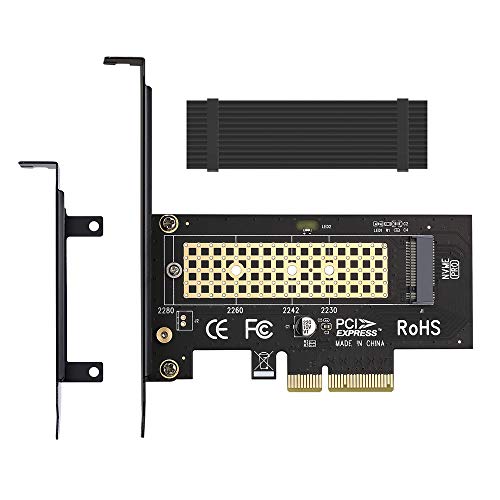
- Aluminum heatsink for better SSD thermals
- Supports 2230/2242/2260/2280 M.2 NVMe drives
- Works in PCIe x4/x8/x16 slots
Best For: Desktop users who want a straightforward NVMe adapter with added cooling.
Best for Gen4 NVMe Upgrades
Duttek M.2 NVMe to PCIe x4 Adapter Card

- Fits M.2 NVMe and AHCI drives from 2230 to 22110
- Supports PCIe 3.0/4.0 x4 slots plus x8/x16 compatibility
- Includes mounting hardware and supports NVMe booting
Best For: Desktop users upgrading an M.2 NVMe drive into a PCIe slot with broad compatibility.
Best for Easy Setup
M.2 NVMe to PCIe 4.0 x4 Adapter

- PCIe 4.0 x4 support with backward compatibility
- Fits 2230/2242/2260/2280 M.2 drives
- Includes heatsink, thermal pads, and brackets
Best For: Desktop users upgrading to a fast NVMe SSD with basic cooling included.
Best for Dual-Slot Flexibility
ELUTENG Dual M.2 PCIe Adapter Card

- Supports both NVMe and SATA M.2 SSDs
- Fits 2230 to 22110 drives for wide compatibility
- Works in PCIe x4/x8/x16 desktop slots
Best For: Desktop users who want a versatile dual-M.2 expansion card for mixed drive setups.
Best for Dual NVMe Expansion
10Gtek Dual M.2 NVMe SSD Adapter Card

- Adds two NVMe drives through PCIe bifurcation
- Includes full-height and low-profile brackets
- Supports 2230, 2242, 2260, and 2280 M.2 sizes
Best For: Desktop users with bifurcation-ready motherboards who want dual NVMe storage from one PCIe slot.
Best for Multi-SSD Expansion

- Supports 4 NVMe SSDs from one x16 slot
- Includes heatsink and drive activity LEDs
- Fits 2230, 2242, 2260, and 2280 NVMe drives
Best For: PC builders with bifurcation support who want to expand into multi-drive NVMe storage.
Best for Dual-Drive Builds

- Runs one NVMe and one SATA M.2 SSD together
- Includes heatsinks and a ventilated PCB for cooling
- Fits standard and low-profile cases with no driver install
Best For: Users who want flexible dual-drive M.2 expansion in a PCIe slot.
Best Simple Pick
ELUTENG Dual M.2 NVMe PCIe Adapter

- Adds two NVMe M.2 SSDs on one adapter
- Fits PCIe X1/X4/X8/X16 slots
- Includes heat sink and low-profile bracket
Best For: Desktop users who want a simple dual-drive PCIe M.2 expansion card.
Best for Easy Install – SABRENT M.2 NVMe to PCIe Adapter with Heatsink
If you want a straightforward pcie m 2 adapter card for adding an NVMe drive to a desktop, this SABRENT model is an easy, practical pick. It supports common M.2 sizes, includes cooling hardware, and is built for standard PCIe x16/x8/x4 slots.
Best For: Desktop builders and upgraders who want a simple NVMe-to-PCIe install with included heatsink cooling.
Pros:
- Supports 2230, 2242, 2260, and 2280 NVMe SSDs
- Includes an aluminum heatsink and thermal pad for better thermals
- Tool-free-friendly install with screws and screwdriver included
- Works across modern Windows, Linux, and NVMe-capable BIOS systems
Cons:
- Not compatible with SATA M.2 drives
- Won’t work in PCIe x1 slots
- Requires a desktop PCIe x16/x8/x4 physical slot
Overall, this pcie m 2 adapter card is a solid choice if you need reliable NVMe expansion without extra fuss. It focuses on compatibility, cooling, and simple installation rather than specialized features, which makes it a strong everyday upgrade option.
Best for High-Speed NVMe Builds – GLOTRENDS M.2 NVMe to PCIe 4.0 X4 Adapter
If you need a pcie m 2 adapter card that can turn an open PCIe x4, x8, or x16 slot into NVMe storage, this GLOTRENDS adapter is a practical choice. It supports PCIe 4.0 and 3.0 M.2 NVMe SSDs, includes cooling hardware, and offers both full-size and low-profile brackets for flexible desktop installs.
Best For: Desktop builders and upgraders who want a cooled NVMe adapter for fast storage expansion and possible boot support.
Pros:
- Supports PCIe 4.0/3.0 NVMe SSDs with no listed capacity limit
- Includes heatsinks plus 12cm and 8cm brackets for different cases
- Works with common M.2 sizes from 2230 to 2280
- Can support booting from NVMe on many systems
Cons:
- Does not support M.2 SATA SSDs
- PCIe x1 and PCI slots are not supported
- Full PCIe 4.0 speeds depend on motherboard, CPU, and SSD support
For shoppers comparing a pcie m 2 adapter card, this model stands out for its cooling, wide compatibility, and included bracket options. It is especially appealing if you want a straightforward way to add NVMe storage without giving up flexibility on case fit.
Best for Cooling – M.2 NVMe to PCIe 3.0 x4 Adapter
If you need a simple pcie m 2 adapter card for installing an NVMe drive into a desktop expansion slot, this M.2 adapter is a practical pick. It supports common M-Key NVMe SSD sizes and adds an aluminum heatsink to help keep temps in check during sustained use.
Best For: Desktop builders and upgraders who want an affordable, no-frills adapter with better cooling for NVMe SSDs.
Pros:
- Aluminum heatsink helps reduce SSD temperatures
- Supports multiple M.2 lengths: 2230, 2242, 2260, and 2280
- Fits PCIe x4, x8, and x16 slots for flexible installs
- Works with a wide range of NVMe drives and older high-end models
Cons:
- Designed for NVMe M-Key SSDs, not SATA M.2 drives
- No included extras beyond the adapter and cooling solution
For buyers who mainly want compatibility and basic thermal support, this pcie m 2 adapter card covers the essentials without adding complexity. It is a solid value choice if your priority is getting an NVMe SSD into a PCIe slot and keeping it cooler under load.
Best for Gen4 NVMe Upgrades – Duttek M.2 NVMe to PCIe x4 Adapter Card
If you need a straightforward pcie m 2 adapter card for moving an NVMe drive into a desktop PCIe slot, this Duttek board covers the basics well. It supports common M.2 sizes, works with PCIe 3.0/4.0 x4 lanes, and includes the hardware needed for a quick install.
Best For: Desktop builders and upgraders who want a simple NVMe-to-PCIe adapter with broad compatibility and boot support.
Pros:
- Supports M.2 NVMe and AHCI drives in 2230/2242/2260/2280/22110 sizes
- Works with PCIe x4, x8, and x16 slots and is backward compatible with older PCIe generations
- Includes a screwdriver, mounting screw, and full-size bracket for desktop installs
- Supports booting from an NVMe SSD on compatible systems
Cons:
- Windows 7 may not recognize NVMe drives without extra driver work
- Must be installed in a PCIe slot, not a legacy PCI slot
For a basic pcie m 2 adapter card, this is a practical pick if you want broad SSD support, easy installation, and the ability to reuse an M.2 drive in a desktop system. It is especially appealing for users who want a no-fuss adapter rather than a feature-heavy expansion card.
Best for Easy Setup – M.2 NVMe to PCIe 4.0 x4 Adapter
If you need a straightforward pcie m 2 adapter card for adding an NVMe drive to a desktop slot, this Bejavr adapter is built for speed and compatibility. It supports M.2 NVMe and AHCI SSDs in common 2230/2242/2260/2280 lengths, works in PCIe x4/x8/x16 slots, and includes an aluminum heatsink plus thermal pads to help manage temperatures.
Best For: Desktop users who want a simple, high-bandwidth M.2-to-PCIe add-in card for NVMe SSD upgrades.
Pros:
- Supports PCIe 4.0 x4 bandwidth and is backward compatible with older PCIe generations.
- Fits multiple M.2 lengths and includes both regular and low-profile brackets.
- Comes with an aluminum heatsink, thermal pads, and mounting hardware for installation.
- Broad OS support for Windows, Linux, and server environments without extra drivers on newer systems.
Cons:
- PCIe 4.0 speeds depend on both the SSD and the motherboard slot.
- Windows 7 and older server systems may need additional NVMe drivers.
For buyers focused on raw transfer speed and easy desktop compatibility, this pcie m 2 adapter card covers the essentials without adding unnecessary complexity. The included cooling parts and bracket options make it a practical pick for everyday storage expansion or a fast scratch-drive setup.
Best for Dual-Slot Flexibility – ELUTENG Dual M.2 PCIe Adapter Card
If you need a practical pcie m 2 adapter card that can handle multiple M.2 drive types, the ELUTENG dual-slot board is a flexible pick. It supports both NVMe and SATA M.2 SSDs, works with a wide range of lengths, and is designed for PCIe x4-class expansion rather than basic x1 use.
Best For: Builders who want a straightforward dual-M.2 adapter for adding or testing NVMe and SATA drives in a desktop PCIe slot.
Pros:
- Supports NVMe and SATA M.2 SSDs in B-Key, M-Key, and B&M-Key formats
- Fits common SSD lengths from 2230 up to 22110 for broad compatibility
- PCIe x4, x8, and x16 support makes it easy to slot into many desktops
- Built-in heat-dissipation design and voltage regulation add stability
Cons:
- Does not support PCIe x1 or legacy PCI slots
- Booting from the card depends on motherboard BIOS support
- Top speed claims depend heavily on the host system and SSD
Overall, this pcie m 2 adapter card is a solid choice if you want broad M.2 compatibility and a simple way to expand desktop storage without overcomplicating the build.
Best for Dual NVMe Expansion – 10Gtek Dual M.2 NVMe SSD Adapter Card
If you need a pcie m 2 adapter card that can turn one PCIe x8 slot into dual NVMe storage, this 10Gtek board is built for that job. It supports M-Key drives in common 2230 to 2280 sizes, includes full-height and low-profile brackets, and is a practical way to add fast SSD capacity to a desktop.
Best For: Desktop builders who want to add two NVMe SSDs in one adapter card and already have motherboard BIOS bifurcation support.
Pros:
- Supports two NVMe drives through PCIe bifurcation for expanded storage
- Works with PCIe 3.0 and is backward compatible with PCIe 2.0 and 1.0
- Includes both full-height and low-profile brackets for broader case fitment
- Supports common M.2 lengths: 2230, 2242, 2260, and 2280
Cons:
- Requires motherboard and BIOS split support, or only one drive may be detected
- Hot swapping is not supported
- Standard mounting screw is not included
This pcie m 2 adapter card makes sense if your platform supports bifurcation and you want the simplest path to dual-drive NVMe expansion. It is less of a universal upgrade and more of a compatibility-dependent performance add-on for the right desktop build.
Best for Multi-SSD Expansion – RIITOP Quad NVMe PCIe Adapter
If you need to turn one open x16 slot into a high-capacity storage array, this pcie m 2 adapter card is built for exactly that job. It supports up to four M.2 NVMe drives at once, with a heatsink and status LEDs to help keep performance and monitoring simple.
Best For: Users with a bifurcation-capable motherboard who want to add multiple NVMe SSDs for fast local storage or a software RAID setup.
Pros:
- Adds support for up to 4 NVMe SSDs from a single PCIe x16 slot
- Works with PCIe 4.0/3.0 and multiple M.2 sizes: 2230, 2242, 2260, and 2280
- Built-in heatsink helps reduce throttling during sustained transfers
- LED indicators make it easy to check each drive’s activity at a glance
Cons:
- Requires motherboard PCIe x16 bifurcation support to use all four drives
- Does not support M.2 SATA-based B+M key SSDs
- No hardware RAID support; RAID must be software-based
For the right system, this pcie m 2 adapter card is a strong way to scale NVMe storage without giving up extra slots. Just make sure your board supports x4x4x4x4 bifurcation before you buy.
Best for Dual-Drive Builds – Dual M.2 PCIe Adapter Card
If you need a pcie m 2 adapter card that can handle both NVMe and SATA drives in one slot, this dual-M.2 board is built for flexible storage upgrades. It supports multiple M.2 lengths, includes both standard and low-profile brackets, and adds heatsinks to help manage thermals during heavier use.
Best For: Builders who want to add one NVMe M.2 drive and one SATA M.2 drive to a PCIe system with minimal fuss.
Pros:
- Supports two M.2 SSDs at once: one NVMe and one SATA
- Includes heat sinks plus ventilated PCB design for better cooling
- Works with 2230, 2242, 2260, 2280, and 22110 sizes
- Covers standard and low-profile chassis installs
Cons:
- SATA M.2 use requires a SATA cable connection
- Not ideal if you only need a single-drive adapter
For mixed-drive expansion, this pcie m 2 adapter card is a practical option because it combines broad compatibility with simple, driver-free setup. It makes the most sense for users upgrading an older system or adding extra storage without replacing the motherboard.
Best Simple Pick – ELUTENG Dual M.2 NVMe PCIe Adapter
If you need a practical pcie m 2 adapter card for adding two NVMe drives to a desktop, this ELUTENG model is built around straightforward expansion. It fits a wide range of PCIe slot sizes and includes a heat sink, making it a sensible pick for users who want more M.2 storage without a complicated install.
Best For: Desktop builders and upgraders who want to mount two NVMe M.2 SSDs on a single PCIe adapter with basic thermal support.
Pros:
- Supports two M.2 NVMe SSDs on one card
- Works in PCIe X1, X4, X8, and X16 slots
- Includes a heat sink for better drive cooling
- Low-profile bracket adds flexibility for compact builds
Cons:
- Requires an available PCIe slot, so it is not for laptops
- Performance depends on slot bandwidth and motherboard support
Overall, this is a solid pcie m 2 adapter card if your main goal is to add dual NVMe capacity with broad slot compatibility and a simple, no-frills layout. It is especially appealing for users who want expansion first and fancy extras second.
How We Picked the Best Pcie M 2 Adapter Card
We focused on compatibility, lane requirements, cooling, drive support, and installation simplicity. For a Pcie M 2 Adapter Card, the most important question is not just whether it fits, but whether your PCIe slot, BIOS, and SSD type all work together.
We favored models that support common M.2 lengths, offer clear PCIe generation support, and include heatsinks or low-profile options where they improve real-world usability.
Quick Comparison
Single-drive adapters are the simplest and most affordable. Dual-drive models are better for users who want more capacity or mirrored storage, but they may require PCIe bifurcation support. Quad-drive cards are best for advanced builds with a compatible x16 slot and a board that can split lanes correctly.
If your goal is adding one fast boot or scratch drive, a basic x4 adapter is usually enough. If you want a storage pool, cache tier, or multiple NVMe drives in one slot, look at dual or quad options with stronger cooling.
Key Buying Factors for a PCIe M.2 Adapter Card
PCIe Slot and Lane Support
Match the card to your available slot size and lane wiring. An x4 adapter may physically fit in larger slots, but performance still depends on the lanes the motherboard provides.
NVMe Vs. SATA Compatibility
Many adapters are designed for NVMe only, while others support both NVMe and SATA M.2 drives. Make sure the card matches your SSD protocol, because M-key and B-key compatibility alone does not guarantee support.
Drive Length Support
Check whether the card supports 2230, 2242, 2260, 2280, or 22110 drives. Longer drives are common in high-capacity builds, while shorter modules are increasingly used in compact systems.
Cooling and Heatsinks
NVMe drives can throttle under sustained workloads. A good heatsink can help maintain performance during gaming, editing, backups, or disk-intensive server tasks.
Bifurcation Requirements
Dual- and quad-drive cards often need motherboard bifurcation support. Without it, the system may only detect one drive or fail to initialize the card correctly.
Who Should Buy Which Pcie M 2 Adapter Card?
Choose a single-drive Pcie M 2 Adapter Card if you want the easiest upgrade for a desktop PC or workstation. Choose a dual-drive model if you need more capacity and your motherboard supports lane splitting. Choose a quad-drive card if you are building a high-end storage array, content-creation rig, or lab system with a compatible x16 slot.
If you are unsure, start with a straightforward x4 adapter and a heatsink. It offers the best balance of compatibility, cost, and simplicity for most users.