If you need more drive connections without replacing your system, a PCIe SATA expansion card 8 port can be an efficient upgrade. It is a practical way to add storage for bulk data, backups, media libraries, or a home NAS.
The best options balance lane compatibility, chipset reliability, cable support, and operating-system compatibility so you can expand storage with fewer headaches.
Best 10 Pcie Sata Expansion Card 8 Port Picks for 2026
Best for 8-Bay Expansion

- Adds 8 SATA 3.0 ports for HDD/SSD expansion
- Includes 8 data cables and a power splitter
- Supports Windows, Ubuntu Linux, and low-profile cases
Best For: Desktop users building a simple multi-drive storage expansion with included cables.
Best for 8-Bay Storage

- Eight SATA 3.0 ports for SSD/HDD expansion
- Works with Windows, macOS, Linux, and NAS
- Includes heatsink plus cables and bracket
Best For: Users building a high-capacity storage system or NAS with up to eight SATA drives.
Best for Maximum Port Expansion
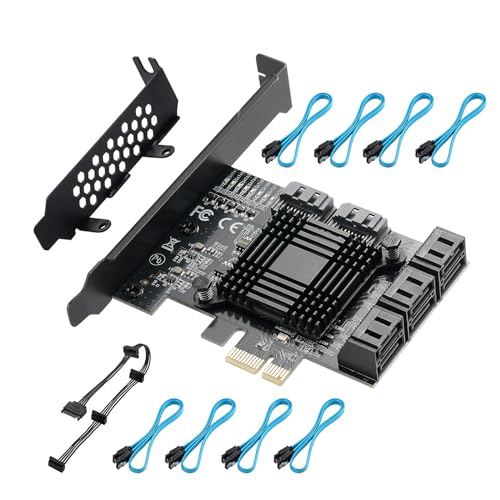
- Eight SATA ports and eight included cables
- ASM1064 + JMB575 chips for better stability
- Low-profile bracket included for tighter cases
Best For: Users who want to add up to eight SATA drives with included cables and broad OS support.
IT-Mode ZFS Pick
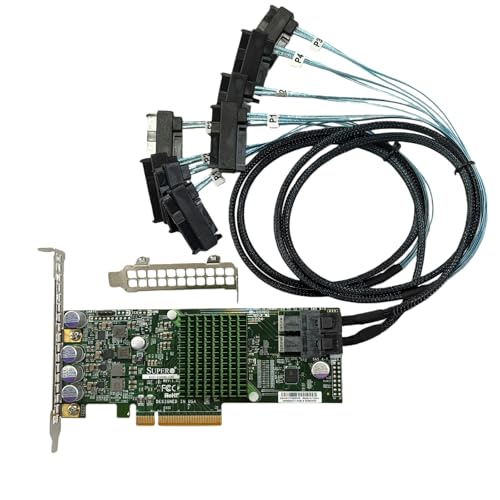
- 12Gb/s LSI 3008 controller
- IT mode for ZFS, FreeNAS, unRAID
- Includes brackets and 2 SAS cables
Best For: NAS and home server users who want a dependable 8-port storage HBA.
Best for 8-Drive Storage Builds
ELUTENG 8-Port PCIe to SATA Expansion Card

- Eight SATA ports for larger storage setups
- SATA 3.0 support up to 6Gb/s
- Fits PCIe x1 slots and older SATA devices
Best For: Desktop users building a high-port-count storage setup or simple home server.
Best for Massive Drive Expansion
GLOTRENDS SA3112-C 12-Port SATA Card

- Up to 12 SATA drives for large storage builds
- Plug-and-play support for Windows, Linux, Mac OS, and NAS
- Includes SATA cables, power splitters, and LED status indicators
Best For: Users building a large, simple SATA storage array or NAS.
Best for High-Capacity Builds
StarTech 8-Port SATA PCIe Card

- Eight SATA III 6Gbps ports from one PCIe x4 Gen 2 slot
- Quad-controller design for distributed drive traffic
- Includes breakout cables, brackets, and broad OS support
Best For: IT-focused users and storage-heavy builds that need eight SATA drives from one PCIe slot.
Best for IT Mode NAS Builds

- IT mode firmware for ZFS, TrueNAS, and unRAID
- Supports up to 8 SATA drives via two SFF-8643 ports
- Includes 2 breakout cables for immediate setup
Best For: Home-lab and NAS builders who want a dependable 8-port HBA for SATA drives.
Best for ZFS NAS Builds
LSI 9300-8i IT Mode 8-Port HBA

- IT mode firmware for ZFS, TrueNAS, and unRAID
- Includes 2x SFF-8643 to 4x SATA cables
- PCIe 3.0 x8 with 12Gbps SAS3 support
Best For: DIY NAS and homelab users building a reliable 8-drive software-defined storage array.
Best for High-Density NAS Builds
LSI 9305-16i IT Mode 16-Port HBA

- IT mode HBA for ZFS, TrueNAS, and unRAID
- 4x SFF-8643 ports for up to 16 drives
- PCIe 3.0 x8 with 12Gbps SAS3 bandwidth
Best For: NAS and homelab users who want a scalable HBA for direct-attach storage or future expansion.
Best for 8-Bay Expansion – PCIe to 8 Port SATA 3.0 Card
If you need a practical pcie sata expansion card 8 port option for adding more drives to a desktop or home server, this model focuses on straightforward expansion rather than flashy extras. It comes with eight SATA data cables, a low-profile bracket, and support for Windows and Ubuntu Linux, making it an easy fit for mixed-use storage builds.
Best For: Users who want a simple way to add up to eight SATA drives for HDD or SSD expansion in a desktop tower or DIY storage setup.
Pros:
- Supports up to 8 SATA 3.0 devices at 6Gbps for broad storage expansion
- Includes 8 SATA cables plus a SATA power splitter, reducing extra purchases
- Low-profile bracket and PCIe x1 compatibility make installation flexible
- Works with Windows and Ubuntu Linux for common desktop and server builds
Cons:
- Performance can drop when multiple drives are used at the same time
- Requires a PCIe slot, so it will not work in legacy PCI slots
- Not ideal if your main goal is maximum SSD speed rather than more ports
This is a good fit if your priority is drive count and convenience over top-end throughput. For shoppers comparing a pcie sata expansion card 8 port, the included accessories and broad compatibility make it a solid expansion choice for everyday storage growth.
Best for 8-Bay Storage – 8-Port SATA Expansion Card
If you need a pcie sata expansion card 8 port for a storage-heavy PC, NAS, or small server, this board is built around expanding drive count without a complicated setup. It adds eight 6Gbps SATA ports through a PCIe 3.0 x1 slot, offers broad OS compatibility, and includes a heatsink for more stable long-run operation.
Best For: Builders who want to add up to eight SATA drives to a Windows, macOS, Linux, or NAS system with minimal configuration.
Pros:
- Eight SATA 3.0 ports support SSDs and HDDs at up to 6Gbps each
- Driver-free plug-and-play support across Windows, macOS, Linux, and NAS
- Includes heatsink and multiple cable/bracket accessories for easier installation
- Software RAID support for flexible storage setups
Cons:
- Hardware RAID is not supported
- Not suitable if you need boot-from-card functionality
- PCIe 3.0 x1 bandwidth can become a bottleneck with many fast drives active at once
Overall, this pcie sata expansion card 8 port makes the most sense when capacity and compatibility matter more than peak per-drive throughput. It is a practical choice for bulk storage, surveillance systems, and NAS builds that need lots of SATA connections in a simple add-in card.
Best for Maximum Port Expansion – PCIE 1X SATA Card 8 Ports
If you need a pcie sata expansion card 8 port for adding a large number of SATA drives in one shot, this ASM1064+JMB575-based adapter is built for straightforward capacity expansion. It includes eight SATA cables, supports up to 6Gbps per port, and fits common PCIe x4, x8, and x16 slots, making it a practical pick for storage-heavy PCs and home servers.
Best For: Users who want to connect up to eight SATA drives with included cables and minimal fuss.
Pros:
- Eight SATA 3.0 ports with eight included cables
- ASM1064 + JMB575 chips help improve compatibility and stability
- Works with a wide range of Windows, macOS, and Linux systems
- Includes a low-profile bracket for smaller cases
Cons:
- Does not support hardware RAID
- Uses a PCIe 1x card design, which may limit peak bandwidth in very demanding setups
- Best suited for SATA storage, not NVMe expansion
This pcie sata expansion card 8 port option stands out most for buyers who value raw port count and bundled accessories over advanced RAID features. If your priority is adding multiple SATA drives quickly and affordably, it covers the basics well.
IT-Mode ZFS Pick – 9300-8i LSI3008 8-Port HBA
If you want a pcie sata expansion card 8 port that is aimed more at storage reliability than flashy extras, this LSI 3008-based HBA is a practical fit. It runs in IT mode for ZFS, FreeNAS, and unRAID setups, and the included SFF-8643 to 8482 cables make it easier to connect multiple drives in a server or NAS build.
Best For: NAS and home server builders who need an 8-port HBA for ZFS, FreeNAS, or unRAID with 12Gb/s SAS/SATA support.
Pros:
- LSI 3008 controller with 12Gb/s throughput
- IT mode is well suited to ZFS, FreeNAS, and unRAID
- Includes high and low brackets plus 2 SAS cables
- PCIe 3.0 x8 interface for serious storage builds
Cons:
- More of a server HBA than a simple plug-and-play card
- Accessories and cable compatibility may need close checking
- Not the cheapest option for basic desktop expansion
Overall, this pcie sata expansion card 8 port is best when you care about stable multi-drive connectivity and filesystem compatibility more than consumer-friendly extras. For a NAS or storage server, the 9300-8i style layout is a strong, practical foundation.
Best for 8-Drive Storage Builds – ELUTENG 8-Port PCIe to SATA Expansion Card
If you need a practical pcie sata expansion card 8 port for adding multiple SATA drives, the ELUTENG 8-port adapter is built for straightforward storage expansion. It supports SATA 3.0 speeds up to 6Gb/s, includes backward compatibility for older SATA devices, and works with PCIe x1 slots, making it a flexible option for home servers, NAS-style builds, and bulk drive hookups.
Best For: Users who want an affordable way to connect up to eight SATA drives in a desktop or storage-focused system.
Pros:
- Eight SATA ports for large drive arrays and storage expansion
- Supports SATA 3.0, 2.0, and 1.0 devices with up to 6Gb/s speeds
- PCIe x1 compatibility makes it easy to fit into more systems
- Includes screws and a screwdriver for the basic installation process
Cons:
- Performance depends on the host PCIe slot and drive mix
- Best results typically require quality SATA 3.0 data cables
For buyers who mainly want to add lots of SATA connections without moving to a larger RAID-focused card, this pcie sata expansion card 8 port is a sensible value pick. It is especially appealing when port count matters more than advanced controller features.
Best for Massive Drive Expansion – GLOTRENDS SA3112-C 12-Port SATA Card
If you need a pcie sata expansion card 8 port alternative that goes beyond the usual limit, this 12-port GLOTRENDS card is built for high-capacity storage builds, software RAID, and NAS setups. It works across Windows, Linux, Mac OS, and many NAS systems, and the included cables make it easier to get a large multi-drive array running quickly.
Best For: Home labs, NAS users, and storage-heavy PCs that need simple plug-and-play SATA expansion without hardware RAID.
Pros:
- Supports up to 12 SATA drives for large storage pools
- Plug-and-play compatibility with Windows, Linux, Mac OS, and NAS
- Includes 12 SATA cables and power splitters for a full install kit
- LED indicators help monitor drive activity at a glance
Cons:
- No hardware RAID support
- Bandwidth is shared across the expanded ports, so it is not ideal for all drives at peak speed
- Regular-profile bracket may not fit mini or compact cases
For buyers comparing a pcie sata expansion card 8 port to something bigger, this model stands out for sheer drive count and easy setup rather than top-end per-drive throughput. It is a practical pick when capacity and compatibility matter more than raw speed.
Best for High-Capacity Builds – StarTech 8-Port SATA PCIe Card
If you need a pcie sata expansion card 8 port for a desktop or server build, this StarTech adapter is built around practical expandability. It adds eight SATA III 6Gbps connections from a single PCIe x4 Gen 2 slot, and the included Mini-SAS to SATA breakout cables make it easier to wire up multiple drives without a complicated setup.
Best For: IT-focused users and storage-heavy builds that need eight SATA drives from one PCIe slot with broad OS support.
Pros:
- Eight SATA III 6Gbps ports from one PCIe x4 Gen 2 slot
- Quad-controller design helps spread drive traffic across host controllers
- Includes Mini-SAS to 4x SATA adapter cables and full/low-profile brackets
- No motherboard bifurcation required; works with major storage tools
Cons:
- Not a built-in RAID solution
- Best performance depends on your PCIe slot bandwidth
- More complex than a basic single- or dual-port SATA add-in card
For builders who want a dependable pcie sata expansion card 8 port with strong compatibility and no bifurcation requirement, this StarTech option stands out as a straightforward way to scale storage in a workstation or small server.
Best for IT Mode NAS Builds – LSI 9300-8i 8-Port HBA Card
If you want a pcie sata expansion card 8 port for a ZFS or NAS build, this LSI 9300-8i IT mode HBA is aimed at reliability first. It uses a Broadcom SAS3008 controller, supports up to 12Gbps SAS and 6Gbps SATA, and includes two SFF-8643 to 4x SATA breakout cables so you can connect eight SATA drives right away.
Best For: Home-lab and NAS users building TrueNAS, unRAID, Proxmox, or ESXi storage arrays who want a proven IT-mode HBA instead of a RAID card.
Pros:
- IT mode firmware is ideal for ZFS, TrueNAS, and unRAID passthrough-style storage
- Two SFF-8643 ports support up to 8 direct-attached SATA drives
- Includes 2 breakout cables, saving an extra purchase for SATA setups
- PCIe 3.0 x8 interface and 12Gbps SAS controller offer strong bandwidth headroom
Cons:
- Not a RAID card, so it is not meant for hardware RAID management
- Included cables are for SATA drives only, not SAS drive connections
- May be overkill if you only need to add one or two drives
Overall, this pcie sata expansion card 8 port makes the most sense when you need a dependable HBA for a storage-focused system rather than a cheap generic adapter. The included cables and IT mode firmware make it especially practical for serious NAS and homelab builds.
Best for ZFS NAS Builds – LSI 9300-8i IT Mode 8-Port HBA
If you need a pcie sata expansion card 8 port for a reliable NAS or homelab build, this Broadcom/LSI SAS3008 HBA is a strong fit. It runs in IT mode for direct disk access, supports up to 12Gbps SAS and 6Gbps SATA, and works well with ZFS, TrueNAS, unRAID, Proxmox, and ESXi setups.
Best For: DIY storage builders who want a straightforward 8-port HBA for ZFS, TrueNAS, and other software-defined arrays.
Pros:
- Compatible with LSI 9300-8i and 9211-8i ecosystems
- IT mode firmware is ideal for ZFS and direct-drive access
- Includes 2x SFF-8643 to 4x SATA cables for eight SATA drives
- PCIe 3.0 x8 host interface with 12Gbps SAS3 support
Cons:
- Included cables are for SATA drives only, not SAS drives
- SAS drive hookup may require separate SFF-8643 to SFF-8482 cables
- Overkill if you only need a basic SATA add-in card for a few drives
Overall, this pcie sata expansion card 8 port makes the most sense for users who care more about storage stability and expandability than RAID features. It is a practical pick if you want a proven HBA-style controller for a multi-drive NAS or homelab array.
Best for High-Density NAS Builds – LSI 9305-16i IT Mode 16-Port HBA
If you need a pcie sata expansion card 8 port alternative that can scale well beyond a basic 8-bay setup, this LSI 9305-16i-compatible HBA is built for direct-attach storage and larger NAS arrays. It runs in IT mode, supports 12Gbps SAS3 speeds, and works well in ZFS, TrueNAS, unRAID, and homelab storage servers where stability matters more than RAID features.
Best For: NAS builders who want a reliable HBA for ZFS or unRAID and may grow into 16 drives or an expanded SAS shelf later.
Pros:
- IT mode HBA is a strong fit for ZFS, TrueNAS, and unRAID.
- 4x SFF-8643 ports support up to 16 direct-attached drives.
- PCIe 3.0 x8 and 12Gbps SAS3 bandwidth suit high-throughput storage.
- Includes four SAS cables in the box for compatible SAS drives.
Cons:
- Included cables are for SFF-8482 SAS drives, not SATA drives.
- To connect SATA disks, you need separate breakout cables.
- May be more card than you need if you only want a simple 8-port build.
This is a smart pick if you want more headroom than a typical pcie sata expansion card 8 port model offers, especially for a storage server that may expand later. The tradeoff is that it is more HBA-centric than a plug-and-play SATA card, so SATA users should plan on the right breakout cables.
How We Picked the Best Pcie Sata Expansion Card 8 Port
For this roundup, we focused on cards that offer dependable multi-drive support, sensible host-lane requirements, and broad compatibility with common desktop, workstation, NAS, and server setups. We also favored models with clearer chipset information, better thermal design, and included accessories that reduce setup friction.
For a Pcie Sata Expansion Card 8 Port, the most important question is not just port count. It is whether the card can sustain stable throughput across all attached drives and work properly in your intended operating system or storage stack.
Quick Comparison
Most buyers will fall into one of three camps: budget desktop users who want simple SATA expansion, NAS builders who care about OS and RAID/ZFS behavior, and power users who need higher bandwidth or SAS-based flexibility. Lower-cost x1 SATA cards are usually best for light to moderate workloads, while HBA-style cards are better for more demanding arrays and server-style builds.
What Matters Most at a Glance
Check the PCIe slot width and generation, the chipset or controller family, whether the card uses SATA-native or SAS-to-SATA architecture, and whether it includes low-profile brackets or cables. Also confirm whether it needs extra power or a specific driver.
Key Buying Factors for Pcie Sata Expansion Card 8 Port
Chipset and controller design: Proven controllers matter more than marketing port counts. Look for stable chipsets with documented support for your OS and storage software.
PCIe bandwidth: A PCIe x1 slot may be enough for light storage, but multiple SSDs or heavy simultaneous transfers can benefit from x4 or x8 cards. Match the card to the speed of your drives and the workload you expect.
OS and NAS compatibility: Windows, macOS, Linux, unRAID, FreeNAS, and TrueNAS can all behave differently depending on the card design and driver support. If you are building a NAS, compatibility should rank near the top of your checklist.
Cabling and physical fit: Some cards include SATA cables and low-profile brackets, which can save time in compact cases. Measure clearance carefully if your case, motherboard layout, or adjacent expansion cards are tight.
Use case: A Pcie Sata Expansion Card 8 Port for media storage or backups does not need the same performance profile as one intended for an all-flash array or parity-based NAS.
Who Should Buy Which Pcie Sata Expansion Card 8 Port?
Choose a basic SATA expansion card if you want affordable extra ports for hard drives, SSDs, or a general-purpose PC and do not need enterprise-level features.
Choose an HBA-style card if you are building a NAS, running ZFS, or want better long-term flexibility with larger drive counts and more advanced storage workflows.
Choose a higher-bandwidth model if you expect several drives to transfer data at once, especially with SSDs or mixed storage arrays.
In short, the best Pcie Sata Expansion Card 8 Port is the one that matches your motherboard slot, your operating system, and the speed and reliability demands of your storage setup.