When you’re looking for the best motherboards to pair with Xeon W processors, the right choice can make all the difference in performance and stability. You’ll want options that offer robust features and support for demanding tasks. In this guide, we’ll explore ten top contenders that stand out in the W790 lineup. These picks are designed to meet the needs of gamers and content creators alike. Let’s see which options could elevate your next build.
ASUS Pro WS W790 SAGE SE Intel Motherboard

The ASUS Pro WS W790 SAGE SE Intel Motherboard is an ideal choice for professionals and enthusiasts who demand robust performance and reliability for their Intel Xeon W processors. With support for up to 2TB of ECC R-DIMM DDR5 memory, it guarantees lightning-fast speeds of up to 6800 MHz. Its seven PCIe 5.0 x16 slots and three M.2 slots offer ample connectivity for expansion. You’ll appreciate the dual Intel 10G LAN and advanced IPMI remote management features, enhancing stability and control. Weighing 6.17 pounds, this motherboard is built for 24/7 operation, making it a solid investment for high-performance builds.
Best For: Professionals and enthusiasts seeking a high-performance motherboard for Intel Xeon W processors with extensive memory and expansion capabilities.
Pros:
- Supports up to 2TB of ECC R-DIMM DDR5 memory for exceptional performance.
- Equipped with seven PCIe 5.0 x16 slots and three M.2 slots for extensive connectivity options.
- Features advanced IPMI remote management for enhanced stability and control.
Cons:
- Customer rating of 3.7 out of 5 stars indicates mixed feedback.
- Heavier weight at 6.17 pounds may be a consideration for portable builds.
- Limited to Intel Xeon processors, which may not appeal to all users.
GIGABYTE W790 AI TOP Intel Xeon W Processor Motherboard (LGA4677)

For professionals seeking top-tier performance in demanding computational tasks, the GIGABYTE W790 AI TOP Intel Xeon W Processor Motherboard (LGA4677) stands out as an exceptional choice. This E-ATX motherboard supports 5th Gen Intel Xeon W processors and offers an impressive memory capacity of up to 2TB with DDR5 support. With six M.2 slots and five PCIe 5.0 x16 slots, you’ll enjoy superior connectivity. Additional features like Thunderbolt 4, WIFI7, and 10GbE LAN enhance your system’s capabilities. Its robust power design and thermal management guarantee stability during heavy workloads, making it perfect for high-performance builds.
Best For: Professionals and enterprises requiring high-performance computing solutions for demanding tasks.
Pros:
- Supports up to 2TB of DDR5 memory, enabling extensive multitasking and data handling capabilities.
- Multiple connectivity options including six M.2 slots and five PCIe 5.0 x16 slots for superior expansion and performance.
- Advanced thermal management systems like VRM Thermal Armor and M.2 Thermal Guard ensure stability during heavy workloads.
Cons:
- Higher cost compared to standard motherboards, which may not be justifiable for casual users.
- E-ATX form factor may not fit in smaller cases, limiting compatibility with certain builds.
- Requires specific components such as 5th Gen Intel Xeon W processors, potentially restricting upgrade options.
ASUS Pro WS W790-ACE Motherboard

Designed specifically for creative professionals and engineers, the ASUS Pro WS W790-ACE motherboard offers seamless compatibility with Intel Xeon W-3400 and W-2400 processors. With a robust 12+1+1 power stage design, it guarantees reliable performance for demanding tasks. You’ll enjoy enhanced speed with PCIe 5.0 and DDR5 support, allowing for efficient CPU and memory overclocking. Connectivity is excellent, featuring five PCIe 5.0 slots and dual 10G Ethernet ports. Plus, its thorough thermal management keeps everything cool. Although it has a 3.7-star rating, it remains a solid choice for high-performance builds tailored to your professional needs.
Best For: Creative professionals, developers, and engineers seeking a high-performance motherboard for demanding tasks.
Pros:
- Robust power design with 12+1+1 stages for reliable performance during intensive workloads.
- Enhanced connectivity options including five PCIe 5.0 slots and dual 10G Ethernet ports for superior speed and networking capabilities.
- Efficient thermal management with advanced heatsinks and multiple fan headers to maintain optimal operating temperatures.
Cons:
- Moderate customer rating of 3.7 out of 5 stars, indicating mixed reviews from users.
- Limited PCIe 4.0 M.2 slots compared to some competitors, which may restrict certain high-speed storage options.
- Higher price point may not be suitable for budget-conscious users looking for entry-level motherboards.
ASUS Z790-AYW WiFi W II ATX Motherboard

Engineered for high-performance computing, the ASUS Z790-AYW WiFi W II ATX Motherboard stands out with its robust support for Intel’s latest processors, including the powerful Xeon W series. With PCIe 5.0 and three M.2 slots, it maximizes data transfer speeds. You’ll benefit from its 12+1 DrMOS power solution and DDR5 memory support, pushing speeds up to 8000+ (OC). Connectivity is exceptional with Wi-Fi 6, 2.5Gb LAN, and USB 10Gbps options. Plus, advanced cooling features like large VRM heatsinks guarantee peak performance. This motherboard is perfect for building a high-performance workstation tailored for demanding tasks.
Best For: High-performance computing enthusiasts and professionals seeking a reliable and feature-rich motherboard for demanding tasks.
Pros:
- Supports the latest Intel processors, including 14th, 13th, and 12th Gen, ensuring compatibility with current technologies.
- Offers exceptional connectivity options with PCIe 5.0, Wi-Fi 6, and USB 10Gbps, enhancing data transfer and internet speeds.
- Advanced cooling solutions and optimized memory performance features help maintain stability during intensive workloads.
Cons:
- May be overkill for casual users or those with basic computing needs, leading to unnecessary expenses.
- Limited to Intel LGA 1700 socket, restricting upgrade options for users with older processors.
- Larger form factor may require a compatible case, potentially complicating some builds.
MICRO CENTER CPU Motherboard Combo – Intel Ultra 7 265K Gaming Desktop Processor with Asus Z890 Motherboard

The MICRO CENTER CPU Motherboard Combo featuring the Intel Ultra 7 265K is an excellent choice for gamers seeking high performance without breaking the bank. With 20 cores and a clock speed reaching 5.5 GHz, this unblocked processor guarantees smooth gameplay. The Asus Z890 motherboard complements it perfectly, offering robust power solutions and extensive connectivity options, including PCIe 5.0 and Wi-Fi 6. Its DIY-friendly design, complete with thermal management features, makes installation a breeze. Rated 4.6 out of 5 stars, this combo is a reliable choice for any serious gaming or high-performance build. You won’t regret this investment!
Best For: Gamers and PC enthusiasts looking for a powerful and budget-friendly CPU and motherboard combo for high-performance gaming builds.
Pros:
- High performance with 20 cores and clock speeds up to 5.5 GHz for smooth gameplay and multitasking.
- Robust connectivity options including PCIe 5.0, Wi-Fi 6, and multiple M.2 slots for future-proofing and expansion.
- DIY-friendly design with features like Q-Release, Q-Latch, and AI Cooling II, making installation and thermal management easier.
Cons:
- Base power of 125W may require a robust power supply for optimal performance.
- Limited motherboard compatibility as it uses the newer LGA 1851 socket, which may not support older processors.
- Availability of warranty information upon request may not be convenient for all customers.
MICRO CENTER CPU Motherboard Combo – Ultra 7 265KF Gaming Processor with Z890 Motherboard
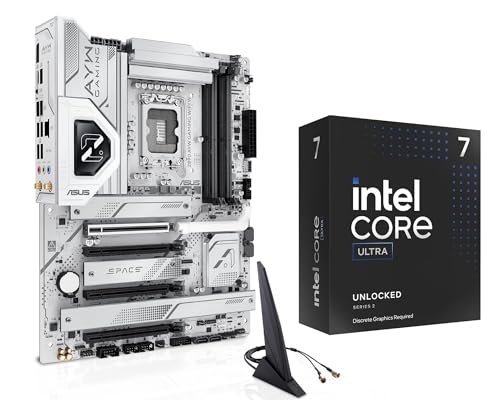
For gamers seeking high performance and multitasking capabilities, the MICRO CENTER CPU Motherboard Combo featuring the Ultra 7 265KF Gaming Processor with the Z890 Motherboard stands out. This powerful combo boasts a 20-core processor with a max turbo frequency of 5.5 GHz, ensuring smooth gameplay. The Z890 motherboard supports DDR5 memory and PCIe 5.0, offering cutting-edge connectivity. With robust thermal design and advanced fan control, your system stays cool even under intense loads. Plus, the DIY features simplify upgrades. Overall, this combo is ideal for those looking to build a high-performance gaming rig.
Best For: Gamers seeking high-performance and multitasking capabilities in their gaming rigs.
Pros:
- High core count (20 cores) and max turbo frequency of 5.5 GHz for smooth gameplay and efficient multitasking.
- Supports cutting-edge technologies like DDR5 memory and PCIe 5.0 for fast data transfer and connectivity.
- Robust thermal design with advanced fan control features to maintain optimal system temperatures during intense gaming sessions.
Cons:
- Discrete graphics are required, which adds to the overall cost of building the gaming rig.
- Customer ratings are relatively low at 3.6 out of 5 stars, indicating potential concerns with performance or reliability.
- Package dimensions and weight may make shipping and handling less convenient for some users.
ASUS Z890 AYW Gaming WiFi ATX Motherboard

When you’re looking for a high-performance motherboard to complement your Intel® Core™ Ultra Series 2 processor, the ASUS Z890 AYW Gaming WiFi ATX motherboard stands out with its robust power solution and advanced AI capabilities. Its 16+1+2+1 stage design and 80A DrMOS power stages guarantee first-rate performance. You’ll enjoy next-gen connectivity with PCIe® 5.0 and Wi-Fi 7, plus excellent storage options featuring multiple M.2 slots equipped with cooling solutions. The DIY-friendly design makes installation a breeze, while ASUS Aura Sync RGB lighting allows you to personalize your setup like never before. Upgrade your build with this exceptional motherboard!
Best For: Gamers and PC enthusiasts seeking a high-performance motherboard to maximize their Intel® Core™ Ultra Series 2 experience.
Pros:
- Robust power solution with advanced cooling features ensures optimal performance and stability.
- Next-gen connectivity options, including PCIe® 5.0 and Wi-Fi 7, provide fast data transfer and internet speeds.
- DIY-friendly design with personalization options like ASUS Aura Sync RGB lighting enhances user experience.
Cons:
- Higher price point may not be suitable for budget builds.
- Potentially complex installation process may deter novice builders.
- Limited availability of DDR5 memory could affect upgrade options in the short term.
ASUS ROG Strix Z890-E Gaming Motherboard

Featuring advanced AI capabilities, the ASUS ROG Strix Z890-E Gaming Motherboard is an excellent choice for gamers and content creators seeking high-performance computing. With Intel LGA 1851 socket compatibility and support for Intel Core Ultra processors, this ATX board weighs 6.42 pounds and measures 14 x 11.3 x 3.5 inches. It boasts cutting-edge AI features like NPU Boost and AI Overclocking, enhancing your experience. The motherboard offers robust cooling solutions and impressive connectivity, including seven M.2 slots and dual Thunderbolt 4 ports. Its DIY-friendly design guarantees effortless installation, making it a solid investment for your next build.
Best For: Gamers and content creators seeking a high-performance motherboard with advanced AI features and extensive connectivity options.
Pros:
- Advanced AI Features: Includes technologies like NPU Boost and AI Overclocking for enhanced performance.
- Robust Connectivity: Offers seven M.2 slots and dual Thunderbolt 4 ports for versatile expansion and high-speed data transfer.
- DIY-Friendly Design: Features such as PCIe Slot Q-Release and M.2 Q-Latch for easy installation and upgrades.
Cons:
- Weight: At 6.42 pounds, it may be heavier than some other motherboards, which could impact portability.
- Price Point: Could be considered expensive compared to entry-level motherboards, making it less accessible for budget-conscious users.
- Complexity for Beginners: The advanced features and settings might be overwhelming for those new to building PCs.
ASUS Z790 MAX Gaming WIFI7 ATX Motherboard

The ASUS Z790 MAX Gaming WIFI7 ATX Motherboard stands out with its robust power delivery system, making it an excellent choice for gamers and content creators seeking high performance. It supports Intel’s LGA 1700 socket, accommodating 12th to 14th Gen processors, ensuring versatility in your build. With a 14+1 DrMOS design and durable components, it guarantees stable power delivery. Connectivity shines with DDR5 memory, Wi-Fi 7, and PCIe 5.0, along with multiple USB ports and M.2 slots. Cooling is effective, featuring large VRM heatsinks and intelligent fan management, keeping your system running smoothly during intense tasks.
Best For: Gamers and content creators seeking high-performance computing with advanced connectivity options and stable power delivery.
Pros:
- Robust power delivery system with 14+1 DrMOS design ensures stable performance during demanding tasks.
- Next-gen connectivity features including DDR5 memory, Wi-Fi 7, and PCIe 5.0 allow for faster data transfer and improved performance.
- Comprehensive cooling solutions with large VRM heatsinks and intelligent fan management keep the system cool under heavy loads.
Cons:
- Limited compatibility with older operating systems, as Wi-Fi 7 features are only supported on Windows 11 24H2 or later.
- Potentially high cost compared to standard motherboards, making it less accessible for budget builds.
- Complexity of advanced features may be overwhelming for beginners who are not familiar with overclocking or enhanced memory profiles.
MSI PRO Z890-S WiFi Motherboard (ATX, LGA 1851)

For professionals and creators seeking a robust and versatile motherboard, the MSI PRO Z890-S WiFi stands out with its support for Intel Core Ultra Processors and cutting-edge DDR5 memory. This ATX motherboard features a powerful 12 Duet Rail Power System, ensuring efficient performance. With four DDR5 DIMM slots, you can achieve speeds over 8600 MT/s and a total capacity of 128GB. The connectivity options are impressive, including Wi-Fi 7, Bluetooth 5.4, and a Thunderbolt 4 Type-C port. Plus, the extensive cooling solutions keep your system running smoothly, making this motherboard an excellent choice for high-performance builds.
Best For: Professionals and creators looking for a high-performance motherboard that supports the latest Intel Core Ultra Processors and DDR5 memory.
Pros:
- Supports cutting-edge DDR5 memory with speeds over 8600 MT/s and a total capacity of up to 128GB.
- Comprehensive connectivity options including Wi-Fi 7, Bluetooth 5.4, and Thunderbolt 4 Type-C for fast data transfer.
- Advanced cooling solutions ensure stable performance during demanding tasks.
Cons:
- The motherboard may be more expensive than entry-level options, making it less accessible for budget-conscious users.
- Limited to LGA 1851 socket, restricting compatibility with older Intel processors.
- The large ATX form factor may not fit in smaller cases, limiting installation options.
Factors to Consider When Choosing W790 Motherboards for Xeon W
When you’re choosing a W790 motherboard for your Xeon W processor, several key factors come into play. You’ll want to take into account socket compatibility, power delivery design, and memory capacity support to guarantee peak performance. Additionally, look at expansion slot availability and thermal management solutions to meet your specific needs.
Socket Compatibility
Choosing the right W790 motherboard for your Xeon W processor hinges on guaranteeing socket compatibility, specifically with the Intel LGA 4677 socket. This socket is designed to accommodate both Intel Xeon W-3400 and W-2400 processors, making it essential for peak performance. You need to confirm that the motherboard has the correct socket type to guarantee compatibility with your intended Xeon processor. By selecting a motherboard that supports the LGA 4677 socket, you’ll gain access to advanced features like ECC memory support and high memory capacities of up to 2TB. Additionally, verify that the motherboard supports the specific generation of your Xeon W processor, as features and compatibility can differ between generations.
Power Delivery Design
A well-designed power delivery system is vital for maximizing the performance of your Xeon W processor on a W790 motherboard. Look for motherboards featuring multiple power phases, like 14+1+1 or 16+2+2, to guarantee stable power distribution. High-quality connectors, such as 8-pin and 6-pin PCIe, are imperative for supporting high-performance processors and overclocking. Effective thermal management is also key; large heatsinks and thermal pads help keep power delivery components cool during intense workloads. Additionally, durable capacitors and alloy chokes enhance reliability and longevity, especially under heavy loads. Finally, compatibility with advanced power management features, like server-grade IPMI, allows for remote monitoring, making your setup even more efficient for professional applications.
Memory Capacity Support
Understanding memory capacity support is essential for getting the most out of your Xeon W processor on a W790 motherboard. These motherboards can support up to 2TB of memory, making them perfect for extensive workloads and high-performance applications. You’ll benefit from ECC R-DIMM DDR5 support, which enhances error correction and boosts system stability. Some models feature optimized memory trace layouts, improving both performance and overclocking potential. With memory speeds reaching up to 6800 MHz, you’ll enjoy the bandwidth needed for demanding tasks. Plus, compatibility with multiple memory slots allows you to configure various capacities, giving you the flexibility to upgrade and customize your system as needed.
Expansion Slot Availability
Maximizing the performance of your Xeon W processor on a W790 motherboard involves more than just memory capacity; expansion slot availability plays an essential role in your system’s overall functionality. When selecting a motherboard, consider the number and type of PCIe slots. More slots allow for greater expandability with GPUs and other devices. Opt for motherboards featuring PCIe 5.0 slots, which offer higher bandwidth for faster data transfers. Assess the number of M.2 slots for NVMe storage, as multiple slots can greatly enhance your storage capabilities. Also, check for SlimSAS connectors if you plan to connect multiple drives. Finally, make sure the motherboard layout supports ideal airflow and component placement, especially when using several expansion cards.
Thermal Management Solutions
When selecting a W790 motherboard for your Xeon W processor, effective thermal management solutions are vital for maintaining peak performance. Look for thorough cooling designs featuring VRM heatsinks and M.2 thermal guards to prevent overheating during heavy workloads. Advanced thermal technologies, like high-conductivity thermal pads and C-shaped heatpipes, enhance heat dissipation, ensuring stable performance under load. Many W790 motherboards come with multiple fan headers and hybrid fan controls, allowing you to customize cooling solutions based on your system’s needs. Additionally, proper airflow management is essential; aluminum heatsinks and extensive cooling solutions help keep operating temperatures ideal. Also, consider motherboards with thermal armor and dedicated heatsinks for important components to prolong hardware lifespan and maintain system reliability.