A Threadripper build needs a motherboard that fits the workload, not just the socket. CPU generation, memory requirements, expansion slots, and case clearance can all narrow the field quickly.
These seven TRX50 listings cover creator and workstation options, including multiple versions and a renewed listing. Use the guide below to compare the specifications that matter before you buy.
Best 7 Trx50 Motherboards for Threadripper Picks for 2026
Connectivity Pick

- Dual USB4 Type-C ports
- 10GbE, 2.5GbE, and Wi-Fi 7
- Four DDR5 R-DIMM slots
Best For: Threadripper PRO 7000 builds needing fast I/O
9000-Series Workstation Pick

- Supports listed 9000/7000 CPU families
- Three PCIe 5.0 x16 slots
- Dual USB4 and 10 Gb LAN
Best For: Expandable 9000- or 7000-series workstations
Compatibility-Check Pick
GIGABYTE TRX50 Aero D 9000 Listing

- Advertised Threadripper 9000 support
- Wi-Fi 7, 10GbE, and USB4
- Conflicting socket details: verify fit
Best For: Buyers who can verify the exact CPU support
Multi-GPU Workstation Pick

- Three PCIe 5.0 x16 slots
- Up to 1TB ECC DDR5 R-DIMM
- Wi-Fi 7 and dual-speed LAN
Best For: Expandable Threadripper 7000 workstations
High-Capacity Pick
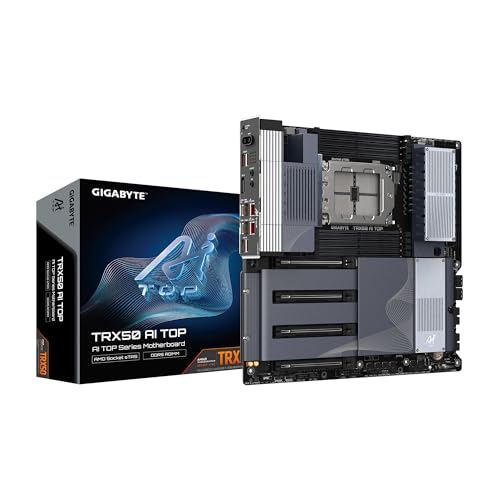
- Eight ECC R-DIMM slots; up to 2TB stated
- Dual 10GbE, Wi-Fi 7, and dual USB4
- E-ATX board with PCIe 5.0 support
Best For: Memory-heavy Threadripper workstations
Multi-GPU Pick

- Four listed PCIe 5.0 x16 slots
- Four PCIe 5.0 x4 M.2 slots
- Dual 10GbE, Wi-Fi 7, and dual USB4
Best For: Expansion-heavy, multi-GPU workstations
Renewed Option
- Renewed sTR5/TRX50 listing
- Advertises PCIe 5.0, USB4, Wi-Fi 7, and 10GbE
- Verify conflicting CPU details; 90-day warranty
Best For: Buyers willing to verify a renewed board's specifications
Connectivity Pick – GIGABYTE TRX50 AERO D
Among trx50 motherboards for threadripper, the GIGABYTE TRX50 AERO D is a practical choice if fast external devices and networking matter as much as expansion. Its listed support covers Ryzen Threadripper PRO 7000 processors on the sTR5 socket.
Best For: Threadripper PRO 7000 builds that need USB4, Wi-Fi 7, and dual wired networking.
Pros:
- Dual USB4 Type-C ports and PCIe 5.0 connectivity.
- 10GbE, 2.5GbE, and Wi-Fi 7 networking.
- Four DDR5 R-DIMM slots and quick-release PCIe and M.2 connectors.
Cons:
- The supplied compatibility list specifically names Threadripper PRO 7000; confirm support for other CPU families before buying.
- E-ATX sizing requires a compatible case.
This board makes sense when its broad connectivity will be used; check CPU and case fit before committing.
9000-Series Workstation Pick – ASUS Pro WS TRX50-SAGE WiFi A
For buyers comparing trx50 motherboards for threadripper across generations, the ASUS Pro WS TRX50-SAGE WiFi A lists support for both 9000- and 7000-series Threadripper and Threadripper PRO processors. It pairs that compatibility with substantial expansion and workstation-oriented management options.
Best For: Multi-GPU workstations using a supported 9000- or 7000-series Threadripper CPU.
Pros:
- Three PCIe 5.0 x16 slots and four M.2 slots.
- Dual USB4 ports plus 10 Gb and 2.5 Gb LAN.
- Supports up to 1TB ECC DDR5 R-DIMM memory and offers IPMI expansion-card support.
Cons:
- IPMI remote management requires a separate ASUS expansion card.
- CEB dimensions call for a case that accommodates the board.
Its appeal is the combination of stated cross-generation CPU support, expansion, and remote-management capability; plan separately for the enclosure and any IPMI hardware.
Compatibility-Check Pick – GIGABYTE TRX50 Aero D 9000 Listing
This GIGABYTE TRX50 Aero D listing stands out among trx50 motherboards for threadripper because its title advertises Ryzen Threadripper 9000 compatibility and a strong connectivity mix. However, the supplied specifications conflict on socket and CPU details, so verify the exact board revision and processor support before ordering.
Best For: Buyers willing to confirm Threadripper 9000 compatibility directly before purchasing.
Pros:
- Title lists three PCIe 5.0 M.2 connections plus one PCIe 4.0 M.2 connection.
- Advertises Wi-Fi 7, 10GbE LAN, and USB4.
- Lists a 16+8+4-phase digital VRM and up to 7800MHz DDR5 overclocking.
Cons:
- Details list an sTRX4 socket and Ryzen Threadripper 1900X despite the TRX50 and Threadripper 9000 title.
- Listed dimensions and PCIe-port counts should be checked against the exact board documentation.
The advertised features are compelling, but the contradictory listing details make independent compatibility verification essential.
Multi-GPU Workstation Pick – ASUS Pro WS TRX50-SAGE WIFI
Among trx50 motherboards for threadripper, the ASUS Pro WS TRX50-SAGE WIFI targets workstation builds based on Ryzen Threadripper PRO 7000 WX-Series or Threadripper 7000 processors. Its stated strengths are multi-GPU expansion, ECC memory capacity, and fast networking.
Best For: Threadripper 7000 workstations that need multiple PCIe 5.0 GPUs and ECC R-DIMM support.
Pros:
- Three PCIe 5.0 x16 slots for expansion.
- Wi-Fi 7 plus 10 Gb and 2.5 Gb LAN.
- Lists up to 1TB ECC DDR5 R-DIMM support and a 36-power-stage design.
Cons:
- IPMI remote management requires a compatible expansion card.
- The supplied details conflict with the feature bullets on memory-slot and USB-port counts; confirm the board specifications.
Choose it for its stated expansion and workstation features, but verify the exact slot and port layout rather than relying on the inconsistent listing fields.
High-Capacity Pick – GIGABYTE TRX50 AI TOP
Among TRX50 motherboards for Threadripper, the GIGABYTE TRX50 AI TOP stands out for its eight ECC R-DIMM slots and stated support for up to 2TB of DDR5 memory. Its sTR5 socket supports Threadripper and Threadripper PRO 7000-series processors.
Best For: Workstation builders who prioritize large memory capacity and fast networking.
Pros:
- Eight ECC R-DIMM slots with a stated 2TB maximum.
- Dual 10GbE LAN, Wi-Fi 7, and dual USB4 Type-C ports.
- PCIe 5.0 support and quick-release M.2 heatsinks.
Cons:
- E-ATX size requires a compatible case.
- ECC R-DIMM requirement limits memory choices.
This is a strong fit if memory headroom and built-in connectivity matter more than a compact build. Check your case and memory compatibility before buying.
Multi-GPU Pick – GIGABYTE TRX50 AI TOP-2B
If you’re comparing TRX50 motherboards for Threadripper with several expansion cards in mind, the GIGABYTE TRX50 AI TOP-2B lists four PCIe 5.0 x16 slots and four PCIe 5.0 x4 M.2 slots. It supports Threadripper and Threadripper PRO 7000-series processors on socket sTR5.
Best For: Builders planning a multi-GPU workstation with several high-speed M.2 drives.
Pros:
- Four listed PCIe 5.0 x16 slots for expansion.
- Four PCIe 5.0 x4 M.2 slots and screwless M.2 heatsinks.
- Eight ECC R-DIMM slots, dual 10GbE LAN, Wi-Fi 7, and dual USB4 Type-C.
Cons:
- Its approximately 13-by-12-inch dimensions call for careful case-fit checks.
- Maximum listed memory capacity depends on ECC R-DIMMs.
The expansion layout is the main reason to choose this model. Confirm chassis clearance and the specifications of your planned cards and drives before committing.
Renewed Option – GIGABYTE TRX50 AERO D
For shoppers considering renewed TRX50 motherboards for Threadripper, this GIGABYTE TRX50 AERO D listing offers an sTR5 board with advertised PCIe 5.0, USB4 Type-C, Wi-Fi 7, and 10GbE connectivity. Its supplied specifications conflict on processor compatibility, however, so verify the exact CPU support before ordering.
Best For: Buyers comfortable checking the condition and specifications of a renewed sTR5 board.
Pros:
- Advertised PCIe 5.0 M.2 and PCIe 5.0 expansion support.
- USB4 Type-C, Wi-Fi 7, and Marvell 10GbE appear in the listing title.
- Six SATA ports are listed in the supplied specifications.
Cons:
- Renewed unit has a listed 90-day limited warranty.
- Compatibility details are inconsistent: the title identifies TRX50/sTR5, while the specifications say “AMD Ryzen 7000 series.”
This option warrants more verification than the others: confirm CPU and memory support, included accessories, and the renewed unit’s condition with the seller.
How We Picked These Trx50 Motherboards for Threadripper
We organized the seven selected listings around practical buying questions: stated CPU compatibility, memory support, PCIe expansion, connectivity, board size, and purchase condition. This is a comparison of listed options, not a claim that every board was independently benchmarked. Several entries share a model family, so verify the exact product name, revision, and seller specifications rather than assuming each listing represents a different board.
Quick Comparison
The GIGABYTE TRX50 AERO D listings emphasize a creator-friendly mix of PCIe 5.0, USB4 Type-C, Wi-Fi 7, and 10GbE; one is explicitly marked renewed. The ASUS Pro WS TRX50-SAGE listings focus on workstation features and a CEB form factor, but their stated power-stage counts and naming differ. The GIGABYTE TRX50 AI TOP listings highlight expansion and connectivity, while the AI TOP-2B listing specifically calls out Threadripper PRO 7000 support and four PCIe 5.0 slots. Treat those descriptions as starting points and confirm the exact specifications on the board manufacturer’s page.
Key Buying Factors for Trx50 Motherboards for Threadripper
CPU and BIOS Compatibility
An sTR5 socket alone does not settle compatibility. Match your exact Ryzen Threadripper or Threadripper PRO processor to the board’s CPU support list, then check the minimum BIOS version. A listing that mentions one CPU generation may need a BIOS update for another. Confirm how that update can be performed before assembling the system.
Memory and Expansion
Check the supported DDR5 RDIMM type, capacity, and qualified memory list before buying RAM. Advertised peak speeds are not a promise for every CPU and module configuration. Count the full-length PCIe slots you need for GPUs, capture cards, or fast networking, and inspect the manual for lane sharing and slot spacing. Do the same for M.2 storage: the number of sockets matters less if using one disables a slot you planned to occupy.
Fit, Power, and Connectivity
E-ATX and CEB labels are not interchangeable guarantees of case fit. Compare the board’s actual dimensions, mounting points, and connector placement with your case. Check power-supply connectors and cooling clearance, especially for sustained workstation loads. Prioritize ports you’ll use: USB4 for compatible peripherals, 10GbE for fast local storage, or Wi-Fi where wired networking is impractical.
Who Should Buy Which Trx50 Motherboards for Threadripper?
Choose an AERO D listing if its verified port mix suits a creator workstation and you have an appropriate E-ATX-capable case. Look closely at the Pro WS TRX50-SAGE listings for a CEB workstation build, but resolve their specification differences before ordering. Consider an AI TOP listing when its documented slot layout fits a multi-card system; check the AI TOP-2B’s exact CPU support if you’re building around Threadripper PRO 7000. The renewed AERO D may suit a budget-conscious buyer only if the seller’s return terms, warranty, and included accessories meet your needs.
Before checkout, confirm the manufacturer’s CPU and memory lists, board revision, BIOS version, case fit, and the exact condition of the listing. Those checks matter more than a headline feature count.