A good ultrawide monitor for trading can make a real difference in how much market data, chart history, and watchlist information you can see at once.
This roundup focuses on models that balance screen space, clarity, refresh rate, and connectivity so you can choose the right setup for your workflow.
Best 9 Ultrawide Monitor for Trading Picks for 2026
Best for Wide Workspace
Samsung 34" ViewFinity S50GC Ultrawide QHD

- 34-inch 21:9 ultrawide layout for charts and watchlists
- 100Hz refresh for smoother scrolling and window changes
- PBP/PIP plus eye-care features for long trading sessions
Best For: Traders who want a simple single-screen setup with plenty of horizontal room.
Best for Fast Charts
KOORUI 34" 240Hz Ultrawide Curved Monitor
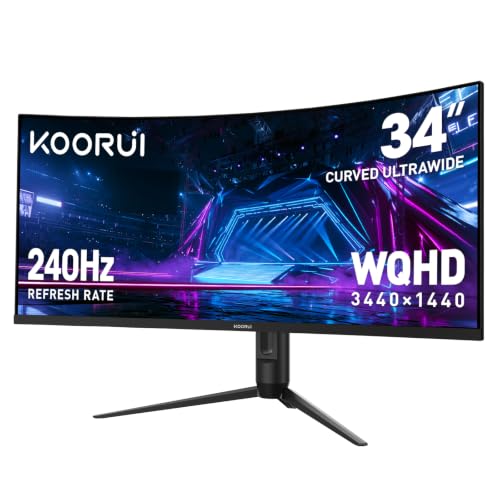
- 34-inch 21:9 ultrawide layout for charts and multitasking
- 240Hz refresh with 1ms response for very smooth motion
- 3440×1440 panel with HDR400 and 98% DCI-P3 color
Best For: Traders who want a spacious ultrawide workspace with gaming-grade speed.
Best Curved IPS Value
CRUA 34-Inch Ultrawide Curved Monitor

- 34-inch 21:9 ultrawide format for more chart and window space
- IPS panel with 120% sRGB for consistent color and viewing angles
- 100Hz refresh, FreeSync, speakers, and flexible input options
Best For: Traders and multitaskers who want a spacious curved ultrawide at a value-focused price.
Best for Trading Multi-Tasking
Deco Gear 49" Curved DQHD Ultrawide Monitor

- 49-inch 32:9 DQHD layout replaces a dual-monitor desk setup
- USB-C 65W PD, KVM, and PIP/PBP streamline multi-device use
- 120Hz and Adaptive Sync add smooth everyday responsiveness
Best For: Traders who want a huge single-screen workspace for charts, watchlists, and multiple apps.
Best for OLED Contrast
ASUS ROG Strix 34” QD-OLED 175Hz

- 34-inch 3440 x 1440 ultrawide workspace for chart-heavy setups
- QD-OLED delivers deep blacks, strong HDR, and true 10-bit color
- 175Hz refresh and OLED Care Pro add speed plus burn-in protection
Best For: Traders and power users who want a premium ultrawide with excellent contrast and fast motion.
Best for Fast Multi-Window Trading
SANSUI 34" 240Hz Ultrawide Curved Monitor

- 3440×1440 ultrawide panel for charts and watchlists
- 240Hz refresh with 1ms MPRT for ultra-smooth motion
- PIP/PBP plus HDMI 2.1 and dual DP for flexible setups
Best For: Active traders who want a wide, fast display for split-screen charting and multitasking.
Best for Multi-Screen Trading
Samsung 49” Curved Dual QHD Ultrawide

- 49-inch 32:9 Dual QHD layout for expansive charting
- USB-C hub with HDMI and DisplayPort for cleaner setups
- 120Hz refresh and Eye Care features for long sessions
Best For: Traders who want a single-screen setup with huge horizontal space and simple connectivity.
Best Super Ultrawide Value
Deco Gear 49-Inch Curved Ultrawide Monitor

- 49-inch 32:9 panel fits multiple trading windows side by side
- 144Hz and 3ms keep motion and window switching smooth
- USB-C 65W, KVM, and PIP/PBP support flexible workflows
Best For: Traders and multitaskers who want one wide screen for charts, alerts, and multiple apps.
Best Superwide Value for Multi-Window Trading
Deco Gear 49" Curved Ultrawide Monitor

- 49-inch 32:9 layout for charts, watchlists, and dashboards
- 3840 x 1080 keeps performance demands lower than higher-res ultrawides
- PIP/PBP helps traders compare two inputs on one screen
Best For: Traders and multitaskers who want one huge screen for multiple windows and live data.
Best for Wide Workspace – Samsung 34" ViewFinity S50GC Ultrawide QHD
If you want an ultrawide monitor for trading that gives you more room for charts, watchlists, and news feeds without jumping to a dual-monitor setup, the Samsung 34" ViewFinity S50GC is a practical fit. Its 21:9 Ultra-WQHD panel creates a broad desktop for multitasking, while 100Hz, HDR10, and eye-care features help keep the display smooth and comfortable through long sessions.
Best For: Traders who want a simple single-screen layout with enough horizontal space for multiple windows and side-by-side analysis.
Pros:
- 34-inch 21:9 ultrawide screen makes it easier to spread out charts and trading tools
- 100Hz refresh rate helps motion feel smoother when scrolling, switching windows, or watching live data
- PBP and PIP support are useful for monitoring two sources at once
- Eye Saver Mode, Flicker Free, and auto brightness are helpful for long trading days
Cons:
- Not as sharp or feature-rich as higher-end ultrawide productivity monitors
- No USB-C docking or built-in KVM features
- May be too wide for small desks
This is a sensible ultrawide monitor for trading if your priority is usable screen space, smooth everyday performance, and comfort over premium extras. It’s especially appealing for traders who want to consolidate their setup into one wide display without overcomplicating the workflow.
Best for Fast Charts – KOORUI 34" 240Hz Ultrawide Curved Monitor
If you want an ultrawide monitor for trading that also stays responsive for gaming and everyday multitasking, this KOORUI 34-inch model is worth a look. The 3440×1440 panel gives you plenty of horizontal space for charts, watchlists, news, and order entry, while the 1500R curve keeps the screen comfortable to scan over long sessions.
Best For: Traders who want an ultrawide workspace with very smooth motion, plus enough color and contrast for mixed work, media, and after-hours gaming.
Pros:
- 34-inch 21:9 ultrawide layout makes it easier to track multiple charts and windows at once
- 240Hz refresh rate and 1ms response time help keep motion sharp and fluid
- 3440×1440 resolution with HDR400 and 98% DCI-P3 delivers crisp detail and strong image quality
- PIP/PBP support and HDMI 2.1 plus DisplayPort 1.4 improve multitasking and connectivity
Cons:
- 240Hz is more than most trading workflows need, so part of the cost goes toward gaming performance
- The 34-inch curved format may take some desk space and adjustment if you are coming from a flat monitor
For buyers comparing an ultrawide monitor for trading, this KOORUI stands out most for users who want a roomy desktop and fast panel performance in one display. It is especially appealing if you split time between markets, content, and gaming, but pure chart watchers may not need the high refresh rate.
Best Curved IPS Value – CRUA 34-Inch Ultrawide Curved Monitor
If you want an ultrawide monitor for trading that gives you more room for charts, watchlists, and spreadsheets without jumping to a high-end price tier, this 34-inch CRUA is a practical fit. The 3440×1440 resolution and 21:9 layout make it easier to keep multiple windows visible at once, while the 100Hz refresh rate helps everyday scrolling feel smoother.
Best For: Traders, home-office users, and multitaskers who want a wide, curved display with solid color quality and a cleaner desk setup.
Pros:
- 34-inch 21:9 ultrawide panel gives you space for charts, tables, and side-by-side apps
- IPS display with 120% sRGB offers strong color consistency and wide viewing angles
- 100Hz refresh rate with FreeSync helps reduce stutter during scrolling and general use
- Built-in speakers plus HDMI, DisplayPort, and wall-mount support improve setup flexibility
Cons:
- Not a true trading monitor with advanced business features like KVM or USB-C
- Built-in speakers are convenient, but not a replacement for dedicated audio
- Curved design may not appeal to users who prefer a flat panel for data work
Overall, this is a straightforward ultrawide monitor for trading if your priority is more screen real estate, good IPS color, and a comfortable curved view without overspending. It is especially appealing for users who value productivity first and can live without premium workstation extras.
Best for Trading Multi-Tasking – Deco Gear 49" Curved DQHD Ultrawide Monitor
If you want an ultrawide monitor for trading that can replace a dual-screen desk without the bezel gap, this 49-inch 5120×1440 display is built for dense charting, watchlists, and side-by-side apps. The 32:9 format gives you a massive workspace, while USB-C, KVM, and PIP/PBP make it easier to juggle a laptop, desktop, and peripherals from one screen.
Best For: Traders and power users who want a single-screen trading setup with lots of horizontal space for charts, platforms, and research windows.
Pros:
- 49-inch 32:9 DQHD panel creates a true dual-monitor-style workspace
- USB-C 65W power delivery plus built-in KVM simplifies multi-device setups
- 120Hz refresh rate and Adaptive Sync keep motion smooth for everyday use
- PIP/PBP support is handy for comparing charts, feeds, and connected devices
Cons:
- VA panel and HDR400 are solid, but not a top-tier choice for color-critical work
- Large footprint may be too much for compact desks
- No built-in speakers
For traders who want one expansive screen instead of two separate monitors, this is a strong value play. It’s especially appealing if you want an ultrawide monitor for trading that also cuts cable clutter and makes mixed PC/laptop workflows easier.
Best for OLED Contrast – ASUS ROG Strix 34” QD-OLED 175Hz
If you want an ultrawide monitor for trading that also doubles as a premium all-around screen, the ASUS ROG Strix XG34WCDG brings deep OLED blacks, sharp 3440 x 1440 detail, and a fast 175Hz panel. It is a strong fit for traders who keep multiple windows open, while still wanting excellent color and motion handling for after-hours gaming or media.
Best For: Traders and power users who want ultra-wide workspace, rich contrast, and fast response in one display.
Pros:
- 34-inch 3440 x 1440 ultrawide layout gives plenty of room for charts, order panels, and dashboards
- QD-OLED panel delivers outstanding contrast, true 10-bit color, and HDR-ready image quality
- 175Hz refresh rate and 0.03ms response time keep motion extremely smooth
- OLED Care Pro and burn-in coverage help address a key long-term OLED concern
Cons:
- Premium pricing makes it more of an enthusiast buy than a value pick
- OLED panels still require some care for static trading layouts
- Not ideal if you mainly need maximum brightness for a very sunny room
This is a compelling ultrawide monitor for trading if you want a wide, highly detailed workspace with standout contrast and modern protection features. It is especially appealing for users who split time between charts, content creation, and gaming, rather than those who only need the cheapest productivity display.
Best for Fast Multi-Window Trading – SANSUI 34" 240Hz Ultrawide Curved Monitor
If you want an ultrawide monitor for trading that can keep charts, watchlists, and news feeds visible at once, this 34-inch 3440×1440 SANSUI is built for that kind of multitasking. The 21:9 layout gives you more horizontal space than a standard widescreen, while the 1500R curve and 450-nit HDR400 panel help make long sessions easier on the eyes.
Best For: Traders who want a fast, wide desktop for multiple windows, split charts, and active monitoring, with gaming-grade smoothness as a bonus.
Pros:
- Ultrawide 3440×1440 canvas is great for side-by-side charts and platforms.
- 240Hz refresh rate and 1ms MPRT deliver very smooth motion.
- PIP/PBP, HDMI 2.1, and dual DisplayPort inputs make multitasking easier.
- Strong color specs and HDR400 add extra visual punch for content-heavy work.
Cons:
- Fast VA tuning is more gaming-focused than a pro-grade color-accurate office panel.
- No built-in speakers.
- 240Hz is more than most trading setups need, so the price may feel overbuilt for pure work use.
As an ultrawide monitor for trading, this SANSUI stands out if you value lots of horizontal workspace and smooth performance in one screen. It is a strong fit for traders who also want a monitor that can handle gaming after market hours.
Best for Multi-Screen Trading – Samsung 49” Curved Dual QHD Ultrawide
If you want an ultrawide monitor for trading that feels closer to running two large displays without the bezel gap, this 49-inch Samsung is built for that workflow. The 32:9 Dual QHD panel gives you plenty of room for charts, watchlists, news, and order platforms, while the 1000R curve helps keep everything in view with less head turning.
Best For: Traders who want a single-screen setup with huge horizontal space, USB-C convenience, and a clean desk.
Pros:
- 49-inch 32:9 Dual QHD layout makes it easy to spread out multiple trading windows
- USB-C, HDMI, DisplayPort, and USB connectivity help simplify a multi-device desk
- 120Hz refresh rate keeps scrolling and switching views feeling smooth
- Height-adjustable stand and Eye Care features support long sessions
Cons:
- Very large size needs a wide desk and good viewing distance
- Overkill if you only need one or two apps open at a time
- 120Hz is unavailable in Picture-by-Picture mode
This is a strong pick if you want an ultrawide monitor for trading that can replace a cluttered dual-monitor setup. The size, connectivity, and ergonomic extras make it especially appealing for active traders who spend hours watching multiple markets at once.
Best Super Ultrawide Value – Deco Gear 49-Inch Curved Ultrawide Monitor
If you want a wide, practical ultrawide monitor for trading, this 49-inch Deco Gear display gives you the room to keep charts, watchlists, news, and order panels visible at once. The 32:9 layout effectively replaces a dual-monitor setup, while the 3840×1080 resolution is easier to run than higher-resolution super ultrawides.
Best For: Traders, multitaskers, and office users who want a single extra-wide screen for multiple windows without jumping to a more demanding 5K-class panel.
Pros:
- 49-inch 32:9 screen feels like two monitors in one seamless panel
- 144Hz refresh rate and 3ms response time keep scrolling and window movement smooth
- USB-C 65W, KVM, and PIP/PBP make it flexible for multi-device setups
- VA contrast and HDR400 help charts and visuals look punchy
Cons:
- 3840×1080 is less sharp than higher-resolution 49-inch ultrawides
- No built-in audio output port
- Large footprint may be too big for compact desks
For buyers focused on workspace over maximum pixel density, this is a strong ultrawide monitor for trading because it balances screen real estate, easier system requirements, and convenient multi-input features.
Best Superwide Value for Multi-Window Trading – Deco Gear 49" Curved Ultrawide Monitor
If you want an ultrawide monitor for trading that makes room for charts, watchlists, news feeds, and spreadsheets without a bezel in the middle, this 49-inch Deco Gear display is built for that kind of workflow. The 32:9 layout gives you a huge uninterrupted desktop, while the 3840 x 1080 resolution keeps text and data readable without pushing your GPU as hard as a higher-resolution superultrawide.
Best For: Traders, multitaskers, and office users who want a single-screen setup for charts, data, and multiple windows.
Pros:
- 49-inch 32:9 screen replaces a dual-monitor trading setup with one continuous workspace
- 3840 x 1080 resolution is easier on mid-range PCs than sharper superultrawides
- PIP/PBP support makes it easy to view two inputs side by side
- 144Hz, Adaptive Sync, and 1ms MPRT add smooth motion for mixed work and gaming use
Cons:
- Dual FHD resolution is less sharp than 5120 x 1440 alternatives
- No built-in audio output port
- Large footprint may be too wide for compact desks
For buyers who care more about screen real estate and multitasking efficiency than maximum pixel density, this is a practical ultrawide monitor for trading. It offers a lot of usable space, flexible input handling, and a clean white design that stands out on a modern desk.
How We Picked the Best Ultrawide Monitor for Trading
For trading, the best display is not just about size. We prioritized panel resolution, usable screen width, text clarity, multitasking features, and connectivity that supports clean desk setups. We also considered refresh rate and response time for traders who monitor fast-moving markets alongside charts, alerts, and news feeds.
Quick Comparison: What Matters Most
Most buyers will fall into one of three groups: a 34-inch 21:9 monitor for a balanced single-screen upgrade, a 49-inch super ultrawide for side-by-side workflows, or a high-end OLED option for premium image quality. If your goal is pure productivity, resolution and workspace usually matter more than gaming-style refresh numbers.
Key Buying Factors for an Ultrawide Monitor for Trading
Screen Size and Aspect Ratio
34-inch ultrawides are often the sweet spot for trading because they offer plenty of horizontal room without dominating a desk. A 49-inch 32:9 display is ideal if you want to replace dual monitors with one seamless panel.
Resolution and Sharpness
Look for at least 3440×1440 if you want crisp charts and readable small text. Lower-resolution 49-inch models can still work well, but they are better suited to users who value width over pixel density.
Refresh Rate and Motion Handling
Most traders do not need ultra-high refresh rates, but 100Hz or higher can make scrolling, window management, and fast market movement feel smoother. If you also game after hours, higher-refresh models become more appealing.
Connectivity and Productivity Features
USB-C with power delivery, DisplayPort, HDMI, built-in speakers, Picture-in-Picture, and Picture-by-Picture can simplify your setup. These extras are especially useful if you run multiple machines, a laptop dock, or separate charting and news sources.
Panel Type and Comfort
VA, IPS, and OLED all have tradeoffs. IPS tends to offer strong viewing angles and balanced color, VA often delivers deeper contrast, and OLED brings standout image quality with the usual care considerations. Eye comfort features and adjustable stands also matter during long sessions.
Who Should Buy Which Ultrawide Monitor for Trading?
If you want a practical all-around option, choose a 34-inch 3440×1440 ultrawide. If you manage several charts, scanners, and browsers at once, a 49-inch dual-QHD monitor is the better fit. If you want premium contrast and top-tier responsiveness, a QD-OLED model stands out, though it is usually the most expensive choice.
In short, the best Ultrawide Monitor for Trading is the one that matches your desk space, chart density, and workflow—not just the one with the highest specs on paper.