Choosing the right drive matters when you want clean, dependable disc access for your Plex library. The best 4K Blu-ray drives for Plex ripping should support the formats you actually use, connect reliably to your computer, and handle long ripping sessions without drama.
Below, we focus on practical options for home media collectors who want stable performance, broad compatibility, and good value rather than flashy extras.
Best 10 4K Blu Ray Drives for Plex Ripping Picks for 2026
Best Bundle Pick
LG BP60NB10 Portable 4K Blu-ray Burner

- UHD Blu-ray drive with BDXL and M-DISC support
- Includes CyberLink Media Suite, USB cable, and 100GB M-DISC
- Portable external format works well for desktops and laptops
Best For: Plex users who want a portable external drive with bundled software and solid disc-format support.
Best for Mac-Compatible Ripping
Archgon Aluminum UHD 4K Blu-Ray Writer

- UHD 4K Blu-ray support on PC with compatible software
- Reads/writes Blu-ray, DVD, CD, and M-DISC
- CNC aluminum external USB 3.0 design
Best For: Mac-friendly buyers who mainly need standard Blu-ray ripping, plus PC users who want UHD support.
Best Easy-Setup 4K Disc Player
Sony UBP-X700U 4K Blu-ray Player

- 4K Ultra HD playback with HDR10 and Dolby Vision
- Dual HDMI outputs for cleaner A/V separation
- Included HDMI cable simplifies setup
Best For: Home theater buyers who want easy 4K disc playback, not ripping.
Best for Portable Setup
External Blu Ray Drive with USB 3.0/Type-C

- USB 3.0 and Type-C for flexible connections
- Portable design with easy cable storage
- Blu-ray, DVD, and CD read/write support
Best For: Laptop and desktop users who want a portable Blu-ray drive for standard disc use and easy connectivity.
Best All-in-One Drive Hub

- 16x Blu-ray read speed for faster disc handling
- Works as an HDD enclosure for 2.5-inch and 3.5-inch SATA drives
- Adds a 2-port USB 3.0 hub plus USB-A/Type-C support
Best For: Plex users who want a multi-function external drive with storage expansion.
Best for Budget-Packed Connectivity
External 4K Blu Ray Drive with USB Hub

- USB 3.0 and Type-C support
- Built-in hub plus SD/TF slots
- Portable plug-and-play design
Best For: Laptop users who want a versatile external drive with extra ports for casual disc work.
Best Multi-Function Drive
8-in-1 External Blu-ray/DVD Drive

- BD/DVD/CD read and write support, including 100G BD discs
- USB 3.0 and Type-C connections for broad compatibility
- Extra HDMI, LAN, SD, and TF ports expand usefulness
Best For: People who want an all-in-one external optical drive with extra connectivity, not UHD ripping.
Best for Multi-Function Use
8-in-1 External Blu-ray Drive with USB-C

- Reads and burns BD/DVD/CD media
- USB-A, USB-C, and SD/TF expansion
- Includes carrying case and disc sleeves
Best For: Plex users who want a portable external Blu-ray drive with extra connectivity and storage features.
Best for Portability
7-in-1 External 4K Blu Ray Drive
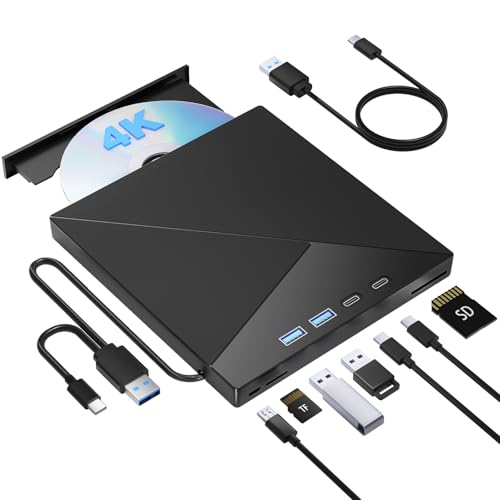
- USB 3.0 and USB-C support for easy setup
- Reads and burns CD, DVD, and Blu-ray discs
- Built-in SD/TF slots and cable storage for travel
Best For: Plex users who want a portable external Blu-ray drive with extra card-reader convenience.
Best Budget Hub Pick
External Blu Ray Drive for Laptop with USB-C Hub

- Supports BD-R/RE/ROM, DVD±R/RW, and CD formats
- USB 3.0 and USB-C with extra hub ports and card readers
- Works with Windows, Mac, and Linux
Best For: Shoppers who want a portable Blu-ray drive with extra connectivity for standard disc ripping and backups.
Best Bundle Pick – LG BP60NB10 Portable 4K Blu-ray Burner
If you want a straightforward external option for 4k blu ray drives for plex ripping, the Produplicator LG BP60NB10 is appealing because it combines UHD Blu-ray support with a ready-to-use software bundle and a portable USB design. It also adds M-DISC and BDXL compatibility, which makes it useful for both large backups and long-term archiving.
Best For: Plex users who want a portable external drive with bundled software and solid disc-format support.
Pros:
- Supports BDXL, BD-R/RE, DVD, and CD formats for flexible disc handling
- Includes CyberLink Media Suite, USB cable, and a 100GB M-DISC
- Portable external design is easy to connect to a desktop or laptop
- Silent Play and Jamless Play help keep playback quieter and smoother
Cons:
- Not specifically marketed as a firmware-flashed ripping drive
- Bundle extras may be less important if you already own software
For buyers comparing 4k blu ray drives for plex ripping, this model stands out more for its convenience and included extras than for hardcore ripping features. If you want a practical external burner that can handle archive discs and general media duties, it is a balanced pick.
Best for Mac-Compatible Ripping – Archgon Aluminum UHD 4K Blu-Ray Writer
archgon Premium Aluminum External USB 3.0 UHD 4K Blu-Ray Writer Super Drive for PC and Mac
Check Price On AmazonIf you want one of the more versatile 4k blu ray drives for plex ripping, Archgon’s external USB 3.0 drive is a strong pick thanks to its UHD Blu-ray support on Windows PCs and broad disc compatibility. It handles Blu-ray, DVD, CD, and M-DISC media, while the CNC aluminum shell gives it a more durable feel than many plastic drives.
Best For: Mac users who want a reliable external drive for standard Blu-ray ripping, and PC users who need UHD Blu-ray support with third-party software.
Pros:
- Supports UHD 4K Blu-ray playback and ripping on PC with compatible software
- Reads and writes Blu-ray, DVD, and CD, plus M-DISC support
- Rugged CNC aluminum body and USB 3.0 external design
Cons:
- Mac support is limited for UHD 4K playback due to software availability
- Requires third-party software for full UHD functionality on PC
For buyers comparing 4k blu ray drives for plex ripping, this Archgon model stands out more for flexibility and build quality than for being the simplest plug-and-play option. It’s a sensible choice if you want a dependable external drive that can handle both regular discs and UHD tasks on the right setup.
Best Easy-Setup 4K Disc Player – Sony UBP-X700U 4K Blu-ray Player
If you want a simple way to play 4K discs without overthinking the setup, the Sony UBP-X700U is a practical pick. It’s a better fit for movie playback than for people shopping specifically for 4k blu ray drives for plex ripping, but it still covers the core needs of a home theater disc setup with 4K upscaling, Dolby Vision, and dual HDMI outputs.
Best For: Home theater buyers who want an easy-to-use 4K Blu-ray player with strong format support and quick setup.
Pros:
- Plays 4K Ultra HD Blu-ray discs with HDR10 and Dolby Vision support
- Dual HDMI outputs can help separate video and audio for cleaner setup
- Included HDMI cable makes first-time installation easier
- Supports DVDs and multiple disc/file formats for broader compatibility
Cons:
- It’s a player, not a drive, so it’s not ideal for ripping discs to Plex
- Region coding may limit use with some imported discs
- Not the right choice if you need computer-based disc extraction
For buyers comparing 4k blu ray drives for plex ripping, the Sony UBP-X700U is useful as a straightforward living-room player, but it does not replace a dedicated internal or external drive for ripping workflows. Choose it if playback convenience matters more than library extraction.
Best for Portable Setup – External Blu Ray Drive with USB 3.0/Type-C
If you want a compact external drive for disc backups, this model fits the practical side of 4k blu ray drives for plex ripping research—especially if you need Blu-ray read support, dual USB-A/Type-C connectivity, and easy portability. It’s aimed more at everyday Blu-ray/DVD use than advanced 4K UHD disc ripping.
Best For: Laptop and desktop users who want a portable Blu-ray/DVD drive for standard disc reading, burning, and occasional media setup.
Pros:
- Dual USB 3.0 and Type-C connections for wider device compatibility
- Portable, lightweight design with included storage-friendly cable layout
- Supports Blu-ray playback and 3D discs, plus CD/DVD read/write functions
- Works across Windows, MacOS, and Linux systems
Cons:
- Does not support 4K Ultra HD disc playback
- Requires compatible Blu-ray software for playback
- Not intended for TVs, tablets, phones, or standalone BD recorders
This is a solid pick if portability and broad OS support matter more than UHD disc handling. For buyers comparing 4k blu ray drives for plex ripping, the key limitation is that it won’t handle 4K Ultra HD discs.
Best All-in-One Drive Hub – 4-in-1 External Blu Ray Drive
If you want one box that can handle disc ripping, laptop expansion, and extra storage, this 4-in-1 external drive stands out for 4k blu ray drives for plex ripping shoppers who need more than a basic optical drive. It offers Blu-ray read speeds up to 16x, USB 3.0 connectivity, a Type-C option, and built-in HDD enclosure support, so it fits a mixed home media workflow better than a plain burner.
Best For: Plex users who want a multi-function external drive that can also act as a USB hub and hard drive enclosure.
Pros:
- Reads Blu-ray discs at up to 16x for faster disc access.
- Built-in HDD enclosure supports 2.5-inch and 3.5-inch SATA drives.
- Includes a 2-port USB 3.0 hub for extra peripherals.
- Works with both USB-A and Type-C setups on Mac and PC.
Cons:
- Bulkier than a standard external Blu-ray drive.
- Playback and ripping support still depend on your computer software and compatibility.
For buyers comparing 4k blu ray drives for plex ripping, this model is less about being the simplest drive and more about doing several jobs at once. If you value storage expansion and hub features alongside disc ripping, it is a practical pick.
Best for Budget-Packed Connectivity – External 4K Blu Ray Drive with USB Hub
If you want one compact unit that can handle disc playback, basic burning, and extra device connections, this is a practical pick for 4k blu ray drives for plex ripping. It works as a USB 3.0 external BD/DVD/CD drive and adds a built-in hub plus SD/TF slots, which is handy for a laptop setup with limited ports.
Best For: Laptop users who want an affordable all-in-one external drive for disc reading, basic burning, and occasional media library tasks.
Pros:
- USB 3.0 connection with Type-C support for easier compatibility
- Built-in USB ports plus SD and TF card slots for extra flexibility
- Wide Windows and Mac support for simple plug-and-play use
- Portable, slim design that travels easily with a laptop
Cons:
- Requires separate software for Blu-ray playback and burning
- Not compatible with tablets, phones, projectors, or cars
- Region-code limits may matter for some discs
For buyers comparing 4k blu ray drives for plex ripping, this model stands out more for convenience and port expansion than for a high-end ripping workflow, but it still covers the basics well if you need a versatile external drive.
Best Multi-Function Drive – 8-in-1 External Blu-ray/DVD Drive
If you want a single external drive that can handle discs, cards, and network/AV connectivity, this 8-in-1 model is worth a look for 4k blu ray drives for plex ripping buyers who need broad versatility rather than a bare-bones reader. It supports BD/DVD/CD read and write tasks, plus USB 3.0 and Type-C connections for modern laptops and desktops.
Best For: Users who want an all-in-one external optical drive with extra ports and wide computer compatibility for general disc work and media handling.
Pros:
- Supports BD/DVD/CD reading and writing, including 100G BD discs
- USB 3.0 and Type-C connectivity for flexible use on newer and older systems
- Extra HDMI, LAN, SD, and TF ports add unusual utility
- Compatible with Windows and macOS laptops/desktops
Cons:
- Does not support 4K discs
- Bulkier than a simple portable external drive
- May require compatible playback software for Blu-ray features
For shoppers comparing 4k blu ray drives for plex ripping, this unit stands out more for its feature set than for UHD disc support, so it makes the most sense if you want a multi-purpose burner and reader for standard Blu-ray media.
Best for Multi-Function Use – 8-in-1 External Blu-ray Drive with USB-C
If you want one external drive that can handle disc ripping, playback, and a little extra connectivity, this 8-in-1 model is a practical option in the 4k blu ray drives for plex ripping category—just note that it does not support 4K playback. It reads and burns standard BD, DVD, and CD media, works with both USB-A and USB-C systems, and adds SD/TF card slots plus hub-style USB ports for everyday laptop use.
Best For: Plex users who want a flexible, portable external Blu-ray drive for standard Blu-ray ripping, disc playback, and light peripheral expansion.
Pros:
- Supports BD/DVD/CD read and burn functions, including up to 50GB dual-layer Blu-ray burning
- USB-A and USB-C connections make it easy to use with newer laptops and older desktops
- Built-in USB ports and SD/TF slots add extra convenience beyond basic disc handling
- Includes a carrying case and disc sleeves for travel-friendly storage
Cons:
- Does not support 4K Blu-ray playback
- Requires third-party software for Blu-ray playback
- May need extra power from the included cable on some low-power systems
For shoppers comparing 4k blu ray drives for plex ripping, this unit stands out more for versatility than raw enthusiast focus. It’s a solid pick if you mainly need reliable standard Blu-ray ripping and want the bonus of USB-C support, card reading, and a compact travel case.
Best for Portability – 7-in-1 External 4K Blu Ray Drive
If you want a compact external option for 4k blu ray drives for plex ripping, this 7-in-1 model gives you broad disc support plus handy SD/TF and USB pass-through features. It’s a practical pick for users who need a portable drive for occasional ripping, burning, and file transfers on Windows or macOS laptops and desktops.
Best For: Plex users who want a travel-friendly external Blu-ray drive with built-in card slots and extra connectivity.
Pros:
- USB 3.0 and USB-C support make it easy to use with modern laptops and desktops.
- Reads and burns CDs, DVDs, and Blu-ray discs, including 3D discs.
- Built-in SD and TF slots add convenience for quick media transfers.
- Integrated cable storage makes it easier to pack and carry.
Cons:
- It’s a general-purpose Blu-ray drive, not a Plex-specific ripping bundle.
- Mac compatibility is listed broadly, but some users may still need third-party software for ripping.
Overall, this is a flexible, travel-friendly choice if you’re shopping for 4k blu ray drives for plex ripping and want extra ports beyond the optical drive itself. It stands out more for convenience and versatility than for any specialist ripping features.
Best Budget Hub Pick – External Blu Ray Drive for Laptop with USB-C Hub
If you’re comparing 4k blu ray drives for plex ripping, this external Blu-ray drive stands out more for versatility than for 4K UHD disc support. It handles standard BD-R/RE/ROM, DVDs, and CDs, adds USB and card-reader expansion, and works across Windows, Mac, and Linux—useful if you want one portable drive for ripping, backups, and general disc access.
Best For: Buyers who want a portable Blu-ray drive with extra hub-style ports for everyday ripping, backup, and media tasks.
Pros:
- Reads and writes Blu-ray, DVD, and CD formats, including 100GB BD media
- USB 3.0 plus USB-C connectivity helps keep transfers quick and flexible
- Built-in USB hub and SD/TF card readers add useful extra connectivity
- Compatible with Windows, Mac, and Linux systems
Cons:
- Does not support 4K Ultra HD discs, so it won’t cover UHD ripping
- No genuine playback or burning software is included
- May require extra software for Blu-ray playback or disc authoring
For buyers focused on 4k blu ray drives for plex ripping, this is better viewed as a capable standard Blu-ray burner with convenience features, not a true UHD ripping solution. It makes sense if you mainly need reliable BD/DVD/CD support and appreciate the added ports in a single compact unit.
How We Picked the Best 4K Blu Ray Drives for Plex Ripping
For 4K Blu-ray drives for Plex ripping, we prioritized disc-format support, connection stability, enclosure quality, and real-world convenience. That means looking for UHD Blu-ray compatibility where available, dependable USB 3.0 or USB-C connections, and drives that are widely used with desktop and laptop setups. We also considered portability, included software, and whether the drive is better suited to occasional backups or frequent ripping.
Quick Comparison
The simplest way to narrow the field is by use case. Portable slim drives are best if you need a compact setup or plan to move between machines. Larger external writers can be a better fit for a dedicated media workstation because they often feel sturdier and may include more connection options. If you already have a Plex ripping workflow, the most important thing is usually stable read performance and compatibility with your operating system.
Key Buying Factors for 4K Blu-Ray Drives for Plex Ripping
Disc Support
Check whether the drive supports UHD Blu-ray, standard Blu-ray, DVD, CD, and recordable formats such as BD-R, BD-RE, and M-DISC if you care about archival use. Not every “4K” drive handles the same disc types, so confirm the exact specifications before buying.
Connection Type
USB 3.0 remains the most common choice, but USB-C can be more convenient on newer laptops. A drive with both USB-A and USB-C support can reduce adapter hassles and improve flexibility.
Power and Stability
For ripping, stability matters more than speed claims. A solid external enclosure, good cable quality, and consistent power delivery help prevent read errors and interrupted sessions. Desktop-style drives are often a better fit if you expect to rip large disc libraries.
Software and Compatibility
Some drives include bundled software, but Plex ripping workflows often rely on separate tools. Make sure the drive is recognized by your operating system and is known to work with your preferred ripping software.
Who Should Buy Which 4K Blu Ray Drives for Plex Ripping?
If you want a compact, straightforward setup, choose a portable external UHD drive with USB 3.0 or USB-C. If you plan to rip discs often or want a more feature-rich home media station, look for a sturdier external writer with strong format support and reliable power. If your priority is archival storage, choose one that explicitly supports M-DISC or other long-life media. The best choice depends on whether you value portability, durability, or maximum disc compatibility for your Plex library.
In short, the best 4K Blu-ray drives for Plex ripping are the ones that match your discs, your computer, and your workflow—not just the highest spec sheet.