As a music producer, you know the importance of having the right tools at your fingertips. In 2025, USB audio interfaces have become essential gear for achieving high-quality sound in your recordings. From the user-friendly Focusrite Scarlett Solo 3rd Gen to the versatile ESI Amber i1, these devices cater to various recording needs. But with so many options available, how do you determine which one is the best fit for your setup?
ESI Amber i1 USB Audio Interface for Guitarists and Vocalists

If you’re a guitarist or vocalist looking to elevate your recording game, the ESI Amber i1 USB Audio Interface is an excellent choice for you. With its 2-in/2-out configuration, it captures high-quality audio via combo XLR/line inputs and offers phantom power for condenser mics. You’ll appreciate the studio-grade converters supporting up to 24-bit/192kHz resolution, ensuring pristine sound. It’s compatible with both Mac and PC, featuring a plug-and-play setup for hassle-free use. Plus, the included software bundle, like Bitwig Studio 8-Track, boosts your creativity. Customers love its build quality and performance, making it perfect for home studios and portability.
Best For: Guitarists, vocalists, and producers seeking a high-quality, portable audio interface for recording and streaming.
Pros:
- High-quality audio capture with studio-grade converters supporting up to 24-bit/192kHz resolution.
- Plug-and-play compatibility with both Mac and PC, making setup easy and straightforward.
- Includes a software bundle that enhances creativity and supports digital audio recording.
Cons:
- Some users report glitches or distortion after extended use.
- Occasional driver installation challenges noted on Windows systems.
- Limited to two inputs/outputs, which may not suit larger setups.
EBXYA 2i2 USB Audio Interface for PC Recording
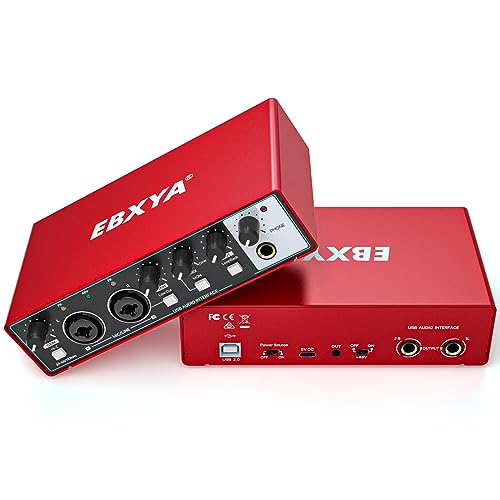
The EBXYA 2i2 USB Audio Interface stands out as an excellent choice for musicians and podcasters who need a reliable, user-friendly recording solution. With its 24-bit/192kHz resolution and plug-and-play functionality, you can easily connect it to your Mac, PC, or mobile device without complex installations. The two XLR/Line combo inputs and +48V phantom power guarantee you can work with various microphones and instruments. Plus, its compact design makes it portable. Enjoy ultra-low latency for real-time monitoring and a powerful preamp for superior sound quality. The included accessories and 2-year warranty provide added peace of mind for your creative endeavors.
Best For: Musicians and podcasters seeking a user-friendly, high-quality recording solution that is portable and compatible with multiple devices.
Pros:
- Plug and Play functionality for easy setup without complex driver installations.
- High audio quality with 24-bit/192kHz resolution and ultra-low latency for real-time monitoring.
- Supports various microphones and instruments with +48V phantom power and HI-Z selection switch.
Cons:
- Limited to two XLR/Line combo inputs, which may not suffice for larger setups.
- May require additional adapters for certain mobile devices.
- Compact design might feel less robust for heavy daily use.
USB Audio Interface for PC Computer Recording Music

For musicians and podcasters seeking an affordable yet reliable solution, the USB Audio Interface for PC Computer Recording Music offers impressive 24-bit/192kHz recording quality. This compact interface features two XLR/Line combo inputs and balanced TRS outputs, making it versatile for various setups. With a maximum input gain of 60dB and 48V phantom power, it’s perfect for condenser microphones too. Enjoy zero-latency monitoring through the headphone output, ensuring you hear your recordings in real-time. User-friendly and compatible with major DAWs, this interface is ideal for home studios, live streaming, or on-the-go recording, delivering quality without breaking the bank.
Best For: Musicians and podcasters looking for an affordable and reliable audio interface for home recording and live streaming.
Pros:
- High-quality recording: Supports 24-bit/192kHz audio for professional sound recordings.
- User-friendly: Plug and play functionality with no complicated installations or driver issues.
- Versatile compatibility: Works seamlessly with major DAWs such as Pro Tools, Ableton Live, and Cubase.
Cons:
- Sensitive gain dial: Users report challenges in adjusting gain levels, particularly for quiet sources.
- Occasional noise issues: Some users experience popping sounds and microphone recognition problems.
- Setup difficulties: A few users have noted issues with setup and filtering features.
HOSONGIN 2i2 USB Audio Interface for Beginners

Designed specifically for beginners, the HOSONGIN 2i2 USB Audio Interface offers an impressive 24Bit/192kHz recording quality, making it an excellent choice for those venturing into the world of audio production. With 48V phantom power and zero-latency headphone monitoring, you can easily record vocals and instruments. Its plug-and-play feature means you can set it up in just 60 seconds—no complicated drivers or software needed. Compatible with PC, Mac, and iOS, this interface is perfect for podcasts, YouTube, and more. Plus, its durable metal chassis guarantees it’ll last, even through your most ambitious projects.
Best For: Beginners and aspiring podcasters looking for an easy-to-use audio interface with high-quality recording capabilities.
Pros:
- Plug & Play: Set up in just 60 seconds without complicated drivers or software.
- High-Quality Recording: Offers studio-quality recording with 24Bit/192kHz audio.
- Durable Design: Built with a metal chassis for longevity and reliability.
Cons:
- Compatibility Issues: Some users have reported problems with certain PC setups.
- Limited Brand Recognition: May lack the support and reputation of more established brands.
- Mixed Customer Feedback: Experiences can vary, with some users facing challenges despite positive sound quality.
Focusrite Scarlett Solo 3rd Gen USB Audio Interface

Offering studio-quality sound in a compact design, the Focusrite Scarlett Solo 3rd Gen USB Audio Interface is perfect for guitarists, vocalists, podcasters, and producers alike. You’ll enjoy high-performing mic pre-amps that deliver brighter recordings and switchable Air mode for enhanced clarity. With two high-headroom instrument inputs, you can record guitar and bass without worrying about clipping or distortion. Achieve professional quality with converters supporting up to 24-bit/192kHz, ensuring your music and podcasts sound pristine. Plus, it includes essential software like Pro Tools Intro+ and Ableton Live Lite, making it easy to start creating right away.
Best For: The Focusrite Scarlett Solo 3rd Gen USB Audio Interface is best for guitarists, vocalists, podcasters, and producers seeking studio-quality sound in a compact design.
Pros:
- High-performing mic pre-amps provide brighter recordings and enhanced clarity.
- Supports professional recording quality up to 24-bit/192kHz for pristine sound.
- Includes essential software packages for immediate music creation.
Cons:
- Limited to two inputs, which may not be sufficient for larger setups.
- No built-in effects processing; relies on external software for effects.
- The compact design may feel cramped for users with larger hands or equipment.
M-AUDIO M-Track Solo USB Audio Interface for Recording and Streaming

The M-AUDIO M-Track Solo USB Audio Interface stands out as an excellent choice for budding musicians and podcasters seeking high-quality audio without breaking the bank. It’s compatible with both Mac and PC, delivering 48 kHz audio resolution for crystal-clear recordings. You’ll find one combo XLR/Line input with phantom power and an additional Line/Instrument input, perfect for capturing vocals or instruments. With a 1/8” headphone output and stereo RCA outputs, monitoring is flexible and easy. Plus, the transparent Crystal Preamp guarantees peak sound quality. Included MPC Beats Software enhances your production capabilities, making this interface a fantastic investment.
Best For: Budding musicians and podcasters seeking high-quality audio recording and streaming solutions at an affordable price.
Pros:
- High audio resolution at 48 kHz for crystal-clear sound quality.
- Versatile input options with combo XLR/Line input and Line/Instrument input, suitable for various recording needs.
- Included software (MPC Beats) enhances music production capabilities, providing essential tools for creators.
Cons:
- Limited input channels with only one XLR/Line input and one Line/Instrument input, which may not suffice for larger setups.
- No MIDI input/output, limiting connectivity with MIDI devices for music production.
- Basic build quality, which may not be as durable for frequent transport or heavy use.
MAONO USB Audio Interface for PC (PS22 Lite Black)

For budding musicians and podcasters seeking an affordable yet high-quality option, the MAONO USB Audio Interface PS22 Lite Black stands out with its impressive 24-bit/192kHz recording capability. This compact interface features an XLR input for both condenser and dynamic microphones, delivering up to 56 dB of preamp and 48V phantom power. You’ll appreciate its user-friendly design, complete with intuitive controls and a dynamic light ring for sound input status. The LOOPBACK feature simplifies audio mixing, making it perfect for streaming. Plus, its broad compatibility guarantees easy setup across devices, enhancing your recording experience without breaking the bank.
Best For: Budding musicians and podcasters looking for an affordable yet high-quality audio recording solution.
Pros:
- High-resolution recording at 24-bit/192kHz with a dynamic range of 106dB.
- User-friendly design with intuitive controls and a dynamic light ring for sound input status.
- Broad compatibility with various devices and operating systems, ensuring easy setup.
Cons:
- Some users have reported issues with crackles and pops, which may require driver reinstallation.
- Suggestions for improved preamp quality and additional power options for consistent performance.
- Potential build quality concerns noted, indicating room for enhancement in future iterations.
M-AUDIO M-Track Duo USB Audio Interface for Recording and Streaming

Designed for aspiring musicians, podcasters, and streamers, the M-Audio M-Track Duo USB Audio Interface stands out with its dual combo XLR/Line/DI inputs and phantom power, allowing you to record vocals and instruments with ease. It delivers 48 kHz audio resolution, ensuring high-quality recordings on both Mac and PC. The USB-powered design makes it portable, while zero-latency monitoring through the headphone output guarantees clear sound at all gain levels. With straightforward setup and compatibility across multiple operating systems, you’ll find it ideal for home recording and streaming. Plus, it includes MPC Beats software for all your production needs.
Best For: Aspiring musicians, podcasters, and streamers looking for a portable and high-quality audio interface for recording and streaming.
Pros:
- High-quality 48 kHz audio resolution for clear recordings.
- Dual combo XLR/Line/DI inputs with phantom power for versatile recording options.
- USB-powered design allows for easy portability and setup.
Cons:
- Some users reported sensitivity in gain control requiring adjustments for different input types.
- Compatibility issues may arise with older PC systems.
- Limited bundled software options compared to other interfaces.
EBXYA 2i2 USB Audio Interface for PC Recording

Offering exceptional sound quality and ease of use, the EBXYA 2i2 USB Audio Interface is perfect for budding musicians and podcasters alike. With 24-bit/192kHz recording capabilities, it delivers professional audio quality. Its plug-and-play design means you can connect it to your Mac or PC without hassle. The interface includes two XLR/Line combo inputs, +48V phantom power, and a handy loopback function for seamless podcasting. Weighing just 1.53 pounds, it’s portable and easy to set up. While some users have noted minor issues, overall, it’s an excellent choice for home recording and streaming without breaking the bank.
Best For: The EBXYA 2i2 USB Audio Interface is best for beginner musicians and podcasters looking for an affordable and easy-to-use recording solution.
Pros:
- Excellent sound quality with 24-bit/192kHz recording capabilities.
- Portable design weighing only 1.53 pounds, making it easy to set up and transport.
- Plug-and-play functionality ensures hassle-free connectivity to Mac and PC.
Cons:
- Some users reported issues with the phantom power switch.
- Input gain levels may not meet the expectations of advanced users.
- Headphone output quality has been criticized by certain customers.
2×2 USB Audio Interface for PC

The Tiimge 2×2 USB Audio Interface stands out as an excellent choice for guitarists, vocalists, podcasters, and producers looking to enhance their recording experience. With 48V phantom power and 24Bit/192kHz high-fidelity recording, it guarantees your sound quality remains first-rate. You’ll appreciate the dual multifunctional jacks that accommodate MIC, LINE, and XLR inputs, along with independent TRS/TS outputs for versatile connectivity. It’s compatible with both Windows and Mac OS, requiring no driver installation. While some users mention latency issues, its ease of use and functionality continue to earn it a solid reputation in the market.
Best For: Guitarists, vocalists, podcasters, and producers looking for a high-quality recording solution.
Pros:
- High-fidelity recording with 24Bit/192kHz resolution ensures excellent sound quality.
- Easy to use with no driver installation required, making it compatible with both Windows and Mac OS.
- Versatile connectivity with dual multifunctional jacks for MIC, LINE, and XLR inputs.
Cons:
- Some users report latency issues during recording and playback.
- Mixed reviews indicate that customer satisfaction is varied, with some users facing functionality concerns.
- Weight and size may not be ideal for those seeking a more portable audio interface option.
Factors to Consider When Choosing USB Audio Interfaces for PC
When choosing a USB audio interface for your PC, you’ll want to take into account several key factors. Think about the recording quality specifications, input and output options, and whether it supports phantom power. Also, check its compatibility with your software and how portable and well-designed it is for your needs.
Recording Quality Specifications
Recording quality is vital for any audio project, especially when selecting a USB audio interface for your PC. Look for interfaces that support at least 24-bit/192kHz recording quality to guarantee professional sound fidelity. If you plan to use condenser microphones, check for phantom power (typically +48V) to optimize their performance. A low signal-to-noise ratio is essential, so aim for interfaces with low-noise preamps to minimize unwanted background noise. Also, consider the maximum input gain specification; around 60dB is ideal for effectively handling a range of audio sources. Finally, zero-latency monitoring capabilities are significant for real-time feedback during recording, helping you avoid distracting delays in sound. Choose wisely for the best recording experience!
Input and Output Options
Choosing the right USB audio interface involves carefully considering your input and output options. Look for interfaces with multiple input types, like combo XLR/Line inputs, to accommodate microphones, guitars, and line-level instruments. Having sufficient output options is essential, so make sure the interface includes balanced TRS outputs and headphone jacks for monitoring and connecting to speakers. Pay attention to maximum input gain specifications too; higher gain, such as up to 60dB, helps capture quieter sounds without distortion. Finally, check that the interface is compatible with popular recording software, making certain it integrates seamlessly with your preferred digital audio workstation (DAW). This way, you’ll set yourself up for a smoother recording experience.
Phantom Power Support
Understanding phantom power support is vital, especially if you’re planning to use condenser microphones, which rely on a 48V supply to operate effectively. Many USB audio interfaces come equipped with a phantom power switch, allowing you to easily enable or disable this feature based on your connected microphone. Look for interfaces that indicate phantom power status with a dedicated LED light, giving you visual confirmation that it’s active. Additionally, interfaces that support phantom power typically feature XLR/Line combo inputs, accommodating both microphones and high-impedance instruments. It’s essential to guarantee your USB audio interface provides reliable phantom power to prevent audio glitches or distortions during recording sessions, ensuring your audio is crisp and clear.
Compatibility With Software
Compatibility with software is a crucial factor when selecting a USB audio interface for your PC. You’ll want to verify it supports popular Digital Audio Workstations (DAWs) like Pro Tools, Ableton Live, and Cubase for seamless integration. Check for plug-and-play compatibility with both Mac and PC systems to avoid any complicated driver installations. It’s also worth considering interfaces that mention direct compatibility with mobile devices, expanding your recording and streaming options. Confirm the device can handle different operating systems, including Windows 7 or later and macOS, to fit your setup. Finally, look for interfaces featuring loopback functions, ideal for live streaming and podcasting, allowing you to mix audio from multiple sources directly.
Portability and Design
When you’re ready to record or stream on the go, portability and design become key considerations for your USB audio interface. Look for compact and lightweight models that easily fit in your laptop bag, typically measuring between 3 to 7 inches wide and 1 to 2 inches tall. A durable metal chassis is essential, ensuring your interface withstands travel wear and tear. Additionally, prioritize user-friendly controls, allowing for quick adjustments without hassle, especially if you’re a beginner. Many portable interfaces also feature plug-and-play functionality, which means you can start recording immediately without complicated setups. This combination of portability and thoughtful design will make your mobile recording sessions smoother and more efficient.
Setup and Usability
Choosing the right USB audio interface for your PC hinges on setup and usability, so it’s crucial to evaluate how easily you can get started. Look for interfaces with plug-and-play functionality, which simplifies installation without complex drivers—perfect for beginners. Confirm compatibility with major operating systems like Mac and Windows to avoid any setup headaches. Clear and intuitive controls are essential, allowing you to adjust gain, volume, and monitoring settings effortlessly. Features like zero-latency monitoring provide real-time feedback, enhancing your recording experience. Finally, consider the build quality and portability; a durable, lightweight design makes it easy to set up and use in different environments, guaranteeing you can create music wherever inspiration strikes.
Warranty and Support Services
While you might focus on features and performance when selecting a USB audio interface, warranty and support services are equally important. A solid warranty typically covers repairs or replacements for manufacturing defects, giving you peace of mind. Check the duration of the warranty; it can range from one to three years, varying considerably between models. Robust customer support is essential, as it can help you with troubleshooting, installation issues, and compatibility concerns. Look for options that offer 24/7 technical support for timely solutions. Additionally, some interfaces provide extra resources like online guides or community forums to help you maximize your equipment’s performance. Ensuring reliable support can make a big difference in your overall experience as a music producer.