In 2025, finding the right NAS server for your small business is essential for efficient data management. You want a solution that guarantees speed, security, and scalability. With so many options available, it can feel overwhelming. But understanding the top contenders can simplify your decision-making process. Let’s explore the best NAS servers designed to meet your needs and enhance your operations.
Beelink ME Mini PC with Intel N150, 12GB RAM, 64GB EMMC

If you’re looking for a compact and efficient solution for your small business, the Beelink ME Mini PC is a standout choice. With its Intel N150 processor and 12GB of LPDDR5 RAM, it delivers impressive performance for various tasks. The 64GB eMMC storage can be expanded via six M.2 PCIe slots, accommodating up to 24TB. Networking is a breeze with dual 2.5Gbps LAN and built-in Wi-Fi 6. Plus, its vertical airflow cooling design guarantees quiet operation and efficient heat dissipation. Whether you need a NAS or a media server, this Mini PC has you covered.
Best For: Small businesses and home users seeking a compact and efficient solution for storage, media streaming, and multitasking.
Pros:
- High performance with Intel N150 processor and 12GB RAM, ideal for various applications.
- Extensive storage options with 6 M.2 PCIe slots, allowing for massive expansion up to 24TB.
- Quiet and efficient cooling system ensures low noise levels and optimal temperature during use.
Cons:
- Limited built-in storage of 64GB eMMC may require immediate expansion for heavy users.
- Requires additional peripherals such as a monitor and keyboard, as it is a mini PC.
- Performance may not meet the demands of high-end gaming or intensive video editing tasks.
UGREEN NASync DXP2800 2-Bay Desktop NAS

The UGREEN NASync DXP2800 2-Bay Desktop NAS is an excellent choice for small business owners seeking a powerful and cost-effective storage solution. With an Intel N100 Quad-core CPU and 8GB DDR5 RAM, it delivers impressive performance, transferring a 1GB file in just three seconds. You can expand storage up to 76TB and enjoy local data security without ongoing cloud fees. Its user-friendly interface allows easy file sharing across multiple platforms. Plus, features like AI-powered photo organization and music management enhance your experience. Weighing only 9.35 pounds, it’s a robust yet manageable addition to any workspace.
Best For: The UGREEN NASync DXP2800 is best for small business owners and tech-savvy individuals seeking a powerful, cost-effective, and secure storage solution.
Pros:
- Impressive performance with file transfer speeds of up to 730MB/s using cache drives.
- User-friendly interface for easy setup and file sharing across various platforms.
- Cost-effective with no ongoing cloud storage fees and local data security.
Cons:
- Weight of 9.35 pounds may be cumbersome for some users.
- Noise levels can exceed 50 dB under full load, which might be distracting in quiet environments.
- Limited to 2-bay configuration, which may not meet the needs of larger storage requirements.
TERRAMASTER F4 SSD NAS Storage (Diskless)

For small business owners seeking a powerful yet compact storage solution, the TERRAMASTER F4 SSD NAS Storage stands out with its impressive performance capabilities. Powered by a robust N95 processor, it achieves turbo speeds of up to 3.4GHz, ensuring fast data access. Its ultra-compact design supports four M.2 NVMe SSDs, offering a total capacity of 32TB while fitting comfortably on your desk. With minimal noise levels and advanced cooling, it operates quietly, perfect for any environment. Plus, the included TerraMaster Business Backup Suite provides thorough data protection, ensuring your valuable information remains safe and accessible at all times.
Best For: Small business owners and home users seeking a powerful, compact, and quiet storage solution with robust data protection features.
Pros:
- High Performance: Powered by a N95 processor with turbo speeds up to 3.4GHz, ensuring fast data access.
- Compact Design: Ultra-compact size supports four M.2 NVMe SSDs, offering 32TB of storage while fitting easily on a desk.
- Quiet Operation: Minimal noise levels below 19dB and an advanced cooling system make it suitable for any environment.
Cons:
- Diskless Model: Requires separate purchase of M.2 NVMe SSDs to utilize the full storage capacity.
- Limited Connectivity: Only features a 5Gbps Ethernet port, which may not be sufficient for very high-demand environments.
- Potential Overheating in Peak Workloads: While designed for cooling, intensive workloads could still risk performance stability without proper ventilation.
UGREEN NASync DH4300 Plus 4-Bay Desktop NAS

Small businesses looking for a robust storage solution will find the UGREEN NASync DH4300 Plus 4-Bay Desktop NAS an excellent choice, particularly due to its impressive capacity of up to 120TB. With an 8GB LPDDR4X RAM and a quad-core Intel N5105 CPU, it guarantees fast performance for your data needs. The user-friendly setup via NFC and intuitive UGOS interface make it easy to navigate. Plus, its AI photo management features streamline your media organization. At just $629.99, it’s a cost-effective alternative to cloud storage, saving you thousands over time. Enjoy reliable, local storage tailored for your business.
Best For: Small businesses seeking a cost-effective and robust local storage solution with high capacity and fast performance.
Pros:
- Affordable one-time purchase compared to ongoing cloud storage costs.
- Easy setup with NFC and an intuitive user interface.
- Supports various RAID configurations for data protection and flexibility.
Cons:
- Limited software features may require additional applications for full functionality.
- Initial open security settings necessitate IT knowledge for enhanced protection.
- Some users report issues with auto backup functionality.
TERRAMASTER F2-425 2-Bay NAS Storage
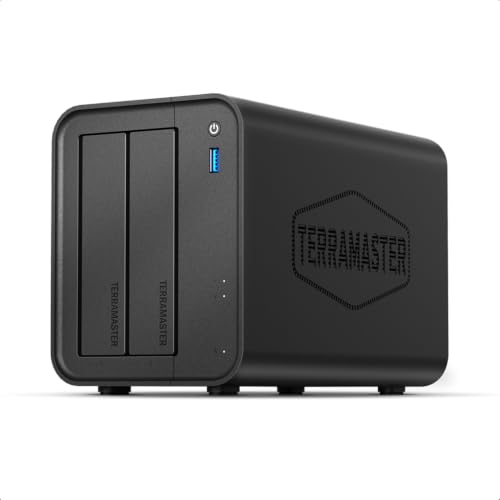
If you’re seeking a reliable and efficient storage solution for your small business, the TERRAMASTER F2-425 2-Bay NAS stands out with its impressive performance specifications. Featuring an Intel x86 quad-core processor and 4GB RAM, it handles 4K transcoding seamlessly. The 2.5GbE port guarantees ultra-fast file transfers and supports multiple users simultaneously. With hardware-level 4K H.265 decoding and compatibility with Plex, Emby, and Jellyfin, enjoy smooth HD playback. The user-friendly TNAS Mobile app makes setup a breeze, while automatic backups and real-time synchronization keep your data secure. Plus, its quiet operation and tool-free design enhance usability.
Best For: Small businesses and multimedia enthusiasts looking for a reliable and efficient network storage solution.
Pros:
- High performance with Intel x86 quad-core processor and 4GB RAM for seamless multitasking and 4K transcoding.
- User-friendly setup via the TNAS Mobile app, making it easy to manage without a PC.
- Quiet operation at just 19dB(A), suitable for any office or home environment.
Cons:
- Limited to 2-bay configuration, which may not be sufficient for larger storage needs.
- Requires additional hard drives for full storage capacity, leading to extra costs.
- May have a learning curve for users unfamiliar with NAS systems and network configurations.
UGREEN NASync DXP4800 Plus 4-Bay Desktop NAS

The UGREEN NASync DXP4800 Plus 4-Bay Desktop NAS is an excellent choice for businesses that require massive storage and fast data transfers. With a powerful Intel Pentium Gold 8505 CPU and 8GB DDR5 RAM (upgradable), it supports up to 136TB of storage. You can back up 1GB in less than a second using its 10GbE connectivity. The user-friendly app allows easy file-sharing across various devices, while the secure private cloud guarantees your data remains protected. Setup is straightforward, and it’s designed for quiet operation, making it perfect for 4K video editing and streaming tasks.
Best For: The UGREEN NASync DXP4800 Plus is best for businesses and creative professionals seeking a powerful, high-capacity storage solution with fast data transfer capabilities.
Pros:
- Massive storage capacity of up to 136TB, ideal for large file storage and backups.
- Super-fast data transfers with 10GbE connectivity, enabling quick backups and file sharing.
- User-friendly app for easy access and management across multiple devices.
Cons:
- Some users report limitations with the iOS app, affecting remote access functionality.
- Requires additional hard drives for full functionality, as it is diskless.
- Initial setup may take time, especially for users unfamiliar with NAS systems.
BUFFALO LinkStation 220 4TB NAS Network Attached Storage

For small businesses looking to streamline their data management, the BUFFALO LinkStation 220 4TB NAS Network Attached Storage stands out with its subscription-free personal cloud feature. This 2-bay NAS offers 4TB of storage, with options for RAID 1 or RAID 0 configurations. You’ll appreciate the automated backups for multiple devices, and the closed system enhances data security with SSL encryption. Sharing files is simple, thanks to configurable access restrictions. While setup can be tricky for some, 24/7 US-based support is available. Overall, it’s a solid choice for reliable, secure storage without ongoing costs.
Best For: Small businesses seeking reliable and secure data management without subscription fees.
Pros:
- Ample storage capacity of 4TB with flexible RAID configuration options.
- Subscription-free personal cloud capabilities for easy file management.
- Automated backups for multiple devices ensure data safety.
Cons:
- Initial setup may require technical knowledge and can be challenging for some users.
- Performance may vary depending on the chosen configuration.
- Some users have reported issues with hardware reliability and customer service experiences.
Synology 2-Bay NAS DS223 (Diskless)

Designed with small businesses in mind, the Synology 2-Bay NAS DS223 (Diskless) offers centralized data storage that guarantees you maintain full ownership of your files. With multi-platform access, you can easily share files and media, ensuring clients and collaborators stay on the same page. The NAS also features simple data protection and various backup options for your media libraries and essential business documents. Plus, its intelligent surveillance capabilities provide flexible monitoring tools for home security, making it an excellent choice for thorough data management. With a 2-year warranty, you can trust its reliability for your growing business needs.
Best For: Small businesses seeking centralized data storage with full ownership and flexible collaboration tools.
Pros:
- Centralized data storage ensures complete control over your files.
- Multi-platform access allows for easy sharing of files and media across different devices.
- Intelligent surveillance capabilities provide effective monitoring tools for home security.
Cons:
- Diskless design requires additional investment in hard drives for operation.
- Limited built-in features compared to larger, more expensive NAS systems.
- Setup and configuration may be challenging for users without technical expertise.
QNAP TS-216G-US 2-Bay Desktop NAS

Affordable and efficient, the QNAP TS-216G-US 2-Bay Desktop NAS is an excellent choice for small businesses looking to enhance their file storage and sharing capabilities. With a powerful ARM Cortex-A55 quad-core processor and 4 GB DDR4 RAM, it guarantees smooth performance for all your tasks. The dual 2.5GbE ports enable swift file transfers, making collaboration effortless. You can easily organize and stream multimedia, while QNAP’s NetBak Replicator software simplifies backup for Windows users, and Mac users can utilize Time Machine. Plus, remote access via MyQNAPCloud lets you securely access files from anywhere, providing flexibility for your business needs.
Best For: Small businesses and families looking for an affordable and efficient solution for file storage and multimedia streaming.
Pros:
- High-performance with an ARM Cortex-A55 quad-core processor and 4 GB DDR4 RAM for smooth multitasking.
- Fast file transfers facilitated by dual 2.5GbE ports, enhancing collaboration and productivity.
- User-friendly backup options for both Windows and Mac users, ensuring data security and easy recovery.
Cons:
- Limited to 2 bays, which may not be sufficient for users with extensive storage needs.
- No hot-swappable drives, requiring the NAS to be powered down for drive replacements.
- Basic multimedia capabilities compared to more advanced NAS models, which may limit streaming options.
Synology 2-Bay DiskStation DS225+ (Diskless)

The Synology 2-Bay DiskStation DS225+ (Diskless) stands out as an ideal choice for small businesses seeking a reliable and efficient NAS solution. With support for up to 40 TB, it provides ample storage capacity. You’ll experience speedy data transfer rates of up to 282/217 MB/s, ensuring quick access to your files. Its user-friendly Synology DiskStation Manager (DSM) software centralizes data management and offers backup solutions, making file sharing and protection effortless. However, keep in mind that it only supports Synology-branded HDDs, which may limit your options and increase costs. Overall, it’s a solid pick for data management and surveillance needs.
Best For: Small businesses seeking a reliable and efficient NAS solution for data management and surveillance.
Pros:
- Centralizes data management and file sharing with user-friendly Synology DiskStation Manager (DSM).
- Supports up to 40 TB of storage, providing ample space for growing data needs.
- Offers fast data transfer rates of up to 282/217 MB/s, ensuring quick access to files.
Cons:
- Only supports Synology-branded HDDs, limiting drive options and potentially increasing costs.
- Users may feel locked into Synology’s ecosystem, leading to dissatisfaction.
- Mixed reviews on performance compared to previous models, with some users expressing disappointment.
Factors to Consider When Choosing NAS Servers for Small Business PC
When you’re choosing a NAS server for your small business PC, there are several key factors to keep in mind. You’ll want to assess your storage capacity needs, data transfer speeds, and how well the server integrates with your current systems. Plus, don’t overlook security features and user-friendly management tools that can simplify your daily operations.
Storage Capacity Requirements
Selecting the right NAS server for your small business hinges on understanding your storage capacity needs. Depending on your file volume and application use, you might require anywhere from a few terabytes to over 100TB. Pay attention to the number of bays; a 2-bay setup can enhance data redundancy with RAID, while a 4-bay or larger model offers more future expansion options. Choose NAS solutions that support both HDDs and SSDs, as SSDs can improve access times. Also, consider scalability—ensuring your NAS can accommodate additional or larger drives as your business grows is vital. Finally, evaluate the types of data you’ll store, as multimedia files, backups, and databases each have unique storage requirements.
Data Transfer Speeds
Understanding your storage capacity needs sets the groundwork for choosing a NAS server, but data transfer speeds play an equally important role in overall performance. High-performance NAS devices can achieve speeds up to 730MB/s with cache drives, making file transfers quick and efficient. For instance, transferring a 1GB file can take as little as 3 seconds on these systems. Look for models with 2.5GbE or 10GbE ports, as they greatly outperform traditional Gigabit Ethernet connections. Additionally, NAS servers with SSDs offer faster read and write speeds than HDDs. Don’t forget that network protocols and RAID configurations can also enhance throughput, ensuring your data transfers are both fast and reliable.
Compatibility With Systems
Choosing a NAS server that aligns with your business’s existing systems is essential, especially if you want seamless integration and efficient workflows. First, verify the NAS supports multiple operating systems like Windows, macOS, and Linux. This compatibility allows you to integrate smoothly into diverse IT environments. Next, look for NAS systems that accept various hard drive brands, such as Western Digital, Seagate, and Toshiba, giving you flexibility in hardware choices. Check for support for virtualization and applications like Docker to deploy software that fits your needs. Additionally, built-in features for multi-platform access enable users to access files from different devices without issues. Finally, evaluate potential RAID configurations for enhanced data protection and performance across your systems.
Security Features Offered
When it comes to safeguarding your business’s sensitive data, the security features of a NAS server are paramount. Look for NAS servers that offer advanced encryption methods to protect your data during transmission and storage. Secure access controls are essential; they let you manage user permissions and restrict access to specific files, enhancing your data protection. Consider devices with automated backup solutions and data redundancy options, like RAID configurations, to guard against data loss from hardware failures or cyber attacks. Additionally, NAS systems that support cloud synchronization and data recovery features provide secure off-site backups and quick recovery options. Finally, check for compliance with industry security standards, which indicates a strong commitment to your data protection and privacy.
User-Friendly Management Tools
Selecting a NAS server with user-friendly management tools can greatly streamline your small business operations. Look for systems with intuitive interfaces that simplify setup and configuration, making it easy for you and your team to manage data without technical expertise. Mobile apps and web interfaces allow you to access and share files remotely, which is essential for today’s flexible work environment. Consider NAS solutions featuring AI-powered tools that automatically organize your files, like recognizing faces in photo albums, saving you time. Additionally, extensive backup solutions with automated syncing guarantee your data’s safety and quick recovery. Finally, choose systems that support multiple platforms, fostering collaboration among team members using different devices.