Finding the right workstation can make engineering work faster, smoother, and less frustrating. Refurbished models can deliver serious CPU, RAM, and storage value at a much lower cost than new systems.
This guide helps you compare the best options for CAD, analysis, and general productivity so you can choose a dependable machine for your workload and budget.
Best 10 Refurbished Workstation PCs for Engineers Picks for 2026
Best for Heavy Multitasking
PCSP T7820 Dual Xeon Workstation

- 36 total cores for demanding parallel workloads
- New 2TB SSD and Windows 11 Pro included
- Up to 384GB DDR4 RAM for future expansion
Best For: Engineers who need a renewed, CPU-heavy workstation for CAD, simulation, and multitasking.
Best Renewed Value
HP OmniDesk AI Business Desktop (Ultra 7)

- 20-core Intel Ultra 7-265 for strong multitasking
- 1TB PCIe NVMe SSD with 16GB DDR5 memory
- Renewed certification plus 90-day warranty
Best For: Engineers and technical buyers who want a renewed desktop with strong CPU performance and modern connectivity.
Best Budget
Dell Precision T5810 Xeon 12-Core 64GB 480GB SSD
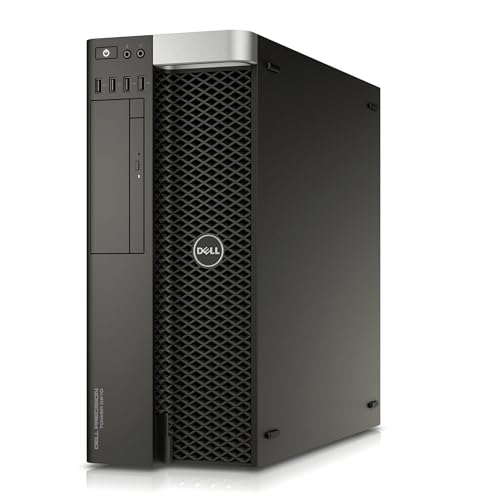
- 12-core Xeon for sustained workloads
- 64GB DDR4 for serious multitasking
- 480GB SSD for fast boot and load times
Best For: Engineers and power users who need a refurbished tower for CPU-heavy multitasking and large projects.
Best All-Around Refurbished Desktop

- 6-core i5-12500 with 16GB RAM for smooth multitasking
- 512GB PCIe SSD for fast boot and file access
- Windows 11 Pro plus Wi-Fi, Ethernet, keyboard, and mouse
Best For: Engineers and professionals who need a dependable refurbished tower for everyday productivity.
Best Certified Refurbished Value
Dell Precision 5810 Xeon Workstation

- Certified refurbished with testing and a 90-day warranty
- 4-core Xeon E5-1620 v3 at 3.50 GHz
- Upgrade-friendly mid-tower workstation chassis
Best For: Engineers who want a dependable refurbished tower for CAD, analysis, and general office-to-workstation tasks.
Best for Quiet Reliability
Lenovo ThinkStation P330 MT i5 Workstation

- 6-core Core i5-9400 for steady everyday engineering tasks
- 16GB RAM plus 1TB SSD for responsive multitasking
- Windows 11 Pro and strong port selection for office setups
Best For: Engineers and small teams wanting a reliable refurbished tower for CAD, analysis, and daily productivity.
Best for Comfort
Dell Precision T3610 Xeon Workstation

- Dual Xeon workstation platform
- 96GB ECC RAM for large projects
- 480GB SSD for fast loading
Best For: Engineers and power users who need a refurbished tower for demanding multitasking.
Best for Compact Engineering Desktops
Dell Optiplex 5050 SFF i7-7700 16GB/512GB

- Compact SFF design saves desk space
- Fast NVMe SSD and 16GB RAM for snappy multitasking
- Good fit for light engineering and office workflows
Best For: Engineers who need a compact refurbished desktop for general productivity and light technical work.
Best for Small Spaces
Dell OptiPlex 3070 Micro i5 Mini Desktop

- Space-saving Micro case for tight desks and clean setups
- Core i5-9500 with SSD keeps daily work responsive
- Windows 11 Pro, WiFi, and Bluetooth add modern convenience
Best For: Engineers and office users who need a compact refurbished desktop for everyday productivity.
Best Simple Pick
Dell Precision T7810 Dual Xeon Workstation

- Dual Xeon CPUs for strong multi-threaded performance
- 128GB DDR4 suits large engineering workloads
- 480GB SSD helps speed up boot and project loading
Best For: Engineers and technical users who need lots of CPU threads and RAM in a refurbished tower.
Best for Heavy Multitasking – PCSP T7820 Dual Xeon Workstation
If you want refurbished workstation pcs for engineers that prioritize CPU throughput and plenty of headroom, this PCSP T7820 is built around dual Xeon Gold 6140 processors, a new 2TB SSD, and configurable DDR4 memory up to 384GB. It’s a strong fit for CAD, simulation, modeling, and other demanding workloads where core count matters more than flashy graphics.
Best For: Engineers and technical users who need a renewed workstation with high-core-count CPU power, large RAM expansion options, and reliable Windows 11 Pro support.
Pros:
- 36 total CPU cores for heavy multitasking and parallel workloads
- New 2TB SSD helps with fast boot times and project loading
- Up to 384GB DDR4 RAM support gives it serious upgrade potential
- 950W power supply adds room for a more demanding build
Cons:
- Quadro M2000 4GB is older and not ideal for modern GPU-heavy rendering
- Renewed listing may include stock photos and variable configuration details
- Large tower design may be more machine than some desks can comfortably handle
For engineers shopping refurbished workstation pcs for engineers, this model stands out as a CPU-first value pick rather than a graphics-centric one. If your workflow benefits from lots of cores, lots of memory, and a fresh SSD, it offers a practical balance of performance and renewal value.
Best Renewed Value – HP OmniDesk AI Business Desktop (Ultra 7)
If you want refurbished workstation pcs for engineers without paying full-new pricing, this renewed HP OmniDesk is a practical middle ground. It pairs a 20-core Intel Ultra 7-265 with 16GB DDR5 and a 1TB PCIe NVMe SSD, so it should handle CAD, code builds, data prep, and heavy multitasking better than basic office desktops.
Best For: Engineers, developers, and technical buyers who want a renewed desktop with strong CPU performance, fast storage, and modern wireless connectivity for everyday workstation tasks.
Pros:
- 20-core Intel Ultra 7-265 offers strong multitasking headroom for engineering workloads
- 1TB PCIe NVMe SSD and DDR5 memory make the system feel responsive
- Renewed and certified with a 90-day warranty for lower-risk value buying
- WiFi 6, Bluetooth 5.4, and wired RJ-45 cover flexible office connectivity
Cons:
- Integrated Intel graphics are not ideal for GPU-heavy simulations or 3D rendering
- 16GB RAM is serviceable, but some engineering workflows will want more
- Windows 11 Home is less workstation-oriented than Pro
As refurbished workstation pcs for engineers go, this model stands out for balancing a current-gen CPU and fast SSD with a renewed price point. It is best viewed as a capable everyday engineering desktop rather than a graphics-focused workstation.
Best Budget – Dell Precision T5810 Xeon 12-Core 64GB 480GB SSD
If you need a no-nonsense tower for CAD, simulation, code builds, or large spreadsheet work, this Dell Precision T5810 is a strong fit for refurbished workstation pcs for engineers. Its 12-core Xeon CPU, 64GB of DDR4 RAM, and SSD storage give it the kind of responsive multitasking many technical users need without jumping to a new machine.
Best For: Engineers and power users who want a refurbished workstation that can handle CPU-heavy workflows, multiple apps, and everyday productivity with room to spare.
Pros:
- 12-core Xeon processor handles demanding engineering and productivity tasks well
- 64GB DDR4 memory is excellent for multitasking and larger project files
- 480GB SSD helps with fast boot times and quicker app loading
- Professional NVIDIA Quadro graphics support stable workstation visuals
Cons:
- Old-generation platform may not match newer workstations on raw efficiency
- No operating system included, so setup takes extra time
- Quadro NVS 315 is basic for advanced 3D or GPU-accelerated workloads
Overall, this is a practical pick if you want dependable performance and plenty of RAM at a refurbished price. For refurbished workstation pcs for engineers, it makes the most sense when CPU throughput and multitasking matter more than cutting-edge graphics power.
Best All-Around Refurbished Desktop – Dell OptiPlex 3000 Tower i5
If you want a practical, ready-to-use option among refurbished workstation pcs for engineers, this Dell OptiPlex 3000 Tower is a solid middle-ground choice. The Intel Core i5-12500, 16GB of RAM, and 512GB PCIe SSD give it enough speed for CAD light-to-moderate multitasking, documentation, spreadsheets, and everyday engineering software without pushing into high-end workstation pricing.
Best For: Engineers, students, and office users who need a dependable refurbished tower for productive day-to-day work.
Pros:
- 6-core Intel Core i5-12500 and 16GB RAM handle multitasking smoothly
- 512GB PCIe SSD helps with fast boot times and file access
- Includes Windows 11 Pro plus keyboard, mouse, Wi-Fi, and Ethernet
- Tower design offers more expandability than a compact mini PC
Cons:
- Integrated Intel UHD Graphics 770 is not ideal for demanding 3D workloads
- Renewed unit may show cosmetic wear compared with new systems
- DVD drive and included accessories add value, but not raw performance
For buyers comparing refurbished workstation pcs for engineers, this OptiPlex stands out as a balanced, low-friction choice rather than a heavy-duty rendering machine. It is best when reliability, expansion room, and everyday productivity matter more than top-tier graphics horsepower.
Best Certified Refurbished Value – Dell Precision 5810 Xeon Workstation
If you want refurbished workstation pcs for engineers without paying new-system prices, this Dell Precision 5810 is a practical place to start. It pairs a Xeon E5-1620 v3 quad-core processor with Dell’s Precision platform, giving you a solid base for CAD, modeling, light simulation, and other everyday engineering workloads.
Best For: Engineers and technical users who want a dependable certified refurbished tower for CAD, analysis, and general productivity.
Pros:
- Certified refurbished and tested to arrive working like new
- Xeon-based workstation platform with 4 cores at 3.50 GHz
- Includes accessories and at least a 90-day warranty
- Mid-tower design leaves room for future upgrades
Cons:
- Single-processor configuration limits heavy multitasking versus dual-socket workstations
- Older Xeon generation may feel dated for demanding modern workloads
- Generic packaging and refurbished condition may not suit every buyer
Overall, this is a straightforward choice for buyers comparing refurbished workstation pcs for engineers who care more about reliability and value than cutting-edge specs. It makes sense if you need a proven Dell tower for professional software and want certification, warranty coverage, and upgrade-friendly hardware at a lower cost.
Best for Quiet Reliability – Lenovo ThinkStation P330 MT i5 Workstation
If you want one of the more dependable refurbished workstation pcs for engineers, the Lenovo ThinkStation P330 MT offers a practical mix of six-core Intel performance, 16GB of RAM, and a fast 1TB SSD. It is a sensible choice for CAD, analysis tools, and everyday multitasking when you need stable Windows 11 Pro support without paying new-workstation prices.
Best For: Engineers, students, and small teams who need a refurbished tower that balances speed, storage, and business-ready features.
Pros:
- Core i5-9400 with 6 cores is solid for light to moderate engineering workloads
- 1TB SSD and 16GB DDR4 RAM help keep apps, files, and browsers moving smoothly
- Windows 11 Pro adds a familiar, secure environment for work setups
- Useful port selection with USB 3.0, DisplayPort, Gigabit Ethernet, and audio connections
Cons:
- Not as powerful as higher-end Xeon or modern i7/i9 workstation options
- Refurbished unit may ship in a generic box with non-original power accessories
Overall, this ThinkStation is a straightforward pick for refurbished workstation pcs for engineers who value reliability, storage, and a clean business desktop setup more than raw expansion or top-tier rendering power.
Best for Comfort – Dell Precision T3610 Xeon Workstation
If you need refurbished workstation pcs for engineers that prioritize memory capacity and proven workstation hardware, this Dell Precision T3610 is a practical pick. It pairs dual Xeon processing with 96GB of ECC memory and a 480GB SSD, making it a solid fit for CAD, analysis, and other demanding desktop workflows.
Best For: Engineers, technical users, and power buyers who want a refurbished tower with lots of RAM for multitasking and workstation-grade reliability.
Pros:
- Dual Xeon setup helps with heavy multitasking and parallel workloads
- 96GB ECC memory is excellent for large projects and memory-hungry applications
- 480GB SSD improves boot speed and day-to-day responsiveness
- Workstation-class Precision platform is built for professional use
Cons:
- Older-generation platform is not ideal if you want the newest CPU architecture
- Quadro 4000 is dated for modern GPU-accelerated workloads
- Bulkier tower design takes more desk or floor space
This is a strong value option if your priority is dependable specs over cutting-edge hardware. For shoppers comparing refurbished workstation pcs for engineers, it stands out as a memory-rich, work-ready system that can handle serious productivity tasks without a premium price tag.
Best for Compact Engineering Desktops – Dell Optiplex 5050 SFF i7-7700 16GB/512GB
If you want a capable, space-saving option among refurbished workstation pcs for engineers, the Dell Optiplex 5050 SFF is a practical pick. Its 7th-gen Intel Core i7, 16GB of RAM, and NVMe SSD give it enough responsiveness for CAD viewing, code work, document-heavy multitasking, and everyday office engineering tasks without taking over your desk.
Best For: Engineers who need a compact refurbished desktop for general productivity, light design work, and multi-app workflows.
Pros:
- Core i7-7700 and 16GB DDR4 handle everyday engineering productivity well
- 512GB NVMe SSD helps boot times and file access stay fast
- Small form factor fits tight offices, labs, or shared workspaces
- Windows 11 Pro adds business-friendly features out of the box
Cons:
- Integrated Intel HD 630 graphics are not ideal for heavy 3D workloads
- Older 7th-gen platform limits upgrade runway versus newer workstations
- Refurbished condition can vary by seller and included accessories
Overall, this Dell is a solid value if your priority is a reliable, compact system rather than a high-end GPU workstation. For buyers comparing refurbished workstation pcs for engineers, it makes the most sense for general engineering office use and lighter technical workloads.
Best for Small Spaces – Dell OptiPlex 3070 Micro i5 Mini Desktop
If you want a compact, dependable option in the world of refurbished workstation pcs for engineers, the Dell OptiPlex 3070 Micro is a practical fit for light CAD, code, documentation, and everyday office workflows. Its tiny footprint makes it easy to place on cramped desks or mount out of the way, while the 9th-gen Core i5, SSD, and Windows 11 Pro keep the experience responsive for routine business tasks.
Best For: Engineers, office users, and home workers who need a space-saving refurbished desktop for productivity-first workloads.
Pros:
- Compact Micro design saves desk space and keeps workstations clean.
- Intel Core i5-9500, 8GB RAM, and SSD support smooth everyday multitasking.
- Windows 11 Pro plus WiFi and Bluetooth make it easy to integrate into a modern setup.
Cons:
- 8GB RAM may feel limited for heavier engineering software or large projects.
- 250GB SSD is modest if you store big files locally.
- Not a high-end workstation for demanding 3D rendering or simulation.
Overall, this is a strong value pick if you need a compact system rather than a full-power tower, and it suits refurbished workstation pcs for engineers who prioritize reliability, efficiency, and a minimal footprint over maximum expandability.
Best Simple Pick – Dell Precision T7810 Dual Xeon Workstation
If you want refurbished workstation pcs for engineers that prioritize raw CPU headroom and lots of memory, the Dell Precision T7810 is a strong value pick. Its dual Xeon setup and 128GB of DDR4 make it well suited to demanding technical workloads, especially when stability matters more than flashy graphics.
Best For: Engineers, CAD users, and technical professionals who need a refurbished tower with high core count, generous RAM, and room for serious multitasking.
Pros:
- Dual Intel Xeon E5-2670 v3 processors offer substantial multi-threaded performance
- 128GB DDR4 memory is excellent for large projects and heavy multitasking
- 480GB SSD provides faster boot and load times than a traditional hard drive
- Flexible I/O and workstation-grade build suit office or lab environments
Cons:
- No operating system included, so setup time will be longer
- Quadro NVS 315 is basic and not ideal for GPU-heavy rendering or gaming
- Older platform may use more power than newer compact workstations
For engineers who care more about cores, RAM, and dependable expansion than modern cosmetics, this T7810 hits a practical sweet spot. It stands out among refurbished workstation pcs for engineers as a capable multitasking tower that can handle demanding productivity workloads on a tighter budget.
How We Picked These Refurbished Workstation PCs for Engineers
We focused on the specs that matter most for engineering workloads: core count, memory capacity, SSD speed, graphics support, and overall upgrade potential. We also prioritized systems with practical configurations for real-world use, not just benchmark numbers.
Because Refurbished Workstation PCs for Engineers can vary widely in age and capability, we favored models that balance performance, value, and compatibility with modern software.
Quick Comparison
High-core-count dual-Xeon towers are best for heavily threaded simulations, rendering, and multitasking. Midrange towers and business desktops are usually the sweet spot for CAD, modeling, and everyday engineering software. Small-form-factor and micro PCs work best for lighter workloads, compact desks, or secondary stations.
Key Buying Factors for Refurbished Workstation PCs for Engineers
Processor and Core Count
For CAD and design work, a newer high-clock CPU can feel faster than an older chip with more cores. For simulation, compiling, or rendering, more cores and threads can pay off. Match the processor style to your software rather than chasing specs alone.
Memory and Storage
At least 16GB of RAM is a practical minimum, while 32GB or more is preferable for larger assemblies, analysis, and multitasking. SSD storage is essential for fast boot times and responsive project loading; NVMe is ideal when available.
Graphics Support
Engineering apps may run on integrated graphics for basic work, but dedicated GPUs are better for smoother 3D viewport performance and multi-monitor setups. Check whether your software benefits from workstation graphics or whether a modern integrated GPU is enough.
Form Factor, Power, and Upgrades
Tower systems usually offer better cooling, more expansion, and easier upgrades. SFF and micro systems save space but can limit GPU and storage options. Also confirm power supply size, drive bays, and memory slots if you plan to expand later.
Who Should Buy Which Refurbished Workstation PCs for Engineers?
If you need maximum threaded performance for demanding compute jobs, choose a dual-CPU tower with abundant RAM. If your work centers on CAD, drafting, and general engineering productivity, a newer tower with a faster single processor and SSD is often the smarter buy.
If desk space is tight or the system will serve as a lightweight workstation, an SFF or micro desktop can be a good fit. For the best long-term value, look for Refurbished Workstation PCs for Engineers that leave room to upgrade RAM, storage, and graphics as your projects grow.