Building a home lab does not have to mean buying brand-new hardware. Refurbished workstation PCs can deliver strong multitasking, reliable cooling, and better upgrade options for far less money.
Whether you are running virtual machines, containers, network services, or a small development stack, the best choice depends on CPU generation, memory support, storage expandability, and power efficiency.
Best 10 Refurbished Workstation PCs for Home Lab Picks for 2026
Best for Reliable Xeon Performance
ThinkStation P520 Refurbished Workstation

- Xeon W-2123 for stable 24/7 workloads
- 32GB RAM and 512GB NVMe SSD included
- 900W Platinum PSU and roomy upgrade path
Best For: Home lab users who want an enterprise-style tower with room to grow.
Best for Balanced Refurbished Power
HP OmniDesk AI Business Desktop

- Ultra 7 CPU with DDR5 for responsive multitasking
- 1TB NVMe SSD gives roomy, fast lab storage
- Wi‑Fi 6, Bluetooth 5.4, Ethernet, HDMI, and DP
Best For: Home lab builders who want a newer-gen refurb for everyday compute and light virtualization.
Best for Balanced Home Lab
Dell OptiPlex 7070 Tower i7-9700, 16GB, 500GB SSD

- 8-core i7-9700 is solid for multitasking and light VMs
- 500GB SSD keeps boot and app load times snappy
- Wi‑Fi 6 and Windows 11 Pro simplify setup
Best For: Home lab builders who want a fast, quiet, Windows-ready refurbished tower for VMs and everyday use.
Best 4K Monitor Support
HP EliteDesk 800 G3 SFF i7 Renewed
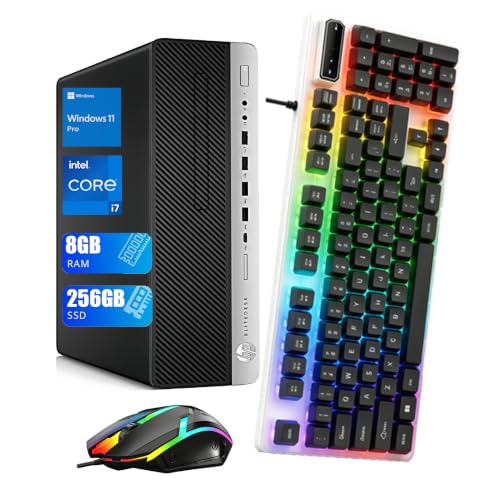
- Core i7-6700 with 4 cores and 8 threads
- Compact SFF case suits tight desk or lab spaces
- Dual DisplayPort and WiFi/Bluetooth included
Best For: Home lab users who want a compact refurbished desktop with reliable display connectivity.
Best for Easy Office-to-Lab Setup

- 32GB DDR4 RAM supports multitasking and light home lab use.
- 512GB SSD delivers fast boot and load times.
- Mini tower chassis offers easier expandability than small-form-factor PCs.
Best For: Home lab beginners and office users who want a ready-to-go renewed desktop.
Best for Compact Home Labs
Dell Optiplex 5050 SFF i7-7700

- Quad-core i7-7700 with 16GB DDR4 for light lab workloads
- 512GB NVMe SSD for quick boots and responsive use
- Small form factor design saves desk and rack space
Best For: Home lab users who want a compact refurbished desktop with solid everyday performance.
Best for Reliable ProDesk Value
HP ProDesk 600 G6 i5 Tower, 16GB RAM

- 6-core i5-10500 handles light VMs and multitasking
- Upgradeable tower design suits future lab expansion
- Windows 11 Pro plus Wi-Fi/Bluetooth make setup easy
Best For: Home lab builders and small-office users who want a dependable refurbished tower with room to upgrade.
Best for Small Lab Racks
Dell OptiPlex 7070 SFF i5 Refurbished Desktop

- Compact SFF case fits tight home lab spaces
- 9th-gen i5, 16GB RAM, and 512GB NVMe SSD
- Includes Wi-Fi, Bluetooth, and Windows 11 Pro
Best For: Home lab users who want a compact, ready-to-use refurbished desktop for light virtualization and daily admin tasks.
Best for CAD and Creative Apps
HP Workstation PC with Quadro K1200

- 32GB RAM and 5TB total storage
- Quadro K1200 suits CAD and Adobe work
- Windows 11 Pro with Wi-Fi and Bluetooth
Best For: Home lab builders who also need a renewed workstation for creative and office work.
Best Compact 2.5GbE Pick
GMKtec M6 Ultra Ryzen 7640HS Mini PC

- Dual 2.5GbE LAN suits firewall and lab networking roles
- Ryzen 5 7640HS delivers modern Zen 4 efficiency
- 32GB DDR5 RAM and 1TB SSD come preinstalled
Best For: Home lab users who want a compact mini PC with strong networking and modern performance.
Best for Reliable Xeon Performance – ThinkStation P520 Refurbished Workstation
If you want refurbished workstation pcs for home lab use that feel more like a true business machine than a consumer desktop, this ThinkStation P520 is a strong fit. The Xeon W-2123, 32GB of RAM, and NVMe SSD make it a practical choice for virtualization, light CAD, and always-on lab tasks.
Best For: Home lab builders who want a durable tower with enterprise-class CPU, plenty of memory, and room to expand.
Pros:
- Xeon W-2123 CPU delivers stable 24/7 workstation performance
- 32GB DDR4 RAM and 512GB NVMe SSD give it a fast out-of-box setup
- Quadro M2000 with 4x DisplayPort supports multi-monitor workstation use
- Full-size tower includes upgrade-friendly storage bays and strong 900W PSU
Cons:
- Older 4-core CPU is not ideal for heavy VM density or modern CPU-bound workloads
- Quadro M2000 is fine for displays and light pro apps, but not for gaming or GPU-heavy tasks
- Large tower footprint takes more space than compact lab systems
Overall, this is a dependable pick for refurbished workstation pcs for home lab owners who value expandability, certification-grade parts, and a proven platform over cutting-edge specs. It is especially appealing if you want a ready-to-run tower that can handle long uptimes without fuss.
Best for Balanced Refurbished Power – HP OmniDesk AI Business Desktop
If you want refurbished workstation pcs for home lab use that feel modern without jumping to a server tower, this renewed HP OmniDesk is a strong middle ground. The Intel Ultra 7, 1TB NVMe SSD, and DDR5 memory give it enough speed for VMs, light container work, office tasks, and general multitasking, while the compact business-desktop design keeps setup simple.
Best For: Home lab builders who want a fast, newer-generation refurb for everyday compute, light virtualization, and a tidy desk footprint.
Pros:
- Ultra 7 CPU and DDR5 memory offer solid responsiveness for multitasking and lab workloads
- 1TB PCIe NVMe SSD provides plenty of fast storage for tools, images, and projects
- Modern connectivity includes Wi‑Fi 6, Bluetooth 5.4, RJ-45, HDMI, and DisplayPort
- Renewed unit includes testing and a 90-day warranty for added peace of mind
Cons:
- Only 16GB of RAM, so heavier virtualization may call for an upgrade
- Integrated Intel graphics are fine for lab work but not for GPU-heavy tasks
- Windows 11 Home may be less ideal than Pro for some advanced admin features
For refurbished workstation pcs for home lab projects, this HP stands out as a practical buy if you want current-gen performance and a clean, low-fuss system rather than a bulky enterprise tower. It is especially appealing when you value speed, storage, and connectivity over maximum expandability.
Best for Balanced Home Lab – Dell OptiPlex 7070 Tower i7-9700, 16GB, 500GB SSD
If you want refurbished workstation pcs for home lab use without jumping into a power-hungry server, this OptiPlex 7070 Tower is a practical middle ground. The i7-9700, 16GB of RAM, and 500GB SSD give it enough speed for virtual machines, light services, and everyday admin tasks, while Windows 11 Pro and Wi‑Fi 6 make setup straightforward.
Best For: Home lab builders who want a fast, quiet, Windows-ready refurbished tower for VMs, testing, and mixed productivity.
Pros:
- 8-core Intel i7-9700 handles multitasking and light virtualization well
- 500GB SSD and 16GB RAM provide a responsive out-of-box experience
- Wi‑Fi 6, Windows 11 Pro, and multiple display outputs improve convenience
- Tower format leaves room for future expansion
Cons:
- Integrated graphics are fine for basics, not heavy GPU workloads
- 16GB RAM may feel limited for larger VM clusters
- Refurbished configuration details can vary by seller
Overall, this is a sensible pick if you want refurbished workstation pcs for home lab projects that can double as a dependable everyday desktop. It’s not the most expandable or server-like option, but it offers a strong balance of speed, simplicity, and value.
Best 4K Monitor Support – HP EliteDesk 800 G3 SFF i7 Renewed
If you’re comparing refurbished workstation pcs for home lab use, this HP EliteDesk 800 G3 SFF is a practical pick for light servers, test rigs, and everyday admin tasks. The i7-6700, 8GB of RAM, and 256GB SSD give it enough responsiveness for labs that need a compact, dependable Windows machine.
Best For: Home lab users who want a small-form-factor refurbished desktop with solid ports and 4K display support.
Pros:
- Core i7-6700 offers 4 cores and 8 threads for everyday multitasking
- Small form factor design fits neatly on a desk or in a tight lab setup
- Multiple USB ports plus dual DisplayPort outputs make it easy to connect gear
- Windows 11 Pro and WiFi/Bluetooth add convenience out of the box
Cons:
- 8GB RAM is workable, but heavier virtualization may need an upgrade
- 256GB SSD is modest if you plan to store large VM images locally
- Renewed units can vary in cosmetic condition
Overall, this is a sensible option if you want refurbished workstation pcs for home lab projects without overspending on a larger enterprise tower. It is most appealing as a compact, ready-to-run system that can be expanded later if your lab workload grows.
Best for Easy Office-to-Lab Setup – Dell OptiPlex 7040 Mini Tower
If you want refurbished workstation pcs for home lab use without starting from a barebones build, the Dell OptiPlex 7040 Mini Tower is a practical choice. Its 6th Gen Core i5, 32GB of RAM, and 512GB SSD give it enough headroom for everyday productivity plus light lab tasks, virtualization, or service testing.
Best For: Home lab beginners, office users, and anyone who wants a renewed desktop with solid memory and storage already in place.
Pros:
- 32GB DDR4 RAM is strong for multitasking and light virtual machine use.
- 512GB SSD helps with fast boots, app launches, and general responsiveness.
- Mini tower design leaves room for future expansion and better airflow.
- Built-in WiFi, Ethernet, and multiple display outputs make setup easy.
Cons:
- 6th Gen Intel platform is older than newer workstation options.
- Integrated graphics are fine for desktop work but not ideal for GPU-heavy workloads.
- Not the best pick if you want a high-core-count system for larger home lab projects.
As refurbished workstation pcs for home lab setups go, this OptiPlex stands out more for convenience and ready-to-use value than raw power. It is a sensible fit if you want dependable hardware, Windows 11 Pro, and enough memory to get started quickly.
Best for Compact Home Labs – Dell Optiplex 5050 SFF i7-7700
If you want refurbished workstation pcs for home lab use without giving up speed or reliability, this OptiPlex 5050 SFF is a practical pick. The i7-7700, 16GB of DDR4 memory, and 512GB NVMe SSD make it a solid starter tower for virtualization, light server tasks, and everyday admin work.
Best For: Home lab builders who need a compact, ready-to-run Windows 11 Pro desktop with enough performance for small virtualized workloads.
Pros:
- Quad-core i7-7700 and 16GB RAM handle lightweight lab and productivity tasks well
- 512GB NVMe SSD gives fast boot and app loading speeds
- Small form factor case fits easily on a desk or in a tight rack area
- Windows 11 Pro included, with keyboard and mouse in the box
Cons:
- Older 7th-gen CPU limits upgrade headroom versus newer mini PCs or towers
- Integrated Intel HD Graphics 630 is fine for basics, not graphics-heavy work
- SFF layout can be more restrictive for expansion than full-size workstation PCs
For refurbished workstation pcs for home lab setups, this Dell stands out for compactness and balanced specs rather than raw expandability. It is a smart choice if you want a dependable used machine that can jump into lab duty quickly.
Best for Reliable ProDesk Value – HP ProDesk 600 G6 i5 Tower, 16GB RAM
If you want refurbished workstation pcs for home lab use without overpaying for enterprise hardware, the HP ProDesk 600 G6 Tower is a practical middle ground. The 6-core Intel Core i5-10500, 16GB of RAM, and 256GB SSD give you enough headroom for virtualization, light server tasks, and everyday desktop work.
Best For: Home lab builders, students, and small-office users who want a dependable refurbished tower with solid upgrade potential.
Pros:
- 6-core, 12-thread i5-10500 is capable for light VMs and multitasking
- Standard tower chassis makes future RAM, storage, and GPU upgrades easier
- Windows 11 Pro, Wi-Fi, Bluetooth, and included keyboard/mouse add convenience
Cons:
- 256GB SSD is modest if you plan to store multiple VM images or datasets
- Not a high-core-count workstation, so heavier lab workloads may outgrow it
For buyers comparing refurbished workstation pcs for home lab projects, this ProDesk stands out more for balanced value and expandability than raw power. It is a sensible pick if you need a clean, ready-to-run tower that can scale a bit as your lab grows.
Best for Small Lab Racks – Dell OptiPlex 7070 SFF i5 Refurbished Desktop
If you want refurbished workstation pcs for home lab use, this Dell OptiPlex 7070 SFF is a practical pick: it combines a 9th-gen Core i5, 16GB of RAM, and a 512GB NVMe SSD in a compact tower that should fit neatly on a shelf or under a desk.
Best For: Home lab builders who want a small, dependable Windows 11 Pro system for light virtualization, general admin work, dual-monitor setups, and everyday tinkering.
Pros:
- Compact small-form-factor design saves space in a rack, desk, or lab corner
- Core i5-9500, 16GB RAM, and NVMe SSD are solid for multitasking and basic lab workloads
- 4K dual-display support makes it easy to run monitoring or admin screens side by side
- Includes Wi-Fi, Bluetooth, keyboard, mouse, and Windows 11 Pro for quicker setup
Cons:
- Small-form-factor limits internal expansion compared with full-size workstations
- Integrated Intel UHD 630 graphics are not meant for heavy GPU tasks
- Refurbished condition can vary a bit more than buying new
For buyers comparing refurbished workstation pcs for home lab use, this OptiPlex 7070 stands out as a space-efficient, ready-to-run option that balances speed, ports, and low hassle better than many bulkier desktop alternatives.
Best for CAD and Creative Apps – HP Workstation PC with Quadro K1200
If you want refurbished workstation pcs for home lab use that can also handle content creation, this HP Renewed tower is a strong middle-ground option. The 8th-gen Intel Core i5, 32GB of DDR4 memory, and 1TB SSD plus 4TB HDD give you enough headroom for virtualization, light rendering, file serving, and everyday admin tasks without feeling cramped.
Best For: Home lab builders who also want a capable refurbished workstation for CAD, Adobe apps, and general productivity.
Pros:
- 32GB RAM and a fast SSD/HDD combo are useful for multitasking and lab workloads
- Quadro K1200 is a solid fit for certified creative and engineering software
- Windows 11 Pro, Wi-Fi 5G, and Bluetooth make setup more convenient
- Plenty of ports for monitors, peripherals, and storage expansion
Cons:
- Older Intel Core i5 platform is not ideal for heavy CPU virtualization
- Quadro K1200 is entry-level by modern GPU standards
- Renewed unit means condition and accessory contents can vary
This is a practical pick if you want refurbished workstation pcs for home lab projects and also need a machine that can double as a dependable editing or design workstation. It is not the newest or fastest option, but the memory, storage, and pro-oriented GPU make it easy to justify for mixed-use buyers.
Best Compact 2.5GbE Pick – GMKtec M6 Ultra Ryzen 7640HS Mini PC
If you want a small, efficient box that can still handle lab work, the GMKtec M6 Ultra is a smart alternative to many refurbished workstation pcs for home lab setups. Its Ryzen 5 7640HS, dual 2.5GbE ports, and triple-display support make it useful for virtualization, routing, light dev work, and everyday multitasking without taking up much desk space.
Best For: Home lab users who want a compact mini PC with strong networking, modern I/O, and enough CPU headroom for light server or desktop tasks.
Pros:
- Ryzen 5 7640HS offers solid Zen 4 performance in a low-power mini PC
- Dual 2.5GbE LAN is ideal for firewall, router, and lab networking roles
- 32GB DDR5 and 1TB SSD give you a ready-to-use starting point
- USB4, DP, and HDMI support flexible multi-monitor setups
Cons:
- Not a true workstation tower, so expansion is more limited
- Integrated graphics are fine for light gaming, not heavy GPU workloads
- Storage and memory upgrades may still be needed for bigger lab builds
For buyers comparing refurbished workstation pcs for home lab use, this model stands out more for efficiency and networking than raw expansion. It fits best when you want modern performance in a compact chassis and don’t need the bulk of a traditional tower.
How We Picked These Refurbished Workstation PCs for Home Lab
For a home lab, the best Refurbished Workstation PCs for Home Lab use are the ones that balance core count, RAM capacity, storage flexibility, and long-term stability. We prioritized systems with business-class parts, practical upgrade paths, and enough ports or network support to handle common lab tasks like virtualization, file serving, and light self-hosting.
We also looked for models that make sense on a used-market budget: machines with proven reliability, readily available replacement parts, and cases that are easier to open and expand. Compact systems can still be a good fit, but only if they do not limit RAM, storage, or cooling too much.
Quick Comparison
High-core-count towers are usually the best fit for multi-VM labs and heavier workloads. Midrange towers and mini towers offer a strong middle ground for general-purpose services, while small form factor and mini PCs are better for quiet, space-conscious setups. If you want GPU acceleration, PCIe expansion, or multiple drives, choose a tower over an ultra-compact chassis.
Key Buying Factors for Refurbished Workstation PCs for Home Lab
CPU and Virtualization
Look for a CPU with enough threads to keep several services responsive at once. For virtualization, newer Intel Core and Xeon chips generally offer better performance per watt and stronger platform support than older 6th- or 7th-gen systems.
Memory Capacity
RAM is often the first bottleneck in a lab. A system with 16GB may work for basic services, but 32GB or more is much better if you plan to run multiple virtual machines, containers, or development tools. Confirm the number of DIMM slots and the maximum supported capacity before buying.
Storage and Expansion
NVMe SSDs are ideal for the operating system and active workloads. Extra drive bays or SATA ports are valuable if you want to separate boot, data, and backup storage. PCIe slots also matter if you need extra network cards, RAID cards, or a GPU.
Networking and Power
Built-in Ethernet is essential, and dual-NIC systems are especially useful for routing, firewall, or segmented lab projects. Also check the PSU rating if you plan to add drives or expansion cards. In compact systems, power and cooling limits can restrict future upgrades.
Who Should Buy Which Refurbished Workstation PCs for Home Lab?
If you want maximum flexibility, choose a tower workstation with upgrade headroom. If your lab is mostly containers, media services, or a small virtualization stack, a well-equipped midrange business desktop may be enough. If noise, desk space, or low power use matters most, a mini PC or SFF system can be the smarter pick.
In short, Refurbished Workstation PCs for Home Lab buyers should match the machine to the workload, not just the price. Start with enough RAM and storage, then buy the most expandable system your budget allows.