If you need a workstation that can handle heavy scenes, complex simulations, and long render jobs, Threadripper remains one of the strongest platforms for the job.
These picks focus on 3D rendering workstations with Threadripper that balance CPU throughput, GPU power, memory capacity, and upgrade headroom for demanding production workflows.
Best 9 3d Rendering Workstations with Threadripper Picks for 2026
Best for Extreme Threadripper Performance
CLX Horus Threadripper 9980X Creator

- 64-core Threadripper 9980X for demanding CPU rendering
- RTX 5090 accelerates ray tracing, AI, and viewport work
- 256GB ECC RAM and 4TB SSD suit large production files
Best For: Professional creators who need a top-end workstation for heavy 3D rendering and AI workflows.
Best 32-Core Threadripper Workstation
Lenovo ThinkStation P620 Threadripper PRO
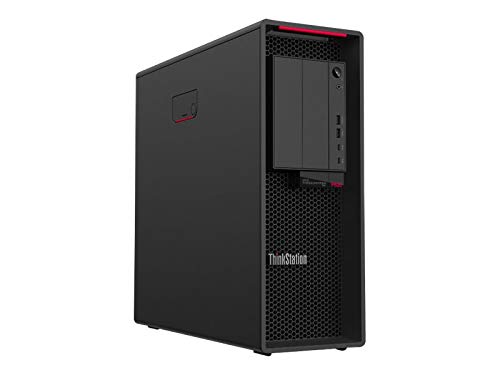
- 32-core Threadripper PRO for heavy multi-threaded rendering
- 1TB SSD and 32GB RAM for responsive pro workflows
- Workstation tower with NVIDIA Quadro P1000 graphics
Best For: Artists and studios needing a CPU-focused workstation for demanding 3D rendering and production tasks.
Best for Threadripper Builds
ASUS Pro WS TRX50-SAGE WIFI Workstation Board

- Supports Threadripper PRO 7000 WX CPUs up to 96 cores
- 36 power stages with dual 8-pin CPU power and VRM cooling
- Three PCIe 5.0 x16 slots, WiFi 7, and 10 Gb LAN
Best For: Professional creators and studios building a Threadripper Pro workstation for rendering and other heavy multi-threaded workloads.
Best for Threadripper Pro Productivity
Lenovo ThinkStation P620 12-Core Workstation

- Threadripper PRO 12-core CPU handles CPU-heavy rendering
- 32 GB RAM and 1 TB SSD make a strong base config
- 10 Gigabit Ethernet suits studio and networked workflows
Best For: Artists and production teams needing a dependable Threadripper PRO tower for rendering and multitasking.
Best Threadripper Creator Pick

- Threadripper 7960X for heavy multicore workloads
- RTX 5080 for fast GPU rendering and viewport performance
- ECC memory, NVMe SSD, and large HDD storage included
Best For: 3D artists and studios wanting a powerful Threadripper prebuilt for rendering and content creation.
Best for Heavy Multithreaded Workloads
Lenovo ThinkStation P8 Threadripper PRO 7955WX

- 16-core Threadripper PRO for CPU rendering
- WRX90 workstation platform for upgrades
- 32 GB DDR5 and 1 TB SSD included
Best For: Professionals who need a scalable Threadripper PRO workstation for rendering and other CPU-intensive creative work.
Best for Heavy 3D Scenes
CLX Horus Threadripper 7960X Workstation
- 24-core Threadripper for strong multi-threaded rendering
- RTX 5070 supports modeling, viewport, and GPU-accelerated workflows
- ECC memory plus NVMe SSD and 4TB HDD balance stability and storage
Best For: 3D artists and creators who need a Threadripper workstation for demanding render and simulation work.
Best for Reliable ECC Workloads
Lenovo ThinkStation P8 Threadripper Pro 7945WX

- Threadripper PRO 7945WX with 12 cores
- 64GB ECC DDR5 memory and 2TB NVMe SSD
- Workstation features with Windows 11 Pro
Best For: 3D artists and studios that want a stable Threadripper Pro workstation for daily production work.
Best Heavy-Duty Pick
CLX Horus Threadripper Creator Workstation
- 24-core Threadripper 9960X with liquid cooling
- RTX 5080 for fast GPU rendering and previews
- 256GB ECC RAM plus 4TB NVMe SSD
Best For: 3D artists and VFX creators handling massive scenes, render jobs, and multitasking.
Best for Extreme Threadripper Performance – CLX Horus Threadripper 9980X Creator
If you want one of the most powerful 3d rendering workstations with threadripper for heavy scenes, fast exports, and AI-assisted creative work, the CLX Horus Creator Workstation is built to stay ahead under sustained load. Its 64-core Threadripper CPU, RTX 5090 GPU, and massive memory/storage configuration make it a serious fit for studios and independent creators who need desktop-class throughput.
Best For: Professional 3D artists, VFX teams, and power users who need top-tier rendering speed, large RAM capacity, and reliable workstation hardware.
Pros:
- 64-core AMD Threadripper 9980X is ideal for CPU-heavy rendering and multitasking
- RTX 5090 with 32GB GDDR7 delivers elite real-time viewport and ray-tracing performance
- 256GB DDR5 ECC memory and 4TB NVMe SSD provide excellent headroom for large projects
- Dual LAN, WiFi 6E, and Windows 11 Pro support a capable pro workflow
Cons:
- Very expensive compared with mainstream creator desktops
- Overkill for users who only do light modeling or occasional rendering
- Large, high-power build is not meant for portability
As a high-end option among 3d rendering workstations with threadripper, this CLX system makes the most sense when raw output, memory capacity, and GPU speed matter more than price. It is a workstation-class purchase aimed at professionals who need maximum performance without compromise.
Best 32-Core Threadripper Workstation – Lenovo ThinkStation P620 Threadripper PRO
If you want one of the more serious 3d rendering workstations with threadripper, the Lenovo ThinkStation P620 is built around a 32-core Ryzen Threadripper PRO 3975WX and paired with 32GB of RAM. That gives it the CPU muscle needed for heavy scene prep, multitasking, and long rendering jobs, while the 1TB SSD keeps projects and assets moving quickly.
Best For: Artists, studios, and technical users who need a high-core-count workstation for demanding 3D rendering, simulation, and production workloads.
Pros:
- 32-core Threadripper PRO CPU delivers excellent multi-threaded rendering performance
- Workstation-class ThinkStation tower design is made for demanding pro workloads
- 1TB SSD provides fast storage for large project files and active asset libraries
- Includes NVIDIA Quadro P1000 graphics for pro-oriented display support
Cons:
- 32GB RAM is solid, but large scenes may benefit from a memory upgrade
- Quadro P1000 is entry-level for GPU-heavy rendering and viewport acceleration
- Desktop tower size is not ideal for users who need a compact setup
For buyers comparing 3d rendering workstations with threadripper, this P620 stands out for CPU-heavy workloads first and foremost. It is a strong fit when render speed, stability, and expandability matter more than flashy graphics specs out of the box.
Best for Threadripper Builds – ASUS Pro WS TRX50-SAGE WIFI Workstation Board
If you’re building one of the highest-end 3d rendering workstations with threadripper, this ASUS Pro WS TRX50-SAGE WIFI board gives you the platform you need for big-core CPUs, ECC memory, and serious expansion. It’s aimed at workstation users who care more about stability, connectivity, and multi-GPU support than flashy extras.
Best For: Professional creators and studios building a Threadripper Pro workstation for rendering, simulation, and other heavy multi-threaded workloads.
Pros:
- Supports AMD Ryzen Threadripper PRO 7000 WX and Threadripper 7000 CPUs up to 96 cores
- 36 power stages, dual 8-pin CPU power, and heavy VRM cooling for sustained loads
- Three PCIe 5.0 x16 slots plus multi-GPU and PCIe 5.0 M.2 support
- Server-grade connectivity with 10 Gb and 2.5 Gb LAN, WiFi 7, and IPMI support
Cons:
- Requires a very high-end Threadripper platform, so total build cost will be steep
- ATX workstation layout may be overkill for simpler editing or entry-level builds
For buyers comparing 3d rendering workstations with threadripper, this motherboard stands out as a true workstation foundation rather than a consumer gaming board. Its strongest appeal is long-duration performance, storage bandwidth, and expandability for demanding production environments.
Best for Threadripper Pro Productivity – Lenovo ThinkStation P620 12-Core Workstation
If you want one of the more practical 3d rendering workstations with threadripper, the Lenovo ThinkStation P620 is built around AMD’s Ryzen Threadripper PRO platform for heavy multitasking, scene prep, and content-creation workloads. The 12-core 5945WX, 32 GB of RAM, and 1 TB SSD give it a solid balance of CPU muscle, memory headroom, and fast storage for demanding studio use.
Best For: Artists, designers, and production teams who want a dependable Threadripper PRO tower for rendering, modeling, and general workstation duties.
Pros:
- Threadripper PRO 12-core CPU is well-suited to CPU-heavy rendering and multitasking
- 32 GB RAM and 1 TB SSD provide a strong everyday workstation baseline
- 10 Gigabit Ethernet supports faster network workflows and studio environments
- 1000 W PSU leaves room for a capable professional build
Cons:
- No discrete GPU is listed in the base configuration
- 32 GB of memory may be modest for very large 3D scenes
- Tower design is not ideal for compact desks or mobile use
For buyers comparing 3d rendering workstations with threadripper, this ThinkStation stands out as a serious workstation foundation rather than a flashy spec sheet build. It makes the most sense if you want a stable AMD Threadripper PRO system that can be customized around your rendering pipeline.
Best Threadripper Creator Pick – CLX Horus Creator Workstation
If you want a ready-to-run tower for 3d rendering workstations with threadripper, this CLX Horus setup leans into high-core CPU performance, fast GPU acceleration, and creator-friendly storage out of the box. The Ryzen Threadripper 7960X paired with an RTX 5080 makes it well suited for complex scenes, heavy multitasking, and GPU-accelerated render pipelines.
Best For: 3D artists, motion designers, and studios that want a powerful Threadripper-based workstation without building from scratch.
Pros:
- Threadripper 7960X offers serious multicore headroom for CPU rendering and multitasking
- RTX 5080 gives strong acceleration for GPU rendering, viewport work, and AI-assisted tools
- Includes 1TB NVMe SSD plus 4TB HDD for a practical mix of speed and capacity
- ECC memory and 360mm AIO cooling add stability for longer creator sessions
Cons:
- 32GB RAM may feel light for very large scenes or simulation-heavy workflows
- Windows 11 Home is less ideal than Pro for some studio environments
- Premium parts likely put it above entry-level workstation budgets
For buyers comparing 3d rendering workstations with threadripper, this model stands out as a balanced prebuilt option: strong CPU muscle, modern GPU power, and useful storage in a single package. It is a smart fit if you value performance and convenience more than customization.
Best for Heavy Multithreaded Workloads – Lenovo ThinkStation P8 Threadripper PRO 7955WX
If you need one of the more capable 3d rendering workstations with threadripper, this Lenovo ThinkStation P8 is built around AMD’s 16-core Ryzen Threadripper PRO 7955WX platform for demanding scene builds, simulation, and rendering jobs. With 32 GB of DDR5 memory, a 1 TB SSD, and the WRX90 workstation chipset, it’s aimed at professionals who want a serious base system they can scale over time.
Best For: Artists, architects, and studios that want a Threadripper PRO workstation for high-throughput rendering and other CPU-heavy creative workloads.
Pros:
- 16-core Threadripper PRO CPU is well suited to CPU rendering and multitasking
- WRX90 platform offers a true workstation foundation for upgrades and expansion
- 32 GB DDR5 and 1 TB SSD provide a solid out-of-box setup for professional projects
- Lenovo ThinkStation line is designed for business-grade reliability
Cons:
- 32 GB RAM may be limiting for very large scenes or simulation-heavy workflows
- Integrated value is strongest for CPU workloads; GPU rendering may require a separate graphics upgrade
- Higher upfront cost than mainstream creator desktops
Overall, this is a strong pick if your priority is a scalable workstation for 3d rendering workstations with threadripper rather than a general-purpose desktop. It makes the most sense for buyers who want dependable multithreaded performance and a platform they can expand as projects grow.
Best for Heavy 3D Scenes – CLX Horus Threadripper 7960X Workstation
If you want one of the more capable 3d rendering workstations with threadripper for serious modeling, animation, and AI-assisted creative work, the CLX Horus is built around a 24-core Ryzen Threadripper 7960X and a GeForce RTX 5070. It pairs fast SSD storage with large-capacity HDD space, making it a practical fit for creators who need compute headroom without giving up everyday usability.
Best For: 3D artists and content creators who want Threadripper CPU power, ECC memory, and a balanced GPU for demanding render and workflow tasks.
Pros:
- 24-core Threadripper CPU with strong multi-threaded performance for rendering and simulation
- RTX 5070 acceleration helps with viewport work, GPU rendering, and video pipelines
- 32GB DDR5 ECC memory adds stability for pro workloads
- 1TB NVMe SSD plus 4TB HDD offers a good mix of speed and storage capacity
Cons:
- 32GB RAM may feel modest for very large scenes or heavy multitasking
- Windows 11 Home is less workstation-focused than Pro editions
- Not the ideal pick if you want the highest-end GPU for top-tier GPU rendering
Overall, this CLX build stands out among 3d rendering workstations with threadripper because it combines a high-core-count CPU, ECC memory, and a capable modern GPU in one ready-to-use tower. It is a sensible choice for creators who want a serious workstation foundation without jumping straight to a fully maxed-out system.
Best for Reliable ECC Workloads – Lenovo ThinkStation P8 Threadripper Pro 7945WX
If you want a dependable tower for 3d rendering workstations with threadripper, the Lenovo ThinkStation P8 is built around an AMD Ryzen Threadripper PRO 7945WX, 64GB of ECC DDR5 memory, and a fast 2TB NVMe SSD. It is aimed at professionals who need strong multitasking, stable performance, and workstation-class features rather than a flashy gaming build.
Best For: 3D artists, motion designers, and studios that want a stable Threadripper Pro workstation for heavy scene files and multitasking.
Pros:
- Threadripper PRO 12-core CPU with workstation-oriented platform support
- 64GB ECC DDR5 and 2TB SSD help keep demanding projects responsive
- Includes Windows 11 Pro, Wi-Fi 6E, and 10GbE for pro environments
- Lenovo Premier Support adds peace of mind for business use
Cons:
- NVIDIA T1000 graphics is modest for very GPU-heavy rendering workflows
- Not the best choice if you need maximum out-of-box GPU power
For buyers comparing 3d rendering workstations with threadripper, this ThinkStation stands out more for balance and reliability than raw graphics muscle. It makes the most sense for users who value ECC memory, fast storage, and a proven workstation platform for everyday production work.
Best Heavy-Duty Pick – CLX Horus Threadripper Creator Workstation
If you need one of the most capable 3d rendering workstations with threadripper for large scene files, this CLX Horus setup is built for speed, memory headroom, and fast GPU-accelerated previews. The 24-core Threadripper 9960X, RTX 5080, and 256GB of ECC RAM make it a strong fit for creators who want workstation-class responsiveness without constant bottlenecks.
Best For: 3D artists, VFX teams, and motion designers working with complex renders, heavy multitasking, and large project caches.
Pros:
- 24-core Threadripper CPU with 360mm liquid cooling for demanding render workloads
- RTX 5080 speeds up real-time viewport work and GPU rendering
- 256GB ECC DDR5 memory is ideal for massive scenes and multitasking
- 4TB NVMe SSD gives you plenty of fast storage for active projects
Cons:
- More machine than most casual creators need
- High-end specs push it into a premium price tier
- Mid-tower design may be overkill if you want a compact setup
This is a serious workstation for buyers comparing 3d rendering workstations with threadripper and prioritizing throughput over value. If your workflow is CPU-heavy, memory-hungry, and GPU-assisted, the Horus is built to keep up.
How We Picked the Best 3d Rendering Workstations with Threadripper
We focused on systems and platform options that make sense for pro 3D work: high core counts, strong multi-threaded performance, ECC memory support where available, fast NVMe storage, and modern PCIe expansion for GPUs and accelerators. For 3d Rendering Workstations with Threadripper, the best choices are not just the fastest on paper; they also need enough cooling, power delivery, and chassis space to stay stable under sustained loads.
Quick Comparison
As a rule, Threadripper PRO systems are best when reliability, memory capacity, and workstation-class expansion matter most. Standard Threadripper builds can be excellent value for artists who want high render performance plus strong single-thread responsiveness. GPU choice also matters: a faster card can noticeably improve viewport work and GPU-accelerated rendering, while larger SSDs help with project loads, caches, and texture-heavy scenes.
Key Buying Factors for 3d Rendering Workstations with Threadripper
CPU Core Count and Clock Speed
More cores help with CPU rendering, simulation, and multitasking, but higher boost clocks still matter for modeling, scene interaction, and general responsiveness. If your workload is mostly rendering, prioritize core count. If you spend more time in the viewport or switching between apps, balance core count with higher clocks.
GPU Capability
For many creators, the GPU is just as important as the CPU. Look for enough VRAM and a modern architecture if you use GPU render engines, AI denoisers, or real-time previews. A strong GPU also improves performance in software that leans on hardware acceleration.
Memory Capacity and ECC Support
Large scenes can consume memory quickly, especially with high-resolution textures, simulation caches, and multiple applications open. ECC memory is a major plus for long sessions and production reliability. If you work on client deliverables, more RAM is often a better investment than chasing a slightly faster CPU tier.
Storage and Expandability
Fast NVMe storage shortens boot times, project loading, and cache access. Dual-drive or multi-drive setups are useful when you want to separate OS, active projects, and archive data. Also check for PCIe lanes, motherboard slot layout, and chassis clearance if you plan to add capture cards, high-speed networking, or more storage later.
Who Should Buy Which 3d Rendering Workstations with Threadripper?
Choose a high-end Threadripper build with top-tier GPU and large memory if you handle large-scale rendering, simulation, or studio production. Go with a more balanced midrange system if you want strong performance for modeling, animation, and occasional heavy renders without overbuying.
If reliability and upgrade room matter most, prioritize Threadripper PRO-based workstations and workstation motherboards with strong power delivery, ECC support, and generous PCIe expansion. If you are building around a specific render engine, match the system to whether it benefits more from CPU cores, GPU horsepower, or memory capacity.