If you need faster renders, fewer crashes, and a workstation that can keep up with heavy scenes, the right hardware matters more than ever.
This roundup focuses on 3D rendering workstations for GPU rendering, with choices that balance graphics power, CPU performance, memory capacity, and expansion options.
Best 10 3d Rendering Workstations for GPU Rendering Picks for 2026
Best for Heavy GPU Rendering

- RTX PRO 6000 with 96GB VRAM for large render workloads
- 192GB DDR5 RAM and 10TB NVMe storage for heavy projects
- Liquid cooling plus 1000W PSU for stable long sessions
Best For: 3D artists and studios that need maximum GPU memory and workstation stability.
Best Low-Profile GPU
PNY T1000 8GB Professional Graphics Card

- Low-profile, small-form-factor friendly design
- 8GB GDDR6 with 4 mini DisplayPort outputs
- Stable pro-grade choice for compact workstations
Best For: Compact workstations needing a reliable professional GPU with modest rendering needs.
Best for High-End GPU Workloads
- RTX 5080 for demanding GPU rendering
- 64GB RAM for large creative projects
- 2TB SSD for fast asset and cache storage
Best For: Artists and power users who need a strong GPU-focused workstation for rendering and creative production.
Best for Multi-Display CAD Work

- 8GB GDDR6 with workstation-oriented drivers
- Supports up to four 5K displays
- Good fit for compact pro workstations
Best For: Designers and engineers who need a stable pro GPU for CAD, multitasking, and light GPU rendering.
Best for Balanced 20GB VRAM
PNY RTX A4500 20GB Workstation GPU

- 20GB GDDR6 for larger scenes and textures
- Ampere ray tracing and workstation reliability
- Metal backplate for added durability
Best For: Creators and small studios that want pro-grade GPU rendering with plenty of VRAM.
Best Low-Power Workstation Pick
Zopsc 4GB 4-Port Graphics Card

- 47W draw with no external power required
- Four DisplayPort 1.4a outputs for multi-monitor workflows
- Workstation-certified support for modeling and lighter rendering
Best For: Users who want a compact, efficient workstation GPU for modeling, office productivity, and lighter rendering tasks.
Best for PCIe Expansion
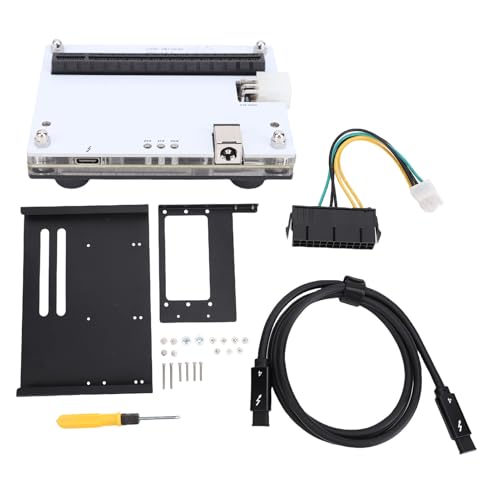
- Thunderbolt 3/4 and USB4 compatibility
- PCIe 16X slot for GPU and add-on cards
- Includes cable, bracket, and setup tools
Best For: Users who want flexible external PCIe expansion for graphics, storage, or networking.
Best for Heavy GPU Rendering – NOVATECH AI Workstation
If you want one of the most aggressively specced 3d rendering workstations for gpu rendering, this NOVATECH tower is built around the Intel Core i9-14900K and RTX PRO 6000 with 96GB of VRAM. The 192GB DDR5 memory pool and 10TB of NVMe storage make it a strong fit for large scenes, simulation caches, and fast project turnaround.
Best For: 3D artists, studios, and technical users who need maximum GPU memory and workstation-class reliability for demanding rendering and AI workflows.
Pros:
- RTX PRO 6000 with 96GB VRAM is ideal for large GPU render jobs and heavy scenes
- 192GB DDR5 RAM supports multitasking, simulation, and data-heavy creative work
- 10TB NVMe storage helps keep assets, caches, and project files moving quickly
- Liquid cooling and a 1000W 80+ Gold PSU add stability under long workloads
Cons:
- High-end configuration puts it well above entry-level workstation budgets
- More power than most casual creators or hobbyist render users need
- Large footprint may be overkill for smaller desks or simple editing setups
For buyers prioritizing raw GPU capacity over price, this is a serious option among 3d rendering workstations for gpu rendering. It is especially compelling when your projects routinely push past consumer hardware limits.
Best Low-Profile GPU – PNY T1000 8GB Professional Graphics Card
If you need a compact card for 3d rendering workstations for gpu rendering, the PNY T1000 is a practical workstation option that focuses on efficiency, small-form-factor compatibility, and professional stability rather than raw high-end gaming performance.
Best For: Builders who need a low-profile, power-conscious pro GPU for CAD, light to moderate 3D work, and multi-display productivity in compact desktops.
Pros:
- Low-profile design with bracket included for small or slim workstations
- 8GB GDDR6 memory and 4 mini DisplayPort outputs for flexible multi-monitor setups
- Professional-class card suited to stable workstation use
Cons:
- Not ideal for heavy GPU rendering workloads that need maximum CUDA horsepower
- Mini DisplayPort connectors may require adapters for standard displays
For compact 3d rendering workstations for gpu rendering, this card makes sense when space, thermals, and reliability matter more than chasing top-tier render speeds.
Best for High-End GPU Workloads – NOVATECH Apex AI Workstation
If you want one of the more capable 3d rendering workstations for gpu rendering, this NOVATECH Apex configuration is built around a Ryzen 9 9950X3D, RTX 5080 graphics, 64GB of RAM, and a 2TB SSD. That combination is well suited to heavy scene work, fast viewport interaction, and demanding creative or simulation pipelines where GPU power matters most.
Best For: Artists, editors, and technical users who want a strong all-around workstation for GPU-accelerated 3D rendering, machine learning, and content creation.
Pros:
- RTX 5080 offers excellent headroom for GPU-rendered scenes and acceleration.
- 64GB RAM is a solid fit for large projects, multitasking, and heavier creative apps.
- 2TB SSD provides plenty of fast storage for assets, caches, and project files.
- Ryzen 9 9950X3D adds strong CPU performance for mixed workstation workloads.
Cons:
- Likely more machine than casual users need for basic design work.
- Premium specs can push the price well above entry-level systems.
For buyers comparing 3d rendering workstations for gpu rendering, this model stands out as a high-performance option that balances fast graphics hardware with ample memory and storage. It is best suited to users who want a serious desktop for creative production rather than a budget-oriented starter tower.
Best for Multi-Display CAD Work – nVidia Quadro T1000 8GB
If you need a compact professional GPU for 3d rendering workstations for gpu rendering, the Quadro T1000 8GB is a practical choice for lighter production pipelines, CAD, and multi-monitor work. It is not a top-tier brute-force renderer, but it delivers workstation-focused drivers, 896 CUDA cores, and support for up to four 5K displays in a low-power form factor.
Best For: Designers, architects, and workstation buyers who want a reliable pro graphics card for multitasking, model review, and entry-level GPU rendering.
Pros:
- Workstation-class drivers and pro-app compatibility
- 8GB GDDR6 helps with moderate scenes and texture-heavy projects
- Supports up to four 5K displays for expansive desktop setups
- Single-slot, lower-power design suits smaller workstations
Cons:
- Not as fast as higher-end GPUs for heavy rendering jobs
- Limited CUDA count compared with modern RTX workstation cards
- Better for stability and display output than raw render speed
For buyers comparing 3d rendering workstations for gpu rendering, this card makes the most sense when reliability, display support, and professional software compatibility matter more than maximum throughput.
Best for Heavy GPU Compute – Xidax AI Workstation
If you need one of the stronger 3d rendering workstations for gpu rendering, this Xidax tower is built around workstation-class parts that can handle long, demanding projects. The Threadripper 9980X gives you high-core-count CPU muscle for scene prep and simulation, while the Radeon AI Pro R9700 adds 32GB of VRAM for large textures, complex viewports, and accelerated GPU workloads.
Best For: Artists, studios, and technical users who want a ready-to-run workstation for GPU rendering, AI tasks, and heavy multitasking without assembling the system themselves.
Pros:
- Threadripper 9980X offers serious multi-threaded performance for rendering and simulation.
- 32GB Radeon AI Pro graphics memory is well suited to demanding GPU workloads and large scenes.
- 128GB ECC DDR5 and a Gen5 NVMe SSD help keep big projects stable and responsive.
- Prebuilt, stress-tested, and backed by a strong labor/service warranty.
Cons:
- Premium configuration means a high overall price.
- Large tower design may be overkill for smaller desks or simpler setups.
- Single-GPU design may not suit users planning extensive multi-GPU scaling.
This is a compelling option if your priority is dependable throughput over value pricing: it combines workstation-grade CPU power, lots of ECC memory, and a high-VRAM pro GPU in a turnkey system. For buyers comparing 3d rendering workstations for gpu rendering, it stands out as a strong ready-made choice for serious production work.
Best External GPU Dock – PCIe eGPU Dock for USB4 Laptops
If you need a portable way to add desktop-class graphics to a compatible laptop, this PCIe external graphics expansion dock is built for 3d rendering workstations for gpu rendering, editing, and gaming. Its USB4/Type-C connectivity, 40Gbps bandwidth, and 100W charging make it a practical bridge between mobility and heavier GPU workloads.
Best For: Creators, gamers, and professionals who want an external GPU enclosure for a USB4 laptop with strong expansion and charging support.
Pros:
- 40Gbps USB4 connection supports fast external GPU performance
- 100W power delivery can charge a compatible laptop while in use
- Metal housing and ATX power support suit demanding setups
- Useful for 4K editing, 3D rendering, and GPU-heavy gaming
Cons:
- Requires a compatible USB4/Type-C laptop to work properly
- External GPU setup is less portable than using an internal laptop GPU
- GPU and power supply may need to be purchased separately
For users comparing 3d rendering workstations for gpu rendering, this enclosure is less about being a full workstation and more about giving a laptop a serious graphics upgrade. It makes the most sense if you already have a compatible system and want desktop-style GPU capability without replacing your machine.
Best for Balanced 20GB VRAM – PNY RTX A4500 20GB Workstation GPU
PNY NVIDIA RTX A4500 20GB GDDR6 Ampere Ray Tracing Workstation OEM Graphic Card
Check Price On AmazonIf you need a serious mid-to-high-end GPU for 3d rendering workstations for gpu rendering, the PNY NVIDIA RTX A4500 is a strong fit thanks to its 20GB of GDDR6 memory and workstation-focused Ampere architecture. It’s designed for creators who want reliable CUDA performance, ray tracing support, and enough VRAM to handle larger scenes without immediately jumping to flagship pricing.
Best For: Designers, 3D artists, and small studios that need dependable workstation-class GPU performance with generous VRAM.
Pros:
- 20GB GDDR6 VRAM helps with larger textures, scenes, and rendering workloads
- Workstation-grade Ampere GPU with ray tracing support
- Metal backplate adds durability for long-term system use
- Good balance of performance and capacity for pro creator builds
Cons:
- Not the cheapest option for budget-conscious buyers
- OEM card packaging may be less accessory-rich than retail versions
For 3d rendering workstations for gpu rendering, the RTX A4500 stands out as a practical choice when VRAM headroom matters more than chasing the absolute top-end card. It’s a sensible workstation upgrade for users who want dependable pro graphics performance without overbuying.
Best USB4 eGPU Dock – PCIe External Graphics Expansion Dock
If you want a portable way to add desktop-class graphics to a laptop, this PCIe external GPU dock is built for 3d rendering workstations for gpu rendering, video editing, and gaming. Its USB4/Thunderbolt-style 40Gbps connection and 100W power delivery make it a practical bridge between a thin laptop and a more capable workstation setup.
Best For: Laptop users who need an external GPU enclosure for rendering, editing, and other graphics-heavy work.
Pros:
- 40Gbps USB4-class connection for fast external GPU performance
- 100W power delivery helps charge supported laptops while working
- Metal housing adds durability for frequent desk setups
- Works well for 4K editing, 3D rendering, and gaming workloads
Cons:
- Requires a compatible laptop and GPU to get full value
- Not a complete plug-and-play upgrade for every system
- May be more hardware than casual users need
For creators building 3d rendering workstations for gpu rendering around a laptop, this dock makes the most sense when portability matters but you still need serious graphics horsepower. It is more of a flexible expansion platform than an all-in-one solution, so it suits buyers who already know their GPU and power requirements.
Best Low-Power Workstation Pick – Zopsc 4GB 4-Port Graphics Card
If you need a compact card for 3d rendering workstations for gpu rendering, this Zopsc model focuses more on steady workstation output than raw gaming-style muscle. Its 4GB GDDR5 memory, 640 cores, and 47W power draw make it a practical fit for light-to-moderate modeling, multi-monitor work, and systems that cannot support a bulky, high-wattage card.
Best For: Creators building a quiet, low-power workstation that needs four displays and dependable support for CAD, modeling, and lighter rendering jobs.
Pros:
- Low 47W power requirement with no external power connector needed
- Four DisplayPort 1.4a outputs support a flexible multi-monitor setup
- Workstation-oriented software certification helps with stability in pro apps
- Single-slot cooling is a good match for tight or older cases
Cons:
- 4GB VRAM is limited for heavy modern scenes and large GPU render projects
- Performance is better suited to entry-level and midrange workflows than demanding 3D production
- DisplayPort-only outputs may require adapters for HDMI-based setups
For 3d rendering workstations for gpu rendering, this card makes the most sense when power efficiency, reliability, and multi-display productivity matter more than maximum render speed.
Best for PCIe Expansion – Buachois External GPU Dock
If you need one dock that can stretch a laptop or compact system into one of your 3d rendering workstations for gpu rendering, this Buachois external GPU dock is built around broad Thunderbolt 3/4 and USB4 compatibility plus a full PCIe 16X slot for graphics and add-on cards.
Best For: Creators, editors, and hobbyists who want flexible PCIe expansion for an external GPU or other compatible cards without replacing their whole machine.
Pros:
- Thunderbolt 3/4 and USB4 support makes it easy to add GPU-style expansion to many systems.
- Works with RX-series GPUs and several PCIe add-ons, including SSD, sound, and 10G network cards.
- Includes a 1m cable, SFX bracket, power cable, and basic tools for faster setup.
- Metal-and-PCB build is aimed at stable use during long editing or rendering sessions.
Cons:
- Not a full turnkey workstation; you still need a compatible GPU and power planning.
- DMA capture cards are not supported.
- Best results depend heavily on host port bandwidth and device compatibility.
For buyers building 3d rendering workstations for gpu rendering on a budget or upgrading a portable setup, this is a practical expansion dock rather than a replacement for a dedicated desktop tower.
How We Picked the Best 3d Rendering Workstations for GPU Rendering
For 3d Rendering Workstations for GPU Rendering, we focused on the parts that most affect real production work: GPU capability, VRAM capacity, CPU headroom, RAM support, storage speed, cooling, and upgrade potential. We also considered whether a system is better suited to a fixed desktop build or an external GPU setup for laptops and compact rigs.
Quick Comparison
In simple terms, high-VRAM professional GPUs are the best fit for large scenes, complex materials, and longer renders. Faster CPUs help with scene preparation, physics, and multitasking, while ECC memory and strong cooling improve stability on demanding jobs. External GPU docks are a niche option when portability matters more than raw tower performance.
Key Buying Factors for 3d Rendering Workstations for GPU Rendering
GPU and VRAM
Your GPU is the main engine for render acceleration. Look for professional cards with enough VRAM to hold textures, geometry, and simulation data without spilling into system memory. For serious workloads, more VRAM usually matters more than extra core count alone.
CPU Performance
Even in GPU-first workflows, the CPU still affects file handling, simulations, batching, and overall responsiveness. High-core-count desktop CPUs are useful for mixed creative work, while workstation-class platforms can offer better balance for sustained loads.
Memory and Storage
32GB is a minimum starting point for professional use, but 64GB or 128GB is safer for large projects. Fast NVMe storage helps with cache, asset loading, and project transfers, especially when you are iterating quickly between renders.
Cooling, Power, and Expandability
Rendering is a sustained workload, so thermal design matters. Liquid cooling, robust airflow, and quality power delivery help maintain consistent performance. If you plan to grow your setup, check for additional PCIe slots, PSU overhead, and chassis clearance for larger GPUs.
Who Should Buy Which 3d Rendering Workstations for GPU Rendering?
If you want the simplest path to strong all-around performance, choose a full tower workstation with a modern high-end CPU and a professional GPU. If your scenes are large and memory-hungry, prioritize higher-VRAM cards and more RAM over flashy extras. If you work from a laptop or compact system, an external GPU dock can extend capability, but it will not match a purpose-built desktop for sustained rendering throughput. For most buyers, the best 3d Rendering Workstations for GPU Rendering are the ones that match scene complexity, software needs, and upgrade plans instead of chasing the highest specs on paper.