If you color grade professionally, your workstation needs more than fast specs on paper. Smooth playback, reliable timelines, and accurate monitor output all matter when every frame counts.
This roundup focuses on video editing workstations for color grading that can handle heavy footage, layered effects, and demanding post-production workflows without slowing you down.
Best 10 Video Editing Workstations for Color Grading Picks for 2026
Best for Heavy 8K Timelines
Ryzen 9 9950X 8K Editing Workstation
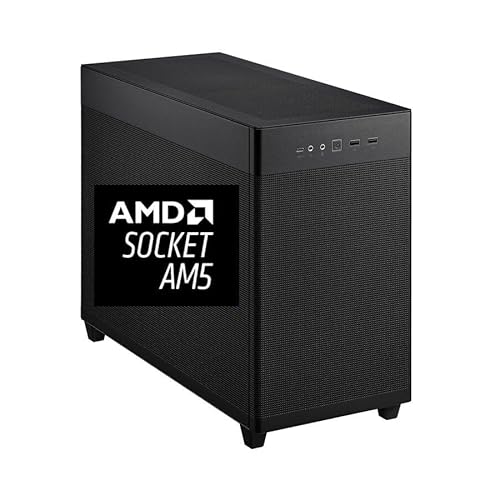
- Ryzen 9 9950X with 16 cores and up to 5.7GHz boost
- 64GB DDR5 RAM plus a fast 2TB Gen4 NVMe SSD
- RTX Pro 2000 16GB suits pro editing and color workflows
Best For: Editors and colorists working on demanding 4K/8K projects in a compact tower.
Best for DaVinci Resolve Control
Blackmagic Design Speed Editor Bundle

- Tactile controls speed up trimming and playback
- Resolve Studio included for extra value
- Compact Bluetooth and USB-C workstation accessory
Best For: DaVinci Resolve editors who want a faster, more hands-on workflow with Studio included.
Best High-End Nvidia Creator Rig
CPU Solutions VidCore 4K Editing PC

- Core Ultra 9 285K with 24 cores and up to 5.7 GHz boost
- Quadro RTX 2000 Ada 16GB for pro apps and up to 4 displays
- 64GB DDR5 RAM and 2TB NVMe SSD for heavy projects
Best For: Professional editors and 3D creators who need a powerful workstation for color grading and multi-monitor editing.
Best Control Surface
TourBox NEO Editing Controller

- Customizable dials and buttons for shortcuts
- Compact design for tight desk setups
- Useful for faster color grading and editing
Best For: Editors and colorists who want hands-on shortcut control to speed up repetitive workflows.
Best for Compact 8K Grading
CPU Solutions Mini Express Core Ultra 7 8K Editing PC
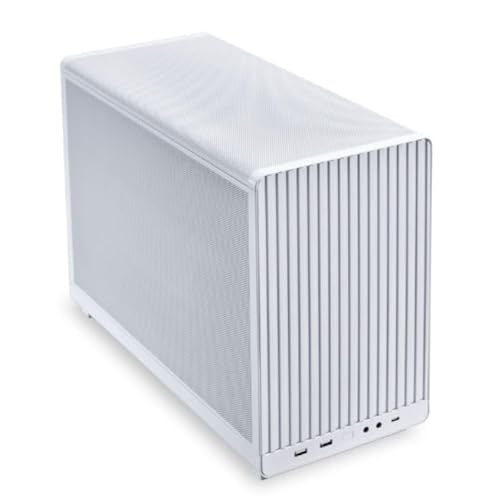
- RTX 2000 Pro 16GB for grading-friendly VRAM
- 2TB NVMe SSD for fast media handling
- Compact workstation build for tight setups
Best For: Editors and colorists who want a compact pro workstation for 4K to 8K work.
Best for Color Grading Control
TourBox Elite Color Grading Controller

- Tactile knobs and dials for precise grading control
- Strong app support for Resolve, Premiere Pro, and Final Cut Pro
- Highly customizable buttons and macros for faster workflows
Best For: Editors and colorists who want a compact control console for faster grading on Mac or Windows.
Best for Heavy 8K Timelines – Ryzen 9 9950X 8K Editing Workstation
If you need one of the more powerful video editing workstations for color grading, this desktop is built to keep large projects moving with a Ryzen 9 9950X, 64GB of DDR5 memory, and a fast 2TB Gen4 NVMe SSD. The RTX Pro 2000 16GB graphics card adds the display output and GPU muscle that colorists and editors rely on for smooth playback, multi-monitor work, and faster turnaround.
Best For: Editors and colorists handling heavy 4K/8K timelines who want strong CPU performance, plenty of RAM, and pro-class GPU support in a compact tower.
Pros:
- Ryzen 9 9950X delivers 16 cores, 32 threads, and up to 5.7GHz boost for demanding edits
- 64GB DDR5 RAM and a 2TB PCIe 4.0 SSD help with caching, scrubbing, and large media files
- RTX Pro 2000 16GB supports multi-display pro workflows and color-focused creative apps
- Mini tower design includes a premium cooler, mesh airflow, and Windows 11 Pro
Cons:
- Higher-end spec may be more power than casual editors need
- Compact chassis can limit internal expansion compared with larger towers
For buyers comparing video editing workstations for color grading, this model stands out for its balanced blend of CPU speed, memory capacity, and pro graphics support. It’s a practical pick when you want a workstation that can handle long sessions without feeling underbuilt.
Best for DaVinci Resolve Control – Blackmagic Design Speed Editor Bundle
If you already edit in DaVinci Resolve, this bundle is a smart, workflow-focused add-on for video editing workstations for color grading. It combines the Speed Editor’s tactile transport and trim controls with Resolve Studio, making it easier to move quickly through cuts, color, and finishing tasks.
Best For: Editors who use DaVinci Resolve and want a faster, more hands-on control surface with Studio included.
Pros:
- Tight integration with DaVinci Resolve for faster editing and trimming
- Includes the Resolve Studio activation card, adding extra value
- Compact Bluetooth and USB-C setup suits desk-focused editing rigs
- Great for speeding up timeline navigation and color-grading workflows
Cons:
- Only makes sense if you work in DaVinci Resolve
- Less useful as a general-purpose keyboard for other apps
For editors building video editing workstations for color grading, this is less about raw power and more about efficiency: it helps you work faster in Resolve while keeping the setup compact and purpose-built. If your workflow is already centered on Blackmagic’s software, it’s an easy productivity upgrade.
Best High-End Nvidia Creator Rig – CPU Solutions VidCore 4K Editing PC
If you want a workstation-class tower for demanding video editing workstations for color grading, this CPU Solutions VidCore build stands out with a Core Ultra 9 285K, 64GB of DDR5 memory, and a Quadro RTX 2000 Ada 16GB GPU. It is aimed at editors who need strong timeline responsiveness, reliable pro drivers, and enough storage and connectivity to handle large media projects.
Best For: Professional editors and 3D creators who need a strong all-around desktop for 4K/8K timelines, color work, and multi-monitor setups.
Pros:
- Core Ultra 9 285K with 24 cores and high turbo speeds for heavy editing workloads
- Quadro RTX 2000 Ada 16GB with pro drivers, ECC memory, and up to 4-monitor support
- 64GB RAM plus 2TB NVMe SSD for large projects, caching, and fast file access
- Liquid cooling and 750W power supply help maintain performance during long sessions
Cons:
- Likely overkill for casual or beginner editors
- Premium specs may push it beyond budget-focused buyers
- Large tower design is not ideal if desk space is limited
This is a serious pick for video editing workstations for color grading when you want pro-level graphics support and plenty of headroom for complex projects. It makes the most sense for users who value stability, multitasking, and NVIDIA Ada workstation features over a minimalist price tag.
Best Control Surface – TourBox NEO Editing Controller
If you want faster, more tactile control on video editing workstations for color grading, the TourBox NEO is a compact controller that can streamline common adjustments without relying so heavily on mouse and keyboard shortcuts. It’s especially useful for editors and colorists who want a more hands-on workflow in Adobe apps and similar creative software.
Best For: Editors, photo colorists, and creative pros who want a customizable shortcut controller to speed up repetitive grading and editing tasks.
Pros:
- Highly customizable buttons, dials, and shortcuts for editing workflows
- Compact footprint fits easily beside a keyboard and tablet
- Can speed up repetitive color grading and timeline navigation tasks
- Works with Mac and PC across popular creative apps
Cons:
- Not a replacement for a dedicated monitor calibration or grading panel
- Has a learning curve before the shortcuts feel natural
- Best results depend on software support and personal setup
For video editing workstations for color grading, the TourBox NEO makes sense if you want a productivity boost more than a traditional editing panel. It won’t change image quality on its own, but it can make grading sessions feel faster, smoother, and more controlled.
Best for Compact 8K Grading – CPU Solutions Mini Express Core Ultra 7 8K Editing PC
If you want a small-form-factor tower that still has serious editing hardware, this CPU Solutions Mini Express is a strong fit for video editing workstations for color grading. The Core Ultra 7 processor, RTX 2000 Pro 16GB, 32GB of DDR5 memory, and 2TB NVMe SSD give you a solid balance of speed, VRAM headroom, and fast storage for demanding timelines.
Best For: Editors and colorists who need a compact Windows workstation with dedicated pro graphics for 4K to 8K projects.
Pros:
- RTX 2000 Pro 16GB offers useful VRAM for grading and GPU-accelerated effects
- 2TB NVMe SSD provides roomy, fast storage for large media libraries
- Core Ultra 7 and 32GB DDR5 deliver strong everyday editing performance
- Compact desktop design is easier to place than a full-size tower
Cons:
- 32GB RAM may feel tight for heavier 8K finishing workflows
- Compact systems can be less expandable than larger workstations
- Not the most budget-friendly option
For buyers comparing video editing workstations for color grading, this system stands out for combining a pro-grade GPU with fast storage in a smaller chassis. It is best suited to editors who prioritize a clean desk setup without giving up the essentials needed for responsive grading work.
Best for Color Grading Control – TourBox Elite Color Grading Controller
The TourBox Elite is a practical add-on for video editing workstations for color grading when you want faster, more tactile control than a mouse and keyboard can offer. With Bluetooth and USB-C connectivity, broad support for DaVinci Resolve, Premiere Pro, Final Cut Pro, and more, it is designed for editors who want precise timeline navigation, grading adjustments, and macro-driven workflow shortcuts on desktop systems.
Best For: Editors and colorists who want a compact, customizable control console for faster grading and timeline work on Mac or Windows.
Pros:
- Highly customizable knobs, buttons, and macros for personalized editing workflows
- Excellent tactile control for timeline scrubbing and color adjustments in supported apps
- Dual connectivity options with Bluetooth and USB-C for desktop setups
- Works with major creative software, including DaVinci Resolve, Premiere Pro, and Final Cut Pro
Cons:
- Desktop-only device, so it is not compatible with iPad, Android tablets, or Linux
- Has a learning curve if you want to fully customize the controls
For editors building video editing workstations for color grading, the TourBox Elite stands out as a workflow accelerator rather than a full editing system. It is most useful when paired with a capable workstation and software that can take advantage of its dedicated grading controls and custom shortcuts.
Best for Heavy Color Grading – Adamant Ryzen 9 9950X3D RTX 5080 Workstation
If you need a fast, ready-to-run tower for video editing workstations for color grading, this Adamant build brings together a 16-core Ryzen 9 9950X3D, RTX 5080 graphics, and 64GB of DDR5 memory. It is aimed at creators who want strong timeline performance, responsive scrubbing, and enough headroom for GPU-accelerated effects without piecing together a custom system.
Best For: Editors and colorists who want a high-end Windows workstation for 4K/6K editing, grading, and rendering.
Pros:
- 16-core Ryzen 9 CPU offers plenty of multicore power for exports and background tasks
- RTX 5080 should help with GPU-accelerated grading, effects, and playback
- 64GB DDR5 memory is well suited to large projects and heavy multitasking
- 3-year labor and parts warranty adds peace of mind for studio use
Cons:
- 1TB SSD may feel small for large media libraries and cache-heavy workflows
- 850W Bronze PSU is serviceable, but not the most premium power supply class
- High-end specs likely put it out of reach for budget-conscious buyers
For video editing workstations for color grading, this configuration stands out because it pairs a strong CPU with a top-tier GPU and ample memory in a single package. If your priority is fast finishing work and smooth creative performance rather than value pricing, it is an easy machine to take seriously.
Best for 4K+ Grading – Adamant Ryzen 9 RTX 5090 Workstation
If you need serious headroom for video editing workstations for color grading, this Adamant tower is built around a 16-core Ryzen 9, RTX 5090 graphics, 32GB of DDR5 memory, and a fast 4TB NVMe SSD. That combination is aimed at demanding timelines, GPU-accelerated effects, and smooth playback on heavier projects.
Best For: Editors and creators handling 4K or higher footage, color-heavy timelines, and mixed editing/rendering workloads who want a no-compromise Windows 11 Pro workstation.
Pros:
- RTX 5090 gives it huge GPU headroom for grading, effects, and accelerated export workflows
- 16-core Ryzen 9 and 32GB DDR5 suit multitasking and demanding editing apps
- 4TB PCIe 4.0 NVMe SSD provides generous fast storage for media libraries and project files
- 1200W PSU, Wi-Fi 7, and 3-year labor/parts warranty add convenience and confidence
Cons:
- Likely more machine than casual editors need
- 32GB RAM is good, but some pro grading rigs may prefer 64GB or more
- High-end parts make it a serious investment
This is a strong fit if you want one of the most powerful video editing workstations for color grading and you care more about performance margin than budget efficiency. It’s especially compelling for creators working in Resolve, Premiere Pro, or similar apps that can benefit from heavy GPU power.
Best for High-End GPU Workloads – Adamant 16-Core Ryzen 9 RTX 5080 Workstation
If you want a ready-to-go tower for video editing workstations for color grading, this Adamant build leans hard into speed where it matters most: a 16-core Ryzen 9 9950X3D, RTX 5080 graphics, and 32GB of DDR5 memory. The 2TB NVMe SSD and Windows 11 Pro setup make it a practical option for editors who need strong timeline performance, fast renders, and a system that can handle demanding creative apps without much tinkering.
Best For: Editors and creators who need a high-end, factory-built PC for 4K editing, color grading, and GPU-accelerated rendering.
Pros:
- Powerful 16-core Ryzen 9 CPU pairs well with the RTX 5080 for editing and export workloads
- 2TB PCIe 4.0 NVMe SSD gives plenty of fast storage for active projects
- 360mm AIO cooling, Wi-Fi 7, and Windows 11 Pro add convenience and modern connectivity
- 3-year labor/parts warranty with lifetime tech support improves peace of mind
Cons:
- 32GB RAM is solid, but heavy 6K/8K grading workflows may eventually want more
- 850W Bronze PSU is serviceable, though not as premium as higher-efficiency units
- Likely more machine than casual editors need for basic projects
This is a strong fit if you want a no-fuss workstation for video editing workstations for color grading and other GPU-heavy creative tasks. It’s especially appealing when you want current-gen performance in a prebuilt system, though buyers doing larger studio workloads may still want to plan for a RAM upgrade later.
Best for RTX 5080 Color Grading – Adamant 16-Core Ryzen 9 Editing PC
If you want a fast tower for video editing workstations for color grading, this Adamant build leans hard into GPU power, high-core-count CPU performance, and generous memory and storage. The Ryzen 9 9950X3D, 64GB of DDR5, 4TB NVMe SSD, and RTX 5080 make it a strong fit for demanding timelines, 4K work, and GPU-accelerated effects.
Best For: Editors and creators who need a high-end Windows workstation for color grading, heavy compositing, and fast render times.
Pros:
- RTX 5080 should handle color grading, effects, and accelerated playback well
- 64GB DDR5 and a 4TB NVMe SSD give you room for large projects and media caches
- Ryzen 9 9950X3D offers strong multitasking and export performance
- 360mm liquid cooling and Wi‑Fi 7 add to the premium workstation setup
Cons:
- 850W bronze power supply is less premium than the rest of the hardware
- Califonia sales restriction may be inconvenient for some buyers
- It may be more machine than casual editors need
As a whole, this is a serious option for video editing workstations for color grading if you want a powerful all-in-one tower that prioritizes speed, storage, and GPU headroom. The main tradeoff is value: it makes the most sense when your workflow can actually use the extra performance.
How We Picked the Best Video Editing Workstations for Color Grading
We looked for systems and control tools that support real editing and grading workflows, prioritizing CPU performance, GPU capability, memory capacity, fast NVMe storage, and workstation-class stability. For color work, consistency matters as much as raw speed, so we also favored configurations suited to Resolve, Premiere Pro, and similar NLE pipelines.
Quick Comparison
Among Video Editing Workstations for Color Grading, the best choice depends on your footage type and timeline complexity. High-core-count CPUs help with renders and exports, while stronger GPUs improve playback, effects, and color processing. Larger RAM pools are better for 4K and 8K projects, and fast SSDs reduce cache and media bottlenecks. Control surfaces can also speed up grading sessions by making adjustments more tactile and precise.
Key Buying Factors for Video Editing Workstations for Color Grading
CPU and Multicore Performance
Choose a workstation with enough CPU headroom for decoding, rendering, noise reduction, and background tasks. High-end chips are especially useful if you work with long-form timelines or multiple apps at once.
GPU and VRAM
Color grading leans heavily on the GPU. More VRAM helps with higher-resolution footage, LUT-heavy timelines, and real-time playback. If you grade 4K or 8K content, don’t underbuy the graphics card.
Memory and Storage
For serious grading work, 64GB of RAM is a strong starting point, with more useful for large projects or multiple streams. Pair that with a fast Gen4 or Gen5 NVMe SSD so cache, proxies, and source footage stay responsive.
Workflow Tools
Dedicated grading controllers, such as editing panels or customizable consoles, can improve precision and reduce repetitive mouse work. These are especially valuable for Resolve users who spend long hours making fine tonal adjustments.
Who Should Buy Which Video Editing Workstations for Color Grading?
If you want maximum all-around editing power, choose a tower with a top-tier CPU, lots of RAM, and a workstation GPU. If you mainly cut and grade in DaVinci Resolve, a control surface can be a smarter upgrade than more raw hardware. For 4K creators, a midrange workstation with strong SSD speed and 32GB to 64GB of memory may be enough, while 8K editors should aim for the highest CPU, GPU, and storage specs available.
In short, the best Video Editing Workstations for Color Grading are the ones that match your footage size, software, and pace of work—not just the most expensive build on the list.